
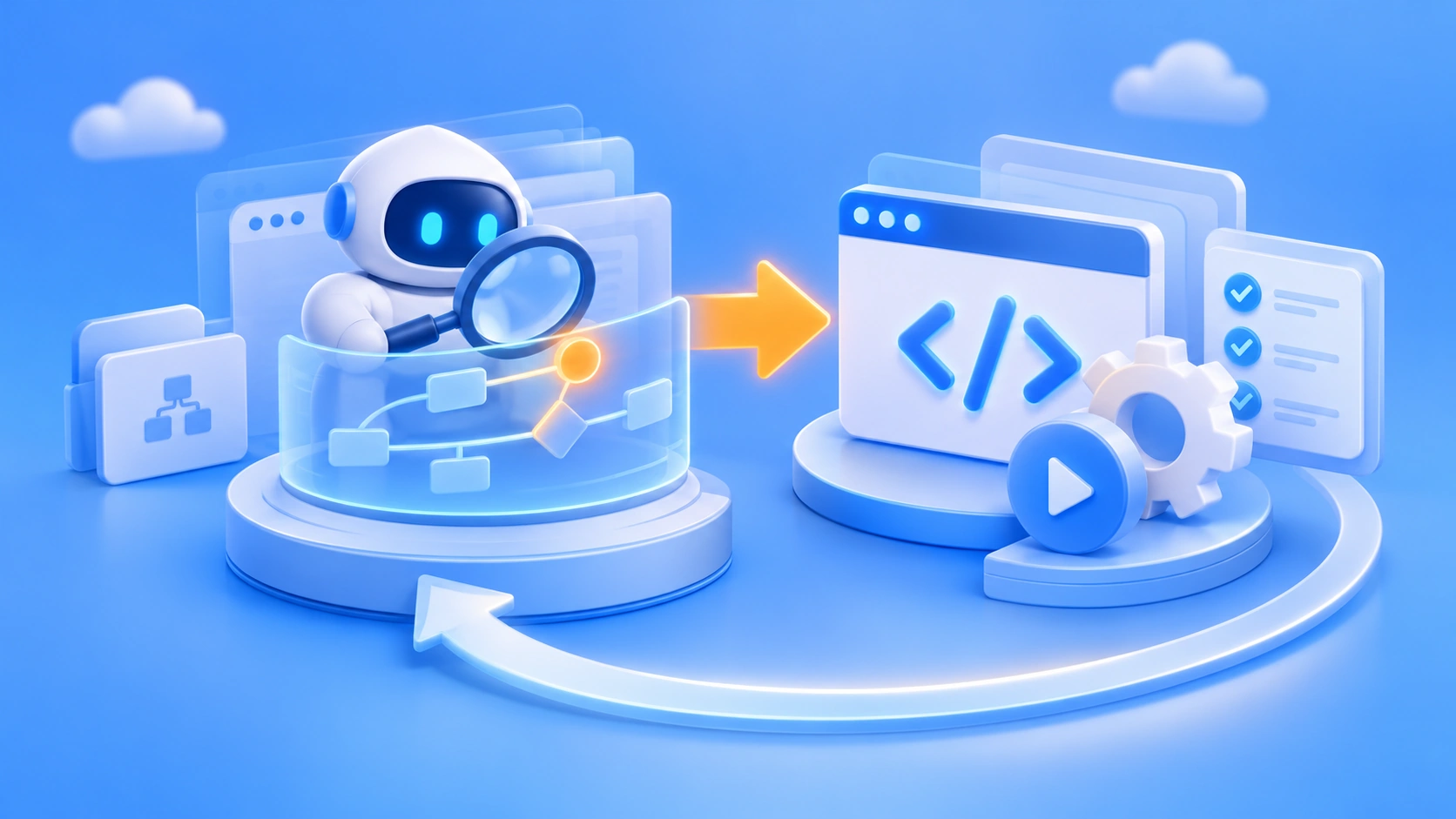
Enterprise agents don’t have to call the Large Language Model (LLM) again every time a task repeats. CVS Health’s open-source CUA Agent Kit offers a more cost-effective engineering path: first let a computer-use agent explore an unfamiliar business workflow and record the successful run as screenshots, events, and a Trace; then have Codex turn that evidence into deterministic code that can be inspected, maintained, and executed repeatedly.
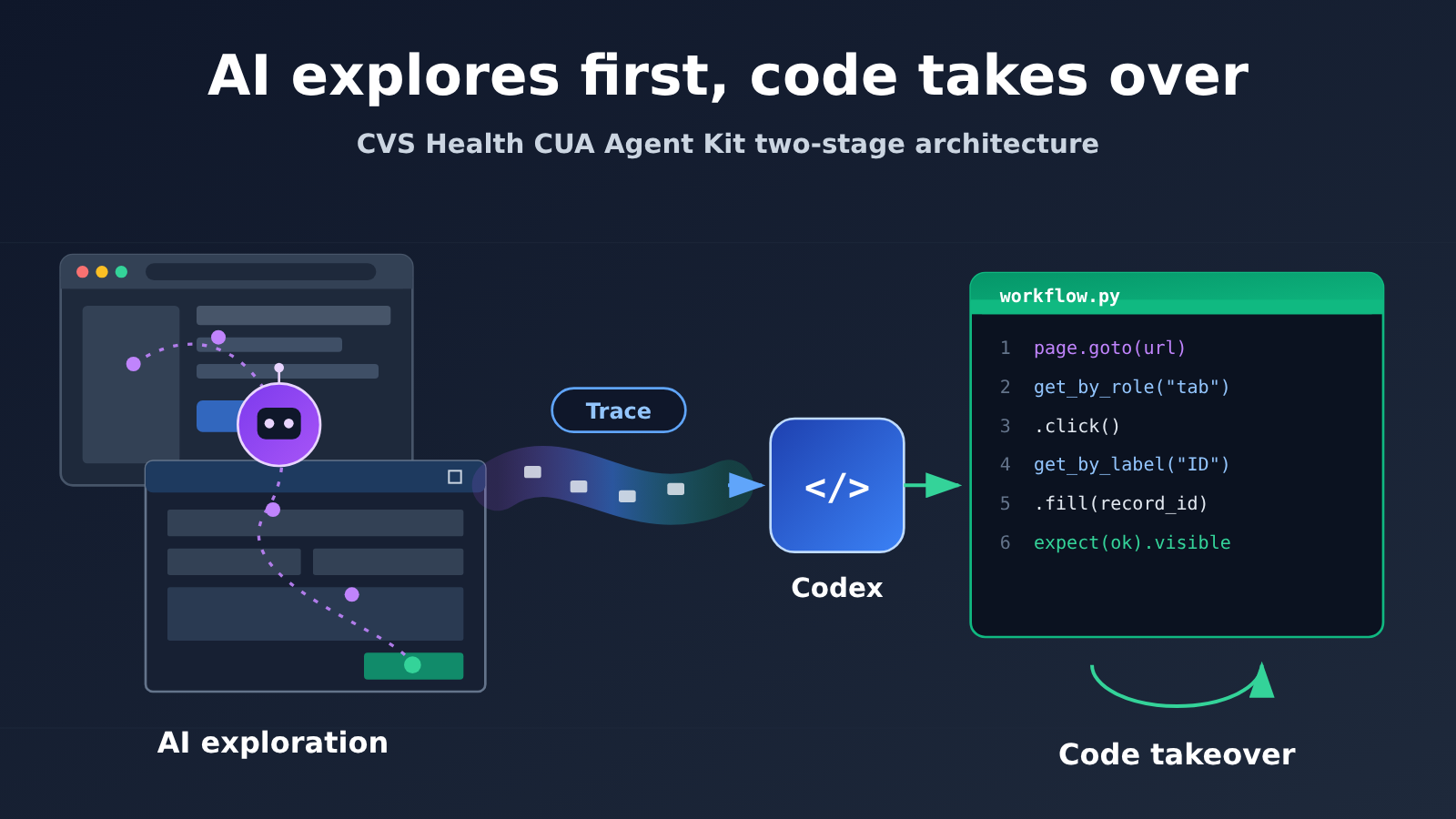
This approach combines AI’s flexible exploration with the stable execution of traditional automation, forming a hybrid architecture of “AI exploration, code codification, continuous maintenance.” It doesn’t replace scripts with agents; it has agents write and fix scripts.
What you’ll take away from this article
- How CVS Health CUA Agent Kit completes the two-stage process from AI exploration to code codification
- What role screenshots, events.jsonl, Trace, and semantic locators play in the codification phase
- How the fixed workflow runs without calling the LLM, and how it’s maintained when something goes wrong
The factual part below covers, in order: how CUA Agent Kit works, what happens between AI operation and Playwright code, what maintenance work the agent still handles after codification, what research evidence supports the differences between this architecture and traditional RPA, and how developers can put it to work themselves. The analysis section then discusses two questions: why it’s wasteful for an agent to reason from scratch every time, and which tasks fit this hybrid architecture versus which must keep human review.
To Know: 7 Concepts for Understanding the CVS Agent Automation Path
| Concept | Brief explanation |
|---|---|
| Computer Use | The ability to complete tasks by observing software interfaces and performing actions such as clicks and typing |
| EHR | Electronic Health Record system — the core software healthcare organizations use to store and process patient medical records |
| MCP | A standard protocol for discovering and invoking external tools |
| RPA | An automation approach that runs repetitive processes through preconfigured rules or programs |
| Rubric points | Scoring points broken out by evaluation rubric, measuring how well individual requirements are met |
| End-to-end success rate | The share of complete tasks that satisfy all success conditions |
| Trace | Trail evidence recording the execution process, actions, and page states |
Impact at a Glance: Who the CVS Agent Automation Path Affects
- Developers and tech leads: The key question isn’t “Agent or no Agent” — it’s how to split execution mechanisms by task. You need to separately validate the completion rate of the exploration phase, the stability of hardened code, and the full cost including maintenance, instead of fixating on the price of a single model invocation.
- Healthcare organizations and workflow owners: You need to distinguish between synthetic demos, vendor evaluations, public enterprise case studies, and your own pilots — these kinds of evidence carry different weight. For steps involving patient data and state changes, put human approval, least privilege, and operation audit trails in place ahead of time.
Objective facts: CVS Health’s CUA Agent Kit and its two-phase approach
First, some background. On November 16, 2026, OpenAI published an update on its Computer-use Agent work for healthcare teams. It shared evaluation results for clinical and healthcare-administrative tasks, along with details of work with organizations including CVS Health, Cigna Healthcare, Abridge, and Ambience. CVS Health shared a production-environment case study and open-sourced the CUA Agent Kit under the Apache-2.0 license.
The production results CVS Health shared include: an agent in one production workflow cleared a months-long backlog of document-sending tasks in a single weekend; another agent handles tens of thousands of system operation steps in specialty consultations every day. The setup includes verification checks and human oversight, and cross-checks actual actions against application state using screenshots and operation records. Note that these are figures the company disclosed itself. “Tens of thousands” refers to system operation steps tied to consultations—it doesn’t mean tens of thousands of clinical decisions were made independently by AI. The public materials also don’t say whether these production agents are built entirely on the open-source Agent Kit, so the two shouldn’t be equated directly.
Source: openai.com/index/advancing-computer-use-for-healthcare-teams/
How does CVS Health’s CUA Agent Kit work?
The project README is pretty direct about what it is: a starter kit for automating browser and Windows workflows—use AI to discover the steps, then use code to repeat them. The project makes a point of stressing that “figuring out how to do a task” and “doing it reliably over the long term” are two different problems, and they should be solved with different tools.
The process has two phases:
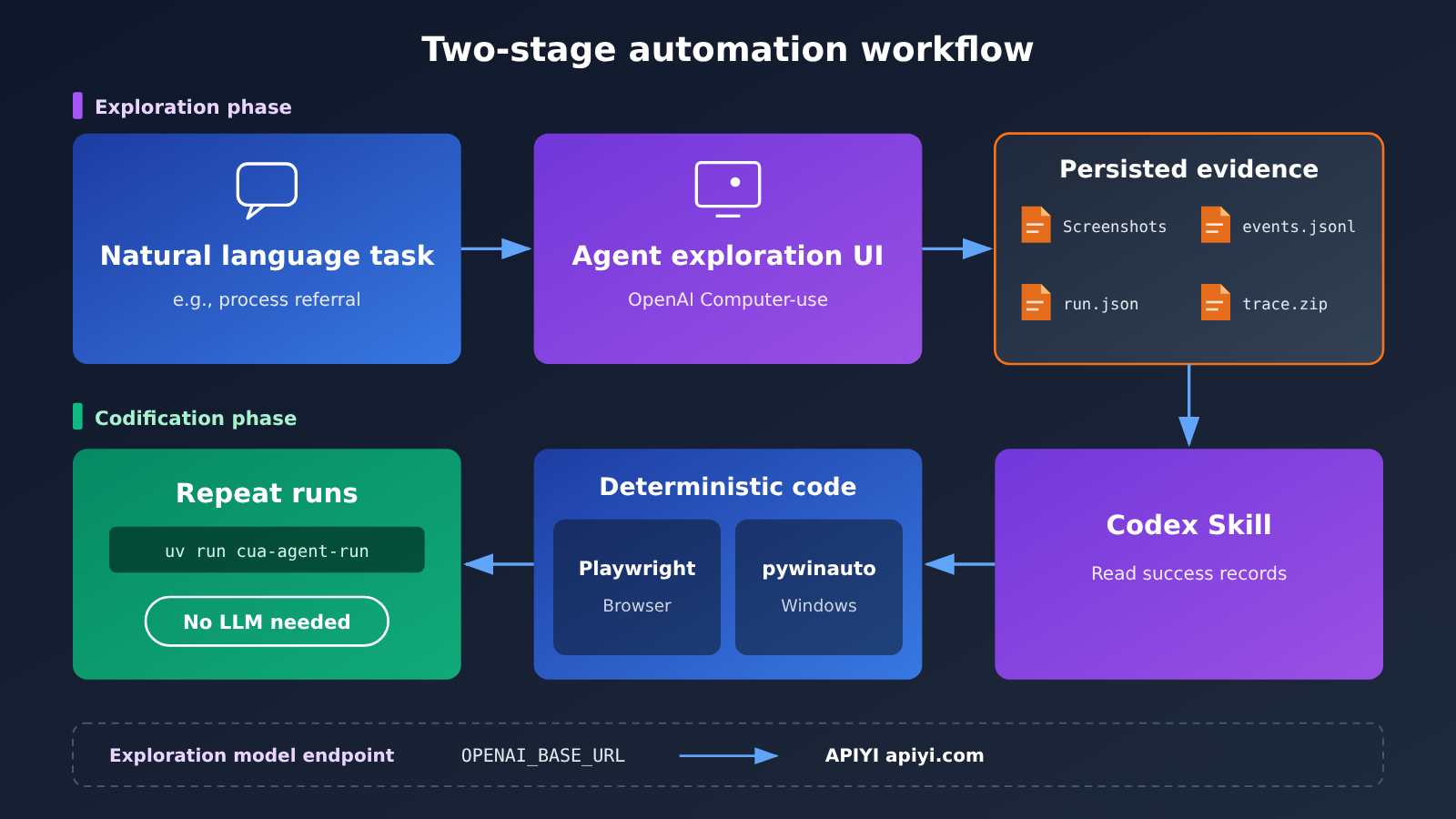
- Exploration phase: The OpenAI Computer-use Agent receives a task described in natural language—for example, “find a record and process a referral”—and explores, executes, and verifies it in the real interface. Along the way, it saves screenshots, actions, action targets, and execution traces.
- Codification phase: Codex Skill reads exploration records from successful runs and generates or updates deterministic workflow code. After that, repeat runs of the same workflow go through regular code—the Large Language Model no longer has to reason it out every time.
The evidence left by the exploration phase is all persisted to disk as files, not left inside the model’s internal reasoning. The record types the README documents are as follows:
| Record | Main use | Value in codification |
|---|---|---|
| Screenshots | Captures the interface state at each step | Lets engineers and Codex verify what the page actually looks like |
| events.jsonl | Logs operation events line by line | Reconstructs “what was done, in what order” |
| run.json | Records information about this run | Distinguishes runs and helps determine whether one succeeded |
| trace.zip | Playwright execution trace | Provides details on elements, network, and timing for generating and diagnosing code |
Source: github.com/cvs-health/cua-agent-kit
From AI Actions to Playwright Code: What Does CVS Agent Kit Actually Do?
The most critical detail in the consolidation phase is this: what gets generated isn’t a “mouse-coordinate replay.” When the CVS project generates browser workflows, it uses semantic locators to produce Playwright code, targeting elements through their semantic characteristics—role, name, and so on—rather than hardcoding a specific screen position.
The difference between the two approaches becomes most obvious during maintenance. Coordinate replay is at the mercy of resolution, window size, and minor layout tweaks—a button shifting a few pixels can cause the click to miss entirely, and when something goes wrong, it’s hard to tell from a string of coordinates what you originally intended to click. Code written with semantic locators looks something like “click the button named ‘Submit'”—the intent lives right there in the code, engineers can review it directly, and it’s less likely to break when the page gets adjusted locally. Of course, if the button gets renamed or the flow gets redesigned, semantic locators will fail too—it’s just much easier to pinpoint the failure.
The project’s tools break down like this:
- Playwright: handles deterministic execution of browser workflows and produces replayable traces like trace.zip.
- pywinauto: handles automation of Windows desktop apps, covering legacy systems that have no web interface.
- Codex Skill: reads successful exploration traces and generates or updates the two types of code above.
This approach aligns with the direction laid out in OpenAI’s official documentation. OpenAI’s Computer Use guide describes two paths: one where the model returns structured mouse and keyboard actions for the application to execute; the other where the model generates code and uses tools like Playwright to drive the interface. The documentation recommends the code-execution approach for GPT-6 Astra, while the Computer Tool remains as an optional approach. ComputerToolset, BrowserToolset, and the hosted browser entry point are each covered separately in the official guide.
Source: developers.openai.com/api/docs/guides/tools-computer-use
After Consolidation, What Does the Agent in CVS Agent Kit Still Need to Do?
Once the workflow is consolidated, deterministic execution runs through the command provided in the README:
uv run cua-agent-run
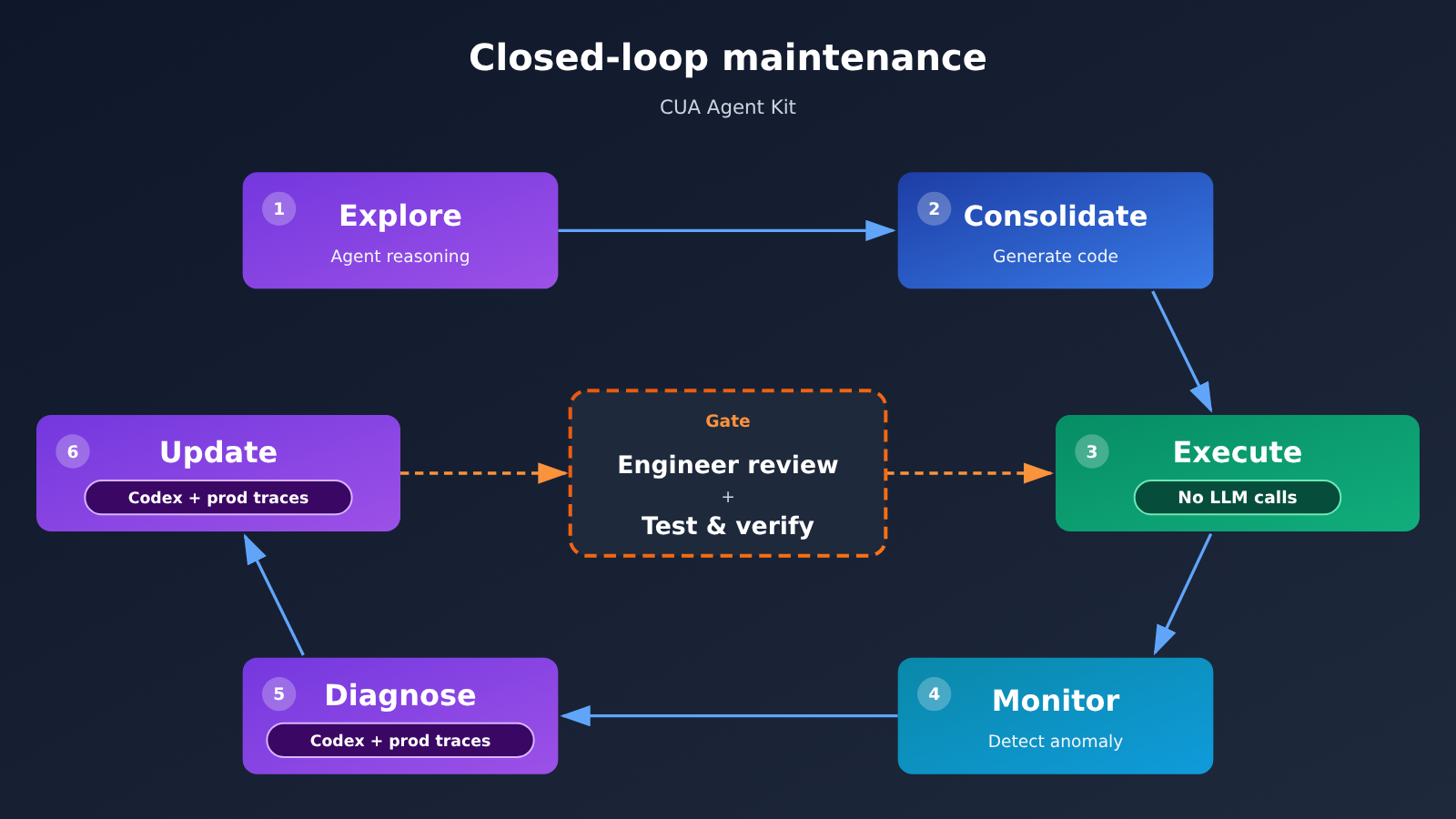
At this stage, you don’t need to invoke a Large Language Model on every run, and you don’t need an API key. But the project doesn’t treat consolidation as a one-and-done effort. The maintenance mechanism described in the README is a closed loop:
- The fixed workflow runs on schedule;
- Anomalies are discovered in production traces;
- Codex uses the traces to diagnose the issue;
- The deterministic code is updated;
- An engineer reviews the changes;
- After passing tests and validation, it’s put back into repeated execution.
In other words, the agent’s role shifts from “doing the work itself every time” to “staying out of the way normally and fixing code when something goes wrong.” Code fails, interfaces get redesigned—the project assumes this from the start, which is why it builds in diagnosis and review steps.
How Does CVS’s Hybrid Agent Automation Differ from Traditional RPA?
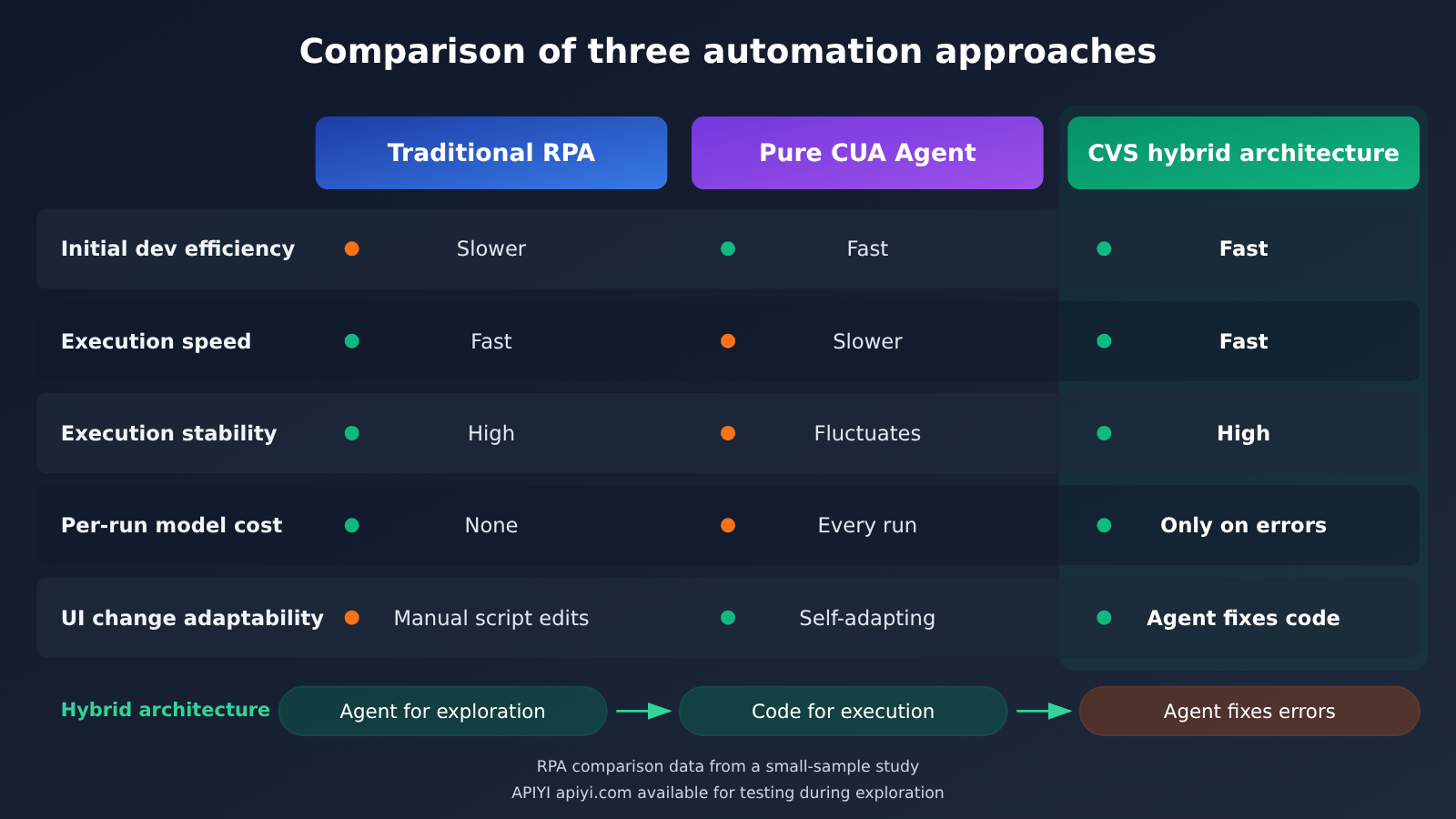
Traditional RPA relies on preconfigured steps and UI locators. It runs fast and produces stable results, but development and maintenance after redesigns still require manual effort. A pure Agent can understand natural language and adapt to UI changes, but reasoning from scratch each time brings cost and variability in results. CUA Agent Kit sits between the two: the Agent replaces the step of “manually recording and writing workflows,” while the execution phase falls back to deterministic code.
For a direct comparison, see a 2026 study: Are LLM agents the new RPA? A comparative benchmark study of agentic automation and RPA across standardized workflow tasks (DOI: 10.1080/23311975.2026.2724760). The study was conducted in May–June 2025 and compared UiPath Studio 2023.4.0 with Anthropic Computer Use Agent across three standard task categories: data entry, monitoring, and document extraction.
| Task | RPA success rate | Agent success rate | Initial development time (single-developer observation) |
|---|---|---|---|
| P1 | Not included in the comparative statistics | Agent failed after only 1 run and wasn’t included in later statistics | Not disclosed |
| P2 | 100% (10 runs) | 90% (10 runs) | Agent about 10 minutes, RPA about 38 minutes |
| P3 | 100% (10 runs) | 60% (10 runs) | Agent about 15 minutes, RPA about 240 minutes |
The study also found that RPA executed significantly faster in P2 and P3; Agent problems mainly included UI operation failures, context loss, and judgment errors; Agent has potential advantages in adapting to dynamic UIs.
The study’s limitations need to be made clear:
- Small sample: P2 and P3 used 10 runs per technology, while P1 wasn’t “10 runs per technology,” so it can’t be broadly generalized.
- Development time is only an initial observation: it comes from a single developer, has no statistical representativeness, and can’t be treated as an industry average.
- Tool versions are older: the study used a 2025 Agent configuration and can’t represent the results of new models in 2026.
Even so, the direction of the conclusions aligns with CVS’s design: Agent is good at rapid exploration and flexible handling, while RPA-style deterministic execution still has advantages for stable repetition.
Source: tandfonline.com/doi/full/10.1080/23311975.2026.2724760
How Can Developers Reuse the CVS CUA Agent Kit Approach?
The README doesn’t list many environment requirements:
- Python 3.12 or higher;
- uv (Python package and project management tool);
- an accessible target website or desktop app;
OPENAI_API_KEYrequired during the exploration phase;- a custom API Endpoint can be configured via
OPENAI_BASE_URL.
Usage maps to three phases: discovery (the Agent explores and leaves evidence), solidification (Codex generates code), and running (deterministic execution). For the specific commands and parameters for the discovery and solidification phases, refer to the repo README; the running phase is the uv run cua-agent-run mentioned earlier.
The OPENAI_BASE_URL design is worth noting. It means the model entry point for the exploration phase can point to the official API, or to an enterprise internal gateway or other service compatible with the OpenAI interface, making it easy to unify authentication, billing, and auditing. The environment variables for the exploration phase can be configured like this:
# Exploration phase: requires model API
export OPENAI_API_KEY="YOUR_API_KEY"
export OPENAI_BASE_URL="https://api.apiyi.com/v1"   # Use APIYI unified interface, or swap in your own gateway

# Running phase: deterministic execution, no API Key needed
uv run cua-agent-run
One thing to emphasize: Computer Use relies on specific Responses API capabilities and tool types. Before switching to any custom endpoint, make sure that endpoint supports the models and tools required for the exploration phase—get a simple flow working first, then roll it out.
After solidification, the most common day-to-day maintenance task is reading traces and event logs. Here’s a helper script example: feed the events.jsonl from a run to a general-purpose large model, and have it produce a step list and suspicious failure points for engineers to reference during review. The exact fields in events.jsonl depend on the project’s actual output; this just reads line by line. When patient or other sensitive information is involved, be sure to desensitize it first, or only process it within a compliant environment.
import json
import openai

client = openai.OpenAI(
    api_key="YOUR_API_KEY",
    base_url="https://api.apiyi.com/v1"  # APIYI OpenAI-compatible interface
)

def summarize_events(path: str, model: str = "gpt-4o-mini") -> str:
    """Read a desensitized events.jsonl and generate a step list and suspected failure points"""
    with open(path, encoding="utf-8") as f:
        events = [json.loads(line) for line in f if line.strip()]

    sample = json.dumps(events[:200], ensure_ascii=False)  # control context length
    prompt = (
        "The following is an event log from a UI automation run. "
        "Please list the operation steps in order, and point out the steps most likely to cause failure and why, "
        "based only on the log content—do not speculate.\n" + sample
    )
    resp = client.chat.completions.create(
        model=model,  # Replace with a model actually available on your platform
        messages=[{"role": "user", "content": prompt}],
    )
    return resp.choices[0].message.content

print(summarize_events("runs/latest/events.jsonl"))
This script is just a reading aid; it doesn’t replace Codex diagnosing problems from the full trace, nor does it replace engineers’ review and testing.
🚀 Quick-start tip: When reusing this approach, you can first pick a low-risk flow on an internal test site and run the full “discovery → solidification → running” chain end to end. The exploration phase requires repeated model calls to compare results; you can get a free testing quota through APIYI apiyi.com, use the same API key to switch between different models for auxiliary tasks like log analysis, and then decide on the model selection for the production environment.
Analysis: Trade-offs in the CVS Agent Automation Path
The following is an interpretation based on the facts above — not a conclusion from the project team or from OpenAI.
Why is it wasteful for an Agent to reason from scratch every time?
Multi-step business automation has a quirk: once a workflow is proven to work, the vast majority of later runs follow the same path. If you make a Computer-use Agent take fresh screenshots, interpret the UI, and plan the next step every single time, the model is effectively paying again and again for questions whose answers it already knows. That repeated reasoning carries three kinds of cost at once.
The first is cost. Computer Use is a multi-turn invocation, and the screenshot after each action counts as image input, so tokens keep piling up. Take the Standard short-context pricing OpenAI published on November 17, 2026, for example: GPT-6 Astra’s input, output, and cached input cost $10, $50, and $1 per million tokens respectively, while GPT-6 Luna costs $0.10, $0.50, and $0.01. In the HealthAdminBench evaluation, Luna costs $0.085 per task, 98% less than Astra. Working backward from that ratio, Astra comes out to roughly $4.25 per task — but that’s only an estimate, and it’s a cost under benchmark conditions, not a production quote.
The second is latency. Every step waits for the model to respond, so the longer the workflow, the longer the wait. That’s also why, in the earlier study, RPA executed significantly faster than the Agent on P2 and P3.
The third is variance. Run the same task multiple times and the Agent may take different paths; in the study, the Agent’s success rate on P3 was only 60%. For business processes that need to be predictable and auditable, that uncertainty is harder to accept than the cost.
So the cost structures of the two phases should be accounted for separately:
| Cost item | Exploration phase (Agent) | Execution phase (deterministic code) |
|---|---|---|
| Model tokens | Count visual and text input and billed output separately for each turn; retry tokens already included in the total shouldn’t be added again | Zero in normal operation |
| Tools and runtime environment | The services actually used, such as browsers, desktop environments, and containers | The machine and browser environment running the code |
| Engineering effort | Writing task descriptions, verifying evidence, reviewing generated code | Monitoring, diagnosing anomalies, updating and testing code |
| Frequency | When a new workflow goes live or changes significantly | Every business run |
| Recommended approach | Tier model selection by complexity — strong models for hard workflows, cheaper models for structured ones | Avoid model calls as much as possible; only fall back to the Agent for fixes when something goes wrong |
The economics of a hybrid architecture come straight from this table: expensive model calls cluster in the low-frequency exploration and repair stages, while the high-frequency execution stage falls back to code with near-zero marginal model cost. A real-world ledger also has to account for maintenance effort — the more often the UI gets redesigned, the more often you return to the exploration phase, and the smaller the savings.
💰 Cost tip: For model tiering in the exploration phase, it’s best to test against your own real workflows rather than copying benchmark numbers. With APIYI apiyi.com, you can switch models under the same OpenAI-compatible interface and pay as you go, making it easy to compare the actual token consumption of different models during exploration and log diagnosis.
There’s another easily overlooked issue here around what the benchmark is actually measuring. OpenAI reports Astra at 94.3% and Luna at 91.8% on HealthAdminBench—both are the share of rubric points at maximum reasoning effort, not end-to-end success rates. The Stanford team’s paper, version 2604.09937v1, covers 135 tasks and 1,698 subtasks (1,177 scored deterministically and 521 judged by a model), and reports a best full-task success rate of 36.3% (Claude Opus 4.6 CUA) and a best subtask success rate of 82.8% (GPT-5.4 CUA). The 70 tasks and 947 scoring points disclosed on an earlier webpage belong to a different public version and can only serve as a historical reference. These numbers come from different models, dates, execution conditions, and metrics, so they can’t be lined up on one leaderboard.
For an “explore first, then solidify” approach, end-to-end success rate matters more than partial scores. Codex needs a single fully successful trajectory. If exploration gets 90% of the substeps right but gets stuck at the final submission, the trace it leaves behind still can’t be directly solidified. When choosing a model, you should measure full-task success rate using your own workflow.
Which tasks are a good fit for a CVS-style hybrid Agent architecture?
Putting these facts together gives us a rough task-allocation table:
| Task characteristic | Recommended execution mode | Typical example | Human involvement |
|---|---|---|---|
| Unknown process, missing documentation, complex UI | Agent explores and leaves evidence | Mapping out the operation path of a legacy system for the first time | Review the exploration results and generated code |
| Stable process, high-frequency repetition, verifiable state | Solidify into deterministic code | Cross-system file sending, fixed-field transfer | Spot-check results, monitor anomalies |
| Existing API coverage | Prefer API calls | Structured data writing | Managed with standard permissions |
| Frequent UI changes | Strengthen monitoring after solidification, reserve budget for returning to exploration | Third-party portals | Review required on every code update |
| Changing high-risk business state | Code or Agent goes only as far as draft / pending approval | Submit applications, send messages, modify records | Human approval required |
Medical scenarios offer reference points from what other partners are doing. Ambience’s approach has the Agent stop and ask the doctor when a medical record is ambiguous, and wait for approval before submitting; in Assort’s case, the API handles whatever it can cover, and Computer Use only fills in the UI steps the API doesn’t cover. The combination of “API + Computer Use + deterministic code + human approval” is more realistic than betting on any single technology.
To be clear, deterministic code only makes execution predictable; it doesn’t guarantee correct results. If what got solidified during exploration is a flawed path, the code will faithfully repeat that flaw—and in cross-system operations, a single error can get copied into multiple downstream systems. So pre-operation state checks, post-operation result verification, least privilege, and a full audit trail still can’t be skipped after solidification. This article is about engineering architecture and doesn’t involve any patient diagnosis or treatment advice.
For teams ready to get hands-on, a safer path is: pick a low-risk, high-repetition process in a non-production environment, walk through exploration, solidification, running, and one deliberately induced UI change end to end, and record the model invocation cost, code maintenance hours, and failure recovery time. Those three data points say more about whether this architecture pays off in your scenario than any benchmark score. For multi-model comparison testing during the exploration phase, you can start with the free quota on APIYI apiyi.com, then decide on the production model and access method based on actual measurements.
CVS’s approach is worth paying attention to not because of how smart it claims the Agent is, but because it acknowledges the Agent’s limitations and puts that intelligence where it’s needed most: explore once, solidify into code, fix it when it breaks. Whether this path holds up in more enterprises will ultimately depend on real-world measurements of each company’s processes.
The proof of the pudding is in the eating. (Whether the pudding is good, you only know after eating it: real results must be verified through practice.)
Author: APIYI Technical Team
Technical Discussion: Feel free to contact us on the APIYI apiyi.com homepage; for more integration materials, visit the docs.apiyi.com documentation center.


