

It can fill part of the gap — but not all of it. OpenAI File Search tackles the problem of “existing material being hard to pin down and citations being vague.” It can semantically retrieve files from a vector store and attach file citations to the answer, which is genuinely useful for a writing system. What it doesn’t fix is material that’s missing or out of date: the tool only searches files you’ve already put in, and it won’t automatically discover new announcements on the internet. Citation markers only tell you which file something came from — they can’t guarantee the conclusion is correct.
So the more accurate read is: File Search can serve as the “retrieval layer” of a writing system, but collection, version management, and fact-checking still have to be built separately.
What you’ll learn from this article
- Where File Search sits in the Responses API, and what it can bring to a writing workflow
- How to tune the number of results retrieved, and how to make the response return the actual retrieved content so you can troubleshoot
- Why a deleted file may still be retrievable for a short while, and how a writing system should handle that
- Which layer to fix each of these three problems at: missing material, retrieval failure, and generation errors
- Which metadata to store at ingestion time so you don’t write outdated limits into current rules
Index: The preamble explains a few key concepts and lays out the impact by audience. The “Objective Facts” section draws on OpenAI’s official documentation to walk through how File Search works, its tunable parameters, and its known behaviors. The “Analysis and Judgment” section covers how it fits into a writing system, troubleshooting paths, and ingestion conventions, then closes with a few pitfalls to watch out for.
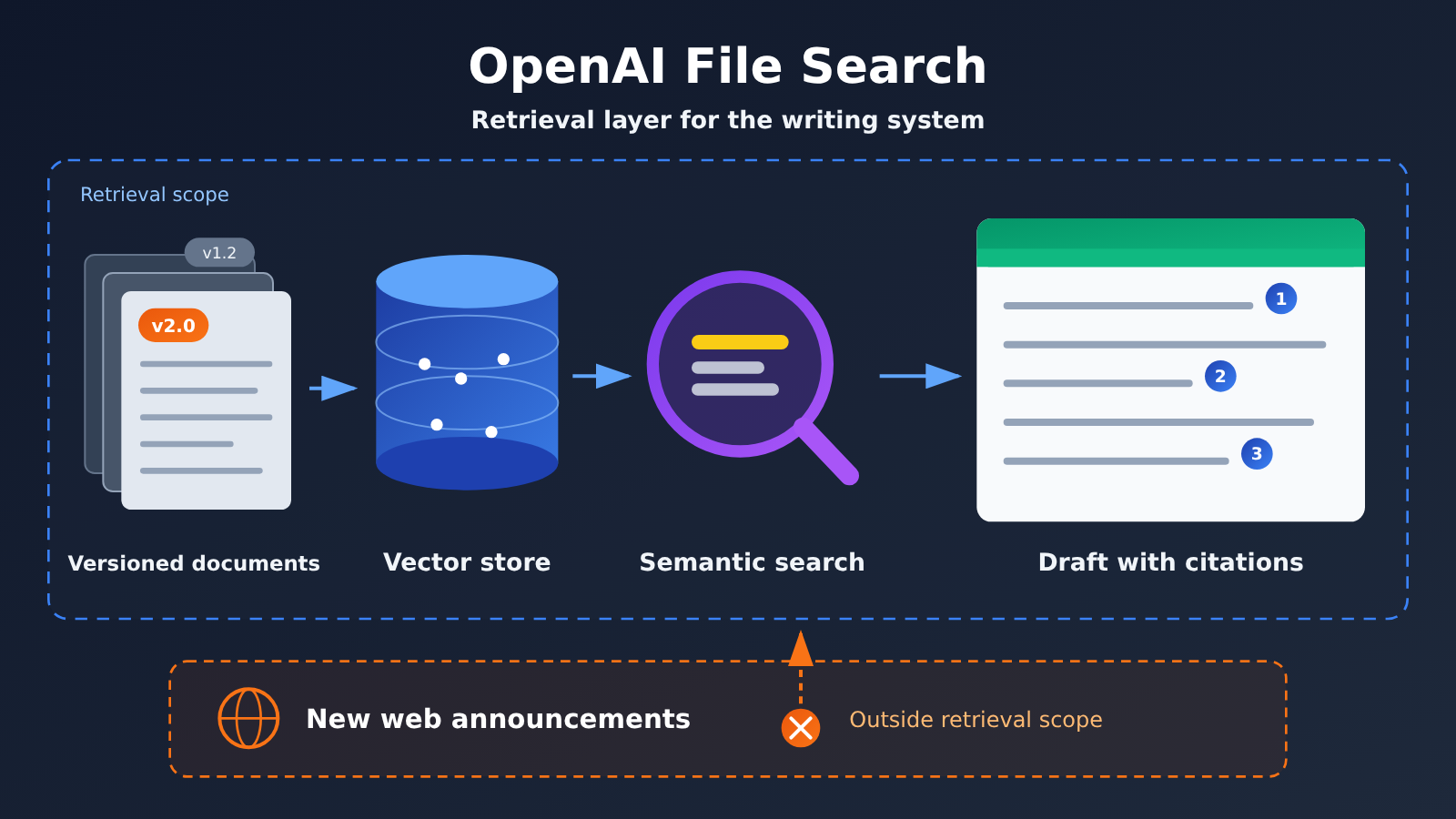
OpenAI File Search Concepts to Know
| Concept | Quick explanation |
|---|---|
| Responses API | OpenAI’s response generation endpoint where you can attach tools in a single request — File Search is one of them |
| File Search | A built-in tool of the Responses API that pulls relevant snippets from files in a vector store to help generate answers |
| Vector Store | The store that holds uploaded files and their vector representations; this is the scope File Search searches over |
| Semantic search | Finds content by similarity of meaning, so passages that are worded differently but related in meaning still get found |
| Citation | Marks which file a passage in the answer came from, so readers and reviewers can look it up |
max_num_results |
A parameter that caps how many results a single retrieval returns |
include |
A request parameter; pass file_search_call.results and the response will include the content actually retrieved |
| Eventual consistency | Writes or deletions don’t take effect everywhere right away — you might see stale state for a short while |
OpenAI File Search: Impact at a Glance
| Audience | Main impact |
|---|---|
| Writing system developers | You get semantic search and citations without building your own retrieval service. You’ll still need to design ingestion conventions and a troubleshooting process |
| Content editors / reviewers | Citations make checking easier, but you still need to verify each conclusion — don’t wave things through just because there’s a citation |
| Technical doc maintainers | Label old and new docs with version and date, or outdated constraints may get retrieved and written into new articles |
| Cost owners | Vector store storage and tool calls both cost money; check OpenAI’s current pricing page for specifics, and estimate ahead of time when your data volume is large |
OpenAI File Search: The Facts
The following is based on two OpenAI developer docs — the File Search guide and the Retrieval guide — with a fact-check date of 2026-11-17. Both are actively maintained documents; this article does not verify when the feature first shipped.
What File Search is: a retrieval tool inside the Responses API
File Search is a tool offered by the Responses API. You upload files to a vector store first, then declare File Search in tools and point it at the vector store when you send a request. As the model generates an answer, it retrieves relevant content from those files, and the answer can carry file citations showing where the information came from.
It uses semantic search, so it can find content that’s related in meaning even when the wording doesn’t match exactly. Query “API rate limiting,” for example, and a document that actually says “request frequency caps” can still get pulled in. For a writing system, that means you don’t have to reproduce the original phrasing word for word when you ask a question.
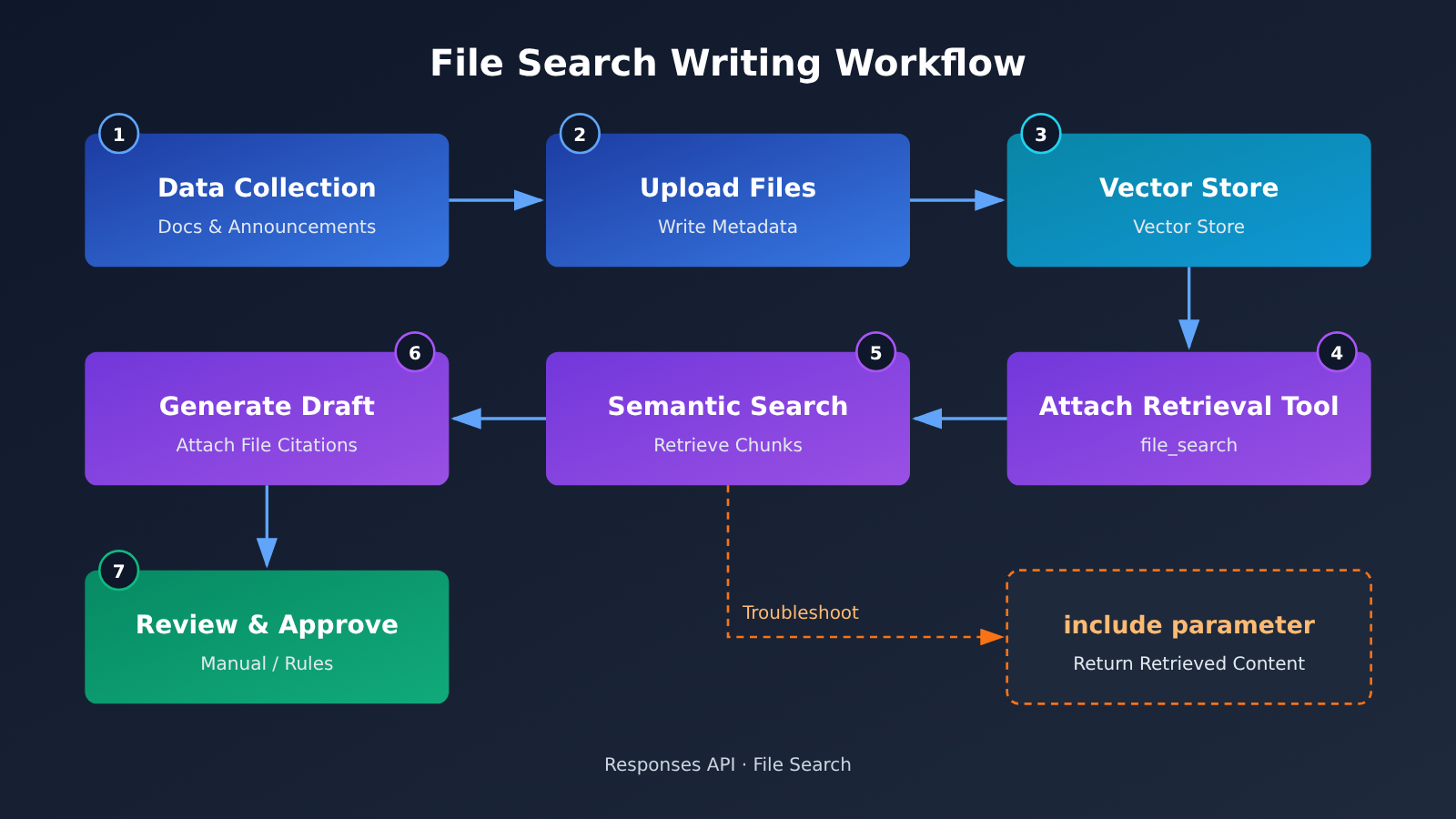
File Search: Tunable Parameters and Debugging Switches
Two parameters in the docs map most directly onto the writing system:
| Parameter / Behavior | What it does | Why it matters for the writing workflow |
|---|---|---|
max_num_results |
Adjusts how many results a single retrieval returns | Fewer results save context, but the evidence may be incomplete; more results cover more ground, but noise goes up too |
| Default returned content | Tool calls by default do not return the full retrieval results | If you only look at the final answer, you can’t tell what the model actually read |
include: ["file_search_call.results"] |
Makes the response include the content that was actually recalled | Lets you separate “nothing was recalled” from “recalled but written wrong” — essential for troubleshooting |
| File citations | Marks the source file in the answer | Handy for looking things up later, but it doesn’t mean the conclusion is correct |
Here’s a minimal call example that shows how to attach a vector store, cap the number of recalled results, and ask the response to return the retrieval results. Swap the model name and vector store ID for your own configuration:
from openai import OpenAI

client = OpenAI()  # reads the key from the OPENAI_API_KEY environment variable

response = client.responses.create(
    model="YOUR_MODEL",
    input="根据资料库,总结该接口目前的调用限制,并标明出处。",
    tools=[{
        "type": "file_search",
        "vector_store_ids": ["YOUR_VECTOR_STORE_ID"],
        "max_num_results": 8,   # number of results: trade-off between evidence coverage and noise
    }],
    include=["file_search_call.results"],  # return the actual recalled content, easier to debug
)

# iterate over the output: get both the final text and which snippets were retrieved
for item in response.output:
    if item.type == "file_search_call":
        for r in (item.results or []):
            print("召回:", r.filename, r.score)
    elif item.type == "message":
        print(item.content[0].text)
Eventual Consistency When File Search Deletes Files
The docs state that deleting a file from a vector store is eventually consistent: for a while after deletion, the file may still be retrievable. So you shouldn’t claim that “once deleted, it’s immediately unsearchable.” If some material has to be taken offline because it’s incorrect or outdated, your writing system should ideally also filter it at its own layer, rather than relying only on the delete operation.
What File Search Doesn’t Do
Based on the official documentation and how the tool itself works, a few things are worth clarifying:
- File Search only retrieves files that already exist in the vector store. It does not automatically discover new public announcements or document updates on the internet.
- Citation markers indicate which file the content came from, but they do not guarantee that conclusions drawn from that file are correct.
- Both vector store storage and tool calls are billed, based on OpenAI’s currently published pricing. This article doesn’t give specific numbers.
- This article has not verified whether APIYI or other third-party platforms are compatible with File Search-related APIs. For support details, refer to each platform’s official documentation.
OpenAI File Search: Analysis and Takeaways
Takeaway 1: File Search fills the “retrieval layer,” not the “source layer”
Most writing systems hit one of two content problems. In one case, you’ve got the material but can’t find the right piece of it, so the model writes from memory and can’t justify where its claims came from. In the other case, there’s simply no material to begin with — or what you have is already out of date. File Search is very effective against the first case: semantic retrieval makes recall more flexible, and file citations let you trace every section back to its source.
It can’t do anything about the second case. The tool won’t go out and fetch new announcements on its own — whatever’s in the vector store is all it can retrieve. Take, for example, a model whose pricing or limits just changed, while the store only holds old documentation: File Search will “accurately” retrieve stale information, complete with a citation that looks thoroughly reliable. That’s more dangerous than having no citation at all, because it’s far more likely to slip past review.
So File Search should be seen as one layer within a writing system, not the entire content strategy. Source collection, regular updates, and retiring old versions still need a separate process to handle them.
Diagnosis Two: Use a Three-Way Classification to Pin Down File Search Writing Problems
When an article comes out wrong, the problem can originate in any of three different stages. The value of include: ["file_search_call.results"] is that, for the first time, it lets you tell these three types of problems apart.
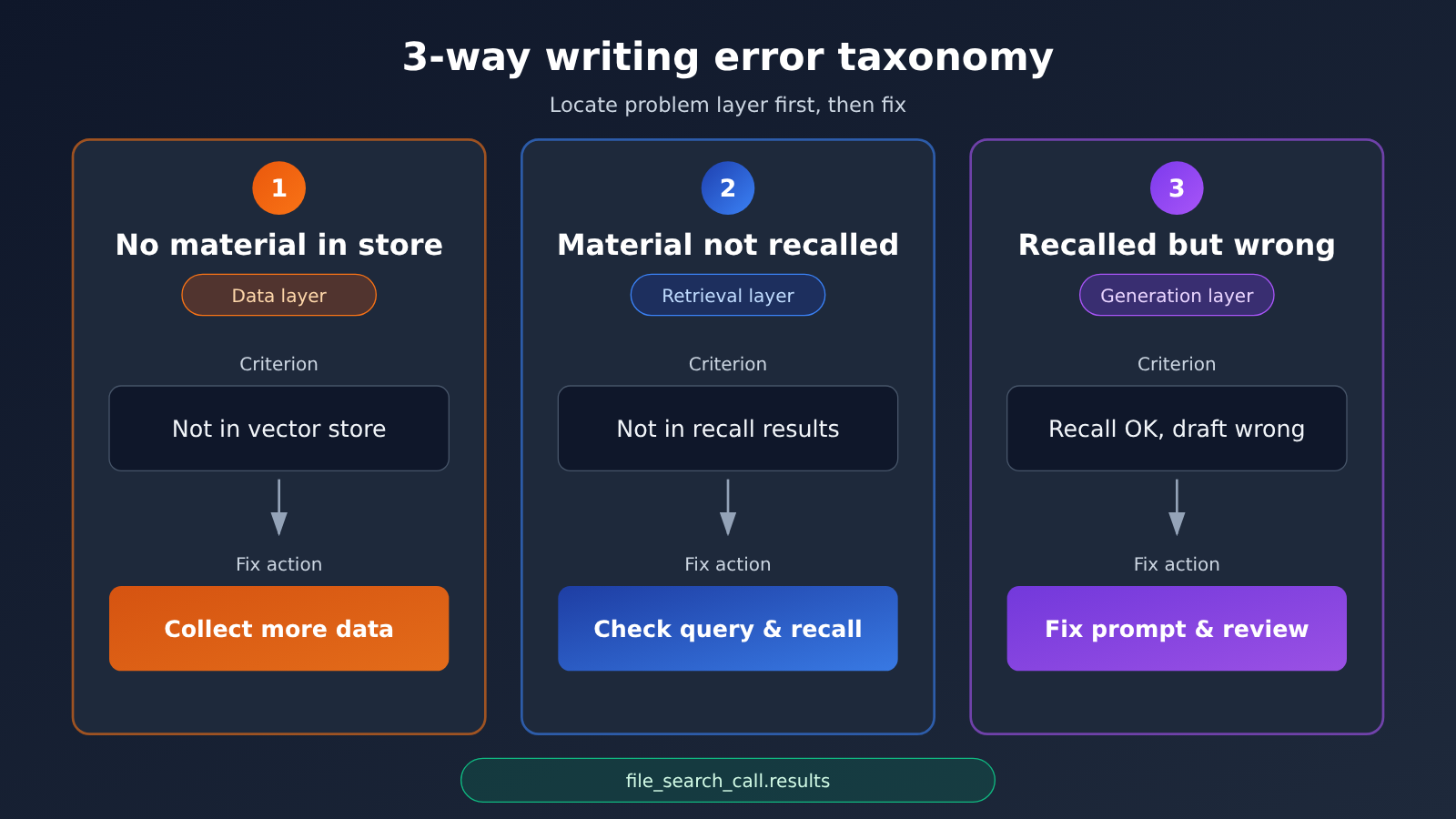
| Problem Type | Diagnostic Basis | Fix Direction |
|---|---|---|
| No material in the library | The relevant file can’t be found in the vector store | Gather more material — this is a data-layer problem |
| Material present but not retrieved | The file is in the library, but it’s not in file_search_call.results |
Adjust the query wording, split the question apart, or appropriately increase max_num_results |
| Retrieved but written wrong | The retrieval results are correct, but the final draft doesn’t match them | Revise the generation prompt and review rules — this is a generation-layer problem |
If no retrieved content is returned, teams often can only say vaguely that “the AI made it up again” and then go tweak the prompt. Quite often the real cause is that the library doesn’t contain this material, or the query didn’t hit it. Figure out which layer the problem is on before you start changing things, and you’ll save yourself a lot of detours.
Takeaway 3: OpenAI File Search ingestion metadata sets the ceiling on writing quality
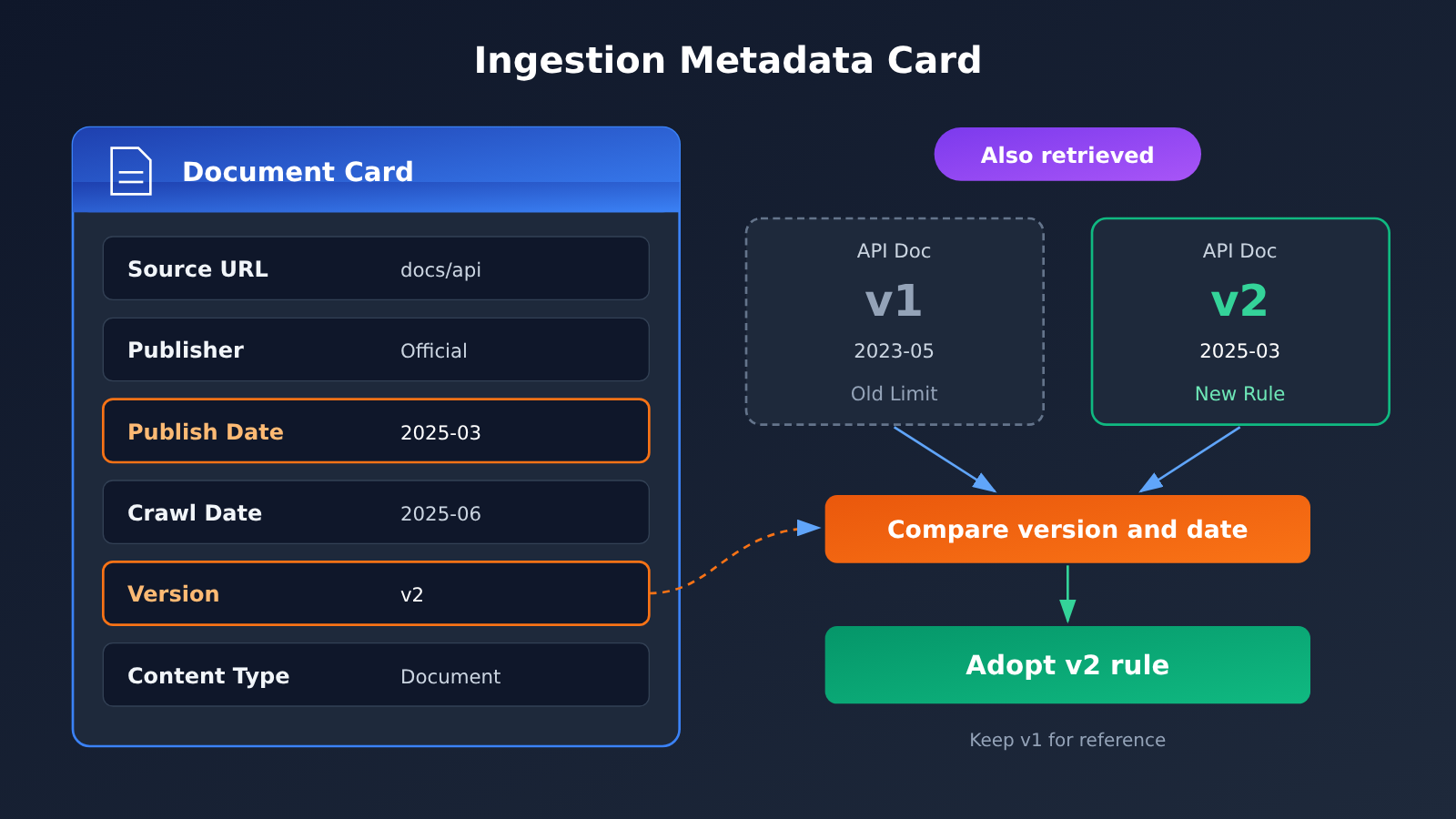
Retrieval can only return what’s in the store, and the quality of that content depends on what was recorded when it was ingested. For a writing system, just uploading the body text of a file isn’t enough. It’s a good idea to attach at least the following information to every source:
| Metadata field | Purpose |
|---|---|
| Original URL | Makes it easy to go back to the source to verify, and lets you list it in references |
| Publisher | Distinguishes official statements, third-party interpretations, and community rumors |
| Publication date | Helps determine whether the information is still valid |
| Crawl date | Helps gauge how long it’s been since the material was updated |
| Version number | Prevents old constraints from being mistaken for current rules when old and new docs coexist |
| Source type | Distinguishes announcements, docs, blog posts, and forum threads, so you can set credibility levels |
Version information is the easiest to overlook. Old and new docs for the same API may both live in the store, and they can be semantically very similar, so retrieval may well pull up both at once. Without version and date info, the model has a hard time telling which restriction has been retired. Keeping version information is safer than deleting old docs outright. For one thing, you’ll still need them when writing historical comparisons. For another, deletion itself is eventually consistent—just because you delete something doesn’t mean it disappears right away.
Judgment 4: There’s no standard answer for recall count
Turning max_num_results down keeps the context cleaner, with lower cost and noise, but it may miss key evidence—especially for topics that need multiple sources to corroborate each other, such as when price, limits, and version differences are all involved at once. Turning it up covers more ground, but irrelevant snippets dilute attention, and the model becomes more likely to mix information from different versions.
A more practical approach is to set it separately by article type. News analysis pieces need cross-validation from multiple sources, so you can loosen it a bit. Parameter docs for a single API can be tightened. There’s no universal optimal value—you should adjust based on actually observing the recalled content that comes back, rather than picking a fixed number by gut feeling.
Follow-up changes worth watching
The following are directions worth observing—not confirmed facts: whether File Search will offer finer-grained metadata filtering so you can filter directly by version or date; whether the delay before delete operations take effect will get clearer documentation; whether the billing model will change. All of these directly affect the architecture choices for a writing system, so it’s worth rechecking the official docs and pricing page before integrating.
The easiest misjudgment when plugging File Search into a writing system is thinking “now that we have retrieval and citations, the source material problem is solved.” In reality, it just helps you make better use of the material you already have. The freshness and accuracy of that material still depend on collection, version management, and review to guarantee.
How can the pond be so clear? Because fresh water flows in from the source. — Zhu Xi, Reflections on Reading


