

Author’s note: d1.2-ultra shows up at #1 on Decision Index v2.1. This article walks you through first figuring out whether your workload is document extraction, tool calling, or hard-question answering, then looking only at the subscore that matches, and finally using 20 to 50 of your own samples to decide whether to switch.
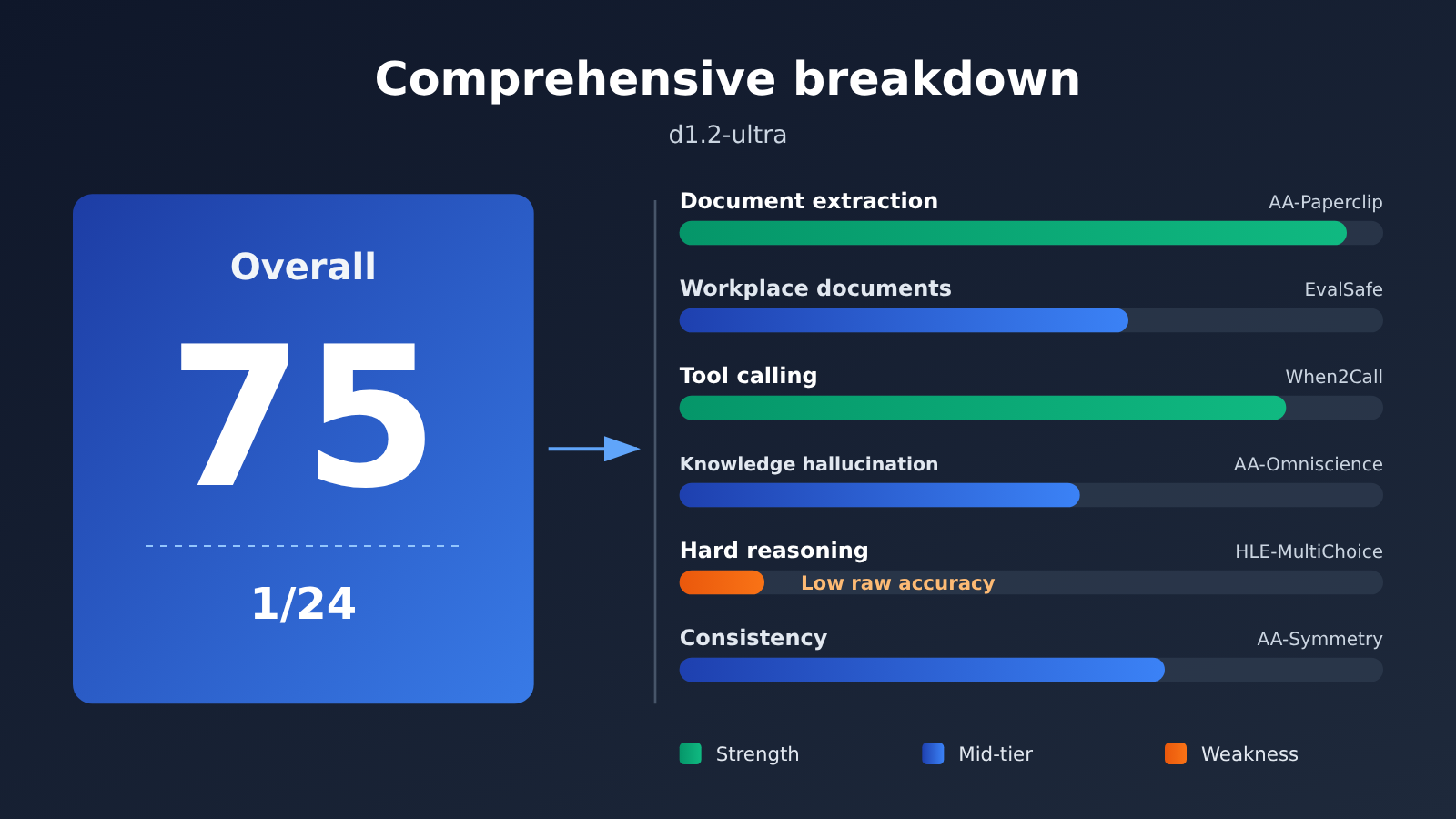
On 2026-11-16, Liquid AI released d1.2 and d1.2-ultra. The official blog says d1.2-ultra scored 75 on the Artificial Analysis Decision Index v2.1 — the highest among decision models. Plenty of developers who are in the middle of wiring up API calls saw “No. 1” and their first instinct was to swap out their production model. Hold your horses. The composite 75 is just the hook — what you actually need to look at is the subscore that lines up with your business.
This is not a hit piece, and it’s not a hype piece. The same model ranks #1 on document extraction, yet on really hard multiple-choice questions its raw accuracy is the lowest of the 24 decision models. Both of those things are true at the same time, and a composite score papers right over them.
The core value: by the end of this article you’ll know which subscore to look at, how to read decision scores versus raw accuracy, and how to use 20 to 50 of your own samples to reach a switch-or-don’t-switch conclusion in a single afternoon.
The key points behind d1.2-ultra’s No. 1 overall ranking
Let’s start by laying out the numbers on the leaderboard page. The data below comes from the d1.2-ultra model page on Artificial Analysis, read on 2026-11-17. A total of 24 decision models were compared.
| Item | Leaderboard page data | How to read it |
|---|---|---|
| Composite index | 74.85, displayed as 75 on the page, No. 1 of 24 | No. 2, Drex Max v1.1, is at 72.62 — a gap of about 2.2 points, which is the same thing as the official “two points” after rounding |
| Latency | 218 ms/task, 14th of 24 | The page median is 209 ms, so it’s mid-pack |
| Cost to run the full index | $133 per million tasks, 11th of 24 | This is a task cost, not the list price per million tokens |
| Input price | $0.042 per million tokens | Consistent with Liquid’s official blog; the official figure counts input only |
| Brier | 0.150, the lowest among the 24 | Lower is better — it suggests the probabilities it gives are fairly “honest” |
How d1.2-ultra’s overall score is calculated
Decision Index v2.1 is a weighted average of six components. The model page defines the decision score as accuracy minus the Brier score of the probability assigned to the chosen answer, on a 0–100 scale where higher is better. In other words, being confidently wrong gets penalized more than being hesitant and wrong. Raw accuracy, by contrast, is the share of questions where the model assigns the highest probability to the correct option, and it is not the same number as the decision score.
That distinction directly affects how you read d1.2-ultra. A model can achieve a decent decision score by often abstaining and making fewer confident mistakes, while its raw accuracy remains low. If your business requires that an answer must always be given, you should look at raw accuracy; if the business allows “when unsure, hand it off to a human,” the decision score is more useful as a reference.
| Component | Weight | What it measures | AA category |
|---|---|---|---|
| AA-Paperclip | 30% | Document judgment and extraction; 15 answers in one document count as one decision | Document |
| EvalSafe-O*NET-AA | 15% | Workplace document judgment | Document |
| When2Call | 10% | Tool calling | Tool |
| AA-Omniscience-Decision v1.1 | 15% | Knowledge and hallucination | Knowledge |
| HLE-MultiChoice v1.1 | 15% | Humanity’s Last Exam text multiple-choice questions; can decline to answer | Reasoning |
| AA-Symmetry v1.1 | 15% | Whether the judgment stays the same after paraphrasing, changing the order of options, or negation | Consistency |
Note that HLE-MultiChoice is labeled as reasoning at AA, not knowledge. So when it comes up later, don’t call it a “knowledge test.”
How to Match d1.2-ultra’s Score to the One That Actually Matters
Step one isn’t reading the leaderboard. It’s grabbing a sheet of paper and writing down which bucket your work falls into: pulling fields off documents, calling tools, answering hard problems, or knowledge Q&A. Once you’ve written it down, look only at the matching item — ignore the other subscores and the 75 overall score for now.
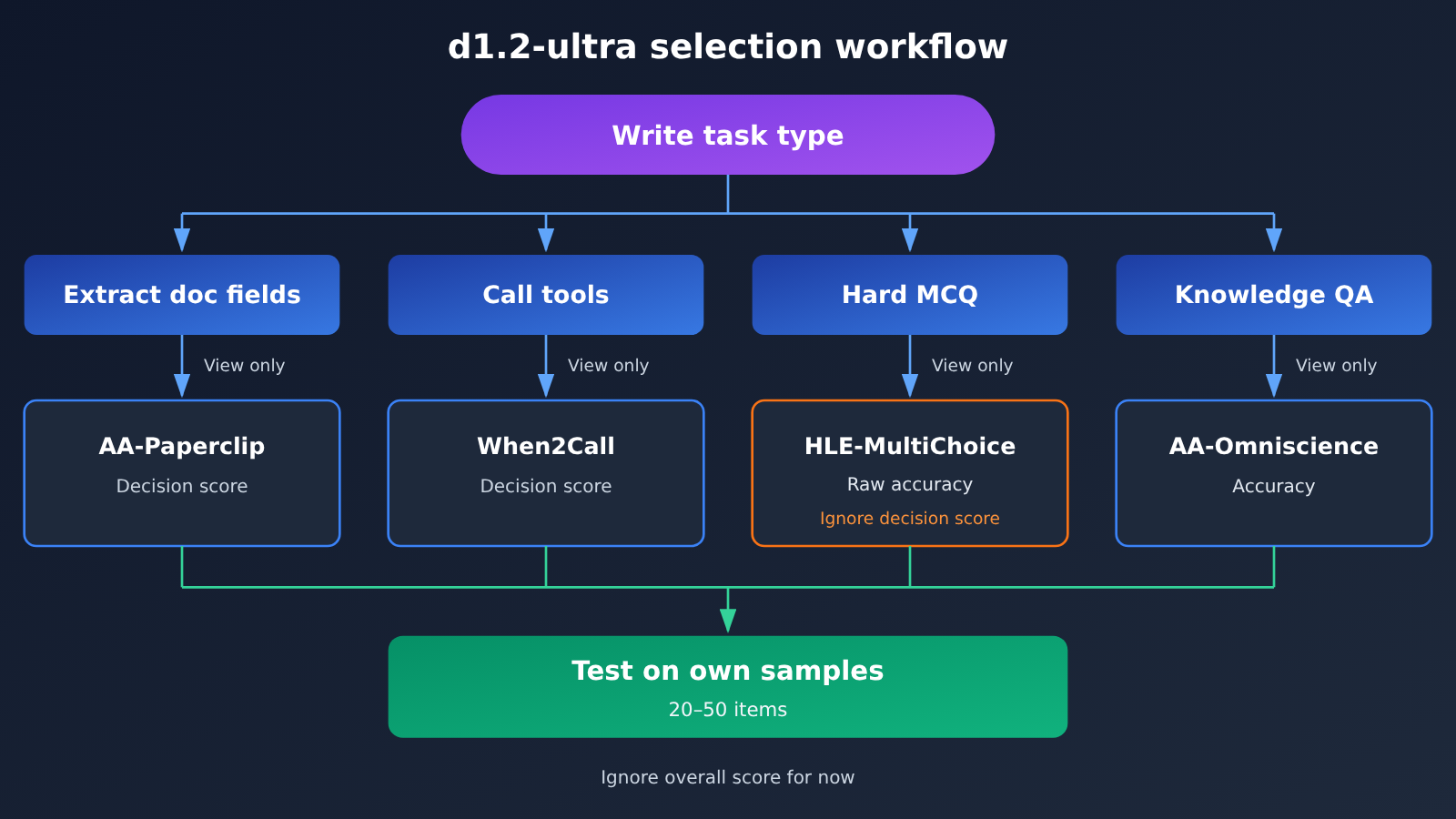
| What you’re trying to do | Look at only this item | d1.2-ultra leaderboard page data | How to read it |
|---|---|---|---|
| Extracting invoice, resume, and paper fields | AA-Paperclip | Decision score 75.81, document all-correct rate 67.7%, both 1/24 | No. 2 Drex Max v1.1 sits at 72.82 and 63.0%, so the lead is fairly clear |
| Calling tools, judging whether a call is needed | When2Call | Decision score 96.49, No. 1 | SubQ Snap 1.2 is 96.10 and d1.2 is 96.09 — the top few are packed within about 1 point |
| Judging workplace documents | EvalSafe-O*NET-AA | Decision score 89.53, No. 3 | Ahead of it are Jev 1.14 (91.14) and GLiDE v1.2 (89.67) |
| Answering very hard multiple-choice questions | HLE-MultiChoice raw accuracy | 2.36%, lowest among the 24 decision models | Its decision score of 46.36 isn’t last, and its non-hallucination rate is 76.1% — it often chooses not to guess |
| Knowledge Q&A | AA-Omniscience accuracy | Raw accuracy 23.6%, No. 20/24 | Decision score 60.80 ranks 6th, non-hallucination rate 83.8% |
| Whether answers hold up when rephrased | AA-Symmetry all-pass rate | Score 86.34 is 2nd; all-pass rate 56.7% is 5th | Second in score doesn’t mean second in stability |
The two easiest things to misread in d1.2-ultra’s subscores
The first is HLE-MultiChoice. The 2.36% raw accuracy really is the lowest among the 24 decision models, but its decision score of 46.36 isn’t bottom of the pile — the same page has lower numbers, like Mercury Decide’s 34.79. Add the 76.1% non-hallucination rate, and the sensible reading is: when it hits a very hard reasoning multiple-choice question, d1.2-ultra tends not to commit to a high-confidence answer. AA classifies this item as reasoning, so you can’t call it “last place on the knowledge test.”
The second is AA-Omniscience. 23.6% accuracy ranks 20/24, not last. What’s interesting is that the smaller d1.2 on the same page scores 30.0% here and 5.30% on HLE raw accuracy — both higher than ultra. But d1.2’s overall index is 68.69, ranking 9/24, so “the pricier ultra is worse at knowledge” applies only to these two items; you can’t stretch it into “worse across the board.”
🎯 Leaderboard reading tip: If your work is document extraction,
d1.2-ultra‘s No. 1 on AA-Paperclip is worth taking seriously. If it’s tool calling, that No. 1 is real — but the gap to the runners-up is within 1 point, so whether to switch depends on your own samples.
How to use d1.2-ultra’s self-reported numbers
In the same blog post, Liquid also lays out five new task categories and internal test results. The vendor states up front that these new tasks aren’t yet covered by any public benchmark — the numbers below are all self-reported by the vendor, measured on an internal held-out set, not Artificial Analysis scores.
| New task (vendor-reported) | d1.2-ultra | d1.2 | Notes |
|---|---|---|---|
| Receipt field reading (CORD, SROIE) | 98% | 96% | Answers “not found” when a value is missing |
| PII span detection (Nemotron PII), precision/recall | 94% / 93% | 92% / 88% | Returns the location of each span |
| Grounded object detection from description (RefCOCO family) | 94% | 94% | Tie between the two |
| Object counting, off-by-one tolerance (COCO) | 93% | 92% | Estimates a count and gives a range |
| Segmenting every object in the image (COCO) | 87% | 90% | The cheaper d1.2 wins on this row |
On the audio side, the vendor says both models land around 95% to 97% when classifying sound categories (ESC-50) and languages (FLEURS, 43 languages) on held-out recordings. As for calibration error, Liquid measured 0.8 for d1.2-ultra, 1.2 for d1.2, 2.7 for Jev 1.14, 3.7 for Perplexity Decider v1.3, and 7.2 for GPT-6 Luna’s Decisions API, across 13 benchmarks and 22,505 questions.
One distinction matters a lot here: GPT-6 Luna (Decisions) scores a composite index of 60.25 on the Artificial Analysis decision leaderboard, ranking 22/24, with an HLE raw accuracy of 7.86%. Those are all results for the Decisions interface — they can’t be treated as results for the chat interface gpt-6-luna. The vendor blog also says “Coming to OpenRouter and Vercel soon” — that’s a vendor teaser, and doesn’t mean it’s already live.
d1.2-ultra Quick Start: Run Your Own Samples Through It
Once you’ve looked at the leaderboard, what really determines whether you switch is your own data. You only need 20 to 50 real samples, like 30 invoices or 30 resumes. Label the correct field values for each sample in advance, and ideally include a few samples where a field is deliberately missing.
Minimal steps
- Pick 20 to 50 samples from your business data, manually label the correct value for each field, and mark missing fields as not found.
- Write a fixed prompt: ask the model to output the specified fields as JSON, require fields it can’t find to be
not found, and forbid guessing. - Use the OpenAI-compatible SDK, set
base_urltohttps://api.apiyi.com/v1, and run it once withmodelset togpt-6-luna, then again withgpt-6.1-sol. - Compare record by record and track three numbers: field-level accuracy, whole-document all-correct rate, and how many times missing fields get filled in.
- Once the target model is available for invocation, run the same batch of samples with the same prompt and compare the three numbers directly.
See the full comparison approach
– **Input**: one sample file where each line contains the source text (or image) and a human-annotated field dictionary.
– **Calling**: loop through the samples, call `client.chat.completions.create` or the `responses` endpoint, set `temperature` to 0, and require strict JSON output.
– **Parsing**: count output parse failures separately—that’s a usability metric in itself.
– **Comparison**: compare field by field after normalization (trim spaces, normalize date formats, keep amounts to two decimal places).
– **Hallucination count**: fields marked as not found that the model fills in anyway are counted separately as “guesses”.
– **Summary**: output field accuracy, document all-correct rate, guess count, and average token usage so you can do the cost math later.
Run a baseline with APIYI first
This will cost tokens. d1.2 and d1.2-ultra aren’t in APIYI’s model list yet, so for now you can use the already-listed gpt-6.1-sol or gpt-6-luna on APIYI (apiyi.com), with the endpoint https://api.apiyi.com/v1, and run the same batch of invoices or resumes through it to see whether the fields are right and whether missing fields get guessed. That gives you a quantifiable baseline.
It’s not listed yet; we’ll get this model listed as soon as we can. Model names and pricing are subject to the platform’s model list.
| Self-check item | How to record it | Criteria |
|---|---|---|
| Field accuracy | Correct fields / total fields | Compare with your current production model |
| Whole-document all-correct rate | Share of documents where every field is correct | Corresponds to AA-Paperclip’s “document all-correct rate” |
| Guess count | Number of times a not found field gets filled in | Lower is better—this mirrors the thinking behind the non-hallucination rate |
| Parse failures | Number of records whose JSON can’t be parsed | Directly affects rollout cost |
| Token usage | Average input/output tokens per record | Used to translate into actual cost |
🚀 Getting started tip: Start by using APIYI apiyi.com’s free trial credits for new users to run 20 records. Once you’ve confirmed the prompt and comparison script are working, expand to 50 so you don’t spend your credits on debugging right out of the gate.
d1.2-ultra: Pricing and How to Call It
You have to be careful about the unit when comparing prices. The $133 on the leaderboard is the benchmark cost per million tasks, while Liquid’s official price is per million input tokens: $0.02 for d1.2 and $0.042 for d1.2-ultra, input only. Images are billed at the text rate as 1.5 tokens per 32×32 pixels, so a 1024×1024 image comes to about 1536 tokens; text and images in a single request are counted once, and asking one more question only adds the text of that question itself.
The official way to call it is also different from your typical chat API: the model IDs are d1.2-ultra and d1.2, the endpoint is https://api.liquid.ai/decisions/v1/systemone, and you request a key in the Liquid console. The official blog mentions text, image, and audio input; the technical spec on the Artificial Analysis page lists text and image with a 66k context window. That window number only shows up on the leaderboard page — it isn’t a spec Liquid published on its blog.
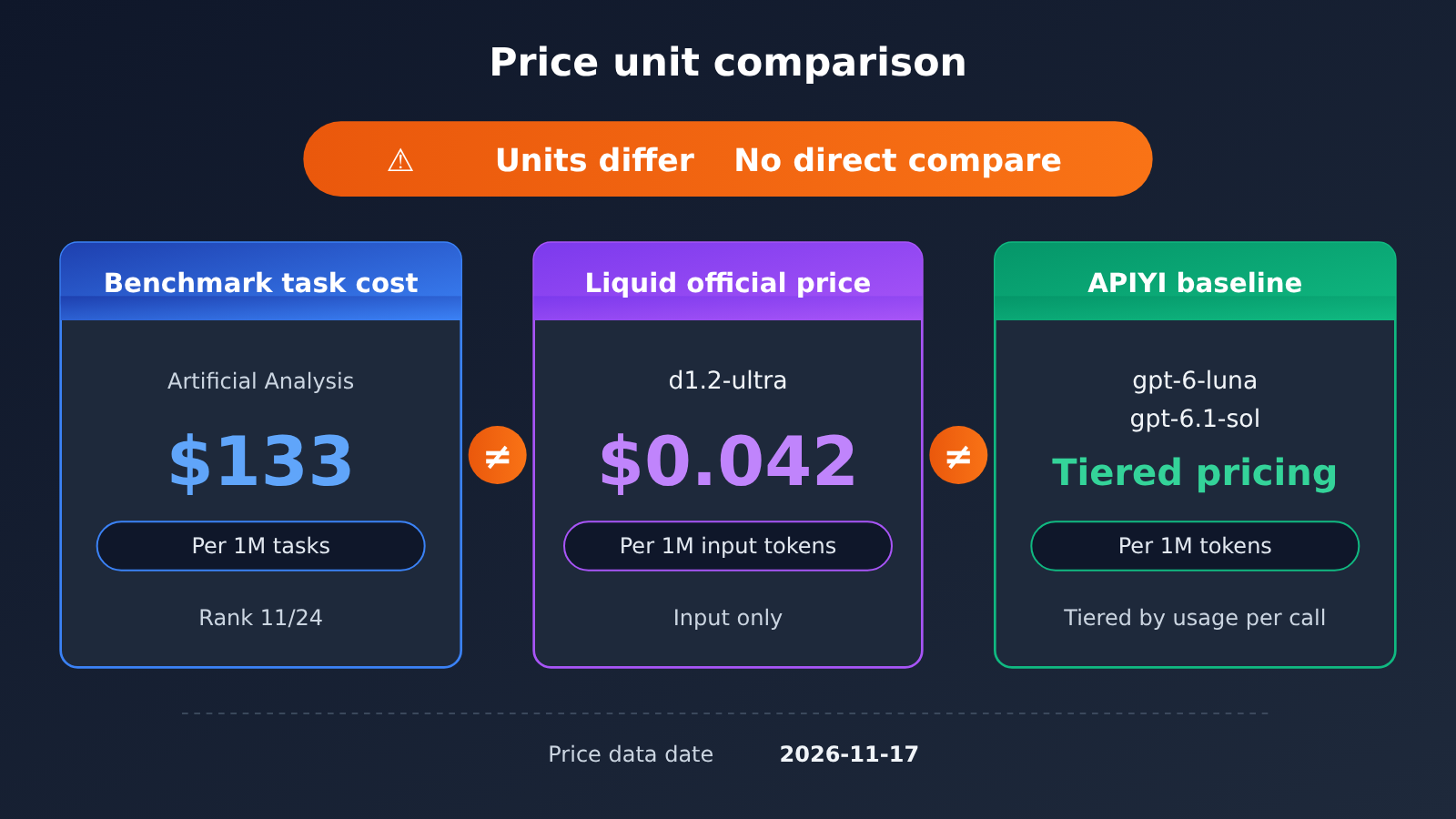
The APIYI models used for the baseline runs are priced as follows (USD per million tokens, tiered by token count per request; data comes from the pricing endpoint as of 2026-11-17, consistent with the 2026-11-16 update to the model table):
| Model | Tier | Input | Output | Cache read | Endpoint |
|---|---|---|---|---|---|
gpt-6-luna |
≤ 272000 | 0.1 | 0.5 | 0.01 | responses preferred, chat also available |
gpt-6-luna |
≥ 272001 | 0.2 | 0.75 | not listed separately | same as above |
gpt-6.1-sol |
≤ 272000 | 2 | 10 | 0.1 | responses preferred, chat also available |
gpt-6.1-sol |
≥ 272001 | 4 | 15 | not listed separately | same as above |
💰 Cost tip: For a 50-sample comparison,
gpt-6-lunais the one to run volume with first, whilegpt-6.1-solworks well as a high-quality reference. APIYI apiyi.com tops up at 1:7 and group discounts stack on top; the actual charge is whatever the console shows.
FAQ
Q1: What kind of model is d1.2-ultra?
It’s a decision model that Liquid AI released on 2026-11-16, launched alongside the smaller d1.2. What sets decision models apart is that they output a probability for each option, making them good at “choose an answer” tasks like document extraction, tool-call judgment, and classification—not long-form writing.
Q2: Is d1.2-ultra the strongest across the board because it ranks #1 overall?
No. Its overall index of 74.85 puts it at 1/24, but it ranks #3 on EvalSafe-O\*NET-AA, #5 on AA-Symmetry all-pass rate, #20 on AA-Omniscience raw accuracy, and its HLE-MultiChoice raw accuracy is the lowest of all 24. The overall score only tells you it leads after weighting.
Q3: Does that HLE-MultiChoice result count as dead last on the knowledge test?
No. Last place belongs to HLE-MultiChoice’s raw accuracy of 2.36%, which is the raw accuracy among the 24 decision models; its decision score of 46.36 isn’t at the bottom, and AA labels this item as reasoning, not knowledge.
Q4: What scenarios is d1.2-ultra best suited for?
Judging from the leaderboard page, it lines up best with extracting invoice, résumé, and paper fields (AA-Paperclip decision score and all-correct rate are both #1) and with tool-call judgment (When2Call #1, though the top few are separated by about 1 point). For hard multiple-choice questions and knowledge Q&A, its raw accuracy isn’t a strength.
Q5: Can I call d1.2-ultra on APIYI right now?
Right now d1.2 and d1.2-ultra aren’t in APIYI’s model list. They aren’t listed yet, but we’ll get this model up as soon as we can; model names and pricing are subject to the platform’s model list. We suggest first running `gpt-6-luna` or `gpt-6.1-sol` on APIYI at apiyi.com to establish a baseline on your own samples, then switching models to compare directly.
Q6: Can I take Liquid’s published calibration error of 0.8 at face value?
That’s Liquid’s own testing across 13 benchmarks and 22,505 questions—official self-reported numbers. What the leaderboard page can cross-validate is that its Brier score of 0.150 is the lowest of the 24, which points in the same direction, but for your specific business you still need to check whether the “number of wild guesses” in your own samples is actually lower.
Q7: Is GPT-6 Luna’s 7.2 the same thing as gpt-6-luna on APIYI?
No, they’re not the same. The 7.2 is the calibration error of GPT-6 Luna’s Decisions API in Liquid’s testing, and the 60.25 on the leaderboard is also a score from the Decisions interface. The `gpt-6-luna` that APIYI provides is a chat interface, so its performance needs to be measured on your own samples.
Q8: How many samples do I actually need?
20 to 50 samples are enough to reveal a clear gap. The key is covering your real distribution: common formats, rare formats, and samples with missing fields should all be included. If two models differ by only one or two samples out of 50, it means switching doesn’t matter much either way—prioritize price and latency instead.
d1.2-ultra Key Takeaways
- The 75 composite is just a conversation starter: 74.85 puts it at 1st out of 24, about 2.2 points ahead of No. 2 — but that doesn’t mean it wins every category.
- For document extraction, check AA-Paperclip: decision score 75.81 and fully-correct rate 67.7%, both No. 1.
- For tool calling, check When2Call: 96.49, No. 1 — though the top few are bunched within about 1 point of each other.
- For hard problems, check raw accuracy: HLE-MultiChoice sits at 2.36%, the lowest — but its decision score isn’t last, and AA tags it as reasoning.
- For knowledge Q&A, check Omniscience accuracy: 23.6%, ranking 20th out of 24 — not dead last.
- Don’t mix up the units: $133 is per million tasks; $0.042 is per million input tokens.
- Let your own samples decide: first run 20 to 50 samples on the models available now at APIYI apiyi.com, and track field accuracy plus how often it takes a wild guess.
Summary
Reading the d1.2-ultra leaderboard comes down to three steps:
- Write down your task type: document extraction, tool calling, hard-problem answering, or knowledge Q&A — then look only at the sub-score that matches.
- Keep the two numbers straight: the decision score rewards “don’t guess if you’re not confident,” while raw accuracy measures “how often you guessed right.” Pick the one that fits your business needs.
- Decide with your own samples: 20 to 50 labeled real examples will tell you more than any composite score.
If your work happens to be document extraction, d1.2-ultra deserves a spot on your shortlist. If it’s hard-problem reasoning or knowledge Q&A, don’t switch just because it’s No. 1 overall. I’d recommend setting up baselines now with gpt-6-luna and gpt-6.1-sol at APIYI apiyi.com, so you can compare in one click once the target model becomes available.
📚 References
-
Liquid AI Official Blog – d1.2 Release: Release details, official pricing, and self-reported benchmarks
- Link:
liquid.ai/blog/d1-2 - Description: The new-task accuracy and calibration error figures are both self-reported by the vendor
- Link:
-
Liquid AI Decision Models Documentation: Model IDs and invocation endpoints
- Link:
docs.liquid.ai/lfm/models/decision-models - Description: Official guide to how the models are invoked
- Link:
-
Artificial Analysis – d1.2-ultra Model Page: Overall index and individual sub-scores
- Link:
artificialanalysis.ai/decision-models/d1-2-ultra - Description: All leaderboard data in this article was read on 2026-11-17
- Link:
-
Artificial Analysis – Decision Index Methodology Page: Weights and scoring definitions
- Link:
artificialanalysis.ai/methodology/decision-index - Description: Explains the difference between the decision score and raw accuracy
- Link:
-
APIYI Model Master List: Models currently available and their pricing
- Link:
docs.apiyi.com/models - Description: Model names and pricing follow the platform’s model list
- Link:
Author: APIYI Technical Team
Technical Inquiries: If you have questions about model selection or our comparison scripts, feel free to reach out through the APIYI homepage — for more integration guides, check out the docs center


