

Author’s note: An analysis of Cursor’s final official investigation report from 2026-11-13, explaining the actual exposure rates for API credentials and coding traces, the systems Cursor officially named as unaffected, and recommendations for minimizing storage and rotating third-party keys.
Cursor released the final official investigation report for this security incident on 2026-11-13. Fewer than 0.01% of customers had API credentials exposed, and fewer than 0.05% of users who hadn’t enabled Privacy Mode had coding traces exposed. These two figures are the factual baseline for the current discussion around the Cursor API key leak. If you’ve ever pasted an OpenAI, Claude, or other third-party key into Cursor or Claude Code, this article will help you decide whether you need to take action.
This isn’t a reworked version of rumors circulating online. All figures are based on Cursor’s final official investigation report; the security advisory and media reports from October 29 were used only for cross-checking.
Key takeaways: In 3 minutes, get clear on the official impact rates, the systems Cursor explicitly says were unaffected, and how to store fewer keys and rotate them.
Cursor API Key Leak: Core Facts at a Glance
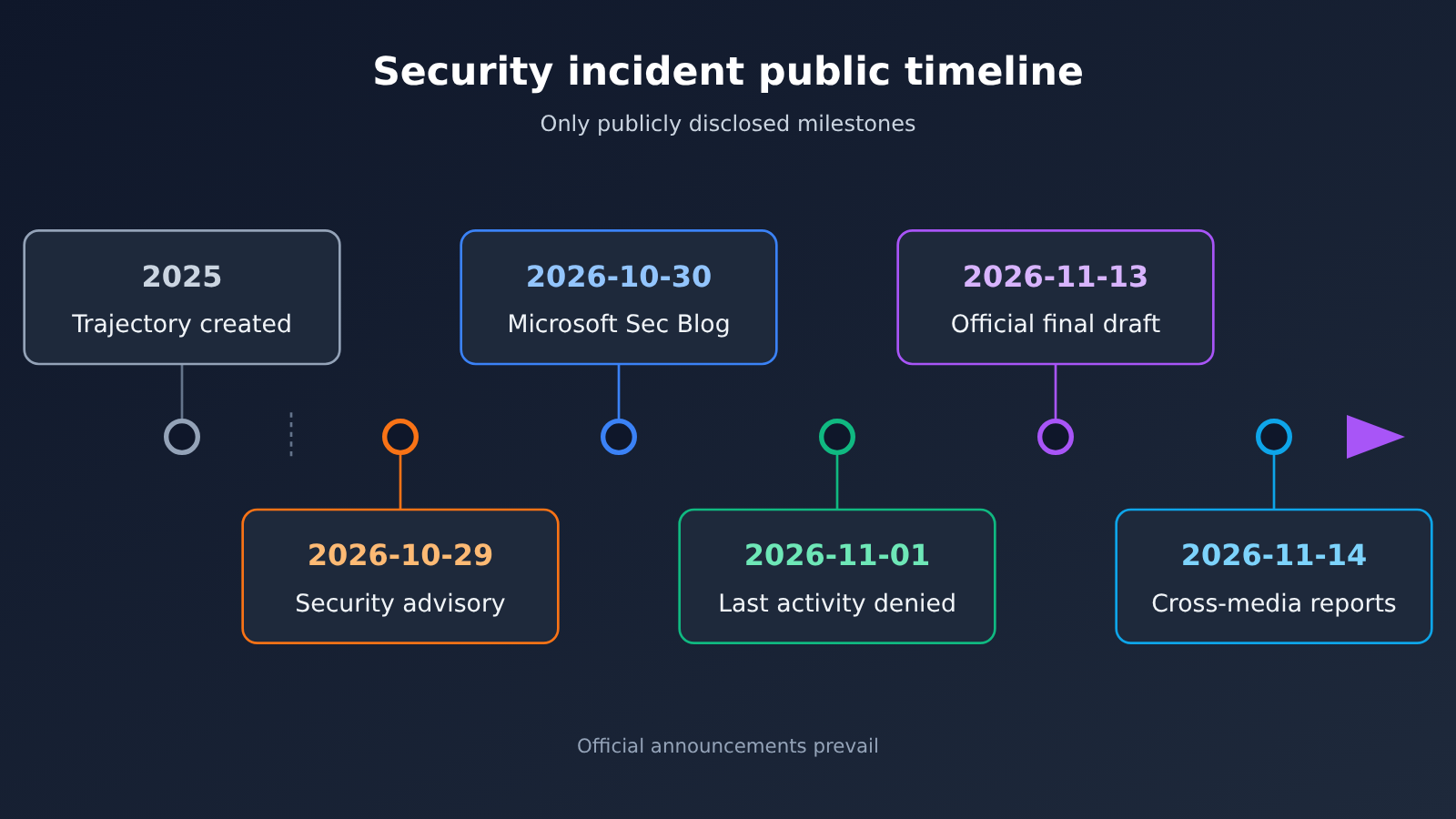
Let’s start with the most important facts in a single table. Pay close attention to the role of the two official posts: the November 13 one is the final official investigation report, and the October 29 one is the security advisory published on the day of the incident. Where numbers and scope differ, the final report takes precedence.
| Item | Details |
|---|---|
| Final official investigation report | Published 2026-11-13, titled as a security incident update; all figures should follow this version |
| Same-day security advisory | Published 2026-10-29, concerning an unauthorized copy of the Claude Code extension |
| Where it started | An access key Cursor issued to Fireworks was exposed (Cursor describes it as exposed by Fireworks) |
| Direct data impact | A read-only storage bucket was copied, containing a limited set of coding agent trajectories, mostly from 2025 |
| Share of API credentials exposed | Fewer than 0.01% of customers |
| Share of coding trajectories exposed | Fewer than 0.05% of users who hadn’t enabled Privacy Mode |
| Malicious extension impact | Up to 5,000 people may have received the malicious build, which was live for about 11 hours |
| Last attacker activity | 2026-11-01, and it was blocked |
| Contact | [email protected] |
Where did the data in the Cursor API key leak come from?
The copied bucket contained coding agent trajectories, and two conditions had to hold for data to be in there: the session wasn’t running with Privacy Mode enabled, and Cursor was permitted to use it for training. In other words, sessions with Privacy Mode turned on weren’t part of this dataset.
Only a small number of those trajectories contained unredacted credentials — that’s where the “fewer than 0.01% of customers had API credentials exposed” figure comes from. Credentials typically end up in trajectories because developers pasted plaintext keys directly into a conversation or into their code, which matters for the hardening advice below.
How far did the incident spread afterward?
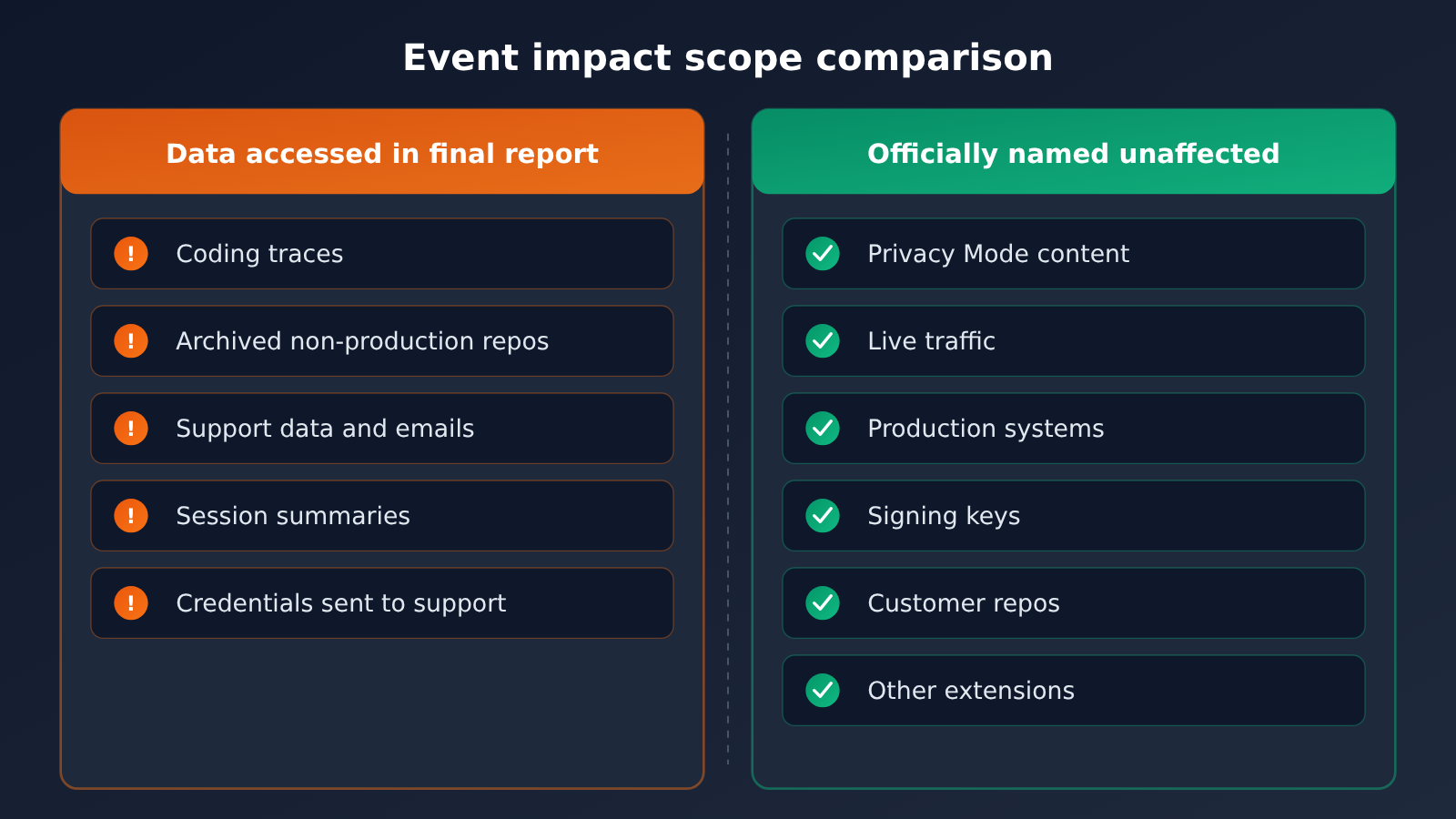
The attacker then got into some of the SaaS services Cursor uses. The final report lists the scope of exposure as: some archived non-production source code repositories (a few containing business contacts), limited customer support data and emails, product usage and contact details, some coding session summaries, and credentials that users had previously sent to the Cursor support team.
The last item deserves its own callout: if you’ve ever pasted a key into a support ticket or email — no matter what problem you were troubleshooting at the time — treat that key as something you need to rotate.
How Much Was Affected by the Cursor API Key Leak, and How to Tell
The question many developers care about most: if you didn’t get a notification, should you try to figure it out yourself? The final version gives a clear answer. Cursor says it has notified affected users individually — if you didn’t receive a notification, you’re not in this batch of traces.
| What’s affected | Official figure | How to tell if you’re affected |
|---|---|---|
| API credential exposure | Fewer than 0.01% of customers | Go by Cursor’s direct notification |
| Coding trace exposure | Fewer than 0.05% of users without Privacy Mode enabled | Notified individually; if you didn’t get one, you’re not included |
| Credentials sent to the support team | Listed as accessed data in the final version | Check whether you sent a key in a ticket or email |
| Malicious extension builds | Up to 5,000 people | Whether you installed or updated a specific version during the October 29 window |
BleepingComputer’s November 14 report repeated the two figures — “fewer than 0.05% of traces, fewer than 0.01% of API credentials” — matching the final version. So there’s no need to adjust your assessment based on other estimates circulating on social media.
Safeguards for the security incident involving the Claude Code extension
On October 29, attackers placed an unauthorized copy of the Anthropic Claude Code extension on the cache used by the Cursor VS Code extension marketplace. There are three facts to keep straight here:
- It wasn’t published by Anthropic: Anthropic didn’t publish this copy, and it isn’t a vulnerability in an Anthropic product.
- The marketplace source wasn’t compromised: this malware isn’t on Open VSX; Microsoft’s security blog also states that the official Claude Code on Visual Studio Marketplace and npm doesn’t include these packages.
- Only two versions are involved:
Anthropic.claude-code2.1.312and2.1.313, which were removed after being live for about 11 hours.
If you installed or updated to either of these versions during the exposure window, follow the instructions in Cursor’s security advisory from October 29. The official guidance is explicit: uninstalling the extension alone may not be enough — don’t piece together cleanup methods circulating online; stick to the remediation steps in the official advisory.
Systems Cursor Officially Confirmed as Unaffected
In a security incident, “what wasn’t affected” matters just as much as “what was.” It tells you what you don’t need to panic about and which unnecessary actions you can skip.
| Category | What the official statement explicitly lists as unaffected |
|---|---|
| User data | Prompts and code with Privacy Mode enabled; customer code repositories |
| Live requests | Real-time traffic currently being sent; active inference requests at the time |
| Production environment | Production systems and infrastructure running Cursor |
| Release pipeline | Cursor app, official updates, release signing keys |
| Other products | Cloud Agents, Grok Bot, and other SpaceX SI products |
| Extensions and plugins | Other extensions in the extension marketplace; plugins downloaded from Cursor Marketplace |
What this table means: the Cursor app itself and official updates can be used normally, and customer code repositories were not touched. The real concerns are two types of legacy risk: plaintext keys that appeared in sessions where Privacy Mode was not enabled, and keys that were sent to the support team.
Security Incident Handling Cursor Has Already Completed
According to the final report, Cursor has taken the following measures:
- Moved inference traffic away from Fireworks, revoked the keys issued to it, and disconnected the shared dataset.
- Rotated the exposed credentials that were identified and proactively rotated internal credentials.
- Rebuilt the VS Code extension marketplace.
- Brought in an external firm to conduct forensics.
- Contacted affected users directly.
Security Incident Protection Recommendations After a Cursor API Key Leak
The suggestions below are general practices compiled from the facts in the final report. They aren’t official Cursor requirements, nor do they imply that any platform was involved in this incident. There are just two core ideas: store fewer keys and rotate them regularly.
Store fewer keys: reduce the number of places where plaintext appears
The credentials exposed this time came from plaintext in trajectory logs and from content sent to the support team. So the most effective protection is to keep keys out of conversations, code, and support tickets:
- Turn on Privacy Mode: According to the final report, prompts and code were unaffected when Privacy Mode was enabled.
- Don’t paste keys into conversations: Have the editor read them from config or environment variables instead of pasting plaintext directly into Chat.
- Never send a full key to any support team: When troubleshooting, just provide the first and last few characters or the request ID.
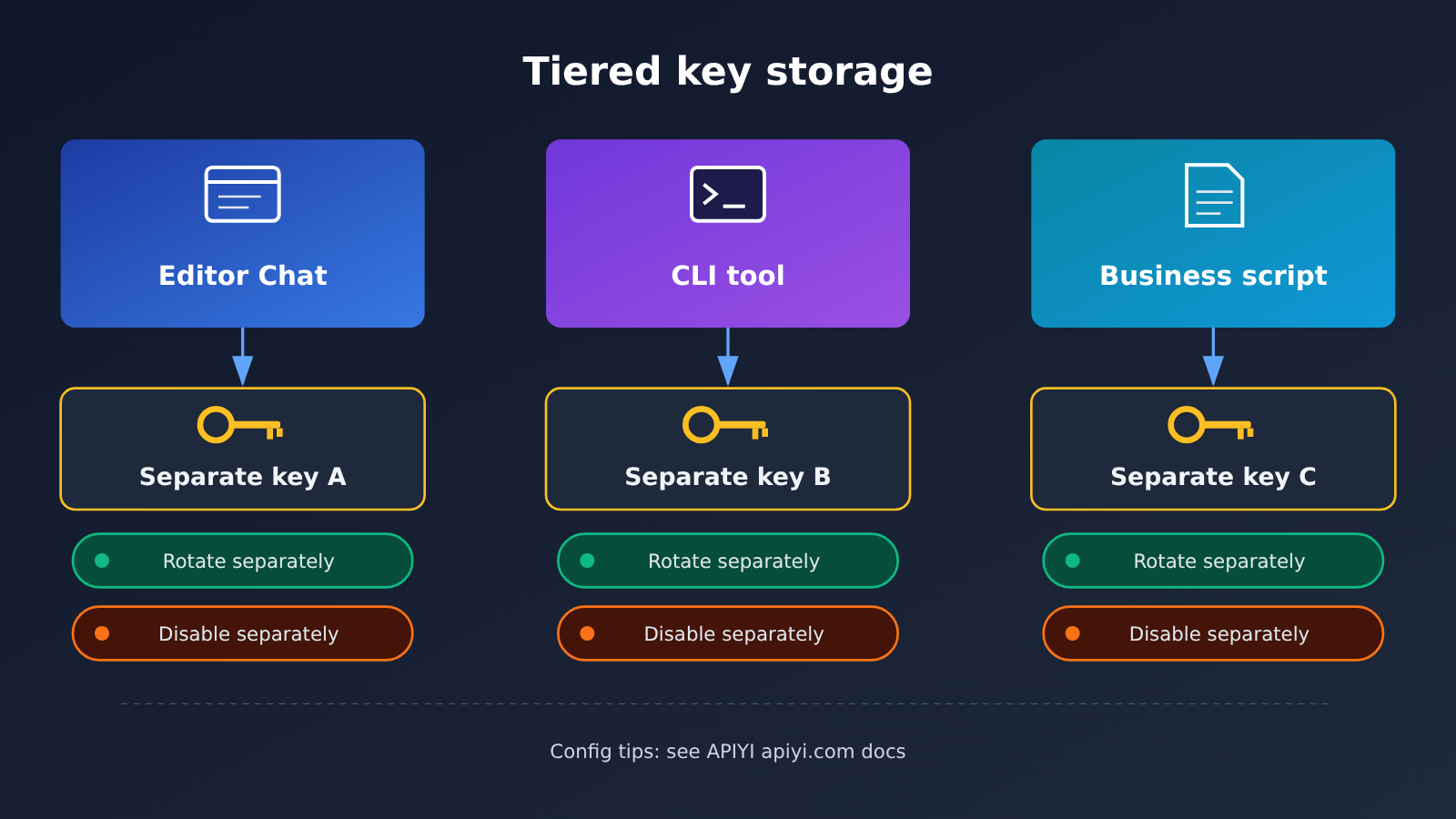
- One tool, one key: Give Cursor, Claude Code, and scripts their own keys, so if something goes wrong you only need to revoke one.
Reducing the number of keys is another angle. If you call several model providers at once and store a separate key for each, the number of credentials you have to safeguard and rotate locally multiplies. With an OpenAI-compatible aggregation gateway like APIYI apiyi.com, a single API key lets you call OpenAI, Claude, Gemini, and other models — so when it’s time to rotate, you only deal with one.
🔐 Protection tip: Create a dedicated key just for Cursor, and don’t share it with production services. When connecting through APIYI apiyi.com, it’s best to allocate a separate key for editor scenarios so you can disable it independently if something looks off, without affecting live business.
Rotate regularly: prioritize by risk level
If you’re not sure whether your key ever appeared in a risky location, rotate in this order:
- Keys that were sent to Cursor or another support team — rotate these first.
- Keys that appeared in plaintext in sessions where Privacy Mode wasn’t enabled.
- All keys stored on machines that installed or updated to
2.1.312or2.1.313during the October 29 window — and handle that machine according to the official advisory at the same time. - Any other keys that haven’t been changed in a long time — rotate them on your team’s usual schedule.
After rotating, remember to update the configuration in your editor, CI, and scripts, and check whether the old key still shows any invocation records. If there are leftover calls, that means some place hasn’t been updated yet.
Reconfiguring a Custom Key in Cursor
Now that you’ve rotated the key, the next step is to put the new key back into Cursor. Many developers use this opportunity to switch models, check pricing, and verify the API protocol at the same time. According to APIYI’s Cursor integration docs, the configuration fields are as follows:
| Configuration item | What to enter | Notes |
|---|---|---|
| OpenAI API Key | The newly generated APIYI key | It’s a good idea to create one specifically for Cursor |
| Override OpenAI Base URL | https://api.apiyi.com/v1 |
OpenAI-compatible endpoint |
| Verification | Click Verify | Once it passes, you can select models in Chat |
| Anthropic native protocol URL | https://api.apiyi.com |
Don’t append /v1 for the native protocol |
One thing worth clarifying: APIYI’s documentation states that “the custom key route currently doesn’t support Agent, only Chat.” That’s a documentation note about the custom-key access method. It doesn’t mean Cursor as a product lacks Agent functionality, and it’s unrelated to the coding traces and extension marketplace involved in this incident.
🚀 Quick start: Generate a new key in the APIYI apiyi.com console, enter the Base URL
https://api.apiyi.com/v1, and click Verify. You can then check whether the model works in Cursor Chat. New users get free test credits, which makes it a good option to get everything working before switching to a production key.
Model Pricing Reference
The table below is taken from APIYI’s master pricing table. Data was updated on 2026-11-16 09:39 (UTC+8), and prices are in USD per 1 million tokens. Model names and prices are subject to the platform’s model list. When entering a model ID, use the exact original name shown in inline code.
| Model ID | Input | Output | Cache read | Endpoint | Available platform |
|---|---|---|---|---|---|
claude-opus-5-5 |
4 | 20 | 0.2 | chat, messages | APIYI apiyi.com |
claude-sonnet-5-5 |
2 | 10 | 0.1 | chat, messages | APIYI apiyi.com |
claude-haiku-5-5 |
0–100K tokens: 0.1; over 100K: 0.5 | 0.5 | 0.01 | chat, messages | APIYI apiyi.com |
For groups, claude-opus-5-5 and claude-sonnet-5-5 belong to ClaudeCode, Claude_Reverse, Claude_Enterprise, Default, and SVIP. claude-haiku-5-5 belongs to ClaudeCode, Claude_Enterprise, Default, and SVIP; the master table row doesn’t include Claude_Reverse. If you’re using Claude Code, make sure to select the correct group and protocol URL.
Frequently Asked Questions (FAQ)
Q1: How many people were actually affected by the Cursor API key leak?
Based on the final official investigation report dated 2026-11-13: fewer than 0.01% of customers had API credentials exposed; among users who did not enable Privacy Mode, fewer than 0.05% had coding traces exposed. As for the malicious extension, up to 5,000 people may have received malicious builds.
Q2: I didn’t receive a Cursor notification. Do I still need to investigate on my own?
The final report says affected users were notified individually, so if you didn’t receive a notification, you’re not among those traces. But if you’ve ever sent a key to the support team, or installed or updated `2.1.312` or `2.1.313` during the October 29 window, you should still handle it according to the relevant scenario.
Q3: What’s the difference between the October 29 announcement and the November 13 final report?
October 29 was the security advisory released on the day of the incident, focusing on unauthorized copies of the Claude Code extension and how they were handled. November 13 is the final official investigation report, which fully explains the incident’s origin, the proportion of data affected, and the systems that were not affected. For figures on the scope of impact, the final report is authoritative.
Q4: After rotating my key, how do I quickly get back up and running in Cursor?
Generate a new key at APIYI (apiyi.com), enter it in OpenAI API Key, set Override OpenAI Base URL to `https://api.apiyi.com/v1`, and click Verify. According to the documentation, the custom key method is currently used for Chat.
Q5: Is APIYI connected to this Cursor incident?
No. APIYI is an API gateway, not the model hosting provider in this Cursor incident, and it isn’t mentioned in the final report. This article mentions APIYI (apiyi.com) only to explain where a rotated key can be stored, how to configure it, and how using a single key can reduce the number of credentials you have to manage locally.
Q6: Does enabling Privacy Mode make me completely safe?
The final report explicitly states that prompts and code under Privacy Mode were not affected, so it is a valid layer of protection. But it doesn’t cover credentials sent to the support team, and it can’t replace key rotation. The safest approach is still to never let plaintext keys appear in any conversation or support ticket.
Cursor API Key Leak: Key Takeaways
- Go by the final report: The official final investigation report dated 2026-11-13 is the only baseline for the numbers.
- The affected share is very small: Fewer than 0.01% of API credentials and fewer than 0.05% of traces were exposed.
- No notice means no involvement: Cursor has notified every affected user individually.
- Two extension versions need handling: Deal with
2.1.312and2.1.313according to that day’s security advisory—uninstalling alone may not be enough. - Core systems were unaffected: Production systems, signing keys, and customer code repositories are all on the official unaffected list.
- Protection comes from storing less and rotating: Turn on Privacy Mode, never paste plaintext, use one key per tool, and rotate according to risk.
- Reconfiguring is simple: Generate a new key through APIYI at apiyi.com, and set the Base URL to
https://api.apiyi.com/v1.
Summary
The key takeaways from the Cursor API key leak incident:
- Limited scope, and notifications have gone out: The official final report provides clear percentages—if you didn’t receive a notice, you don’t need to second-guess it yourself.
- The risk is concentrated in old plaintext: Plaintext keys in sessions where Privacy Mode wasn’t enabled, and keys sent to the support team, are the priority items to rotate.
- Handle the extension issue per the advisory: Only the two specific versions in the October 29 window are involved—follow the official security advisory.
For most developers, the biggest lesson from this incident is to reduce the number of keys and the places they show up. Once you’ve finished rotating, you can use the unified interface from APIYI at apiyi.com to consolidate multiple models onto a single dedicated key. For configuration and pricing, refer to the platform docs and model list.
📚 References
- Cursor Official Investigation Final Report: Security incident update published on 2026-11-13
- Link:
cursor.com/blog/security-incident-update -
Note: The source for every impact ratio and every unaffected system cited in this article
-
Cursor Security Advisory Issued That Day: Claude Code extension security notice dated 2026-10-29
- Link:
cursor.com/blog/claude-code-extension-security-notice -
Note: Covers the remediation requirements for
2.1.312and2.1.313 -
Fireworks Security Advisory: Background on the incident’s point of origin
- Link:
fireworks.ai/security/bulletins -
Note: The advisory page cited in Cursor’s final report
-
BleepingComputer Coverage: Cross-checked on 2026-11-14
- Link:
bleepingcomputer.com/news/security/cursor-confirms-security-breach-led-to-malicious-claude-code-extension -
Note: The figures it repeats match the final report
-
Microsoft Security Blog: Analysis of the extension itself, dated 2026-10-30
- Link:
microsoft.com/en-us/security/blog/2026/10/30/inside-malicious-claude-code-branded-cursor-extension-persistent-ssh-backdoor -
Note: Confirms the official marketplace and npm were unaffected, though its scope doesn’t match the final report
-
APIYI Cursor Integration Docs: Custom key configuration instructions
- Link:
docs.apiyi.com/scenarios/programming/cursor.md - Note: Base URL and Verify steps
Author: APIYI Technical Team
Technical Discussion: Feel free to reach out via the APIYI apiyi.com homepage — more configuration and model details are available in the docs.apiyi.com documentation center


