

Author’s note: A multi-project Agent needs independent context, persistent state, task scheduling, and recovery mechanisms. Only then can parallel work be traceable and non-interfering.
Whether an AI assistant can advance multiple projects at once hinges on four things: each piece of work has its own independent context, execution state is persisted, a scheduler centrally manages priorities and concurrency, and work can resume from a checkpoint after interruption. Calling multiple models at the same time isn’t hard; what’s hard is making each of those calls remember what it’s doing. Dots, which OpenAI released on September 29, 2026, follows this pattern. According to the official documentation, a Dot can maintain multiple areas of responsibility and delegate work to background Agents for parallel processing. Each new task gets its own conversation context and does not automatically inherit the full history of conversations between the user and the Dot. Developers can build a similar multi-project management system using a Checkpointer, a Store, a task queue, and a state machine.
The following sections first break down Dots’ multi-tasking and memory mechanisms based on official materials, then use a project management example that runs throughout the article to design, in order, a four-layer task structure, parallel scheduling, interruption recovery, execution tracking, and cost boundaries. The “ten projects” in the title is just an illustrative way of describing the working pattern; neither Dots nor a self-built system has a fixed ten-way concurrency, and neither can run in unlimited parallel. The self-built Agent code in this article is a design proposal and does not include fabricated run results.
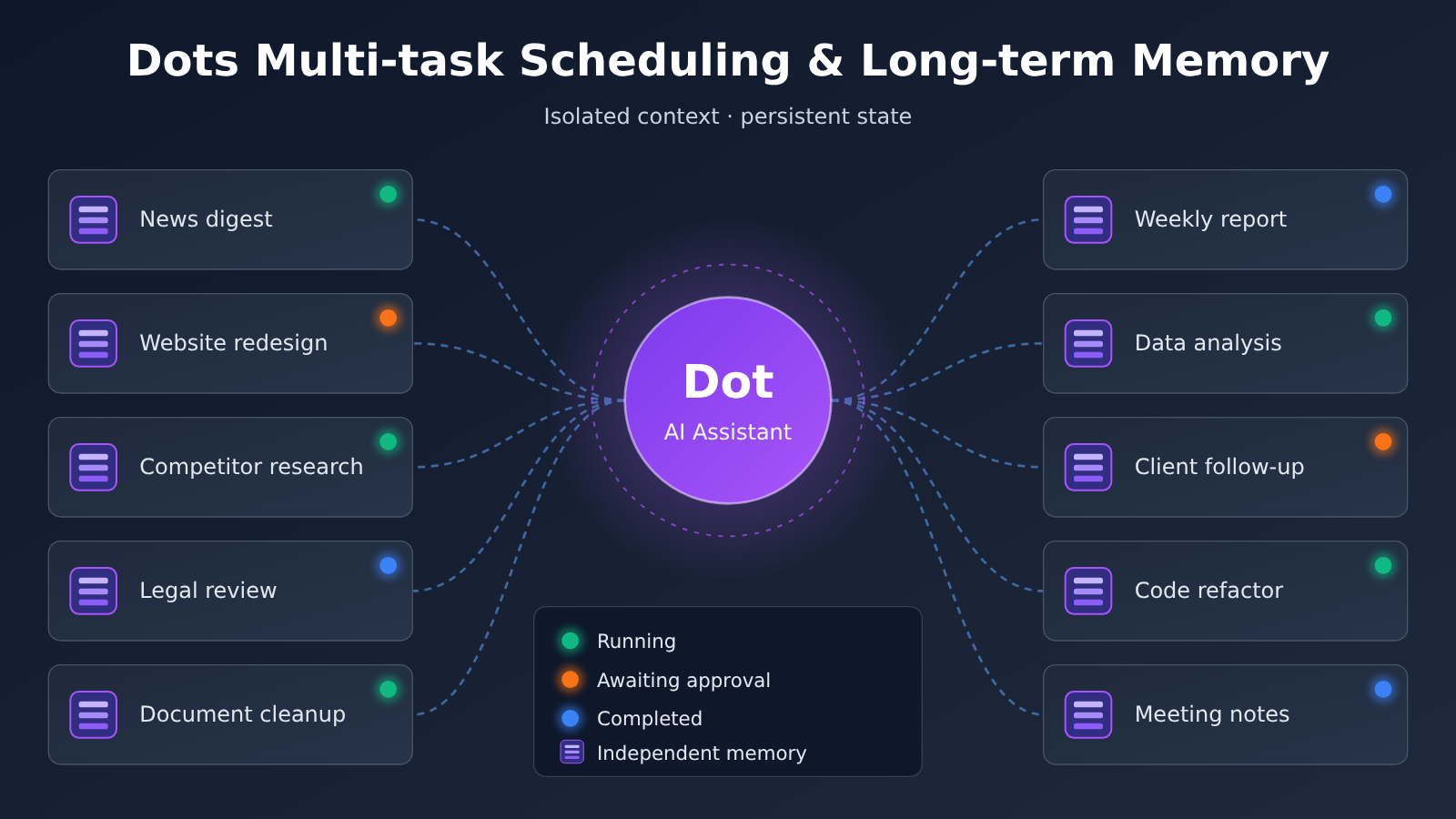
To Know: Terminology for Dots Multi-Task Scheduling
| Term | Explanation |
|---|---|
| Workspace | A workspace for organizing projects and permissions, usually tied to a single user or a team. |
| Project | The project unit, holding goals, source materials, and related tasks. |
| Task | A piece of work with a clear goal, such as “search for today’s OpenAI news.” |
| Run | One actual execution record of a task; the same Task can run many times. |
| Background Agent | An executor that Dot dispatches to handle subtasks in parallel and reports back to Dot when finished. |
| Checkpointer | The component that saves task execution checkpoints and handles recovery after an interruption. |
| Store | The storage component that keeps long-term information across tasks, carrying a project’s context forward. |
| State machine | The mechanism that governs transitions between task stages according to rules, such as pending, running, and awaiting approval. |
| Concurrency limit | The cap on how many tasks can execute at the same time, constrained by API quota, server resources, and cost. |
| Tracing | The tracing capability that records model invocations, tool calls, and handoffs. |
| Proactive Research | Read-only background research that Dots performs on authorized sources when there are no new messages. |
1 Dots multitasking scheduling: why one Dot can take on multiple responsibilities
1.1 Dots’ officially disclosed multi-project capabilities
According to its official positioning, Dots is an always-on personal Agent. It has its own cloud computer and browser, and it can keep pushing forward on delegated work even after the user leaves. For multitasking, the Tasks and memory documentation lists these capabilities:
- Keep the state of multiple work items and switch tasks within the same conversation
- Let users add information and adjust priorities at any time
- Break complex tasks into parts and hand them to background Agents for parallel processing
- Create separate visible task threads, then collect and summarize results from each task
- Ask the user to step in when work is blocked, while users can keep sending messages during background task execution
Together, these capabilities make Dot’s role look more like a project coordinator. It decides what to do first, what to break off, and what to hand back to the user. The actual execution of any single task can be done by a background Agent, a ChatGPT Work task, or a Codex task.
1.2 How multi-conversation, multitasking, and multi-Agent differ
These three concepts often get mixed up, but they solve different problems. Let’s use one example: suppose a user’s workspace has three projects — AI Radar (a daily AI news digest), Website (a website redesign), and Research (competitor research).
| Mode | How it works | In the example | Problem it solves |
|---|---|---|---|
| Multi-conversation | The user opens a separate chat window for each project | The user has to remember how far Research has gotten | Isolates chat content, but progress is still managed by the person |
| Multitasking | One coordinator maintains the state of multiple tasks | Dot tracks each project’s progress and priority | Unified scheduling and state tracking |
| Multi-Agent | The coordinator assigns subtasks to multiple executors | A background Agent gathers materials while another executor writes the report | Parallel execution and specialized division of labor |
Dots stacks all three: users talk to Dot from a single entry point, Dot maintains multiple tasks, and it dispatches background Agents on demand. To replicate this with a self-built system, you need all three layers. Just opening multiple chat windows is nowhere near enough.
1.3 A user’s firsthand account of parallel work
A user on Reddit described a day of testing. He handed Dot hundreds of PDFs and thousands of pages of documents to review while running a legal research task at the same time. He saw three execution processes running at the same time: Dot’s own cloud computer was handling task A, a Linux computer he had connected was handling task B, and another background research Agent was handling task C. He also noted that when he launched the separate legal research task, he ran into an unavailable execution environment, and the task only dispatched successfully after he connected his local computer.
This personal observation shows that Dot’s cloud computer, local computer, and Work/Codex environments are different execution resources. The author himself also notes that he didn’t verify whether these paths have independent, unlimited quotas. So this test only shows that Dots can dispatch work to different environments. You can’t infer from it that every Pro user gets the same level of parallelism.
2 Dots Long-Term Memory: Why Every Task Needs Its Own Memory
2.1 The Context Boundary of a New Task
The official docs say it plainly: each new task has its own conversation context and doesn’t automatically inherit the full history between Dot and the user. Dot can search past ChatGPT conversations for background, but whatever it retrieves is only used as context for the current piece of work.
This design makes practical sense. If every task loaded the entire history, the competitive analysis for the Research project could end up tangled with a redesign discussion from the Website project, and the context would only grow longer and more expensive over time. Long-running projects need explicit management of “what this task should know”—a single chat thread that keeps getting longer can’t do that job.
2.2 The Four Data Layers of Dots Memory
According to the official materials, Dot’s context comes from four different sources:
- ChatGPT Memory: Dot can read relevant ChatGPT memories and recent conversations;
- Dot’s own notes: accumulated user preferences, work habits, project decisions, and long-term responsibilities;
- Current task context: the instructions, files, retrieval results, and tool execution results in this conversation;
- Data from connected apps: Dot reads data from authorized apps and can form memories through proactive research.
Each of these layers has a different lifecycle. ChatGPT Memory and Dot notes are separate data layers—turning off ChatGPT Memory sharing doesn’t automatically delete information Dot has already picked up, and disconnecting an integration only stops new access. As of November 16, 2026, users still can’t view, edit, or delete Dot’s standalone memories one by one; deleting Dot triggers deletion of its own context. When designing a memory layer for your own system, you can borrow this layered approach—and add the management UI for viewing and deleting that it’s missing.
3 Checkpointer and Store: Two Kinds of Memory for Multi-Task Agents
LangGraph’s persistence documentation splits an Agent’s memory into two categories, and this split maps neatly onto Dots’ “task context” and “long-term notes.” We’ll keep using the monthly competitor report from the Research project as our example.
3.1 Checkpointer: Remembering How Far the Work Got
The Checkpointer saves an execution snapshot of a single task thread, including the current step, the tools already called, the results those tools returned, and which step is waiting on human approval. In our example, the monthly report task had already scraped the pricing pages of 6 competitors and was about to start analysis when the service restarted. With a checkpoint, the task can resume from the “analysis” step, and the data that’s already been scraped doesn’t need to be fetched again.
The storage backend determines whether checkpoints survive a restart. In-memory implementations are fine for development and testing, but state is lost when the process restarts. For local persistence you can use SQLite, while services deployed long-term are better served by PostgreSQL. Checkpoints keep growing, so production systems also need a cleanup policy for old state.
3.2 Store: Remembering Project Background
The Store holds long-term material that spans tasks and sessions, such as user preferences, project background, past decisions, and knowledge shared across multiple tasks. In our example, “the report’s audience is the product team,” “track only API pricing and feature updates,” and “last month we decided to stop tracking a competitor that no longer ships updates” all belong in the Store. When a new report task is created next month, it reads these decisions, and the user doesn’t have to explain them again.
3.3 Checkpointer vs. Store: A Comparison of Responsibilities
| Dimension | Checkpointer | Store |
|---|---|---|
| Scope | A single task thread | Multiple tasks, across threads |
| What it stores | Execution state snapshots | Long-term material and facts |
| Core value | Resume work after an interruption | Carry project background into new tasks |
| Example content | “6 pricing pages scraped, analysis is next” | “The report’s audience is the product team” |
| Lifecycle | Tied to task state; can be cleaned up when done | Retained and updated under a long-term memory policy |
The two have clearly divided roles, and you need both. With only a Checkpointer, every new task feels like a new hire’s first day. With only a Store, any interruption means starting over from scratch.
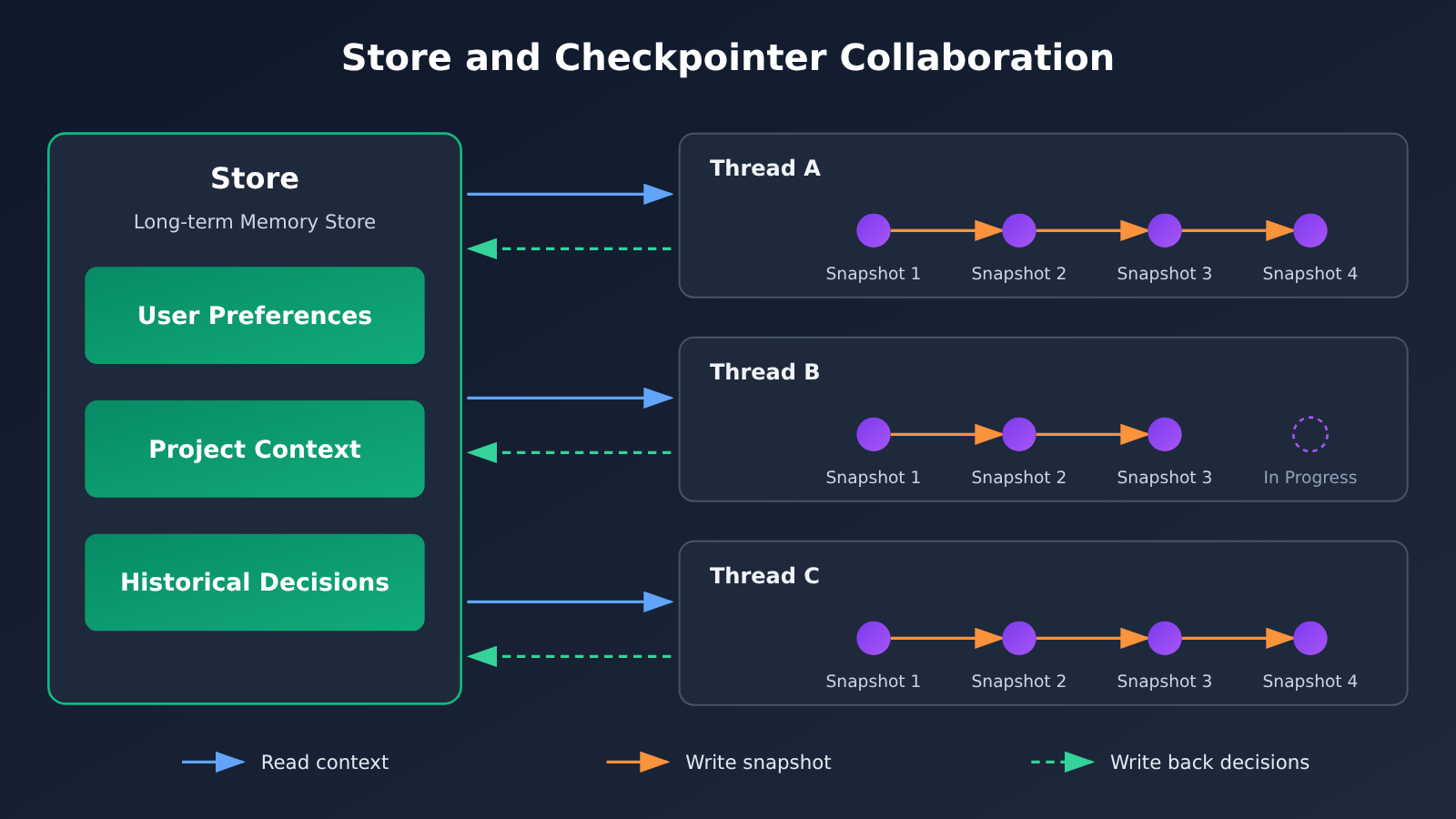
The “read background — write snapshot — write back decisions” loop in the diagram above maps directly onto the code in Section 6. The sample code calls the model through APIYI apiyi.com’s OpenAI-compatible interface; to switch models, you only need to change the model name.
4 Designing a Multi-Project Task Management System: Workspace, Project, Task, Run
4.1 Four-Layer Structure with Independent IDs
For a self-hosted multi-project Agent, a four-layer structure works best, with each layer having its own independent ID:
| Layer | Purpose | Example |
|---|---|---|
| Workspace | Manages one user’s workspace and permissions | regulus |
| Project | Manages the goals and materials of an individual project | AI Radar, Website, Research |
| Task | Manages a specific task | Daily News, Monthly Report |
| Run | Records one actual execution | The 2026-11-16 09:00 run of Daily News |
The corresponding tree structure looks like this:
Workspace: regulus
├── Project: AI Radar
│   ├── Task: Daily News
│   │   ├── Run: 2026-11-16
│   │   └── Run: 2026-11-17
│   └── Task: Topic Discovery
├── Project: Website
│   ├── Task: UI Improvement
│   └── Task: Bug Fix
└── Project: Research
    ├── Task: Competitor Analysis
    └── Task: Monthly Report
Keeping Task and Run as separate records is the key. Daily News runs once a day, and each Run has its own input, output, duration, and status. When something goes wrong, you can pinpoint exactly which execution on which day caused it.
4.2 Memory Access Scope and Project Isolation
When one Agent manages multiple projects, files from different projects shouldn’t be readable across boundaries by default. It’s best to divide memory access scope by layer:
- General user preferences (such as reports in Chinese, conclusions first): readable by all authorized projects;
- Project background (such as the audience and tracking scope for Research): readable only by tasks in that project;
- Single-task records: readable only by the current task and explicitly authorized related tasks;
- Enterprise client materials: readable only by the designated client project;
- Sensitive credentials: kept in separate secure storage and never allowed into the model context.
When sharing materials across projects, record the source and the authorization scope. This aligns with how Dots does it: the official documentation states that a Dot’s context does not retain credentials, images, or screenshots, and permission boundaries are jointly controlled by plugin authorization and Custom Rules.
5 Multi-Task Scheduling: Running Tasks in Parallel Without Interference
5.1 Separate the Scheduler from Agent Reasoning
We recommend splitting “when to do it” and “how to do it” across two components. The scheduler handles start timing, project selection, current run count, priority, timeouts, and retries; the Agent handles understanding the task, planning steps, choosing tools, analyzing results, and submitting deliverables. That way, scheduling rules execute deterministically, and the model only handles the parts that actually need reasoning.
For the tech stack, this combination works well: APScheduler for periodic tasks, Celery for background job queues, Redis for messaging and short-term coordination, PostgreSQL for storing projects and execution state, and a framework like LangGraph for managing Agent flows and persisted state. A small prototype can also get by with Python’s asyncio plus SQLite — that’s how the code in Section 6 is designed.
5.2 Three Ways to Parallelize
A multi-task Agent has at least three kinds of parallelism:
- Independent task parallelism: AI Radar’s daily news and Research’s monthly report don’t depend on each other, so they can run at the same time;
- Subtask parallelism: a project splits into subtasks like data collection and fact-checking, which run separately;
- Model role parallelism: different models handle different specialized work, and the results are merged at the end.
Constraints that decide whether things can run in parallel include API concurrency limits, server resources, task dependencies, database write contention, model costs, result conflicts, and duplicate execution.
5.3 Example: Data Collection, Data Analysis, Report Generation
Research’s monthly report is split into three subtasks. Data collection can run alongside AI Radar’s daily news; data analysis depends on the output of data collection and must wait for it to finish; report generation depends on the analysis conclusions, and once it’s done it moves into a “waiting for approval” state, only counting as delivered after the user confirms.
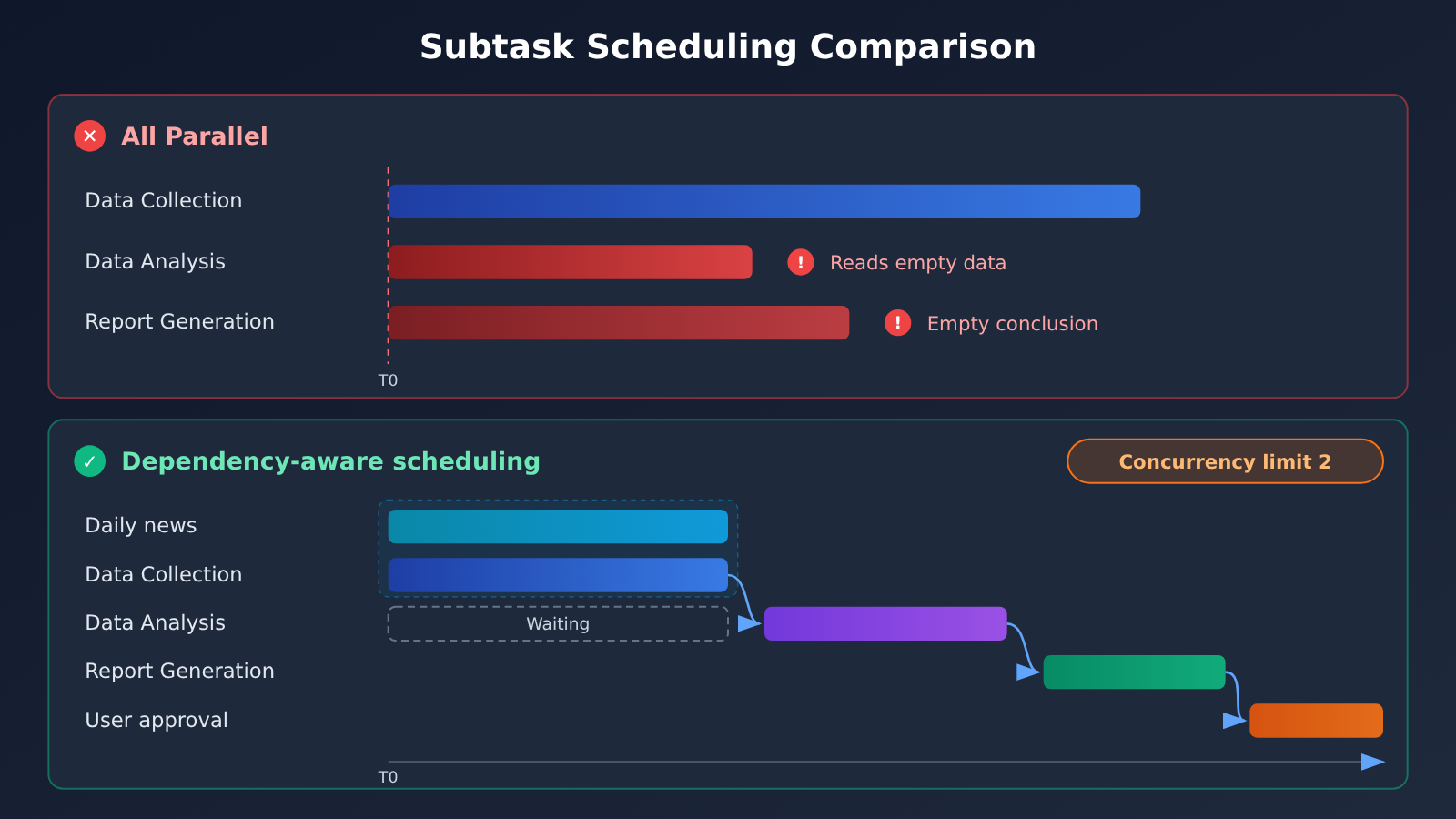
Starting all three subtasks at once looks faster, but data analysis ends up with empty conclusions because it can’t get the data — or worse, it makes up data on its own. Dependencies determine which tasks must run serially, and the concurrency cap determines how many can run at once. Both should be written into the scheduler; leaving them to the model to judge on the fly is an easy way to break things.
5.4 Dividing Work by Model Role
| Subtask | Recommended model type | Why | Available platforms |
|---|---|---|---|
| Data collection and summarization | Lightweight, fast model | High call volume, cost-sensitive | APIYI apiyi.com, official API |
| Data analysis | Model with strong reasoning ability | Requires multi-step comparison and calculation | APIYI apiyi.com, official API |
| Report generation | Model with strong long-form writing ability | High demands on structure and expression quality | APIYI apiyi.com, official API |
| Fact checking | A different model from the writing model | Cross-validation, reduces same-source errors | APIYI apiyi.com, official API |
For specific models, refer to the platform’s current model list. When a single Key connects to multiple models, the role split can be adjusted through configuration without touching the code structure.
6 Quick Start: Building a Multi-Task Agent Prototype with a Unified Interface
6.1 A Minimal Example: Injecting Project Context into Tasks
The code below demonstrates the core idea: before a task runs, pull only the background of the project it belongs to from long-term memory.
from openai import OpenAI

client = OpenAI(
    api_key="YOUR_API_KEY",
    base_url="https://api.apiyi.com/v1"  # APIYI OpenAI-compatible interface
)

# Store: long-term background isolated per project
project_memory = {
    "research": "Audience: product team; track only API pricing and feature updates; lead reports with conclusions",
    "ai-radar": "Every day at 09:00, summarize official updates from OpenAI, Anthropic, and Google",
}

def run_task(project_id: str, goal: str) -> str:
    resp = client.chat.completions.create(
        model="gpt-4.1-mini",
        messages=[
            {"role": "system", "content": f"Project background: {project_memory[project_id]}"},
            {"role": "user", "content": goal},
        ],
    )
    return resp.choices[0].message.content

print(run_task("research", "List the competitor updates worth watching this month"))
6.2 Complete Design Plan: State Machine, Checkpoints, Dependencies, and Concurrency
The code below is a design plan that covers Store, Checkpoint, the state machine, dependency scheduling, concurrency limits, retries, timeouts, and execution records, illustrating how the components work together. It hasn’t been validated in a production environment, and this article doesn’t include any made-up run results.
View the complete design plan code
import asyncio, json, sqlite3, time, uuid
from dataclasses import dataclass, field
from enum import Enum
from openai import AsyncOpenAI

client = AsyncOpenAI(
    api_key="YOUR_API_KEY",
    base_url="https://api.apiyi.com/v1"  # APIYI unified endpoint: one key, many models
)

class Status(str, Enum):
    PENDING = "pending"; RUNNING = "running"; WAITING = "waiting"
    APPROVAL = "approval"; COMPLETED = "completed"
    FAILED = "failed"; CANCELLED = "cancelled"; PAUSED = "paused"

db = sqlite3.connect("agent.db")
db.executescript("""
CREATE TABLE IF NOT EXISTS store(
  scope TEXT, key TEXT, value TEXT, source TEXT, PRIMARY KEY(scope, key));
CREATE TABLE IF NOT EXISTS checkpoint(
  run_id TEXT, task_id TEXT, step TEXT, state TEXT, ts REAL);
CREATE TABLE IF NOT EXISTS runs(
  run_id TEXT PRIMARY KEY, workspace_id TEXT, project_id TEXT, task_id TEXT,
  model_id TEXT, input_tokens INT, output_tokens INT,
  duration REAL, retry_count INT, final_status TEXT);
""")

def store_get(scopes: list[str]) -> str:
    """Read only the authorized scopes: user and project:<id>"""
    marks = ",".join("?" * len(scopes))
    rows = db.execute(f"SELECT key, value FROM store WHERE scope IN ({marks})", scopes)
    return "\n".join(f"- {k}: {v}" for k, v in rows)

def save_checkpoint(run_id, task_id, step, state):
    db.execute("INSERT INTO checkpoint VALUES (?,?,?,?,?)",
               (run_id, task_id, step, json.dumps(state, ensure_ascii=False), time.time()))
    db.commit()

def log_run(run_id, task, usage, duration, retries, status):
    db.execute("INSERT OR REPLACE INTO runs VALUES (?,?,?,?,?,?,?,?,?,?)",
               (run_id, "regulus", task.project_id, task.task_id, task.model,
                getattr(usage, "prompt_tokens", 0), getattr(usage, "completion_tokens", 0),
                duration, retries, status.value))
    db.commit()

@dataclass
class Task:
    task_id: str
    project_id: str
    goal: str
    model: str
    depends_on: list[str] = field(default_factory=list)
    needs_approval: bool = False

async def run_task(task: Task, done: dict, sem: asyncio.Semaphore,
                   max_retry: int = 2, timeout: int = 120):
    run_id = f"run-{uuid.uuid4().hex[:8]}"
    background = store_get(["user", f"project:{task.project_id}"])
    upstream = "\n\n".join(done[d] for d in task.depends_on)
    messages = [
        {"role": "system", "content": f"长期背景:\n{background}"},
        {"role": "user", "content": f"{task.goal}\n\n上游结果:\n{upstream or '无'}"},
    ]
    async with sem:  # concurrency limit
        for attempt in range(max_retry + 1):
            start = time.time()
            save_checkpoint(run_id, task.task_id, f"attempt-{attempt}", messages)
            try:
                resp = await asyncio.wait_for(
                    client.chat.completions.create(model=task.model, messages=messages),
                    timeout)
                output = resp.choices[0].message.content
                status = Status.APPROVAL if task.needs_approval else Status.COMPLETED
                log_run(run_id, task, resp.usage, time.time() - start, attempt, status)
                save_checkpoint(run_id, task.task_id, status.value, {"output": output})
                if status == Status.COMPLETED:
                    done[task.task_id] = output
                return
            except Exception as e:  # timeout or API error: retry with exponential backoff
                save_checkpoint(run_id, task.task_id, "error", {"error": str(e)})
                await asyncio.sleep(2 ** attempt)
        log_run(run_id, task, None, 0, max_retry, Status.FAILED)

async def schedule(tasks: list[Task], max_concurrency: int = 2) -> dict:
    sem = asyncio.Semaphore(max_concurrency)
    done: dict[str, str] = {}
    pending = {t.task_id: t for t in tasks}
    while pending:
        ready = [t for t in pending.values() if all(d in done for d in t.depends_on)]
        if not ready:  # upstream task failed, pending approval, or circular dependency
            print("阻塞任务:", list(pending))
            break
        await asyncio.gather(*(run_task(t, done, sem) for t in ready))
        for t in ready:
            pending.pop(t.task_id)
    return done

tasks = [
    Task("daily-news", "ai-radar", "汇总今日 AI 官方动态", "gpt-4.1-mini"),
    Task("collect", "research", "收集本月竞品 API 价格与功能变更", "gpt-4.1-mini"),
    Task("analyze", "research", "对比变更并归纳趋势", "gpt-4.1", depends_on=["collect"]),
    Task("report", "research", "生成月度竞品报告", "gpt-4.1",
         depends_on=["analyze"], needs_approval=True),
]
asyncio.run(schedule(tasks))
A few spots in the code map back to the design decisions from earlier sections. store_get reads only the user and the current project scope, which is what gives you project isolation; the checkpoint table records each step per run, working together with the runs table that tracks tokens and final status; schedule uses dependency relationships to decide what runs serially and a semaphore to cap concurrency. A real system would still need tool invocation, approval callbacks, and a resume entry point added on top.
🚀 Quick start: during the prototyping phase, we recommend grabbing free test credits through the APIYI apiyi.com API proxy service, then using the same key to configure different models for the three roles — collector, analyst, and writer — so you can compare quality and cost before locking in the division of labor.
7 How a multi-task agent handles interruptions, failures, and human approval
7.1 The task state machine
Task progress should be recorded as explicit states; progress the model describes in chat is only a hint. The recommended main flow is Pending → Running → Waiting (waiting on an external condition) or Approval (waiting for approval) → Completed, with three additional terminal or paused states: Failed, Cancelled, and Paused. Every state transition gets written to the database, and the scheduler makes decisions purely based on the states in the database.
7.2 Retries, timeouts, and pause/resume
- Retries: after an API error or timeout, retry with exponential backoff and record
retry_count, so you can spot steps that fail often; - Timeouts: give every Run an execution time limit; on timeout it flips to Failed and fires an alert, so a stuck task can’t hog a concurrency slot indefinitely;
- Pause and resume: save a checkpoint when pausing, and resume from the last checkpoint — tool calls that already completed don’t need to run again;
- Idempotency: for steps with side effects, like sending email or writing to a database, check whether it already ran before retrying, so you don’t repeat the operation.
There’s a related detail in Dots’ official documentation: stopping a running task and cancelling an already created recurring schedule are two different things, and when you pause a Dot, independent Work, Codex, and scheduled tasks may keep running. A self-built system should treat “stop this Run”, “pause the Task”, and “cancel the recurring schedule” as three separate operations.
7.3 Human approval: learning from Dots’ Custom Rules
Dots uses Custom Rules to split behavior into four tiers: execute directly without asking, execute after pre-authorization, ask before executing, and hand back to the user. Operations like changing a password or moving funds must be handed to the user; permanently deleting data or installing software may require approval every single time. Even with user approval, core safety limits still can’t be overridden.
A self-built system can borrow this approach and tag its tools. Read-only retrieval runs directly; drafting a report goes into Approval once it’s finished; anything sent externally, paid, or deleted always goes to a human. The report task in the example sets needs_approval=True, so it stops in the approval state after generation and only gets written to Completed once the user confirms.
8 Execution Tracing and Logging for Multi-Task Agents
When multiple projects run in parallel, the question users ask most often is “what did it actually do?” Tracing in the OpenAI Agents SDK records which Agent was invoked, which model was used, which tool calls happened, where a handoff occurred, which safety checks were triggered, and how the task ultimately ended.
Tracing is great at reconstructing a single execution, but project-level statistics still need to be supplemented with business logs. It’s worth recording at least project_id, task_id, run_id, model_id, input_tokens, output_tokens, tool_calls, duration, retry_count, and final_status for every Run. With these fields, you can answer management questions like “how many Tokens did the Research project spend this month,” “which step retried the most,” and “which model’s analysis tasks time out most often.” The runs table in Section 6 is the minimal implementation of this field set.
9 Cost and Management Boundaries of Multi-Task Agents
9.1 Dots Pricing Structure
As of November 16, 2026, individual users can use Dots through three ChatGPT subscription tiers — Pro 100, Pro 200, and Pro 500 — priced at $100, $200, and $500 per month, respectively. The official documentation for individual Pro doesn’t list a separate monthly fee for Dots. Tasks that a Dot delegates to ChatGPT Work or Codex are billed according to that product’s quotas and rules, and consumption depends on the model, context, reasoning, tool calls, and retrieval. Individual Pro usage also has age (18+) and regional restrictions; it does not include the European Economic Area, the UK, or Switzerland.
Enterprise workspaces are billed differently. Current official documentation states that eligible enterprise workspaces can choose either a flat rate by work type or usage-based billing; the preview period is free, and billing for enabled Dots starts on November 18, 2026; tasks delegated to Work or Codex are charged separately. The exact amounts depend on the pricing that actually applies to the workspace.
9.2 Where the Costs Come From in a Self-Built System
The cost of a self-built multi-task Agent comes mainly from four places:
- Repeated context reads: every task injects project background, and the longer the background, the more input Tokens each call uses — so the contents of the Store need to be trimmed regularly;
- Retries and failures: a failed analysis task sends the upstream material into the model all over again;
- Model choice: using the strongest model for every subtask multiplies the cost;
- Concurrency quota: the API’s rate limits determine how much parallelism is actually available.
9.3 Degree of Parallelism vs. Effective Work
Degree of parallelism and effective work are two different things. Starting a task before its dependencies are met only produces garbage results, conflicting conclusions have to be merged by hand, and bad data from one project spreading to another through shared memory drives rework costs even higher. The sensible approach is to first guarantee project isolation and correct dependencies, then gradually raise the concurrency ceiling based on monitoring data.
10 FAQ
Q1: What is Dots’ multi-task scheduling?
A single Dot maintains multiple responsibilities at once. Users can switch tasks and adjust priorities. Dots hands off complex work to background Agents for parallel processing, then returns the results to the user when a decision is needed.
Q2: Does Dots’ long-term memory remember every historical conversation?
No, it doesn’t load everything. A new task has its own conversation context. Dots works from ChatGPT Memory, its own notes, the current task context, and data from connected apps, retrieving past conversations only when needed.
Q3: Can Checkpointer and Store replace each other?
They serve different purposes. Checkpointer saves an execution snapshot of a single task, used for interrupt recovery. Store saves project context and decisions across tasks, so a new task can carry on the context. Long-term projects need both.
Q4: How many tasks can Dots run in parallel at once?
Official materials don’t publish a fixed concurrency number. Dots supports parallelism, and both the execution environment and usage quota have limits. One Reddit user self-reported seeing three execution processes running at the same time—that’s just one person’s test result.
Q5: For a self-built multi-project Agent, how do I quickly call many different models?
You can use an OpenAI-compatible aggregated interface. After registering at APIYI apiyi.com to get an API key and free test quota, set the `base_url` in this article’s code to `https://api.apiyi.com/v1`, and the same code can configure GPT, Claude, Gemini, and other models for different subtasks.
Q6: How do I control model costs for a multi-task Agent?
Allocate models by role: use lightweight models for data gathering, and stronger models for analysis and writing. Trim the project context stored in Store. Use a runs table to tally Tokens for each project. With APIYI apiyi.com’s pay-as-you-go billing, it’s easy to test on a small scale first and then decide on quotas.
Q7: What security concerns should I watch for with Dots and self-built systems?
Agents can misunderstand tasks, misjudge materials, or fall victim to Prompt Injection, and the official docs also state that current safeguards can’t eliminate every risk. Any operation involving accounts, funds, or external sending should require human approval, and sensitive credentials should never enter the model context.
11 Dots Multi-Task Scheduling and Long-Term Memory: Key Takeaways
- The core challenge: The key to a multi-task Agent lies in independent contexts, persistent state, scheduling, and recovery.
- The Dots mechanism: One Dot coordinates multiple items, background Agents execute in parallel, and new task contexts stay independent of one another.
- Two kinds of memory: Checkpointer handles execution recovery, while Store handles carrying project context forward.
- Four-layer structure: Workspace, Project, Task, and Run each have their own ID, and projects are isolated from one another.
- Scheduling principles: Dependencies determine serial execution, concurrency limits determine scale, and the rules live in the scheduler.
- Traceability: Each Run records the model, tokens, elapsed time, retry count, and final status.
- Getting started: Use the APIYI apiyi.com unified interface to assign different models to different subtasks.
12 Summary
Dots shows what a personal Agent managing multiple long-term projects can look like as a product: it runs continuously, keeps task contexts separate, stores memory in layers, runs background Agents in parallel, and hands high-risk operations back to the user. Its multi-project capability is built on state management; simply adding more parallelism won’t get you there.
If you’re building a similar system yourself, you can implement it in the order laid out in this article: first use the four-layer structure and scope separation to isolate projects, then use Store and Checkpointer to solve “remembering context” and “being able to recover,” respectively, then use the scheduler to manage dependencies and concurrency, and finally use a state machine, approvals, and execution logs to make every step controllable and auditable. During the prototype stage, we recommend using APIYI apiyi.com to quickly validate how different models perform in each role, then adjust role assignment and concurrency based on log data.
References
- OpenAI: Introducing dots: Product launch announcement
- Link:
openai.com/index/introducing-dots - Description: Product positioning, cloud computer, and multi-project execution
- ChatGPT Learn: Tasks and memory: Dots tasks and memory documentation
- Link:
learn.chatgpt.com/docs/dots/tasks-and-memory - Description: Background Agents, per-task isolated context, and proactive research
- OpenAI Help Center: Dots privacy, security, and safety FAQs: Privacy and security notes
- Link:
help.openai.com/en/articles/20001529-dots-privacy-security-and-safety-faqs - Description: Permissions, approvals, memory deletion, and data retention
- ChatGPT Learn: Dots admin guide: Enterprise management and billing
- Link:
learn.chatgpt.com/docs/enterprise/dots-admin-guide - Description: How enterprise workspaces are billed and when billing starts
- About ChatGPT Pro tiers: Notes on Pro subscription tiers
- Link:
help.openai.com/en/articles/9793128-about-chatgpt-pro-tiers - Description: Pricing and quota rules for Pro 100, 200, and 500
- LangGraph Persistence documentation: Checkpointer and Store
- Link:
github.com/langchain-ai/docs/blob/main/src/oss/langgraph/persistence.mdx - Description: The split between short-term execution state and long-term memory
- OpenAI Agents SDK: Tracing and workflows
- Link:
developers.openai.com/api/docs/guides/agents/sdk - Description: Tracing and debugging of Agent execution
Author: APIYI Technical Team
Technical Support: Feel free to reach out to us on the APIYI apiyi.com homepage. For more integration resources, visit the docs.apiyi.com documentation center.


