

Author’s note: This article breaks down three design challenges from DeepSeek Harness’s “Exploring Super-agent Design”—full-duplex operation, memory, and credentials. It covers what you can use today, what remains an open question, and the interface contracts and implementation checklist you’ll need.
A long-running Agent often gets stuck on three things at once. While a six-minute test runs, the user’s new questions have to wait. Yesterday’s context gets pushed out of the window by today’s events. And when the Agent opens .env while debugging, a secret ends up in the conversation history. On 2026-11-01, the DeepSeek Harness team published a detailed design article, “Exploring Super-agent Design,” describing these three challenges as full-duplex operation, memory (Chain of Recall), and “using credentials without seeing them”.
This isn’t a product launch explainer. The original article describes an architecture, not a set of switches you can simply turn on. Full-duplex operation has been implemented in DeepSeek Harness but is disabled by default. Some of the work lives in the prototype plugin dsh-superagent-prototype, which the author explicitly says is “not an official DeepSeek product.” The original article also lists long-term memory and credentials as open questions.
What you’ll get: By the end of this article, you’ll know which approaches you can adopt, what contracts their APIs need to satisfy, and where to start in your own Agent project.
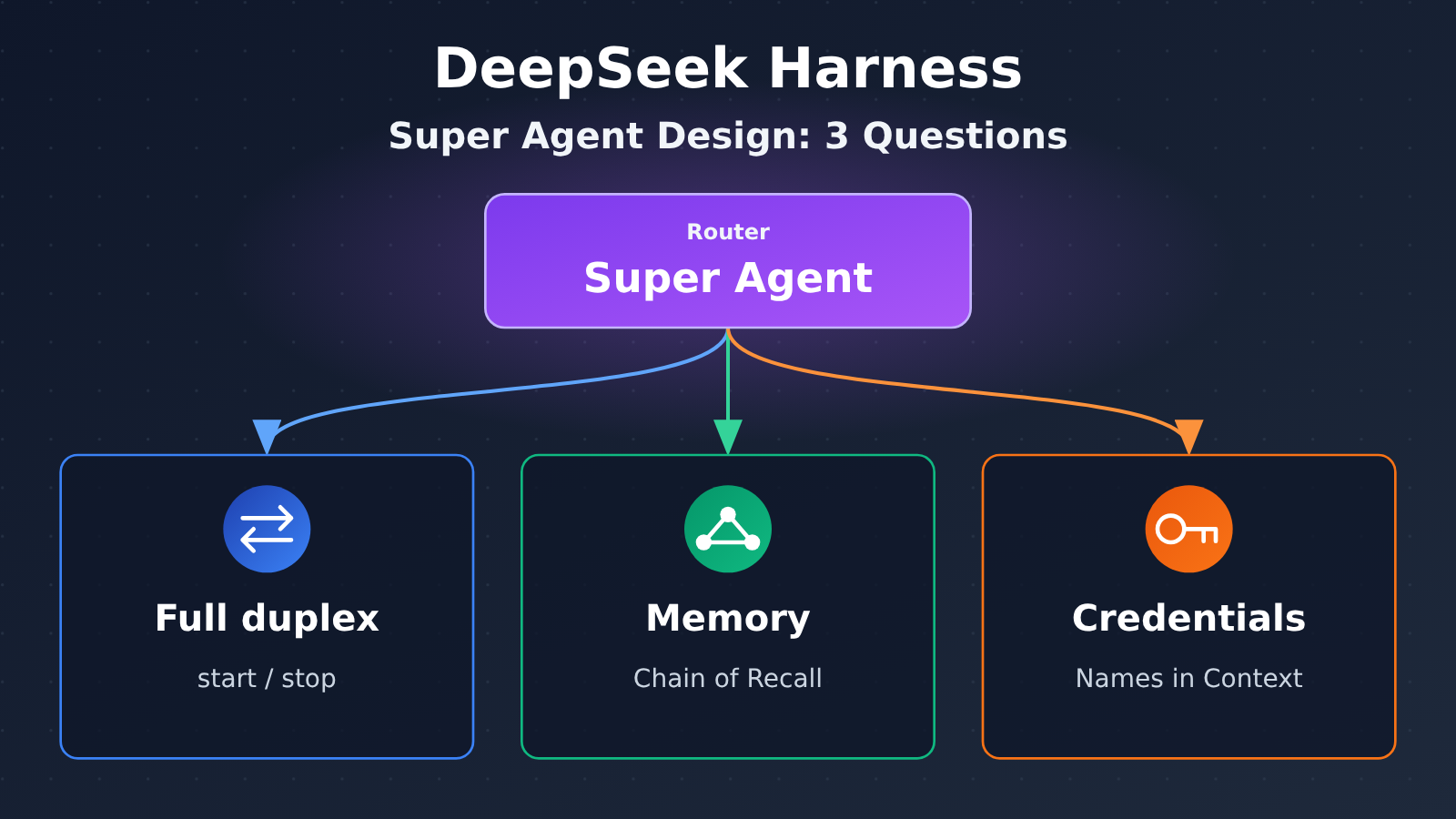
Key Design Principles of the DeepSeek Harness Super Agent
The table below shows how the original article frames three design problems and which ideas you can put to use today.
| Design problem | Core idea in the original article | Status in the original article | Ideas you can use directly |
|---|---|---|---|
| Full duplex | Split the blocking run() into start() and stop(), so the Agent can receive instructions while it works |
Implemented but disabled by default | Asynchronous tool contracts, event reinjection, batching |
| Memory | Keep only stable IDs, short summaries, and nearby messages in the context; spill the rest and leave pointers, using ID links for multi-hop retrieval | Long-term memory is listed as an open question | Stable IDs, inline/spill, precise retrieval by ID |
| Credentials | The Agent should be able to use credentials without those credentials entering its context | Listed as an open question | Engineering patterns that put names in the context while keeping values outside it |
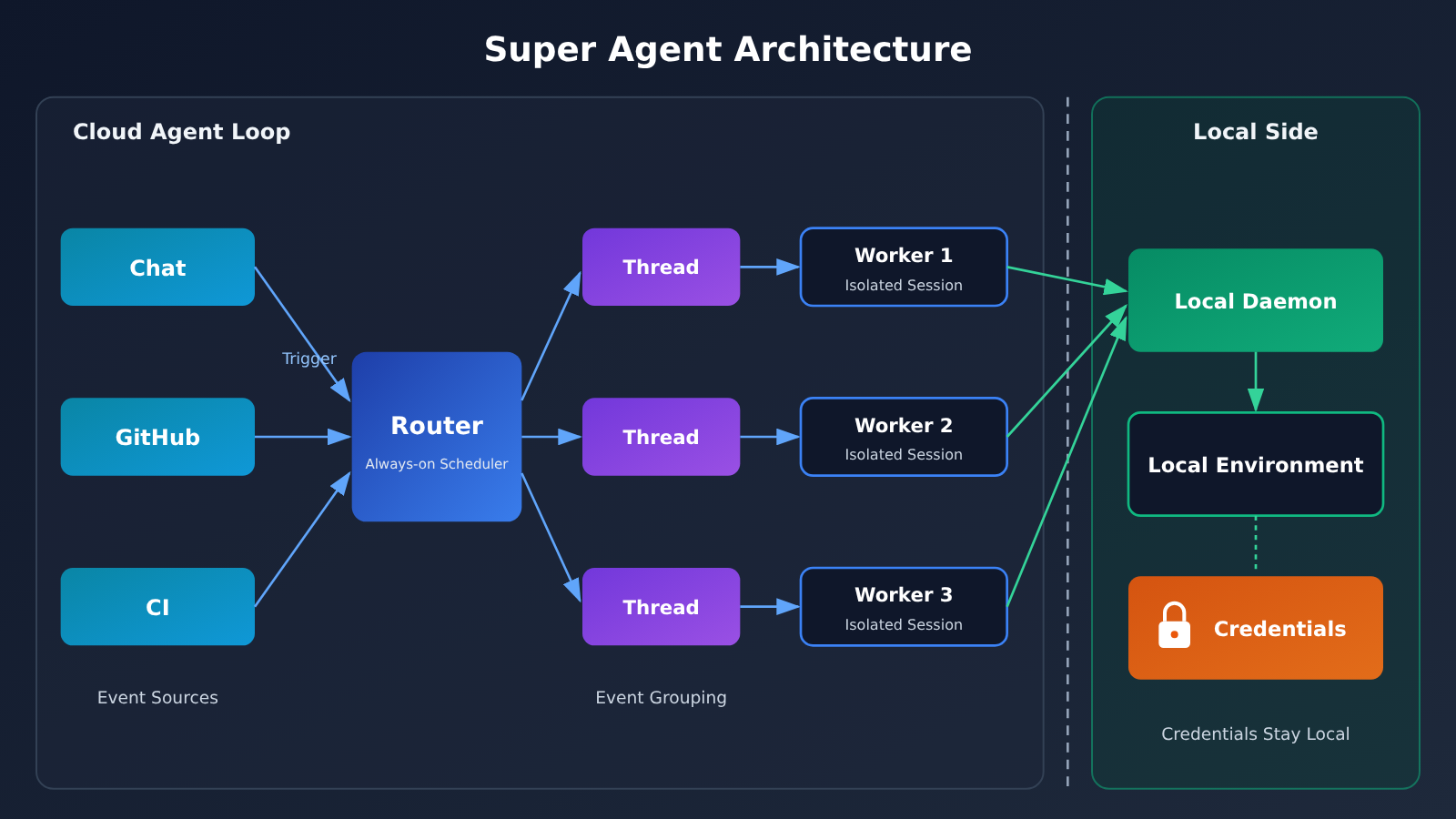
Overall Architecture of the DeepSeek Harness Super Agent
The super Agent in the original article consists of a Router and Workers. The Router is an always-on scheduling entry point that listens for events from sources such as chat, GitHub, and CI. Each Worker is an isolated Agent session that handles one task. Every event entering the system is called a Trigger, and related events from the same PR, IM topic, or email chain are grouped into a Thread.
The architecture also has a distinctive deployment model: the Agent loop runs in the cloud, while the user’s execution environment stays on their local machine. A small daemon connects the two, and credentials stay local alongside the environment. All three design problems build on this setup. Once you understand Router, Worker, Trigger, and Thread, the full-duplex and memory designs are easier to follow.
How to Apply the DeepSeek Harness Full-Duplex Design
Full duplex solves the problem of “one slow tool freezing the entire Agent.” Traditionally, an Agent calls a tool and waits synchronously. A 200 ms query isn’t a big deal, but a six-minute test run creates three problems: delays pile up for subsequent requests; the Agent can’t hear the user say “skip the e2e tests” midway through; and the gateway may drop a long-held connection, causing a timeout even though the work succeeded.
The original article calls the ideal state “productive”: the Agent can accept the next instruction before the previous one has finished. The approach is to split one blocking run() into a set of smaller contracts: start() immediately returns a job handle, status() reports progress, stop() initiates cancellation, and the result returns to the conversation later as an event. The difference is who waits: with run(), the model waits; with start(), the runtime waits.
The DeepSeek Harness Full-Duplex Asynchronous Tool Contract
In practice, each long-running capability exposes three tools instead of one. For a test run, start_test_run returns only a job_id and a queued status, with no task data; get_job_status returns one of queued, running, done, or failed, along with a brief progress update; and stop_job initiates cancellation and returns the actual resulting status.
Two rules help keep the model on track. First, the tool description should explicitly say “don’t wait for the result”; otherwise, the model may repeatedly poll get_job_status. Second, start should never return data, so the model doesn’t have to guess which response structure it has received. You can design the task API behind these tools using the table below. RFC 9110 defines 202 Accepted as a request that’s been accepted for processing, but whose processing hasn’t been completed.
| Call | Response | Corresponding tool |
|---|---|---|
POST /jobs (with an Idempotency-Key header) |
202, returns job_id and queued status; Location points to /jobs/{id} |
start |
GET /jobs/{id} |
200, returns queued / running / done / failed | status, job listener |
GET /jobs/{id}/result |
200 with the result when complete; 409 when incomplete | Result retrieval tool |
DELETE /jobs/{id} |
202 means the cancellation request was accepted; subsequent calls return 404 or 409 | stop |
| Optional callback URL | POSTs to the caller when the job completes | Job listener |
DeepSeek Harness: Full-Duplex Result Delivery and Batching
Polling is just a fallback. A better design is for the runtime to monitor tasks and push a brief completion event into the conversation when each one finishes. The event includes the job_id, status, and a one-line summary, such as “412 passed, 3 failed.” Full logs remain behind a result-fetching tool, so 40,000 lines of logs don’t enter the context directly.
The original article also describes Router batching: Triggers that arrive during a generation turn are queued and combined into the next model invocation. These calls have long inputs and short outputs, so most of the cost falls in the prefill stage. In the original experiment, when the Trigger frequency rose from 1 to 40 per minute, the average batch size increased from 1.0 to 2.8, and the time per decision fell from 6.4 s to 1.6 s. These are the article’s own test results, not a universal benchmark, but the idea is directly applicable: queue events and user messages while the model is generating, then send them together in arrival order when the turn ends.
Engineering Details: Ordering, Cancellation, and Idempotency
These details are easy to overlook during prototyping and can cause serious problems in production:
- Ordering: Tasks don’t finish in a fixed order. When B depends on A, make that dependency explicit: either wait for A’s completion event before starting B, or have the API support
depends_on. - Cancellation:
stopis only a request; it doesn’t guarantee cancellation. Return the actual final state. If the task finished before cancellation, returndoneso the model can tell the user what happened. - Idempotency keys: Models retry, and a lost response can trigger a second
start. Require anidempotency_keyfor everystartand return the existing task for a duplicate key. Otherwise, a request to “run the migration” could be executed twice. - Partial results and timeouts: Provide early output through a cursor-based results API. Set a deadline for every task and emit a
job_timed_outevent when it expires.
If your tools use MCP, take a look at Tasks, an optional extension in the 2026-07-28 version of the MCP specification. The server can respond to a tool call with a result containing a taskId. The client can then poll with tasks/get or listen for notifications/tasks, and request cancellation with tasks/cancel. Both the client and server must explicitly enable this extension, and support varies across hosts, so check before using it.
When you don’t need async: The call returns within a second or two, the next step can’t start without its result, or there’s no real task API behind it. If the tool itself blocks, wrapping it in an async interface only adds complexity. A practical rule is to keep reads blocking and make longer-running writes and computations asynchronous.
Learning From DeepSeek Harness Memory Design: Chain of Recall
Long-running Agents will eventually hit the context limit as new work keeps coming in. The three common ways to handle this each come with trade-offs: keep everything, and the window fills up while costs rise with every turn; use rolling summaries, and you lose specific errors or PR numbers you may need later; use similarity search, and you may miss a fact if its wording doesn’t closely match the query.
The original approach treats context as a cache with just two operations. Inline keeps what the Agent is most likely to need right now, including IDs, short summaries, and nearby messages. Spill handles everything else: the content is truncated and replaced with a pointer, so it can be retrieved later if needed. Spilled content isn’t deleted—it just appears in the prompt as a pointer. For example, a CI failure might be reduced to one line in context: “CI failed for PR #412; 3 of 118 tests in the payments directory failed.” The full 41 KB log is represented only by a retrieval path. If the summary is enough, the Agent doesn’t have to pay to include those 41 KB.
Stable IDs and the Reference Graph in DeepSeek Harness Memory Design
Chain of Recall depends on IDs never changing. In the original design, three types of objects have IDs:
| Object | Meaning | Example ID | Link |
|---|---|---|---|
| Trigger | An event entering the system: a chat message, Webhook, or CI callback | trg_8f21 |
Belongs to a Thread |
| Thread | A series of related events on the same PR, IM topic, or email chain | thr_pr_412 |
Held by one or more Workers |
| Worker | An isolated Agent session handling a single task | wkr_77a0 |
References the Triggers it handled in its report |
These links form a reference graph, and that graph is the Agent’s memory. To recall something, the Agent follows the links one hop at a time, without loading the entire history or searching for similar text. For example, on Friday someone asks the Router, “Why were retries added to the payments client?” The relevant discussion took place on Tuesday and has long since been spilled. On the first hop, the Router uses a one-line index still in context to retrieve thr_pr_412. On the second, it reads the Thread record to find the Worker that holds it and retrieves that Worker’s final report. On the third, it follows a reference in the report to the CI failure Trigger, retrieves its log, and finds a timeout error. Three precise, small queries deliver an answer without any guesswork.
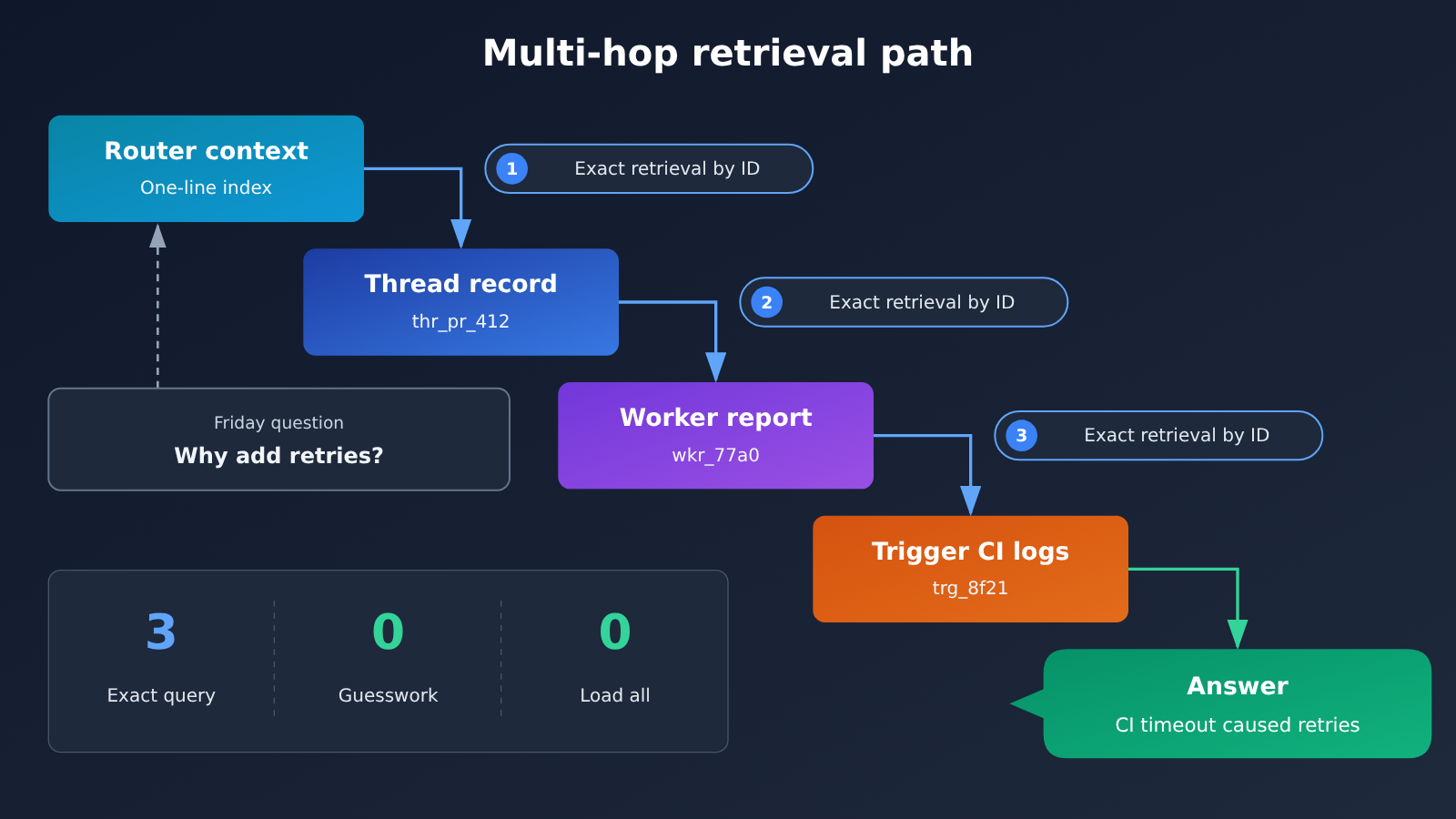
Four Contracts the DeepSeek Harness Memory API Must Meet
Every hop in the recall chain is an API call. If any call returns a different record or no record at all, the chain breaks, and the Agent either gets stuck or guesses at an answer. The underlying API must meet four contracts:
- IDs never change: An ID returned today must resolve to the same object next month. IDs aren’t reused after deletion or reassigned during migration.
- Retrieval by ID is cheap and precise:
GET /threads/{id}returns only that record. It doesn’t search or return the “closest match.” - Unknown IDs fail explicitly: Return a 404 with a clear error body. If the API returns a 200 with an empty object, the Agent will think the memory exists.
- Cursor pagination has no gaps: Long Threads are paginated in order, with each event appearing exactly once. Cursors remain valid when new events are written.
These contracts can easily be broken unnoticed during refactoring. They should be encoded as automated tests and run on every merge.
It’s worth keeping two limitations in perspective. First, Chain of Recall can’t replace vector search: vector search answers “What’s similar to this?”, while Chain of Recall answers “What’s linked to this?” In practice, a common approach is to use a vector index to find a starting Thread ID, then follow links to the precise facts. Second, the “37%” figure in the original article refers to Thread pass-through: without it, cache-read tokens per run rose from 23.2M to 31.8M. That’s the cost of missing a feature, not a saving delivered by Chain of Recall itself. Don’t conflate the two when citing it.
Learning From DeepSeek Harness Credential Design: Use Credentials Without Seeing Them
The original article identifies this as an open question: credentials can leak if they enter an agent’s context, so an agent should be able to use credentials without seeing them. There are four common paths to leakage: reading .env while troubleshooting; writing plaintext request headers in debugging commands or running echo to “confirm the variable is set”; putting real values in PR descriptions, issue comments, or test fixtures; and being tricked by prompt injection in a webpage or API response into printing environment variables. OWASP lists prompt injection as the top risk for LLM applications and classifies credential exposure as sensitive information disclosure.
All safeguards follow the same rule: put only names in the context; keep values outside the model. The context can contain variable names like STRIPE_KEY, secret manager references, placeholders like {{token}}, or masked values. It must not contain actual keys, resolved values, or unredacted log lines. If a real value appears in a conversation, rotate the key that same day. Conversations are logged, cached, and exported, and a token that’s been sent can’t be taken back.
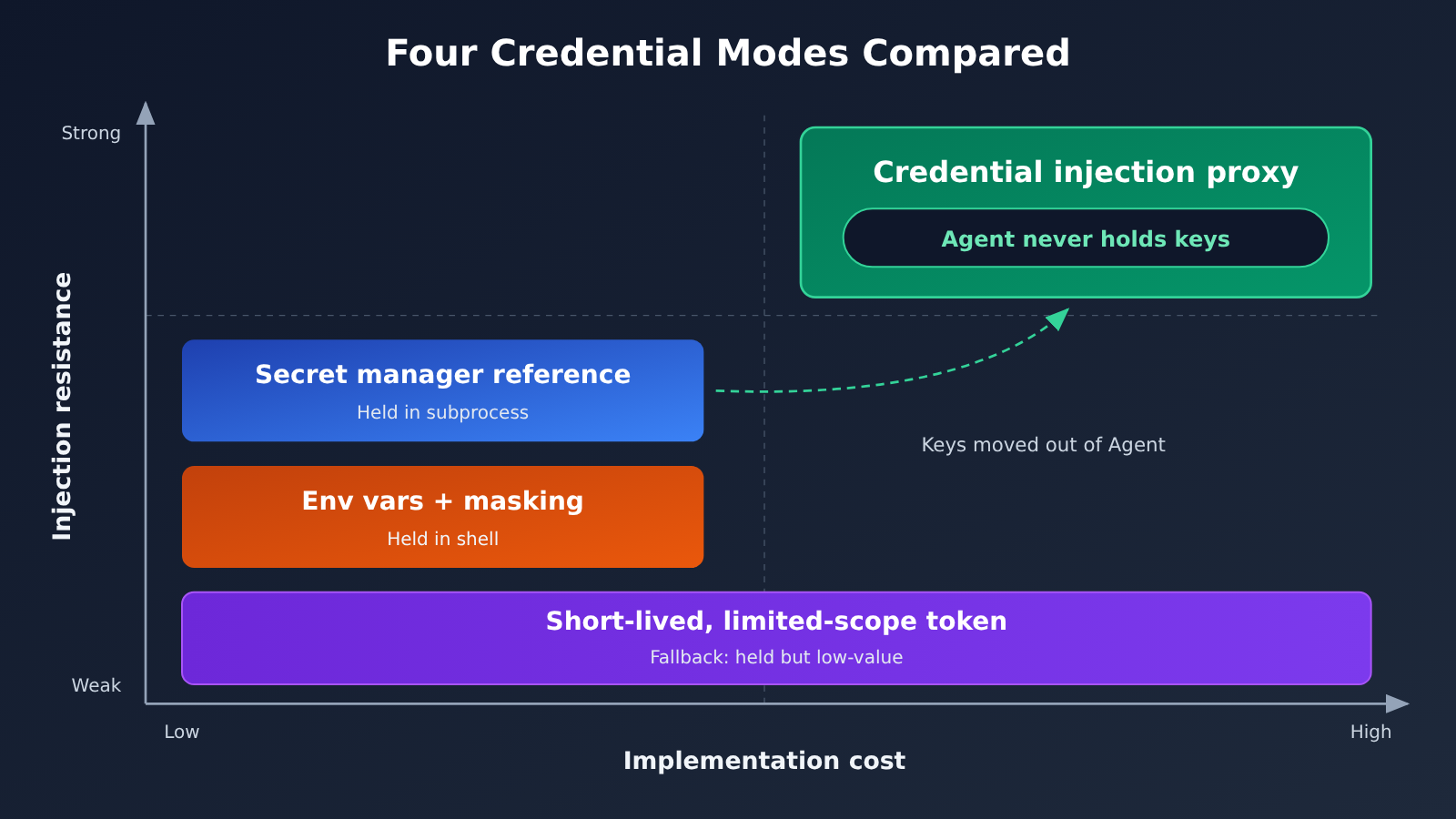
Four Practical Patterns for Handling Credentials in DeepSeek Harness
| Pattern | Approach | Does the Agent Hold the Secret? | Main Limitation |
|---|---|---|---|
| Environment variables + masking | Use $NAME in commands and let the shell expand it; prohibit reading .env; mask output before returning it |
Held by the shell | Prevents accidental exposure, but not deliberate printing after prompt injection |
| Secret manager references | Store only references like op://vault/item/field in configuration; a CLI resolves them into the child process at runtime |
Held by the child process | Same limitations as environment variables |
| Credential injection proxy | The Agent sends requests without a key to a local proxy, which adds authentication headers and forwards requests according to an allowlist | Never holds it | Requires a separately deployed and maintained proxy |
| Short-lived, narrowly scoped tokens | Issue a token for each session that expires within minutes and can do only one thing | Holds it, but its value is limited | Only a fallback; it can still be abused while valid |
Of these four patterns, only a credential injection proxy truly keeps the key out of the Agent’s possession. The proxy’s allowlist is just as important as its credential injection: for example, allow GET /v1/charges but deny DELETE /v1/customers. Even if the Agent is compromised by prompt injection, it can only make calls you’ve approved, and it can’t take the key with it. Run the proxy as a separate user or in a separate container to prevent the Agent from reading its configuration. This matches the deployment approach in the original article: credentials stay local with the environment.
If your Agent invokes models through APIYI, you can apply the same approach to the model API key: have the proxy inject the key when forwarding requests to APIYI, so the Agent only knows to use the local proxy. That way, even if conversation records are exported, they won’t contain a usable APIYI API key. For the specific endpoint and authentication method, refer to the APIYI documentation at docs.apiyi.com.
The final layer is masking. Tool output, CI logs, and saved sessions should mask secrets with known prefixes, including sk_live_, ghp_, github_pat_, AKIA, and xoxb-, as well as the values of all Authorization and X-API-Key headers and any specific values injected during the session. If even one line goes unmasked, all the earlier safeguards can be undone.
Getting Started with DeepSeek Harness Design: Implementation Checklist and Model Selection
You don’t have to tackle all three design problems at once. Here’s the recommended implementation order, ranked by return on effort:
- Start with credential hygiene: Prevent Agents from reading
.env, specify inCLAUDE.mdorAGENTS.mdthat they must not print any variables ending in_KEY,_TOKEN, or_SECRET, and add a redaction filter to outputs. This can be done in half a day, with immediate benefits. - Make slow tools asynchronous: Start with tools such as tests, builds, and deployments that often take more than a few seconds. Split them into start / status / stop operations, and add idempotency keys and deadlines.
- Establish stable IDs: Assign immutable IDs to events, session threads, and subtasks. Keep only the ID and a one-line summary in context; offload longer content and leave a pointer.
- Add an injection proxy and short-lived tokens: Deploy a proxy with an allowlist for third-party APIs, and issue a separate token for each Agent session.
For model selection, the Router handles long inputs and short outputs and makes frequent batch decisions. It’s a good fit for a cheap, fast model with low cache-hit pricing. Workers write code and handle complex reasoning, so they’re better served by more capable models. The prices below are taken from the APIYI pricing page at docs.apiyi.com/models. Refer to the live page for billing details and current prices; this article makes no other pricing commitments.
| Model (APIYI model name) | Input price | Output price | Cache price | Recommended role | Available platform |
|---|---|---|---|---|---|
| deepseek-v4.1-flash | $0.3 | $1.2 | $0.006 | Router batch decisions, event summaries | APIYI apiyi.com |
| claude-sonnet-5-5 | $2 | $10 | $0.1 | Worker for everyday coding | APIYI apiyi.com |
| kimi-k3.1-pro | $2 | $10 | $0.2 | Worker for long-context and document tasks | APIYI apiyi.com |
| claude-opus-5-5 | $4 | $20 | $0.2 | Worker for complex refactoring and critical decisions | APIYI apiyi.com |
It’s worth noting that both the batch-processing and Thread pass-through experiments in the original article emphasize the volume of cache-read tokens. Most Router costs come from prefill and cache reads, so cache pricing is often more important than output pricing when choosing a model.
🚀 Quick start: APIYI provides API access to the models above and supports both OpenAI and Anthropic interface formats. Connect the Router to deepseek-v4.1-flash using the OpenAI format, and the Worker to claude-sonnet-5-5 using the Anthropic format. You can manage both under a single account. For integration instructions, see the APIYI documentation at docs.apiyi.com. For current pricing, see docs.apiyi.com/models.
Frequently Asked Questions (FAQ)
Q1: What is DeepSeek Harness’s “Super-agent Design”?
“Exploring Super-agent Design” is a long-form design article published by the DeepSeek Harness team on 2026-11-01. It explores how to design a persistent super-agent that listens to multiple event sources at once. It describes an architecture, not an officially released feature. Some of the ideas are included in the prototype plugin `dsh-superagent-prototype`, which the author says is not an official DeepSeek product.
Q2: What’s the difference between full duplex and parallel tool calls?
Parallel tool calls run multiple tools at the same time within a single turn, but the model still has to wait for all of them to return. With full duplex, asynchronous tool calls return handles immediately, and results arrive as events in later turns. While waiting, the model can continue the conversation, receive new instructions, and start new tasks.
Q3: Can I turn on Chain of Recall directly? Can it replace RAG?
Neither. Chain of Recall is a design pattern from the original article, not a feature you can switch on. You need to implement stable IDs and an interface for retrieving content by ID yourself. It also solves a different problem from RAG: RAG finds similar content, while Chain of Recall retrieves content through exact links. In practice, projects often use vector search to find a starting point, then follow ID links to specific facts. The original article also lists long-term memory as an open question; it doesn’t claim that Chain of Recall has solved it.
Q4: What applications are these three design considerations best suited for?
– **Full duplex**: Tasks such as testing, building, crawling, rendering, and deployment that often take more than a few seconds, where users continue talking to the agent while the task runs.
– **Memory**: Histories made up of discrete, linkable events, such as PRs, tickets, CI runs, customer support conversations, and release records.
– **Credentials**: Coding and operations agents that need to call paid or sensitive third-party APIs.
Q5: How can I quickly connect different models to the Router and Worker?
A convenient approach is to use a single platform compatible with both OpenAI and Anthropic API formats. After registering at APIYI apiyi.com, get an API key and enter the appropriate model name for the Router and Worker. Refer to the APIYI documentation at docs.apiyi.com for the connection endpoint. Before going live, test the decision quality of deepseek-v4.1-flash and claude-sonnet-5-5 on the same set of real events, then decide how to divide their responsibilities.
Q6: Where can I check the models and prices mentioned in the original article?
For all model prices covered here, refer to the live data on the APIYI pricing page at docs.apiyi.com/models. Figures in the original article and third-party materials are included only for comparison. If a model isn’t listed on the pricing page, it isn’t currently available on APIYI. We’ll make it available as soon as possible; check the pricing page for the latest information.
Q7: What are the known limitations of these approaches?
Full duplex requires a real task API. Wrapping a blocking implementation in “pseudo-async” behavior only adds complexity. Chain of Recall can’t find content that hasn’t been linked, and ID contracts can easily break during migrations and refactoring. For credentials, neither environment variables nor secret references prevent an injected agent from actively printing a secret. Only an injection proxy can keep the agent from holding the value at all; short-lived tokens are merely a fallback. The original article also lists memory and credentials as open questions.
DeepSeek Harness Super Agent Design: Key Takeaways
- About the article: This is an architecture design article. Full-duplex mode is off by default, and the prototype plugin isn’t an official product.
- Full-duplex: Replace blocking
runcalls with start / status / stop operations. Feed results back as events and merge them in batches. - Task API contract: Return 202 when a task is accepted, deduplicate with idempotency keys, return the actual status on cancellation, and set a deadline for each task.
- Memory design: Keep only stable IDs and short summaries in context. Store pointers to overflow content and follow ID links across multiple hops during retrieval.
- Memory API contract: IDs remain stable, retrieval is exact, unknown IDs return 404, and cursor-based pagination has no gaps.
- Credential principles: Put names in context and keep values outside it. Prefer an injection proxy, use short-lived tokens as a fallback, and redact all logs.
- Model roles: Choose an inexpensive model with low cache pricing for the Router and a capable model for the Worker. You can compare and test them with one APIYI account.
Summary
DeepSeek Harness’s Super Agent Design offers more practical ideas than its prototype status might suggest:
- Full-duplex: Asynchronous tool contracts and event-based feedback are established engineering practices. You can write tests for the underlying task API before connecting it to an Agent.
- Memory: Stable IDs plus inline/spill storage are a low-cost way to give an event-driven Agent precise memory, but they can’t replace vector search.
- Credentials: You can put the rule “names in context, values outside” into practice today. An injection proxy is the only approach that keeps the Agent from holding keys altogether.
Start with credential hygiene and making slow tools asynchronous. Save stable IDs and the injection proxy for the second phase. When pairing different models for the Router and Worker, you can test them through APIYI at apiyi.com using a unified interface compatible with OpenAI and Anthropic formats. See docs.apiyi.com/models for current pricing.
📚 References
- What Is Chain of Recall? How Stable IDs Give AI Agents Memory: An explanation of the Chain of Recall memory design
- Link:
apidog.com/blog/chain-of-recall-ai-agent-memory -
Details: Covers stable IDs, inline/spill, multi-hop recall examples, and four API contracts
-
Async Tool Calls for AI Agents: Why start() Beats a Blocking run(): An explanation of full-duplex asynchronous tool design
- Link:
apidog.com/blog/async-tool-calls-ai-agents -
Details: Covers the start/status/stop contract, batch-processing experiment data, and the MCP Tasks extension
-
How to Let AI Agents Use API Keys Without Seeing Them: Agent credential security practices
- Link:
apidog.com/blog/ai-agents-use-api-keys-without-seeing-them -
Details: Covers four credential patterns, leak paths, and a redaction checklist
-
APIYI Documentation and Pricing: Integration instructions and pricing data for the models covered in this article
- Links:
docs.apiyi.comanddocs.apiyi.com/models - Details: Refer to these pages for authoritative model names, API formats, and current pricing
Author: APIYI Technical Team
Technical discussions: For questions about agent architecture choices and multi-model integration, contact us through the APIYI homepage at apiyi.com. For more resources, visit the documentation center at docs.apiyi.com.


