

Author’s note: What reliability metrics should you check when choosing an AI API proxy or aggregation service for production? This article covers 10 core metrics, a seven-day validation process, and an evaluation checklist.
Many teams start using an AI API proxy or aggregation service because it works and costs less. The real problems often surface only after it reaches production: more 429 errors during peak traffic, streaming responses dropping midstream, bills that don’t match your own token counts, or model behavior changing overnight. This article covers the 10 reliability metrics you should check when choosing an AI API proxy or aggregation service for production, along with a seven-day validation process.
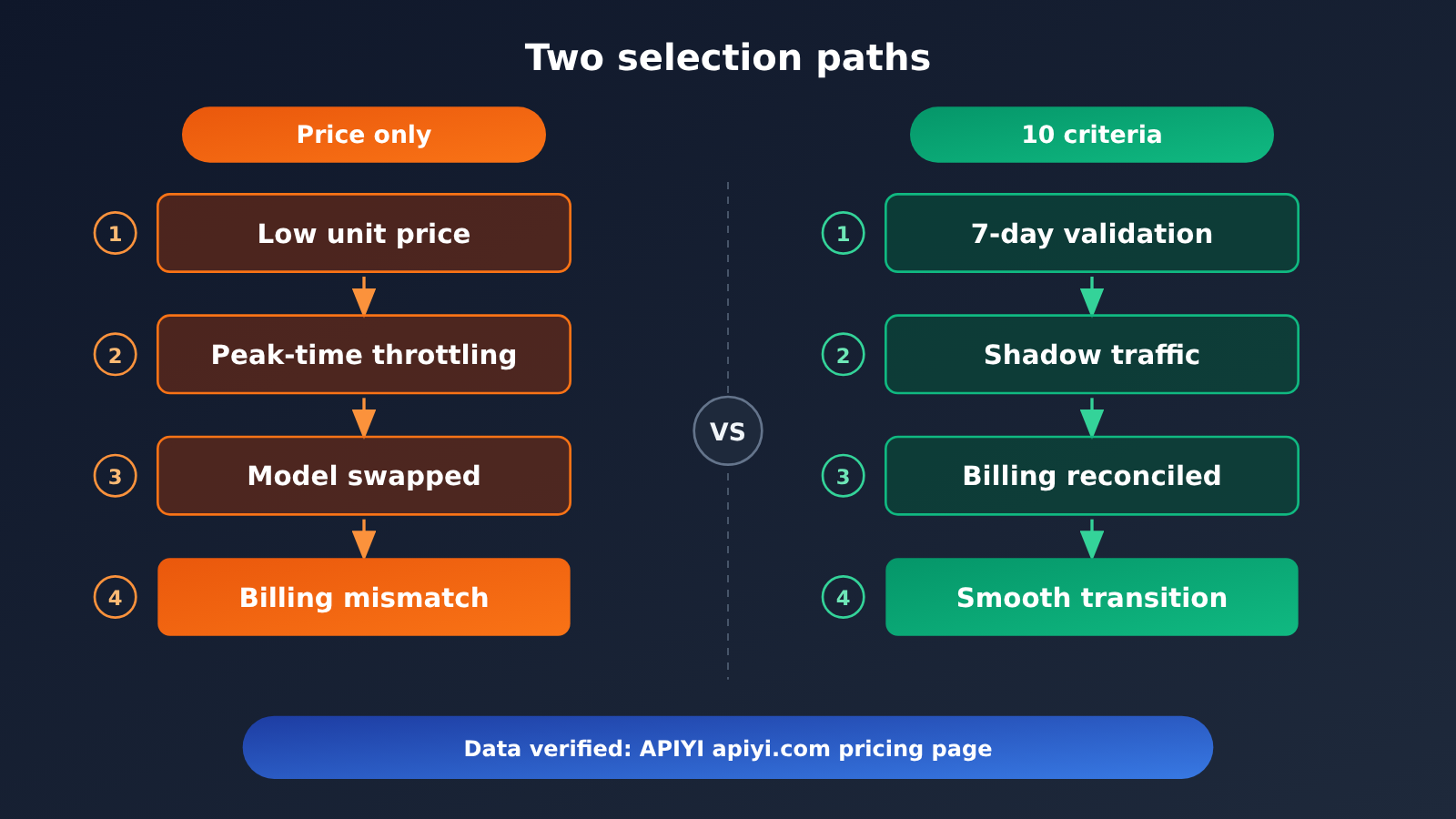
This isn’t another price comparison that tells you to pick the cheapest provider. We’re focused on one question: Can an AI API proxy or aggregation service handle your production traffic—and when something goes wrong, can the issue be detected, explained, and compensated for?
What you’ll get: An actionable AI API proxy reliability checklist to help you use data to decide whether a platform is ready for production before you sign a contract or switch traffic.
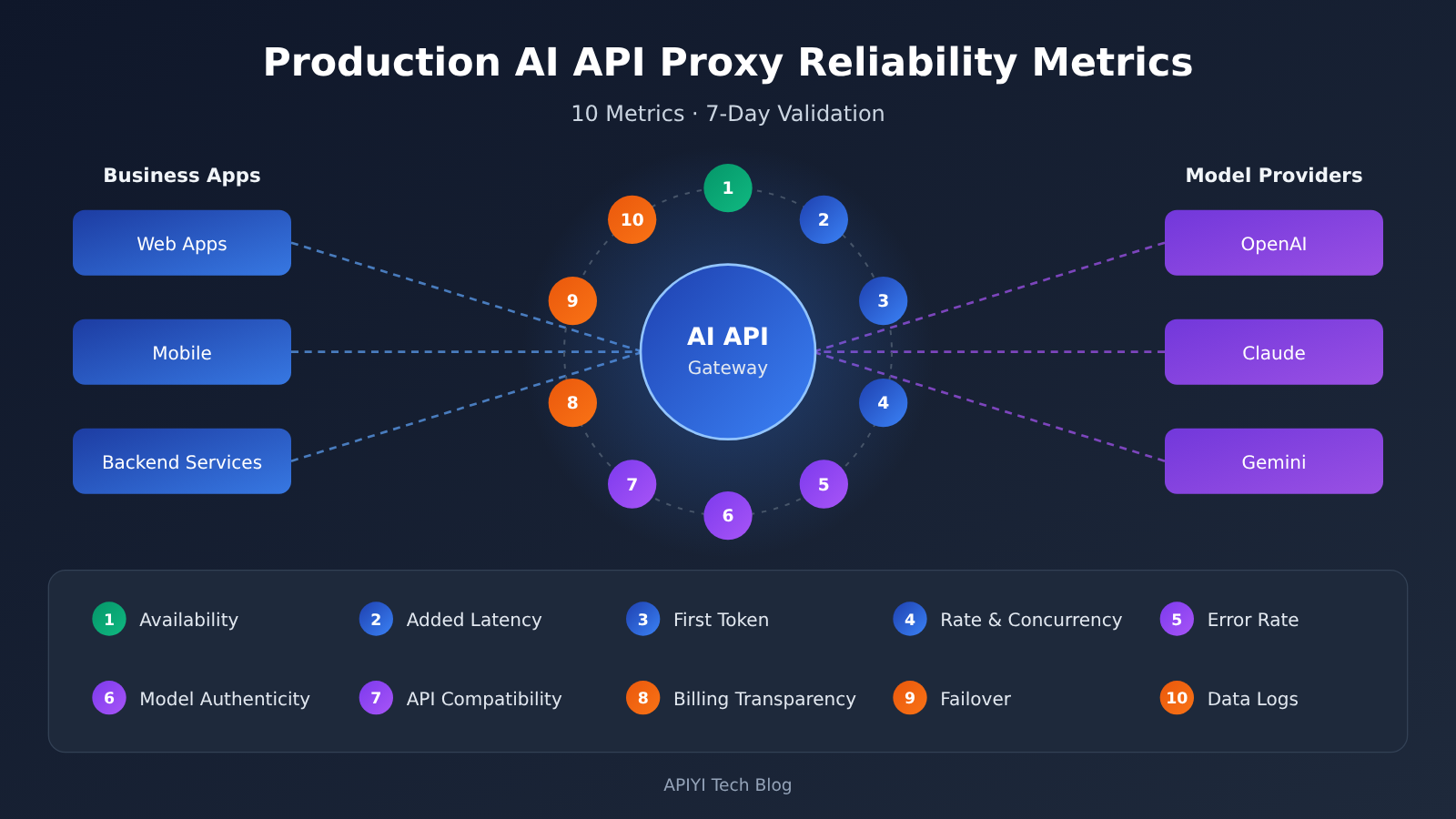
Key Reliability Factors for AI API Proxy and Aggregation Services in Production
Before evaluating an AI API proxy and aggregation service, organize the metrics into categories. Reliability isn’t just about whether a service is up or down. It also includes predictable latency, trustworthy results, and bills you can verify. The table below groups 10 metrics into four categories to help you divide up the evaluation.
| Category | Key metrics | What to look for | Production impact |
|---|---|---|---|
| Availability | Historical incidents, status page, SLA commitments | Incident frequency, recovery time, whether postmortems are public | Determines whether your service can stay online |
| Performance | Added latency, time to first token, rate limits and concurrency | Proxy-layer overhead, peak-time performance | Directly affects user experience and timeout rates |
| Consistency | Model version authenticity, API compatibility, error code transparency | Whether models are substituted, whether streaming and tool calls work fully | Determines output quality and code stability |
| Governance | Billing transparency, failover, data and logging policies | Verifiable bills, redundancy across upstream providers, privacy compliance | Determines whether you can use the service with confidence over the long term |
AI API Proxy Availability Metrics
Availability is the first hurdle when choosing an AI API proxy service for production. Don’t just look at the percentage advertised by the platform. Check whether it has a public status page, whether you can find past incidents, and whether it publishes a postmortem for each one. A platform that shares incident timelines is often more trustworthy than one that simply claims “high availability.”
Third-party sources can give you a point of reference. For example, an Ofox.ai Blog production review of OpenRouter reported three documented OpenRouter incidents between 2025 and 2026 and approximately 25 to 40ms of added latency (source: Ofox.ai Blog, cited for comparison only). The point of data like this isn’t to judge a particular platform. It’s a reminder that any proxy layer can introduce failures and overhead. What matters is whether they’re acceptable and transparently reported.
AI API Aggregation Service Performance and Consistency
For performance, break the proxy layer’s added latency into two parts: fixed overhead from networking and authentication, and variable overhead from queuing during peak periods. The former is usually stable and measurable; the latter is more likely to cause production incidents. That’s why you should test during your own peak business hours rather than drawing conclusions from a single benchmark run in the middle of the night.
For consistency, the most subtle risk is model substitution. Some platforms may route requests to a cheaper model or a quantized version when upstream capacity is tight. The API still returns 200, but output quality drops noticeably. Check that the model field in the response matches the request, and regularly run regression tests using a fixed set of questions to spot sudden changes in output style or accuracy.
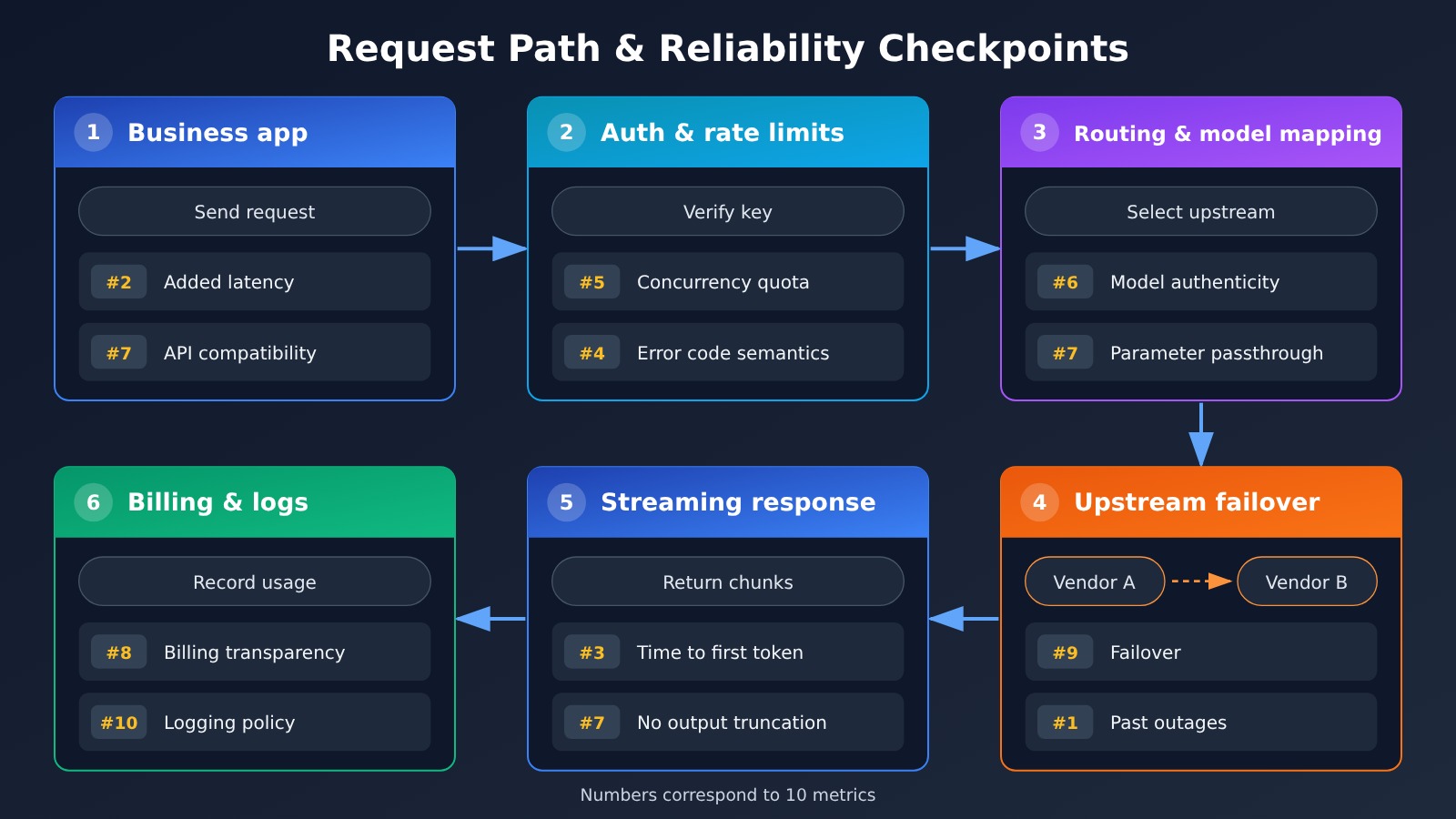
A 10-Point Reliability Checklist for Production AI API Proxy Services
The table below is the core checklist for this article. Each item includes a way to test it and a suggested passing standard. You can copy it directly into your internal review document. These standards are based on experience, so adjust them to your business’s tolerance for risk.
| No. | Reliability Metric | How to Check | Suggested Passing Standard |
|---|---|---|---|
| 1 | Incident history and status page | Review the public status page and incident postmortems | A status page is available, with postmortems for major incidents |
| 2 | Added latency overhead | Compare the same request sent directly and through the proxy | Fixed overhead is stable, with no significant degradation during peak periods |
| 3 | Time to first token | Record when the first packet arrives for streaming requests | Percentiles are stable, and long-tail latency can be explained |
| 4 | Error rates and error codes | Track the distribution of 4xx and 5xx errors | Error codes have clear meanings and distinguish upstream issues from platform issues |
| 5 | Rate limits and concurrency quotas | Increase load in stages and observe when 429 errors appear | Quotas are clear, and increases can be requested |
| 6 | Model version authenticity | Check the model field and run regression tests against a fixed question set | The returned model matches the request, with no unexpected output drift |
| 7 | API compatibility | Test streaming, tool calling, multimodal inputs, and caching | Common parameters are passed through intact, without being silently dropped |
| 8 | Billing transparency | Reconcile your own token counts with the platform’s bill | Differences can be explained, and cache billing rules are public |
| 9 | Failover capability | Review upstream redundancy and switching mechanisms | A single upstream failure doesn’t make the entire service unavailable |
| 10 | Data and logging policies | Read the privacy policy and log retention documentation | It’s clear whether data is retained, for how long, and whether retention can be disabled |
Why AI API Proxy Billing Transparency Is a Reliability Metric
Many people think of billing as a cost issue, but in production, opaque billing is a reliability risk in its own right. A sudden spike in a bill can mean cache misses, changes to token-counting rules, or abnormal client retries—all system-level issues. The Ofox.ai Blog reported that Anthropic had confirmed peak-period rate limiting and two cache bugs that could inflate token bills by 10 to 20 times (source: Ofox.ai Blog, cited for comparison only). This shows why you should check your own bills even when using an official channel.
The same source also noted that some aggregation platforms charge fees for adding credit, such as OpenRouter’s 5.5% credit fee (source: Ofox.ai Blog, cited for comparison only). When evaluating an API proxy service, factor fees, exchange rates, minimum top-up amounts, and cache pricing into the “actual unit price,” rather than looking only at the input and output prices listed on the page.
What to Check for API Compatibility in AI API Aggregation Services
Compatibility issues usually don’t show up at the Hello World stage. The scenarios most likely to cause trouble are things like streaming output being cut off midway by the proxy layer, tool-calling parameter structures being rewritten, image input sizes being restricted, or Anthropic-format cache-control fields being silently dropped. List every parameter your application actually uses, then run regression tests for each one with real requests.
If your system uses both OpenAI and Anthropic API formats, make sure the proxy service supports both natively rather than forcing Anthropic requests into OpenAI format and then converting them back. The more format conversions involved, the greater the chance of dropped fields and inconsistent behavior.
Getting Started with an AI API Proxy Service in Production: A 7-Day Validation Process
Now that you have the checklist, the next step is validation. We recommend a seven-day, low-traffic trial to cover both weekday peaks and weekend traffic patterns. You don’t need complex tools—logs and a spreadsheet are enough.
| Stage | Time | Key Actions | Deliverable |
|---|---|---|---|
| Preparation | Day 1 | List the models, parameters, and peak QPS your application uses, and prepare a fixed regression test set | Parameter list and test set |
| Functional regression | Day 2 | Test streaming, tool calling, multimodal features, and cache fields individually | Compatibility checklist |
| Load testing | Day 3 | Gradually increase the load to 1.5 times peak traffic, recording when 429 and 5xx errors appear | Concurrency and rate-limiting curves |
| Shadow traffic | Days 4–6 | Copy a small portion of real requests to the API proxy service and compare results with the existing pipeline | Latency, error rate, and output difference report |
| Reconciliation and review | Day 7 | Compare your own token counts with the platform bill and summarize all 10 metrics | Selection decision and migration plan |
Key Configuration Tips for AI API Proxy Integration
During integration, aim to change configuration rather than code. If your project uses the official OpenAI SDK, you usually only need to change the base_url to the address provided by the API proxy service and replace the api_key. For example, with APIYI, you can set the OpenAI-compatible base_url to https://api.apiyi.com/v1 and use a model ID listed on the pricing page.
If you use the Anthropic SDK or an Anthropic-format tool like Claude Code, confirm that the platform supports the native Anthropic format, then set the appropriate base URL and API key environment variables according to the documentation. APIYI supports both OpenAI and Anthropic API formats. Check the documentation at docs.apiyi.com for the current addresses and parameters rather than copying outdated addresses from third-party tutorials.
When setting up the integration, it’s also a good idea to do three things:
- Configure timeouts and retries separately: Keep connection timeouts short, set longer read timeouts based on the model and output length, and retry only for 429 and 5xx errors with exponential backoff.
- Log key fields: Record the request ID, model name, input and output tokens, latency, and status code for every request. These are essential for later reconciliation and troubleshooting.
- Keep a fallback route: Maintain at least one backup route, whether it’s another API proxy service or a direct connection to the official API, and switch between them with a configuration flag.
🚀 Quick start tip: If you’d like to run through the seven-day process above with a small amount of traffic first, you can sign up at APIYI apiyi.com to get a testing allowance. The platform offers a unified API compatible with both OpenAI and Anthropic formats, so you can redirect shadow traffic for comparison by changing a
base_url.
Checking Model Coverage and Pricing for AI API Aggregation Services
When choosing a service, make sure the models you need are actually available and that the pricing is clear. The table below lists some models currently available on APIYI and their prices as listed on its pricing page. All prices are subject to the actual data on the APIYI pricing page at https://docs.apiyi.com/models. Check that page for billing units and the latest changes; the figures here are for reference only.
| Model ID | Use case | Input / output / cache unit price (APIYI pricing page) | Available platform |
|---|---|---|---|
| claude-opus-5-5 | Complex reasoning, long-chain programming | $4 / $20 / $0.2 | APIYI apiyi.com |
| claude-sonnet-5-5 | Everyday programming, primary agent model | $2 / $10 / $0.1 | APIYI apiyi.com |
| kimi-k3.1-pro | Long-context, Chinese-language tasks | $2 / $10 / $0.2 | APIYI apiyi.com |
| deepseek-v4.1-flash | High-concurrency, low-cost batch processing | $0.3 / $1.2 / $0.006 | APIYI apiyi.com |
| gpt-image-2.6-flare / sunburst | Image generation | Text input $5, image input $8, output $30 | APIYI apiyi.com |
| qwen3.8 series | General Chinese-language tasks | See pricing page | APIYI apiyi.com |
One important note: if your business relies on Baidu’s ERNIE series, APIYI doesn’t currently offer these models. We plan to add them as soon as possible; until then, keep your existing integration. This is good practice when evaluating any API proxy service: confirm that each model actually appears on the pricing page rather than relying on broad claims like “supports hundreds of models.”
💡 Selection tip: Multiply the cache unit price by your actual cache hit rate, then add input and output costs to get the real cost. Try testing Claude, Kimi, DeepSeek, and other models with the same batch of requests on APIYI apiyi.com. Choose the lowest-cost option that meets your quality requirements, rather than looking at unit prices alone.
Frequently Asked Questions
Q1: What is an AI API proxy and aggregation service?
An AI API proxy and aggregation service is a gateway between your application and model providers. It brings models from multiple providers under a single interface and handles authentication, routing, billing, and failover. It simplifies integration and makes switching models easier, but adds another dependency whose reliability you’ll need to evaluate.
Q2: Is an AI API proxy always less reliable than connecting directly to an official API?
Not necessarily. A direct connection depends on a single provider, leaving you without a fallback if it experiences rate limits or an outage. A proxy service with redundant upstream providers can switch automatically when one has a problem. The real difference is the quality of the proxy layer itself, so validate it using the 10 metrics in this article rather than making assumptions.
Q3: How often should I review an AI API proxy’s reliability metrics?
Run a full seven-day validation before launch, then check error rates, latency percentiles, and billing discrepancies monthly. Whenever the platform updates model versions or adjusts pricing, or your traffic grows significantly, rerun functional regression and load tests.
Q4: Which production scenarios require the most attention to AI API aggregation service reliability?
The main scenarios include:
– **Real-time conversations with end users**: Time to first token and streaming stability directly affect the user experience.
– **Coding agents and automated workflows**: If tool-call fields are modified, the entire workflow can fail.
– **Batch data processing**: Concurrency quotas and billing accuracy determine whether jobs finish on time and within budget.
Q5: How can I quickly use an API to check whether a proxy service meets my requirements?
The easiest approach is to connect to a platform that supports multiple models and compare results using shadow traffic:
1. Visit APIYI at apiyi.com, register an account, and get test credits
2. Set base_url to `https://api.apiyi.com/v1`, or configure the Anthropic format using the documentation at docs.apiyi.com
3. Copy a small portion of real requests and compare latency, error rates, and output differences
APIYI provides API access to the models covered in this article, including Claude, Kimi, DeepSeek, GPT Image, and Qwen, making it easy to compare them through a single interface.
Q6: Where should I check pricing for a proxy service?
Use the platform’s official pricing page as the source of truth, and save a screenshot or record the date you checked. For example, APIYI’s pricing page at https://docs.apiyi.com/models is the source of truth for all model input, output, and cache prices. Quotes in third-party blogs are useful only for comparison, since their pricing definitions and update dates may differ.
Q7: What unavoidable limitations do AI API proxy and aggregation services have?
Any proxy layer adds some latency and another potential point of failure. New models also typically become available on proxy platforms after their official release, and some provider-specific parameters may take time to support. Keep a direct official connection or a second service as a backup, and prepare fallback plans for critical workloads.
Key Takeaways: AI API Proxy Reliability in Production
- Reliability has four layers: Availability, performance, consistency, and governability all matter. Don’t just check whether the service is down.
- Measure latency at peak times: The proxy layer’s added overhead is stable and measurable; fluctuations in peak-time queueing are the main cause of incidents.
- Watch for model substitution: Check the
modelfield and run regression tests against a fixed set of questions to catch silent downgrades. - Billing is part of reliability: Billing anomalies often point to cache failures or retry storms, so reconcile charges regularly.
- Test compatibility feature by feature: Verify streaming, tool calls, and cache fields with real requests—not just a Hello World test.
- Validate with seven days of shadow traffic: Comparing results with a small amount of traffic gives you more confidence than relying on guesswork.
- Getting started: Use the unified interface at APIYI apiyi.com to compare models. Check the pricing page for current prices.
Summary
When choosing an AI API proxy or aggregation service for production, keep three things in mind:
- Set your criteria before comparing prices: Use 10 reliability metrics to filter out unsuitable platforms, then compare costs among those that qualify.
- Use data, not marketing claims: Run a seven-day validation process to collect latency, error rate, and billing data for your own workload.
- Always have a fallback: Any single connection can fail. Backup channels and fallback plans are standard practice in production.
If you’re planning to add an AI API gateway to an online service, try running a small-traffic validation using the evaluation checklist in this article. You can use APIYI apiyi.com to quickly test the results. The platform supports OpenAI and Anthropic API formats. Check available models and prices at https://docs.apiyi.com/models, and find integration details in the documentation center at docs.apiyi.com.
📚 References
- APIYI Pricing Page: Model list and input, output, and cache pricing
- Link:
docs.apiyi.com/models -
Note: All APIYI pricing data in this article is based on this page
-
APIYI Documentation Center: Integration guides for OpenAI and Anthropic formats
- Link:
docs.apiyi.com -
Note: Includes base_url configuration, model IDs, and FAQs
-
Ofox.ai Blog: OpenRouter production reliability review and reporting on Claude billing issues
- Link:
ofox.ai/blog/page/39 -
Note: Source of the third-party incident counts, latency overhead, and fee data cited for comparison
-
Ofox.ai Blog: Reporting on Claude peak-hour rate limits and cache billing issues
- Link:
ofox.ai/blog/page/36 - Note: Cited for comparison to illustrate why billing should be checked
Author: APIYI Technical Team
Technical discussions: Contact us through the APIYI homepage at apiyi.com to share experiences choosing an AI API gateway. For more integration resources, visit the documentation center at docs.apiyi.com.


