

Author’s note: A breakdown of Kimi K3.1 Pro’s 2.8T parameters, 104B active parameters, MXFP4 quantization, and 1M context window. We’ll estimate weight size and hardware requirements, compare them with the $2/$10 API pricing, and provide a decision table and checklist for choosing between self-deployment and an API.
Let’s start with the bottom line: Kimi K3.1 Pro is a MoE model with 2.8T total parameters, and you can’t run it on a single machine. At MXFP4 precision, the weights alone are estimated to be terabytes in size—too large for a typical single-node, eight-GPU server. You’ll need a multi-GPU deployment across multiple nodes, plus enough GPU memory for the 1M-context KV cache. Open weights answer the question of whether you can get the model; they don’t make it any easier to run it well.
For most technical teams, calling the API at $2/$10 is the more practical starting point. Self-deployment is worth serious consideration only when all three conditions are met: your usage is high and steady, your data must stay in your own data center, and your team has experience operating GPU clusters. This article won’t rehash benchmark scores. Instead, we’ll look at weight size and hardware costs, then utilization and operations, and finally make recommendations by team type. If you just want to test the model first, you can connect through an aggregation platform like APIYI, apiyi.com, with a single key and decide on your longer-term approach later.
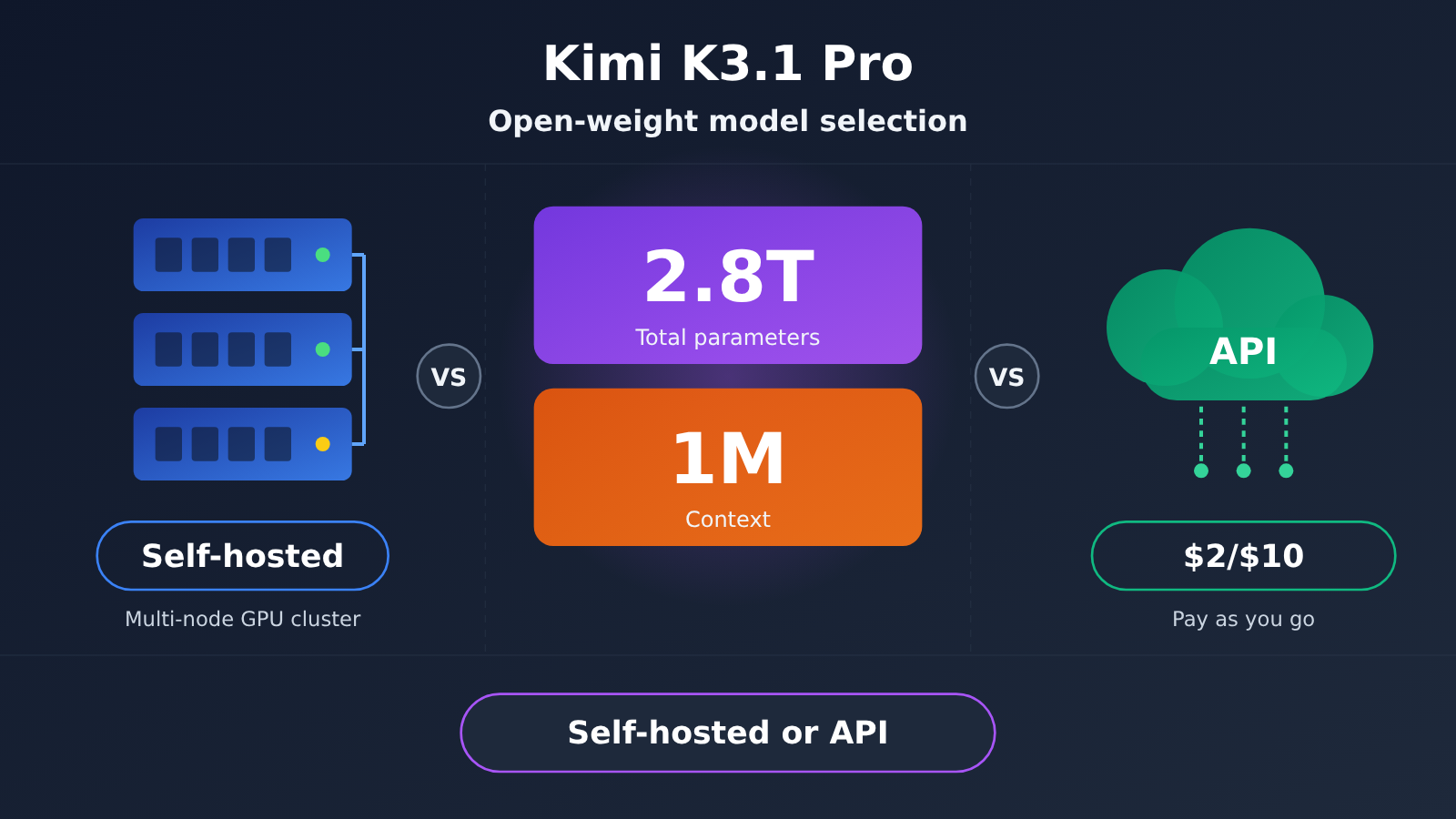
Kimi K3.1 Pro Specs: What 2.8T Parameters and a 1M Context Window Mean
Kimi K3.1 Pro is the first model in the K3.1 series and is available with open weights. It uses a mixture-of-experts (MoE) architecture with 2.8T total parameters, activating roughly 104B parameters per token. Think of it this way: storage costs scale with the full 2.8T, while compute costs are closer to those of a 104B-parameter dense model. That’s the trade-off with self-hosting MoE models: compute requirements aren’t quite as extreme, but GPU memory requirements are harder to reduce.
Another key feature is quantization-aware training (QAT). The model uses MXFP4 weights and MXFP8 activations, with quantization taken into account during training. That makes low-precision operation the model’s native form rather than a version compressed after the fact, theoretically keeping accuracy loss more manageable. It does, however, require inference hardware and engines that efficiently support MX microscaling formats.
| Specification | Kimi K3.1 Pro | What It Means for Model Selection |
|---|---|---|
| Architecture | MoE, 93 layers | Storage scales with total parameters; compute scales with active parameters |
| Total parameters | 2.8T | Determines weight size and minimum GPU memory requirements |
| Active parameters | 104B | Determines compute per token |
| Vision encoder | MoonViT-V2, 401M parameters | Native multimodal support; no add-on needed for image understanding |
| Quantization | MXFP4 weights / MXFP8 activations, QAT | Low precision is native, but depends on hardware support |
| Context | 1M tokens | Well suited to long documents and large repositories, but puts pressure on the KV cache |
| Target use cases | Coding, 3D creation, financial research, Agents | Focused on complex tasks and long sequences of calls |
Kimi K3.1 Pro’s 1M Context Window and Multimodal Capabilities
A 1M-token context window can fit a medium-sized code repository, a full set of financial reports, or extensive research materials in a single request—exactly what’s useful for Agent workflows and financial research. Native multimodal support also lets the model read images, screenshots, and charts directly, making it more useful for 3D creation and coding tasks.
Both capabilities come at a cost when self-hosting. Long context means the KV cache grows linearly with sequence length, and GPU memory usage can be substantial when you fill the full 1M context window. The vision encoder itself isn’t large, but preprocessing and batch scheduling for multimodal inputs make the inference service more complex. With an API, the provider handles all of that, and you pay only for the tokens you use.
Kimi K3.1 Pro Model Size and Hardware Requirements
Estimated Kimi K3.1 Pro Weight Size
First, a caveat: the sizes below are estimates based on parameter count. Actual file sizes will depend on the official release. MXFP4 uses approximately 4 bits, or 0.5 bytes, per parameter, so 2.8T parameters work out to roughly 1.4TB. The MX format also needs extra storage for block scaling factors, and components such as the vision encoder and embedding layers may retain higher precision. Actual files are therefore usually a little larger than the simple calculation suggests.
| Precision assumption | Bytes per parameter | Estimated size of 2.8T weights | Notes |
|---|---|---|---|
| MXFP4 | About 0.5 bytes | About 1.4TB | Officially promoted format; excludes scaling factor overhead |
| 8-bit level | About 1 byte | About 2.8TB | For comparison only; not officially recommended |
| BF16 | 2 bytes | About 5.6TB | For comparison only; illustrates the value of QAT |
The takeaway is that even with the most space-efficient MXFP4 format, the weights are already in the terabyte range. Downloading, verifying, and distributing them across multiple machines is an engineering project in itself, so you’ll need to plan for storage and internal network bandwidth in advance.
Kimi K3.1 Pro Self-Deployment Hardware Requirements
Using 1.4TB as a rough estimate, you’d need nearly 18 accelerator cards with 80GB of VRAM each just to hold the weights. That doesn’t include KV cache, activations, or inference engine overhead. A conventional 8-GPU server clearly isn’t enough. Even with newer-generation cards that have more VRAM per card, a single node could only just fit the weights, leaving little headroom for long contexts. In practice, the solution is essentially multiple GPUs across multiple machines, splitting the model using a combination of tensor parallelism, expert parallelism, and pipeline parallelism.
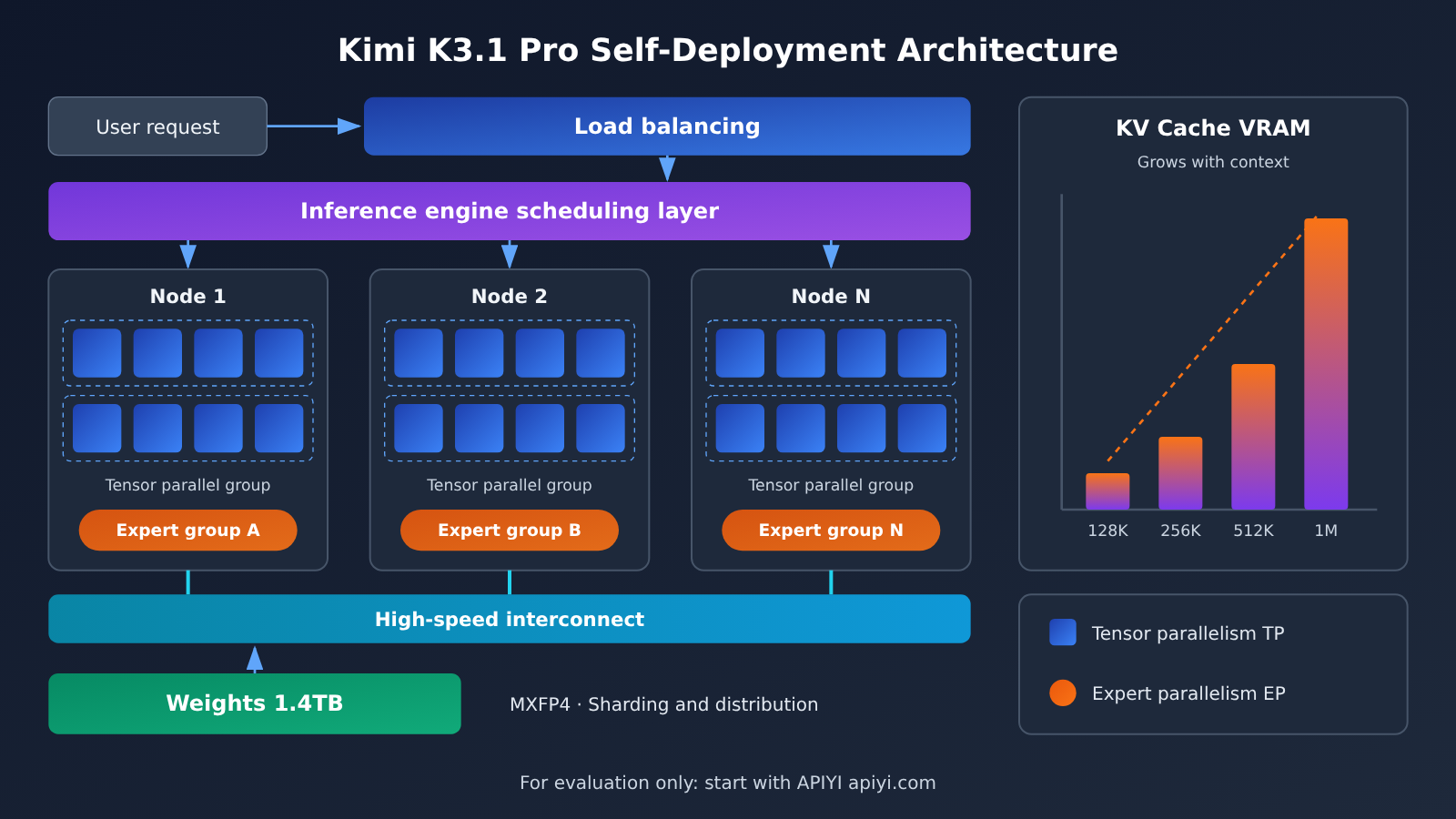
Beyond the hardware, several other costs are easy to underestimate:
- Inference engine and parallelism strategy: You’ll need an inference framework that supports MoE expert parallelism and the MX format. Check the official deployment documentation for recommended engines and parallel configurations.
- Inter-node interconnects: Expert parallelism generates substantial cross-node communication, so network bandwidth and latency directly affect throughput.
- Data center and power: Power supply, cooling, and rack space for a multi-machine GPU cluster all need to be arranged in advance.
- Peak capacity: Peak demand requires extra capacity, which becomes an idle compute cost during quieter periods.
- Operations staff: Model upgrades, troubleshooting, monitoring, and alerting all require ongoing work from engineers who understand GPU clusters.
It’s worth emphasizing that the reference materials don’t include official measured throughput or cost data, and this article doesn’t provide a definitive quote for building your own deployment. If you’re planning a project, rely on the official deployment documentation and your own load-testing results.
Kimi K3.1 Pro License: Open Weights Don’t Mean Unrestricted Commercial Use
“Open weights” and “open source with unrestricted commercial use” aren’t the same thing. Check the license before choosing a model. Many open-weight model licenses impose conditions on commercial use, such as revenue or user-count thresholds and requirements to disclose the model’s source in your product. For Kimi K3.1 Pro’s specific commercial terms, revenue thresholds, and notice requirements, always refer to the official license text.
Beyond direct commercial use, several other activities may have additional requirements:
- Distribution: Providing weights or derivative versions to third parties.
- Modification: How the license applies to models produced through fine-tuning, distillation, or merging.
- Hosted services: Offering a self-hosted model to others through an API is often a key scenario covered by license restrictions.
Have your legal and technical leads review the license together, clause by clause, and document their conclusions before buying hardware. When invoking the model through the official API or a third-party platform, the service terms generally apply, and weight distribution usually isn’t an issue. Even so, confirm that your data practices and intended usage comply with those terms.
Kimi K3.1 Pro API Pricing: How $2/$10 Adds Up
The official API model ID is kimi-k3.1-pro. It offers OpenAI- and Anthropic-compatible interfaces, so existing projects need minimal changes. Prices are per million tokens:
| Billing item | Standard kimi-k3.1-pro |
Highspeed | Notes |
|---|---|---|---|
| Input | $2 |
$4 |
Per million tokens |
| Output | $10 |
$20 |
Per million tokens |
| Cache hits | $0.20 |
Refer to official pricing | Repeated prefixes can significantly reduce costs |
| Cache writes | $2 |
Refer to official pricing | Same price as standard input |
| Speed | Baseline | About 3× | An option for latency-sensitive use cases |
Here’s an illustrative calculation (not a measured result, just a price conversion): Assuming 100 million input tokens and 20 million output tokens per month, the standard version costs approximately 100 × $2 + 20 × $10 = $400. If 70% of the input hits the cache, the input portion becomes 70 × $0.20 + 30 × $2 = $74, bringing the total down to about $274. For the same usage on Highspeed, the cost would be about $800 without caching.
That scale is telling: even with hundreds of millions of tokens per month, the API bill is far lower than the monthly depreciation, electricity, and staffing costs of a multi-machine GPU cluster. In agent workflows, system prompts and tool definitions are often highly repetitive, so taking advantage of cache-hit pricing is one of the most direct ways to reduce API costs.
For integration, if your client supports the OpenAI-compatible protocol, just change the base_url to https://api.apiyi.com/v1 and set the model name to the model ID provided by the platform. There’s no need to write an additional adapter.
🚀 Quick start: If your team wants to compare Kimi, Claude, GPT, and Gemini on the same task, you can access them through APIYI apiyi.com with a single API key and check the model list, usage, and logs in the console. For availability and current pricing of
kimi-k3.1-pro, refer to the live information in the console.
Kimi K3.1 Pro Self-Deployment vs. API: Key Differences
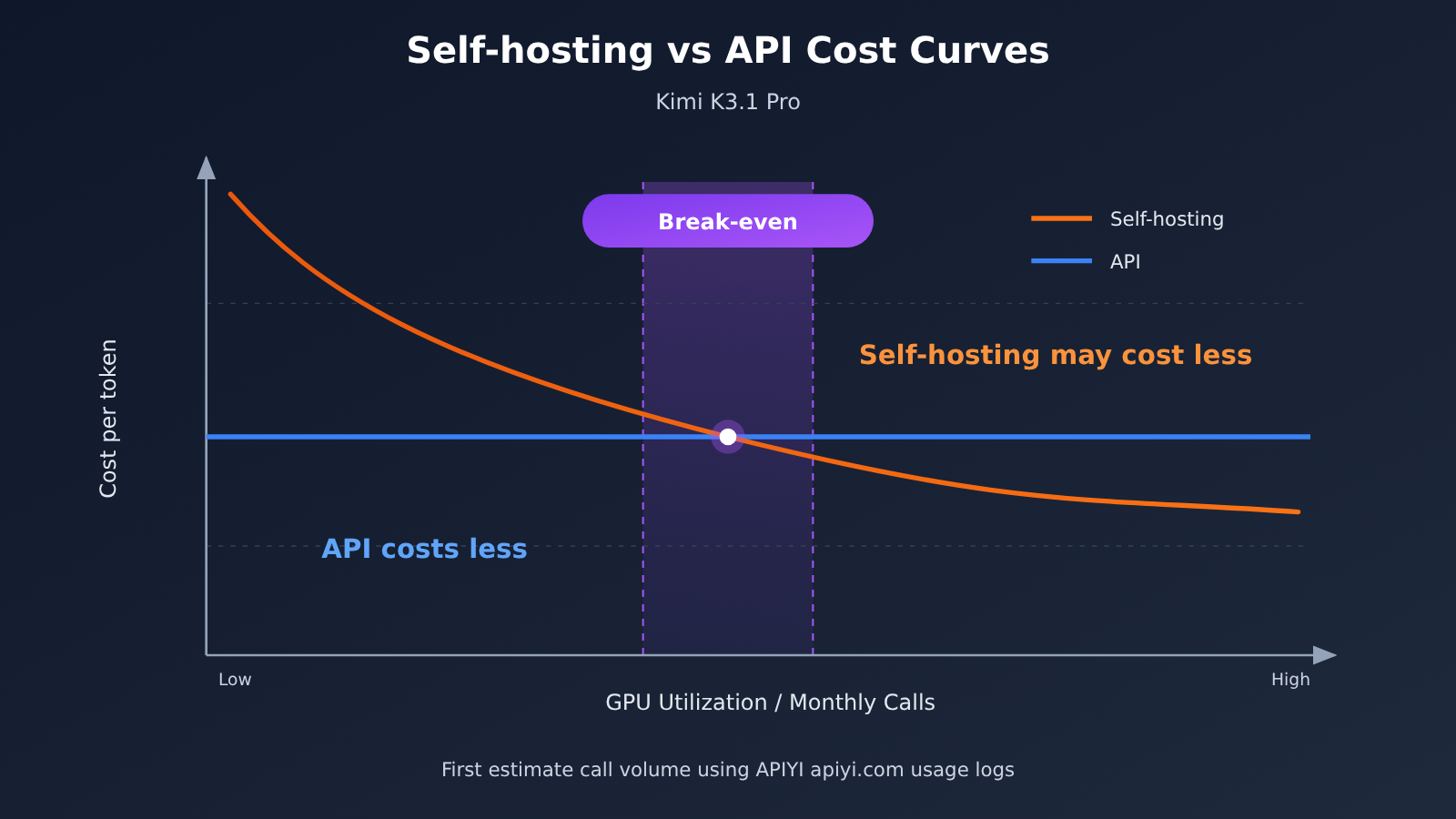
The fundamental difference between self-deployment and an API is the cost structure. An API has purely variable costs: you pay for what you use, and nothing when you don’t. Self-deployment combines high fixed costs with low marginal costs. Once you’ve invested in hardware, facilities, and staff, you’re paying whether the cluster is fully utilized or not. That makes utilization the deciding factor: only when a cluster consistently runs at high load can its cost per token potentially fall below API pricing.
| Decision factor | Self-deployed Kimi K3.1 Pro | API | Recommendation |
|---|---|---|---|
| Utilization | Needs sustained high load to spread costs | Pay as you go, with no idle capacity costs | Choose API for low-to-moderate usage |
| Data compliance | Data can stay entirely within your environment | Data must be sent to the service provider | Choose self-deployment for heavily regulated environments |
| Upfront investment | Significant investment in multi-server GPU infrastructure, facilities, and networking | Almost zero | API |
| Operations costs | Requires dedicated GPU cluster operations staff | Handled by the service provider | API |
| Peak scalability | Requires spare capacity; scaling is slow | More flexible, subject to rate limits | API |
| Customization | Supports fine-tuning and inference configuration changes | Limited to available API parameters | Choose self-deployment for deep customization |
| Time to launch | Weeks to months | Hours | API |
| Access options | Build your own inference service | Official API, APIYI apiyi.com, and other platforms | Depends on your needs |
API comparison: APIs have the edge in time to launch, scalability, and total cost of ownership, but data must leave your environment and the available configuration parameters are limited. Self-deployment offers more control over data and deeper customization, making it better suited to heavily regulated teams with very high invocation volumes.
Self-deployment comparison: Self-deployment has the potential to offer lower unit costs and greater control, but upfront investment, operations staffing, and the risk of idle capacity are all significant. For teams with fluctuating usage or no dedicated GPU team, an API remains the safer choice.
Kimi K3.1 Pro Use Cases and Recommendations
Teams That Should Use the Kimi K3.1 Pro API
- Startups and small-to-medium teams: Without a GPU cluster or dedicated operations staff, the API is the only practical option.
- Businesses with fluctuating usage: Whether traffic peaks during the day and dips at night or surges during promotional events, pay-as-you-go pricing avoids paying for idle capacity.
- Projects that need to launch quickly: Speed matters most when validating a product, and API integration can be completed in a few hours.
- Teams evaluating multiple models: When comparing models on the same task, a unified interface is much easier than deploying each one separately.
Teams That Should Self-Deploy Kimi K3.1 Pro
- Data must stay within the network: In finance, healthcare, government, and enterprise settings, compliance may require data to remain entirely on internal networks.
- High, steady usage: Sustained workloads run 24/7, keeping utilization high over the long term.
- An existing GPU cluster and operations team: Additional costs are manageable, and the model can be incorporated into existing infrastructure.
- Deep customization needs: The team needs to fine-tune open weights or make specialized inference optimizations, provided the license allows it.
A Hybrid Approach
There’s another option that’s often overlooked: use the API for prototyping, then reassess self-deployment for production. Or take the reverse approach: self-deploy for sensitive core data and use the API for general traffic. The first approach replaces guesswork with real usage data; the second balances compliance and flexibility.
💡 Recommendation: Before investing in hardware, run real production traffic through APIYI at apiyi.com for a while. Use the console’s usage logs to track daily token counts, peak-to-trough ratios, and cache hit rates. These figures are the most reliable basis for deciding whether self-deployment is cost-effective.
FAQ
Q1: Can I self-host Kimi K3.1 Pro on a single server?
At MXFP4 precision, the weights are estimated to require about 1.4TB, which won’t fit on a typical 8-GPU server. Even nodes with more VRAM per GPU would struggle to leave enough room for the KV cache at a 1M context window. A practical approach is to deploy across multiple GPUs and servers. Check the official deployment documentation for specific configurations.
Q2: Do 104B activated parameters mean hardware requirements are based on just 104B parameters?
No. Activated parameters determine the compute required per token, but the weights for all experts need to remain in GPU memory. VRAM requirements are still based on the full 2.8T parameters. That’s the defining trade-off of an MoE model: less compute, but more memory.
Q3: Can I use the model commercially once its weights are open?
Not necessarily. Open weights don’t mean unrestricted commercial use. Revenue thresholds, notification obligations, and restrictions on hosted services depend on the official license. It’s a good idea to have your legal team review it before purchasing hardware.
Q4: How can I try the Kimi K3.1 Pro API at a low cost?
You can sign up at APIYI, apiyi.com, and use the free testing credits for new users to connect your existing project through an OpenAI-compatible interface. One API key can access the Kimi family and models like Claude, GPT, and Gemini. Check the console for `kimi-k3.1-pro` availability and pricing.
Q5: How do I choose between the Standard and Highspeed versions?
Highspeed costs `$4/$20`, twice the price of the Standard version, and is about three times faster. It’s a good fit for real-time user interactions and agents sensitive to time-to-first-token latency. For offline batch processing and background tasks, the Standard version with caching is more cost-effective.
Summary: Kimi K3.1 Pro Self-Deployment vs. API Checklist
Kimi K3.1 Pro’s open weights are a good thing: they give teams with the necessary resources a fully controlled option. But its 2.8T parameters make it a cluster-scale model. The real barriers to self-deployment aren’t just downloading the weights—they’re hardware, utilization, operations, and licensing. For most teams, the lowest-risk path is to get the business running on the $2/$10 API first, then use real usage data to decide whether to self-deploy.
Kimi K3.1 Pro Key Takeaways
- Specs: 2.8T total parameters, 104B active parameters, 93 MoE layers, native multimodal support, and a 1M context window.
- Weights: Estimated at around 1.4TB with MXFP4; the official files are the final reference. They won’t fit on a single machine.
- Hardware: Requires parallel deployment across multiple GPUs and machines, with GPU memory reserved for the long-context KV cache.
- License: Open weights don’t mean unrestricted commercial use. Check the official license for the applicable terms.
- Pricing: Standard tier
$2/$10, cache hit$0.20, Highspeed$4/$20. - Decision: Utilization is the key variable. Choose the API first for low-to-moderate or highly variable workloads.
Self-Deployment vs. API Checklist
| Check | Signals to choose the API | Signals to self-deploy |
|---|---|---|
| Usage volume | Low or highly variable monthly usage | Sustained high utilization 24/7 |
| Data compliance | Data can be sent to a service provider | Data must stay on the internal network |
| GPU capabilities | No cluster or dedicated operations team | Existing multi-machine cluster and operations team |
| License | Don’t want to handle distribution and hosting terms | Legal team has confirmed commercial-use terms |
| Time to launch | Need to launch and validate quickly | Can accept a deployment timeline of weeks to months |
| Cost data | No real usage statistics yet | Break-even point calculated using real data |
If most items on your checklist fall in the left column, go with the API. We recommend using APIYI at apiyi.com to access the Kimi family and other major models with a single API key. Use the console’s usage logs to build up real data, then evaluate self-deployment when your usage volume and compliance requirements justify it.
Author: APIYI Technical Team
Technical discussions: Contact us through the APIYI homepage. For more integration details, visit the documentation center at docs.apiyi.com.


