
Wiring a third-party Large Language Model API into production is never hard at the moment the first line of code runs. What decides whether a project ships reliably is the stuff you can’t see in advance, the problems that show up in the first month after launch: a request comes back but the format is wrong, the client times out but the platform has already billed you, the primary channel goes down and the fallback quietly switches to a pricier model, and three months later you go to do a postmortem and find the logs have been purged.
This isn’t another “which API platform is best” recommendation post. We won’t repeat the adjectives from vendors’ marketing pages, and we won’t rank any platforms. We’re covering one actionable question: before launch, what verifiable evidence can you pull together to judge whether a Large Language Model API proxy service or gateway is dependable?
Core value: By the end, you’ll have a checklist of 7 acceptance items and a conclusion table that turn “seems fine” into “backed by evidence.”
Terminology First: Six Terms to Get Straight Before Going Live
Before we get into the acceptance method, let’s align on a few terms that come up again and again. Vendor docs and technical articles often use them inconsistently, and inconsistent definitions are a launch risk in their own right.
- API gateway: The entry point that receives your application’s requests and forwards them to the upstream model service. It usually handles authentication, billing, routing, and logging all at once, so a failed call can originate at any layer of the chain. You need to work out who’s responsible for what up front.
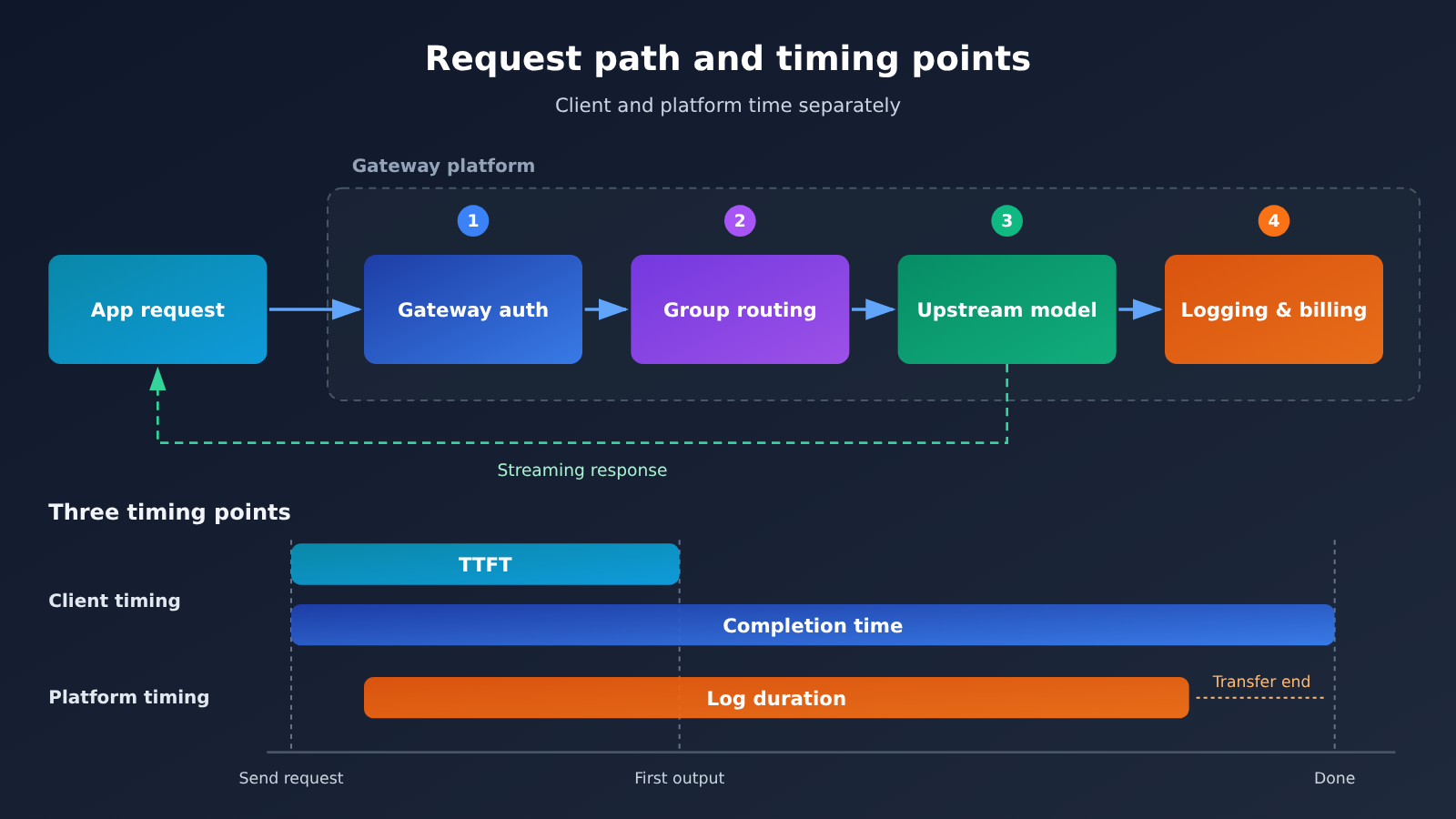
- TTFT (time to first token): The time from sending a request until the first valid output token arrives. In streaming interactions, this is the number users actually feel, not the total time for the full response.
- p95: The metric value that about 95% of samples don’t exceed. Averages hide slow requests; p95 exposes the small batch of calls that occasionally hang for ten-plus seconds.
- RPM vs. concurrency: RPM is the number of requests sent per minute, while concurrency is the number of requests still in flight at the same moment. The longer each request takes, the more in-flight concurrency can pile up even at a low RPM, so you need to record the two separately.
- Fallback: The mechanism that tries a backup channel or model when the primary service can’t fulfill a request. When you validate it, check the final model, core features, cost ceiling, and data policy together, not just whether the request succeeded.
- SLA: A service-level agreement that defines how metrics are measured, the scope of coverage, who’s responsible for failures, and the conditions for compensation. It’s an enforceable contract, not a standalone percentage you can quote.
Core message: gateway reliability breaks down into 5 verification layers
The value of a Large Language Model API proxy and gateway lies in a unified interface — but the convenience of that unified interface is exactly what masks the differences underneath. Behind a single OpenAI-compatible base_url you might find a completely different upstream provider, rate-limit policy, log-retention rule, and incident-handling process.
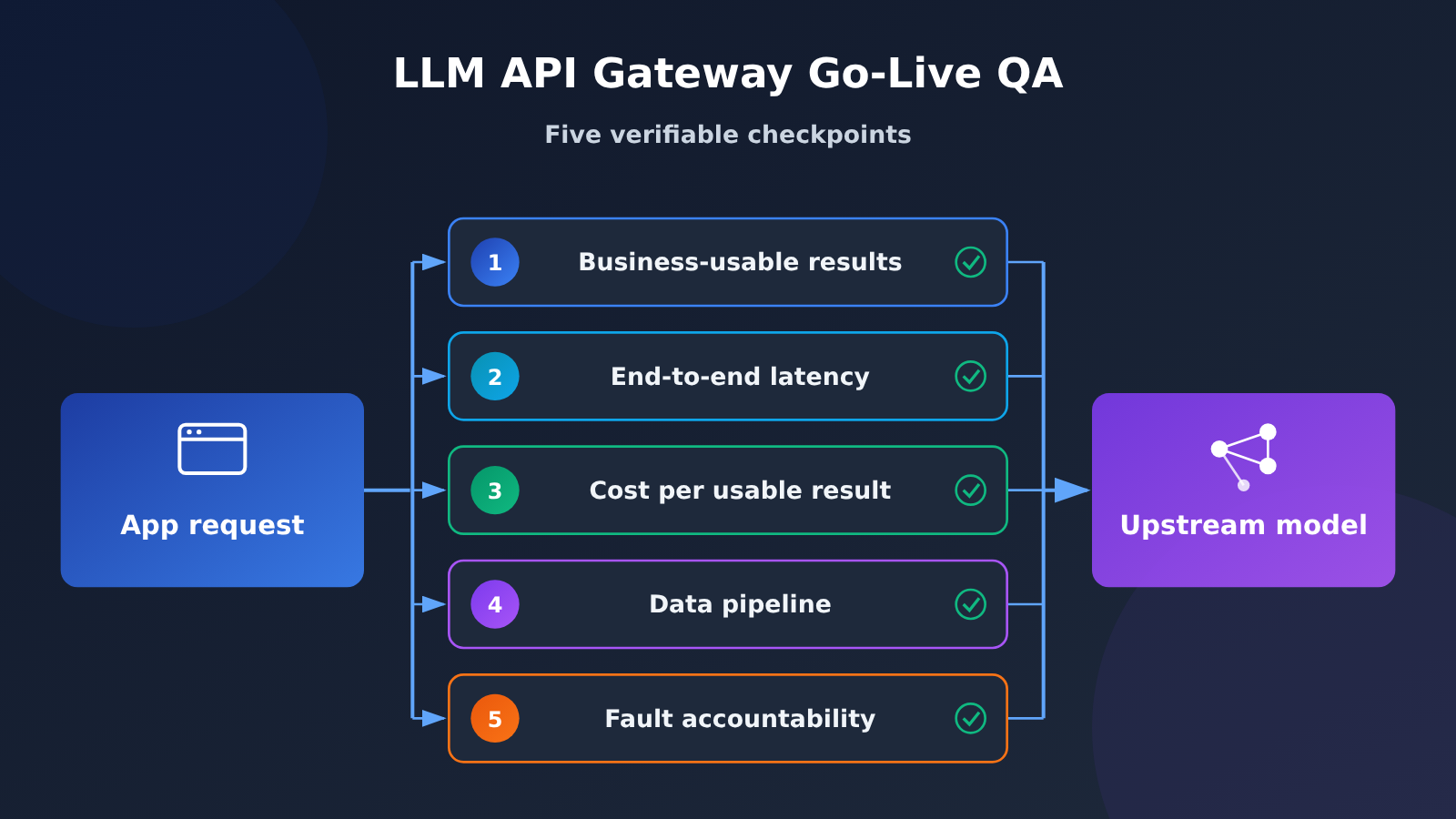
So a go-live decision can’t stop at “does it connect”. You have to watch three things at once: is the result usable, is the wait acceptable, and is an anomaly traceable. The table below expands those three into five verification layers — and they’re the backbone of the five sections that follow.
| Verification layer | Question to answer | Evidence to judge by | Common misjudgment |
|---|---|---|---|
| Business-usable result | Can the returned content go straight into the business workflow | Count of complete responses, count of format-usable responses, count passing business validation | Treating HTTP 200 as success |
| End-to-end latency | How long before the user sees the first piece of valid output | p50 and p95 of TTFT and completion time, timed separately on client and platform | Looking only at average duration |
| Cost per usable result | How much did each usable result actually cost | Total settled spend divided by count of business-usable results | Comparing unit price only, ignoring retries and fallbacks |
| Data path | Who handles input and output, how long it’s retained, who can see it | Layered policies across gateway, upstream, logs, and async artifacts | Mistaking transport encryption for content being unreadable |
| Incident accountability | What criteria determine fault, and how compensation works | SLA statistical period, exclusions, claim process, and form of compensation | Treating a public statement as a contractual commitment |
🎯 Technical recommendation: Copy this table into your own team’s acceptance checklist, and every row must have an evidence source filled in. If you need to get the call chain working first, you can get test credits through APIYI apiyi.com and use the same script to record results across multiple models side by side.
Why Reliability Should Be a Business Acceptance Criterion
A unified interface lowers the cost of integration, but it also pushes a pile of judgments that used to belong to infrastructure onto the application team. Before, you maintained your own retry logic and juggled multiple SDKs; now you change one base_url and you can call a whole range of models. The price is that you have less visibility into the chain.
So the first step in acceptance isn’t measuring performance — it’s defining “available” clearly. For a single request, three things can happen: the platform bills it successfully, the client gets a 200, and the business side parses it. These are distinct events and each needs its own count. A structurally invalid JSON blob is still zero output for the business even when the platform completed the request normally — and it still gets billed.
Second, split your test sets by workload shape. For interactive Q&A, look at time to first valid output and time to complete reply. For tool calls, look at whether the argument structure is legal and the fields are all present. For batch jobs, look at how many usable results you can produce before the delivery deadline. Mash all three into one “average latency” number and the conclusion you get is guaranteed to be misleading.
Third, align your timing conventions. The wait the client experiences and the time recorded in platform logs don’t cover the same stages — the official documentation has already spelled out the case where the platform records success and bills it while the client times out during response transfer or connection teardown. Automatic failover to other routes in the background also stretches total wait time. So for every anomaly, first reconcile three things using the business ID and the request_id — your client record, the platform log, and the balance change — and only then decide whether to retry.
How to Test Gateway Capability and Peak Load with Fixed Tasks
If you want your tests to be reproducible, you have to pin down the variables first: the target model version, the channel or group, the calling interface, the core parameters, the network entry point, the input and output size, and whether the call streams. Change any one of them, and the two data sets you collected before and after can no longer be compared side by side. Samples must come from real business data that has been redacted and anonymized — not toy inputs like “hello”.
The table below is an acceptance-record template you can put to work right away. It’s a methodological suggestion, and it carries no measured conclusions from any platform. You set the thresholds yourself based on what the business needs: for an interactive task, perhaps the first valid output has to land within a certain number of seconds; for an offline task, perhaps you need a certain number of usable results delivered within a few hours.
| Dimension | What to record | How to judge |
|---|---|---|
| Business delivery success | Total requests, complete returns, format-usable returns, business-passed returns | Write out the full denominator; the final metric is the share of business-usable results |
| Latency | Start time, time to first valid output, completion time, duration in platform logs | Time it on the client and on the platform separately, and report p50 and p95 |
| Core capabilities | Stream finalization, tool-argument validity, structured-output parsing, long-input handling | Pass each capability your product actually relies on, one item at a time |
| Peak load | Concurrent in-flight requests, requests per minute, 429 rate, queueing and retries | Hold request size constant, add load one step at a time, and leave an observation window |
| Cost | Charge per call, refunds, fallback charges, number of business-usable results | Work out the total cost shouldered by each usable result |
| Troubleshootability | Business ID, request_id, model and group, error code, ticket reply | You can trace an anomalous order back to platform records |
The script below does just one thing: during a streaming call it records both the time to first valid output and the total elapsed time, so you can line up client-side timing and platform logs on the same timeline.
import time
from openai import OpenAI

client = OpenAI(
    api_key="YOUR_API_KEY",
    base_url="https://api.apiyi.com/v1"  # APIYI unified endpoint
)

start = time.perf_counter()
stream = client.chat.completions.create(
    model="gpt-4o-mini",
    messages=[{"role": "user", "content": "用一句话说明什么是 API 网关"}],
    stream=True,
)
ttft = None
for chunk in stream:
    delta = chunk.choices[0].delta.content
    if delta and ttft is None:
        ttft = time.perf_counter() - start
total = time.perf_counter() - start
print(f"TTFT {ttft:.3f}s / total {total:.3f}s")
View the batch load-testing and percentile-statistics code
import statistics
import time
from openai import OpenAI

client = OpenAI(
    api_key="YOUR_API_KEY",
    base_url="https://api.apiyi.com/v1"  # APIYI unified endpoint
)

def one_call(prompt: str) -> dict:
    start = time.perf_counter()
    ok, ttft = False, None
    try:
        stream = client.chat.completions.create(
            model="gpt-4o-mini",
            messages=[{"role": "user", "content": prompt}],
            stream=True,
        )
        for chunk in stream:
            delta = chunk.choices[0].delta.content
            if delta and ttft is None:
                ttft = time.perf_counter() - start
        ok = True
    except Exception as exc:
        return {"ok": False, "ttft": None,
                "total": time.perf_counter() - start, "err": type(exc).__name__}
    return {"ok": ok, "ttft": ttft,
            "total": time.perf_counter() - start, "err": None}

def summarize(rows: list) -> None:
    done = [r for r in rows if r["ok"]]
    totals = sorted(r["total"] for r in done)
    print(f"成功率 {len(done)}/{len(rows)}")
    if totals:
        print(f"p50 {statistics.median(totals):.3f}s")
        print(f"p95 {totals[int(len(totals) * 0.95) - 1]:.3f}s")

rows = [one_call("把下面这句话翻译成英文:请检查订单状态。") for _ in range(50)]
summarize(rows)
The most common mistake in load testing is treating RPM and concurrency as the same thing. Requests per minute, tokens per minute, and in-flight requests are three different constraints, and none of them can stand in for another. Retries also amplify pressure on the system once latency starts climbing, so your script needs a local queue, a maximum wait time, and capped backoff retries.
There’s one easily overlooked detail here: the APIYI docs aren’t entirely consistent about the scope of rate limits between the “Concurrency” page and the “Tokens and Groups” page. The former says quotas are independent across multiple tokens, while the latter says rate limits follow the account. The right approach during acceptance testing is to measure the actual quota on your own target account and target channel, recording concurrency and RPM separately. Don’t reuse the fixed numbers from someone else’s screenshot, and don’t try to get around limits by creating extra keys.
How to Check Cost Per Usable Result and Fallback Behavior
What’s worth comparing more than unit price is the actual cost per usable business result. The formula is simple: the numerator is all settled spend (including retries and fallbacks), the denominator is the number of usable business results, and any confirmed refunds are subtracted from the numerator.
Below is a purely hypothetical example that only illustrates the calculation. It doesn’t represent any provider’s pricing.
| Option | Net Settled Spend | Usable Business Results | Cost per Usable Result |
|---|---|---|---|
| Option A | $3.0 | 90 | ~$0.0333 |
| Option B | $3.2 | 98 | ~$0.0327 |
Looking at spend alone, Option A is cheaper. Measured per usable result, Option B actually comes out ahead. That’s why “who’s cheaper?” is a meaningless question without a business denominator. Two more things to watch for: quota that’s been pre-deducted for async tasks but not yet settled should be listed separately, and simply summing up consumption records may overstate net spend, because refunds for async tasks show up as negative entries in your billing history.
Fallback behavior breaks down into two very different kinds of change. A channel switch moves you to a different route for the same model, so model capability and price should theoretically stay the same. A model switch tries other models from a list when the primary model is unavailable. This is a common mechanism in the industry. OpenRouter’s model fallbacks, for example, explicitly state that billing is based on the model actually used, and that the final model is reported in the response’s model field. This example is only meant to illustrate the mechanism; don’t assume the field semantics carry over to other platforms.
So your acceptance checklist should cover at least four points: which model actually served the request after fallback, whether the core functionality still works, whether there’s a cap on the cost of a single request, and what the maximum wait time is. If a given workload doesn’t allow model switching, you’ll also need to confirm that fallback can be turned off. Streaming scenarios need their own test: if a failure happens after partial output has already been returned, can the stream be picked up seamlessly? You can’t infer that from a successful fallback in non-streaming mode.
💡 Tip: Compare direct-connection pricing and fallback paths in the same table, and you’ll see the real cost. To quickly get actual billing records across multiple models, you can run a small sample through APIYI at apiyi.com, then bring the results back to your own acceptance sheet and do the math.
How to Verify Your Data Pipeline and Fault Liability
These two areas tend to get glossed over with phrases like “we’re secure” or “we’re stable,” yet they’re the only things that can save you when something goes wrong. The way to verify them is to lay out the gateway, upstream model providers, detailed troubleshooting logs, and asynchronous outputs along a single data pipeline, then ask about the policy at each layer.
| Pipeline Stage | Policies to Verify | How to Verify |
|---|---|---|
| The gateway itself | Whether inputs and outputs are stored by default, who can enable troubleshooting logs, and how long they’re retained | Read the official data security and logging documentation |
| Upstream model providers | Training usage, retention period, whether opt-in authorization is required | Read each upstream provider’s policy separately; don’t merge them into one |
| Detailed troubleshooting logs | Scope of recording, who can view them, default retention period, and when deletion happens after logging is turned off | Confirm that turning the switch off doesn’t mean existing records are deleted immediately |
| Asynchronous task outputs | Where outputs are stored, how long download links stay valid | Save outputs on your own side promptly; don’t rely on temporary links |
According to its public documentation, APIYI’s standard policy is not to store customer inputs and outputs by default. Administrators can temporarily enable detailed troubleshooting logs to record full inputs, context, and outputs. That content is visible only to administrators, and the default retention period shown on the page is 7–30 days. The same page also notes that turning off the logging switch shouldn’t be read as meaning existing records have been deleted immediately. When you cite statements like these, keep the attribution to “the official documentation says.” They aren’t a compliance certification, and they aren’t a legal conclusion.
There’s another operational fact that often gets overlooked: logs have a lifecycle too. APIYI’s dedicated log retention page states that invocation logs are kept on a rolling basis for roughly the most recent two months. On the 5th, 15th, and 25th of each month, records older than two months from that date are deleted, and the cleanup can’t be undone. If you need detailed records for long-term reconciliation and auditing, you’ll have to export and save them yourself. Storage periods for synchronous results and asynchronous outputs differ again, and the page says output download links are valid for about one day. If you wait past that window to do a post-mortem, you won’t have any evidence left.
Fault liability has to come down to clauses you can actually act on. APIYI’s dedicated SLA page covers credit reissuance when losses are caused by the platform, and says enterprises can agree in a contract on the scope of coverage, availability targets, response times, and a liability cap. It doesn’t give every customer a single fixed uptime figure. When comparing vendors, record each metric’s measurement period, how the denominator is defined, exclusions for outages, the claims process, and the form of compensation. Also be clear about the difference in procurement value between service credits and cash compensation.
Use a Single Acceptance Table to Decide Your Rollout Scope
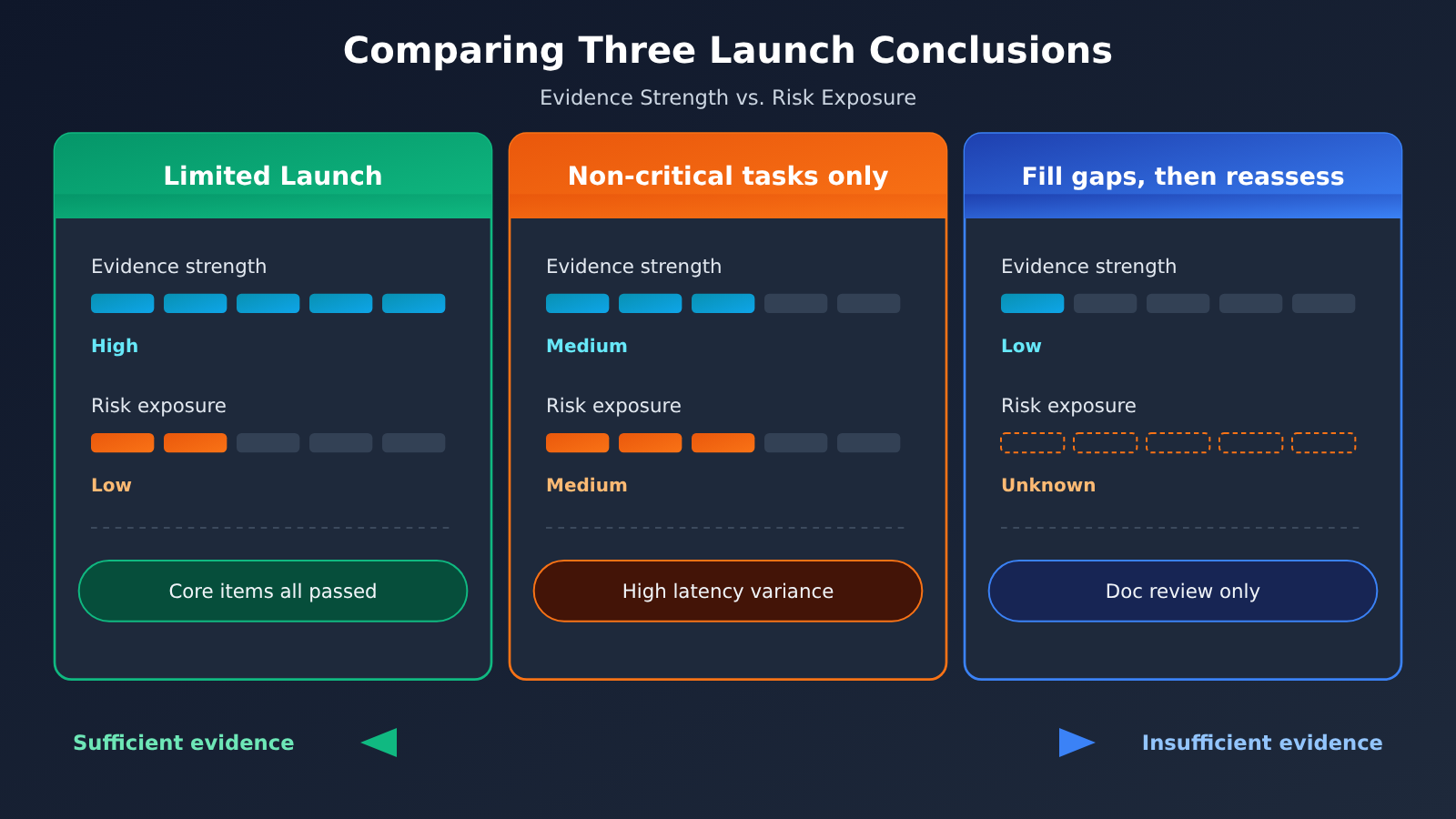
When you pull all your records together into a conclusion, don’t hand down a “reliability ranking” — make a scope judgment. The same vendor that’s only good enough for “non-critical tasks” in your interactive workload may be perfectly adequate for your offline batch processing.
| Conclusion | Evidence you need to produce | Trigger to switch or stop |
|---|---|---|
| Cleared for limited rollout | Core capabilities pass item by item, p95 is within your business threshold, cost per usable result is acceptable, and the data pipeline and SLA have been verified | Business availability falls below the threshold on consecutive occasions, or billing anomalies can’t be reconciled |
| Non-critical tasks only | Capabilities pass but latency is volatile, or the fallback changes the model and the cost | Move critical paths back to self-hosted or direct connections, and explicitly disable the fallback strategy |
| Re-evaluate once conditions are met | You only have document review, no hands-on testing on your own account, or the SLA terms haven’t made it into the contract | Re-run the conclusion once the test data and contract terms are in place |
If document review is all you can do for now, write the conclusion honestly as “public capabilities and procurement terms verified,” and push the actual acceptance testing to the next round. When you need to verify how the vendor handles failures, use a test configuration or isolated environment the vendor permits — don’t deliberately interfere with shared production services. If a call times out and the outcome is unclear, check execution and billing first so you don’t repeat the same business action twice.
🚀 Quick start: If you’d rather not build a test script from scratch, start with the free test credits at APIYI apiyi.com to run through the “capabilities” and “latency” columns of the 7-item checklist above, then decide whether to move on to heavier load testing.
FAQ
Q1: What exactly is a Large Language Model API proxy service and gateway?
It’s the entry layer between your application and the upstream model services: it receives requests and then handles authentication, billing, routing and forwarding, and logging. The “proxy” part of the name emphasizes that it collapses several providers behind one compatible interface — so what you gain is integration convenience, and what you give up is visibility into the underlying chain.
Q2: Where does reliability differ between calling the official API directly and going through a proxy gateway?
The difference is in the number of hops and where responsibility ends. With a direct connection you only have one upstream to reason about; through a gateway, three layers — the gateway itself, the grouped channel, and the upstream provider — can each become a point of failure, though you also gain a possible extra layer of fallback and unified logs. The way to judge isn’t to compare who’s faster, but to gather evidence separately across the five dimensions laid out in this article.
Q3: Why isn’t average latency enough?
Because an average hides the handful of very slow requests — and those are usually exactly what users complain about. For streaming interactions you should also track TTFT and full completion time separately, and state the sample size, time window, and whether failures, queueing and retries are included; otherwise even p95 isn’t comparable.
Q4: The request succeeds but the content is unusable — does that count as a platform problem?
Usually not, but the cost still counts. The platform bills as soon as it completes a request normally; an invalid output structure is something the business side has to retry, and that duplicate spend belongs in the numerator of “cost per usable result.” That’s why your acceptance sheet needs two separate columns: platform execution succeeded, and business validation passed.
Q5: How can I quickly check whether a gateway can support my workload?
Take your own de-identified samples with the model, channel, parameters and input size held fixed, run one small batch, and record TTFT, p95, the share of usable results, and the billing breakdown. You can claim test credit through APIYI at apiyi.com to run that round, then put the numbers back into the acceptance sheet — rather than drawing conclusions from a single connectivity test.
Q6: What are the known limitations of this approach?
p95 on a small sample swings a lot, so it’s no basis for a long-term service commitment; upstream load also varies across time slots, so you need to repeat the run at several different times. On top of that, every calculation here is a methodological suggestion — none of it is measured performance data or actual invoices from any platform — and the final call still has to combine your own business thresholds with your contract terms.
Key Takeaways for Large Language Model API Proxy Gateways
- Define reliability by business acceptance: A successful billing event on the platform, a 200 on the client, and a passing business-level parse are three separate things. Count them separately.
- Measure latency at two timing points: TTFT determines the interactive experience, while full completion time determines delivery capacity. Check p95 for both.
- Track RPM and concurrency separately: Even a low RPM can pile up high in-flight concurrency. Treat rate limits as whatever you measure on your own target account.
- Calculate cost per usable result: Divide all settled spend by the number of business-usable results. Retries and fallbacks belong in the numerator.
- Distinguish channel switching from model switching in fallbacks: Verify the final model, core features, cost cap, and maximum wait time one by one.
- Look for enforceable terms on data and liability: Logs have a retention window, and an SLA needs a defined measurement method, exclusions, and a form of compensation.
- How to get started: Use APIYI (apiyi.com) to run a small sample through the capability and latency columns first, then move on to load testing and contract review.
Summary
Deciding whether a Large Language Model API proxy gateway is trustworthy is really a forensics problem, not a matter of impressions. Break “does it work?” into five layers: business-usable results, end-to-end latency, cost per usable result, the data path, and fault liability. Keep a verifiable record for each one, and you can turn most surprises into known quantities before launch.
When you put this into practice, keep three rules in mind. State conclusions only within their scope, and don’t rank. Cite only the metrics you measured yourself, not someone else’s screenshots. Write down evidence only to the extent it can be rechecked, because logs expire. Follow these, and your vendor selection discussions will no longer depend on whoever speaks loudest.
We recommend starting with a small-sample acceptance round through APIYI (apiyi.com). The platform offers a unified interface and free test credits, so you can compare multiple models side by side in a single table.
References
- APIYI Tokens and Groups: Multiple keys, quotas, resource groups, and fallback groups
- Link:
docs.apiyi.com/faq/token-and-groups -
Notes: Check key allocation, resource groups, and the primary/backup channel mechanism
-
APIYI Log Retention and Cleanup Policy: Rolling log retention and export instructions
- Link:
docs.apiyi.com/faq/log-retention-policy -
Notes: Confirm how long you need to keep your own copy of the details required for reconciliation and audits
-
APIYI Detailed Log Guide: Scope and retention period for troubleshooting logs
- Link:
docs.apiyi.com/faq/user-logs-control -
Notes: Check the log levels along the data path
-
APIYI Data Security Overview: Policy of not storing inputs or outputs by default
- Link:
docs.apiyi.com/faq/data-security -
Notes: Read alongside the upstream providers’ policies, layer by layer
-
APIYI SLA Guarantee: Quota reissuance and the scope of contractual terms
- Link:
docs.apiyi.com/faq/sla-guarantee -
Notes: Understand the form and limits of compensation for outages
-
How to Read the Billing Amounts in Your Logs: Billing fields and multiplier conventions
- Link:
docs.apiyi.com/faq/log-billing-explained -
Notes: Use it to calculate the actual cost of each usable result
-
Log Shows Completed and Charged, but the Client Never Received a Response: Client timeouts vs. platform billing
- Link:
docs.apiyi.com/faq/log-duration-vs-client-wait -
Notes: Essential reading when investigating abnormal orders
-
Link:
openrouter.ai/docs/guides/routing/provider-selection -
Notes: Understand the difference between switching channels and switching models
-
OpenRouter Model Fallbacks: Model fallbacks and how the actual billing is determined
- Link:
openrouter.ai/docs/guides/routing/model-fallbacks - Notes: Shows how the industry handles the final model and billing attribution
Author: APIYI Technical Team
Technical discussion: Feel free to reach us on the APIYI apiyi.com homepage. For more documentation, visit the docs.apiyi.com documentation center.


