

Author’s note: This article breaks team procurement of a Large Language Model API into five checks: payment and invoicing, billing reconciliation, per-project key assignment, data responsibility, and exit conditions. The goal is to help your team sort out credentials and permissions before topping up.
More and more teams are moving Large Language Model APIs from individual trials to centralized purchasing. Payment, invoicing, reconciliation, and key permissions are now questions that project leads, finance, procurement, and technical leads all have to answer together. This article draws on vendor documentation publicly available as of November 11, 2026 (Beijing time) and turns it into a checklist your team can fill in right away.
This isn’t a beginner’s guide where “it’s paid and it responds” counts as done. Team purchases usually go wrong in a few predictable places: the invoice type doesn’t meet reimbursement requirements, the usage bill doesn’t match the amount actually paid, keys are scattered across multiple people so nobody is accountable, and leftover balances can’t be handled after the trial ends.
For illustration, the article uses the public workflow of APIYI (apiyi.com) to show how corporate bank transfers, prepaid top-ups, channel-specific invoicing, and multi-key management fit together. All vendor terms belong to their respective platforms. They don’t replace your contract with the vendor, testing on your own account, or your organization’s finance guidance.
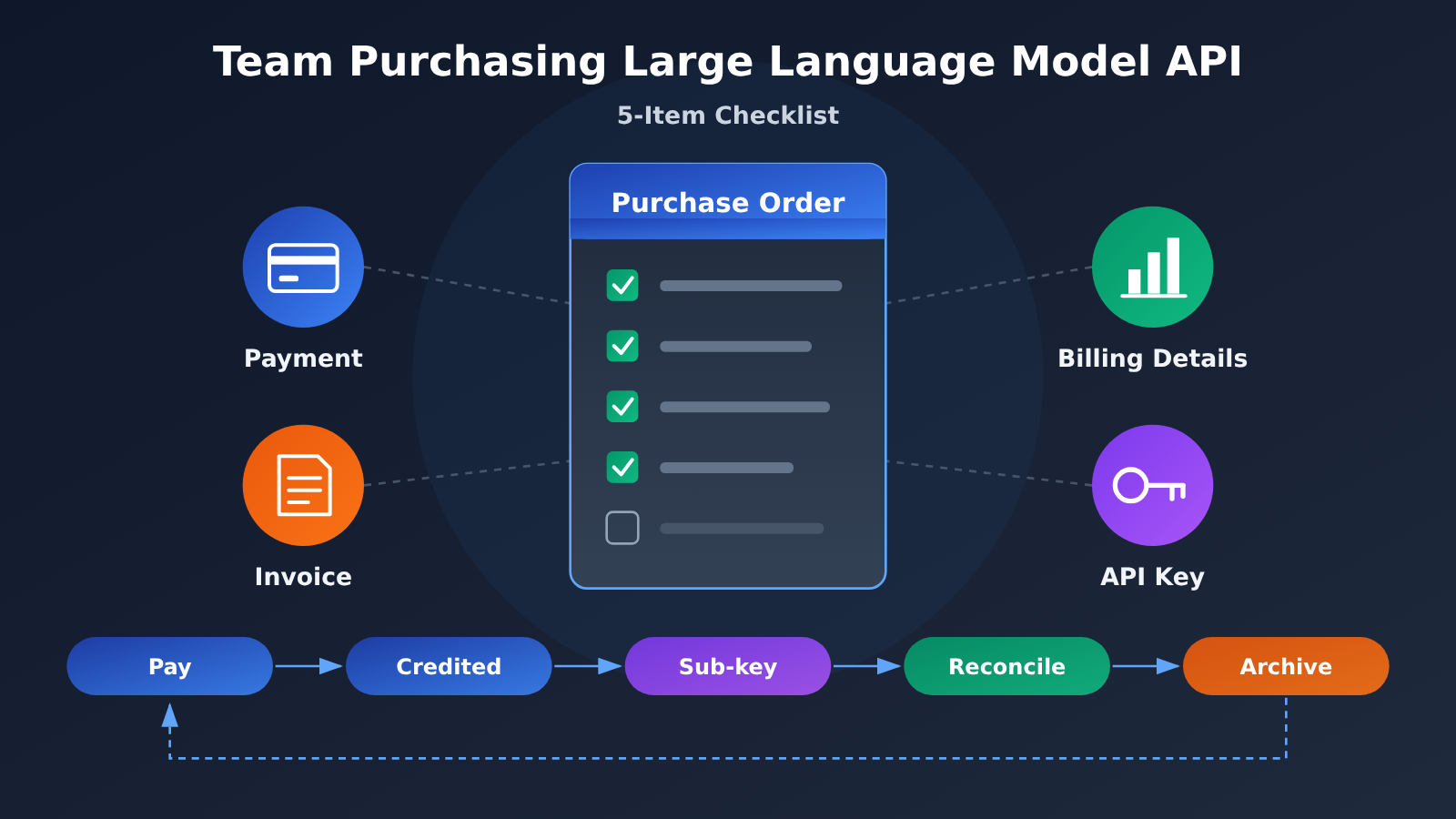
Quick Facts: Buying Large Language Model APIs for a Team
Here’s a table with the core information up front. All policy details in the table come from APIYI’s official documentation, retrieved on November 11, 2026. None of the pages state a publication date.
| Item | Details |
|---|---|
| Research cutoff | November 11, 2026 (Beijing time); based on the vendor’s public documentation |
| Payment model | APIYI uses prepaid top-ups; it doesn’t offer credit lines or monthly billing based on usage |
| Invoicing differences | Alipay and WeChat top-ups can get a VAT invoice; Stripe issues an Invoice; USDT payments don’t get an invoice |
| Billing verification | Charges are calculated from usage and the pricing rules for each model; group multipliers are already reflected in the amount charged |
| Log window | Invocation logs are kept on a rolling basis for about two months; deleted logs can’t be recovered, so export and archive them yourself |
| Key management | You can create multiple independent Keys, each with its own quota, expiration, available models, and resource group |
| Exit terms | Within 30 days of a top-up, you can request a refund of the unused balance to the original payment method; bonus credits aren’t refundable as cash |
6 Terms to Understand Before Buying Large Language Model APIs for a Team
A few terms come up again and again on purchase orders, and finance and engineering often understand them differently. It’s worth aligning on definitions at the project kickoff meeting:
- API Key: The credential an application uses to authenticate with a model service. Whoever holds it can spend quota within the scope that credential allows, so it’s essentially a “card that can be swiped.”
- Prepaid top-up: You pay into a platform account first to build up available quota, then usage is deducted from it. The payment timing is different from monthly billing based on usage.
- Usage: The usage data returned by the API. It may include input, output, and cache tokens, and you need to calculate costs against the pricing rules for the specific model.
- Resource group: A setting in APIYI that selects the upstream channel. It affects which models are available and the billing multiplier.
- Invoice: A bill or commercial payment document issued by the vendor. Check with your finance team whether it can be used for reimbursement at your company.
- Least privilege: Give people and applications only the credentials, model scope, and quota they need to do their work, which limits the impact of misuse or leaks.
Payment and Invoicing: How to Fill Out a Purchase Order for Team Large Language Model API Procurement
The first step in team procurement isn’t comparing prices. It’s getting the transaction entity, payment channel, receiving account, and document type onto the same purchase order. Many teams pay first and ask about invoices later, only to find that the document type tied to their payment channel isn’t accepted by their organization. Then they’re stuck with an exception approval.
Purchase Order Checklist for Team Large Language Model API Procurement
The table below lists what you need to confirm before paying. You can copy it straight into your internal procurement workflow:
| Item to Verify | Information to Get Before Purchasing |
|---|---|
| Transaction entity | Names of the contract provider, payee, and invoicing party, and how they relate to each other |
| Payment attribution | Whether the company or an individual pays, plus amount, currency, fees, and receiving account |
| Document type | Invoice type, invoice title, line items, and whether your organization accepts it |
| Invoicing timing | How to apply, how invoices map to orders, processing time, and the reimbursement deadline |
| Credit delivery | Time to arrive, top-up amount, and how bonus credits map to the platform account |
Payment Channels and Invoice Types for Team Large Language Model API Procurement
According to APIYI’s official documentation, the platform supports online payment and corporate bank transfers. For corporate transfers, customer service provides the payee entity and bank details. Once the payment is confirmed, credits are added to the platform account you specify. This can be combined with a framework contract, and the platform says the contract can be signed afterward. But whether your company allows “pay first, sign later” is up to your internal procurement process, not the vendor.
Don’t stop at “invoices supported” when it comes to invoicing. The enterprise top-up page ties invoicing conditions to the payment channel, and minimum top-up amounts differ too:
| Payment Channel | Document Available | Minimum Top-Up (see official page) | Procurement Tip |
|---|---|---|---|
| Alipay / WeChat Pay | VAT invoice | Usually from $5 | Good for teams that need domestic invoices for reimbursement |
| Corporate bank transfer | Confirmed via contract and customer service | Confirmed by customer service | Good for purchases that go through the company payment process |
| Stripe | Invoice | From $50 per transaction | An Invoice is not the same as a domestic VAT invoice |
| USDT | No invoice | See the page | No reimbursement document available, so use with caution for team procurement |
So don’t treat “$5 minimum top-up” as a universal threshold across all channels. And just because a vendor can provide one type of document, don’t assume another type is available or acceptable for your organization’s reimbursement. Record the date you checked each amount requirement, and verify it again before you pay.
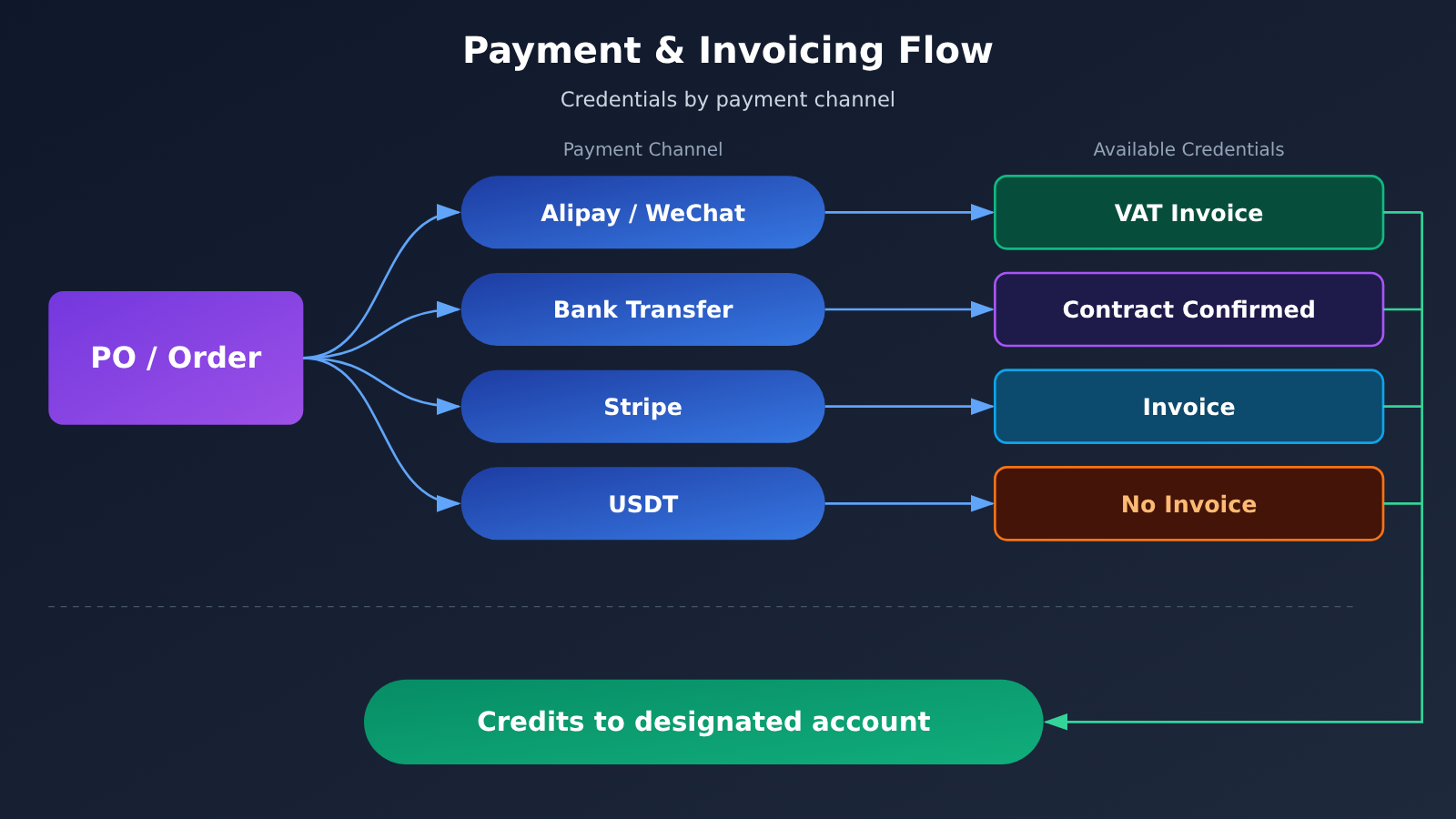
📊 Diagram note: The channel-to-document relationships in the diagram are based on the enterprise top-up and payment method documentation at APIYI (apiyi.com). For invoicing conditions on other platforms, check with each vendor separately.
Small-Value Trials: Invoicing and Exit Terms When a Team Buys LLM API Access
Trial orders are small, which makes invoicing and exit arrangements the easiest things to overlook. Ask about them only when reimbursement or shutdown comes around, and the window has usually already closed.
Invoicing during the trial period for team LLM API purchases
APIYI’s dedicated invoicing page suggests letting multiple orders accumulate to $100 before requesting a consolidated invoice. That figure is a handling recommendation, not a minimum threshold for invoicing. If you’re under $100 but facing a reimbursement deadline, winding down usage, or need to settle accounts, you can contact support to apply anyway.
Invoices are currently requested per order — there’s no standard monthly automatic invoicing. Several orders can be merged into a single invoice; if you need multiple invoices, split them by the corresponding orders and amounts. Two things to watch in practice:
- Don’t scale up your top-up just to reach the suggested consolidation amount. Set the trial budget by what the evaluation actually needs.
- Don’t treat “top-up completed” as “invoice issued.” Keep order numbers and payment receipts filed separately.
Refunds and balance validity for team LLM API purchases
Check refunds and balance validity together before the trial starts. According to APIYI’s refund policy page: within 30 days of topping up, you can request a refund of unused balance back to the original payment method; bonus credit from top-ups is not refunded as cash; and different payment channels carry different fees. The page also notes that invoices already issued can restrict refunds — the earlier section mainly covers mainland China invoices (发票), while the process section instead words the condition as not having issued an “invoice.” For the specifics, confirm in writing with support before you pay.
The same page states that credit carries a 365-day validity period starting August 2, 2026, that a new top-up resets the validity of all available balance, and that expired balance is neither refunded nor restored. Before deciding whether to top up long-term credit, write five items into your trial records: bonus credit, refund window, fees, the effect of invoicing on refunds, and balance validity.
Billing Transparency: Turning Your Team’s Large Language Model API Price List into Spend You Can Actually Reconcile
Finance’s favorite question is: “How much did we actually spend this month?” There are at least two ways to answer it, and if you mix them together, the numbers will never line up.
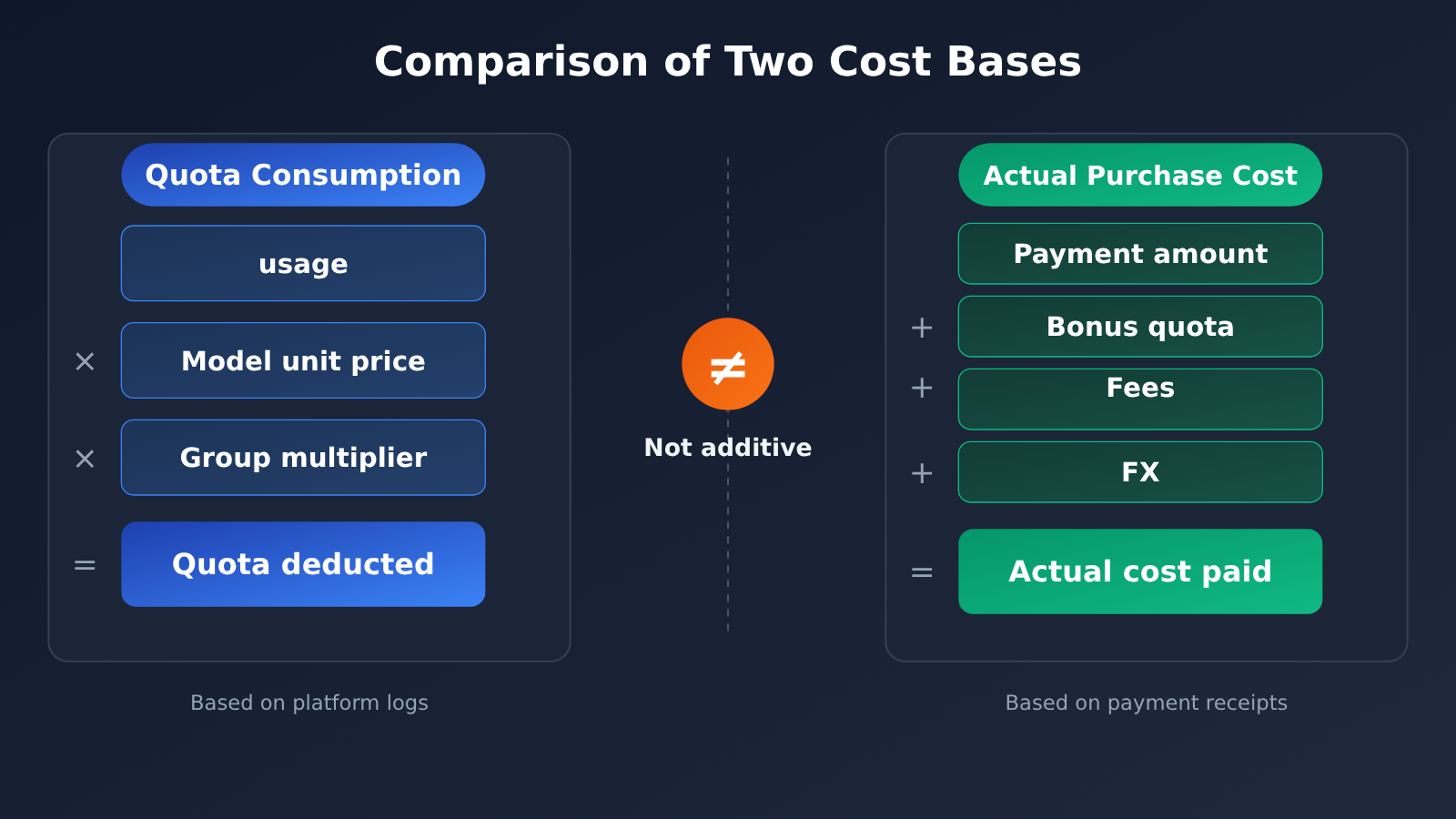
Four Cost Measures for Team Large Language Model API Purchases
| Measure | Meaning | What to check against | Common mistake |
|---|---|---|---|
| Credit consumption | Platform credits deducted per call | Charges, model, and input/output tokens in the logs | Estimating from the visible output text only |
| Group multiplier | The billing coefficient for a given resource channel | Already reflected in the charged amount | Applying the multiplier a second time during reconciliation |
| Top-up bonus | Extra credits received on top of a payment | Order records and bonus ratio | Counting bonus credits as real spend |
| Actual procurement payment | Money your company really paid out | Payment receipts, fees, currency exchange | Treating it as equal to credit consumption |
For token-based pricing, reconcile against the returned usage, the corresponding model price, and any caching or reasoning billing rules. Models priced per call, per image, or per second use their own unit prices and billing quantities, so don’t mix the two types together. You can roughly estimate actual cost as “credit consumption ÷ (1 + bonus ratio)”, but only if the bonus ratio is fixed, balances are on the same basis, and you’re ignoring currency exchange and payment fees. If you have mixed top-ups, multiple bonuses, refunds, or expiring balances, you’ll need to calculate costs batch by batch for each top-up.
Reconciliation Records on the Call Side of a Team’s Large Language Model API Purchases
To make the numbers actually line up, the technical side should record the business ID, request ID, and usage at the moment of the call. Here’s a minimal example:
import openai

client = openai.OpenAI(
    api_key="YOUR_PROJECT_KEY",               # Use a project-specific key, not an admin key
    base_url="https://api.apiyi.com/v1"       # APIYI OpenAI-compatible endpoint
)

raw = client.chat.completions.with_raw_response.create(
    model="gpt-4o-mini",
    messages=[{"role": "user", "content": "生成一句产品介绍"}]
)
resp = raw.parse()
print(resp.id, resp.model, resp.usage.prompt_tokens, resp.usage.completion_tokens)
View the full reconciliation logging code
import csv
import openai
from datetime import datetime, timezone, timedelta

CST = timezone(timedelta(hours=8))  # Use one consistent timezone so records line up with platform logs

client = openai.OpenAI(
    api_key="YOUR_PROJECT_KEY",
    base_url="https://api.apiyi.com/v1"
)

def call_and_record(task_id: str, key_name: str, prompt: str,
                    model: str = "gpt-4o-mini",
                    ledger: str = "usage_ledger.csv") -> str:
    """Call the model and write the fields needed for reconciliation into a local ledger."""
    started = datetime.now(CST).isoformat()
    status, text, row = "ok", "", {}
    try:
        raw = client.chat.completions.with_raw_response.create(
            model=model,
            messages=[{"role": "user", "content": prompt}]
        )
        resp = raw.parse()
        text = resp.choices[0].message.content
        row = {
            "response_id": resp.id,
            # Adjust the request-ID header name to whatever the platform actually returns
            "request_id": raw.headers.get("x-request-id", ""),
            "final_model": resp.model,
            "prompt_tokens": resp.usage.prompt_tokens,
            "completion_tokens": resp.usage.completion_tokens,
        }
    except openai.APITimeoutError:
        status = "client_timeout"   # Outcome unknown — reconcile first, then decide whether to retry
    except openai.APIStatusError as e:
        status = f"http_{e.status_code}"

    with open(ledger, "a", newline="", encoding="utf-8") as f:
        writer = csv.writer(f)
        writer.writerow([
            task_id, key_name, model, started,
            datetime.now(CST).isoformat(), status,
            row.get("request_id", ""), row.get("response_id", ""),
            row.get("final_model", ""),
            row.get("prompt_tokens", ""), row.get("completion_tokens", ""),
        ])
    return text

call_and_record("TASK-20261111-001", "proj-a-prod", "总结本周销售周报")
🚀 Quick start: Create a separate usage-capped key on APIYI at apiyi.com for a trial project, get the ledger script above running, and then do your first reconciliation against a log export from the platform. New users get free test credits, which makes it easy to verify how billing is metered before you commit real money.
Exception Orders and Log Archival in Team Large Language Model API Procurement
APIYI’s official documentation calls out a specific scenario: the platform records the call as successful and bills for it, while the client times out during response transmission or connection close-out. The client’s wait time and the duration logged by the platform cover different phases of the request, so a client-side error or a missing result isn’t on its own proof that the upstream never executed or that the platform didn’t charge. When working through an exception order, start by reconciling the platform record, the balance change, and the full response using the business ID and request ID, then sort the case into one of: parameter or authentication rejection, platform execution failure, client-side receipt failure.
Archival has a deadline too. APIYI’s log retention and cleanup policy states that invocation logs roll with roughly the most recent two months retained, and records older than two months are deleted on the 5th, 15th, and 25th of each month. Deletion is irreversible, and this schedule has been in effect since August 15, 2026. The general data security page still carries the older “current month plus the two preceding calendar months” wording; this article follows the dedicated page. Export from the logs page asynchronously each month rather than digging back through months of records when an audit or expense claim lands on your desk.
Key Management: Centralized Purchasing and Per-Key Accounting in Team Large Language Model API Procurement
Buying centrally and using per Key is the most practical model for most teams. APIYI’s official materials confirm you can create multiple independent API keys, set quota, expiry, available models, and resource groups for each one, and view consumption and logs per key; disabling a key stops that credential’s access. Enterprise and individual accounts share the same account type and public pricing, and existing accounts can bind a company email.
Key Registration Fields for Team Large Language Model API Procurement
Set up a registration record for every key, covering at least these fields:
- Owner and purpose: who requested it, and which department or project it serves.
- Environment: separate keys for development, testing, and production — never mixed.
- Model scope: enable models per project need; don’t leave everything open by default.
- Quota and group: the per-key limit, and the resource group it maps to.
- Expiry: experimental keys must carry an end date.
Resource groups deserve a note of their own. Per the official docs, a single token can be configured with at most one primary group and two fallback groups, and when the primary group can’t serve a request it can route to a backup channel. Backup channels may have different model coverage and billing multipliers, so during procurement, confirm the fallbacks fit your budget and business requirements. Separately, the official pages are inconsistent about how multiple keys relate to rate limits — don’t treat “creating a new key” as a guarantee of extra capacity.
Division of Responsibilities in Team Large Language Model API Procurement
What follows is editorial advice and doesn’t imply the platform offers multi-level approval or a full IAM system. The procurement lead manages payments and credentials, the technical lead manages production keys, and project leads review their own project’s consumption. Finance only needs the exported consumption report — it doesn’t need, and shouldn’t have, a full key capable of calling models directly. When someone leaves, a task wraps up, or a credential is suspected of leaking, disable the corresponding key immediately and reconcile any unsettled jobs.
Sign-off Closure: Data Responsibility and SLAs When Your Team Buys Large Language Model APIs
You don’t need a full performance load test at the procurement stage, but you should ask for evidence you can tie to accountability. The data path has to be checked layer by layer: APIYI’s official documentation states that under its standard policy, customer inputs and outputs are not retained by default; detailed troubleshooting logs can be temporarily switched on by an administrator, will record the full input, context, and output, are visible only to administrators, and have a default retention period of 7–30 days. Turning the logging switch off doesn’t mean existing records have already been deleted.
Upstream model providers have their own training and retention rules as well. OpenRouter’s documentation, for example, describes the gateway’s own data handling separately from upstream provider policies, and lists exceptions such as user-enabled logging, security review, and legal preservation. The only conclusion you can draw from this is “verify each layer separately” — you can’t infer that every gateway or upstream provider has zero retention, and you can’t upgrade a public statement into a compliance certification.
The SLA needs to land in specific clauses too. APIYI’s dedicated SLA page describes credit top-ups when a loss is caused by the platform; enterprises can agree in the contract on the scope of coverage, availability metrics, response times, and a compensation cap. That page doesn’t give every customer a single fixed availability percentage, and compensation for abnormal billing also comes with conditions such as applicable models and high-volume customers. Credits and cash compensation carry different procurement value, so spell it out clearly when you sign.
Team Procurement Sign-off Checklist for Large Language Model APIs
| Item | Verifiable evidence to request | Suggested internal owner |
|---|---|---|
| Vendor and payment | Contract or terms of service, receiving entity, payment channel, and receipt type | Procurement and Finance |
| Billing | Quotes for the relevant models and channels, usage and spend detail, refund and credit rules | Technical and Finance |
| Usage attribution | Department/project Key list, quotas, validity periods, and consumption reports | Project and Technical |
| Data and accountability | Upstream and gateway data policies, detailed logging conditions, SLA and compensation terms | Technical and Procurement |
| Archiving and exit | Order invoices, regularly exported logs, refunds, and balance validity | Finance and Project |
Procurement is finished when payment, credits landing in the account, Key allocation, the first reconciliation, and credential archiving form a closed loop. Miss any one link, and problems can surface later — during reimbursement, an audit, or a staffing change.
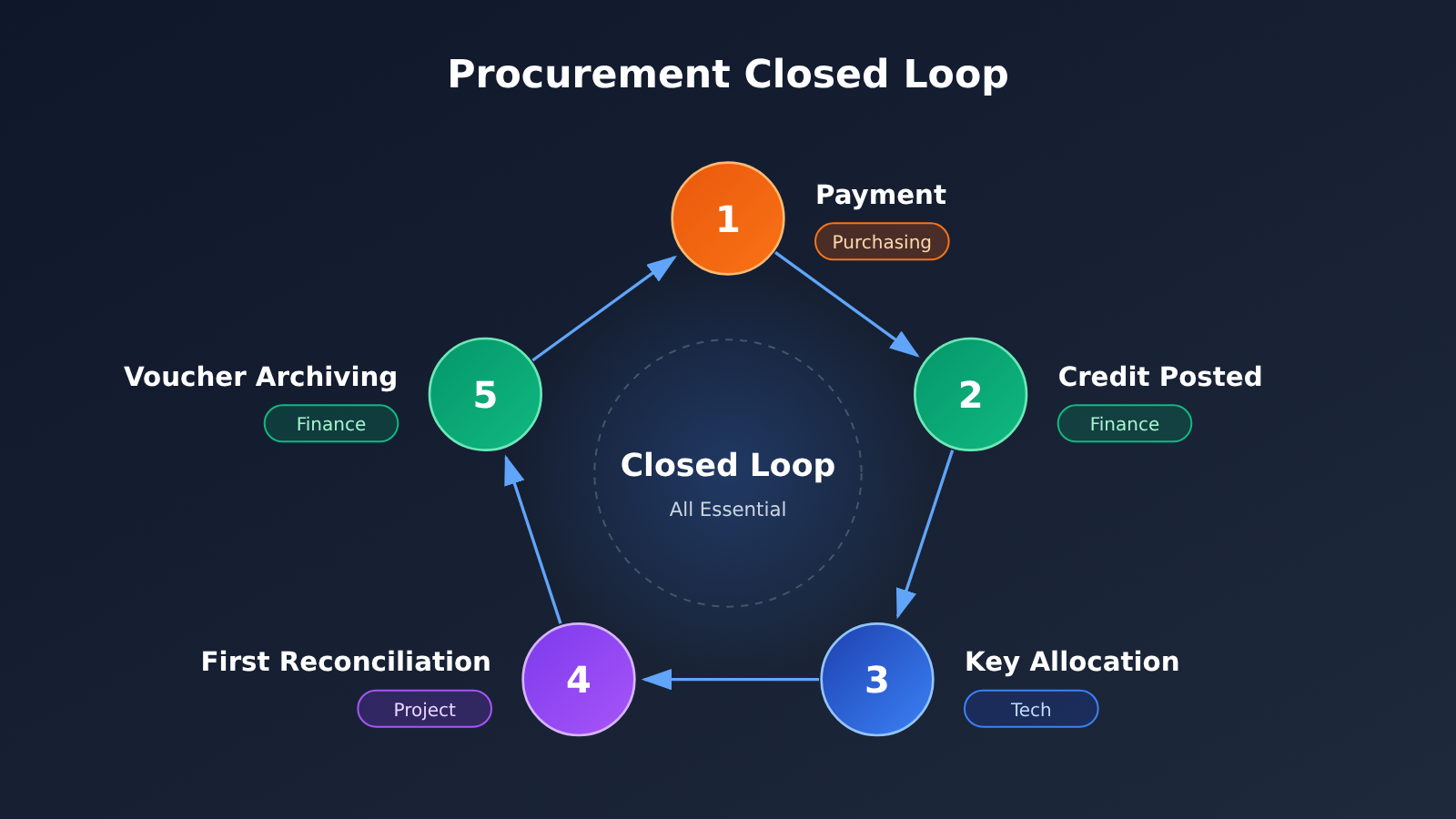
Impact Analysis: Buying LLM APIs for Your Team
What It Means for Tech Leads and Developers
- Log every call: Record the business ID, request ID, final model, and usage at the code level. That’s the only way to trace an anomalous charge later.
- Isolate environments: Use separate keys for development, testing, and production, so a runaway test script can’t eat into your production quota.
- Test your fallbacks: A backup channel can change the available models and the billing. Recovery after a streaming interruption should be observed and verified on its own.
What It Means for Finance and Procurement
- Paperwork before payment: Confirm which invoice or Invoice type your payment channel provides before you decide how to pay.
- Keep two ledgers: Record quota consumption and actual procurement spend separately, so you don’t double-count group multipliers or bonus credits.
- Archives expire: Platform logs get cleaned up on a rolling basis, so exporting them monthly is far more reliable than trying to recover them afterward.
FAQ: Buying LLM APIs for Your Team
Q1: What should we confirm first when buying an LLM API for the team?
First, check that the transaction entity, the payment channel, and the type of receipt all fit your organization’s reimbursement rules. Compare prices after that. Otherwise you might pay and then find you can’t get a compliant receipt.
Q2: Do we have to accumulate $100 before we can request an invoice?
No. Taking APIYI’s invoicing page as an example, $100 is the suggested amount for combining invoices, not a minimum threshold. If a reimbursement deadline is coming up, or you’re about to stop using the service, you can contact support to request an invoice for less than $100.
Q3: If the client times out, will that call still be charged?
It depends. The official documentation explicitly describes cases where the platform bills successfully but the client never receives a response. Check the platform logs and balance changes against the request ID first, then decide whether to retry, so you don’t run the same job twice.
Q4: How can several projects quickly set up separate keys and run a first reconciliation?
In the APIYI apiyi.com console, create an independent key for each project and set its quota, expiration, and allowed models. In your code, set base_url to `https://api.apiyi.com/v1`. After a week of running, export the logs and compare them line by line against your local ledger. That completes your first reconciliation.
Q5: If the trial doesn’t work out, can we get our balance refunded?
Taking APIYI’s refund policy as an example, unused balance can be refunded to the original payment method if you request it within 30 days of topping up. Bonus credits aren’t refunded as cash, channel fees vary, and whether you’ve already received an invoice can also affect the refund. Before you start the trial, get these conditions confirmed in writing by contacting support through APIYI apiyi.com.
Q6: What are the limitations of this procurement checklist?
This article is based on the vendor’s public documentation. It doesn’t involve any paid API calls or actual bills. For contract terms, tax treatment, and data compliance, rely on your contract with the vendor, your own account’s real-world testing, and professional advice.
Key Takeaways for Buying LLM APIs as a Team
- Paperwork first: The payment channel determines the invoice type, so confirm what your finance team can reimburse before you pay.
- Set boundaries for trials: When you start with a small trial, check the refund window, any bonus credits, and how long the balance stays valid.
- Keep two ledgers: Record quota consumption and actual purchase spend separately, and don’t apply the group multiplier twice.
- Archive monthly: Platform logs get cleaned up on a rolling basis, so export usage details and orders regularly.
- Split Keys: Give each department, project, and environment its own Key, and let finance work from reports only.
- Getting started: On APIYI (apiyi.com), get your ledger working with a capped Key before you scale up purchasing.
Summary
Here’s what matters most when your team buys LLM APIs:
- Payment and invoicing: Check the transacting entity, payment channel, and receipt type on the same purchase order.
- Transparent billing: Reconcile quota consumption against usage data and pricing rules, calculate actual purchase spend separately, and archive logs monthly.
- Key management: Buy centrally and issue separate Keys for use. Record each Key’s owner, quota, expiry date, and model scope, and disable Keys promptly when they’re no longer needed.
- Closed-loop accountability: Put the data policy, SLA, and exit conditions into your sign-off sheet, and treat the full cycle from payment to archiving as the bar for a completed purchase.
We recommend running one full dry run with a small order first: “pay, receive credit, split Keys, reconcile, archive.” Then decide how much to commit long term. With APIYI (apiyi.com), you can use a single Key to access mainstream models such as OpenAI, Claude, and Gemini on pay-as-you-go billing, which makes it easy to validate your team’s workflow under one consistent billing standard.
📚 References
All pages below were accessed on November 11, 2026 (Beijing time). Publication dates aren’t listed on the pages, and terms belong to their respective providers.
- APIYI Enterprise Top-Up: Corporate bank transfers, prepaid top-up model, and invoicing by payment channel
- Link:
docs.apiyi.com/faq/enterprise-recharge -
Notes: Main source for how payment channels map to invoice types
-
APIYI Payment Methods: Minimum top-up requirements for each payment channel
- Link:
docs.apiyi.com/faq/payment-methods -
Notes: How the Stripe minimum differs from other channels
-
APIYI Invoicing for Amounts Under $100: Recommendations for combined invoices and per-order requests
- Link:
docs.apiyi.com/faq/invoice-minimum-amount -
Notes: How invoicing works for small orders
-
APIYI Refund Policy: Refund window, bonus credits, and balance validity period
- Link:
docs.apiyi.com/faq/refund-policy -
Notes: For checking trial and exit conditions
-
APIYI Tokens and Groups: Multiple keys, resource groups, and fallback groups
- Link:
docs.apiyi.com/faq/token-and-groups -
Notes: Key allocation and group multipliers
-
APIYI Enterprise vs. Individual Users: Assigning multiple keys to departments or employees
- Link:
docs.apiyi.com/faq/enterprise-vs-individual -
Notes: What centralized purchasing with separate keys can and can’t do
-
How to Read the Billing Amounts in Your Logs: Reconciling charged amounts with usage
- Link:
docs.apiyi.com/faq/log-billing-explained -
Notes: Distinguishing the different cost definitions
-
Log Shows Completed and Charged, but the Client Got No Response: Client timeouts vs. platform billing
- Link:
docs.apiyi.com/faq/log-duration-vs-client-wait -
Notes: How to check abnormal orders
-
APIYI Log Retention and Cleanup Policy: How often logs are rolled over and cleared
- Link:
docs.apiyi.com/faq/log-retention-policy -
Notes: Basis for the archiving window
-
APIYI Detailed Logs / Data Security: Troubleshooting logs and data policy
- Links:
docs.apiyi.com/faq/user-logs-control,docs.apiyi.com/faq/data-security - Notes: For checking the data flow
- Links:
-
APIYI SLA Guarantee: Contract terms and compensation mechanism
- Link:
docs.apiyi.com/faq/sla-guarantee - Notes: How SLA responsibilities are carried out
- Link:
-
OpenRouter Provider Logging / Data Collection: An example of how gateway and upstream data policies are layered
- Links:
openrouter.ai/docs/guides/privacy/provider-logging,openrouter.ai/docs/guides/privacy/data-collection - Notes: Included only to illustrate the mechanism; don’t carry these policies over to APIYI, or vice versa
- Links:
Author: APIYI Technical Team
Get in touch: If you have questions about team purchasing, invoicing, or multi-key setup, reach out through the APIYI homepage at apiyi.com, or check the docs center for the latest policy updates.


