

Author’s note: We break down gpt-6.2-sol’s four billing line items—input, cached read, cache write, and output—explain the whole-order algorithm that kicks in above 272K, walk through the Batch/Fast/Ultrafast multipliers, and work through two cost estimate examples: one for short contexts and one for extra-long contexts.
OpenAI released GPT-6.2 Astra and GPT-6.2 Sol on November 17, 2026. One of the first things many teams did was estimate their gpt-6.2-sol bill—but the numbers they came up with often didn’t match what they were actually charged. The reason is that GPT-6.2 Sol isn’t priced as “one rate for input, one rate for output.” Instead, input, cached read, cache write, and output are billed as four separate line items. On top of that, extra-long contexts and tiers like Ultrafast change the multipliers.
This isn’t just a repackaged price list. Taking the pricing rules on OpenAI’s model page as our source of truth, this article lays out the calculation formula for short contexts, the whole-order algorithm that applies once you cross 272K, and a worked example of each. We’ll also clarify under exactly what conditions the official claim that Sol “costs roughly one-fifth as much as Astra” actually holds.
What you’ll walk away with: By the end of this article, you’ll be able to build your own four-line cost breakdown for gpt-6.2-sol, tell whether a request crosses the 272K threshold, and spot which multiplier can double your costs.
GPT-6.2 Sol Pricing Essentials
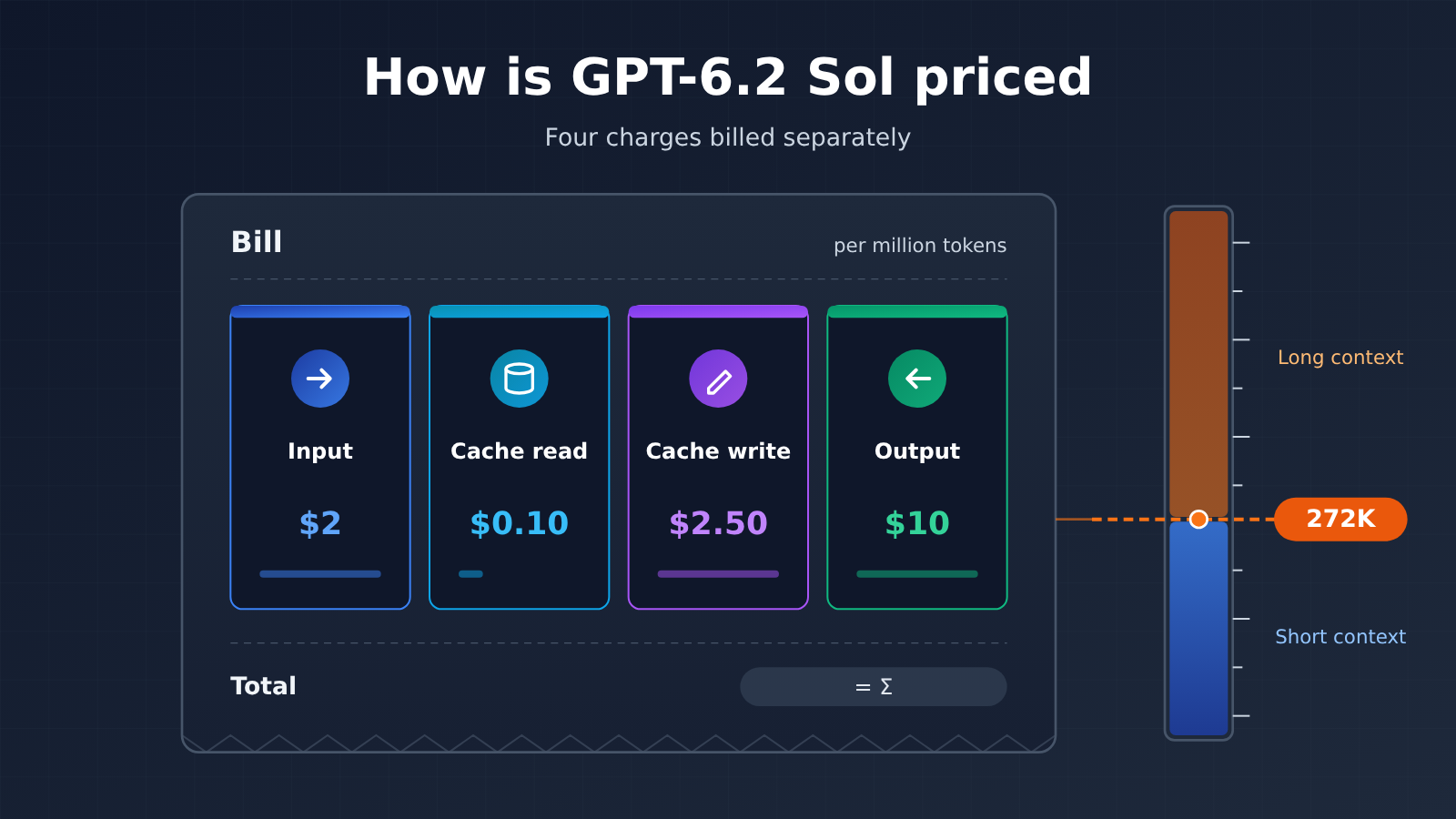
Let’s lay out the rules first. The figures below all come from OpenAI’s official model page, quoted per 1 million tokens at official list prices.
| Point | Details | Impact on Cost Estimation |
|---|---|---|
| Four charges billed separately | Input, cache read, cache write (in two variants: 30 minutes and 12 hours), and output each carry their own unit price | Looking only at input and output prices means missing the cache write charge entirely |
| 272K threshold | When request input exceeds 272K tokens, input and cache prices double, and output goes to 1.5x | The multiplier applies to the entire request, not just the portion above the threshold |
| Tier multipliers | Batch runs at 50% of standard price, Fast at 2x, and Ultrafast at 3x for now — rising to 6x starting 2027-03-01 | For the same token volume, bills can differ by more than tenfold |
| Reasoning can’t be turned off | The API won’t accept setting reasoning effort to none |
Output-side tokens won’t drop to zero-reasoning levels |
| Spec limits | Context window of 1,050,000, max input 922,000, max output 128,000 | Extremely long requests will inevitably cross the 272K threshold |
GPT-6.2 Sol’s Four Charges Explained
Input refers to the regular tokens in a request that don’t hit the cache, with a list price of $2 under short context. Cache read covers the portion that hits an already-cached prefix, priced at just $0.10 — one-twentieth of regular input. That’s exactly why long system prompts and fixed document prefixes are such good candidates for cache reuse.
Cache write is the one people easily overlook. Writing content into the cache costs money in its own right: the write price is $2.50 for 30-minute retention and $5 for 12-hour retention, both more expensive than regular input. So caching doesn’t automatically save you money — the extra you pay at write time only pays off if the cache gets hit often enough afterward to earn it back through those cheap cache reads.
Output is priced at $10 and covers the model’s generated response. Since reasoning effort can’t be set to none, the reasoning process usually inflates output-side token counts too — the usage field returned by the API is the authoritative source. When you’re checking model specs or verifying prices, it’s best to go by the real-time information in the model list on the APIYI apiyi.com platform rather than relying on secondhand accounts.
GPT-6.2 Sol Short-Context and Over-272K Pricing Table
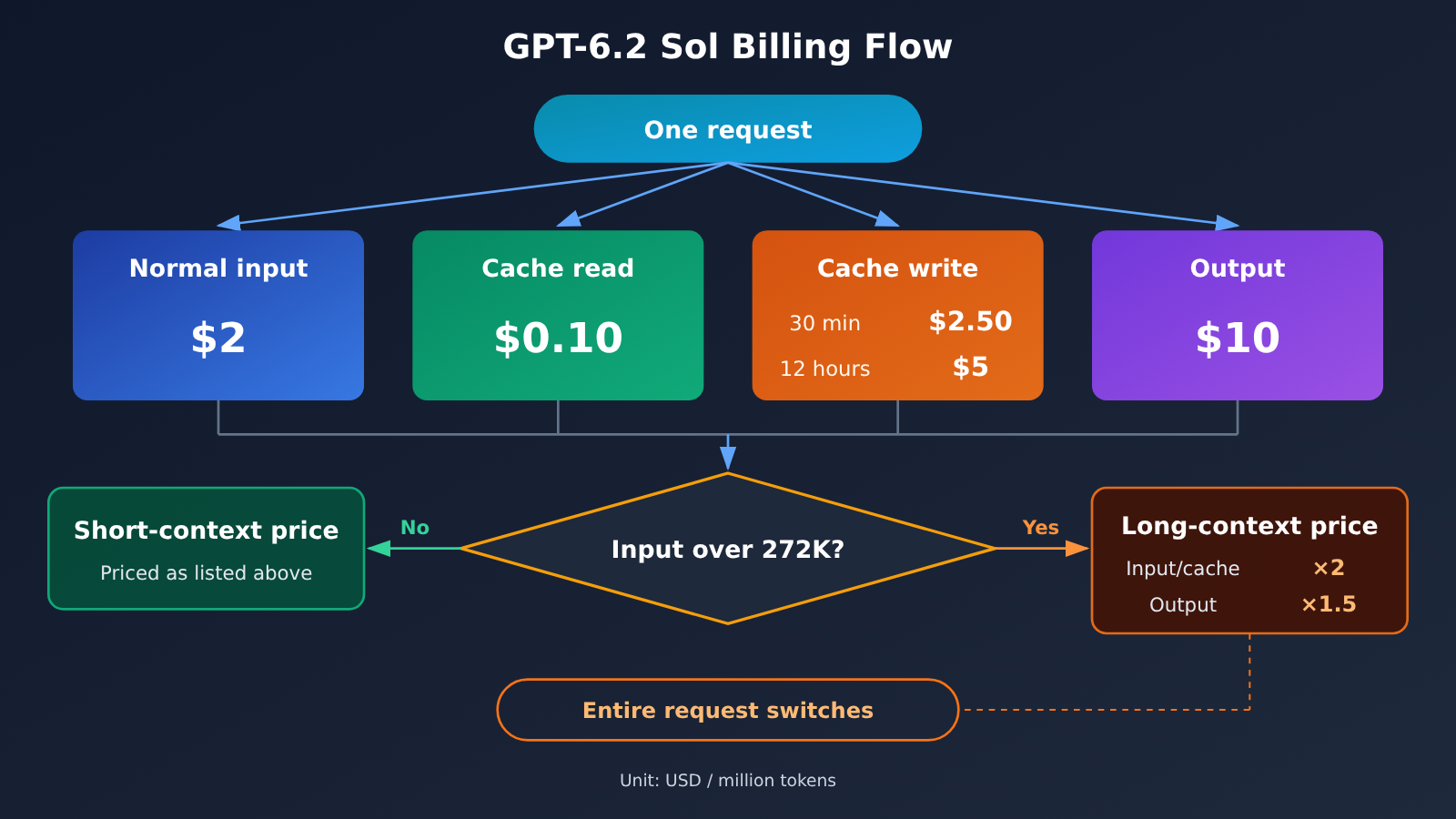
The table below puts gpt-6.2-sol’s standard prices at both context lengths side by side. The long-context column is derived from the rules on the model page: input and cache unit prices are multiplied by 2, and output by 1.5.
| Billing Item (per 1M tokens) | Short Context (≤272K) | Over 272K (entire request) | Rule Source |
|---|---|---|---|
| Input | $2 | $4 | Model page: input doubled |
| Cached read | $0.10 | $0.20 | Model page: cache doubled |
| Cache write (30 minutes) | $2.50 | $5 | Model page: cache doubled |
| Cache write (12 hours) | $5 | $10 | Model page: cache doubled |
| Output | $10 | $15 | Model page: output ×1.5 |
These are OpenAI’s official list prices. gpt-6.2-sol isn’t listed on APIYI yet, but we’ll add it to the platform as soon as possible; model availability and pricing are subject to the platform’s model list, and you can check the latest status at apiyi.com. As of the APIYI master table’s data timestamp of 2026-11-17 15:54 (UTC+8), neither gpt-6.2-sol nor gpt-6.2-astra appears in the master table or the pricing API yet.
How to Understand GPT-6.2 Sol’s Entire-Request Rule
“Applies to the entire request” is the easiest part to get wrong. If a request’s input is 300K, you can’t split the billing so the first 272K is charged at the short rate and the remaining 28K at the long rate. The moment a request’s input crosses the threshold, all of that request’s input, cached reads, and cache writes are billed at double price, and output at 1.5×.
So two requests with inputs of 270K and 280K will differ in cost by far more than the extra 10K tokens. When you’re doing RAG or long-document analysis, keeping input under 272K is often a better deal than squeezing in a little more context.
GPT-6.2 Sol vs. the Previous gpt-6.1-sol
The release notes say Sol keeps GPT-6.1 Sol’s API token pricing. You can use the already-listed gpt-6.1-sol as a reference: in the APIYI master table at apiyi.com, gpt-6.1-sol’s short-context prices are $2 for input, $10 for output, and $0.1 for cached reads; over 272,000, input is $4. The endpoints support responses and chat.
It’s worth stressing that these are the previous model’s platform prices—they don’t mean gpt-6.2-sol is already listed, and you shouldn’t take them directly as 6.2’s platform prices. Also note that in the same table, gpt-6-sol’s cached-read price is $0.2, which differs from 6.1’s—don’t read the wrong row when comparing.
How GPT-6.2 Sol Tier Multipliers Stack
Context length isn’t the only thing that affects the unit price — the service tier does too. The model page lists these multipliers:
| Tier | Multiplier | Timing & Notes |
|---|---|---|
| Standard | 1× | Default tier |
| Batch | 0.5× | 50% of standard price, great for offline tasks that aren’t time-sensitive |
| Fast | 2× | Based on the standard price at the same context length |
| Ultrafast | 3× | Through 2027-02-28 (Pacific Time) |
| Ultrafast | 6× | Starting 2027-03-01 |
The model page is explicit about Fast: it’s “2× the standard price at the same context length.” In other words, if you enable Fast for a request over 272K, you take the long-context price and multiply it by 2 on top. For Batch and Ultrafast, the original text says the multipliers apply to the “standard price.” Exactly how they stack for extra-long requests under those two tiers should follow the official billing; for rough estimates, you can start by multiplying against the standard price at the same context length.
The Ultrafast timing milestone is worth a note of its own. A budget you estimate today could straight-up double by March 2027. If your business depends on Ultrafast, it’s smart to set aside the 6× tier in your budget sheet from the start.
GPT-6.2 Sol Quick Start: Two Billing Estimate Examples
The two examples below use nothing but addition and multiplication, and every number lives right inside the sentence, so you can plug in your own usage directly. Each token is counted in exactly one bucket; for which bucket a given portion of tokens lands in, go by the usage field returned by the API.
Example 1: Short Context Request
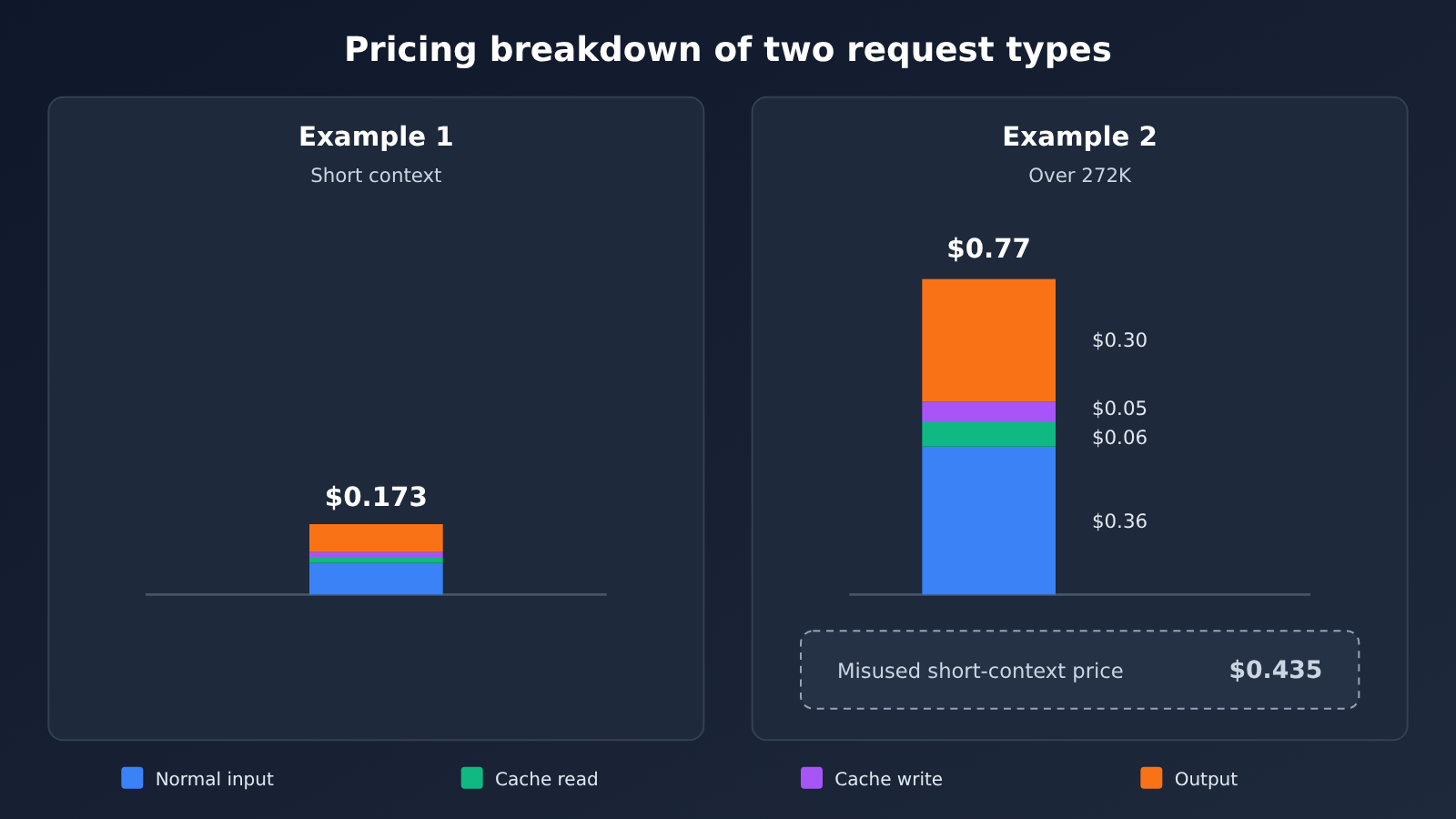
Suppose a single request has 120,000 input tokens in total, of which 80,000 hit the cache (cache reads), 10,000 are written to the 30-minute cache, 30,000 are regular input, and the output is 8,000 tokens.
- Regular input: 30,000 × $2 ÷ 1,000,000 =
$0.06 - Cache read: 80,000 × $0.10 ÷ 1,000,000 =
$0.008 - Cache write (30 minutes): 10,000 × $2.50 ÷ 1,000,000 =
$0.025 - Output: 8,000 × $10 ÷ 1,000,000 =
$0.08
This request comes to $0.173 in total. Notice that 8,000 tokens of output cost ten times more than 80,000 tokens of cache reads. If you estimate based on total input volume alone, your numbers can be way off.
Example 2: A Full Request Over 272K
Suppose a single request has 400,000 input tokens in total, of which 300,000 are cache reads, 10,000 are written to the 30-minute cache, 90,000 are regular input, and the output is 20,000 tokens. Since the input exceeds 272K, the entire request is billed at long context rates.
- Regular input: 90,000 × $4 ÷ 1,000,000 =
$0.36 - Cache read: 300,000 × $0.20 ÷ 1,000,000 =
$0.06 - Cache write (30 minutes): 10,000 × $5 ÷ 1,000,000 =
$0.05 - Output: 20,000 × $15 ÷ 1,000,000 =
$0.30
This request comes to $0.77 in total. If you mistakenly applied the short context rates, you’d only get $0.435—undercounting by nearly half.
| Tier (based on Example 2) | Calculation | Cost per Request |
|---|---|---|
| Standard | Base rate | $0.77 |
| Batch | × 0.5 | $0.385 |
| Fast | × 2 | $1.54 |
| Ultrafast (until 2027-02-28) | × 3 | $2.31 |
| Ultrafast (from 2027-03-01) | × 6 | $4.62 |
For the same request, the cost differs by a factor of 12 between Batch and the 2027 Ultrafast tier. Your choice of tier often has a bigger impact on the bill than tweaking prompt length does.
Verifying Usage with the OpenAI-Compatible Protocol
On the integration side, gpt-6.2-sol officially supports Chat Completions and Responses, plus Batch; it doesn’t support Realtime, Assistants, fine-tuning, image generation, video, or audio. It only accepts text and images as input, and outputs text.
If you’d like to get the cost estimation workflow working on the already-available gpt-6.1-sol first, here’s how:
- In your OpenAI-compatible client, set the base URL to
https://api.apiyi.com/v1and entergpt-6.1-solas the model. - Set the reasoning effort to valid values like
lowormedium—don’t set it tonone. The two 6.2 models outright rejectnonein the official API. - After each request, log the returned usage, noting the four numbers separately: regular input, cached reads, cache writes, and output.
- Plug the four numbers into the unit price table above, and check whether the input exceeds 272K.
Once gpt-6.2-sol goes live, you’ll only need to swap in the model ID and update the unit prices.
View the Full Estimation Checklist
– Step 1: Total up your input tokens, check whether they exceed 272K, and decide whether the whole request uses the short-context or long-context price.
– Step 2: Split the input into three columns: regular input, cached reads, and cache writes (separating 30-minute from 12-hour).
– Step 3: Count the output tokens; when reasoning is enabled, go by the usage returned in the response.
– Step 4: Multiply each of the four columns by its unit price and add them together to get the standard-tier cost.
– Step 5: Multiply by the tier multiplier—Batch is 0.5, Fast is 2, and Ultrafast is 3 or 6 depending on the date.
– Step 6: Multiply by your average daily request count to get the daily budget; estimate your cache hit rate conservatively.
🚀 Quick Start: We recommend claiming free test credits on APIYI at apiyi.com first, then running a few real requests with the already-available gpt-6.1-sol. Once you’ve captured the four usage figures, apply the formulas in this article. Budgets estimated this way come much closer to reality than pure back-of-the-envelope math.
How to Read the “One-Fifth” Claim for GPT-6.2 Sol vs. Astra
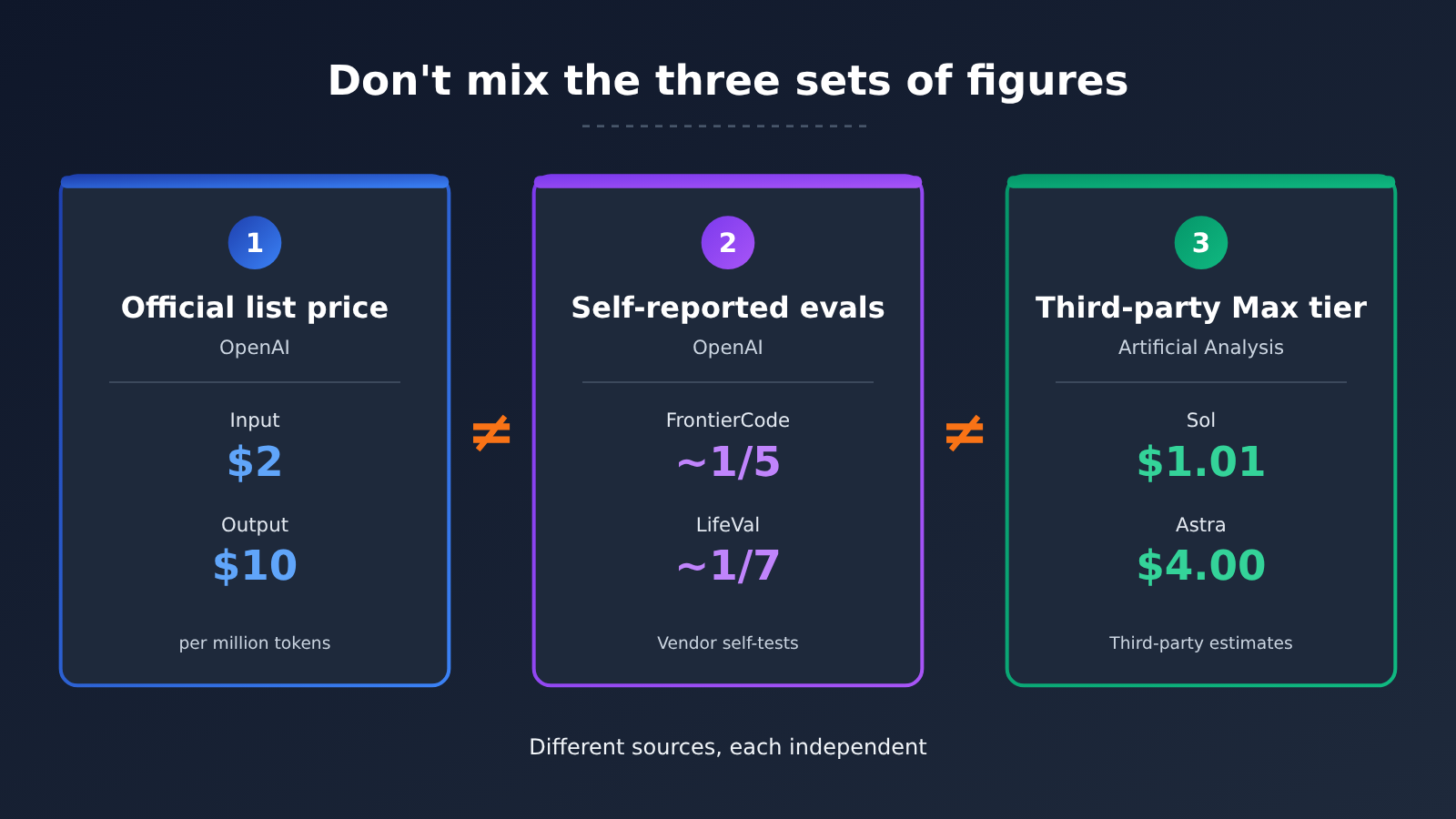
There’s one claim in the release notes that’s easy to misread: on Cognition’s FrontierCode 2.0 (which measures whether changes to real codebases can get merged by maintainers), GPT-6.2 Sol and GPT-6.2 Astra are less than 0.5 points apart, while Sol costs about one-fifth as much — both running on the Max reasoning tier. This is an OpenAI self-reported figure, and it only covers this one benchmark.
It doesn’t mean every Sol request costs one-fifth of an Astra request. Going by list prices, Sol runs $2 input / $10 output, while Astra runs $8 input / $40 output — a unit-price ratio of one-quarter. The actual cost ratio per request also depends on how many tokens each model burns on the same task. Token consumption varies widely across tasks, so the ratio naturally shifts too. Another officially self-reported figure is LifeVal: Sol outscores GPT-6 Astra at roughly one-seventh the cost — again, only for that particular task suite.
The third-party numbers from Artificial Analysis belong to yet another system. In its Intelligence Index v5.0.1, Sol scores 57 on the Max reasoning tier with a composite-index single-task cost of $1.01; Astra scores 62 with a single-task cost of $4.00. That $1.01 only applies to the composite-index benchmark — you can’t multiply or divide it against the official FrontierCode “one-fifth,” and you shouldn’t treat it as the cost of every request in your own workloads.
Official List Prices: GPT-6.2 Sol vs. Other Models
| Model (official list price, per 1M tokens) | Input | Output | Cache read | Long-context rule |
|---|---|---|---|---|
| GPT-6.2 Sol | $2 | $10 | $0.10 | Whole-request surcharge beyond 272K |
| GPT-6.2 Astra | $8 | $40 | $0.40 | Whole-request surcharge beyond 272K |
| Claude Fable 5.2 | $8 | $40 | $0.20 | Rule not listed in docs |
| Claude Opus 5.5 | $4 | $20 | $0.20 | Rule not listed in docs |
| Gemini 4 Carbon (through 11-30) | $2 | $10 | $0.10 | No 272K whole-request doubling in Google’s price list |
| Gemini 4 Carbon (from 12-01) | $4 | $20 | $0.20 | Same as above |
Every figure in the table is a vendor’s official list price, not an APIYI platform price. GPT-6.2 Astra’s official list price is $8 input, $0.40 cache read, $10 for 30-minute cache writes, and $40 output. Like gpt-6.2-sol, it isn’t listed on APIYI yet — we’ll add this model as soon as we can, and the platform’s model list is the authoritative source for model names and prices. Also note: Gemini 4 Carbon is listed at an introductory price on the APIYI docs page, and the official price increase takes effect on 2026-12-01 — please defer to the platform list at that point.
💡 Recommendation: A unit-price table only reflects cost differences at the same token volume — it can’t tell you which model is cheaper overall for your specific tasks. Before deciding, compare the models already listed on APIYI (apiyi.com) using the same batch of real requests, and judge by both usage and output quality.
Frequently Asked Questions (FAQ)
Q1: How is GPT-6.2 Sol priced, and why break the costs out separately?
GPT-6.2 Sol bills four separate line items per 1M tokens: input ($2), cache read ($0.10), cache write ($2.50 for 30 minutes, $5 for 12 hours), and output ($10) — these are the official standard prices for short contexts. The rates across these four line items differ by more than 100x at the extremes, so estimating from total tokens alone will be seriously misleading.
Q2: Once a request exceeds 272K, does the surcharge only apply to the overage?
No. The model page states that it’s calculated on the entire request: as soon as the request input exceeds 272K, the input and cache rates for that whole request double, and output becomes 1.5x. If your input lands right around the threshold, it’s worth compressing your context to stay under 272K.
Q3: When was GPT-6.2 Sol released, and where can you use it?
OpenAI released it on 2026-11-17. According to the official announcement, Plus, Pro, Enterprise, and Edu users can use it in ChatGPT Work and Codex, developers can call it through the OpenAI API, and Ultrafast has been supported since launch. It’s not yet listed on APIYI, but we’ll add it as soon as possible; for the final word on model names and pricing, check the platform’s model list.
Q4: Cache writes cost more than plain input — are they still worth it?
It depends on how often you reuse the cache. The 30-minute write costs $0.50 more per million tokens than regular input, but each subsequent cache hit saves you $1.90. If a given prefix will be hit more than once within 30 minutes, it usually pays for itself. The 12-hour write costs $5, making it a good fit for fixed prefixes that get reused frequently throughout the day.
Q5: How can I rehearse the cost-estimation workflow before 6.2 is listed?
You can practice with the already-listed gpt-6.1-sol. The official announcement says 6.2 Sol uses the same token pricing. After registering at APIYI (apiyi.com) and claiming your trial credit, point your OpenAI-compatible client’s base URL to `https://api.apiyi.com/v1`, log the four usage line items, then plug them into the formulas in this article. Keep in mind that gpt-6.1-sol’s platform price is just the previous model’s pricing — it doesn’t mean 6.2 is already available.
Q6: Will the Ultrafast multiplier change?
Yes. Through 2027-02-28 (Pacific Time), it’s 3x the standard price; from 2027-03-01 onward, it’s 6x. For long-term budgeting, we recommend planning around the 6x rate as your ceiling.
Q7: What are GPT-6.2 Sol’s known limitations?
The reasoning effort can’t be set to `none`, so you can’t cut output costs by turning reasoning off. It doesn’t support audio or video input, nor Realtime, Assistants, or fine-tuning. Third-party benchmark Artificial Analysis notes that Sol scores 14 points lower than 6.1 Sol on SWE-Atlas-QnA-AA and is more prone to missing key facts. OpenAI’s alignment evaluations also point out that, on some tests, the model is more likely to underreport blocking issues such as missing files or unavailable tools.
GPT-6.2 Sol Pricing: Key Takeaways
- Four-column billing: Input $2, cache read $0.10, cache write $2.50 or $5, output $10 (official short-context list pricing)
- 272K whole-request rule: Once you cross the threshold, input and cache prices double for the entire request, and output becomes 1.5x
- Tier has the biggest impact: Batch 0.5x, Fast 2x, Ultrafast 3x — and 6x starting March 2027
- The “one-fifth” claim comes with conditions: It only applies to the officially self-reported FrontierCode 2.0 (Max tier), not to every request
- Read third-party numbers separately: Artificial Analysis’s $1.01 for the Max tier belongs only to their composite index benchmark
- Getting started: Before 6.2 is available, you can use gpt-6.1-sol on APIYI apiyi.com to get the usage logging workflow down
Summary
The core points of GPT-6.2 Sol pricing:
- Calculate column by column: Input, cache read, cache write, and output are each multiplied by their unit price — don’t overlook cache writes.
- Check 272K first: Once past the threshold, the whole request switches to long-context pricing. In Example 2, mistakenly using short-context pricing would undercount by nearly half.
- Apply the multiplier last: The tier multiplier determines the order of magnitude of your bill, so Ultrafast’s date change deserves a spot in your budget planning.
When estimating costs, start with the short-example formula to price out everyday requests, then use the extra-long example to stress-test edge cases. Finally, keep the officially self-reported figures, third-party benchmarks, and your own usage logs in separate buckets — don’t lump them into a single conclusion.
We recommend verifying usage statistics and your cost model on APIYI apiyi.com with the models already available. Once gpt-6.2-sol is listed, just swap in the new model ID and unit prices to keep using the same setup.
📚 References
-
OpenAI Release Post: Introduction to GPT-6.2 Astra and Sol, including official self-reported benchmarks and a pricing summary
- Link:
openai.com/index/introducing-gpt-6-2-astra-sol - Notes: Source of official self-reported data for FrontierCode, LifeVal, and other benchmarks
- Link:
-
OpenAI Model Page for gpt-6.2-sol: Specs, four-tier pricing, 272K rules, and tier multipliers
- Link:
platform.openai.com/docs/models/gpt-6.2-sol - Notes: The primary basis for the pricing rules covered in this article
- Link:
-
OpenAI System Card: Safety and alignment evaluations
- Link:
deploymentsafety.openai.com/gpt-6-2-astra-sol - Notes: Learn about guardrail strategies and known behavioral limitations
- Link:
-
Artificial Analysis Third-Party Benchmarks: Intelligence Index v5.0.1 scores across reasoning tiers and per-task costs
- Link:
artificialanalysis.ai/models/gpt-6-2-sol - Notes: Third-party data — the $1.01 per-task cost at the Max tier applies only to this particular benchmark suite
- Link:
Author: APIYI Technical Team
Technical Discussion: Feel free to reach out to us through the APIYI homepage for more resources on model integration and billing


