

Author’s note: This plain-English explainer covers what MAI Code 2 Flash is for, which Copilot plans it’s available on, its promotional unit price and when it reverts to list price, and where to draw the line between explaining code, making small tweaks, back-and-forth experimentation, and switching to MAI Code 2.
On 2026-11-17, Microsoft released MAI Code 2 and MAI Code 2 Flash at the same time. Flash showed up in GitHub Copilot’s model selector that same day. On social media, some people shorten it to “Code 2 Flash”; the official name is MAI Code 2 Flash.
If your day is full of lots of small changes—reading through unfamiliar code, tweaking a conditional, fixing a routine bug—and you don’t want to invoke a Large Language Model for every step, this model is worth knowing about. This isn’t rumor: Microsoft’s press release, keynote transcript, GitHub changelog, and Copilot pricing table all spell out the relevant details.
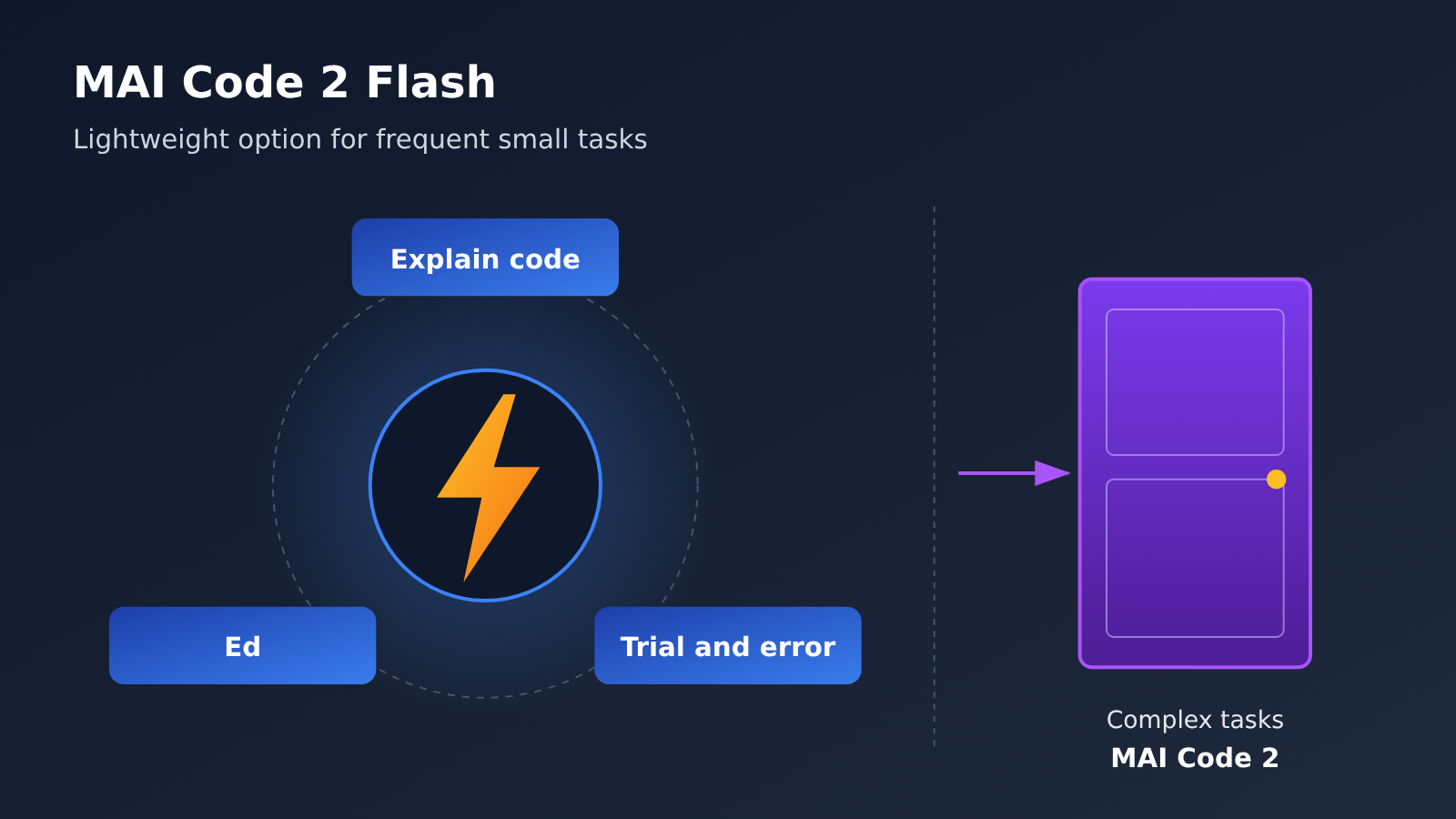
Key point: MAI Code 2 Flash is built for high-volume coding work where no single task is very hard. Large multi-file changes and deep debugging should still go to MAI Code 2.
MAI Code 2 Flash: Key Facts at a Glance
Let’s start with a table that lays out what’s officially been announced. Every item below comes from public Microsoft or GitHub sources and reflects information checked as of 2026-11-18.
| Item | MAI Code 2 Flash details |
|---|---|
| Release date | 2026-11-17, released the same day as MAI Code 2 |
| Released by | Microsoft AI; also available in GitHub Copilot |
| Official positioning | High-volume work: code explanation, targeted small edits, routine fixes, quick back-and-forth |
| Explicitly not tuned for | Basic research, very long-horizon agentic tasks (same as MAI Code 2) |
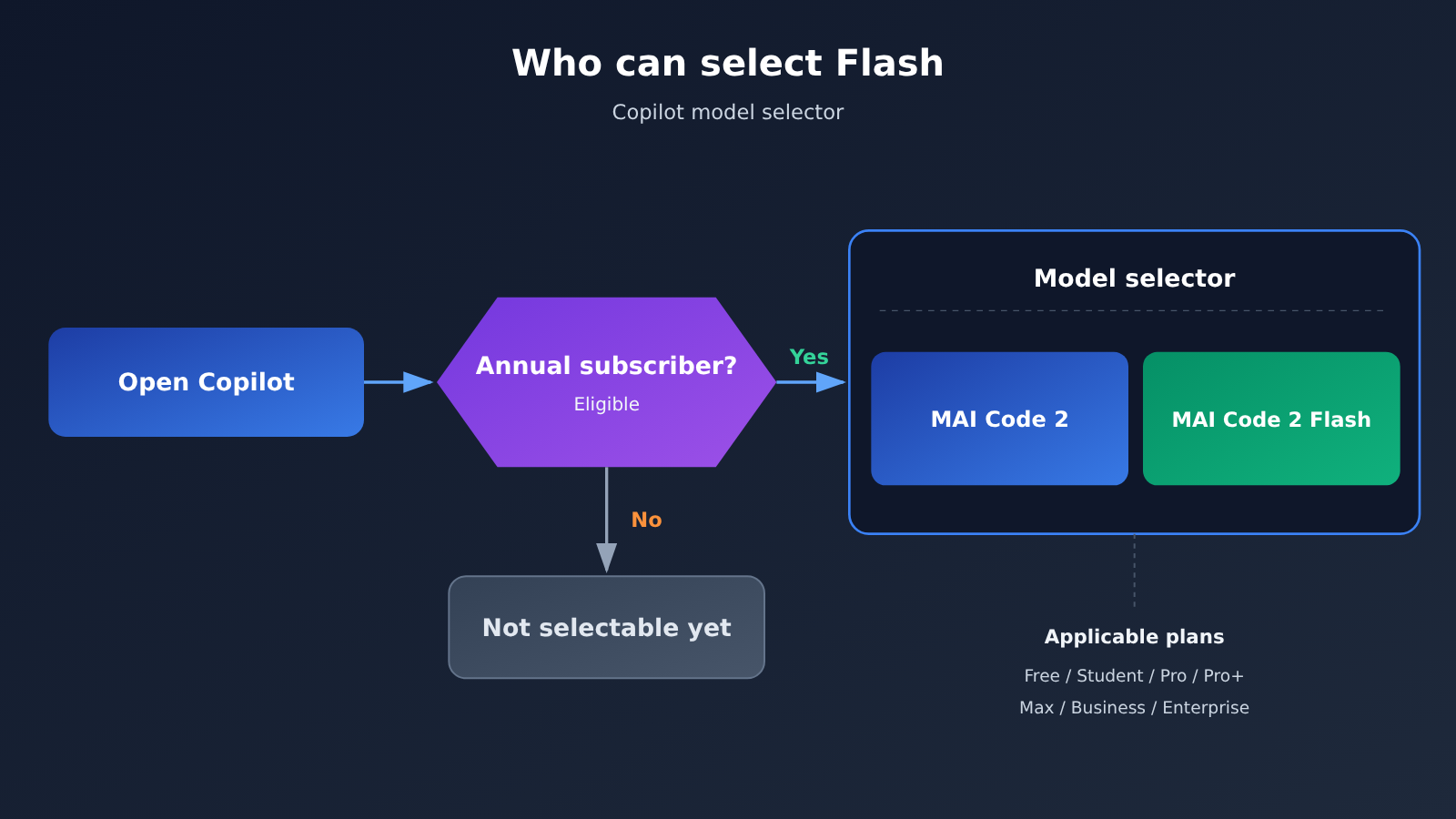
| Available Copilot plans | Free, Student, Pro, Pro+, Max, Business, Enterprise |
| Eligibility | Only for qualifying annual subscribers; picker location is the same as MAI Code 2 |
| Other channels | Press release says limited preview on Foundry; Book of News says private preview on Foundry and general availability on GitHub |
How to Understand MAI Code 2 Flash’s Positioning
The press release is pretty direct about Flash: it’s built for high-volume coding work that isn’t hard individually, and it costs much less. Think of it as a dedicated option for “high-frequency small jobs.” Reading code, asking “what does this function do?”, renaming a variable, or fixing an error with a clear location are all target scenarios.
One thing to keep in mind: Flash isn’t a cheaper version of MAI Code 2. They’re two separate models released at the same time, with different positioning and separate pricing. Microsoft also specifically notes that neither model has been tuned for basic research or very long-horizon agentic tasks, so you shouldn’t treat Flash as a “cheap all-purpose model.”
Who Can Use MAI Code 2 Flash in Copilot
The GitHub changelog lists a broad set of plans: Copilot Free, Student, Pro, Pro+, Max, Business, and Enterprise are all included. That’s good news for students and free users, since it isn’t limited to high-priced plans.
But there’s an easy-to-miss catch: both models are only available to qualifying annual subscribers. So “Free and Student users can select it too” doesn’t mean everyone who opens the picker will see it; it still depends on your account’s plan type and billing method. Finding it is simple: it’s in the same model picker as MAI Code 2.
MAI Code 2 Flash Pricing and Task Costs
Pricing is the part most likely to get muddled this time, because official materials contain two sets of figures: one is Copilot’s per-token pricing, and the other is the “task cost share” mentioned in the press release. These two are not the same thing, so let’s break them down separately.
MAI Code 2 Flash Copilot Pricing
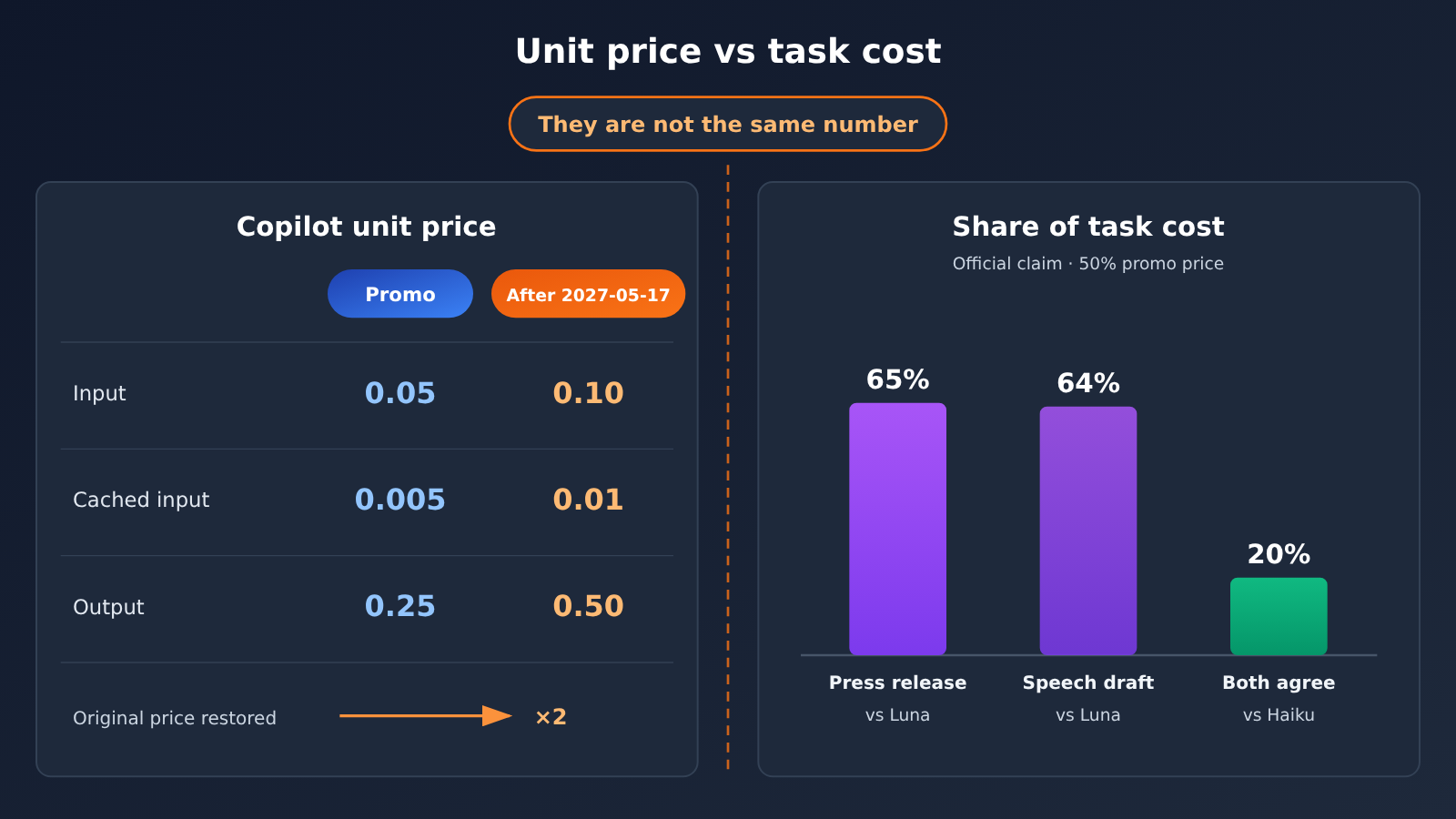
According to GitHub’s Copilot price sheet, MAI Code 2 Flash currently uses promotional pricing, valid through 2027-05-17, after which it returns to list price. The units in the table below are USD per million tokens. The same table also lists default-tier pricing for two comparison models.
| Model and Period | Input | Cached Input | Output | Notes |
|---|---|---|---|---|
| MAI Code 2 Flash promotional period | 0.05 | 0.005 | 0.25 | Through 2027-05-17 |
| MAI Code 2 Flash after list price returns | 0.10 | 0.01 | 0.50 | After 2027-05-17 |
| GPT-6 Luna default tier | 0.10 | 0.01 | 0.50 | Input up to 272K |
| Claude Haiku 5.5 default tier | 0.10 | 0.01 | 0.50 | Input up to 100K |
One thing jumps out from the table: during the promotional period, all three Flash prices are half the list price. After list price returns, its default-tier prices are the same set of numbers as GPT-6 Luna and Claude Haiku 5.5. In other words, if you’re choosing it for the unit price, the promotional period is a limited window — after 2027-05-17, you’ll need to redo the math.
These are all Copilot prices, not APIYI prices. As of 2026-11-18, the APIYI apiyi.com model list and pricing page do not yet include MAI Code 2 Flash or MAI-Code-2-Flash. It’s not listed yet, and we’ll add this model as soon as possible. Model availability and pricing are subject to the platform’s model list, and you can check the APIYI apiyi.com model list page anytime for the latest status.
💰 Cost tip: If you want to get high-frequency workflows like “small edits and explanations” running with models that are already listed, you can use the same API key on APIYI apiyi.com to switch between models and pay as you go. New users get free trial credits, and once Flash is listed, you can switch the model over and compare.
MAI Code 2 Flash Task Cost: Two Figures, 65% and 64%
The press release body says this: across three everyday benchmarks, Flash performs on par with GPT-6 Luna and Claude Haiku 5.5, at 65% and 20% of their task cost respectively. The same-day keynote transcript says 64% and 20%, where 64% maps to GPT-6 Luna and 20% to Haiku 5.5.
The two official materials differ by one point on the Luna figure. This article doesn’t merge them into a single number — both are kept as stated. The table below puts the sources and test conditions side by side so you can compare.
| Item | Press release | Keynote transcript |
|---|---|---|
| Task cost relative to GPT-6 Luna | ~65% | ~64% |
| Task cost relative to Claude Haiku 5.5 | ~20% | ~20% |
| Nature of the data | Microsoft self-reported | Microsoft self-reported |
| Pricing basis | Calculated at MAI-Code-2-Flash’s 50%-off promotional price | Announced the same day, no further clarification |
| Test benchmarks | DeepSWE 1.1, TerminalBench 2.1, SWE Atlas | Same three as above |
| Test conditions | Max reasoning tier, GitHub Copilot CLI on MSBench, no sub-agents | — |
Three details are worth a closer look. First, these figures are task costs computed at the 50%-off promotional price, so they can’t be carried over directly once full pricing returns. Second, the Flash set doesn’t include FrontierCode, so it only covers three everyday benchmarks. Third, these are all Microsoft’s own numbers, not APIYI test results.
📊 Data note: All figures above come from Microsoft’s press release, the keynote transcript, and the GitHub price list, and are officially self-reported. Once the model is listed, you can run your own comparison on your codebase through APIYI apiyi.com.
One more thing worth thinking about. In the table, GPT-6 Luna and Claude Haiku 5.5 have the same default-tier unit price, yet Flash’s task cost relative to them is 65% (or 64%) and 20% — a wide gap. That tells you task cost isn’t just about unit price; it also depends on how many tokens each task actually consumes. Microsoft hasn’t published the per-task token consumption, so you can’t extrapolate task cost from a unit-price ratio.
MAI Code 2 Flash Impact Analysis
Impact on Developers: How to Split the Work with MAI Code 2 Flash
For people dealing with “lots of small changes,” the most immediate change Flash brings is giving high-frequency small tasks their own dedicated option, so you don’t have to call a heavy model at every step. Based on the official positioning, here’s how you can split the work:
- Explaining code: understanding an unfamiliar function or clarifying what a parameter means — use Flash.
- Goal-driven small edits: changing a condition, adding a null check, tweaking a name — use Flash.
- Back-and-forth experimentation: adjusting the prompt line by line, trying a few approaches, then picking one — use Flash; even plenty of iterations won’t hurt.
- Changes spanning many files: when multiple modules are involved — switch to MAI Code 2.
- Code headed for production: changes going live need more solid review — switch to MAI Code 2.
- Deep debugging: bugs with murky symptoms that require tracing the root cause layer by layer — switch to MAI Code 2.
One more rule applies to both: the official docs clearly state that they haven’t tuned these models for basic scientific research or very long-horizon agentic tasks, so whether it’s Flash or MAI Code 2, don’t throw them at these ultra-long tasks. It’s not that they definitely can’t handle them — it’s just that the official team hasn’t offered any guarantee, and if you use them in critical workflows, you’re taking on the risk yourself.
| Scenario | Recommended Model | Reason | Available Platform |
|---|---|---|---|
| Explaining code, understanding logic | MAI Code 2 Flash | High volume, low per-task difficulty | GitHub Copilot; APIYI apiyi.com (coming soon) |
| Goal-driven small edits, routine fixes | MAI Code 2 Flash | Clearly covered by official positioning | GitHub Copilot; APIYI apiyi.com (coming soon) |
| Quick back-and-forth experimentation | MAI Code 2 Flash | High call volume, suited to low per-call difficulty | GitHub Copilot |
| Multi-file changes, going to production | MAI Code 2 | Higher task complexity | GitHub Copilot |
| Deep debugging | MAI Code 2 | Requires a stronger reasoning chain | GitHub Copilot |
| Basic scientific research, ultra-long agentic tasks | Neither recommended | Officially not yet tuned | — |
🎯 Technical tip: If your toolchain uses an OpenAI-compatible interface, you can start by setting
base_urltohttps://api.apiyi.com/v1, and write your routing logic — “fast model for small tasks, strong model for big ones” — using models that are already listed. Once MAI Code 2 Flash is available on APIYI apiyi.com, you just swap the model field to plug it in, with no other code changes needed.
Impact on developers: can MAI Code 2 Flash be wired into your own endpoints today?
A lot of people want to know: can you skip Copilot and call Flash directly from your own scripts or tools? Based on the material available right now, the answer is not yet — at least not through a stable public ID you can call at any time.
The press release says Flash is a limited preview on Foundry and will later reach channels like Open Router, Vercel, Hermes, Open Code, and Kilo; the Book of News describes it as a private preview on Foundry and generally available on GitHub. Both sources point to the same conclusion: today the stable entry point is GitHub Copilot, and the other channels are still on the way.
So the inline code MAI Code 2 Flash and MAI-Code-2-Flash used in this article are just the official name and the way it’s written in footnotes — they don’t mean some platform already provides that invocation ID. When it actually lands in API channels, the final model string will be whatever each platform publishes.
Impact on the industry: MAI Code 2 Flash and MAI Work Flash are not the same thing
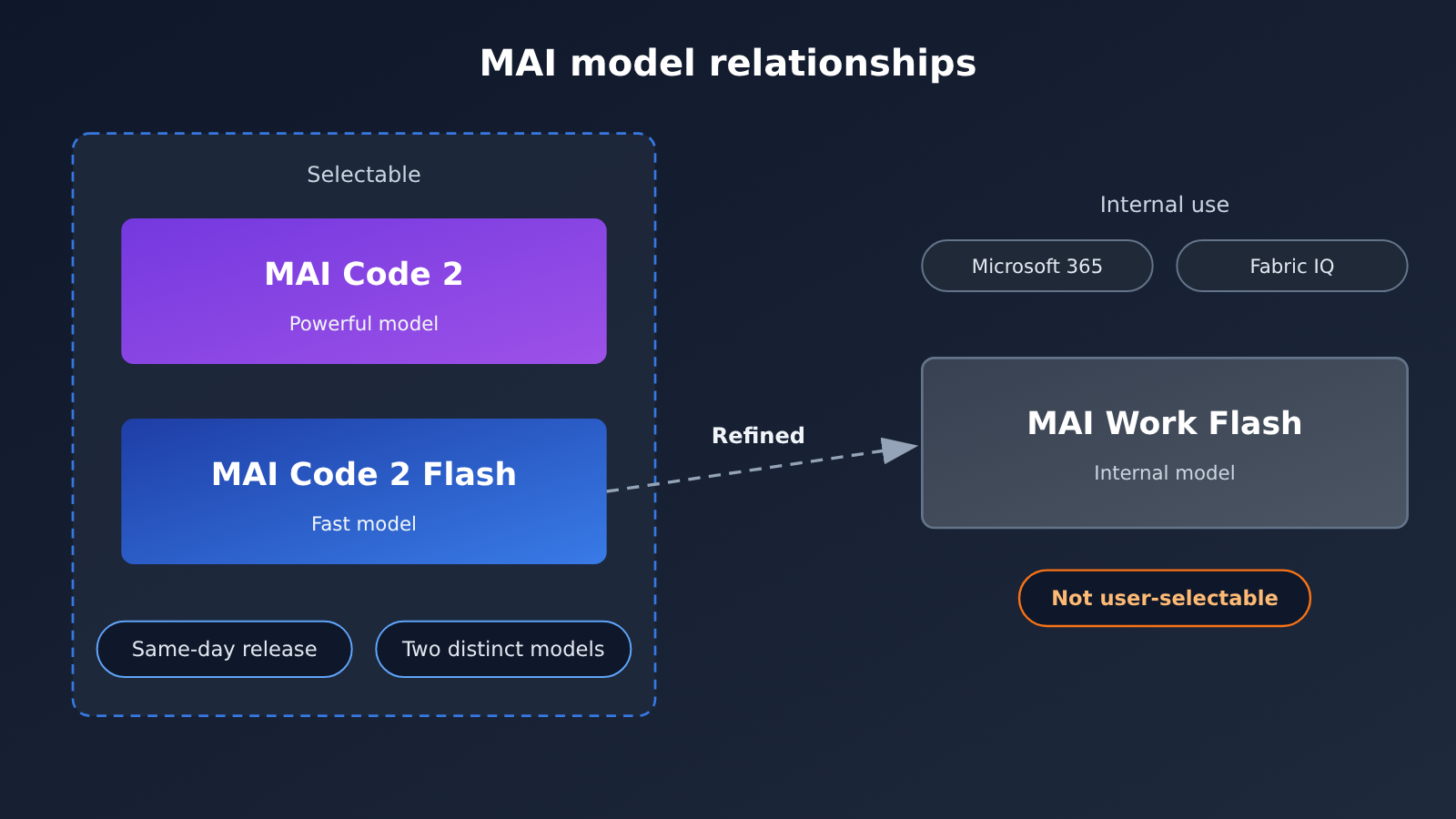
The press release also mentions a model with a very similar name: MAI Work Flash. Officially, it’s built by further optimizing Code 2 Flash for Microsoft 365 and Fabric IQ, with internal benchmarks run on Excel, PowerPoint, Word, and Teams — again, self-reported by Microsoft.
It’s important to keep these straight: MAI Work Flash is the model used inside Microsoft’s own products. It’s not the MAI Code 2 Flash you pick in the Copilot selector, and it isn’t a same-named model you can call yourself. When you see coverage of it, don’t map Work Flash’s office-scenario results onto Code 2 Flash.
| Model | Primary use | Where you can use it | Can you choose it yourself |
|---|---|---|---|
| MAI Code 2 Flash | High-volume coding: explanations, small edits, routine fixes, fast back-and-forth | GitHub Copilot (annual), Foundry preview | Selectable in Copilot |
| MAI Code 2 | More complex coding tasks | GitHub Copilot (annual) | Selectable in Copilot |
| MAI Work Flash | Further optimized from Code 2 Flash, serving Microsoft 365 and Fabric IQ | Microsoft internal products | Not a model you can call yourself |
Impact on the Industry: The Price Window for MAI Code 2 Flash
Configuring coding models into two tiers — “fast model + strong model” — is already common practice, and MAI Code 2 Flash means Microsoft’s own model now fills the fast tier too. What’s more worth watching is the pricing rhythm: the promotion runs until 2027-05-17, after which it reverts to the same unit price as the default tiers of GPT-6 Luna and Claude Haiku 5.5.
That means the current low price is really more of a window to get users to try it out and build the habit. For teams, the safer approach is to map out which scenarios Flash fits during the promo period, while recording the actual consumption for each type of task — then when the original price kicks in, decide whether to keep using it based on your own bill. Don’t just look at the official 65%, 64%, or 20% figures, because those are calculated off promo prices on specific benchmarks.
MAI Code 2 Flash Summary
MAI Code 2 Flash Key Takeaways
- Clear positioning: MAI Code 2 Flash is aimed at high-volume coding work that isn’t individually difficult.
- Not a discounted version: It launched the same day as MAI Code 2, and they’re two separate models.
- Wide plan coverage: Available from Copilot Free through Enterprise, but only for eligible annual subscribers.
- The unit price has an expiry: Promo prices are 0.05 / 0.005 / 0.25, reverting to 0.10 / 0.01 / 0.50 after 2027-05-17.
- Two cost figures: 65% relative to Luna in the press release, 64% in the speech script, and 20% relative to Haiku — all official self-reported numbers.
- Don’t confuse Work Flash: MAI Work Flash is a model Microsoft uses internally, not the one you can select.
- Access has to wait: APIYI apiyi.com hasn’t listed it yet; go by the platform’s model list.
Whether MAI Code 2 Flash is enough depends on the work on your plate. Explaining code, small changes with a clear goal, back-and-forth experimenting — handing those to Flash basically matches the official positioning; when the task spans lots of files, ships to production, or requires deep debugging, you should switch to MAI Code 2; for foundational research and ultra-long agent tasks, neither model is recommended.
On pricing, remember two things: the Copilot unit price is a promo price right now and reverts on 2027-05-17; the task-cost shares in the press release are officially self-reported figures calculated at promo prices, and shouldn’t be conflated with the unit price. If you want to wire this “fast model for small jobs, strong model for big jobs” division into your own tools, keep an eye on the model list at APIYI apiyi.com — once the model is listed, you can switch and compare using the same Key and OpenAI-compatible interface.
📚 References
-
Microsoft AI press release: Introducing MAI Code 2 and MAI Code 2 Flash
- Link:
microsoft.ai/news/introducing-mai-code-2-and-mai-code-2-flash - Notes: Flash positioning, the 65% and 20% task cost figures, benchmark footnotes, and the MAI Work Flash explanation
- Link:
-
Microsoft Ignite 2026 MAI keynote transcript
- Link:
microsoft.ai/news/microsoft-ignite-2026-mai-keynote - Notes: same-day statements referencing 64% and 20%
- Link:
-
GitHub changelog: MAI Code 2 and MAI Code 2 Flash in GitHub Copilot
- Link:
github.blog/changelog/2026-11-17-mai-code-2-and-mai-code-2-flash-in-github-copilot - Notes: available plans, annual billing conditions, and where to find the model selector
- Link:
-
GitHub Copilot models and pricing documentation
- Link:
docs.github.com/en/copilot/reference/copilot-billing/models-and-pricing - Notes: Flash promotional and regular pricing, plus comparison unit prices for GPT-6 Luna and Claude Haiku 5.5
- Link:
-
TestingCatalog post: what sparked this discussion
- Link:
x.com/testingcatalog/status/2122759893174178173 - Notes: the post calls it “Code 2 Flash”; the official name is MAI Code 2 Flash
- Link:
Author: APIYI Technical Team
Technical discussion: Feel free to reach out to us on the APIYI apiyi.com homepage. For model listing updates and integration guides, visit the docs.apiyi.com documentation center.


