
At Google I/O 2026 on May 19, 2026, Google officially unveiled the Gemini Omni multimodal model family, with the debut model, Gemini Omni Flash, rolling out to users that same day. For newcomers hearing this name for the first time, the word "Omni" is far more significant than you might think—it represents a brand-new direction where Google has completely integrated Gemini's intelligent reasoning capabilities with its media generation powers. In this article, we'll break down what Google Omni actually is, what it can do, how it differs from the previous Veo, and how developers or creators can get started, all in just 5 minutes.
Core Value: After reading this, you'll have a clear understanding of Google Omni's (Gemini Omni) positioning, capability boundaries, access channels, and industry significance, without getting lost in the jargon of news headlines.
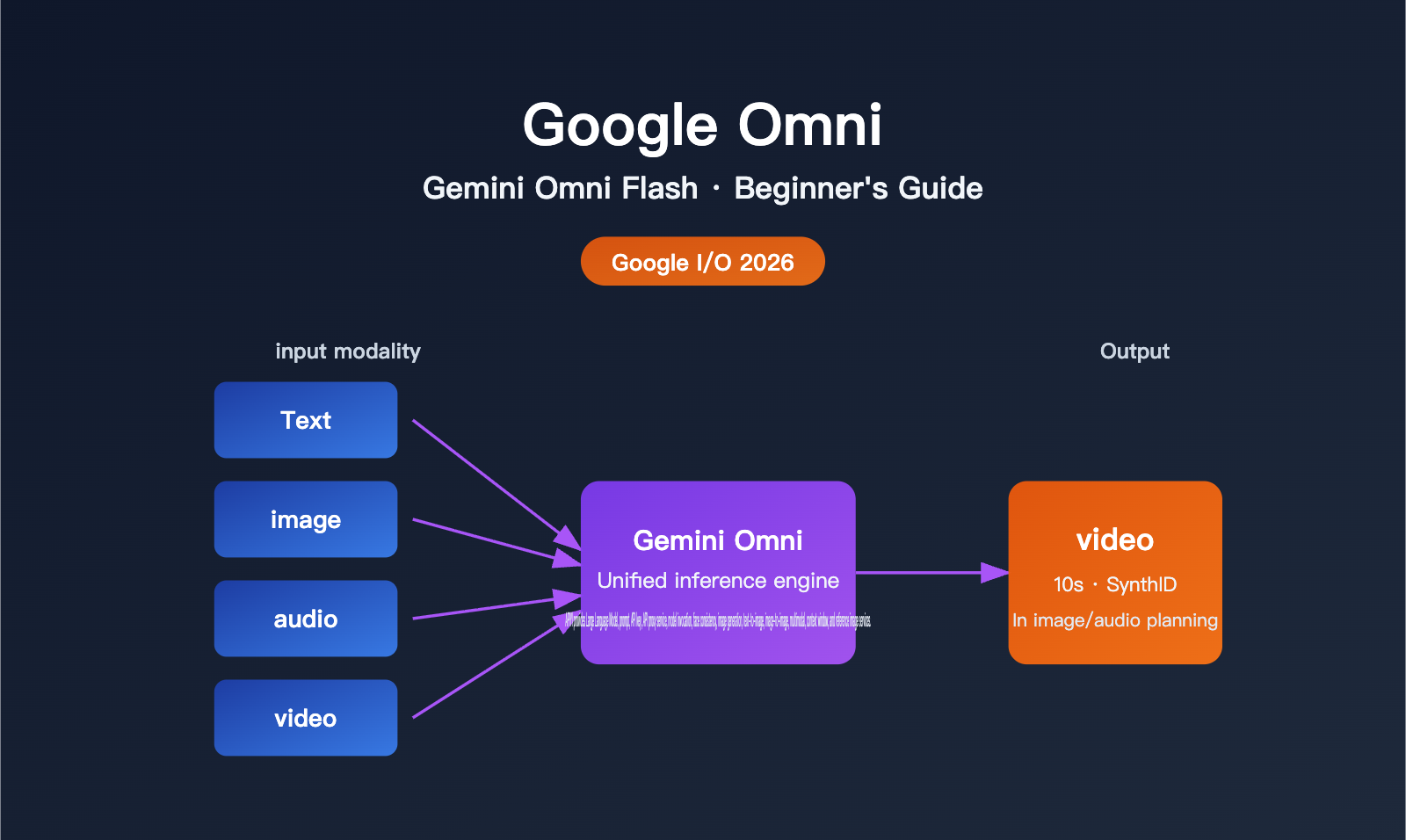
What is Google Omni: A Quick Core Overview
In a nutshell: Google Omni is a "multimodal generative model family" launched by Google, with the first model being Gemini Omni Flash. Its biggest selling point isn't that it's "just another AI that can generate video," but rather that it can take any combination of text, images, audio, and video as input, perform unified reasoning, and produce a coherent video.
Google CEO Sundar Pichai used a very straightforward phrase in his keynote to describe its positioning: "create anything from any input." In other words, in the past, you had to use one model to generate an image and then another to turn that image into a video; Omni attempts to complete cross-modal reasoning and generation with a single model.
| Information Item | Details |
|---|---|
| Release Date | May 19, 2026 (Google I/O 2026) |
| Publisher | Google (Google DeepMind & Google Labs) |
| Debut Model | Gemini Omni Flash |
| Model Positioning | Unified multimodal reasoning + media generation model family |
| Input Modalities | Text, image, video, audio (any combination) |
| Output Modalities | Video (primary focus at launch), image and audio to be opened later |
| Single Segment Duration | Up to 10 seconds (deployment limitation, not a model cap) |
| Content Labeling | All videos automatically embedded with SynthID invisible watermarks |
| Future Roadmap | Gemini Omni Pro, longer durations, audio editing capabilities |
💡 Newcomer Tip: If you want to experience various mainstream models, including the Gemini series, as soon as they launch, you can use the APIYI (apiyi.com) API proxy service to call them via a unified interface, saving you the hassle of registering on multiple platforms.
Decoding Google Omni's Key Capabilities: Why It's a "New Generation"
If you only look at "what goes in and what comes out," it's easy to mistake Omni for just another video model like Sora, Veo, or Runway. But Google's Product Director, Nicole Brichtova, gave a more precise definition: "This is the next step in combining Gemini's intelligence with media model rendering capabilities." The following four capabilities are key for newcomers to understand how Omni differs from traditional video models.
1. Cross-Modal Reasoning, Not Just Stitching
Traditional video generation usually follows a two-step process: "Text → Video" or "Image + Text → Video." Gemini Omni takes a different approach by feeding all inputs into a single model, allowing it to build a unified semantic understanding internally before rendering the video in one go.
For example, if you provide a product photo, a background track, and an ad script to Omni simultaneously, it understands that "the product should appear when the rhythm shifts" and "the script should sync with the on-screen action," rather than just layering music over a video. This "understand first, generate later" capability comes from the inherent reasoning DNA of the Gemini model.
2. Physical Understanding and World Knowledge
Google highlighted two examples in its demo: a shot of a rolling agate ball where the bounce, landing, and collision sounds all align with real-world physics; and a claymation-style educational animation of protein folding, where the geometric structure remains consistent with molecular biology. These demos may look simple, but they actually demonstrate the model's grasp of "real-world laws" rather than just pixel-level fitting.
For newcomers, this means videos generated by Omni are less prone to typical AI video flaws like "object teleportation," "lighting glitches," or "extra fingers."
3. Conversational Iterative Editing
Omni supports "generate first, then edit with natural language." After the model generates a video, you can say, "Change the background to sunset" or "Slow down the camera movement," and the model will make local adjustments while keeping the characters, scenes, and actions consistent.
This interaction style feels more like talking to an editor than writing a long, one-off prompt. It's especially friendly for those without experience in prompt engineering.
4. Custom Digital Avatar
Omni allows users to create their own digital avatar through biometric authentication and then embed that avatar into generated videos. Google emphasizes that this step must be completed by the user themselves via biometric verification to reduce the risk of face-swapping abuse.
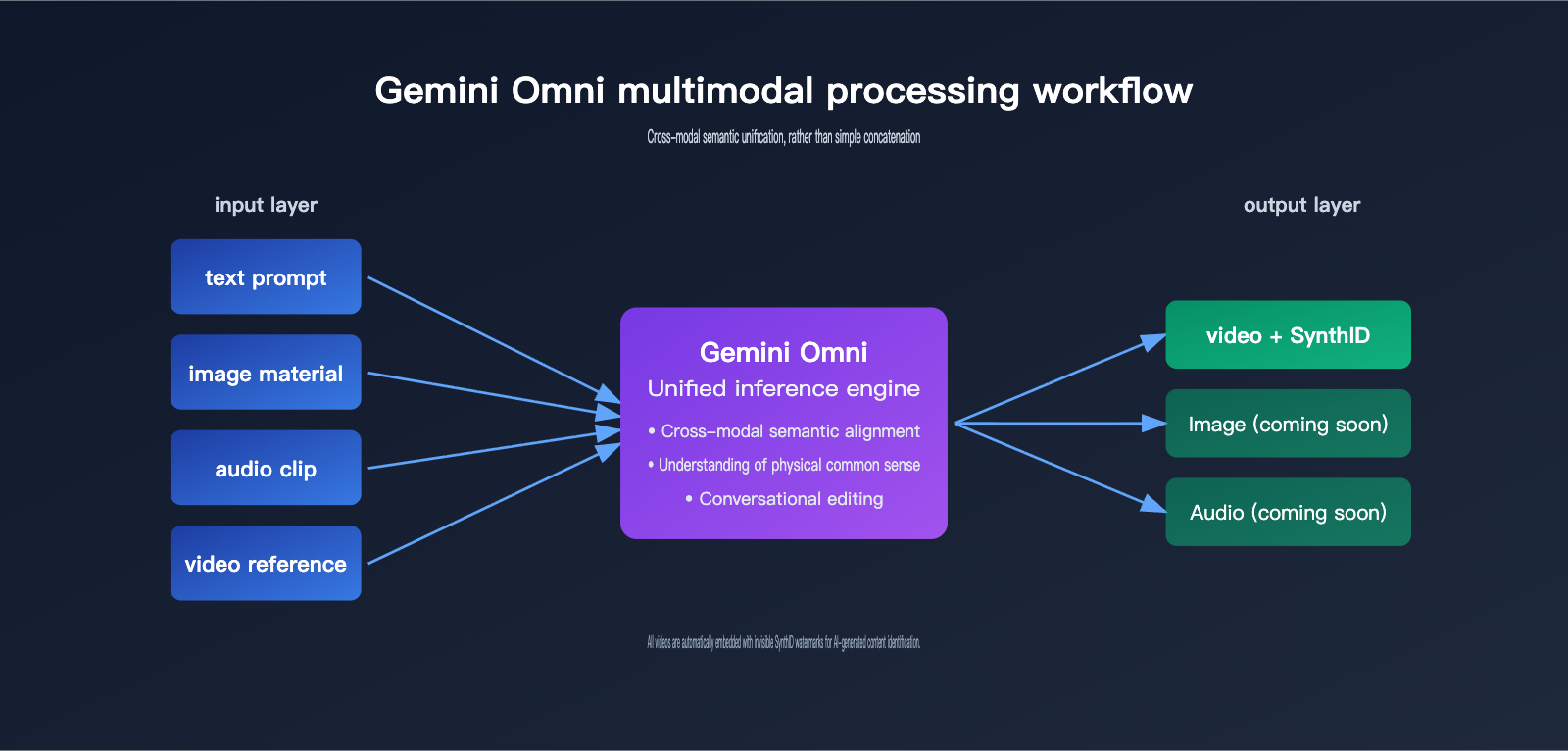
🎯 Capability Summary: The key to Omni isn't "higher resolution" or "longer duration," but the "cross-modal reasoning + physical common sense + conversational editing" trio. To integrate these capabilities into your own products, we recommend using an API proxy service like APIYI (apiyi.com) to test the effects of different model combinations before deciding on your primary solution.
What's the Difference Between Gemini Omni and Veo: The Two Most Confusing Names for Newcomers
Many newcomers ask: Doesn't Google already have Veo? What is Omni for? This is a very reasonable question because both can "generate video," but their positioning is completely different. The table below is the fastest way for newcomers to understand the relationship between the two.
| Comparison Dimension | Veo | Gemini Omni |
|---|---|---|
| Model Type | Specialized Media Model | Unified Multimodal Reasoning + Media Generation Model |
| Input Support | Text, Image | Text + Image + Audio + Video (Any combination) |
| Reasoning Depth | Primarily Rendering | Gemini-powered reasoning, unified cross-modal semantics |
| Editing Method | Primarily Re-generation | Supports conversational incremental editing |
| Physical Understanding | Average | Significantly enhanced (highlighted in official demos) |
| Target Audience | Professional Video Creators | Creators + General Consumers + Developers |
| Current Positioning | High-quality video generation tool | Cross-modal "create anything" foundation model |
A simple analogy: Veo is like a high-fidelity printer—you give it an image, and it prints a beautiful finished product. Omni is more like an all-around assistant that understands your intent; you can throw some materials and a sentence-long request at it, and it will produce the final piece. Both will likely coexist in the future, but Omni represents the "unified multimodal" path that Google is betting on.
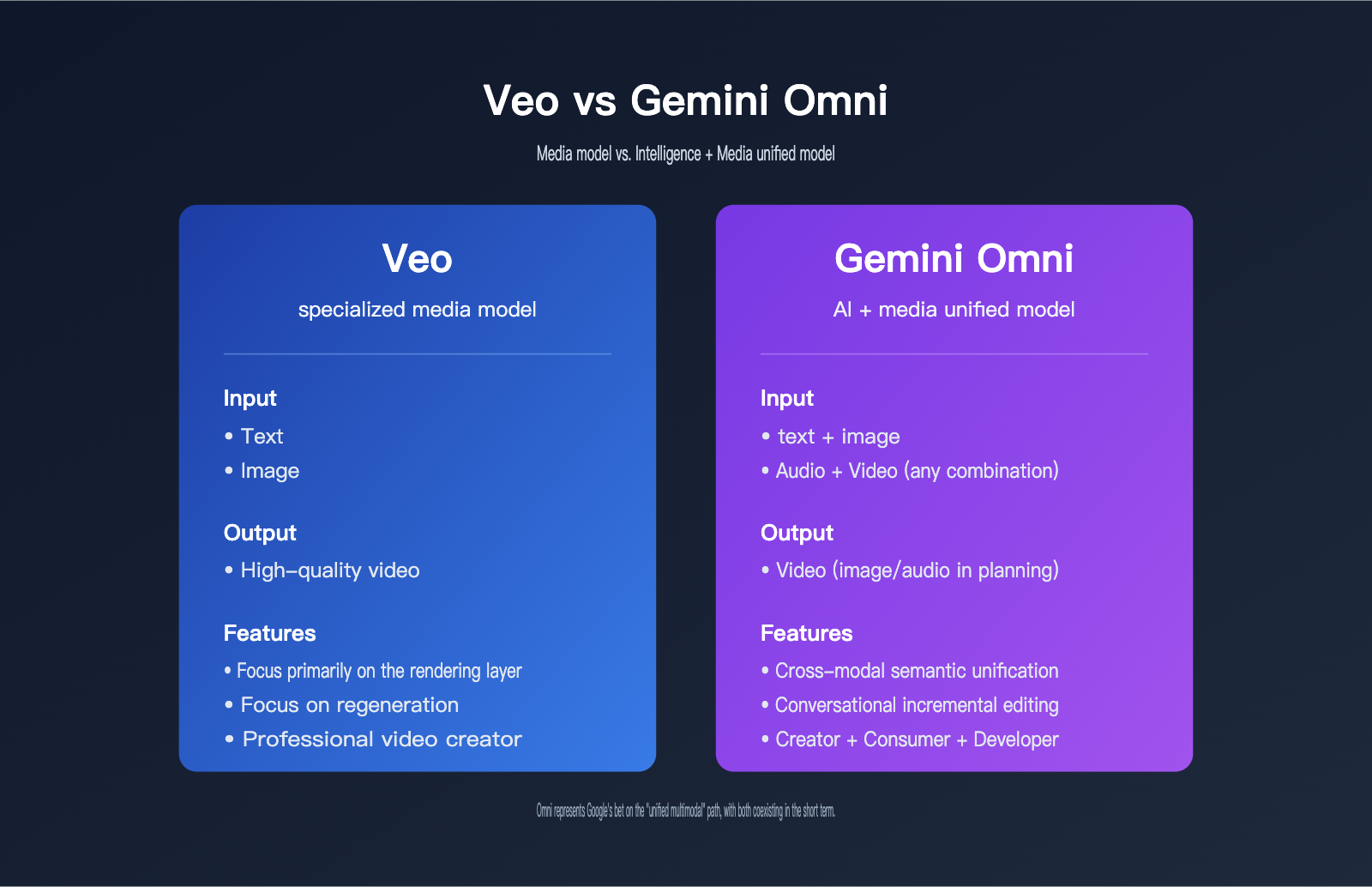
🧭 Newcomer Recommendation: If you just want to generate beautiful short clips, Veo is still sufficient. If you are building application scenarios involving "mixed text, image, audio, and video inputs," Omni is the more suitable direction. To quickly compare the actual performance of these two types of models, we recommend using an API proxy service like APIYI (apiyi.com) that supports multi-model switching for A/B testing, allowing you to swap models without changing your workflow.
How to Use Gemini Omni Flash: A Beginner's Guide
Since its release, Gemini Omni Flash has been made available to various user groups, though the access channels aren't exactly unified. The comparison table below will help you quickly figure out where you should start.
| User Type | Recommended Entry Point | Paid? | Notes |
|---|---|---|---|
| General Consumer | Gemini app | Requires Google AI Plus/Pro/Ultra subscription | Personal creativity, short video production |
| Content Creator | Google Flow | Requires Google AI subscription | Geared toward professional creative workflows |
| Short Video User | YouTube Shorts, YouTube Create App | Free | Limited-time free trial, best entry point for beginners |
| Developer / Enterprise | Google API (Coming soon) | Pricing TBD | Launching in a few weeks, stay tuned for updates |
| Multi-model Evaluator | Third-party API aggregation platforms | Varies by platform | Ideal for R&D teams comparing multiple models |
The Easiest Path for Beginners
- If you don't have any paid AI tools, I recommend starting with YouTube Shorts or the YouTube Create App to experience free Omni video generation—it's the lowest barrier to entry.
- If you're already a Google AI Plus (or higher) subscriber, just open the Gemini app; you'll see the Omni video generation entry point right in the creative panel.
- If you're a developer, the most practical approach right now is to experience the results on the consumer side while waiting for the official API. In the meantime, you can use APIYI (apiyi.com) to call other available Gemini models and start building out your multimodal invocation pipeline.
A Minimalist Invocation Strategy (Once the Official API Launches)
Although the official developer API for Omni is still "a few weeks away," we can pre-design the structure so you're ready to plug it in as soon as it drops.
# Multi-model aggregation invocation example (Conceptual structure, replace model once official Omni API is live)
from openai import OpenAI

client = OpenAI(
    api_key="YOUR_API_KEY",
    base_url="https://api.apiyi.com/v1"  # Unified access to multiple models via APIYI
)

# Currently available to call other Gemini series models
response = client.chat.completions.create(
    model="gemini-2.5-pro",
    messages=[{"role": "user", "content": "Explain the core value of multimodal models in one sentence"}]
)
print(response.choices[0].message.content)
💡 Quick Tip: Don't wait for every official API to launch before getting started. Use APIYI (apiyi.com) to build your workflow with other Gemini models now. Once the Omni API goes live, you'll only need to swap the model name—making the migration cost practically zero.
The Impact of Google Omni on Developers and the Industry
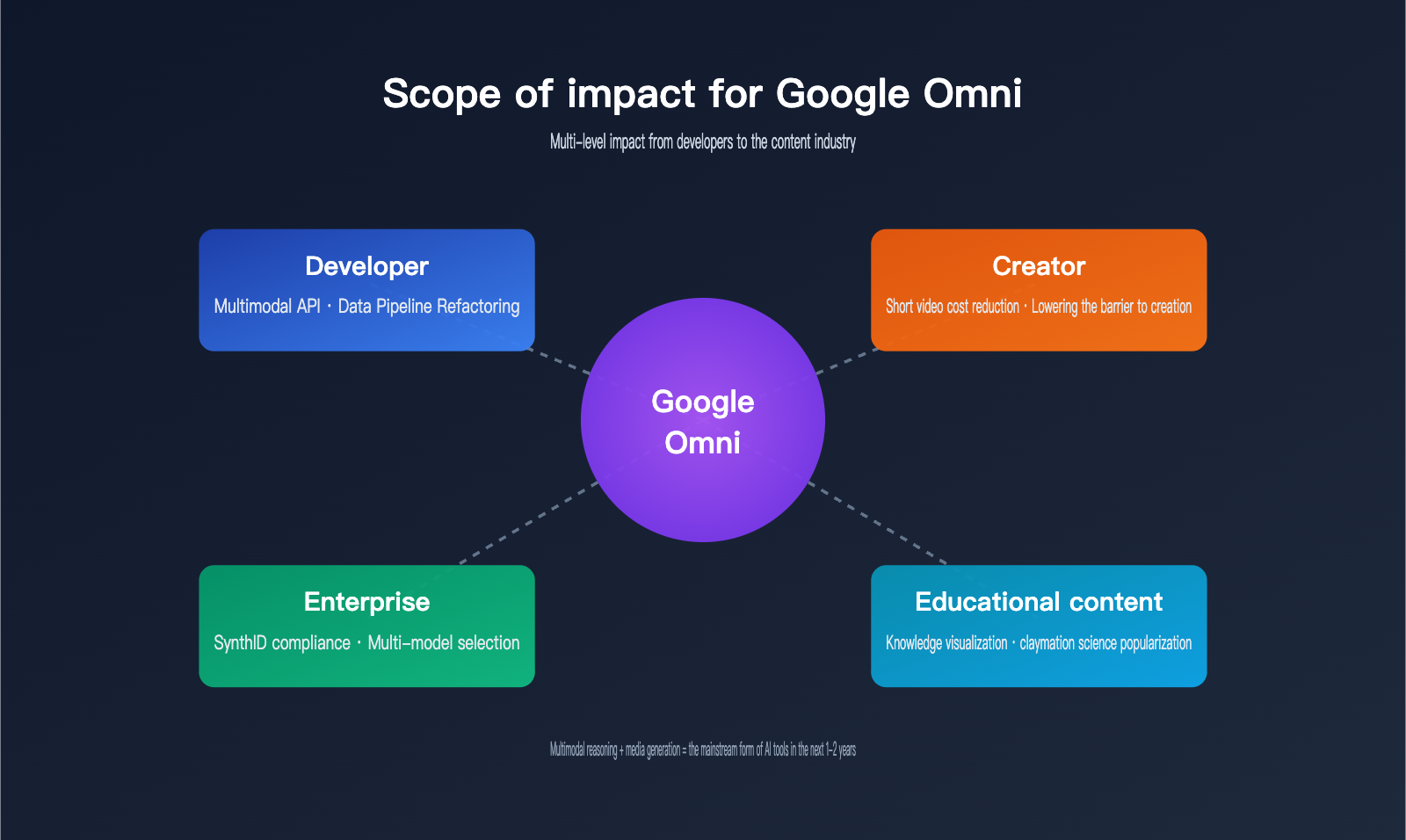
Many newcomers are wondering: what does this new model mean for me? The answer varies depending on whether you're a developer, a creator, or an enterprise user.
Impact on Developers
| Area of Impact | Specific Changes |
|---|---|
| Invocation Method | Multimodal prompt design replaces the "text-to-image then image-to-video" pipeline |
| Toolchain | SDKs need to adapt to "video/audio input streams" rather than just text |
| Content Compliance | SynthID watermarking becomes a default requirement; plan for detection and display |
| Cost Structure | Per-generation costs may be higher than text-only calls; manage usage carefully |
For engineers building AI applications, Omni sends a clear signal: the future of AI interfaces isn't just "text-in, text-out"—it's "multimodal-in, multimodal-out." Refactoring your data pipelines now and managing your assets by modality will give you a head start when the Omni API officially opens.
Impact on the Content Industry
Short video platforms, advertising agencies, and educational content producers will be the first to benefit. A high-quality 10-second video that used to take hours to edit can now be produced as a rough draft by Omni Flash in minutes. For long-tail creators, the barrier to "turning a single image into a finished video" has been significantly lowered.
However, keep in mind that the mandatory embedding of SynthID watermarks means that "AI-generated" content will become increasingly transparent. Platforms, brands, and regulators may adjust their content labeling and review policies based on this watermark.
Impact on Enterprise Users
Enterprise users are primarily concerned with two things: compliance/brand safety and scalability costs. SynthID watermarks address half of the first concern, while the second depends on the API pricing Google announces later. For budget-conscious teams, a safer strategy is to use an aggregation platform like APIYI (apiyi.com) to evaluate video or multimodal capabilities from multiple vendors (like Gemini, GPT, and Claude) simultaneously, then choose the best fit based on cost and quality.
FAQ
Q1: Are Google Omni and Gemini Omni the same thing?
Yes. Google Omni is an unofficial shorthand; the official name used by Google is "Gemini Omni," which belongs to the multimodal branch of the Gemini model family. Gemini Omni Flash is the debut model of this family. Both names refer to the same technology.
Q2: Can beginners try Gemini Omni for free right now?
Yes. The most direct way is to use the Omni video generation feature in YouTube Shorts or the YouTube Create App, which is currently free for creators. If you want to use it within the Gemini app, you'll need a Google AI Plus, Pro, or Ultra subscription.
Q3: Why is a single Gemini Omni video clip limited to 10 seconds?
This is a deployment-stage limitation, not a cap on the model's actual capabilities. The official explanation is that "during periods of high compute demand, we are prioritizing access for as many users as possible." Future models like Omni Pro will gradually support longer video durations.
Q4: Does the SynthID watermark affect video quality or commercial use?
No. SynthID is an invisible watermark; it's imperceptible to the human eye and doesn't affect image quality. Its purpose is to allow platforms and tools to identify that "this video was generated by AI" as content circulates. Commercial use must comply with Google's Terms of Service.
Q5: What should developers do to prepare?
First, get familiar with the design logic of multimodal prompts instead of just writing text prompts. Second, organize your asset library by modality. Third, get your model invocation workflows running early. We recommend using APIYI (apiyi.com) to call existing Gemini series models through a unified interface, allowing you to switch seamlessly once the Omni API is officially released.
Q6: Will Gemini Omni replace Veo?
Not in the short term. Veo remains the standard for high-quality, specialized video generation, while Omni represents a unified direction of "multimodal reasoning + media generation." It's more likely that both will coexist in different scenarios.
Summary: Three Things Beginners Should Remember
First, the essence of Gemini Omni is a unified model for "cross-modal reasoning + media generation," not just "another video AI." Its unique capabilities lie in three dimensions: physical understanding, conversational editing, and cross-modal reasoning.
Second, the fastest way for beginners to experience it is through the free entry points in YouTube Shorts or the YouTube Create App, followed by the Gemini app subscription channel. The developer API is expected to launch "within weeks," so you can start planning your architecture now.
Third, Omni won't immediately replace the tools you're familiar with, but it represents the mainstream form of multimodal AI for the next 1–2 years. Understanding its input/output methods, SynthID compliance requirements, and its positioning relative to Veo early on will help you avoid pitfalls during this new wave of AI tool upgrades. If you want to call mainstream models like Gemini, GPT, and Claude through a single interface, APIYI (apiyi.com) is the most hassle-free solution right now, and it will allow you to integrate the Gemini Omni API as soon as it's officially released.
References
-
Google Official Blog – Gemini Omni Launch Announcement
- Link:
blog.google/innovation-and-ai/models-and-research/gemini-models/gemini-omni - Description: The official authoritative introduction to the positioning and capabilities of Gemini Omni from Google.
- Link:
-
TechCrunch – In-depth Report on Gemini Omni
- Link:
techcrunch.com/2026/05/19/googles-gemini-omni-turns-images-audio-and-text-into-video-and-thats-just-the-start - Description: Features key statements from Sundar Pichai and Nicole Brichtova.
- Link:
-
9to5Google – Hands-on Report: Gemini Omni Flash
- Link:
9to5google.com/2026/05/19/gemini-omni-create-anything-model-video - Description: Includes descriptions of official demos and details on channel availability.
- Link:
APIYI Team | For more updates on Large Language Models and practical guides, visit APIYI at apiyi.com to get free testing credits and experience a unified interface for various mainstream models, including the Gemini series.


