
When Google DeepMind released Nano Banana Pro on November 20, 2025, they repeatedly emphasized one point: "untouched areas remain pixel-perfect — no generation drift, no quality loss across iterative edits." If you take this literally, it sounds like the AI has achieved "Photoshop-style true local editing." However, if you understand the architecture of Gemini 3 Pro Image, you'll realize it's essentially an autoregressive Transformer performing full-image redrawing—the same mechanism used by text models to predict the next token.
How can these two things be true at the same time? Is the Nano Banana Pro image generation principle actually redrawing the whole image, or is it performing true local editing? This article will break down the mechanics from four levels: the Gemini 3 inference backbone, visual token autoregression, hard mask constraints, and bounding box semantic positioning, providing you with a technical understanding that you can actually put to use.
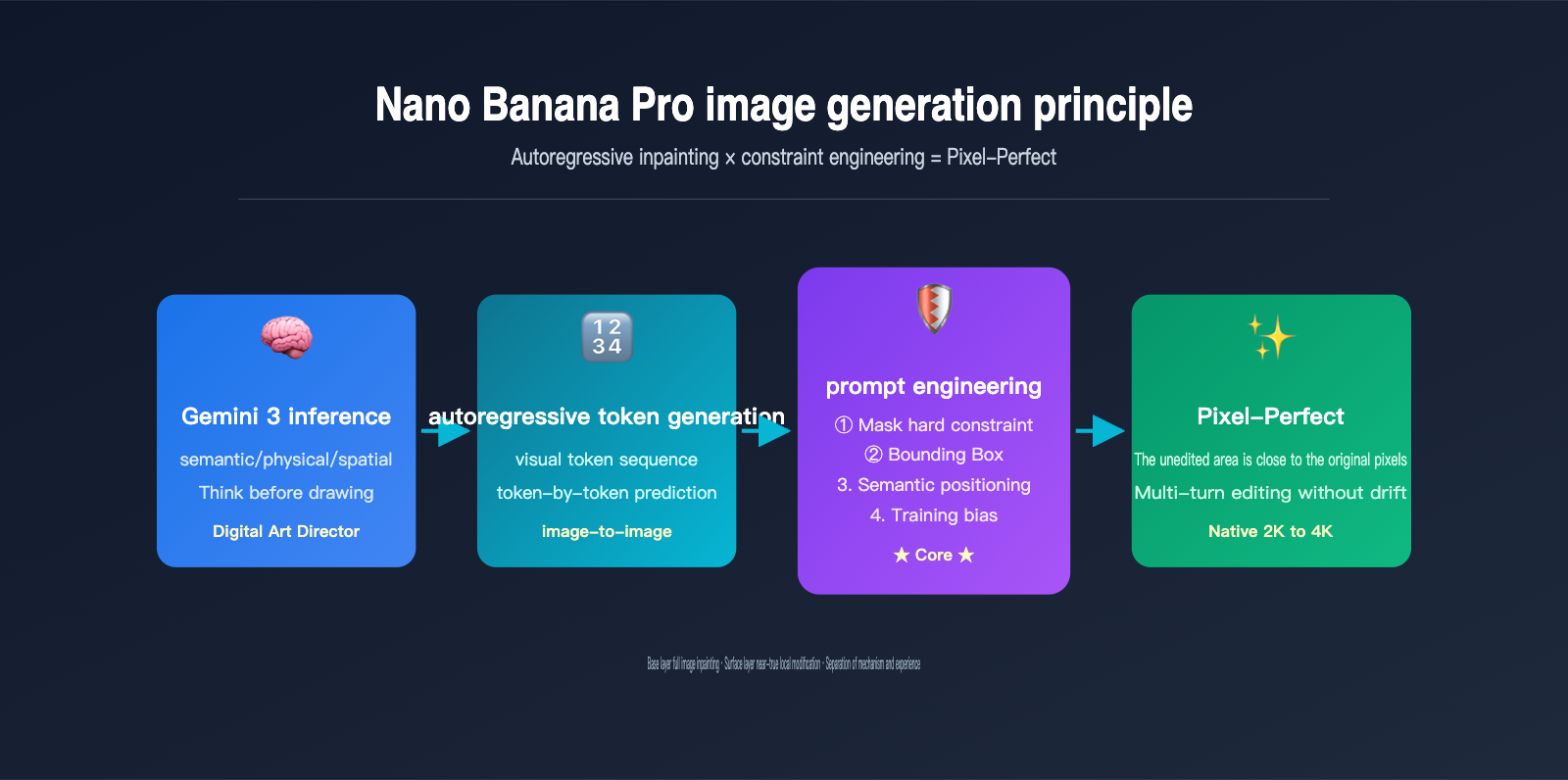
| Core Question | Intuitive Answer | The Truth |
|---|---|---|
| Is it PS-style local editing? | Yes | No, the underlying mechanism is still full-image token redrawing |
| Then why is it pixel-perfect? | The model is smart | Three-layer hard constraints: Mask + Semantic positioning + BBox |
| Is it the same as GPT-Image-2? | Similar | Both are autoregressive, but Gemini 3 adds explicit reasoning |
| Does multi-turn editing drift? | Yes | Almost never, this is the core selling point of Pro |
Understanding this underlying logic is the only way to write prompts that truly activate Gemini 3's reasoning, choose mask modes rationally, and avoid the "looks local but is actually a redraw" trap. We recommend that readers test this while using the Nano Banana Pro API on the APIYI (apiyi.com) platform, mapping each principle to the actual results.
Nano Banana Pro Image Generation Principle: Full-Image Redrawing or True Local Editing?
Before answering this, we need to distinguish between two easily confused concepts: generation mechanism and user experience.
From a generation mechanism perspective, Nano Banana Pro and its predecessors, as well as OpenAI's GPT-Image-2, follow the same path—autoregressive Transformer full-image token redrawing. In other words, even if you only ask the AI to change the color of someone's tie, the model still compresses the entire image into visual tokens, re-predicts the entire output token sequence from start to finish, and finally decodes it back into pixels. There is no physical path that "only changes a small block of pixels while leaving the rest untouched."
However, from a user experience perspective, Nano Banana Pro gives users the feeling of "near-true local editing." Google officially claims that in mask mode or semantic positioning, unedited areas remain almost pixel-perfect, with no generation drift and no quality loss across multi-turn edits. How is this experience squeezed out of a "full-image redrawing" architecture?
The answer is: constraint engineering. Google has layered three hard constraints onto the autoregressive generation flow: Mask token locking, Bounding Box area specification, and Gemini 3's semantic-level "retention list." These three layers of constraints force the model to "actively choose" to reproduce the tokens of the unedited areas of the original image during redrawing. This is the real engineering prowess of the Nano Banana Pro team.
The Relationship Between Redrawing Logic and Local Editing Experience
| Perspective | Reality | User Perception |
|---|---|---|
| Underlying Architecture | Full-image token redrawing | Looks like local editing |
| Unedited Areas | Re-generated tokens | Almost identical to original pixels |
| Editing Boundaries | Autoregressive continuous generation | Natural transition, no artifacts |
| Editing Instructions | Passed through constraints | Automatically matches lighting/perspective |
By understanding this "mechanism vs. experience" separation, you can explain why, at times, the non-edited areas of an image edited by Nano Banana Pro might show extremely slight changes—that is the inevitable cost of token redrawing, but Google has used constraints to suppress this change to a level that is almost imperceptible to the naked eye. We suggest calling the Nano Banana Pro interface on APIYI (apiyi.com) to repeatedly edit the same image and observe the magnitude of detail drift; this kind of comparison will help ground your understanding of the principles.
The Implementation Principle of Nano Banana Pro: The Autoregressive Backbone of Gemini 3 Pro Image
To truly understand the implementation principle of Nano Banana Pro, you have to look at its official name: Gemini 3 Pro Image. This name reveals its two core lineages: the Gemini 3 inference backbone and the image generation decoder.
Gemini 3 is the flagship multimodal Large Language Model that Google launched just two days before the release of Nano Banana Pro, renowned for its "reasoning capabilities." Nano Banana Pro directly reuses the Transformer backbone of Gemini 3 Pro, simply adding visual tokens to its vocabulary and attaching an image decoder to the output side. In other words, it is not a standalone image model, but rather a specific form of the Gemini 3 multimodal family dedicated to generating images.
This leads to a fundamental shift: before Nano Banana Pro draws its first pixel, it uses Gemini 3 to reason about "what should be drawn." As Google puts it, it "functions less like a traditional diffusion model and more like a digital art director"—it first analyzes the semantic logic, physical causality, and spatial relationships of the prompt before entering the visual token generation stage.
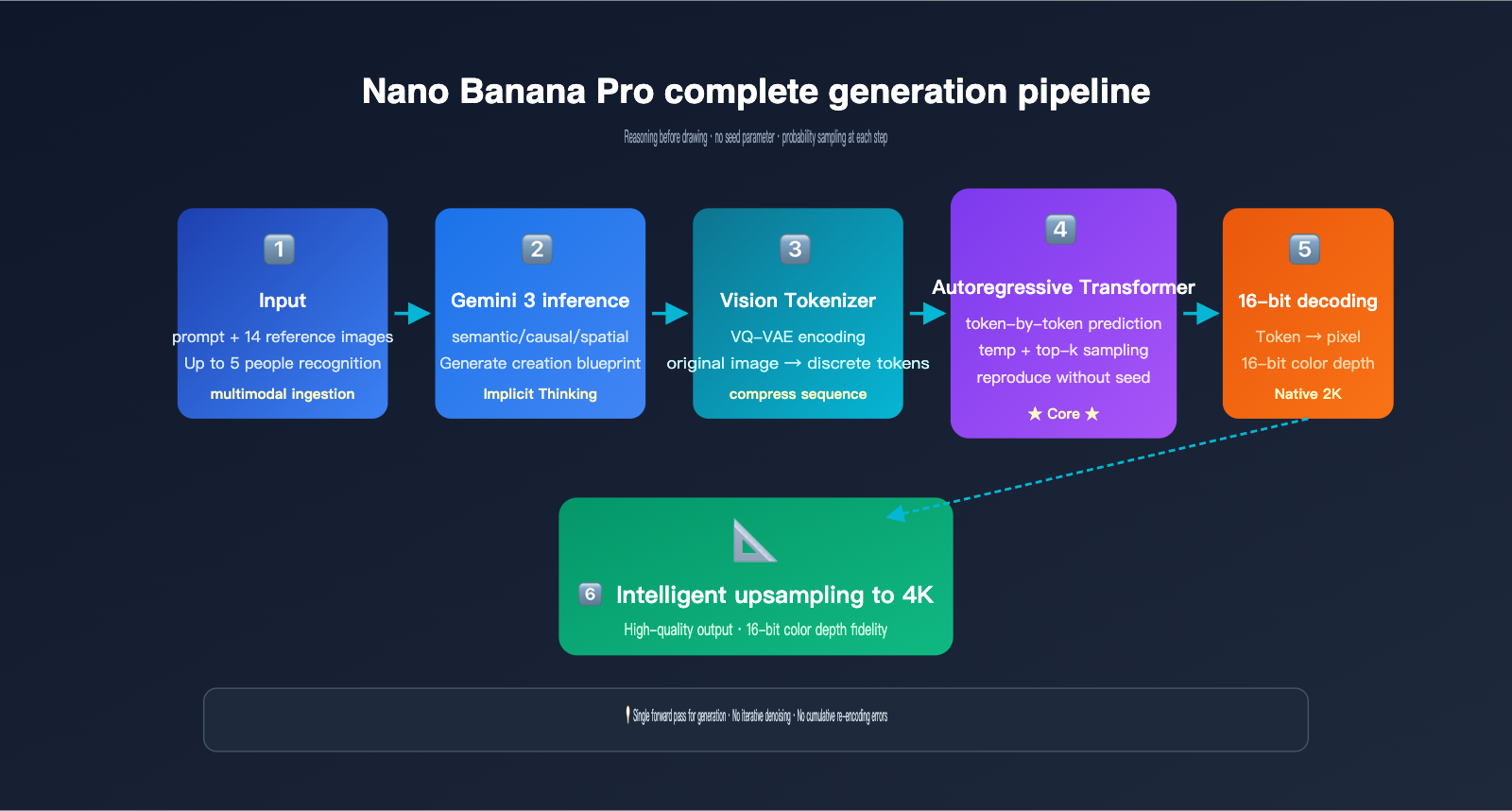
The specific workflow can be broken down into five stages:
- Multimodal Input Parsing: The Gemini 3 inference backbone ingests both the user's text prompt and up to 14 reference images to understand the entire task context.
- Structured Reasoning (Internal Blueprint): The model first "thinks through" the spatial layout, character identity, lighting settings, and what needs to be preserved or modified, generating an invisible "creative blueprint."
- Reference Image Visual Token Encoding: Reference images are compressed into a sequence of visual tokens using a discrete mechanism similar to VQ-VAE.
- Autoregressive Token Prediction: Under the attention mechanism of the Gemini 3 backbone, the model predicts each visual token of the output image one by one from left to right, "seeing" the complete prompt tokens and reference image tokens at every step.
- Decoding and Upsampling: The output tokens are restored into a native 2K image via a 16-bit color depth decoder and then intelligently upsampled to 4K.
Two Unique Capabilities of the Gemini 3 Inference Backbone
The first is "thinking before drawing." This isn't just a gimmick—the reasoning capability of Gemini 3 in text tasks directly migrates to image generation. If you give it a complex instruction like "change this person's clothes to match their professional identity," a typical image model might get confused, but Nano Banana Pro will first reason, "This person looks like a doctor → they should be wearing a white coat," and then proceed to draw.
The second is Grounding with Google Search. Nano Banana Pro can invoke Google Search tools during the generation process to verify facts—for example, if you ask it to draw "the latest product released by a certain brand," it can go online to obtain real appearance references. This is currently the only image generation model that supports native search grounding, and it's one of the biggest differentiators between Nano Banana Pro and GPT-Image-2. If you need to test Grounding capabilities in a production environment, you can access Nano Banana Pro via APIYI (apiyi.com), which provides an interface specification consistent with Google's official standards.
It's worth noting that Nano Banana Pro does not support a seed parameter. Because it is autoregressive, every sampling step draws from a probability distribution (controlled by temperature and top-k), unlike diffusion models that can perfectly reproduce results by fixing the initial noise. This characteristic is both a constraint and a design choice, allowing the model to maintain its creativity.
The 4 Constraint Mechanisms of AI Image Inpainting: How Pixel-Perfect is Achieved
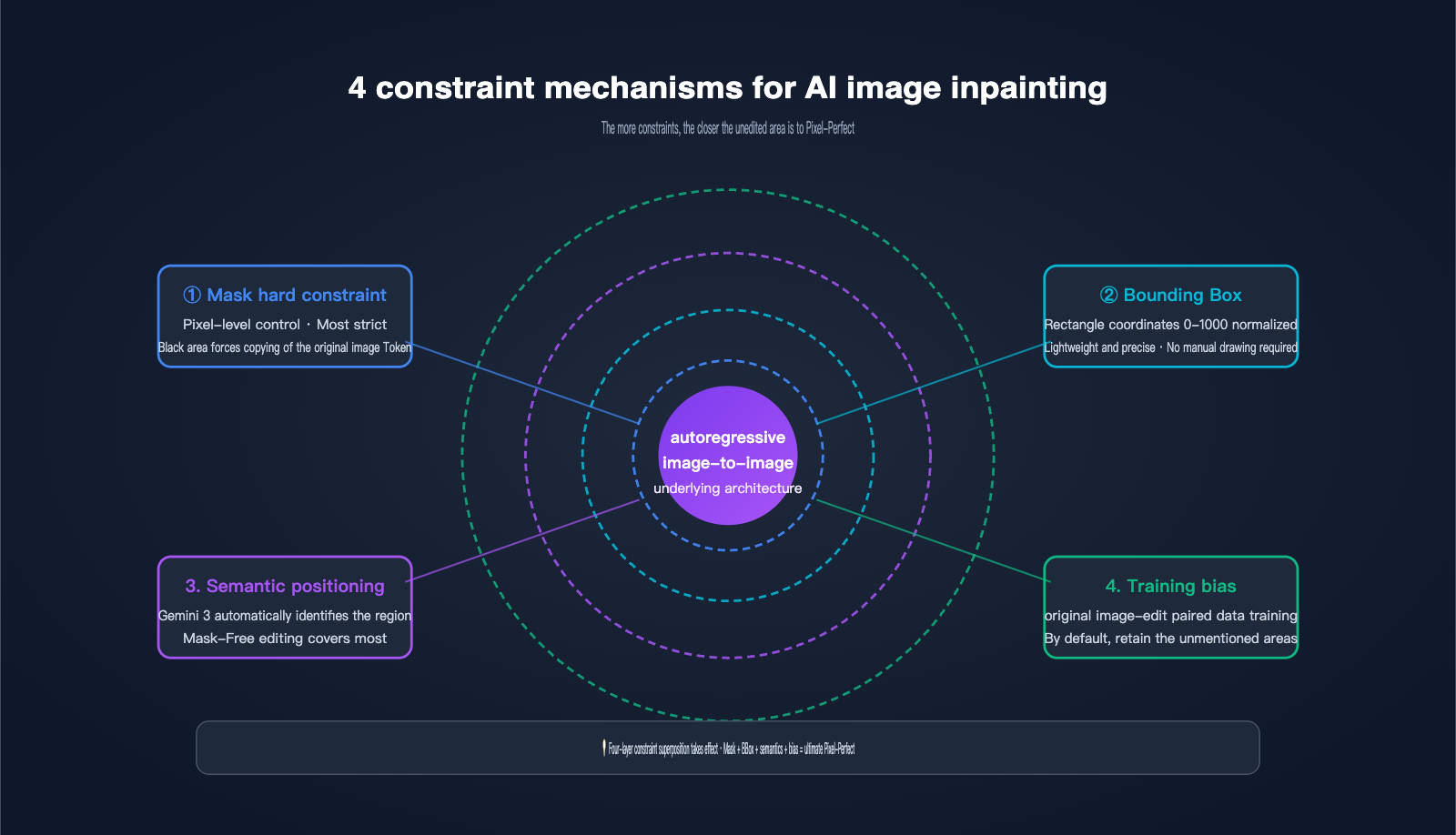
Since the underlying process involves full-image redrawing, how does Nano Banana Pro guarantee that unedited areas remain near pixel-perfect? The answer lies in the four layers of constraint mechanisms Google has layered onto the AI image inpainting scenario. This is the most notable engineering innovation in the Pro version compared to the base Nano Banana.
Layer 1: Hard Mask Constraints. This is the most direct approach—the user provides a black-and-white mask of the same dimensions. The white area allows the AI to generate new tokens, while the black area forces the output tokens to copy the corresponding tokens from the original image. This is equivalent to adding a "hard copy rule" during autoregressive generation. This is the core technical source of what Google calls "pixel-perfect untouched areas."
Layer 2: Bounding Box Localization. Nano Banana Pro supports bounding box parameters with coordinates normalized to a 0-1000 range, allowing you to tell the model to "only modify the rectangular area from (200, 300) to (600, 500)." The system automatically converts the BBox into an internal mask constraint, which is much more convenient than drawing a mask manually.
Layer 3: Gemini 3 Semantic Localization. This is the most "magical" layer. You simply use natural language to say, "change the background to a beach," and the Gemini 3 reasoning backbone automatically identifies which tokens in the image represent the "background," generating an implicit mask. This mask-free editing mode covers what Google officially describes as "most editing scenarios."
Layer 4: Training Data "Retain Unless Mentioned" Bias. Google used massive amounts of "original image-edited image" paired data to teach the model an implicit rule: unless the prompt explicitly requests a change, other areas should be copied from the original image token-by-token as much as possible. This bias is solidified in the weights and automatically takes effect during inference.
Comparison of the 4 Constraint Mechanisms
| Constraint Mechanism | Control Granularity | User Cost | Applicable Scenarios |
|---|---|---|---|
| Hard Mask Constraint | Pixel-level | Requires mask drawing | Precise repair/object replacement |
| Bounding Box | Rectangular area | Coordinates only | Editing known rectangular areas |
| Semantic Localization | Semantic object | Text instructions only | Most daily editing |
| Training Bias | Global | No configuration needed | Default for all scenarios |
These four layers of constraints aren't mutually exclusive; they work in tandem. The strictest combination is "Mask + Bounding Box + Semantic Instruction," which pushes the pixel-perfect experience of Nano Banana Pro to the limit. We found at APIYI (apiyi.com) that even using just semantic localization + training bias, most daily edits achieve consistency that is almost indistinguishable to the naked eye.
Engineering Reasons for No Drift in Multi-Round Editing
One of the key marketing points of Nano Banana Pro is "no cumulative quality loss in multi-round editing." There are two reasons for this. First, the autoregressive architecture itself doesn't require repeated VAE encoding/decoding like diffusion models; there's only one token-to-pixel conversion, so it doesn't accumulate re-encoding errors. Second, the hard mask constraint forces unedited areas to be copied token-by-token from the original, meaning almost no new randomness is introduced even after multiple iterations.
This stands in stark contrast to traditional Stable Diffusion, which often becomes "blurry" after repeated inpainting. If your workflow requires 5-10 rounds of iterative editing on the same base image, Nano Banana Pro is arguably the only model currently capable of handling it.
Gemini 3 Pro Image vs. GPT-Image-2: Differentiated Paths
Many teams are tracking both Gemini 3 Pro Image (Nano Banana Pro) and OpenAI's GPT-Image-2. While both are fundamentally autoregressive, they have different focuses in terms of positioning and capabilities.
GPT-Image-2 emphasizes its "Thinking mode" and text rendering accuracy (approx. 99% officially), excelling in multi-object layout and large-text scenarios. Nano Banana Pro, however, bets on the Gemini 3 reasoning backbone, 4K output, 14-image fusion, 5-person identity consistency, and its unique Grounding with Google Search.
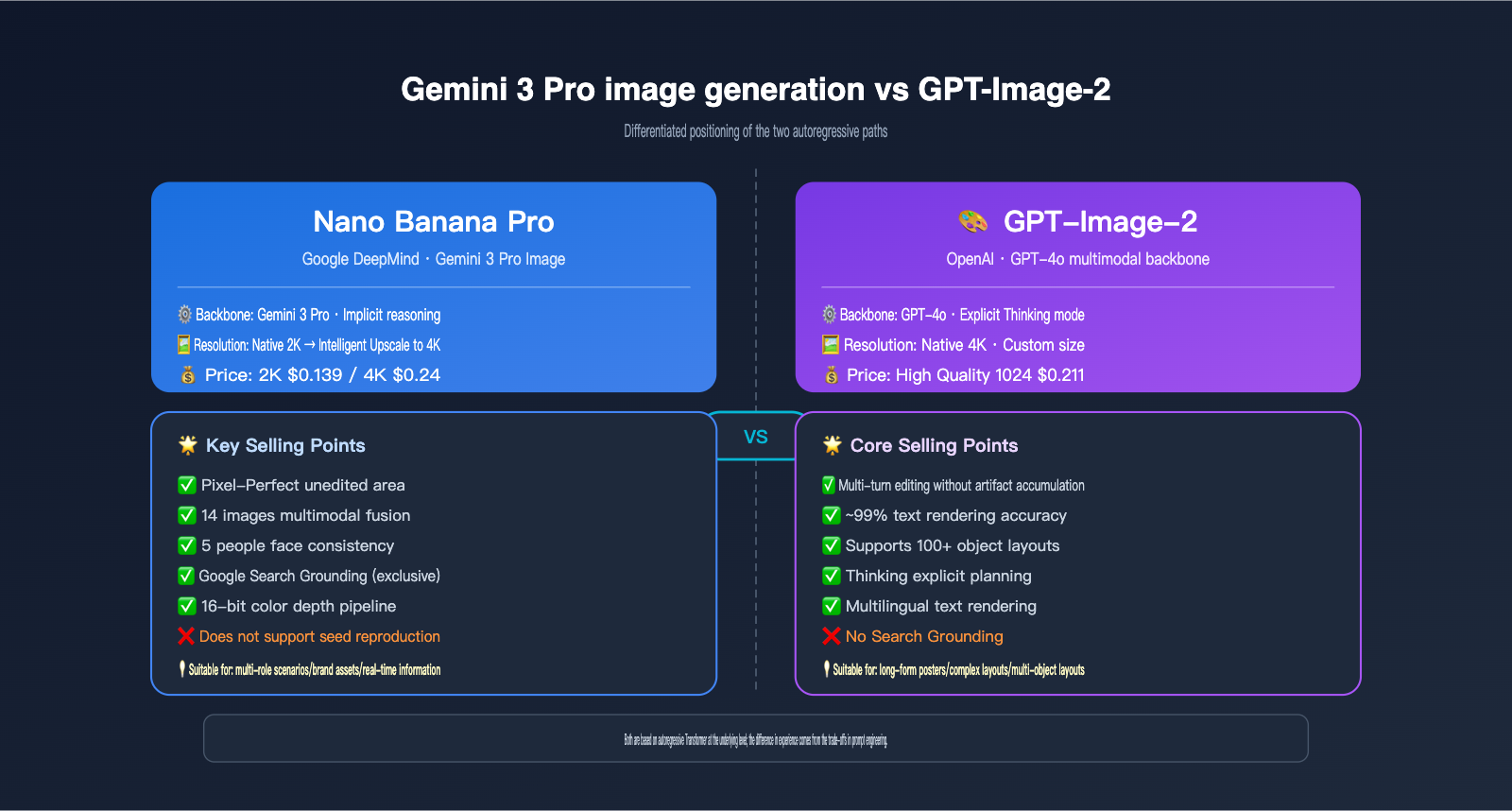
The key differences between the Nano Banana Pro image generation principles and the GPT-Image-2 implementation path can be seen in the table below:
| Dimension | Nano Banana Pro | GPT-Image-2 |
|---|---|---|
| Underlying Model | Gemini 3 Pro | GPT-4o Multimodal |
| Inference Enhancement | Gemini 3 Implicit Reasoning | Explicit Thinking Mode |
| Max Resolution | 4K (upsampled from 2K) | 4K Native |
| Multi-image Input Limit | 14 images | Multiple (limit undisclosed) |
| Character Consistency | Up to 5 people simultaneously | Strong, limit undisclosed |
| Text Rendering | Industry-leading, multilingual | 99% accuracy |
| Real-time Information | ✅ Google Search Grounding | ❌ |
| Seed Parameter | ❌ Not supported | Partially controlled |
| Inpainting Selling Point | Pixel-perfect unedited areas | No drift over multiple rounds |
| Single Image Pricing | 2K $0.139 / 4K $0.24 | High-quality 1024 $0.211 |
Selection Advice: It mainly depends on two things: if you need to create brand assets, product images, or multi-character scene compositions, Nano Banana Pro's multi-image fusion and character consistency are better suited. If your core scenario involves long-text posters, complex layouts, or 100+ object arrangements, GPT-Image-2's Thinking mode might be more stable. We recommend accessing both models through the APIYI (apiyi.com) platform and conducting small-scale A/B testing based on your actual scenarios before deciding on your primary model.
Nano Banana Pro API in Action: From Masks to Bounding Boxes
Now that you understand the underlying principles, let's look at how to put the AI image partial editing capabilities of Nano Banana Pro into practice. Below is a minimal, runnable Python example that uses the APIYI-compatible endpoint to invoke Gemini 3 Pro Image:
from google import genai
from PIL import Image

client = genai.Client(
    api_key="your-apiyi-key",
    http_options={"base_url": "https://vip.apiyi.com/v1"}
)

original = Image.open("portrait.png")
response = client.models.generate_content(
    model="gemini-3-pro-image-preview",
    contents=[
        "Keep the person's identity and background unchanged, only change the white T-shirt to a dark blue suit jacket, maintaining the original lighting and shadow direction",
        original
    ]
)

for part in response.candidates[0].content.parts:
    if part.inline_data:
        with open("edited.png", "wb") as f:
            f.write(part.inline_data.data)
Note the prompt structure: explicitly state "what to keep unchanged," "what to modify," and "maintain original lighting." This directly activates the semantic localization capabilities of the Gemini 3 reasoning backbone. If you need more precise regional control, you can add a bounding box prompt:
response = client.models.generate_content(
    model="gemini-3-pro-image-preview",
    contents=[
        "Within the bounding box [200, 150, 600, 700] of the image, replace the clothing with a dark blue suit jacket. Keep the pixels in all other areas unchanged.",
        original
    ]
)
Coordinates use a 0-1000 normalized range, which is mapped to the image dimensions during processing. For stricter control, you can append a mask image as input.
5 Tips for Practical Optimization
Based on the Nano Banana Pro implementation principles, we've summarized 5 recommendations for real-world engineering:
- Always include a "keep" list in your prompt: "Keep the person's identity, background, and lighting unchanged" is the key to activating the four-layer constraint system.
- Prioritize semantic localization: Unless your editing boundaries require pixel-level precision, mask-free mode is more efficient.
- Limit multi-image fusion to 14 images: Exceeding the official limit will cause truncation, which affects multi-image consistency.
- Choose 2K vs. 4K based on use case: 2K ($0.139) is sufficient for web/mobile displays, while 4K ($0.24) is better for print or large-screen displays.
- Don't try to use seeds for reproducibility: Nano Banana Pro doesn't support seeds. For stable reproduction, use prompt weighting and fixed reference images instead.
Pricing and Use Case Matching
| Configuration | Cost per Image | Recommended Use Case |
|---|---|---|
| 2K Single Image | $0.139 | Social media/web images |
| 4K Single Image | $0.24 | Print/large-screen displays/marketing visuals |
| 4K + 14-Image Fusion | $0.24 + multi-input tokens | Brand multi-character scene synthesis |
| 4K + Grounding | $0.24 + search tokens | Real-world product/event imagery |
We recommend using the Batch API on APIYI (apiyi.com) for production environments to handle bulk tasks. This significantly lowers costs while maintaining quality, making it perfect for batch production of asset libraries.
Nano Banana Pro Image Generation FAQ and Decision Guide
Q1: Is Nano Banana Pro actually drawing or performing partial modifications?
A: The underlying mechanism is [autoregressive full-image token redrawing], which is "drawing." However, by using four layers of constraints—Mask hard constraints, Bounding Boxes, Gemini 3 semantic localization, and training biases—it achieves a user experience that feels like "true partial modification." The two aren't contradictory: the architecture is redrawing, but the engineering is locking.
Q2: Why does the official documentation claim pixel-perfect results for unedited areas?
A: In mask mode, the output tokens for the blacked-out areas are forced to equal the tokens of the corresponding positions in the original image, resulting in nearly identical pixels after decoding. Strictly speaking, there is a minor loss due to VQ-VAE encoding/decoding, so it's "near" pixel-perfect rather than mathematically identical. For daily use, it's indistinguishable to the naked eye.
Q3: Why doesn't Nano Banana Pro support seeds?
A: Autoregressive generation samples from a probability distribution at each step, which is completely different from the mechanism of fixing initial noise in diffusion models. Google chose not to expose seed parameters to allow the model to maintain creative diversity. If you need stable results, use a detailed prompt + reference image combination. We suggest testing the output stability of different prompt templates on APIYI (apiyi.com) to find a "near-deterministic" combination that fits your workflow.
Q4: How should I choose between Nano Banana Pro and GPT-Image-2?
A: For multi-character scenes, brand assets, or scenarios requiring real-time information (Grounding) → choose Nano Banana Pro. For complex layouts, long-text posters, or 100+ object layouts → choose GPT-Image-2. Both are autoregressive at their core; the experience difference mainly comes from the different constraint engineering trade-offs made by Google and OpenAI.
Q5: Can I precisely target an edit area without a mask?
A: Yes, there are two ways. First, use the Bounding Box parameter (0-1000 normalized coordinates); second, rely on the semantic localization of the Gemini 3 reasoning backbone by simply stating in your prompt, "Modify the red object in the bottom right of the image." The latter covers most scenarios, while the former is for specific rectangular regions.
Q6: How do I actually use Grounding with Google Search?
A: Clearly specify the elements requiring fact-checking in your prompt, such as "Draw a picture of the latest 2025 Tesla Cybertruck on the lunar surface." The model will automatically invoke Google Search to retrieve the actual appearance as a reference before entering the generation phase. This is a unique capability of Nano Banana Pro; GPT-Image-2 does not currently have a corresponding feature.
Conclusion: Master Constraint Engineering to Get the Most Out of Nano Banana Pro
Nano Banana Pro is an incredibly sophisticated piece of engineering. It didn't invent a new image generation paradigm; instead, it built upon the Gemini 3 autoregressive backbone, using four layers of constraint engineering—Mask hard constraints, Bounding Boxes, semantic localization, and training biases—to package "full-image redrawing" into a product experience that feels like "true partial modification."
Understanding this "separation of mechanism and experience" is key to writing prompts that activate these four layers, choosing the right editing modes, and planning multi-round iterative workflows. The core of Nano Banana Pro image generation principles isn't a single "black box" technology, but the full-stack synergy of constraint engineering.
We recommend conducting actual tests and comparisons on the APIYI (apiyi.com) platform. The platform supports unified API calls for various mainstream models like Nano Banana Pro, GPT-Image-2, and Stable Diffusion, making it easy to verify all the principles and optimization techniques mentioned in this article to find the optimal setup for your production needs.
This article was written by the APIYI Team, based on official materials from Google DeepMind, Vertex AI, and first-hand testing. If you need to invoke Gemini 3 Pro Image (Nano Banana Pro) in a production environment, visit the official APIYI website at apiyi.com to access the documentation.


