
Author's Note: A deep dive into Claude API's caching billing mechanism, comparing the price differences between 5-minute and 1-hour cache writes, addressing cross-account cache hit questions, and contrasting the caching billing differences between AWS Bedrock and the official Anthropic API.
Claude API's Prompt Caching is a core strategy for reducing API call costs, but many developers are confused about the details of cache billing: How do you choose between 5-minute and 1-hour caching? Can caches be shared across accounts? How does AWS Bedrock's cache billing differ from the official API?
Core Value: After reading this article, you'll fully understand the 3 core mechanisms of Claude API cache billing, master the optimal cache strategy selection method, and avoid unnecessary cost waste.
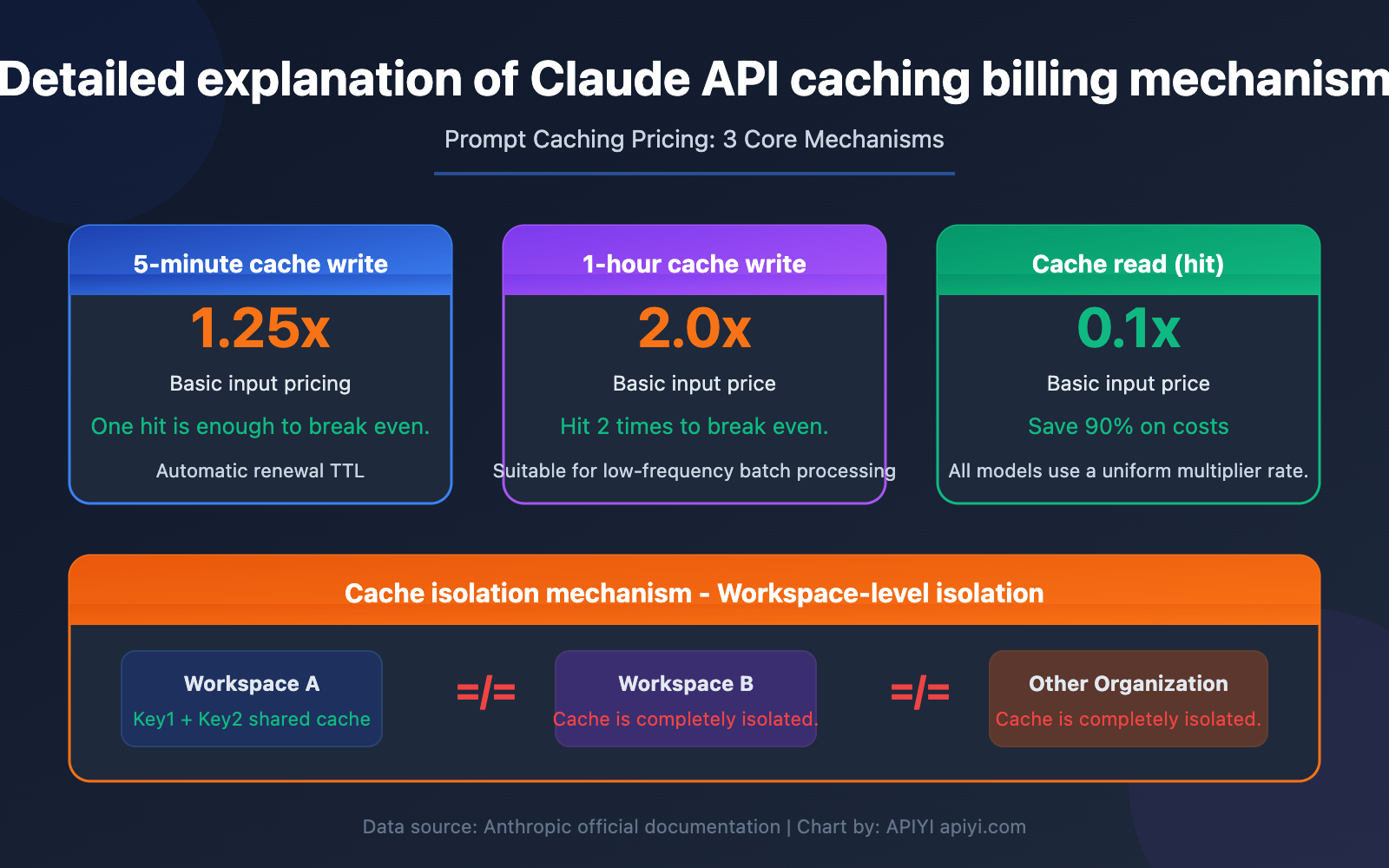
Core Points of Claude API Cache Billing
| Key Point | Description | Value |
|---|---|---|
| 5-Minute Cache Write | Write Cost = Base Input Price × 1.25 | Lowest cost, suitable for high-frequency calls |
| 1-Hour Cache Write | Write Cost = Base Input Price × 2.0 | Longer TTL, suitable for low-frequency but large caches |
| Cache Read (Hit) | Read Cost = Base Input Price × 0.1 | 90% cost reduction after a hit |
| Cache Isolation | Workspace-level isolation, completely isolated between different organizations | Caches cannot be shared across accounts |
The Base Multiplier for Claude Cache Billing
Claude API's Prompt Caching uses a unified multiplier-based billing system. Regardless of which model you use (Opus 4.6, Sonnet 4.6, or Haiku 4.5), the multiplier rules for cache operations are completely consistent:
- Cache Write (5-minute TTL): Base Input Price × 1.25
- Cache Write (1-hour TTL): Base Input Price × 2.0
- Cache Read (Hit): Base Input Price × 0.1
This means for every cache hit, you only pay 10% of the standard input price. Taking Claude Sonnet 4.6 as an example, the standard input price is $3/MTok, while the cache hit price is only $0.3/MTok, saving 90% on input costs.
The Break-Even Calculation for Claude Cache Billing
Understanding the cost-benefit of caching is crucial. Cache writes have an additional fee, but cache reads are extremely cheap. The key question is—how many hits does it take for the cache to "break even"?
- 5-Minute Cache: Write 1.25x + Read 0.1x = After the initial write, it breaks even with just 1 hit (because a normal read is 1x, while a cache read is 0.1x, saving 0.9x > the extra 0.25x paid)
- 1-Hour Cache: Write 2.0x + Read 0.1x = After the initial write, it needs 2 hits to break even (extra payment of 1.0x, each hit saves 0.9x)
So, the 5-minute cache is almost a "sure win" choice, while the 1-hour cache requires ensuring at least 2 hits within its validity period.
Claude Caching Billing: 5-Minute vs. 1-Hour Cache Comparison
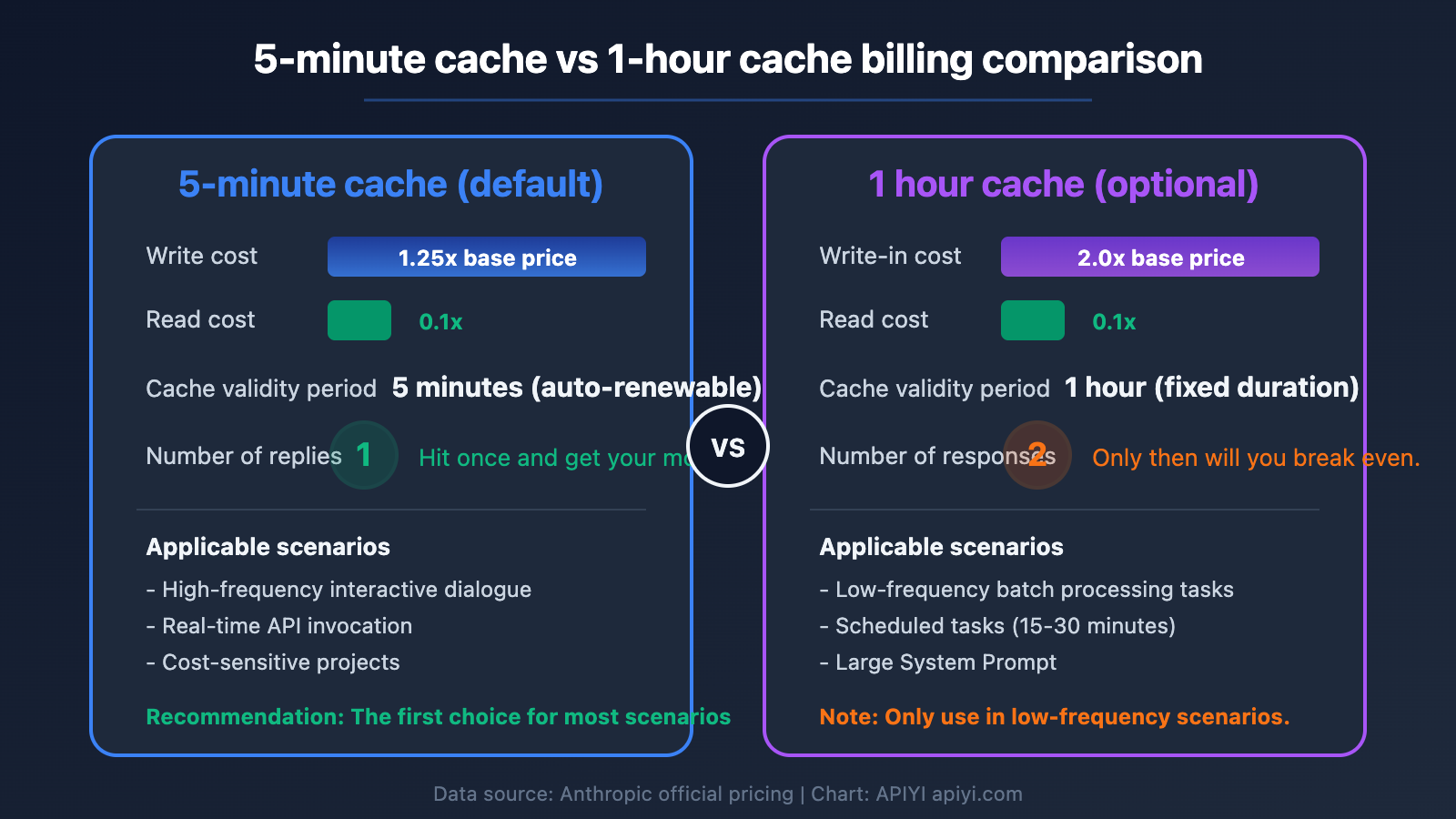
Price Difference: 5-Minute vs. 1-Hour Cache
Here's a breakdown of the specific prices for 5-minute and 1-hour cache writes for each model:
| Model | Base Input Price | 5-Min Cache Write (×1.25) | 1-Hour Cache Write (×2.0) | Cache Read (×0.1) |
|---|---|---|---|---|
| Claude Opus 4.6 | $5.00/MTok | $6.25/MTok | $10.00/MTok | $0.50/MTok |
| Claude Sonnet 4.6 | $3.00/MTok | $3.75/MTok | $6.00/MTok | $0.30/MTok |
| Claude Haiku 4.5 | $1.00/MTok | $1.25/MTok | $2.00/MTok | $0.10/MTok |
TTL Selection Strategy for Claude Caching Billing
The 5-minute and 1-hour caches aren't an either-or choice. You can flexibly choose based on your actual use case, or even mix them within a single request.
When to use 5-minute cache:
- High-frequency API calls (multiple requests per minute), where the cache is continuously refreshed within 5 minutes
- Interactive chat scenarios where users send messages continuously, automatically renewing the cache
- Cost-sensitive projects where lower write costs are important
When to use 1-hour cache:
- Batch processing tasks where data batches might run every few tens of minutes
- Large System Prompts with high write costs, where you want the cache to last longer
- Scheduled tasks that run every 15-30 minutes
Key mechanism: The 5-minute cache automatically refreshes its TTL every time it's hit—think of it as "renewing" the lease. So if your call frequency is high enough (at least one request within 5 minutes), the cache can actually stay alive indefinitely, making the 1-hour cache unnecessary.
🎯 Technical advice: For most scenarios, the 5-minute cache is sufficient. When calling the Claude API through the APIYI platform at apiyi.com, the caching billing rules are identical to the official ones, and it supports unified interface management for multiple models' caching strategies.
Mixed TTL Usage in Claude Caching Billing
Anthropic allows you to use both 1-hour and 5-minute cache controls in the same request, but there's a key constraint:
TTLs must be ordered from longest to shortest: The 1-hour cache marker must appear before the 5-minute cache marker.
In practice, you could set your low-frequency System Prompt to a 1-hour cache, and your slightly higher-frequency Few-shot examples to a 5-minute cache:
import anthropic

client = anthropic.Anthropic(
    api_key="YOUR_API_KEY",
    base_url="https://vip.apiyi.com"  # Call via APIYI
)

response = client.messages.create(
    model="claude-sonnet-4-6-20260320",
    max_tokens=1024,
    system=[
        {
            "type": "text",
            "text": "You are a professional technical documentation assistant...(large system prompt)...",
            "cache_control": {"type": "ephemeral", "ttl": "3600"}  # 1-hour cache
        }
    ],
    messages=[
        {
            "role": "user",
            "content": [
                {
                    "type": "text",
                    "text": "Here is the reference documentation...(large context)...",
                    "cache_control": {"type": "ephemeral"}  # Default 5-minute cache
                },
                {
                    "type": "text",
                    "text": "Based on the above document, answer: What is Prompt Caching?"
                }
            ]
        }
    ]
)
View Cache Hit Status Check Code
import anthropic

client = anthropic.Anthropic(
    api_key="YOUR_API_KEY",
    base_url="https://vip.apiyi.com"
)

response = client.messages.create(
    model="claude-sonnet-4-6-20260320",
    max_tokens=1024,
    system=[
        {
            "type": "text",
            "text": "Your system prompt content (needs >= 1024 tokens to trigger caching)",
            "cache_control": {"type": "ephemeral"}
        }
    ],
    messages=[{"role": "user", "content": "Hello"}]
)

# Check cache usage
usage = response.usage
print(f"Input tokens: {usage.input_tokens}")
print(f"Cache write tokens: {usage.cache_creation_input_tokens}")
print(f"Cache hit tokens: {usage.cache_read_input_tokens}")

# Determine cache status
if usage.cache_read_input_tokens > 0:
    print("Cache hit! Saved 90% on input costs")
elif usage.cache_creation_input_tokens > 0:
    print("First-time cache write, subsequent requests will hit the cache")
💡 Note: There's a minimum token requirement for caching. Claude Opus 4.6 requires at least 1024 tokens, and Sonnet 4.6 and Haiku 4.5 also require at least 1024 tokens. Content below this threshold won't be cached.
Claude Cache Billing: Cross-Account Cache Isolation Mechanism
This is a key concern for many developers: Can Account B hit the cache written by Account A?
Core Rules of Claude Cache Isolation
The answer is clear: No. Caches are completely isolated between different organizations (Organizations).
Starting February 5, 2026, Anthropic further refined the granularity of cache isolation from the "Organization level" to the "Workspace level." This means:
| Scenario | Is Cache Shared? | Explanation |
|---|---|---|
| Different API Keys within the same Workspace | ✅ Shared | Within the same workspace, identical prompts will hit the cache. |
| Different Workspaces within the same Organization | ❌ Not Shared | Even under the same organization, different workspaces are isolated. |
| Accounts from different Organizations | ❌ Completely Not Shared | Fully independent, even if the prompts are 100% identical. |
| Different users via proxy platforms like APIYI | ❌ Not Shared | Requests from different users are routed to different upstream credentials. |
Practical Impact of Claude Cache Isolation
Scenario Analysis: Suppose you have two Claude API accounts (belonging to different Organizations) running the same batch data processing task.
- Account A sends a request, triggers a cache write, and pays the 1.25x write fee.
- Account B sends the exact same prompt within 5 minutes.
- Result: Account B will not hit the cache from Account A. Account B will also trigger a cache write and pay the 1.25x fee again.
This design is for security and privacy reasons—cache content may contain sensitive System Prompts or business data. Sharing across organizations could pose data leakage risks.
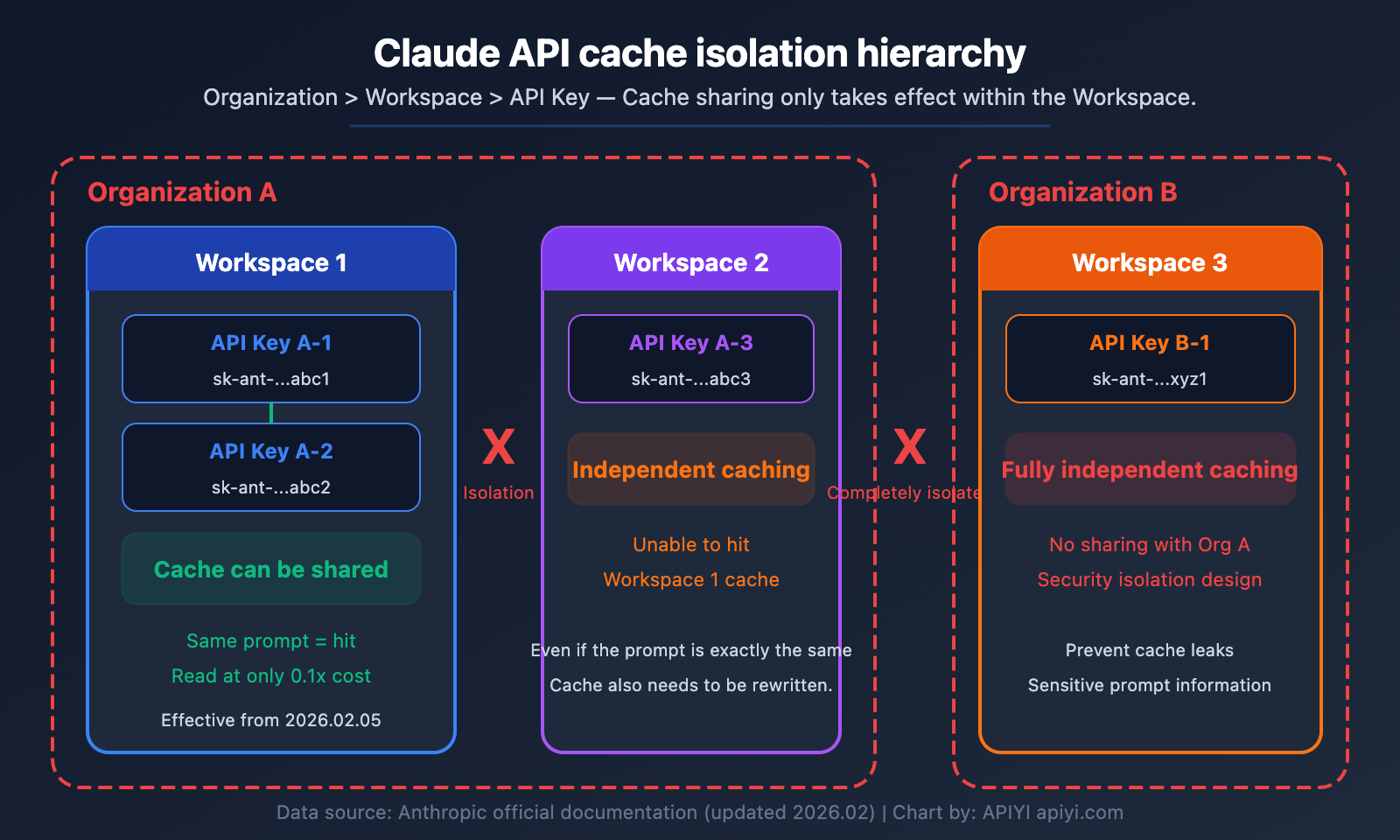
Optimization Strategy: If you need multiple services to share a cache to reduce costs, you should place their API Keys under the same Workspace, rather than using different Organization accounts.
🎯 Practical Advice: On the APIYI platform (apiyi.com), each user's requests are processed through a unified upstream channel. If you need to share cache between multiple projects, it's recommended to plan your Workspace structure appropriately within the Anthropic Console, placing projects that need to share cache within the same Workspace.
Conditions for Claude Cache Hits
Besides Workspace isolation, there's another critical condition for a cache hit—the prompt must be 100% identical.
The cache key is generated by creating an encrypted hash of the prompt content. The matching scope includes:
tools(tool definitions)system(system prompt)messages(message history)
These three parts are concatenated in order, up to the cache_control marker position. If even a single character differs (including spaces, line breaks), the cache won't be hit.
Claude Cache Billing: AWS Bedrock vs Anthropic Official Comparison
Cache Billing Differences Between AWS Bedrock and Anthropic API
Many enterprises use Claude through AWS Bedrock, and its cache billing differs from the official Anthropic API in the following ways:
| Comparison Dimension | Anthropic Official API | AWS Bedrock |
|---|---|---|
| 5-Minute Cache Write | 1.25x base price | 1.25x base price |
| 1-Hour Cache Write | 2.0x base price | 2.0x base price (only for some models) |
| Cache Read | 0.1x base price | 0.1x base price |
| 1-Hour Cache Supported Models | All cache-supported models | Only Haiku 4.5, Sonnet 4.5, Opus 4.5 |
| Cache Isolation Level | Workspace level | Organization (AWS Account) level |
| Regional Pricing | Unified global pricing | Regional endpoint premium ~10% |
| Base Input Price | Official standard price | Basically the same as official |
Key Differences in AWS Bedrock Claude Cache Billing
Difference One: Model Support Range for 1-Hour Cache
As of January 2026, AWS Bedrock only supports 1-hour cache TTL for Claude Haiku 4.5, Sonnet 4.5, and Opus 4.5. The latest Opus 4.6 and Sonnet 4.6 may not yet support the 1-hour cache option on Bedrock. If you need the latest model + 1-hour cache combination, we recommend using the Anthropic official API directly.
Difference Two: Cache Isolation Granularity
AWS Bedrock maintains Organization-level cache isolation (i.e., AWS Account level), while the Anthropic official API has been refined to the Workspace level. This means that on Bedrock, all calls under the same AWS account can share cache, which is coarser-grained than the official API.
Difference Three: Regional Pricing Differences
AWS Bedrock regional endpoints (like us-east-1, eu-west-1) may have about a 10% price premium compared to global endpoints. This premium will also be reflected in cache write and read costs.
💰 Cost Optimization Suggestion: If you primarily use the Claude API and have fine-grained control requirements for cache strategies, calling the Anthropic native API through APIYI apiyi.com is a more flexible choice. The platform supports complete cache control parameter passing and offers more favorable pricing.
Frequently Asked Questions
Q1: Can I choose between 5-minute and 1-hour cache myself?
Yes. Control it by setting the cache_control parameter in the request. The default is 5-minute cache when no TTL is specified; explicitly setting "ttl": "3600" will use 1-hour cache. You can also mix both TTLs in the same request, but you must ensure the 1-hour cache content comes before the 5-minute cache. In most scenarios, 5-minute cache + auto-renewal is sufficient, and you don't need to pay extra for the 1-hour cache.
Q2: Can two different Claude API accounts share cache hits?
No. Cache is isolated at the Workspace level (after February 2026). If two accounts belong to different Organizations, the cache is completely separate. If they belong to the same Organization but different Workspaces, they still cannot share. Only when using different API Keys within the same Workspace can the same prompt hit the same cache. To share cache and reduce costs, you need to place multiple API Keys within the same Workspace.
Q3: How do I determine if the cache was hit?
The API response's usage field will contain two metrics: cache_creation_input_tokens and cache_read_input_tokens. If cache_read_input_tokens > 0, it means a cache hit. When calling through the APIYI apiyi.com platform, these fields are returned as-is, so you can directly monitor cache hit rates to optimize costs.
Q4: Is there a minimum token requirement for cached content?
Yes. The minimum threshold for all Claude model caches is 1024 tokens. If your System Prompt or context content is less than 1024 tokens, the cache won't take effect. We recommend using large system prompts, Few-shot examples, or reference documents as cached content to fully utilize the caching mechanism and reduce costs.
Summary
The key points of Claude API caching billing:
- 5-minute cache writes cost 1.25x, 1-hour writes cost 2.0x: For most scenarios, 5-minute caching is sufficient. With frequent calls, the cache automatically renews, achieving similar effects to long-term caching
- Cache reads cost only 0.1x: When cache hits occur, you save 90% on input costs. A single hit with 5-minute caching covers the initial write cost
- Cache isolation at Workspace level: Caches cannot be shared between different organizations or Workspaces, requiring thoughtful Workspace structure planning
For developers who need to make extensive Claude API calls, implementing smart caching strategies can significantly reduce costs. We recommend using the APIYI platform at apiyi.com for Claude API calls. It supports complete cache parameter passing, unified interface management, and provides free testing credits to help you validate your caching strategy's effectiveness.
References
-
Anthropic Prompt Caching Official Documentation: Complete Claude API caching feature explanation
- Link:
platform.claude.com/docs/en/build-with-claude/prompt-caching - Description: Includes core parameters like cache pricing multipliers, TTL settings, and minimum token requirements
- Link:
-
Anthropic API Pricing Page: Latest pricing for all Claude models
- Link:
platform.claude.com/docs/en/about-claude/pricing - Description: Includes base input/output pricing and detailed pricing for cache operations
- Link:
-
AWS Bedrock Prompt Caching Documentation: Claude caching usage guide on the AWS platform
- Link:
docs.aws.amazon.com/bedrock/latest/userguide/prompt-caching.html - Description: Cache configuration methods specific to Bedrock and supported model lists
- Link:
-
AWS Bedrock 1-Hour Cache Announcement: Release notes for 1-hour cache TTL functionality
- Link:
aws.amazon.com/about-aws/whats-new/2026/01/amazon-bedrock-one-hour-duration-prompt-caching/ - Description: Model coverage and usage methods for Bedrock's 1-hour caching support
- Link:
Author: APIYI Technical Team
Technical Discussion: Feel free to discuss Claude caching billing questions in the comments. For more API usage tips, visit the APIYI documentation center at docs.apiyi.com


