
Author's Note: A detailed comparison of 7 key differences between OpenAI-compatible mode and the native Claude API format, including support for features like Prompt Caching, Extended Thinking, and tool calling, to help you choose the most suitable integration method.
Using the OpenAI SDK to call Claude models by just changing the base_url seems convenient—but you might be losing 90% of potential cost savings from Prompt Caching, unable to access Extended Thinking reasoning processes, and forfeiting native PDF processing capabilities. This article compares the 7 key differences between these two integration methods to help you make the right choice.
Core Value: After reading this, you'll know whether to choose OpenAI-compatible mode or the native Claude format for your specific use case, avoiding unnecessary costs or lost functionality from choosing the wrong format. The key takeaway is: if you're using Claude models, prioritize calling them with the native Claude format, not the OpenAI-compatible mode.
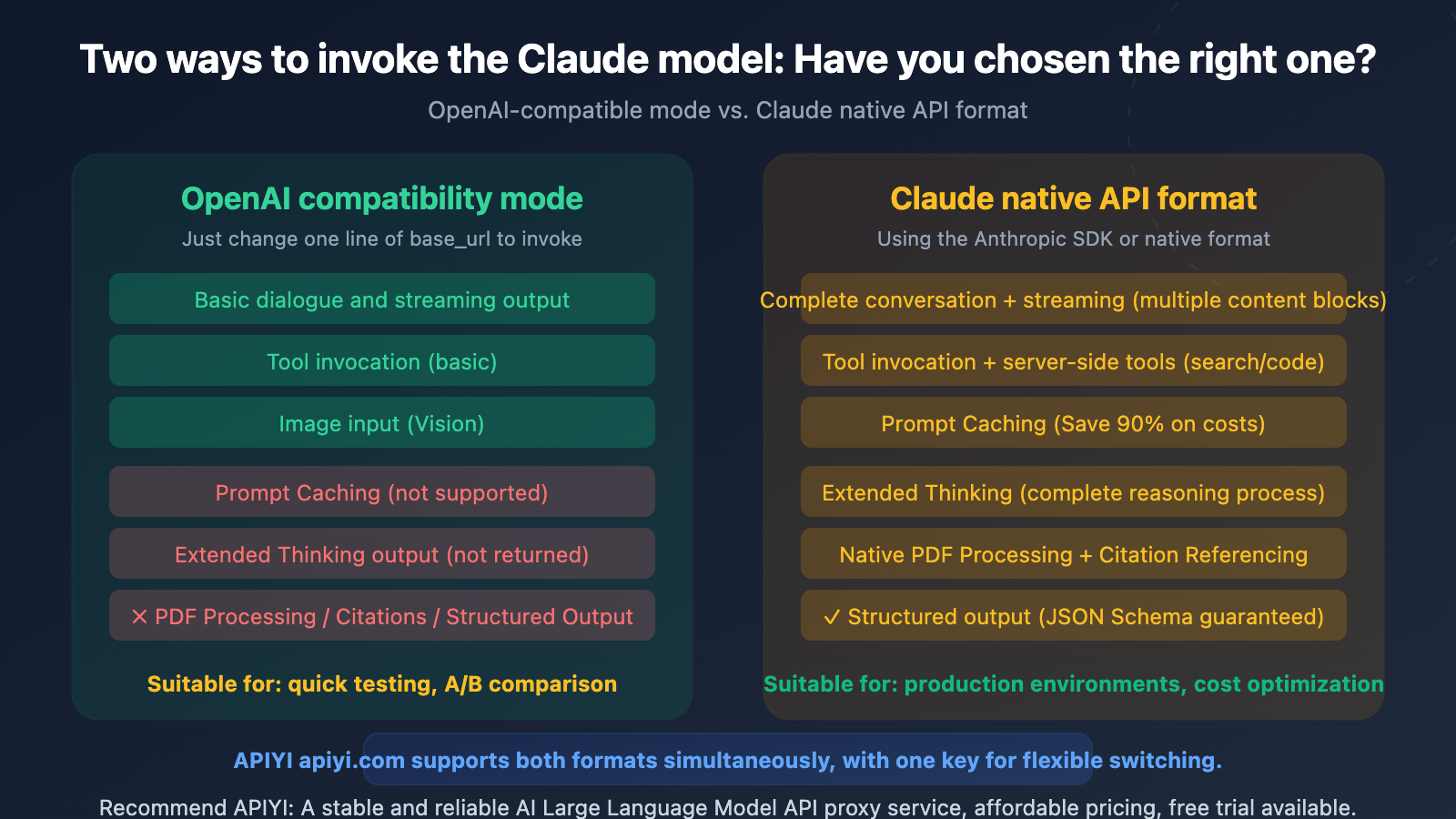
Core Differences: OpenAI-Compatible Mode vs. Native Claude Format
| Difference Dimension | OpenAI-Compatible Mode | Native Claude Format | Impact Level |
|---|---|---|---|
| Prompt Caching | ✗ Not Supported | ✓ Supported (Saves 90% cost) | ⭐⭐⭐⭐⭐ Very High |
| Extended Thinking | ✗ Doesn't return reasoning process | ✓ Returns full chain of thought | ⭐⭐⭐⭐⭐ Very High |
| System Prompt Handling | Multiple merged into one | Independent top-level field | ⭐⭐⭐ Medium |
| Tool Calling | Basic support | Full support + server-side tools | ⭐⭐⭐⭐ High |
| PDF Processing | ✗ Not Supported | ✓ Native document type | ⭐⭐⭐⭐ High |
| Structured Output | ✗ strict parameter ignored |
✓ JSON Schema guaranteed | ⭐⭐⭐⭐ High |
| Citations | ✗ Not Supported | ✓ Precise citation location | ⭐⭐⭐ Medium |
The Fundamental Difference Between OpenAI-Compatible Mode and Native Claude Format
Simply put, OpenAI-compatible mode is a translation layer—it translates OpenAI-format requests into a format Claude understands, then translates Claude's response back into OpenAI format. This translation process is lossy: the multiple content block types (thinking, text, tool_use, citations) supported by the native Claude API get flattened into a single content string when translated back to OpenAI format.
Anthropic officially states that the OpenAI-compatible endpoint is primarily for "testing and comparing model capabilities" and is not a long-term or production-ready solution.
Request Structure Comparison: OpenAI-Compatible Mode vs. Native Claude Format
The most obvious differences in code are the location of the system prompt and the structure of the response:
# ====== OpenAI-Compatible Mode ======
from openai import OpenAI

client = OpenAI(
    api_key="your-api-key",
    base_url="https://vip.apiyi.com/v1"  # Access via APIYI
)

# System prompt placed within the messages array
response = client.chat.completions.create(
    model="claude-sonnet-4-6",
    messages=[
        {"role": "system", "content": "You are a technical expert"},
        {"role": "user", "content": "Explain Tokenizer"}
    ]
)
# Response is a single content string
print(response.choices[0].message.content)
View the request code for the native Claude format
# ====== Native Claude API Format ======
import anthropic

client = anthropic.Anthropic(
    api_key="your-api-key",
    base_url="https://vip.apiyi.com"  # Access via APIYI
)

# System prompt is an independent top-level field
response = client.messages.create(
    model="claude-sonnet-4-6",
    system="You are a technical expert",  # Independent field, not in messages
    messages=[
        {"role": "user", "content": "Explain Tokenizer"}
    ],
    max_tokens=1024
)
# Response is an array of multiple content blocks
for block in response.content:
    if block.type == "text":
        print(block.text)
    elif block.type == "thinking":
        print(f"Thinking process: {block.thinking}")
🎯 Integration Recommendation: APIYI (apiyi.com) supports both OpenAI-compatible format and the native Claude format. If you're currently using the OpenAI SDK and only need basic conversational features, the compatible mode is a quick way to get started. If you need Prompt Caching or Extended Thinking, we recommend switching to the native format.
OpenAI-Compatible Mode vs Claude Native Format: Detailed Feature Comparison
Difference 1: Prompt Caching (Biggest Cost Impact)
This is the most significant difference between the two formats. Claude's Prompt Caching can reduce input costs for repeated content by up to 90%, but OpenAI-Compatible Mode doesn't support this feature at all.
| Prompt Caching Details | Claude Native Format | OpenAI-Compatible Mode |
|---|---|---|
| Cache Control Marker | cache_control parameter |
✗ Not Supported |
| 5-Minute Cache (Write 1.25x) | ✓ | ✗ |
| 1-Hour Cache (Write 2x) | ✓ | ✗ |
| Cache Hit Read (0.1x) | ✓ Saves 90% | ✗ |
| Cache Usage Statistics | ✓ Returns detailed data | ✗ Fields always empty |
| Minimum Cache Threshold | Opus: 4,096 / Sonnet 4.6: 2,048 | — |
What's the actual cost difference? Let's take a typical Agent workflow as an example: each conversation round includes about 10,000 tokens of system prompts and tool definitions. Over 10 conversation rounds:
- No Caching (OpenAI-Compatible Mode): 10 rounds × 10,000 tokens = 100,000 Input Tokens billed at full price
- With Caching (Claude Native Format): First round full price + 9 rounds cache hits (0.1x) = 10,000 + 9,000 = 19,000 equivalent tokens
That's roughly an 81% cost reduction. The more conversation rounds you have, the more significant the cost advantage of Prompt Caching becomes.
Difference 2: Extended Thinking (Reasoning Capability)
Claude's Extended Thinking lets the model perform deep reasoning before answering. While you can enable Extended Thinking in OpenAI-Compatible Mode using extra_body, you won't see the reasoning process—you only get the final answer.
# OpenAI-Compatible Mode — Can trigger thinking, but can't see the process
response = client.chat.completions.create(
    model="claude-sonnet-4-6",
    messages=[{"role": "user", "content": "How do I solve this math problem?"}],
    extra_body={"thinking": {"type": "enabled", "budget_tokens": 5000}}
)
# response.choices[0].message.content only has the final answer
# Thinking process is consumed but not returned ❌
With Claude Native Format, you can get the complete thinking content block, which is crucial for debugging, auditing, and complex reasoning scenarios.
Difference 3: Tool Calling Format
Both formats support tool calling, but there are several key differences:
| Tool Calling Differences | OpenAI-Compatible Mode | Claude Native Format |
|---|---|---|
| Tool Definition Structure | function.parameters |
input_schema |
| Server-Side Tools (Search/Code Execution) | ✗ Not Supported | ✓ web_search / code_execution |
strict Mode (Output Guarantee) |
✗ Ignored | ✓ JSON Schema Guarantee |
| Tool Caching | ✗ Not Supported | ✓ cache_control |
| Parallel Tool Calling | ✓ Supported | ✓ Supported |
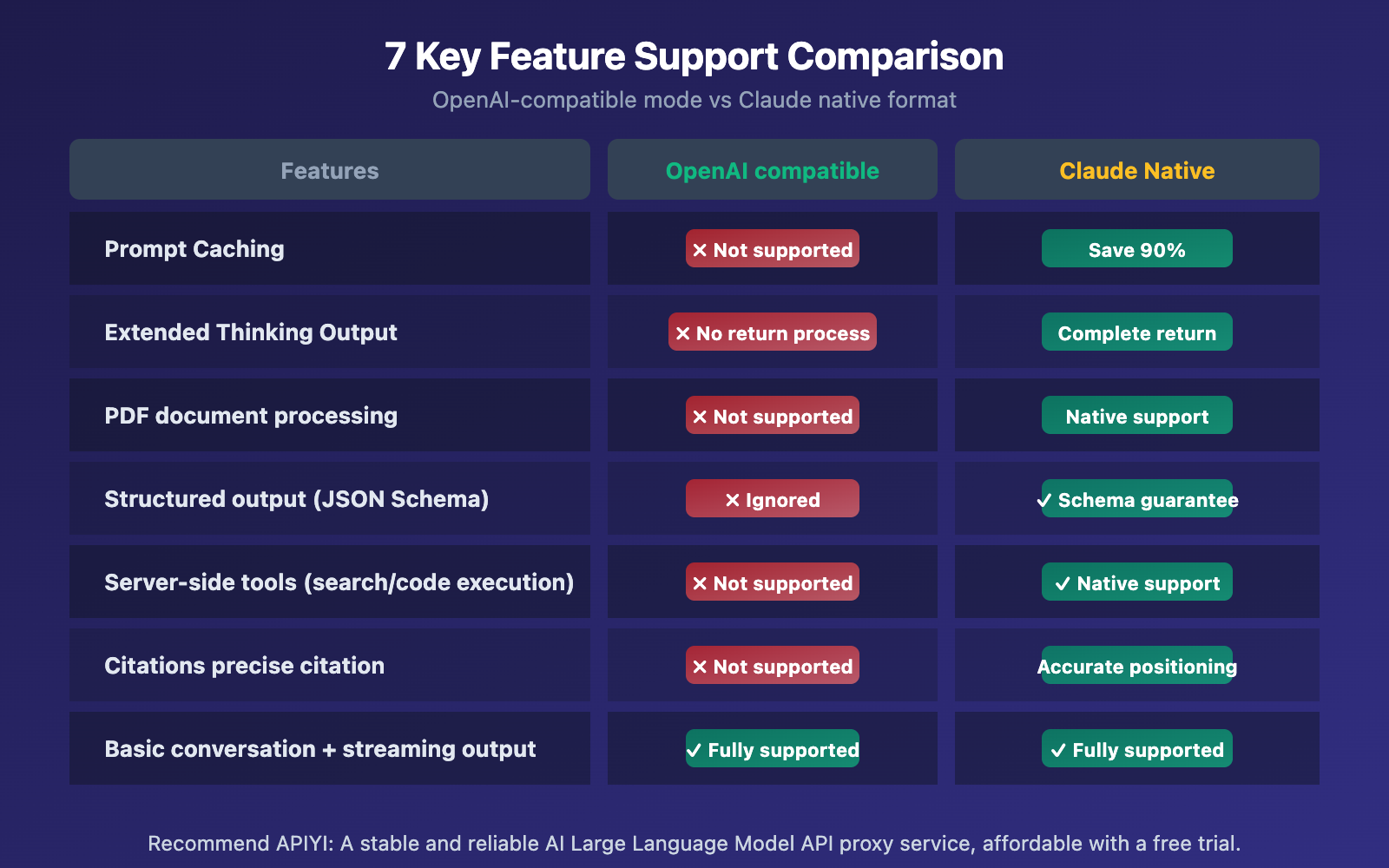
Differences 4-7: Other Important Distinctions
Difference 4: PDF Document Processing. Claude's native API supports type: "document" content blocks, allowing direct processing of PDF files and extraction of structured content. In OpenAI-Compatible Mode, file type content is simply ignored.
Difference 5: Structured Output. In OpenAI-Compatible Mode, both response_format and strict parameters are ignored, meaning you can't guarantee outputs strictly follow JSON Schema. Claude Native Format supports Schema guarantees through output_config.format.
Difference 6: Citations. Claude Native Format can return precise citation locations (document index, character position), which is perfect for source tracing in RAG scenarios. OpenAI-Compatible Mode doesn't have corresponding fields.
Difference 7: Ignored Parameters. The following OpenAI parameters are silently ignored when calling Claude: frequency_penalty, presence_penalty, seed, logprobs, logit_bias, n (must be 1). Any temperature value over 1 is automatically capped at 1.
🎯 Important Reminder: If your code relies on
frequency_penaltyorpresence_penaltyto control output style, you'll need to be aware that these parameters don't work when switching to Claude. We recommend adjusting system prompts to achieve similar effects. When connecting through APIYI at apiyi.com, the platform handles these compatibility details for you.
OpenAI-Compatible Mode vs. Claude Native Format: Choosing the Right One
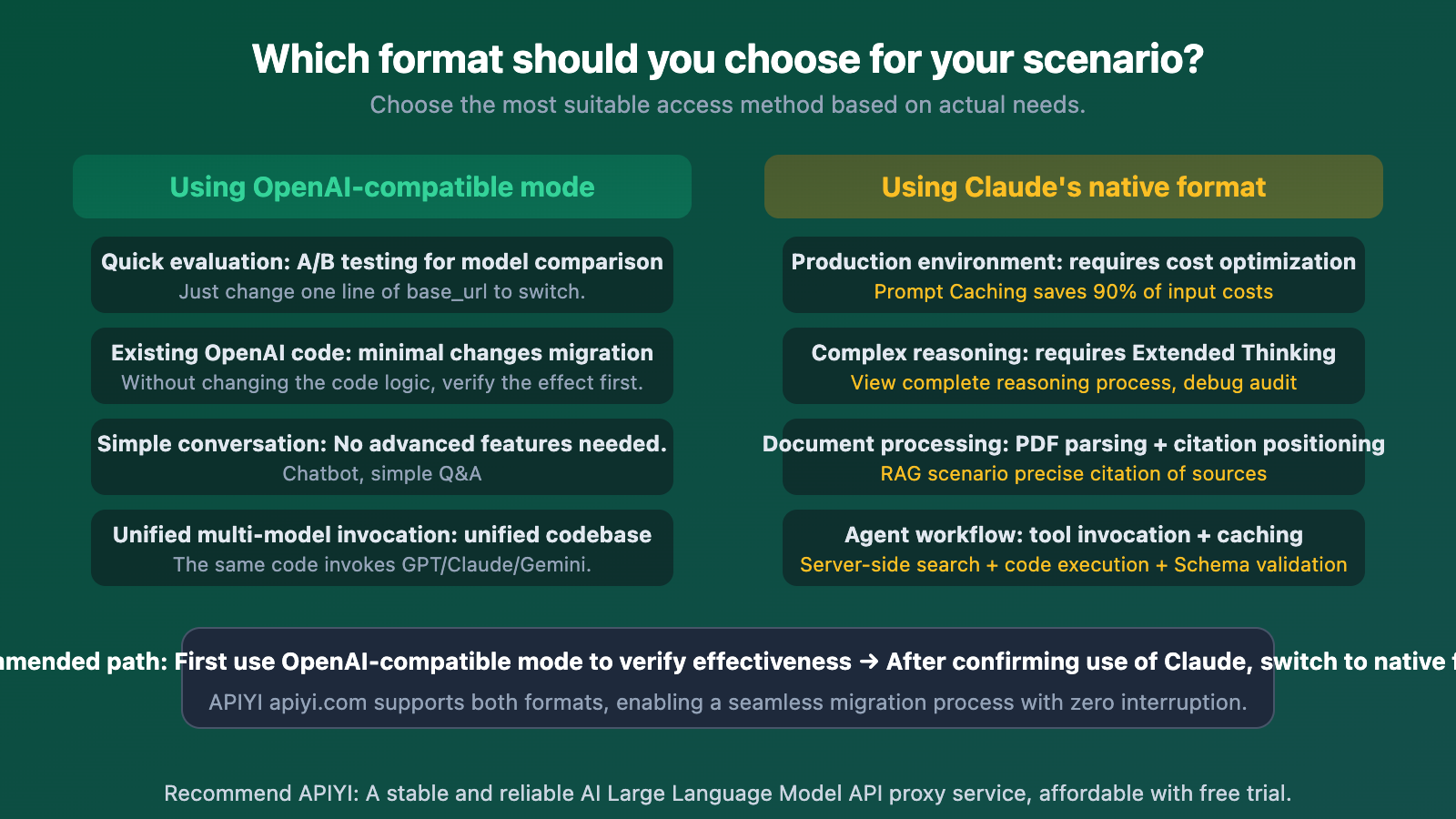
| Use Case | Recommended Format | Core Reason |
|---|---|---|
| Quick Evaluation / A-B Testing | OpenAI-Compatible | Just change the base_url, zero code changes |
| Migrating an Existing OpenAI Project | First OpenAI-Compatible → Then Native | Verify performance first, then migrate gradually |
| Production Long-Context Conversations | Claude Native | Prompt Caching saves 80%+ on costs |
| Agent / Tool-Call Intensive Workflows | Claude Native | Server-side tools + caching + Schema guarantees |
| PDF / RAG Scenarios | Claude Native | Native document processing + Citations |
| Unified Code for Multiple Models | OpenAI-Compatible | One codebase to call GPT/Claude/Gemini |
🎯 Migration Advice: Migrating from OpenAI-Compatible mode to Claude's native format mainly involves: (1) Extracting the system message from the messages array to a top-level field; (2) Changing tool definition
parameterstoinput_schema; (3) Handling the multi-content block structure in the response. Using APIYI (apiyi.com) for access can simplify this process.
Frequently Asked Questions
Q1: When calling Claude in OpenAI-Compatible mode, will I have fewer features compared to calling GPT?
Yes, you'll have slightly fewer features. When calling Claude in OpenAI-Compatible mode, parameters like frequency_penalty, presence_penalty, seed, logprobs, and response_format are silently ignored. These parameters do work when calling GPT. So if your code relies on these, you'll need to be careful when switching from GPT to Claude. However, core features like conversation, streaming output, and basic tool calling work perfectly fine.
Q2: Can I mix Claude native format and OpenAI format?
Absolutely. APIYI (apiyi.com) supports both formats simultaneously. You can use OpenAI-Compatible format for simple conversations in the same project (saves dev time) and Claude Native format for Agent workflows that need Prompt Caching (saves token costs). Both formats use the same API key.
Q3: Is it difficult to switch from OpenAI-Compatible mode to Claude Native format?
The changes aren't huge, mainly three things:
- Switch the SDK from
openaitoanthropic(or use HTTP requests directly) - Extract the system prompt from the messages array into a separate
systemfield - Change response handling from
choices[0].message.contentto iterating through thecontentarray
If you access via APIYI (apiyi.com), the platform provides unified documentation and code examples for both formats, making migration smoother.
Summary
The core criteria for choosing between OpenAI-compatible mode and Claude native format:
- Prompt Caching is the biggest differentiator: In production environments with long conversations and Agent scenarios, using Claude's native format can save 80-90% of input token costs. This gap is far more significant than any other feature differences.
- OpenAI-compatible mode is great for quick validation: If you're just testing Claude's performance or doing A/B comparisons, changing one
base_urlline is enough—no need to rewrite your code. - Production environments should use the native format: Features like Extended Thinking, PDF processing, Citations, and structured output are only fully available in the native format.
Choosing the right integration method lets you leverage all of Claude's capabilities while maximizing cost efficiency.
We recommend accessing Claude through APIYI (apiyi.com). The platform supports both OpenAI-compatible format and Claude native format, allowing you to switch flexibly with a single API key to easily meet different scenario requirements.
📚 References
-
Anthropic OpenAI SDK Compatibility Documentation: Complete list of officially supported and unsupported parameters
- Link:
platform.claude.com/docs/en/api/openai-sdk - Description: Includes detailed explanations of all ignored parameters and response fields.
- Link:
-
Claude Prompt Caching Documentation: Prompt caching mechanism and billing rules
- Link:
platform.claude.com/docs/en/build-with-claude/prompt-caching - Description: Pricing and minimum thresholds for the 5-minute and 1-hour cache levels.
- Link:
-
Claude Messages API Reference: Complete request and response format for Claude's native API
- Link:
platform.claude.com/docs/en/api/messages - Description: Detailed format specifications for content blocks, tool calls, and streaming output.
- Link:
-
Claude Extended Thinking Documentation: How to use the Extended Thinking feature
- Link:
platform.claude.com/docs/en/build-with-claude/extended-thinking - Description: How to enable and retrieve the complete reasoning process output.
- Link:
Author: APIYI Technical Team
Technical Discussion: Feel free to discuss in the comments. For more resources, visit the APIYI documentation center at docs.apiyi.com.


