
Author's Note: A detailed analysis of the root cause of the 429 rate limit issue with Gemini 3.1 Flash Image Preview image generation, comparing rate limiting strategies across AI Studio, Vertex AI, and third-party platforms, and providing 4 proven solutions.
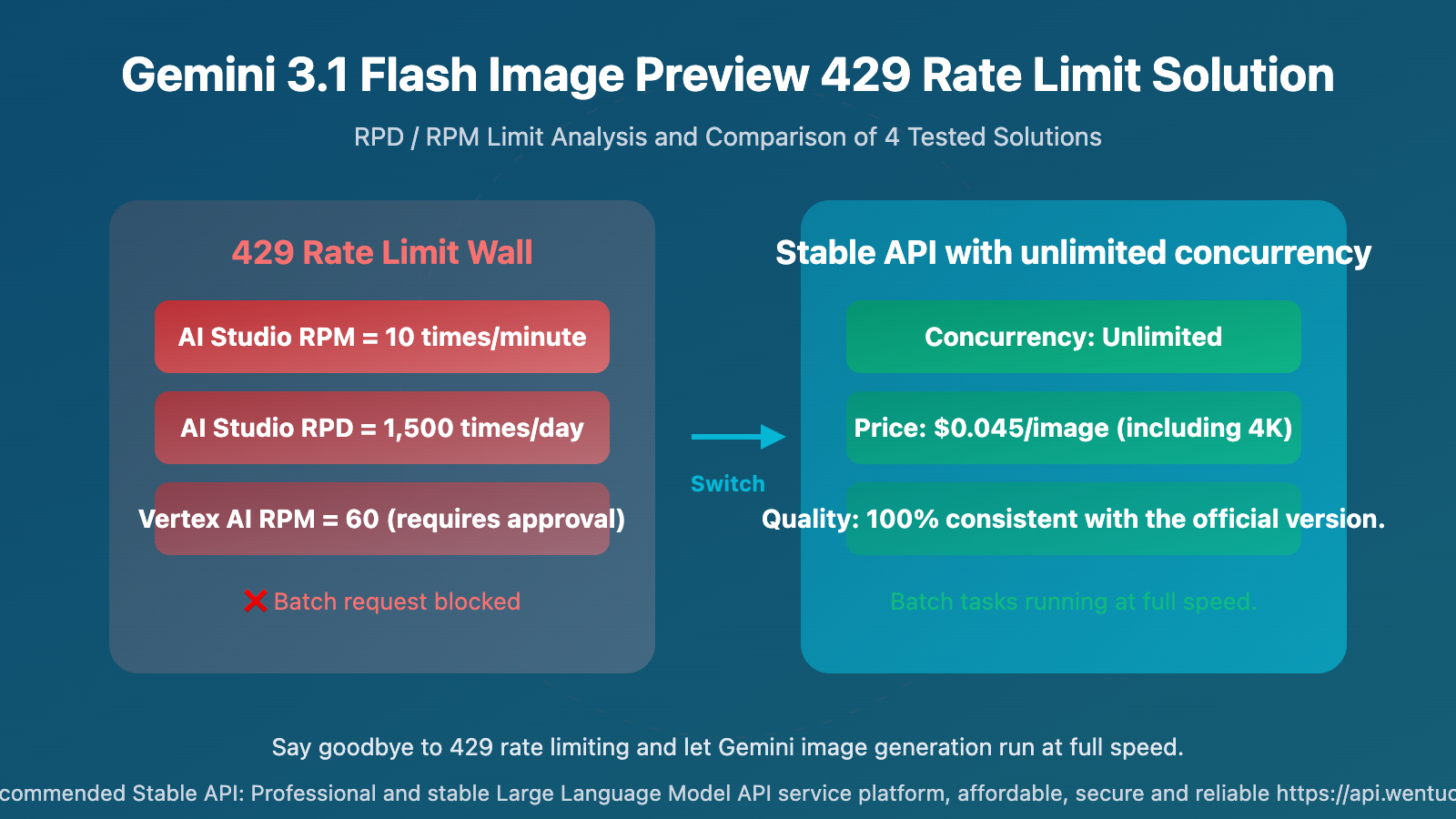
When generating images with Gemini 3.1 Flash Image Preview, the most frustrating part isn't the output quality, but getting blocked by a 429 rate limit as soon as you start. Whether using AI Studio or Vertex AI, the restrictions on RPD (Requests Per Day) and RPM (Requests Per Minute) are very strict, making batch image generation nearly impossible.
This article will draw from practical experience to analyze the root cause of the 429 error, compare the differences in rate limiting strategies across platforms, and present 4 verified solutions—including one with unlimited concurrency and a cost as low as $0.045 per image.
Core Value: After reading this, you'll fully understand the underlying logic behind Gemini's 429 image generation errors and find the best solution for your specific use case.
What is the Gemini 3.1 Flash Image Preview 429 Error?
First, let's see what this error looks like:
{
  "error": {
    "code": 429,
    "message": "Resource has been exhausted (e.g. check quota).",
    "status": "RESOURCE_EXHAUSTED",
    "details": [
      {
        "reason": "RATE_LIMIT_EXCEEDED",
        "metadata": {
          "quota_limit": "GenerateContentRequestsPerDayPerProjectPerModel",
          "quota_limit_value": "1500"
        }
      }
    ]
  }
}
In plain English: You've either used up your daily request quota or you're sending requests too frequently per minute.
Unlike a 503 error, a 429 isn't about the server being overloaded; it's about Google actively enforcing a quota limit on your account. Regardless of whether the server has spare capacity, once you hit the limit, your requests are simply rejected.
The Difference Between Gemini Image Generation 429 and 503 Errors
| Comparison Point | 429 RESOURCE_EXHAUSTED | 503 UNAVAILABLE |
|---|---|---|
| Root Cause | Your quota is exhausted | Insufficient server compute power |
| Trigger Condition | Exceeding RPD/RPM/TPM limits | Global high load |
| Scope of Impact | Limited to your project | All users |
| Can it be resolved by waiting? | RPM: wait 1 minute, RPD: wait until the next day | Typically minutes to hours |
| Can it be resolved by paying? | Vertex AI allows quota increase | Not directly solvable |
| Fundamental Solution | Switch platforms / Increase quota | Wait or switch platforms |
Gemini 3.1 Flash Image Preview Rate Limiting Strategies Across Platforms
This is the core issue—rate limits vary drastically between platforms.
Gemini Image Generation AI Studio Rate Limits
AI Studio is the first choice for most developers—it's free and easy to use. However, its image generation rate limits are extremely strict:
| Rate Limit Dimension | Limit Value | Equivalent |
|---|---|---|
| RPM (Requests Per Minute) | 10 requests | 1 request every 6 seconds |
| RPD (Requests Per Day) | 1,500 requests | Hits the limit after ~2.5 hours of continuous use |
| TPM (Tokens Per Minute) | 4,000,000 | Usually not the bottleneck |
| Image Output TPM | 12,000 tokens/min | ~10 images/minute |
Real-world experience: If you need to batch generate 500 images, with an RPM of 10, the theoretical minimum time is 50 minutes. Factoring in network latency and retries, it realistically takes 1-2 hours. If you need over 1,500 images in a day, you'll hit the RPD wall.
Gemini Image Generation Vertex AI Rate Limits
Vertex AI is Google Cloud's enterprise-level solution, offering higher quotas but still with limits:
| Rate Limit Dimension | Default Value | Can Be Increased? |
|---|---|---|
| RPM | 60 requests | Yes, requires approval |
| RPD | No fixed limit | Constrained by RPM and TPM |
| TPM | 4,000,000 | Yes, can apply |
| Image Output TPM | 24,000 tokens/min | Yes, can apply |
Real-world experience: RPM jumps from 10 to 60, which looks much better. However, requesting an increase requires going through Google Cloud's support ticket process, typically taking 1-3 business days. Also, Vertex AI setup is far more complex than AI Studio (requires creating a GCP project, setting up a service account, configuring IAM permissions, etc.), causing many individual developers and small teams to give up.
Gemini Image Generation Third-Party Platform Rate Limit Comparison
| Platform | Concurrency Limit | RPD Limit | Price per Image (1K) | Notes |
|---|---|---|---|---|
| AI Studio | RPM=10 | 1,500/day | Free (with quota) | Most restrictive |
| Vertex AI | RPM=60 | No fixed limit | ~$0.067 | Requires GCP setup |
| OpenRouter | Depends on plan | Depends on plan | ~$0.06-0.08 | General-purpose platform |
| Wentuo API | Unlimited concurrency | Unlimited | $0.045 | Pay-per-use, unlimited resolution |
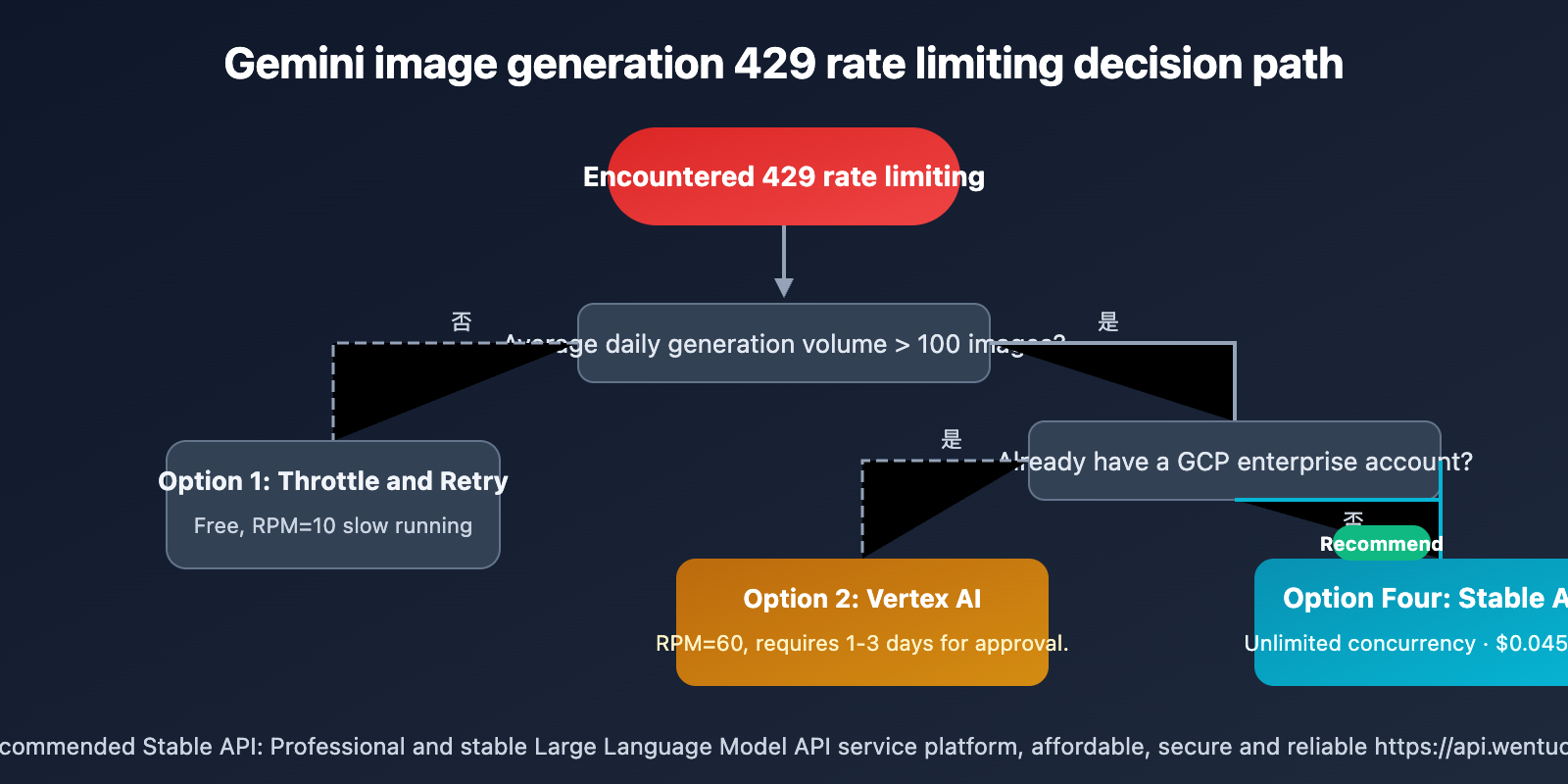
4 Solutions to Fix Gemini 3.1 Flash Image Preview 429 Rate Limits
Solution 1: Gemini Image Generation Request Throttling + Automatic Retry
The most basic solution. It doesn't require switching platforms, but it's inefficient.
import time
import random
import requests

def generate_with_retry(prompt, max_retries=5):
    """Image generation request with backoff retry"""
    for attempt in range(max_retries):
        try:
            response = requests.post(endpoint, json=payload, headers=headers, timeout=120)
            if response.status_code == 200:
                return response.json()
            elif response.status_code == 429:
                # Exponential backoff + random jitter
                wait_time = (2 ** attempt) + random.uniform(0, 1)
                print(f"429 rate limit, waiting {wait_time:.1f}s before retry ({attempt+1}/{max_retries})")
                time.sleep(wait_time)
            else:
                response.raise_for_status()
        except Exception as e:
            print(f"Request exception: {e}")
            time.sleep(2)
    raise Exception("Exceeded maximum retry attempts")
View the complete batch generation script (with rate control)
import time
import random
import requests
import base64
from pathlib import Path
from concurrent.futures import ThreadPoolExecutor

class RateLimitedGenerator:
    """Batch generator that adheres to AI Studio's RPM=10 limit"""

    def __init__(self, api_key, rpm_limit=10):
        self.api_key = api_key
        self.interval = 60.0 / rpm_limit  # Minimum interval between requests
        self.last_request_time = 0
        self.endpoint = "https://generativelanguage.googleapis.com/v1beta/models/gemini-3.1-flash-image-preview:generateContent"

    def _wait_for_rate_limit(self):
        elapsed = time.time() - self.last_request_time
        if elapsed < self.interval:
            time.sleep(self.interval - elapsed)
        self.last_request_time = time.time()

    def generate(self, prompt, output_path, retries=3):
        for attempt in range(retries):
            self._wait_for_rate_limit()
            try:
                response = requests.post(
                    f"{self.endpoint}?key={self.api_key}",
                    json={
                        "contents": [{"parts": [{"text": prompt}]}],
                        "generationConfig": {
                            "responseModalities": ["IMAGE"],
                            "imageConfig": {"aspectRatio": "1:1", "imageSize": "1K"}
                        }
                    },
                    timeout=120
                )
                if response.status_code == 200:
                    data = response.json()
                    img = data["candidates"][0]["content"]["parts"][0]["inlineData"]["data"]
                    Path(output_path).write_bytes(base64.b64decode(img))
                    return True
                elif response.status_code == 429:
                    wait = (2 ** attempt) + random.uniform(0, 2)
                    print(f"[429] Waiting {wait:.1f}s ...")
                    time.sleep(wait)
            except Exception as e:
                print(f"Exception: {e}")
                time.sleep(2)
        return False

# Usage example
gen = RateLimitedGenerator("YOUR_AISTUDIO_KEY", rpm_limit=10)
prompts = ["a sunset over mountains", "a cat in space", "futuristic city"]
for i, p in enumerate(prompts):
    success = gen.generate(p, f"output_{i}.png")
    print(f"{'✅' if success else '❌'} {p}")
Pros: Zero cost, suitable for small request volumes.
Cons: Slow, cannot bypass the hard RPD=1,500 daily limit.
Solution 2: Migrate Gemini Image Generation to Vertex AI for Higher Quotas
Suitable for enterprise users with Google Cloud accounts.
Steps:
- Create a GCP project and enable the Vertex AI API.
- Set up a service account and IAM permissions.
- Request an RPM increase in Google Cloud Console → IAM → Quotas.
- Switch the endpoint in your code from AI Studio to Vertex AI.
Pros: RPM increases from 10 to 60+, usable for enterprise scenarios.
Cons: Complex setup, approval cycle of 1-3 days, billed at standard Google Cloud rates.
Solution 3: Gemini Image Generation Multi-Project Rotation
Bypass single-project RPD/RPM limits by creating multiple GCP projects or AI Studio API keys and rotating requests between them.
import itertools

api_keys = ["KEY_1", "KEY_2", "KEY_3", "KEY_4", "KEY_5"]
key_pool = itertools.cycle(api_keys)

def generate_with_rotation(prompt):
    """Generate image using key rotation"""
    key = next(key_pool)
    # ... Send request using the current key
    return send_request(prompt, api_key=key)
Pros: Theoretically, N keys can provide N times the throughput.
Cons: Violates Google's Terms of Service (TOS), risk of account suspension; managing multiple keys adds complexity.
Solution 4: Use a Third-Party Platform with Unlimited Concurrency for Gemini Image Generation
This is the solution I ultimately adopted. After comparing several third-party platforms, I chose Wentuo API wentuo.ai, for a straightforward reason:
| Comparison Dimension | AI Studio | Vertex AI | Wentuo API |
|---|---|---|---|
| Concurrency Limit | RPM=10 | RPM=60 | Unlimited |
| Daily Limit | 1,500/day | Constrained by RPM | Unlimited |
| Price per Image (incl. 4K) | Free (with quota) | $0.067-$0.151 | $0.045 |
| Pay-as-you-go (1K) | – | $0.067 | ~$0.025 |
| Setup Complexity | Simple | Complex | Simple |
| Requires VPN? | Yes | Yes | No |
In practice, the pay-per-use rate of $0.045 per image includes 4K resolution. If billed by tokens, it's roughly $0.02-$0.05 per image depending on resolution. The most crucial part is the unlimited concurrency—batch tasks can run at full speed without getting stuck by 429 errors.
Calling it is also simple, just change the endpoint:
import requests
import base64

API_KEY = "your-wentuo-api-key"
ENDPOINT = "https://api.wentuo.ai/v1beta/models/gemini-3.1-flash-image-preview:generateContent"

headers = {
    "Content-Type": "application/json",
    "x-goog-api-key": API_KEY
}

payload = {
    "contents": [{"parts": [{"text": "A cute cat wearing a space helmet"}]}],
    "generationConfig": {
        "responseModalities": ["IMAGE"],
        "imageConfig": {"aspectRatio": "1:1", "imageSize": "2K"}
    }
}

response = requests.post(ENDPOINT, headers=headers, json=payload, timeout=120)
result = response.json()

image_data = result["candidates"][0]["content"]["parts"][0]["inlineData"]["data"]
with open("output.png", "wb") as f:
    f.write(base64.b64decode(image_data))
💡 Usage Suggestion: If your daily generation volume exceeds 500 images, or if you have concurrency speed requirements, I recommend directly using Wentuo API's unlimited concurrency solution. At $0.045 per image (unlimited resolution) pay-per-use, or as low as $0.018 per image (512px) pay-as-you-go, it saves 33%-70% compared to Google's official pricing.
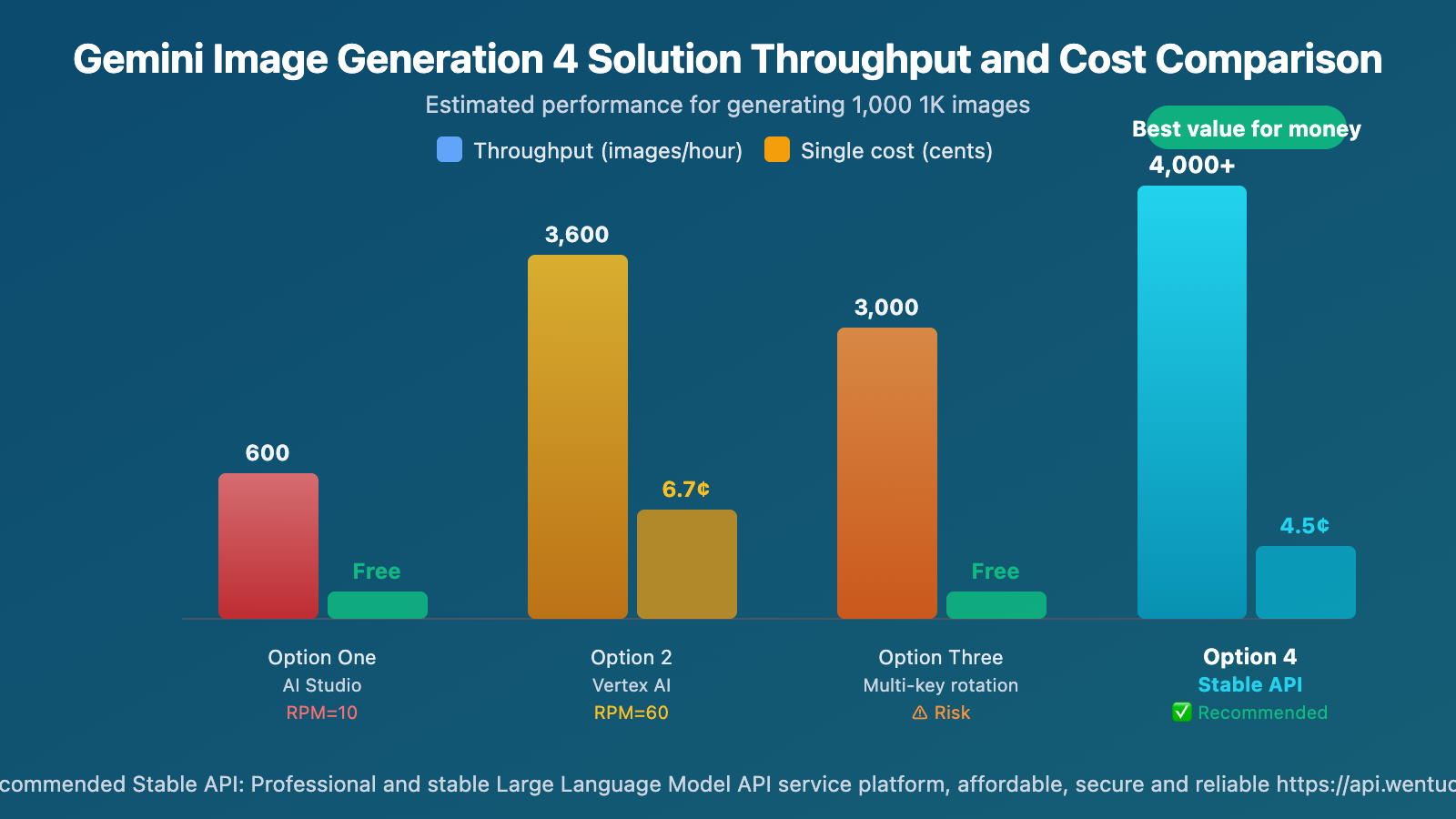
Gemini 3.1 Flash Image Preview 429 Rate Limit: 4 Solution Options and Recommendations
Different scenarios call for different solutions:
| Use Case | Recommended Solution | Reason |
|---|---|---|
| 🎨 Personal Learning/Experimentation | Option 1 (Throttle & Retry) | Free, small volume won't be affected |
| 🏢 Enterprise with Existing GCP | Option 2 (Vertex AI) | Compliant, can apply for higher quotas |
| 🔬 Temporary Large-scale Testing | Option 3 (Multiple Keys) | Short-term usability, but mind the risks |
| 🚀 Production/Batch Generation | Option 4 (Wentuo API) | No concurrency limits, lowest cost |
Throughput Comparison for Different Gemini Image Generation Solutions
Assuming generation of 1,000 1K images:
| Solution | Estimated Time | Total Cost | Feasibility |
|---|---|---|---|
| AI Studio (RPM=10) | ~100 mins + RPD limit may require next day | Free | ⚠️ Subject to RPD limit |
| Vertex AI (RPM=60) | ~17 mins | ~$67 | ✅ Requires GCP |
| Multi-Key Rotation (5 Keys) | ~20 mins | Free | ⚠️ Risk of account suspension |
| Wentuo API (Unlimited Concurrency) | ~10-15 mins | $45 (Per-call) / ~$25 (Volume-based) | ✅ Recommended |
Frequently Asked Questions
Q1: How long does it take to recover after a Gemini 3.1 Flash Image Preview 429 error?
It depends on which rate limit was triggered:
- RPM Limit: Automatically recovers after waiting 1 minute.
- RPD Limit: Resets the next day (at UTC 0:00).
- TPM Limit: Recovers after waiting 1 minute.
It's recommended to check the quota_limit value in the details field of the error response in your code to determine the specific limit and apply the corresponding strategy.
Q2: Is the image generation quality of Wentuo API the same as Google’s official service?
Yes, Wentuo API (wentuo.ai) directly calls Google's official Gemini 3.1 Flash Image Preview model. The generation quality is identical. The differences are:
- Removed RPD/RPM limits.
- Supports unlimited concurrency.
- More favorable pricing ($0.045/image vs. official $0.067/image @1K).
Q3: How to choose between per-call billing and volume-based billing?
Here's a simple decision logic:
- Consistently use 2K/4K resolution → Choose per-call billing ($0.045/call, best value regardless of resolution).
- Primarily use 512px/1K → Choose volume-based billing (512px is only $0.018/call, 60% cheaper than per-call).
- Mixed resolutions → Calculate the average cost; volume-based billing is usually more economical.
Wentuo API (wentuo.ai) supports flexible switching between the two billing methods.
🎯 Summary
The 429 rate limiting issue with Gemini 3.1 Flash Image Preview is essentially due to Google's strict quota limits (RPD/RPM) set for AI Studio and Vertex AI. Key takeaways:
- Understand the Limit Type: 429 is a quota limit (your problem), 503 is server overload (Google's problem) – the solutions are completely different.
- Assess Your Usage: AI Studio is sufficient for under 100 images per day; consider third-party platforms if you exceed 500 images.
- Choose the Right Solution: For production environments, we recommend solutions without concurrency limits to avoid rate limiting impacting your business.
- Cost Comparison is Key: Wentuo.ai's API costs $0.045/image (including 4K) on a pay-per-use basis, and as low as $0.018/image on a volume plan, saving 33%-70% compared to the official pricing.
For developers needing batch image generation, Wentuo.ai's API is currently the best overall choice—no concurrency limits, lower prices, no need for VPN, and fully compatible interfaces.
📚 References
-
Google Gemini API Official Documentation: Image generation quotas and rate limiting details.
- Link:
ai.google.dev/gemini-api/docs/image-generation - Description: Official quota parameters and best practices.
- Link:
-
Google Cloud Quota Management: Vertex AI quota request process.
- Link:
cloud.google.com/vertex-ai/docs/quotas - Description: Official method for enterprise users to increase quotas.
- Link:
-
Wentuo.ai Nano Banana 2 Documentation: Guide for accessing image generation without concurrency limits.
- Link:
docs.wentuo.ai - Description: Detailed explanations and code examples for both pay-per-use and volume-based billing plans.
- Link:
📝 About the Author: A technical content creation team focused on AI image generation and API technology sharing. For more technical content and resources, visit Wentuo.ai.
📋 Content Note: This article is based on practical experience. Specific rate limiting parameters may change according to Google's policies. For technical support, you can get help through Wentuo.ai.


