
title: "Claude Code Prompt Caching: TTL Mechanics, Costs, and Optimization Strategies"
description: "A deep dive into Claude Code's prompt caching TTL, the differences between 5-minute and 1-hour tiers, and how to optimize costs across Anthropic API and AWS Bedrock."
Author's Note: This guide breaks down the TTL mechanism for Claude Code prompt caching, explains the differences between the 5-minute and 1-hour tiers, compares billing between the Anthropic API and AWS Bedrock, and provides actionable tips for cost optimization.
"Can I change the prompt caching TTL in Claude Code? What's the difference between 5 minutes and 1 hour? Which one is actually more cost-effective?" These are the most common questions from Claude Code users looking to manage their expenses.
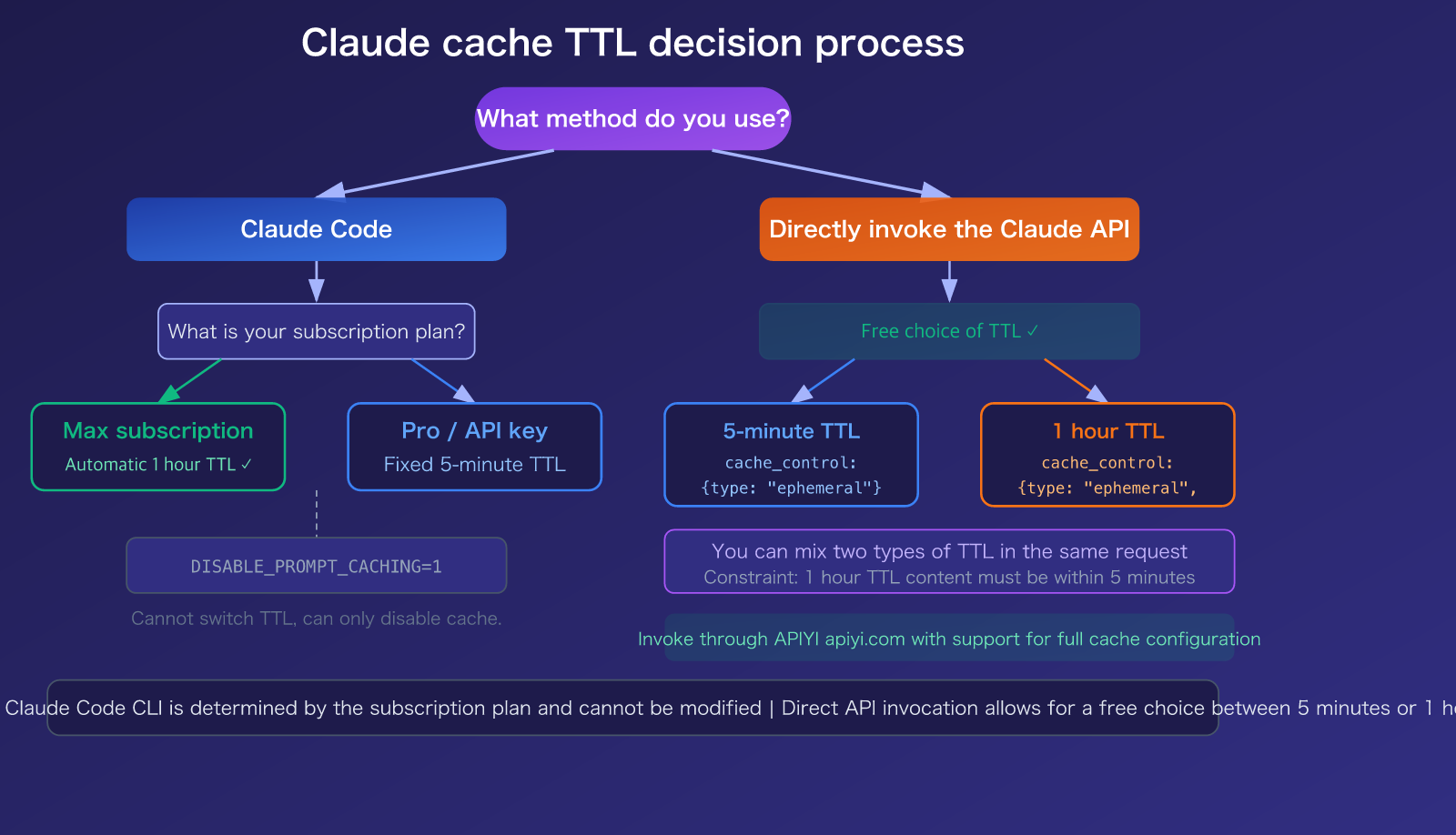
Here’s the bottom line: You cannot directly modify the cache TTL in Claude Code—it's determined by your subscription plan. Max subscribers automatically get a 1-hour TTL, while Pro subscribers and API key users default to a 5-minute TTL. However, if you are calling the Claude API directly, you can freely choose between 5 minutes or 1 hour using the cache_control parameter.
Core Value: After reading this, you'll fully understand the Claude prompt caching TTL mechanism, the billing differences between the official Anthropic API and AWS Bedrock, and how to choose the most cost-effective caching strategy for your specific use case.
Claude Prompt Caching: Key Takeaways
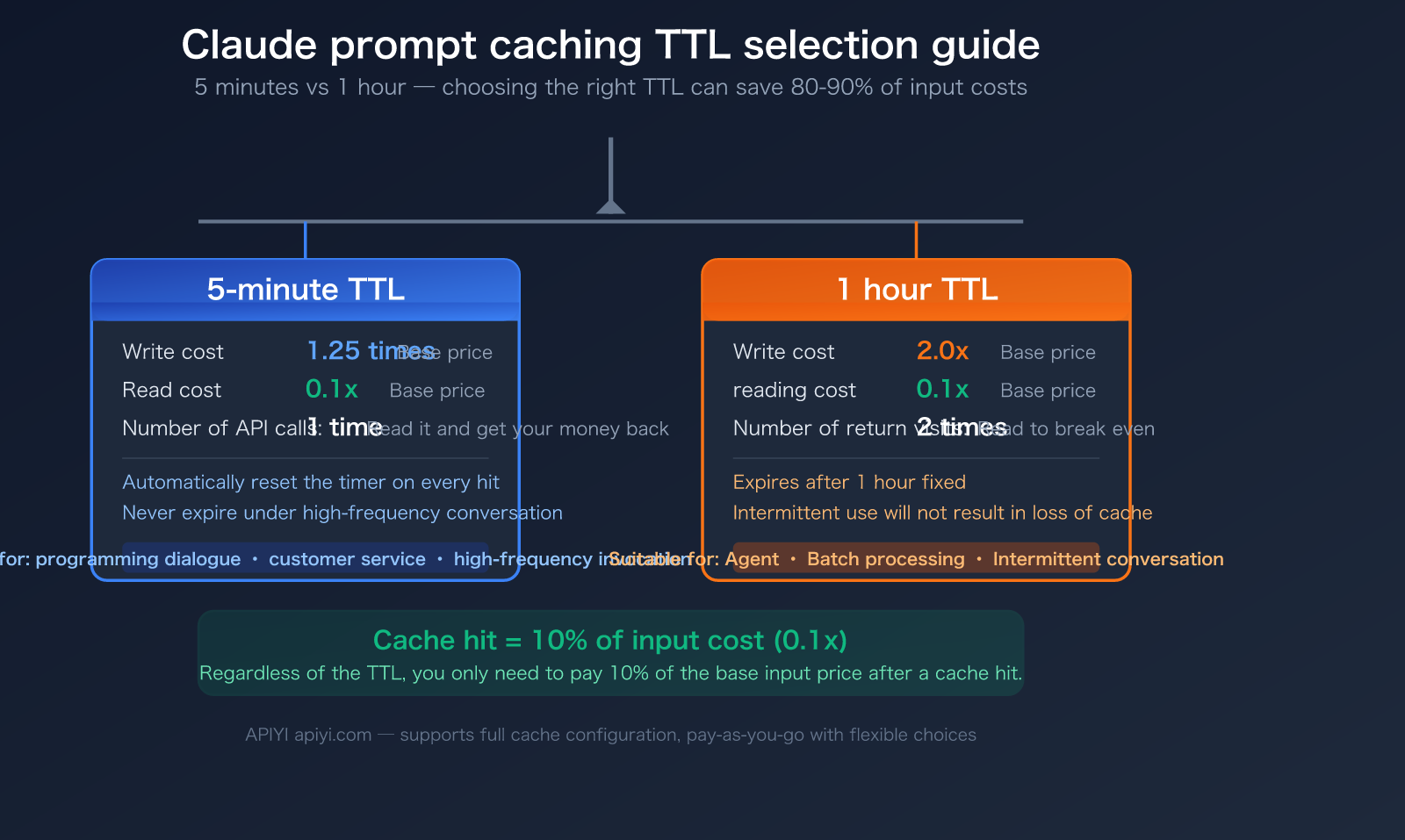
Prompt caching is one of the most effective ways to save money with Claude models. It stores the prompt prefix you've previously sent (system prompts, tool definitions, conversation history, etc.) on the server. If the prefix matches in your next request, it reads directly from the cache, costing only 10% of the standard input price.
| Feature | Description | Practical Impact |
|---|---|---|
| Two TTL Tiers | 5 minutes (default) and 1 hour (optional) | Choosing the right TTL saves significant write costs |
| Cache Read = 10% | Only 0.1x the price for cached input | Saves 80-90% on long conversation costs |
| 5-min Write = 1.25x | 25% premium for writing to cache | Breaks even after one cache read |
| 1-hour Write = 2x | 2x price for writing to cache | Requires two cache reads to break even |
| Auto-managed | System prompts, tools, and CLAUDE.md are cached automatically | No manual configuration needed |
Can I change the TTL in Claude Code?
This is the question users care about most. The answer depends on how you're using it:
Claude Code (Interactive CLI tool): You cannot manually change it. Claude Code's caching is controlled server-side—Max subscribers get a 1-hour TTL (controlled via the tengu_prompt_cache_1h_config feature flag), while Pro subscribers and API key users get a 5-minute TTL. You can only disable caching entirely using the DISABLE_PROMPT_CACHING=1 environment variable; you cannot switch between TTL tiers.
Claude API (Direct invocation): You can choose freely. When calling via the API, you can specify the TTL in the cache_control parameter:
// 5-minute cache (default)
{ "cache_control": { "type": "ephemeral" } }

// 1-hour cache
{ "cache_control": { "type": "ephemeral", "ttl": "1h" } }
🎯 Recommendation: If you primarily use the Claude Code CLI, your TTL is tied to your subscription plan. If you use the API (e.g., via APIYI), you can flexibly choose between 5 minutes or 1 hour based on your workflow to achieve more precise cost control.
A Deep Dive into Claude Prompt Caching TTL Billing Rules
5 Minutes vs. 1 Hour: A Billing Comparison
The core difference between these two TTLs lies in the write costs. Read costs are identical across the board, sitting at 0.1x the base input price:
| Operation | 5-Minute TTL | 1-Hour TTL | Note |
|---|---|---|---|
| Cache Write | 1.25x base price | 2.0x base price | Premium for initial cache write |
| Cache Read | 0.1x base price | 0.1x base price | Discounted rate after a cache hit (same) |
| Break-even Point | 1 read to break even | 2 reads to break even | Usage frequency determines value |
| Auto-renewal | Resets 5 mins on hit | Fixed 1-hour expiration | 5-min can last indefinitely with high frequency |
Specific Prompt Caching Prices by Model
Here is the complete cache billing table for Anthropic's official API models (as of March 2026):
| Model | Base Input Price | 5-Min Write | 1-Hour Write | Cache Read | Output Price |
|---|---|---|---|---|---|
| Claude Opus 4.6 | $5/MTok | $6.25/MTok | $10/MTok | $0.50/MTok | $25/MTok |
| Claude Sonnet 4.6 | $3/MTok | $3.75/MTok | $6/MTok | $0.30/MTok | $15/MTok |
| Claude Haiku 4.5 | $1/MTok | $1.25/MTok | $2/MTok | $0.10/MTok | $5/MTok |
Key Takeaway: The cache read discount is massive. Taking Claude Opus 4.6 as an example:
- Standard input for 1 million tokens = $5.00
- Cached read for 1 million tokens = $0.50 (You save $4.50, a 90% discount)
- This is exactly why the $20/month Claude Code Pro subscription is economically viable—100 rounds of Opus conversation without caching could cost $50–100, but with caching, it drops to just $10–19.
Minimum Token Requirements for Caching
Not everything can be cached. Each model has a minimum token requirement; if your content isn't long enough, it won't trigger the cache:
| Model | Minimum Cache Tokens |
|---|---|
| Claude Opus 4.6 / 4.5 | 4,096 |
| Claude Sonnet 4.6 | 2,048 |
| Claude Sonnet 4.5 / 4 | 1,024 |
| Claude Haiku 4.5 | 4,096 |
| Claude Haiku 3.5 / 3 | 2,048 |
🎯 Pro Tip: If your system prompt is short (e.g., under 2,048 tokens), it won't trigger caching when using Claude Sonnet 4.6. You can reach the minimum threshold by expanding your system prompt content or consolidating your tool definitions. Using APIYI (apiyi.com) for your model invocation also supports caching with even better rates.
Anthropic API vs. AWS Bedrock: Caching Billing Comparison
Platform Support Overview
Claude's prompt caching is supported across the Anthropic official API, AWS Bedrock, and Google Vertex AI, though there are subtle differences:
| Comparison Dimension | Anthropic Official API | AWS Bedrock | Google Vertex AI |
|---|---|---|---|
| 5-Min TTL | ✅ All models | ✅ All models | ✅ All models |
| 1-Hour TTL | ✅ All models | ✅ Select models (Opus/Sonnet/Haiku 4.5) | ✅ Supported |
| Write Premium (5-min) | 1.25x | ~1.25x | 1.25x |
| Write Premium (1-hour) | 2.0x | 2.0x | 2.0x |
| Read Discount | 0.1x | ~0.1x | 0.1x |
| Max Breakpoints | 4 | 4 | 4 |
| Auto-caching | ✅ Supported | ✅ Supported | ✅ Supported |
| Custom TTL | ✅ 5-min/1-hour options | ✅ Select models | ✅ Supported |
Key Platform Differences
Anthropic Official API: Offers the most comprehensive caching features, with both 5-minute and 1-hour TTLs available for all models. As of February 5, 2026, cache isolation shifted from the organization level to the workspace level, meaning caches are independent across different workspaces within the same organization.
AWS Bedrock: Announced support for 1-hour TTL in January 2026, but it's currently limited to specific models like Claude Opus 4.5, Sonnet 4.5, and Haiku 4.5. Support for 1-hour TTL on the latest Claude Sonnet 4.6 and Opus 4.6 via Bedrock is still pending confirmation. If you're connecting to Bedrock via Claude Code, keep an eye on the CLAUDE_CODE_DISABLE_EXPERIMENTAL_BETAS=1 compatibility setting.
Google Vertex AI: Caching functionality is largely identical to the official API, but it requires authentication and billing through your Google Cloud project.
🎯 Platform Recommendation: If you want to avoid the headache of platform-specific differences and complex configurations, using the unified interface at APIYI (apiyi.com) is the simplest solution—it supports full caching features without the need to manage separate AWS IAM or Google Cloud credentials.
description: A quick guide to getting started with Claude Code prompt caching, including TTL selection strategies and cost-saving tips.
Getting Started with Claude Code Prompt Caching
Minimal Example: Setting a 1-Hour TTL Cache
import anthropic

client = anthropic.Anthropic(
    api_key="YOUR_API_KEY",
    base_url="https://vip.apiyi.com/v1"
)

response = client.messages.create(
    model="claude-sonnet-4-6",
    max_tokens=1024,
    system=[{
        "type": "text",
        "text": "You are a professional physics tutor assistant, responsible for answering high school physics problems...(long system prompt here)",
        "cache_control": {"type": "ephemeral", "ttl": "1h"}
    }],
    messages=[{"role": "user", "content": "Explain Newton's Third Law"}]
)
print(f"Cache read tokens: {response.usage.cache_read_input_tokens}")
print(f"Cache creation tokens: {response.usage.cache_creation_input_tokens}")
View Full Code: Mixing 5-minute and 1-hour TTLs
import anthropic

client = anthropic.Anthropic(
    api_key="YOUR_API_KEY",
    base_url="https://vip.apiyi.com/v1"
)

# Mixed TTL: 1 hour for system prompt (rarely changes), 5 minutes for conversation context (frequently changes)
response = client.messages.create(
    model="claude-sonnet-4-6",
    max_tokens=2048,
    system=[
        {
            "type": "text",
            "text": "You are a professional AI technical consultant...(long system prompt, 2000+ tokens)",
            "cache_control": {"type": "ephemeral", "ttl": "1h"}  # 1 hour for system prompt
        },
        {
            "type": "text",
            "text": "Here is the user's historical conversation context...(conversation history)",
            "cache_control": {"type": "ephemeral"}  # 5 minutes for conversation context (default)
        }
    ],
    messages=[{"role": "user", "content": "Compare the reasoning capabilities of Claude and GPT"}]
)

# Check cache usage
usage = response.usage
print(f"Standard input tokens: {usage.input_tokens}")
print(f"Cache read tokens: {usage.cache_read_input_tokens}")
print(f"Cache creation tokens: {usage.cache_creation_input_tokens}")

# Calculate savings (using Sonnet 4.6 as an example)
base_cost = (usage.input_tokens / 1_000_000) * 3
cache_cost = (usage.cache_read_input_tokens / 1_000_000) * 0.3
saved = (usage.cache_read_input_tokens / 1_000_000) * 2.7
print(f"Savings this time: ${saved:.4f}")
Important Constraint: When mixing two types of TTLs in the same request, the 1-hour cached content must be placed before the 5-minute cached content, otherwise, an error will be returned.
Tip: When calling the Claude API via APIYI (apiyi.com), you get full support for
cache_controlparameter configuration, including the flexibility to choose between 5-minute and 1-hour TTLs.
5-Minute vs. 1-Hour TTL: Which one should you choose?
Selection Decision Table
| Use Case | Recommended TTL | Reason |
|---|---|---|
| Claude Code High-Frequency Coding (messages every minute) | 5 Minutes | Timer resets automatically on every hit; it won't expire |
| Customer Service Bot (user reply interval < 5 mins) | 5 Minutes | Low write cost (1.25x), high hit frequency |
| Document Analysis Agent (processing interval 5-60 mins) | 1 Hour | Prevents cache expiration leading to re-writes |
| Scheduled Batch Tasks (one batch every 30 mins) | 1 Hour | 5-minute TTL would expire; 1-hour covers it perfectly |
| Low-Frequency API Calls (intervals > 1 hour) | No Cache | Both TTLs will expire; write costs are wasted |
| System Prompts (rarely change) | 1 Hour | Write once, read multiple times |
| Conversation History (changes every turn) | 5 Minutes | Lower write costs are more cost-effective for frequent changes |
Cost Calculation Formula
To determine if caching is worth it, use this core formula:
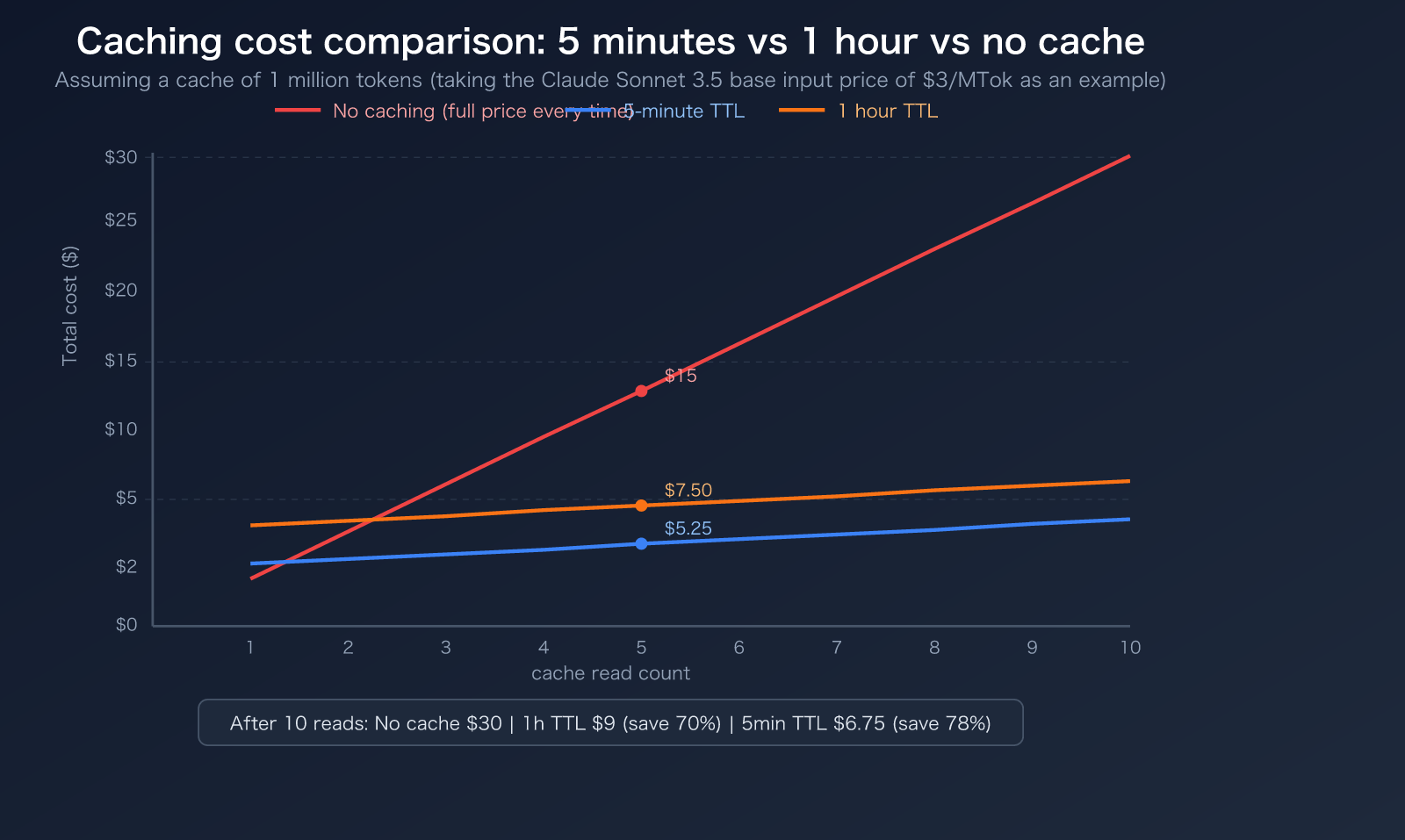
5-Minute TTL Break-even Condition: Cached content is read at least once within 5 minutes
- Write cost: 1.25x → extra 0.25x
- Read savings: 0.9x saved per read
- Breaks even after 1 read (0.9 > 0.25)
1-Hour TTL Break-even Condition: Cached content is read at least twice within 1 hour
- Write cost: 2.0x → extra 1.0x
- Read savings: 0.9x saved per read
- Breaks even after 2 reads (0.9 × 2 = 1.8 > 1.0)
FAQ
Q1: Can I change the 5-minute TTL to 1 hour in Claude Code?
The Claude Code CLI tool doesn't allow users to manually modify the TTL. Max subscribers automatically get a 1-hour TTL (controlled by a server-side feature flag), while Pro and API key users are fixed at a 5-minute TTL. If you need a 1-hour TTL but don't want to upgrade to a Max subscription, you can make direct API calls (by setting cache_control.ttl: "1h") and use pay-as-you-go services like APIYI (apiyi.com).
Q2: Does the 5-minute TTL expire exactly after 5 minutes, or does it auto-renew?
The 5-minute TTL resets its timer every time the cache is hit. If you send a message every 1–2 minutes (like in a Claude Code programming session), the timer keeps resetting, and the cache won't expire. The cache only invalidates if you go 5 minutes without sending a message. So, for high-frequency use cases, a 5-minute TTL is usually more than enough.
Q3: Is the cache billing on AWS Bedrock the same as the official Anthropic API?
It's mostly the same, but with a few minor differences:
- Write premiums are both ~1.25x (for 5 minutes) and ~2.0x (for 1 hour).
- Read discounts are both ~0.1x.
- Key difference: The 1-hour TTL on Bedrock currently only supports specific models like Opus 4.5, Sonnet 4.5, and Haiku 4.5; you'll need to verify support for the latest 4.6 series models.
- By using APIYI (apiyi.com), you get full cache support that matches the official API.
Summary
Key takeaways for Claude prompt caching TTL:
- Two TTL tiers available: 5 minutes (1.25x write cost, breaks even after 1 read) and 1 hour (2x write cost, breaks even after 2 reads). Both offer a 0.1x read cost.
- Claude Code CLI cannot change TTL: Max subscriptions get 1 hour automatically; Pro/API key users are fixed at 5 minutes and cannot toggle this.
- Claude API offers flexibility: You can set the TTL via the
cache_control.ttlparameter, and you can even mix both TTLs in the same request. - Choose 5 minutes for high-frequency chats: It auto-renews on every hit and has lower write costs. Choose 1 hour for intermittent use to avoid expiration.
Cache hits mean your input costs are slashed by 90%, making it the most effective way to save money with Claude. We recommend using the unified interface at APIYI (apiyi.com) for full support of cache configurations, allowing you to test the actual cost differences between various TTL strategies with a single API key.
📚 References
-
Anthropic Official Documentation – Prompt Caching: The authoritative source for TTL configuration, billing rules, and
cache_controlsyntax.- Link:
platform.claude.com/docs/en/build-with-claude/prompt-caching - Note: Includes complete billing formulas and code examples for 5-minute/1-hour TTLs.
- Link:
-
Anthropic Official Documentation – Pricing: Base and caching prices for all models.
- Link:
platform.claude.com/docs/en/about-claude/pricing - Note: Details the cache write and read rates for Opus, Sonnet, and Haiku models.
- Link:
-
AWS Official Documentation – Bedrock Prompt Caching: Details on cache support for the Bedrock platform.
- Link:
docs.aws.amazon.com/bedrock/latest/userguide/prompt-caching.html - Note: Covers TTL support ranges and billing standards for models on Bedrock.
- Link:
-
Claude Code Camp – How Prompt Caching Works: An in-depth analysis of Claude Code's cache implementation.
- Link:
claudecodecamp.com/p/how-prompt-caching-actually-works-in-claude-code - Note: Learn how Claude Code automatically manages cache breakpoints.
- Link:
-
GitHub Issue #19436 – Multi-layer Cache TTL Feature Request: Community discussion on more flexible TTL configurations.
- Link:
github.com/anthropics/claude-code/issues/19436 - Note: Explores community-proposed multi-layer TTL schemes based on content change frequency.
- Link:
Author: APIYI Technical Team
Technical Discussion: Feel free to share your experiences with Claude cache configuration in the comments. For more tutorials on model invocation, visit the APIYI documentation center at docs.apiyi.com.


