

Summary: Gemini Omni 1.2 Flash can generate 3~15-second video with native audio. Going through Google officially requires a paid tier and a supported region. Based on public pricing, 720p runs about $0.07 per second, or roughly $0.70 for a 10-second clip.
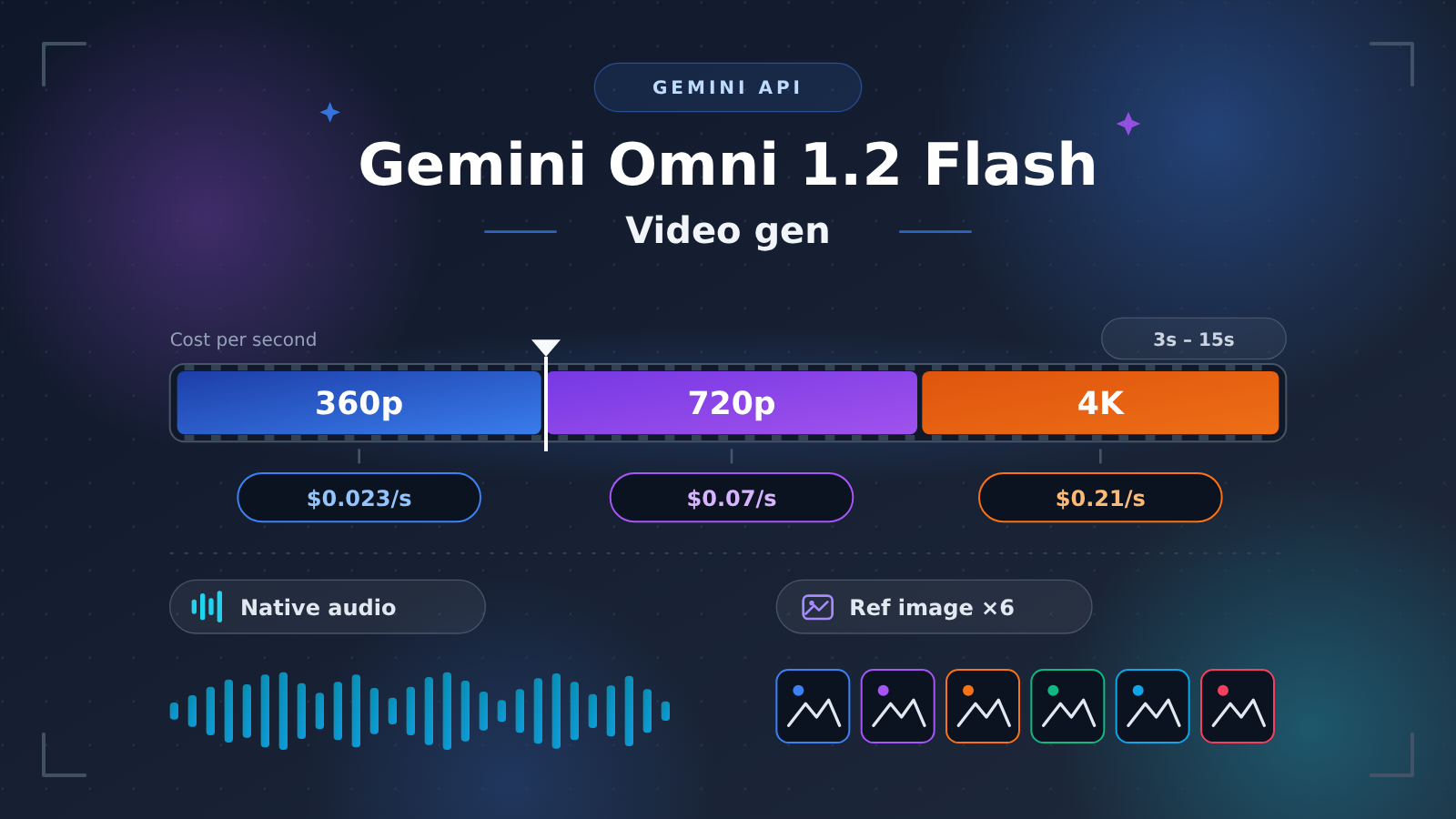
Bottom line up front: Gemini Omni 1.2 Flash is a video model Google released on November 5, 2026. It supports 3~15-second durations, resolutions from 360p to 4K, up to 6 reference images, and outputs native audio directly. There’s no free tier for it on the Gemini API — before you call it, you need a paid project with billing enabled, and your region has to be on the supported list for Google AI Studio and the Gemini API. At $12.00 per million tokens for video output, 360p costs about $0.023 per second, 720p about $0.07 per second, and upscaled 4K about $0.21 per second. For most trial use cases, an 8-second 720p video costs about $0.56, so the cost of a single failed attempt is low — the real barrier is the account, billing, and region.
Below, we’ll start with a glossary to clear up the basic concepts, then break down the model’s capabilities and the official requirements. After that you’ll get a cost comparison table and estimation method for different resolution and duration combinations, followed by an explanation of the “create, poll, download” asynchronous video task flow. Finally, we’ll list the things you need to verify item by item before integrating. Once you’ve read all this, you can decide whether this model is worth putting into your own app or content production workflow.
To Know: Gemini Omni 1.2 Flash Terms
| Term | Explanation |
|---|---|
| Gemini API | Google’s model invocation interface for developers, billed by token |
| Google AI Studio | Google’s web-based debugging console where you can create API keys and try out models |
| Paid Tier | A billing tier you can use only after linking a Cloud billing account, as opposed to the free tier |
| Cloud billing | Google Cloud’s billing account, which usually requires a credit card |
| token | The model’s unit of measurement; video output is also converted to tokens based on resolution and duration |
| Native audio | The model generates sound at the same time as the visuals, with no extra dubbing step |
| Reference image | Images provided during generation to constrain the consistency of people, objects, or style |
| Text-to-video / image-to-video | Generating video from a text prompt, or from an image plus a prompt, respectively |
| Upscaled 4K | Generating at a lower resolution first and then enlarging to 4K; billing uses the 4K tier |
| Asynchronous task | After submitting a request you first get a task ID, then retrieve the result once background generation completes |
| Polling | Checking task status at intervals until it completes or fails |
| Interactions API | Google’s own interface, offering capabilities such as conversational video editing and continuation |
| OpenAI-compatible API | An interface that third-party platforms wrap in the OpenAI SDK request format, making it easy to reuse code |
1 Gemini Omni 1.2 Flash Key Points: What It Can Do
1.1 Gemini Omni 1.2 Flash Capability Boundaries
The table below summarizes the core parameters from currently public information. These parameters come from third-party platforms’ summaries of Google’s release information, so verify them again on Google’s official release page before formally integrating.
| Dimension | Parameter | Significance for developers |
|---|---|---|
| Release date | November 5, 2026 | A brand-new model, so pricing and availability may still change |
| Video duration | 3–15 seconds | Good for short clips, ad shots, and product demos; longer videos need to be stitched together |
| Resolution | 360p to 4K (4K is upscaled) | Use low resolution for previews and high resolution for final output to keep costs controlled |
| Reference images | Up to 6 | Lock in character appearance, product details, or visual style |
| Audio | Native audio | Ambient sound and sound effects are generated in sync with the visuals, cutting down on post-production work |
| Free tier | None | You must set up a paid project before making calls |
1.2 Gemini Omni 1.2 Flash Capability Attribution: What’s Only on Google’s Native API
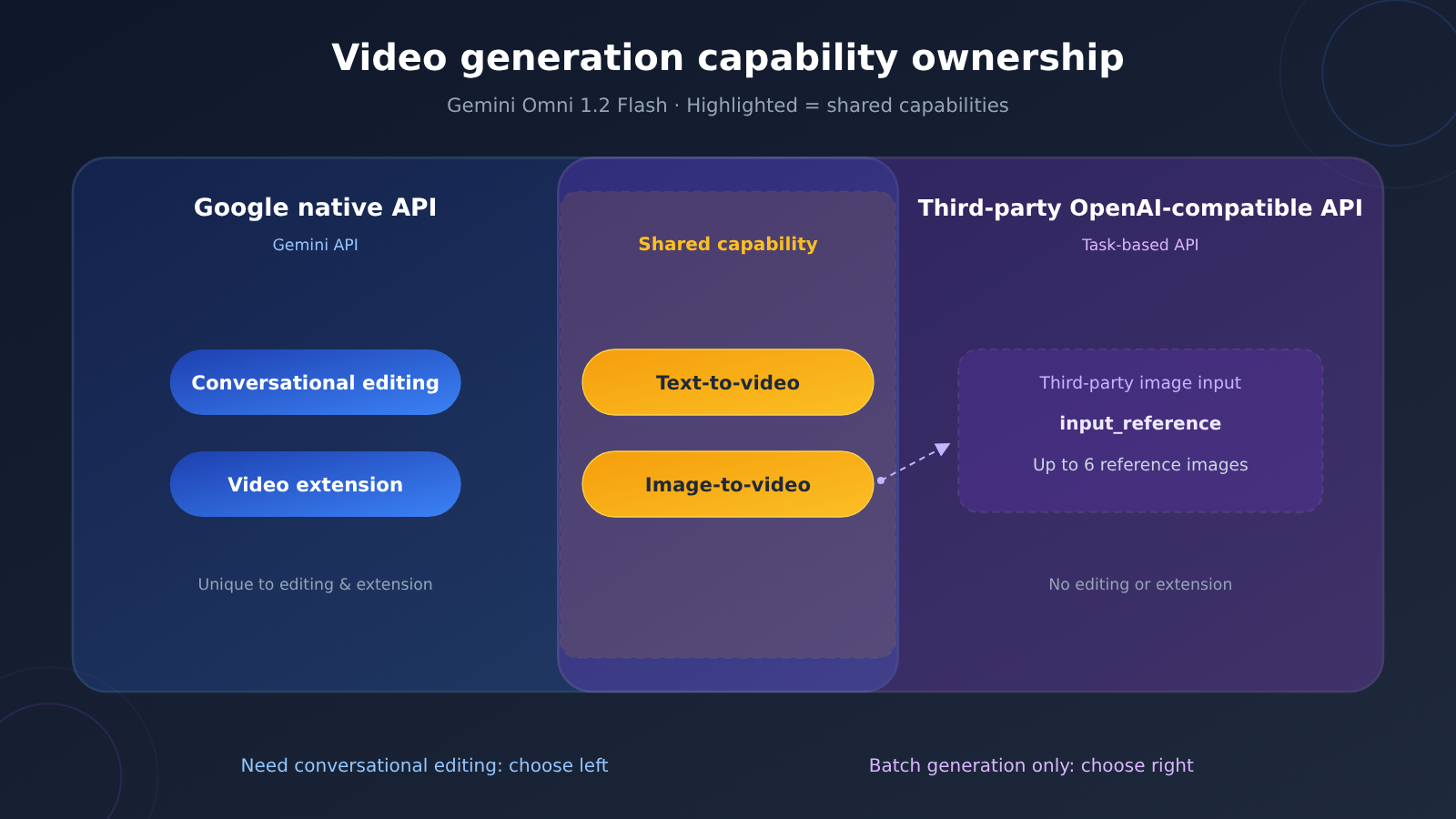
Text-to-video and image-to-video are the two most basic modes, and third-party OpenAI-compatible platforms usually cover these as well. Conversational editing (modifying the previous clip with natural language) and video extension are features of the Google Interactions API.
This distinction matters a lot when picking an approach. If your product needs to “generate a clip, then let users tweak the shot with a single sentence,” you’ll have to use Google’s native API directly. If you just need to batch-generate standalone clips, a task-based API is already enough.
2 Gemini Omni 1.2 Flash Official Requirements: What You Need to Use Google Directly
2.1 Paid Tier and Cloud Billing
On Google’s pricing page, the free tier for Gemini Omni 1.2 Flash is marked “Not available.” Before making calls, you need a Gemini API project with billing enabled — meaning Google Cloud billing is set up and a credit card is linked.
For developers in China, the real hurdle at this step is usually access to a usable overseas payment method and a Google account. When a team uses the model, you’ll also want to plan ahead for who holds the billing account and how to set up budget alerts, so a test script stuck in a loop doesn’t rack up an unexpected bill.
2.2 Regional Restrictions and Recognizing Errors
Google AI Studio and the Gemini API are only available in supported regions. If you’re in a region that’s not on the supported list, AI Studio won’t open, and API calls return “User location is not supported for the API use.”
When you hit this error, the problem is the region your request originates from — swapping the key or tweaking parameters won’t fix it. Google’s supported-regions list changes over time, so before integrating, always refer to the latest list in the official documentation.
2.3 Gemini Omni 1.2 Flash: Official Facts vs. Third-Party Claims
Several third-party platforms have already announced they’ll integrate this model, and their write-ups mix Google’s official information with their own service descriptions. The table below separates the two, so you can tell which parts you can quote directly and which parts you need to confirm with the platform itself.
| Information | Category | Description |
|---|---|---|
| Release date, duration, resolution, number of reference images, native audio | Google official info (relayed by a third party) | Refer to the Google announcement page |
| No free tier, paid items required | Google official pricing page | Refer to the Gemini API pricing page |
| Per-million-token pricing, per-second token conversion | Google official pricing page | Refer to the Gemini API pricing page |
| Conversational editing; continuation falls under the Interactions API | Google’s own API capability | Refer to Google documentation |
Model ID gemini-omni-1.2-flash |
Third-party platform’s own statement | Naming may differ per platform; verify each one |
/v1/videos task endpoint, seconds / size parameters |
Third-party platform’s own statement | It’s an OpenAI-compatible wrapper, not Google’s native format |
| Top-up methods, minimum top-up amount, 402 returned when balance is insufficient | Third-party platform’s own statement | Applies only to that platform |
| “Already live / Coming soon” | Third-party platform’s own statement | Not yet live as of that platform’s post; confirm in real time |
3 Gemini Omni 1.2 Flash Cost Estimation: Per Second, Per Clip
3.1 Official Pricing Structure
The Gemini API charges for this model by token. Per million tokens, pricing is: input $1.50, video output $12.00, text output $9.00. Video output tokens are converted based on resolution and seconds:
- 360p: 1,931 tokens per second, about $0.023 per second
- 720p: 5,792 tokens per second, about $0.07 per second
- Upscaled 4K: 17,376 tokens per second, about $0.209 per second
The conversion formula is straightforward: cost of a single video output = tokens per second × seconds × $12 ÷ 1,000,000. Take 720p at 10 seconds as an example: 5,792 × 10 × 12 ÷ 1,000,000 ≈ $0.695.
3.2 Gemini Omni 1.2 Flash Resolution × Duration Cost Comparison Table
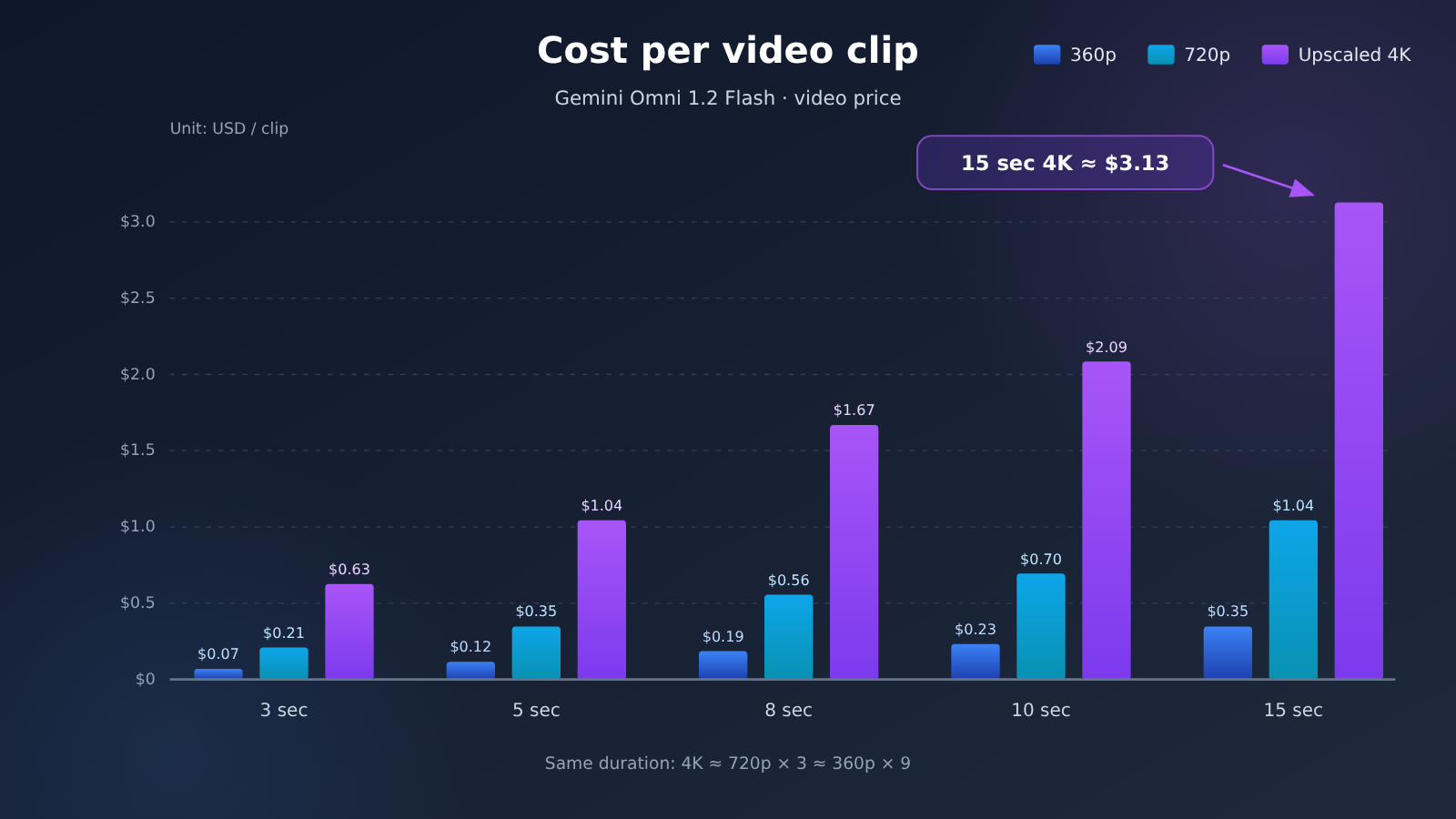
The table below uses the official video output unit price. It covers only the video output portion and rounds to three decimal places.
| Duration | 360p (1,931 tokens/sec) | 720p (5,792 tokens/sec) | Upscaled 4K (17,376 tokens/sec) |
|---|---|---|---|
| 3 seconds | $0.070 | $0.209 | $0.626 |
| 5 seconds | $0.116 | $0.348 | $1.043 |
| 8 seconds | $0.185 | $0.556 | $1.668 |
| 10 seconds | $0.232 | $0.695 | $2.085 |
| 15 seconds | $0.348 | $1.043 | $3.128 |
As you can see, at the same duration, 4K costs roughly 3× 720p and 9× 360p. Public materials don’t provide a token conversion value for 1080p, so check the official pricing page if you need that tier.
3.3 Three Costs That Are Easy to Miss When Estimating
The table above covers only video output. Your actual bill also needs to account for these:
- Input tokens: Prompts and reference images are billed at $1.50 per million tokens. The token count for up to 6 reference images depends on the provider’s official image conversion rules; public materials don’t give an exact figure.
- Retry costs: If you’re not happy with a result, you’ll need to run it again, so your budget should be calculated as “cost per clip × average number of attempts.” There’s no public data on failure or acceptance rates, so it’s best to run a small batch of test tasks first.
- Resolution strategy: Start at 360p to tune your prompts and shots, then render at 720p or 4K once things are locked in — this noticeably cuts trial-and-error costs. Five attempts at 360p for an 8-second clip costs about $0.93, which is close to what two runs at 720p would set you back.
4. Getting Started with Gemini Omni 1.2 Flash: The Async Video Task Flow
4.1 The Three Stages of an Async Task
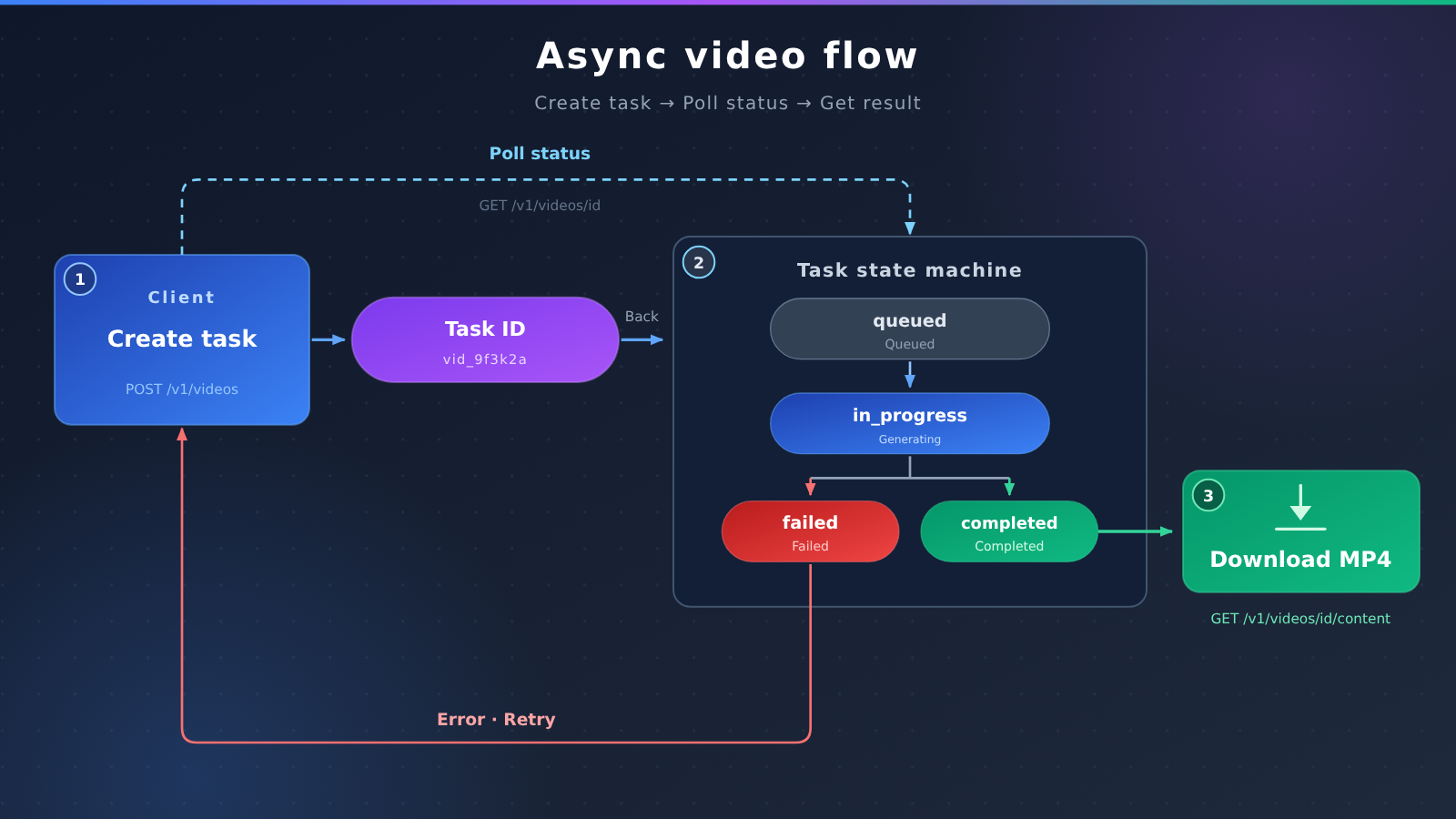
Video generation takes far longer than text completion, so it’s usually built as an async task. A full call has three steps:
- Create the task: Submit the model, prompt, duration, resolution, and other parameters; the API immediately returns a task ID and an initial status (such as
queued). - Poll the status: Query the task at fixed intervals; the status moves through
queuedandin_progress, then finally becomescompletedorfailed. - Download the result: Once the status is
completed, fetch the video file through the content endpoint.
4.2 Calling It with the OpenAI-Compatible Format
The code below uses the OpenAI SDK’s videos interface; the parameter names come from the OpenAI-compatible format that third-party platforms publish. Replace base_url and the model ID with the values your actual service provides, and first confirm that the service has Gemini Omni 1.2 Flash enabled.
import os, time
from openai import OpenAI

client = OpenAI(
    api_key=os.environ["VIDEO_API_KEY"],
    base_url=os.environ["VIDEO_API_BASE_URL"],  # replace with the actual service URL
)

video = client.videos.create(
    model="gemini-omni-1.2-flash",   # defer to the model ID published by the service provider
    prompt="A cat in a tiny spacesuit floating inside a space station, with light ambient sound in the background",
    seconds="8",
    size="1280x720",
)

while video.status in ("queued", "in_progress"):
    time.sleep(5)
    video = client.videos.retrieve(video.id)

if video.status == "failed":
    raise RuntimeError(video.error)

client.videos.download_content(video.id).write_to_file("omni.mp4")
If you’re not using the SDK, the equivalent HTTP flow is: POST /v1/videos to create the task, GET /v1/videos/{id} to poll the status, and GET /v1/videos/{id}/content to download the video. For image-to-video, pass the reference image in the input_reference field. Some services also expose GET /v1/models?type=video, which lists the durations and sizes each model supports.
View the full implementation with timeouts, budget estimates, and error handling
import os, time
from openai import OpenAI

# Official video output conversion (tokens per second), used to estimate cost before submitting
TOKENS_PER_SECOND = {"640x360": 1931, "1280x720": 5792}
VIDEO_OUTPUT_PRICE_PER_M = 12.00  # USD / million tokens

def estimate_cost(size: str, seconds: int) -> float:
    tps = TOKENS_PER_SECOND.get(size)
    if tps is None:
        raise ValueError(f"Unregistered resolution: {size}")
    return tps * seconds * VIDEO_OUTPUT_PRICE_PER_M / 1_000_000

def generate_video(
    prompt: str,
    seconds: int = 8,
    size: str = "1280x720",
    out_path: str = "output.mp4",
    poll_interval: float = 5.0,
    timeout: float = 600.0,
    budget_usd: float = 1.0,
) -> str:
    cost = estimate_cost(size, seconds)
    if cost > budget_usd:
        raise ValueError(f"Estimated ${cost:.3f} exceeds the per-clip budget of ${budget_usd}")
    print(f"Estimated video output cost: ${cost:.3f}")

    client = OpenAI(
        api_key=os.environ["VIDEO_API_KEY"],
        base_url=os.environ["VIDEO_API_BASE_URL"],
    )

    video = client.videos.create(
        model=os.environ.get("VIDEO_MODEL_ID", "gemini-omni-1.2-flash"),
        prompt=prompt,
        seconds=str(seconds),
        size=size,
    )
    print(f"Job created: {video.id}")

    start = time.time()
    while video.status in ("queued", "in_progress"):
        if time.time() - start > timeout:
            raise TimeoutError(f"Job {video.id} timed out; you can query again later with the ID")
        time.sleep(poll_interval)
        video = client.videos.retrieve(video.id)
        print(f"Status: {video.status}")

    if video.status == "failed":
        raise RuntimeError(f"Generation failed: {video.error}")

    client.videos.download_content(video.id).write_to_file(out_path)
    return out_path

if __name__ == "__main__":
    path = generate_video(
        prompt="A coffee shop in the early morning, steam rising from the cup, soft voices and clinking cups in the background",
        seconds=8,
        size="640x360",   # start with 360p while tuning the prompt
        budget_usd=0.5,
    )
    print(f"Saved: {path}")
4.3 Engineering Tips for Polling and Storage
A polling interval of around 5 seconds is fine — checking more often just adds wasted requests. In production, write the job ID to your database and let a background job handle polling centrally. That way, neither a front-end refresh nor a process restart will lose a task you’ve already paid for.
Download the video and move it to your own object storage as soon as possible. For batch generation, use a queue to control concurrency, and run a budget check with something like estimate_cost before submitting — anything over budget gets blocked up front.
5 What to Confirm Before Integrating Gemini Omni 1.2 Flash
5.1 Gemini Omni 1.2 Flash Integration Checklist
| Item to confirm | Via official Google | Via a third-party compatible platform |
|---|---|---|
| Account and payment | Google account, Cloud billing, credit card | Platform account and top-up method |
| Region | Your region is on Google’s supported list | The platform’s own service coverage |
| Model availability | Listed on the pricing page and in the model list | Live in the platform’s model list, with the model ID verified |
| Feature scope | Conversational editing and continuation, including the Interactions API | Usually text-to-video and image-to-video jobs |
| Price | Official per-token price | Platform list price, compared against the official price |
5.2 Validate Quality and Latency with a Small Sample
Right now there’s no published measured data on generation quality, latency, or failure rate. Prepare 5–10 prompts that cover your core scenarios, run one round at 360p for 5–8 seconds, and log the time, success, and usability of each. Then decide your budget for high-resolution batch generation. This test round will cost somewhere between $1 and $2 in video output.
6 FAQ
Q1: What kind of model is Gemini Omni 1.2 Flash?
It’s a video generation model Google released on November 5, 2026. It generates 3–15 second videos with native audio, at resolutions from 360p up to 4K, and supports up to 6 reference images.
Q2: Does Gemini Omni 1.2 Flash have a free tier?
On the Gemini API pricing page, the free tier for this model is marked “Not available.” You need a paid project with billing enabled to call it.
Q3: Roughly how much does it cost to generate a Gemini Omni 1.2 Flash video?
Based on the official video output pricing, 720p runs about $0.07 per second: roughly $0.56 for 8 seconds, $0.70 for 10 seconds, and $1.04 for 15 seconds. 360p is about one-third of that, while upscaled 4K is about 3x. Input tokens for the prompt and reference images are billed separately.
Q4: What should I do when I get “User location is not supported for the API use”?
This means the region your request originates from isn’t on the list of regions supported by the Gemini API — it has nothing to do with your key or your parameters. You’ll need to issue the call from a supported region, or switch to a compliant service that already offers this model.
Q5: Can I edit a Gemini Omni 1.2 Flash video conversationally after generating it?
Conversational editing and continuation are features of Google’s Interactions API. Third-party OpenAI-compatible `/v1/videos` endpoints generally only handle text-to-video and image-to-video tasks; if you need multi-turn editing, use Google’s own API.
Q6: What scenarios is Gemini Omni 1.2 Flash suited for?
It works well for short clips that need synchronized audio and video: e-commerce product showcase shots, short-form social media assets, animated covers inside an app, and ad storyboard previews. Scenarios that rely on reference images to lock down a character’s or product’s appearance are also a good fit.
Q7: What are the current limitations of Gemini Omni 1.2 Flash?
Each clip maxes out at 15 seconds, so longer content has to be stitched together; 4K is upscaled output and costs significantly more; there’s no free tier; and Google’s official channels are region-restricted. There’s no public benchmark data yet on generation quality, generation time, or failure rate, so you’ll need to run your own small-sample tests.
7 Gemini Omni 1.2 Flash Key Takeaways
- Capability boundaries: 3–15 seconds, 360p to 4K, up to 6 reference images, native audio
- Official requirements: no free tier; a paid Gemini API project and a supported region are required
- Per-second cost: about $0.023 at 360p, $0.07 at 720p, $0.209 at upscaled 4K
- Common benchmarks: about $0.56 for 8 seconds at 720p, $0.70 for 10 seconds at 720p
- Invocation pattern: asynchronous jobs, completed in three steps — create, poll, download
- Where the features live: conversational editing and continuation belong to the Google Interactions API
- Cost-saving tactic: tune your prompt at 360p first, then render at higher resolution once it’s confirmed
8 The Verdict: Is Gemini Omni 1.2 Flash Worth Trying?
A single clip from Gemini Omni 1.2 Flash sits in a price range where you can experiment without worrying too much — a 10-second 720p video costs under a dollar, and native audio saves you the dubbing step entirely. For developers in China, the main obstacles boil down to the billing requirements of Google’s paid tier and regional restrictions, plus the fact that conversational editing is only offered through Google’s own API.
The recommended decision path: first confirm that you can meet the official eligibility requirements, or find a service that has already officially launched this model; then use the cost comparison table in this article to budget; finally, test quality and latency with a small 360p sample, and once the numbers meet your targets, scale up to production volume. Since the model was released only recently, pricing and availability may change — re-check Google’s official pricing page before every integration.
References
- TeamoRouter blog: Gemini Omni 1.2 Flash usage guide: a third-party platform’s summary of the release information and official pricing, plus its API documentation
- Link:
teamorouter.com/zh/blogs/use-gemini-omni-1-2-flash-without-google-account -
Description: the source of the capability parameters and token conversion figures in this article; the platform’s API and top-up details are the platform’s own claims
-
Gemini API official pricing page: Google’s published billing standards for the model
- Link:
ai.google.dev/gemini-api/docs/pricing - Description: used to verify the free-tier status, per-million-token unit price, and resolution-based conversion


