

Abstract: Using a single workload, this article calculates the cost of Prompt Caching across four parts — cache writes, cache reads, dynamic input, and output — and explains how hit rate, TTL, and call cadence affect the actual savings.
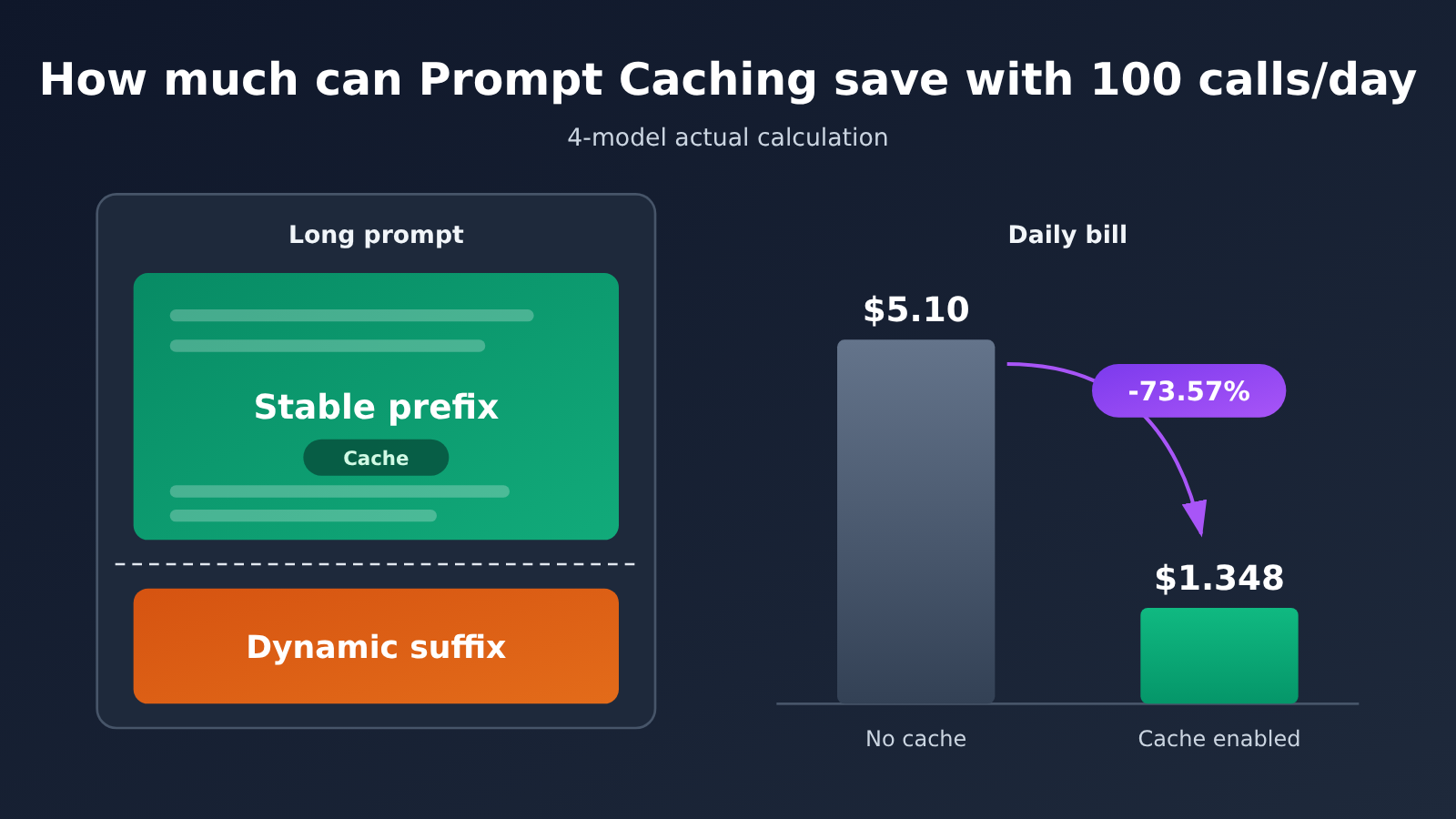
Conclusion: The workload in this article assumes a fixed prefix of 20K tokens per call, 500 tokens of dynamic input, and 1K tokens of output, with 100 calls per day. Under the ideal condition of “first write, then 99 subsequent hits,” the full daily bill for GPT-6.1 Sol drops from $5.10 to $1.348 — a reduction of roughly 73.57%. Claude Sonnet 5.5 produces the same result, GPT-6 Astra drops from $25.50 to $7.73 (about 69.69% off), and Gemini 3.8 Flash drops from $1.9125 to $0.576 (about 69.88% off). Looking at the fixed prefix alone, the savings ratio lands between 88% and 94%. The full bill drops less because output tokens and dynamic input don’t get the cache discount. These numbers are budget projections based on official unit prices, not actual bills. All prices use the standard short-context rate, verified on 2026-11-13.
What’s coming: Part 1 explains which segment of the request the cache reuses, and which part of the bill it affects. Part 2 compares the caching rules of OpenAI, Claude, and Gemini. Part 3 lays out the calculation formulas for the four models item by item so you can redo the math yourself. Part 4 uses TTL and call-cadence calculations to show why hit rates drop. Part 5 covers prompt organization, TTL selection, code examples, and hit-rate monitoring. Part 6 discusses how to judge token-cost control in batch AI production scenarios.
To Know: Prompt Caching Terminology Primer
| Term | Explanation |
|---|---|
| Token | The unit a model uses to measure text. APIs bill by token count, and unit prices are usually quoted as “USD per million tokens (MTok)”. |
| Prompt Caching | Caching a prompt prefix that has already been processed, so later requests with the same prefix can reuse it directly—cutting the cost of reprocessing. |
| Stable prefix | The opening portion of a prompt that’s identical word-for-word across multiple requests, such as role instructions, writing guidelines, sample essays, or knowledge base content. |
| Dynamic input | Content that changes with every request, such as the day’s news material, an article title, or user requirements. |
| Cache write | Processing the stable prefix for the first time and storing it in the cache; the unit price is usually higher than ordinary input. |
| Cache read | Later requests hit the existing cache and get billed at a unit price far below ordinary input. |
| Cache hit | A new request’s prefix matches the available cache token by token, so reuse succeeds. |
| TTL | How long the cache lives. OpenAI defines it as a minimum lifetime and doesn’t promise an exact eviction time. |
| Cache breakpoint | A marker in the prompt that says “the cacheable prefix ends here”. |
| Implicit / explicit caching | With implicit caching, the system decides and reuses automatically; with explicit caching, the developer actively declares a breakpoint or creates a cache object. |
| Full task cost | The combined input, output, and applicable tool fees for a single call—the real denominator for measuring savings percentages. |
1 Prompt Caching Saves Money — Where Exactly?
1.1 What Prompt Caching Reuses
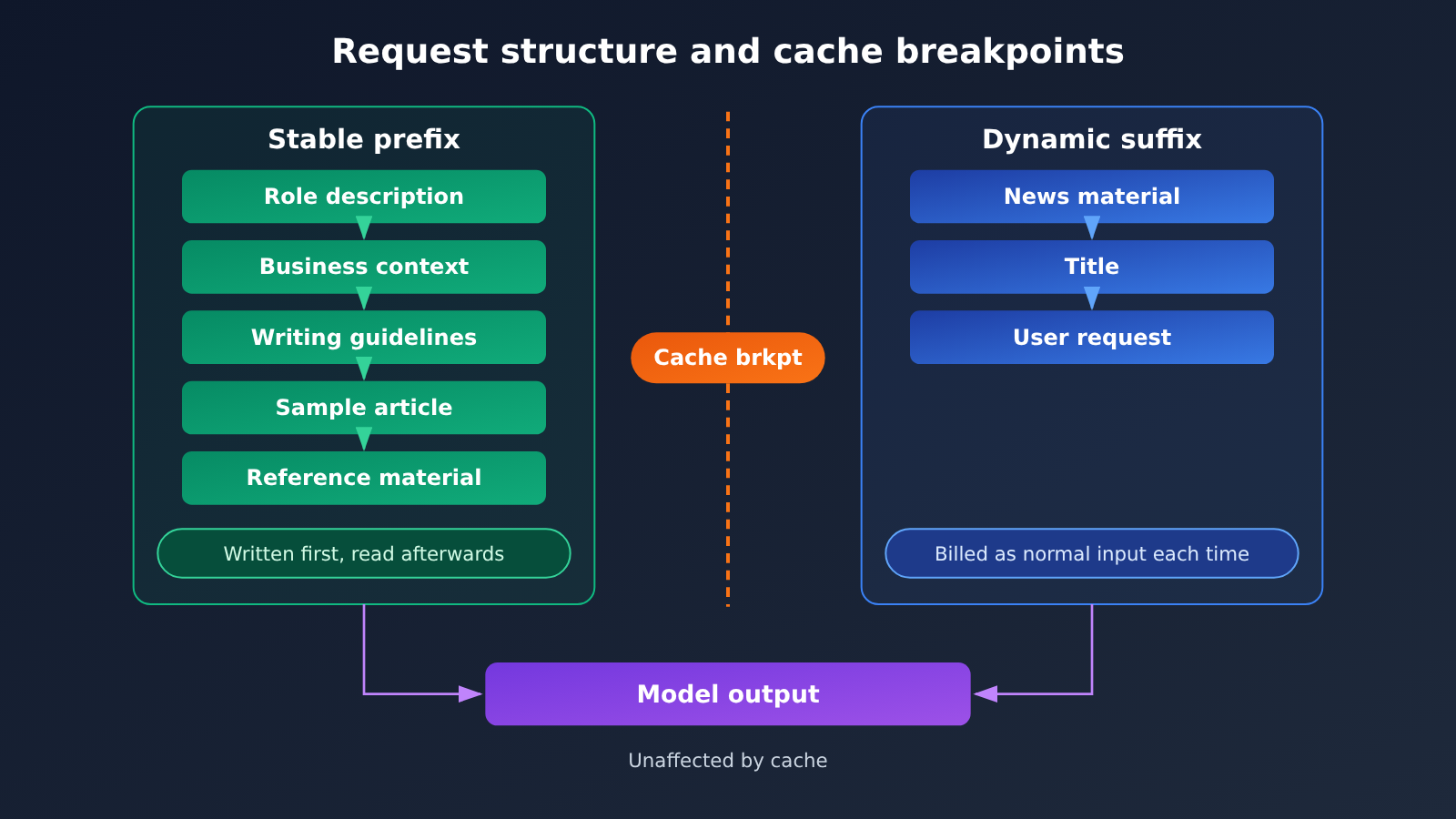
Take an AI writing platform as an example. Every time an article is generated, the request consists of two parts. The first part is fixed content: role description, business context, writing guidelines, example articles, terminology and reference materials. The second part is dynamic content: the day’s news materials, the article title, and the user’s specific requirements.
Prompt Caching reuses the first part — the prefix that’s identical token by token. Cache matching requires an exactly identical token sequence; semantic similarity doesn’t count as a hit. Change one wording, reorder a paragraph, rearrange the tool definitions, and the prefix becomes new content — the cache is invalidated along with it.
So there’s one basic principle for cache optimization: put stable content first and changing content last.
1.2 Which Part of the Cost Prompt Caching Saves
The bill for a single call can be broken into five items, and only the cost of the fixed prefix is changed by caching:
| Cost item | Without cache | With cache enabled |
|---|---|---|
| Fixed prefix | Billed at normal input price each time | First time at write price, hits at read price |
| Dynamic input | Normal input price | Normal input price, unchanged |
| Model output | Output price | Output price, unchanged |
| Tool fees | Per tool rules | Per tool rules, unchanged |
| Explicit cache storage (Gemini) | None | Billed separately by storage duration |
This table highlights a key distinction: the fixed-prefix savings rate and the full-bill savings rate are two different metrics. The former measures only the reduction on the cached portion, while the latter measures the reduction on the entire bill. The longer the output, the lower the latter.
2 How Do the Prompt Caching Rules Differ Across GPT, Claude, and Gemini?
2.1 OpenAI Prompt Caching: 30m and 12h
OpenAI’s documentation specifies that for GPT-5.6 and later models, the minimum cache prefix length is typically 1,024 visible input tokens, with both implicit (implicit) and explicit (explicit) modes supported. In explicit mode, developers mark prompt_cache_breakpoint in an appropriate message content block to define the boundary of the cached prefix.
TTL defaults to 30 minutes. The Responses API can select a minimum 12-hour TTL via prompt_cache_options.ttl = "12h". Billing is split into writes and reads:
- 30-minute writes: 1.25x regular input
- 12-hour writes: 2.5x regular input
- Cache reads: 0.1x regular input for most new models, and 0.05x for GPT-6.1 Sol and GPT-6.1 Terra
prompt_cache_key can be used to separate cache billing for different users or workspaces. On GPT-5.6 and later models, cache routing is now automatically managed by the official platform.
2.2 Claude Prompt Caching: 5m vs 1h
Claude supports automatic or explicit caching via cache_control. The default TTL is 5 minutes, and each cache hit refreshes it. The 5-minute clock starts when the cache write or read request begins—and the time spent generating the response also counts toward it. So for long-output tasks, the usable window is actually shorter than 5 minutes.
The billing multipliers are: 1.25x for 5-minute writes, 2x for 1-hour writes, and 0.1x for regular reads. Read rates for Claude Sonnet 5.5 and Claude Opus 5.5 drop to 0.05x. Standard pricing for Sonnet 5.5 is: input $2, 5-minute write $2.50, 1-hour write $4, read $0.10, output $10 (all in USD per million tokens).
2.3 Gemini Context Caching: Implicit vs Explicit
Implicit caching is enabled by default on Gemini 2.5 and newer models, with no extra configuration. Minimum input requirements vary by model: Gemini 3.8 Flash requires 4,096 tokens, while Gemini 2.5 Flash and 2.5 Pro require 2,048 tokens. Google recommends placing shared content at the beginning of the prompt and reusing the same prefix within a short time window.
Explicit caching requires the developer to explicitly create a cache object and set its lifetime. Costs cover three parts: cached content, subsequent reads, and storage duration. The Gemini Interactions API currently supports only implicit caching; if you need an explicit cache object, use the generateContent API.
As of December 31, 2026, Gemini 3.8 Flash pricing is: input $0.75, output $3.75, cache read $0.075, explicit cache storage $0.50 per million tokens per hour. The official plan is to adjust it from January 1, 2027 to $1.50, $7.50, $0.15, and $1.00. All four prices double by the same proportion, so the savings percentages calculated below stay the same, while the absolute amounts double.
2.4 Prompt Caching Rules Compared Across the Three Providers
| Dimension | OpenAI | Claude | Gemini |
|---|---|---|---|
| Caching method | Implicit / explicit breakpoints | Automatic / explicit via cache_control |
Implicit (default) / explicit cache objects |
| Default TTL | 30 minutes (minimum lifetime) | 5 minutes; refreshed on hit | Implicit managed by the system; explicit duration is user-defined |
| Long TTL option | 12 hours (Responses API) | 1 hour | Custom for explicit caching |
| Write rate | 30m: 1.25×; 12h: 2.5× | 5m: 1.25×; 1h: 2× | Implicit first use billed as regular input |
| Read rate | 0.1× (0.05× for Sol / Terra) | 0.1× (0.05× for Sonnet / Opus 5.5) | 3.8 Flash: $0.075 / MTok |
| Additional fees | No storage fee | No storage fee | Explicit cache charged storage fees by the hour |
| Minimum prefix | Typically 1,024 tokens | Refer to official documentation | 3.8 Flash: 4,096 tokens |
3 How Much Can Prompt Caching Actually Save When You Make 100 Calls a Day?
3.1 Unified Calculation Assumptions
The following is a theoretical calculation based on official unit prices, not an actual user bill. The unified assumptions are:
- Each call has a fixed prefix of 20,000 tokens, dynamic input of 500 tokens, and output of 1,000 tokens
- 100 calls per day, always using the same model
- All dynamic content comes after the stable prefix
- Caching scenario: the first call writes to cache, and the remaining 99 calls fully hit; all calls complete within the TTL, or the validity period is continuously refreshed on each hit
- Third-party markups, bulk discounts, and tool fees are not considered
- The 20K prefix does not trigger the long-context surcharge that applies to GPT-6 Astra above 272K tokens
The calculation formula is unified as:
Cost per item = token count × number of calls ÷ 1,000,000 × unit price (USD / MTok)
Prefix cost after caching = 20,000 × 1 ÷ 1,000,000 × write price + 20,000 × 99 ÷ 1,000,000 × read price
3.2 The Full Formula for GPT-6 Astra
GPT-6 Astra unit prices: regular input $10, output $50, 30-minute write $12.50, cache read $1.
Without caching:
- Fixed prefix: 20,000 × 100 ÷ 1,000,000 × $10 = $20
- Dynamic input: 500 × 100 ÷ 1,000,000 × $10 = $0.50
- Output: 1,000 × 100 ÷ 1,000,000 × $50 = $5
- Daily total: $25.50
With 30-minute caching:
- First write: 20,000 ÷ 1,000,000 × $12.50 = $0.25
- 99 reads: 20,000 × 99 ÷ 1,000,000 × $1 = $1.98
- Dynamic input: $0.50; output: $5
- Daily total: $7.73
Total bill savings of $17.77, about 69.69%. The fixed prefix drops from $20 to $2.23, a savings of about 88.85%.
3.3 GPT-6.1 Sol, Claude Sonnet 5.5, Gemini 3.8 Flash
GPT-6.1 Sol (input $2, output $10, 30-minute write $2.50, read $0.10):
- No caching: prefix $4 + dynamic input $0.10 + output $1 = $5.10
- After caching: write $0.05 + read $0.198 + dynamic input $0.10 + output $1 = $1.348
- Saves $3.752, about 73.57%; the prefix drops from $4 to $0.248, a saving of roughly 93.8%
Claude Sonnet 5.5 (5-minute cache) has the same unit price as GPT-6.1 Sol, and the calculation and final numbers come out identical: $5.10 down to $1.348. The catch is that the invocation intervals have to keep staying inside that 5-minute validity window.
Gemini 3.8 Flash (implicit caching, first billed at the regular input price of $0.75):
- No caching: prefix $1.50 + dynamic input $0.0375 + output $0.375 = $1.9125
- After caching: first prefix $0.015 + 99 reads $0.1485 + dynamic input $0.0375 + output $0.375 = $0.576
- Saves $1.3365, about 69.88%; the prefix drops from $1.50 to $0.1635, a saving of roughly 89.1%
- This result assumes every implicit cache hit, and doesn’t include explicit cache storage fees
3.4 Prompt Caching: Savings Percentage vs. Absolute Dollar Amount
| Model | No cache / day | With cache / day | Daily savings | 30-day savings (extrapolated) | Prefix savings rate | Full-bill savings rate |
|---|---|---|---|---|---|---|
| GPT-6 Astra | $25.50 | $7.73 | $17.77 | $533.10 | 88.85% | 69.69% |
| GPT-6.1 Sol | $5.10 | $1.348 | $3.752 | $112.56 | 93.8% | 73.57% |
| Claude Sonnet 5.5 | $5.10 | $1.348 | $3.752 | $112.56 | 93.8% | 73.57% |
| Gemini 3.8 Flash | $1.9125 | $0.576 | $1.3365 | $40.10 | 89.1% | 69.88% |
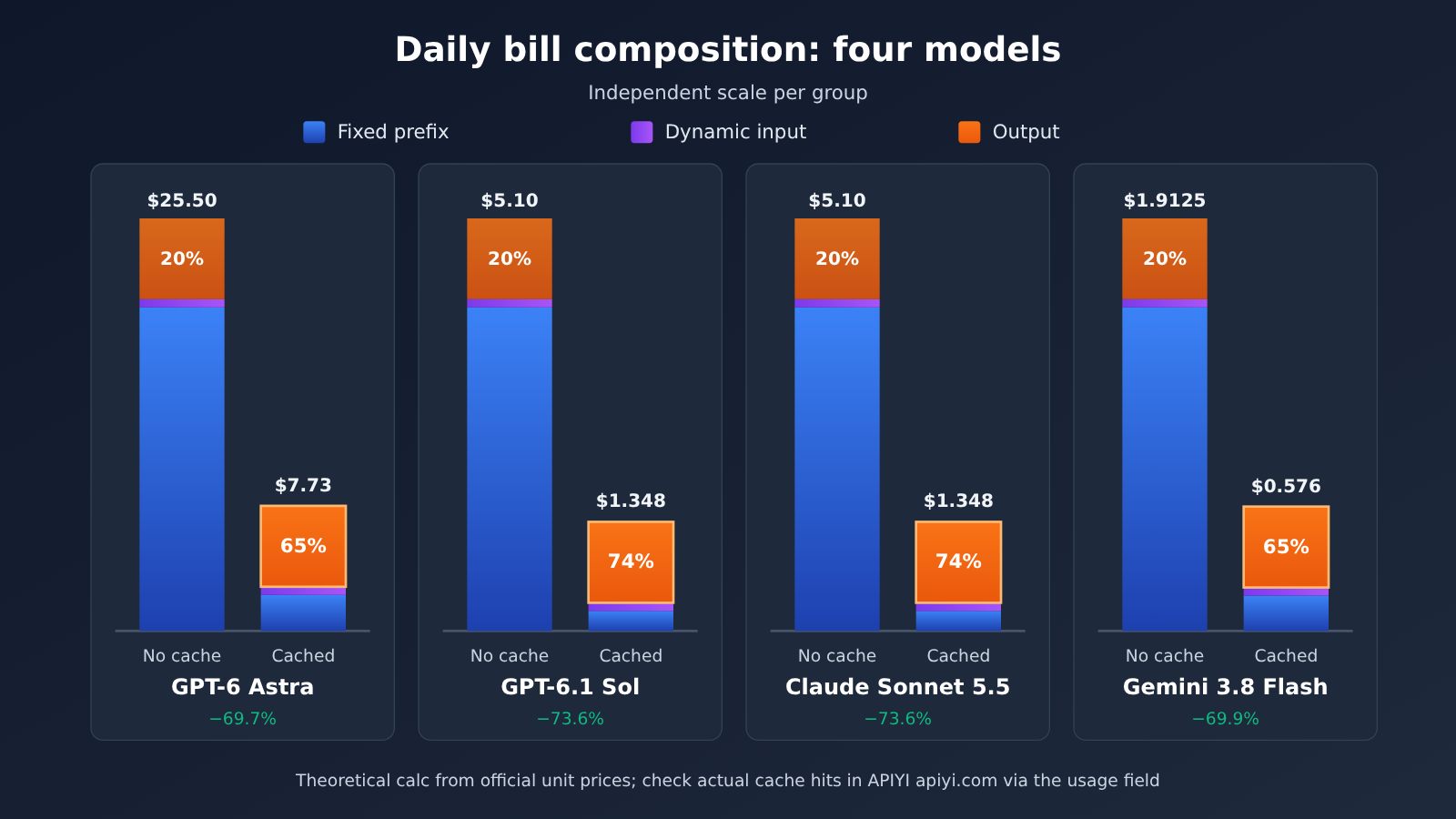
Two things stand out from the table:
- Percentages reflect the cache-read discount. GPT-6.1 Sol and Claude Sonnet 5.5 have a cache-read price of 0.05x regular input, giving them a 93.8% prefix savings rate—higher than Astra and Gemini, which have a 0.1x read price.
- Dollar amounts depend on the unit-price base. Astra has the lowest savings percentage, but it saves $17.77 per day—more than 13x Gemini 3.8 Flash. The higher a model’s unit price, the greater the absolute benefit of enabling caching.
After caching, output’s share of the GPT-6 Astra bill rises from about 20% to about 65% ($5 ÷ $7.73). At this point, the focus for further cost reduction shifts to controlling output length. Note that all four models use the same Token count only for easy comparison. When completing the same task, their actual output lengths and accuracy rates differ.
💡 Model selection tip: When savings percentages are similar, prioritize the balance between daily absolute savings and task quality. Start by calling a few candidate models with the same prompt template on APIYI apiyi.com, record the actual output lengths and cached tokens, then plug those numbers into the formula above to estimate your monthly budget.
4 Why can your Prompt Caching bill still be high even when you send the same prompt every day?
4.1 TTL and call frequency determine your hit rate
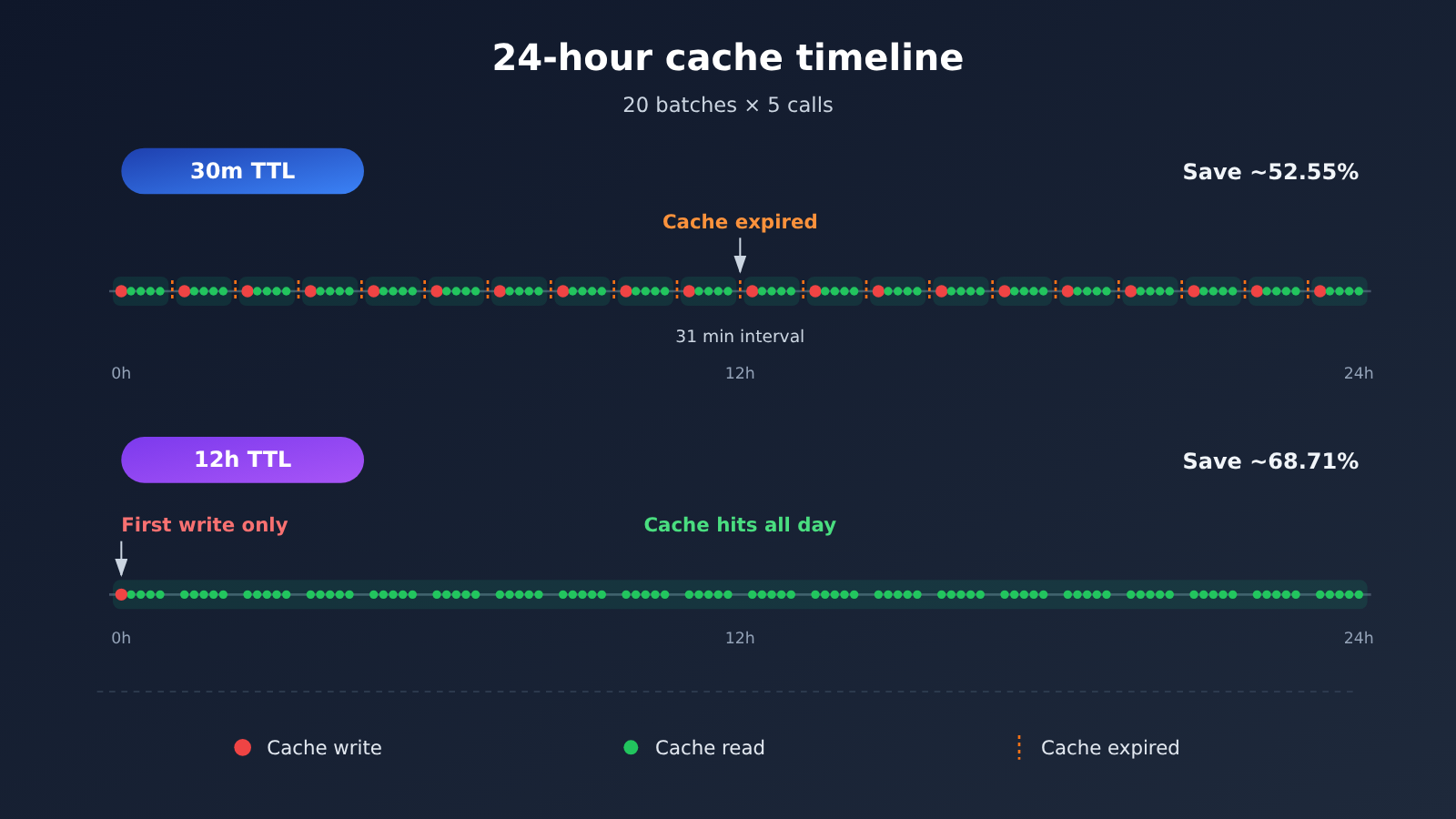
Calling 100 times a day doesn’t mean one write covers the whole day. Take GPT-6 Astra as an example: 20 batches per day, 5 consecutive calls per batch, with 31-minute gaps between batches.
| Scenario | Writes and cost | Reads and cost | Prefix cost | Plus dynamic input and output | Daily total | Savings rate |
|---|---|---|---|---|---|---|
| No caching | — | — | $20 | $5.50 | $25.50 | — |
| A: 30m cache | 20 × $0.25 = $5 | 80 × $0.02 = $1.60 | $6.60 | $5.50 | $12.10 | ~52.55% |
| B: 12h cache (within the same window) | 1 × $0.50 | 99 × $0.02 = $1.98 | $2.48 | $5.50 | $7.98 | ~68.71% |
In scenario A, the gaps between batches exceed 30 minutes, so every batch has to write again, and the savings rate drops from the ideal 69.69% to 52.55%. In scenario B, a single write costs twice as much as a 30m write, but you only write once per day, which makes it more economical for scattered calls. The 12h option only covers the same window, and there’s no guarantee the same cache can be reused the next day. For tasks you only call once or twice a day, having identical prompts alone won’t give you cross-day caching.
You can figure out the break-even point for each TTL type by looking only at the stable prefix, counting ordinary input as 1×:
| Scenario | Write multiplier | Read multiplier | Write 1 + read 1 vs no cache 2 calls | Write 1 + read 2 vs no cache 3 calls | Effective reads needed to break even |
|---|---|---|---|---|---|
| OpenAI 30m | 1.25 | 0.1 | 1.35 < 2 | — | 1 |
| OpenAI 12h | 2.5 | 0.1 | 2.6 > 2 | 2.7 < 3 | 2 |
| Claude Sonnet 5.5 · 5m | 1.25 | 0.05 | 1.30 < 2 | — | 1 |
| Claude Sonnet 5.5 · 1h | 2 | 0.05 | 2.05 > 2 | 2.10 < 3 | 2 |
The conclusion is straightforward: a short TTL pays for itself after just one hit; a long TTL needs at least two hits within its validity period.
4.2 Cache breakpoints and prompt ordering
The most common cause of cache misses is a stable prefix that gets modified. If you put timestamps, user IDs, task titles, or real-time materials at the start of the prompt, every request’s prefix becomes new content, and the cache can never hit.
In OpenAI’s implicit mode, if the first request includes dynamic content within the cache scope, then once that dynamic content changes, you may not hit the expected stable prefix. The fix is to set an explicit cache breakpoint at the end of the stable content.
Other common causes include:
- Switching the model, vendor, or service organization, or changing some parameters
- The agent compressing the conversation, reordering tool definitions, or modifying historical messages, which rewrites the reusable prefix
- A third-party gateway not passing cache parameters through, or not applying the cache discount to the bill
4.3 How output tokens and tool fees affect the bill
Caching only applies to the input prefix. In the Astra example from 3.2, even if the prefix cost drops to zero, the bill still won’t go below $5.50 (dynamic input plus output). For tasks with long output and lots of tool calls, the reduction in the total bill will be noticeably lower than the prefix savings rate. So once caching is on, you also need to control output length and streamline tool calls.
5 How Do AI Applications Configure and Monitor Prompt Caching?
5.1 How to Organize Stable Prefixes and Dynamic Suffixes
Order content from least to most frequently changing:
- Tool definitions: Keep the order and descriptions fixed. Don’t add or remove tools on a per-request basis.
- System rules and writing guidelines: Role instructions, brand standards, and style requirements.
- Examples and knowledge base: Large reference documents; replace the whole block when the version updates.
- (Cache breakpoint)
- Dynamic materials: Today’s news, retrieval results, user input.
- Current task instructions: Title, word count, and specific requirements.
The example below calls the OpenAI-compatible endpoint and reads the cached tokens from the response:
from openai import OpenAI

client = OpenAI(
    api_key="YOUR_API_KEY",
    base_url="https://api.apiyi.com/v1"  # APIYI OpenAI-compatible endpoint
)

STABLE_PREFIX = """你是一名技术博客作者……(写作规范、范文、术语表,约 20K Token,内容逐字固定)"""

resp = client.chat.completions.create(
    model="gpt-6.1-sol",  # Use the actual name from the platform's model list
    messages=[
        {"role": "system", "content": STABLE_PREFIX},          # Stable prefix goes first
        {"role": "user", "content": "今日材料:……\n标题:……"},  # Dynamic content goes after
    ],
)
details = getattr(resp.usage, "prompt_tokens_details", None)
cached = getattr(details, "cached_tokens", 0) or 0
print(f"输入 {resp.usage.prompt_tokens},命中缓存 {cached}")
View the full code: cost calculator + hit rate stats
from openai import OpenAI

M = 1_000_000

def daily_cost(prefix, dynamic, output, calls,
               p_in, p_out, p_write, p_read,
               writes=1, use_cache=True):
    """Calculate the daily cost (USD) at official unit prices; returns (prefix, dynamic input, output, total)"""
    dyn = dynamic * calls / M * p_in
    out = output * calls / M * p_out
    if use_cache:
        pre = prefix * writes / M * p_write + prefix * (calls - writes) / M * p_read
    else:
        pre = prefix * calls / M * p_in
    return round(pre, 4), round(dyn, 4), round(out, 4), round(pre + dyn + out, 4)

MODELS = {
    # Name: (input, output, write, read)  USD / million tokens, verified 2026-11-13
    "GPT-6 Astra (30m)":   (10,   50,   12.5, 1),
    "GPT-6.1 Sol (30m)":   (2,    10,   2.5,  0.10),
    "Claude Sonnet 5.5":   (2,    10,   2.5,  0.10),
    "Gemini 3.8 Flash":    (0.75, 3.75, 0.75, 0.075),  # implicit cache: first write billed as regular input
}

for name, (p_in, p_out, p_w, p_r) in MODELS.items():
    base = daily_cost(20000, 500, 1000, 100, p_in, p_out, p_w, p_r, use_cache=False)[-1]
    cached = daily_cost(20000, 500, 1000, 100, p_in, p_out, p_w, p_r)[-1]
    print(f"{name}: ${base} -> ${cached},节省 {(base - cached) / base:.2%}")

# Scenario A: Astra 30m, 20 batches each requiring a fresh write
a = daily_cost(20000, 500, 1000, 100, 10, 50, 12.5, 1, writes=20)[-1]
print(f"Astra 分批 30m: ${a}")  # 12.1

# ---- Online cache hit rate tracking ----
client = OpenAI(api_key="YOUR_API_KEY", base_url="https://api.apiyi.com/v1")

def run_and_track(stable_prefix, dynamic_inputs, model="gpt-6.1-sol"):
    total_in = total_cached = 0
    for text in dynamic_inputs:
        r = client.chat.completions.create(
            model=model,
            messages=[{"role": "system", "content": stable_prefix},
                      {"role": "user", "content": text}],
        )
        d = getattr(r.usage, "prompt_tokens_details", None)
        total_in += r.usage.prompt_tokens
        total_cached += (getattr(d, "cached_tokens", 0) or 0)
    hit = total_cached / total_in if total_in else 0
    print(f"实际缓存命中率:{hit:.2%}")
    return hit
🚀 Quick-start tip: Start by using the calculator above to estimate your budget, then run 10–20 calls with your real template to see whether
cached_tokensshows up consistently from the second call onward. New users can claim free test credits at APIYI (apiyi.com) to complete this verification step, and once the cache hits are confirmed, go ahead and scale up.
5.2 Selecting the Prompt Caching TTL and Cache Mode
- High-frequency, back-to-back calls (intervals steady within a few minutes): use the default short TTL, that is, 30m for OpenAI and 5m for Claude. A single hit pays for itself, and the write premium is the lowest. For Claude, you need to count the response generation time into the 5-minute window.
- Calls spread throughout the day (batches more than 30 minutes apart): evaluate OpenAI 12h or Claude 1h. As long as you can get more than two hits within the window, a long TTL is cheaper than repeated writes—scenario B in 4.1 is a good example.
- Gemini tasks with extremely long prefixes that need to be reused over longer periods: evaluate explicit caching while also factoring in the storage fee. Taking Gemini 3.8 Flash as an example, storing 20K tokens for 12 hours costs 0.02 × $0.50 × 12 = $0.12. Under the workload in this article, that fee is already fairly significant relative to the $0.576 daily bill. If implicit caching is hitting well, just keep the default.
- Prefix changes frequently: stabilize the prefix first, then think about TTL. When the prefix is unstable, no TTL will buy you any hits.
5.3 Checking Prompt Caching’s Real Hit Rate and Bill
The usage fields for the three providers are:
- OpenAI (Responses API):
usage.input_tokens,usage.input_tokens_details.cached_tokens,usage.input_tokens_details.cache_write_tokens - Claude:
usage.input_tokens,usage.cache_creation_input_tokens,usage.cache_read_input_tokens - Gemini: the usage fields of the corresponding API, such as
total_cached_tokens; explicit caching incurs a separate object storage fee
It’s recommended to track two metrics continuously:
Actual cache hit rate = Cache read tokens ÷ Total input tokens
Actual savings        = Uncached baseline cost − Actual API bill cost
The uncached baseline cost has to be calculated with the same model, the same workload, and the same output size, otherwise the savings aren’t comparable. When reconciling your bill in the APIYI apiyi.com console, you can go line by line through the usage summary and the billing details for the same period, and confirm that cached tokens are billed at the cache rate.
6 APIYI Scenario: How Do Fixed Templates and Batch AI Production Use Prompt Caching to Control Costs?
Typical businesses that fit Prompt Caching include AI writing platforms that run the same article template every day, Agents that repeatedly load the same tool definitions, research analysis systems that reference the same large document many times, and batch content generation that shares brand guidelines and tone instructions. These tasks all have one thing in common: long prefixes, high repetition, and high call volume — exactly the sweet spot where caching delivers the biggest returns.
When making cost decisions in these scenarios, you can use three criteria:
- Does the model support the caching capabilities you need? This includes minimum prefix length, optional TTL, and read discount multiplier. Models with 0.05x read pricing deliver higher prefix savings on long-prefix tasks.
- Do the prompt and TTL match the workload? Use short TTL for continuous batching; for tasks spread out on a schedule, evaluate long TTL and use the formula in Section 4.1 to calculate the number of calls needed to break even.
- Does the API provider fully support caching and bill based on actual cache costs? Upstream support for caching is only one necessary condition for reducing costs. The gateway also needs to correctly pass cache parameters, report cached tokens in usage, and reflect cache pricing in billing charges.
When calling through APIYI apiyi.com, we recommend turning point 3 into a fixed acceptance step: make several consecutive calls with the same 20K template, check the cache fields in usage, and then reconcile them against the billing charges. Once both technical cache hits and billing implementation are confirmed, use the calculations above as the basis for your monthly budget.
FAQ
Q1: What is Prompt Caching?
It caches the already-processed identical prefix of a prompt, so subsequent requests that hit the cache are billed at a price far below that of regular input. Matching requires the tokens to be identical, character for character, which is why it suits scenarios like fixed templates, fixed knowledge bases, and fixed tool definitions.
Q2: Why is the prefix saving over 90%, but the whole bill only saves around 70%?
Caching only applies to the fixed prefix; dynamic input and output are still billed at full price. Take GPT-6.1 Sol as an example: of the $1.348 daily bill after caching, output accounts for $1 and dynamic input for $0.10. The longer the output, the lower the savings rate on the full bill.
Q3: If I only make one or two calls a day, is it worth enabling caching?
The benefit is minimal. Both OpenAI’s 12h and Claude’s 1h require at least two cache hits within the validity period to break even, and reuse across days isn’t guaranteed. A more effective approach is to batch similar tasks into the same time slot, increasing the number of hits within the window.
Q4: Should I choose 30m or 12h?
It depends on your call interval. If intervals are consistently within 30 minutes, use 30m — a single hit is enough to break even. If batches are spaced further apart and scattered throughout the day, use 12h. Take GPT-6 Astra called in 20 batches as an example: 12h costs $7.98 per day, while 30m costs $12.10.
Q5: If I call through an API aggregation platform, will caching still work?
That depends on how the platform passes through the cache parameters and implements billing. We recommend using the free test credits on APIYI apiyi.com to call the same template repeatedly, checking fields like `cached_tokens` in usage, and cross-referencing against your billing details. Only after confirming that the cache is both hit and billed at the cached price should you use it at scale.
Q6: The cache hit rate suddenly dropped — where should I look first?
Check in this order: whether timestamps, IDs, or other dynamic content have crept into the prefix; whether the order of tool definitions has changed; whether the Agent has compressed or rewritten the message history; whether the model or parameters have been switched; and whether the call interval has exceeded the TTL. Using the hit-rate formula in Section 5.3 to calculate statistics hourly makes it fairly quick to pinpoint when the change occurred.
Q7: How do I choose between Gemini’s implicit caching and explicit caching?
Implicit caching is on by default and has no storage fee; it’s used preferentially when the prefix exceeds the model’s minimum length (4,096 tokens for 3.8 Flash). Explicit caching suits extra-long content that needs deterministic reuse, but it requires paying a storage fee per hour and using the generateContent API. The Interactions API currently only supports implicit caching.
Summary
The key takeaways for Prompt Caching:
- Where the savings come from: It only reduces the cost of the fixed prefix. Under the workload in this article, the prefix saving rate is 88.85%–93.8%, and the full-bill saving rate is 69.69%–73.57%.
- How much you save: GPT-6.1 Sol and Claude Sonnet 5.5 go from $5.10 down to $1.348 per day, while GPT-6 Astra goes from $25.50 down to $7.73. The higher the unit price, the bigger the absolute savings.
- Which call frequency pays off most: High-frequency, continuous calls with long prefixes. With a short TTL, a single cache hit breaks even; with a long TTL, you need two hits.
- How to put it into practice: Put stable content first and dynamic content last, and set a breakpoint at the end of the stable content; pick a TTL based on your call rhythm; keep monitoring hit rate with the usage field.
- What has to hold true: The cache has to both hit technically and be billed at the cache price.
We recommend first using the calculator in this article to estimate your budget, then verifying hit rate and billing on APIYI apiyi.com with a real template — once both are confirmed, scale up.
📚 References
- OpenAI Prompt Caching Guide: caching modes, breakpoints, TTL, and billing multipliers
- Link:
developers.openai.com/api/docs/guides/prompt-caching -
Description: parameter documentation for
prompt_cache_optionsandprompt_cache_breakpoint -
OpenAI Models and Pricing: unit prices for GPT-6 Astra and GPT-6.1 Sol
- Link:
developers.openai.com/api/docs/pricing - Link:
developers.openai.com/api/docs/models/gpt-6-astra - Link:
developers.openai.com/api/docs/models/gpt-6.1-sol -
Description: standard short-context rates, verified on 2026-11-13
-
Claude Prompt Caching Docs:
cache_control, 5m / 1h write and read multipliers - Link:
platform.claude.com/docs/en/build-with-claude/prompt-caching - Link:
platform.claude.com/docs/en/models/sonnet-5-5/overview -
Description: Sonnet 5.5 cache reads at a 0.05x rate
-
Gemini Context Caching and Pricing: implicit / explicit caching, storage fees, and the 2027 price change
- Link:
ai.google.dev/gemini-api/docs/caching - Link:
ai.google.dev/gemini-api/docs/pricing - Description: minimum cache length per model and API support scope
Author: APIYI Technical Team
Technical discussion: Feel free to reach us through the APIYI homepage; for more integration resources, visit the docs.apiyi.com documentation center.


