

Author’s note: Multi-model applications should handle tool calling, reasoning state, streaming output, structured data, and caching differences through a unified message format, a provider adapter layer, and a model capability registry.
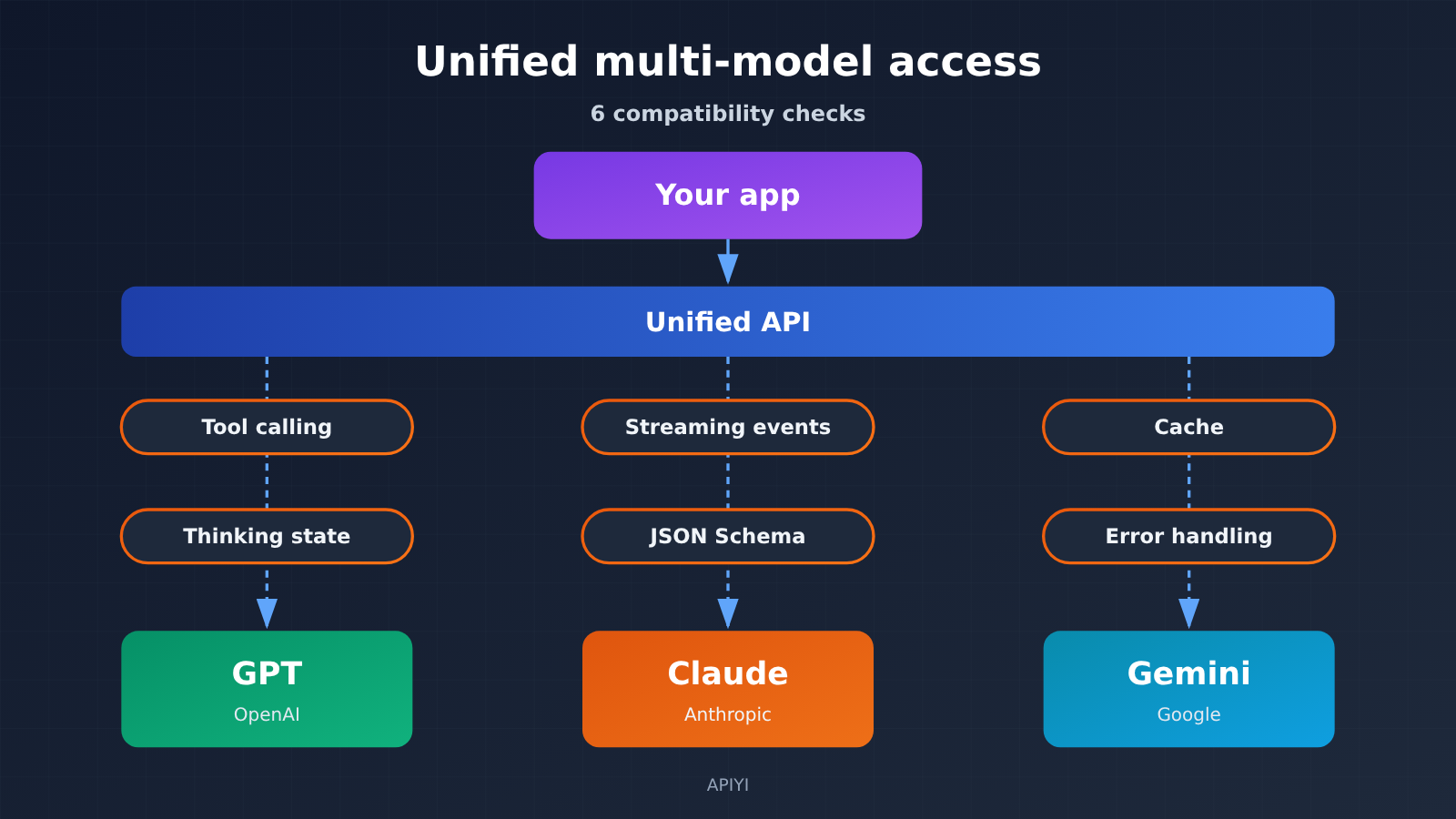
GPT, Claude, and Gemini can all handle standard text calls, and Claude and Gemini also offer official OpenAI SDK-compatible endpoints. When a production application switches models, it needs to solve six categories of compatibility issues: message roles and system instructions, tool-calling protocols, reasoning parameters and thinking state, streaming events, structured outputs and multimodal, and caching, billing, and error handling. Swapping only the Model ID can get simple Q&A working, but multi-turn tool calling, stream interruption recovery, and cost accounting need separate handling. A more reliable engineering approach is “a unified business interface + a Provider Adapter + a model capability registry.” That way, model switching can be managed as a maintainable product feature.
The following section first compares the structural differences among the three native APIs and explains which scenarios OpenAI-compatible interfaces can cover. It then breaks down, one by one, the real failures that the six compatibility issues can cause, and presents a six-layer integration architecture plus runnable unified invocation code. Finally, it lists six pre-launch compatibility tests and explains how a unified API gateway and native capability adaptation should divide responsibilities.
To Know: Multi-Model API Compatibility Glossary
| Term | Explanation |
|---|---|
| API | The interface through which an application sends requests to a model service and gets results back. |
| SDK | A software development kit that wraps up the details of making API calls. |
| Native API | A vendor’s own primary interface, such as OpenAI Responses, Claude Messages, or Gemini Interactions. |
| Compatibility endpoint | An adapter entry that reuses another request format (usually the OpenAI format) so you can call it with the same SDK. |
| Function Calling | The model uses structured arguments to ask the application to run an external function. |
| Call ID | An identifier that matches a tool request initiated by the model with the execution result the application sends back. |
| Thinking Signature | Encrypted state data that some models use to preserve reasoning and tool-call context; it must be returned exactly as received. |
| Streaming | The server returns results segment by segment as events, so the frontend can display them as they arrive. |
| JSON Schema | A specification that describes JSON data structures and validation rules. |
| Prompt Caching | Reusing computed results for input prefixes that repeat, cutting latency and cost. |
| TTL | How long a cache entry stays alive; once it expires, it has to be written again. |
| Provider Adapter | A component that converts a unified request into a vendor’s native format and then converts the response back into the unified format. |
| Capability registry | A configuration list that records which parameters and features each model and each access endpoint actually supports. |
| Idempotent | The same operation produces the same effect whether it runs once or many times, which prevents retries from causing duplicate charges or duplicate sends. |
1 Multi-model API compatibility: why switching models isn’t just changing the Model ID
All three providers let you specify a model through a single model field, but the way they structure request bodies, response objects, and context state is different. For standard Q&A, the differences mostly come down to field names, so adaptation is cheap. Agent-style applications depend on tool calls, reasoning state, and streaming events — and those differences can turn straight into production incidents.
1.1 Side-by-side comparison of the native OpenAI, Claude, and Gemini APIs
The table below describes only the native APIs, not any compatibility layer or gateway endpoint.
| Dimension | OpenAI (native) | Claude (native) | Gemini (native) |
|---|---|---|---|
| Primary endpoint | Responses API, /v1/responses |
Messages API, /v1/messages |
Interactions API (GA in June 2026; officially recommended for new projects); generateContent is still supported |
| Input organization | model + input |
model + messages + max_tokens; system is separate from the messages array |
Native Interactions structure, plus a system_instruction rule |
| Output structure | Multi-type output items: text, reasoning items, function_call, etc. |
content blocks: text, thinking, tool_use, etc. |
steps: model output, tool calls, reasoning, etc. |
| Completion detection | Response completion event / output item type | stop_reason (normal completion, tool execution required, etc.) |
Step type and interaction state |
| Context continuation | previous_response_id |
App sends back the full message history itself | previous_interaction_id, with optional server-side session state |
| Built-in tools | Platform tools + custom functions | Mainly custom tools | Built-in tools such as Google Search, URL Context, code execution; third-party tools are executed by the app |
The table makes it clear that the three split into two camps on one question: who stores the context. OpenAI and Gemini support server-side context continuation, while Claude Messages relies on the app to send history back itself. If your app’s session storage is designed around only one of these approaches, switching to another provider will cause lost context or duplicate sends.
1.2 How much can OpenAI-compatible endpoints actually solve?
Claude and Gemini both offer OpenAI SDK-compatible entry points. Gemini’s official compatibility endpoint is generativelanguage.googleapis.com/v1beta/openai/; when you use the OpenAI client, you just change base_url, the API key, and model. Claude’s compatibility docs, however, explicitly limit the supported scope. The known limitations as of 2026-11-13 are:
- The
strictparameter in tool definitions is ignored, so strict constraints on tool parameters stop working. - Prompt Caching is not supported.
- audio and file input types are not supported.
systemanddevelopermessages are hoisted to the front and merged.thinking-related fields differ from the native API.
Compatibility endpoints are a good fit for three scenarios: standard chat, single-turn generation, and quick comparisons of answer quality across models. Complex agent migrations involve strict tool parameters, caching, file input, and multi-turn reasoning state. Those capabilities require going back to the native API, or shipping only after validating each item. A practical rule of thumb: if a feature your app depends on appears only in the native docs, put it in a capability registry and hand it off to a dedicated adapter.
2 The Six Compatibility Issues You’re Most Likely to Hit When Switching Between GPT, Claude, and Gemini
2.1 Handling Compatibility for Message Roles and System Instructions
OpenAI distinguishes roles like developer and system. Claude’s system instruction lives outside the message array. Gemini uses system_instruction, and its user and model content follow their own structural rules too. All three are basically expressing the same thing—”instruction priority plus multi-turn history”—but the fields that carry it sit in completely different places.
The usual failure comes from taking the lazy concatenation route: stuffing system instructions, conversation history, and tool results into one big string and handing it to the model as user input. It’ll run, sure, but instruction priority gets weakened, and the model might treat tool output in the history as a new request from the user. The right approach is to keep role semantics inside your application and let an adapter map them to each vendor’s fields. One more thing to watch out for: Claude’s compatibility layer merges system and developer, so any prompt design that relies on keeping those two separate needs to be tested for real.
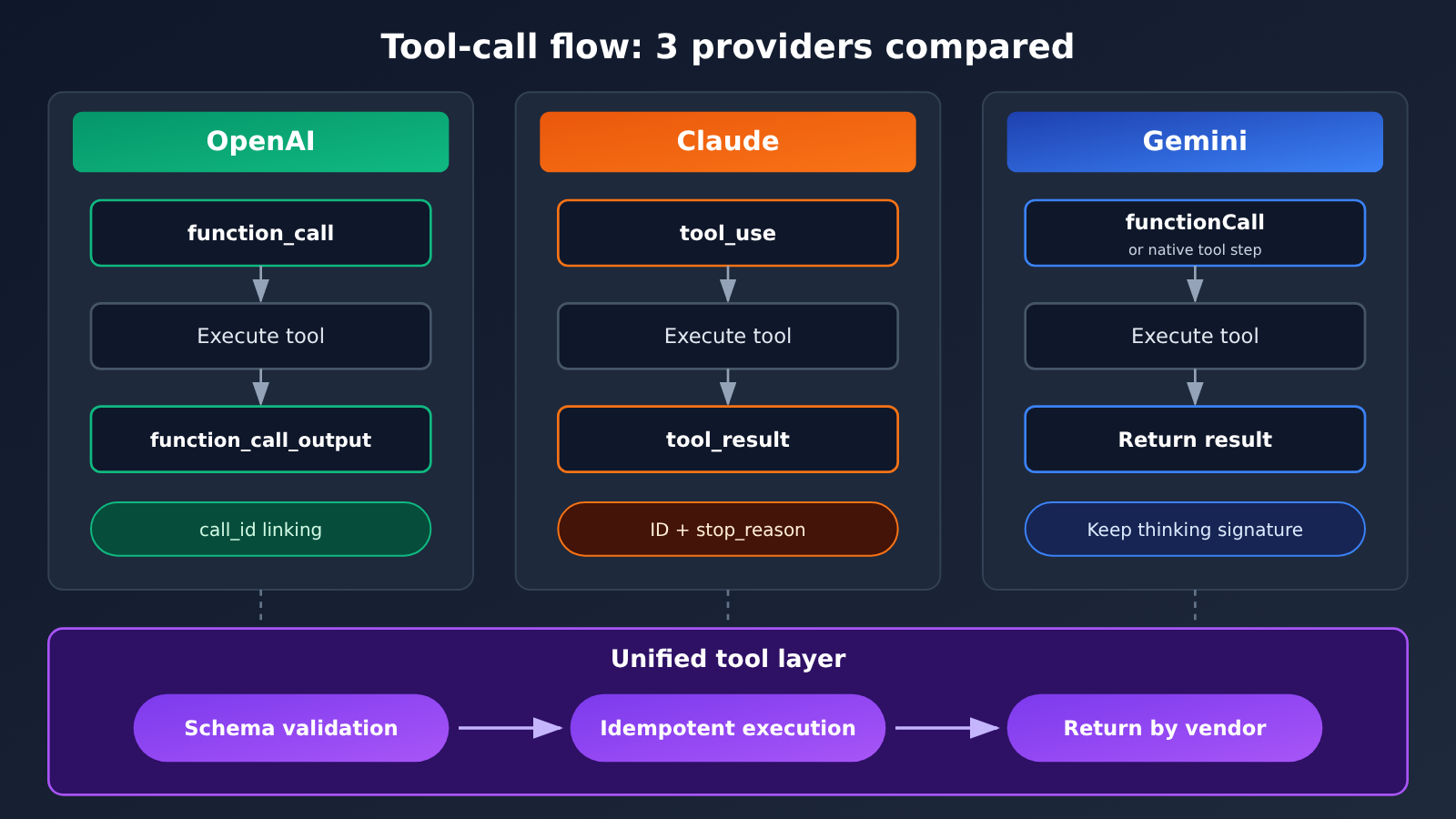
2.2 Tool-Calling Protocol and Call ID Compatibility
All three support Function Calling, and the invocation chain looks like this:
| Stage | OpenAI | Claude | Gemini |
|---|---|---|---|
| Model initiates the call | function_call output item |
tool_use content block |
functionCall / native tool step |
| Correlation identifier | call_id |
the ID of tool_use |
corresponding call identifier |
| App sends back the result | function_call_output |
tool_result content block |
corresponding result-return structure |
| Whether to continue | determined by the output item | stop_reason indicates a tool needs to be run |
determined by the step status |
| Reasoning state | reasoning items may need to be passed along with history | thinking blocks may need to be sent back as-is | in stateless mode, thought blocks and signatures must be preserved |
The tool layer needs to retain six pieces of information in full: the call ID, the function name, the parameter JSON, the parallel-call relationships, the execution result, and whether the model is asking to continue reasoning. Parallel calls are where things go wrong most easily. The model fires off several tool requests at once, and the application returns only one of the results — or the results get matched to the wrong IDs — and the next round of requests will throw parameter errors, or the model will keep answering based on the wrong data.
A good practice is to have the unified tool layer validate parameters with JSON Schema first, and only execute the real external operation once validation passes. The parameters the model generates aren’t always valid, and validating up front lets you intercept the error before it ever reaches “calling an external system.”
2.3 Handling Compatibility for Thinking Modes and Context State
The names and meanings of reasoning parameters don’t line up across the three providers:
- OpenAI: uses parameters like
reasoning.effort. GPT-6 Astra and GPT-6.1 Sol don’t acceptreasoning.effort=none, and tool calls on these two models also require the Responses API. - Claude: newer-generation models mainly use Adaptive Thinking, paired with thinking configurations such as effort. Some newer models no longer support the old manual thinking mode with a fixed
budget_tokens. - Gemini: different models use thinking level or budget, and whether reasoning can be turned off — plus which tiers exist — varies by model. The parameter mapping rules also differ between the native API and the OpenAI-compatible endpoint.
When the product UI offers three reasoning strength tiers — “Fast, Standard, Deep” — the tier names express product intent. The adapter needs to translate that into the parameters each model actually supports, and the same tier doesn’t get the same compute resources across the three providers. On top of that, the thinking summary users see may not match the number of thinking tokens actually billed, so cost accounting should rely on the usage fields returned by the API.
Encrypted state in multi-turn tool calls is the issue long-running agents most easily overlook:
- OpenAI Responses reasoning items and tool calls may need to be carried forward along with the history.
- Claude’s
thinking/redacted_thinkingblocks may contain encrypted state, and the original structure must be preserved when sending them back after tool execution. - Gemini Interactions’ stateless mode requires thought blocks and signatures to be kept verbatim; with stateful mode, some state can be maintained by the server.
Saving only the text displayed in the chat window isn’t enough to fully restore the model’s reasoning history. The typical failure looks like this: the agent suddenly throws an error after the third round of tool calls, or starts repeating steps it already finished. The usual cause is a signature block getting dropped in one of the intermediate rounds.
2.4 Unifying Streaming Events
The three providers all differ in their streaming event types, ordering, and end signals. OpenAI Responses may emit response.output_text.delta, tool-call deltas, and a response completion event. The Claude Messages stream uses events such as message_start, content_block_delta, and message_delta. Gemini’s native API uses its own output and step structure.
If the frontend parses vendor raw events directly, you’d have to touch frontend code every time you add a model. Instead, normalize everything in the backend into an internal event protocol:
| Internal event | Meaning | Handling notes |
|---|---|---|
text_delta |
Text delta | Append directly to the display |
reasoning_summary |
Thinking summary | Can be shown collapsed; billing follows usage |
tool_call_start |
Tool call begins | Record the call ID and function name |
tool_call_args |
Argument fragments | Concatenate by call ID or index; only parse once everything has arrived |
tool_result |
Tool execution result | Maps one-to-one to the call ID |
usage |
Usage stats | Distinguish input, cache, thinking, and output tokens |
completed |
Normal finish | You must receive an explicit end signal |
error |
Error or broken stream | Separate retryable from non-retryable |
Streaming has three common failure points. First, argument fragments for multiple tool calls arrive interleaved, so concatenating them in arrival order mixes up which call they belong to. Second, JSON arguments get cut at arbitrary characters, and parsing a half-received chunk throws an exception. Third, the connection drops midway without a completion event, leaving the UI stuck on “Generating” forever. The conversion layer needs to handle all three cases explicitly.
2.5 JSON Schema Structured Outputs and Multimodal Capability Differences
All three offer structured output, but they differ in which JSON Schema features they support, how their strict modes work, and how those capabilities combine with tool calls. Claude’s official docs distinguish between two mechanisms: JSON outputs constrain the structure of the final answer, while Strict tool use constrains the structure of tool-call arguments. Some models also incur extra Schema compilation or caching overhead when you use strict formatting.
From an engineering perspective, the recommendation is this: your application should maintain its own standard JSON Schema, and record in the capability registry which Schema features each model supports. For features a model doesn’t support, have the adapter perform a downgrade conversion. No matter how strict a model claims to be, the application side should validate the result again—and when validation fails, move into a controlled retry or error flow.
Multimodal capabilities work the same way. “Supports image input” only tells you the capability category. You still need to compare specifics: accepted file types, size and image count, video and audio support, file upload method, the long-context limit and the range that’s actually usable, max output tokens, and whether tool calls can be combined with multimodal input. The Claude compatibility layer doesn’t support audio or file input—that’s a concrete limitation worth writing into the registry.
2.6 Cross-Model Differences in Caching, Billing, and Error Handling
The three providers’ prompt caching mechanisms differ noticeably:
- OpenAI: GPT-5.6 and later models support implicit caching and explicit cache breakpoints, with TTLs of 30 minutes and 12 hours.
- Claude: To use automatic or explicit caching, you specify it via
cache_control, which supports 5-minute and 1-hour modes; this capability isn’t supported in its OpenAI-compatible layer. - Gemini: Newer models provide automatic implicit caching, and some APIs and models support explicitly creating cache objects.
After you switch models, the original provider’s cache generally can’t be reused. If you switch from Claude to Gemini mid-session, the first round of requests is billed at the full input rate. If your cost estimates assume “the cache always hits”, the more often you switch strategies, the bigger the deviation in your bill.
Standard unit prices also differ noticeably across the three. As of 2026-11-13, the official standard prices are as follows (USD per million tokens):
| Model | Input | Output | Notes |
|---|---|---|---|
| GPT-6 Astra | $10 | $50 | Tool calls require the Responses API |
| GPT-6.1 Sol | $1 | $5 | Tool calls require the Responses API |
| Claude Sonnet 5.5 | $2 | $10 | — |
| Gemini 3.8 Flash | $0.75 | $3.75 | Promotional price through 2026-12-31; planned adjustment to $1.50 / $7.50 starting 2027-01-01 |
This table illustrates billing differences. The models differ in capabilities and usage conditions, so higher or lower prices don’t translate directly into a performance comparison. The table also doesn’t include fees such as cache writes, tool calls, service tiers, or third-party markups.
💰 Cost accounting tip: Bills for multi-model applications need to be recorded line by line as “regular input, cache writes, cache hits, thinking and output, tool costs, long-context surcharges.” When you call multiple models through APIYI apiyi.com, you can view usage for each model in one place, making it easy to map routing strategies to actual costs.
On error handling, the three providers differ in request rate, token rate, quota, timeouts, and error formats. Applications should establish a unified error taxonomy: authentication failure, unsupported model, invalid parameters, request too large or context exceeded, 429 rate limiting, server error, network disconnect, response stream interruption, and tool call failure.
Model fallback also needs to consider whether the task has side effects. If the primary model times out after a tool has executed, and the system automatically switches to a backup model and reruns the entire task, operations like charging a payment, sending an email, or modifying a file could execute twice. The fix is to add idempotency keys to side-effecting tools, so fallback resumes only from “steps that haven’t executed yet.”
3 How to Design a Multi-Model API-Compatible Architecture
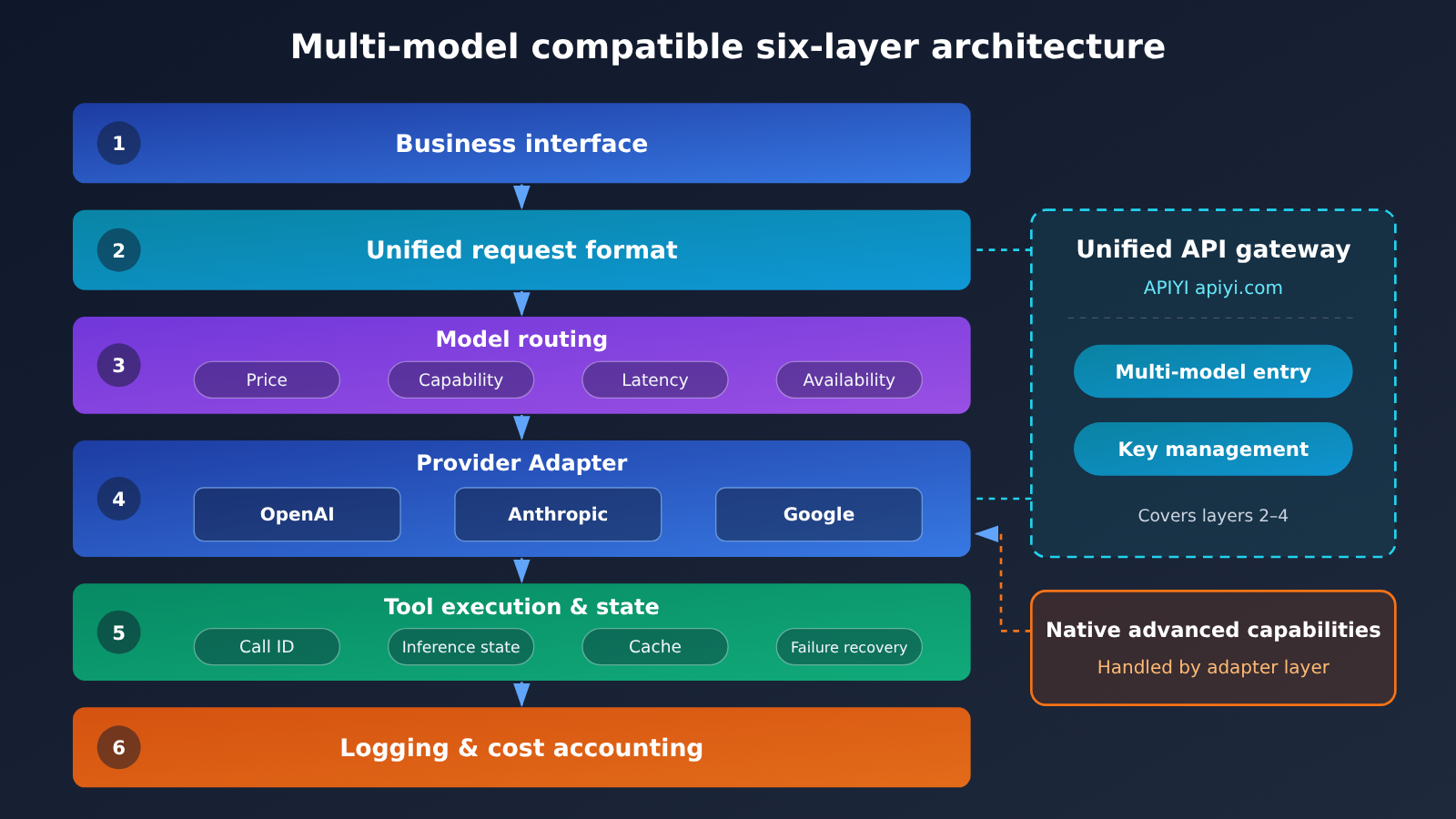
The recommended six-layer structure looks like this:
- Business Interface: Users ask questions, upload materials, and select models and tasks.
- Unified Request Format: Use a unified structure to represent message history, attachments, tool lists, structured output requirements, reasoning intensity, and task ID.
- Model Routing: Select GPT, Claude, or Gemini based on price, capability, latency, availability, and business rules.
- Provider Adapter: Convert standard requests into each vendor’s native format, then map the returned results back into the internal format.
- Tool Execution and State Management: Maintain call IDs, execution records, conversation context, vendor reasoning state, cache, and failure recovery.
- Logging and Cost Accounting: Record the model, tokens, actual cost, latency, cache, errors, and tool calls for each request.
3.1 Establishing a Unified Message and Tool Format
The core principle behind the unified format is to store history in two layers. The first layer is a universal standard history—user messages, the model’s final answers, tool requests, and tool results—that any vendor can understand. The second layer is vendor-specific state, such as reasoning items, thinking signatures, and thought blocks, kept isolated per vendor and sent back unchanged only when you’re calling the same vendor again.
from dataclasses import dataclass, field
from typing import Any, Literal

@dataclass
class ToolCall:
    call_id: str              # Unified call ID; the adapter maps it to and from the vendor ID
    name: str
    arguments: dict[str, Any]
    result: Any = None
    idempotency_key: str = "" # Must be set for tools with side effects

@dataclass
class Message:
    role: Literal["system", "developer", "user", "assistant", "tool"]
    content: list[dict]                      # Multimodal blocks such as text and images
    tool_calls: list[ToolCall] = field(default_factory=list)
    # Vendor-specific state: key is the vendor name, value is the signature / reasoning block stored as-is
    vendor_state: dict[str, Any] = field(default_factory=dict)
When you switch models, the adapter reads the standard fields to build the new request. The parts of vendor_state belonging to other vendors are not sent, while the parts belonging to the target vendor are passed back unchanged.
3.2 Adapting Native APIs with Provider Adapters
Each adapter takes on three responsibilities:
- Input transformation: role mapping (for example, moving
systeminto Claude’s dedicated field), tool definition conversion, schema downgrading, and reasoning-effort mapping. - Output transformation: converting native responses and streaming events into the internal events described in Section 2.4, and mapping tool call IDs to unified IDs.
- State handling: extracting and storing vendor state such as signatures and reasoning items, then deciding between server-side continuation (
previous_response_id,previous_interaction_id) and sending the full history back.
Everyday Q&A can go through the shared OpenAI-compatible adapter. For scenarios that need strict tool parameters, cache control, or encrypted thinking state, implement a native adapter separately. This keeps the convenience of a single entry point while giving advanced capabilities a clear place to live.
3.3 Using a Capability Registry to Decide What’s Available
The capability registry records actual support on a “model + endpoint” basis. The same model may have two entries: one for the native API and one for the compatibility layer. Here’s an example structure — the specific values must come from official documentation and your own test results:
gpt-6.1-sol@responses:
  tools: true
  tool_api: responses          # tool calls require the Responses API
  reasoning_effort: [low, medium, high]   # does not accept none
  vendor_state: reasoning_items
claude-sonnet@openai-compat:
  tools: true
  strict_tools: false          # the compatibility layer ignores strict
  prompt_caching: false
  file_input: false
  merges_system_developer: true
gemini-flash@interactions:
  tools: true
  builtin_tools: [google_search, url_context, code_execution]
  vendor_state: thought_signatures
Before selecting a model, the routing layer queries the registry. If the request includes a file, entries with file_input: false are excluded. If strict tool parameters are required, only entries with strict_tools: true are considered. The product UI can use the same information to hide options the current model doesn’t support, so users trigger fewer errors.
4 Testing and Observability Before Launching Multi-Model API Compatibility
4.1 Six Compatibility Tests, from Simple Q&A to Multi-Turn Tool Chains
Work through the following six tests in increasing order of complexity:
- Basic Q&A: Send the same prompt to all three models and check whether the answer content and token counts look right.
- Streaming output: Confirm that output keeps arriving and that you receive the correct end-of-stream signal.
- Tool calling: The model calls a weather or data lookup tool, and the app executes it and sends the result back.
- Multi-tool loop: Call tools for two or more consecutive rounds and confirm that the history and call IDs are intact.
- Structured JSON: Produce output against the same schema and validate the structure with your app-side validator.
- Model switching: Move the same business session between GPT, Claude, and Gemini, and confirm that context, tool records, and the final answer all behave.
Tests 4 and 6 are the ones most likely to surface reasoning-state problems, so I recommend putting them in your CI pipeline. Re-run them whenever you upgrade a model version or switch endpoints.
4.2 Build Unified Cost and Stability Observability
For every request, log at least these fields: model and endpoint, request success rate, exception type (using the categories from section 2.6), time to first token and total task duration, itemized tokens (input, cache write, cache hit, reasoning, output), tool call count and failure count, and retry and fallback counts.
When you’re evaluating a model, look at the full task’s total duration and total cost—single-request data isn’t worth much on its own. A model with a cheap unit price can end up costing more overall if it gets tool parameters wrong often and needs several retries.
5 The Role of a Unified API Gateway in Multi-Model API Compatibility
5.1 Integration and Maintenance Costs
Using three models at once means three sets of accounts, three sets of API keys, three billing setups, and three SDK configurations. A unified API gateway consolidates this work into a single entry point: centralized management of model integrations and credentials, less configuration maintenance across providers, the ability to select and switch models at the configuration layer, and unified visibility into usage and cost. For teams that need to compare model performance frequently, the barrier to trying a new model also drops.
5.2 APIYI’s Positioning: Division of Labor Between a Unified Model Invocation Entry Point and Native Capability Adaptation
APIYI is an API aggregation platform for AI Large Language Models. With a single API key, you can call mainstream models such as OpenAI, Claude, and Gemini through an OpenAI-compatible interface, with pay-as-you-go billing. It’s well suited to handle the “unified model invocation entry point” layer in your architecture: general Q&A, streaming output, model comparison, and multi-model routing can all plug in directly.
A unified model invocation entry point and full parity with vendor-native capabilities are two different technical requirements. When integrating a specific model, you still need to verify the scope of support for tool calling, thinking state, multimodal input, caching, and structured output item by item in the capability registry. For pipelines that depend on native capabilities such as the Responses API, cache_control, or cryptographic signatures, confirm that the corresponding endpoint is actually available before going live—or keep a dedicated native adapter for that pipeline.
Multi-Model API Compatibility Quick Start
Minimal Example: Comparing Three Models with the Same Prompt
The code below uses a single OpenAI SDK client to call three models in sequence, corresponding to test item 1 in Section 4.1.
from openai import OpenAI

client = OpenAI(
    api_key="YOUR_API_KEY",
    base_url="https://api.apiyi.com/v1"  # APIYI unified endpoint
)

# Model IDs follow the platform's model list
MODELS = ["你的GPT模型ID", "你的Claude模型ID", "你的Gemini模型ID"]

for model in MODELS:
    resp = client.chat.completions.create(
        model=model,
        messages=[{"role": "user", "content": "用一句话解释什么是幂等"}],
    )
    print(model, "→", resp.choices[0].message.content)
    print("usage:", resp.usage)
View the full implementation: unified streaming events + capability registry + tool validation
import json
import openai
from openai import OpenAI
from jsonschema import validate, ValidationError

client = OpenAI(
    api_key="YOUR_API_KEY",
    base_url="https://api.apiyi.com/v1"  # APIYI unified interface
)

# Capability registry: values are structural examples only; maintain them based on official docs and test results
CAPABILITIES = {
    "gpt":    {"model": "你的GPT模型ID",    "tools_via": "responses"},  # Tool calls must go through the Responses adapter
    "claude": {"model": "你的Claude模型ID", "tools_via": "chat"},
    "gemini": {"model": "你的Gemini模型ID", "tools_via": "chat"},
}

def classify_error(e: Exception) -> str:
    """Unified error classification, determines whether a retry is possible"""
    if isinstance(e, openai.AuthenticationError):
        return "auth_failed"
    if isinstance(e, openai.NotFoundError):
        return "model_not_supported"
    if isinstance(e, openai.RateLimitError):
        return "rate_limited"          # Retryable with backoff
    if isinstance(e, openai.BadRequestError):
        return "invalid_request"       # Invalid parameters or context overflow; don't retry blindly
    if isinstance(e, openai.APIConnectionError):
        return "network_error"
    if isinstance(e, openai.InternalServerError):
        return "server_error"
    return "unknown"

def stream_chat(provider: str, messages: list, tools: list | None = None):
    """Convert an OpenAI-compatible stream into internal unified events"""
    cap = CAPABILITIES[provider]
    if tools and cap["tools_via"] != "chat":
        raise NotImplementedError(f"{provider} 的工具调用请交给原生适配器处理")

    kwargs = {
        "model": cap["model"],
        "messages": messages,
        "stream": True,
        "stream_options": {"include_usage": True},
    }
    if tools:
        kwargs["tools"] = tools

    calls: dict[int, dict] = {}   # Concatenate parameter fragments for parallel tool calls by index
    finished = False
    try:
        for chunk in client.chat.completions.create(**kwargs):
            if not chunk.choices:
                if chunk.usage:
                    yield {"type": "usage", "data": chunk.usage.model_dump()}
                continue
            choice = chunk.choices[0]
            delta = choice.delta
            if delta.content:
                yield {"type": "text_delta", "data": delta.content}
            for tc in delta.tool_calls or []:
                slot = calls.setdefault(tc.index, {"id": None, "name": "", "args": ""})
                if tc.id:
                    slot["id"] = tc.id
                if tc.function and tc.function.name:
                    slot["name"] = tc.function.name
                    yield {"type": "tool_call_start", "data": {"id": slot["id"], "name": slot["name"]}}
                if tc.function and tc.function.arguments:
                    slot["args"] += tc.function.arguments
                    yield {"type": "tool_call_args", "data": {"index": tc.index}}
            if choice.finish_reason:
                finished = True
                yield {"type": "completed", "data": {
                    "finish_reason": choice.finish_reason,
                    "tool_calls": list(calls.values()),
                }}
    except Exception as e:
        yield {"type": "error", "data": classify_error(e)}
        return
    if not finished:
        yield {"type": "error", "data": "stream_interrupted"}  # Interrupted mid-stream

EXECUTED_KEYS: set[str] = set()   # In production, replace with persistent storage

def run_tool(call: dict, schema: dict, func, idempotency_key: str | None = None):
    """Validate arguments first, then execute idempotently"""
    try:
        args = json.loads(call["args"])   # Parse only after all fragments are collected
        validate(instance=args, schema=schema)
    except (json.JSONDecodeError, ValidationError) as e:
        return {"error": f"invalid_arguments: {e}"}
    if idempotency_key:
        if idempotency_key in EXECUTED_KEYS:
            return {"skipped": "already_executed"}
        EXECUTED_KEYS.add(idempotency_key)
    return func(**args)

# Usage example
for event in stream_chat("claude", [{"role": "user", "content": "介绍一下流式输出"}]):
    print(event)
🚀 Quick start: Register at APIYI apiyi.com to get free test credits, then use the code above with the same key to complete the first two tests in Section 4.1. For tests involving tool calls and multi-turn reasoning, validate each model one by one using the capability registry.
FAQ
Q1: What exactly do “multi-model API compatibility” issues refer to?
They’re the differences you have to handle when the same app switches between GPT, Claude, and Gemini, because each native API is structured differently. There are 6 main categories: message roles, tool calls, reasoning state, streaming events, structured output and multimodal input, and caching/billing plus error handling.
Q2: If I call Claude and Gemini through the OpenAI-compatible interface, do I still need an adapter layer?
For plain chat, the compatible interface works fine. Once you get into strict tool parameters, Prompt Caching, file input, or encrypted thinking state, you need an adapter layer. Take Claude’s official compatibility layer as an example: it ignores `strict` and doesn’t support caching or audio/file input. Those differences need to go into your capability registry.
Q3: For a new Gemini project, should I use the Interactions API or generateContent?
The Interactions API went GA in June 2026, and Google recommends new projects adopt it first. It supports server-side session state, `previous_interaction_id`, and the steps structure. `generateContent` is still supported, so existing projects can migrate on their own schedule.
Q4: If I switch models mid-conversation, how should I handle the history?
Store user messages, final answers, tool requests, and tool results as standard history, and let the target adapter reassemble them after the switch. Save vendor-specific state separately—signatures, reasoning items, and so on—and send it back verbatim only when you’re calling the same vendor. Also, the original vendor’s cache usually can’t be reused after a switch, so budget for the full input cost on the first turn.
Q5: How can I quickly verify compatibility across all three models in my own business context?
Here’s the recommended process:
1. Go to APIYI apiyi.com, sign up, and get an API key plus free testing credits.
2. Use the code in this article, set `base_url` to the APIYI endpoint, and fill in the three model IDs.
3. Work through the six tests in Section 4.1 one level at a time, recording success rate, error types, cost, and total elapsed time.
Q6: What should I watch out for when setting up automatic model fallback?
First, decide whether the task has side effects. Tools like payments, sending email, or modifying files must carry idempotency keys, and fallback should resume from the last unfinished step rather than rerunning the whole task. Rate limiting and server errors are good candidates for backoff-and-retry; parameter errors and context-length overflows need the request fixed before you send it again.
Q7: How do I control costs when routing across multiple models?
Track costs by token category, and compare using the total cost of a complete task. The per-unit price gaps between the three vendors are large—for example, GPT-6 Astra output costs $50 per million tokens, while Gemini 3.8 Flash is currently on promo at $3.75. Viewing usage for all models in one place on APIYI apiyi.com makes it easier to spot expensive paths and adjust your routing rules accordingly.
Q8: What are the limitations of a unified API gateway?
A gateway unifies the call entry point, keys, and billing. Whether vendor-native advanced capabilities are available—things like Responses API-specific tool calls, `cache_control`, or encrypted signature return—depends on what the specific endpoint supports, and you need to test each one yourself. For paths that rely on these capabilities, keep a native adapter as a supplement.
Multi-Model API Compatibility: Key Takeaways
- Switching models ≠ switching IDs: plain Q&A workloads can migrate directly, but agent pipelines need to handle 6 categories of differences.
- The compatibility layer has limits: the Claude compatibility layer ignores
strictand doesn’t support caching or file inputs. - Signatures must be preserved verbatim: losing thinking/thought signatures is a common cause of errors in multi-turn tool chains.
- Unify streaming events: the backend emits 8 internal event types, while the frontend integrates with just one protocol.
- Capability registry drives routing: record what’s actually supported per “model + endpoint”.
- Fallbacks must be idempotent: add idempotency keys to tools with side effects to prevent duplicate execution.
- Test before you launch: use the free quota on APIYI apiyi.com to run through the six compatibility tests.
Summary
The key to connecting GPT, Claude, and Gemini in a single app is centralizing the differences into a few components:
- Unified message and tool formats: store standard history and vendor-specific state in separate layers, so context isn’t lost when you switch models.
- Provider Adapter: handles input conversion, output conversion, and state management — and this is where native advanced capabilities get implemented.
- Capability registry: accurately records tool, reasoning, multimodal, schema, and caching support for each model and endpoint, and uses that to drive routing and UI options.
On top of that, lock down launch quality with six compatibility tests and per-item cost tracking. During regular calls and model comparison, we recommend using APIYI apiyi.com to quickly validate multiple models with a single key, then letting the test results tell you which pipelines need native adaptation.
📚 References
- OpenAI Function Calling: Tool calls,
call_id, andfunction_call_output - Link:
developers.openai.com/api/docs/guides/function-calling -
Notes: The authoritative explanation of the Responses API tool-calling protocol
-
OpenAI Latest Model Migration Guide: GPT-6 series reasoning parameters and interface requirements
- Link:
developers.openai.com/api/docs/guides/latest-model -
Notes: Value restrictions for
reasoning.effortand Responses API requirements -
OpenAI Prompt Caching: Cache breakpoints and TTL
- Link:
developers.openai.com/api/docs/guides/prompt-caching -
Notes: Implicit and explicit caching mechanisms
-
Claude OpenAI SDK Compatibility: Compatibility layer support scope and limitations
- Link:
platform.claude.com/docs/en/cli-sdks-libraries/libraries/openai-sdk -
Notes: Differences in
strict, caching, file inputs, system merging, and more -
Claude Extended Thinking: Adaptive Thinking and thinking signatures
- Link:
platform.claude.com/docs/en/build-with-claude/extended-thinking -
Notes: Rules for sending thinking blocks back during multi-turn tool calls
-
Claude Structured Output and Caching: JSON outputs, Strict tool use,
cache_control - Link:
platform.claude.com/docs/en/build-with-claude/structured-outputs - Link:
platform.claude.com/docs/en/build-with-claude/prompt-caching -
Notes: Structured constraints and caching patterns
-
Gemini Interactions API and OpenAI Compatibility: The new interface and the compatibility entry point
- Link:
ai.google.dev/gemini-api/docs/interactions-overview - Link:
ai.google.dev/gemini-api/docs/openai -
Notes: The steps structure, session state, and compatibility parameter mapping
-
Gemini Thinking Signatures, Tool Calling, and Caching
- Link:
ai.google.dev/gemini-api/docs/thought-signatures - Link:
ai.google.dev/gemini-api/docs/function-calling - Link:
ai.google.dev/gemini-api/docs/caching -
Notes: Signature preservation in stateless mode, the tool protocol, and explicit caching
-
Official Pricing Pages for All Three Providers
- Link:
developers.openai.com/api/docs/pricing - Link:
platform.claude.com/docs/en/models/sonnet-5-5/overview - Link:
ai.google.dev/gemini-api/docs/pricing - Notes: The data sources for the pricing tables in this article, verified on 2026-11-13
Author: APIYI Technical Team
Technical Discussion: Feel free to contact us through the APIYI website homepage. For more resources, visit the docs.apiyi.com documentation center.


