

Author’s note: All capability boundaries in this article are based on the APIYI model documentation. I checked them against the November 2026 version before writing, and the docs are the final word.
A portrait image and an audio clip, with the goal of making the person in the frame speak—that’s one of the most common requests in image-to-video. Many people’s first instinct is to pass driving_audio along with everything else to happyhorse-1.1-i2v. When audio-driven motion doesn’t kick in, they start doubting the assets, the parameter order, or even the way they’re calling the model.
This isn’t some mysterious glitch, and it’s not because your assets aren’t good enough. The docs are very direct about this: happyhorse-1.1-i2v only accepts first_frame and does not support driving_audio. For lip-sync or rap-style performances, the docs point you to wan2.7-i2v.
Key takeaway: By the end of this article, you’ll understand the division of responsibilities between happyhorse-1.1-i2v and wan2.7-i2v, know which model to pass the “make the image talk” parameters to, and get it working on the first try.
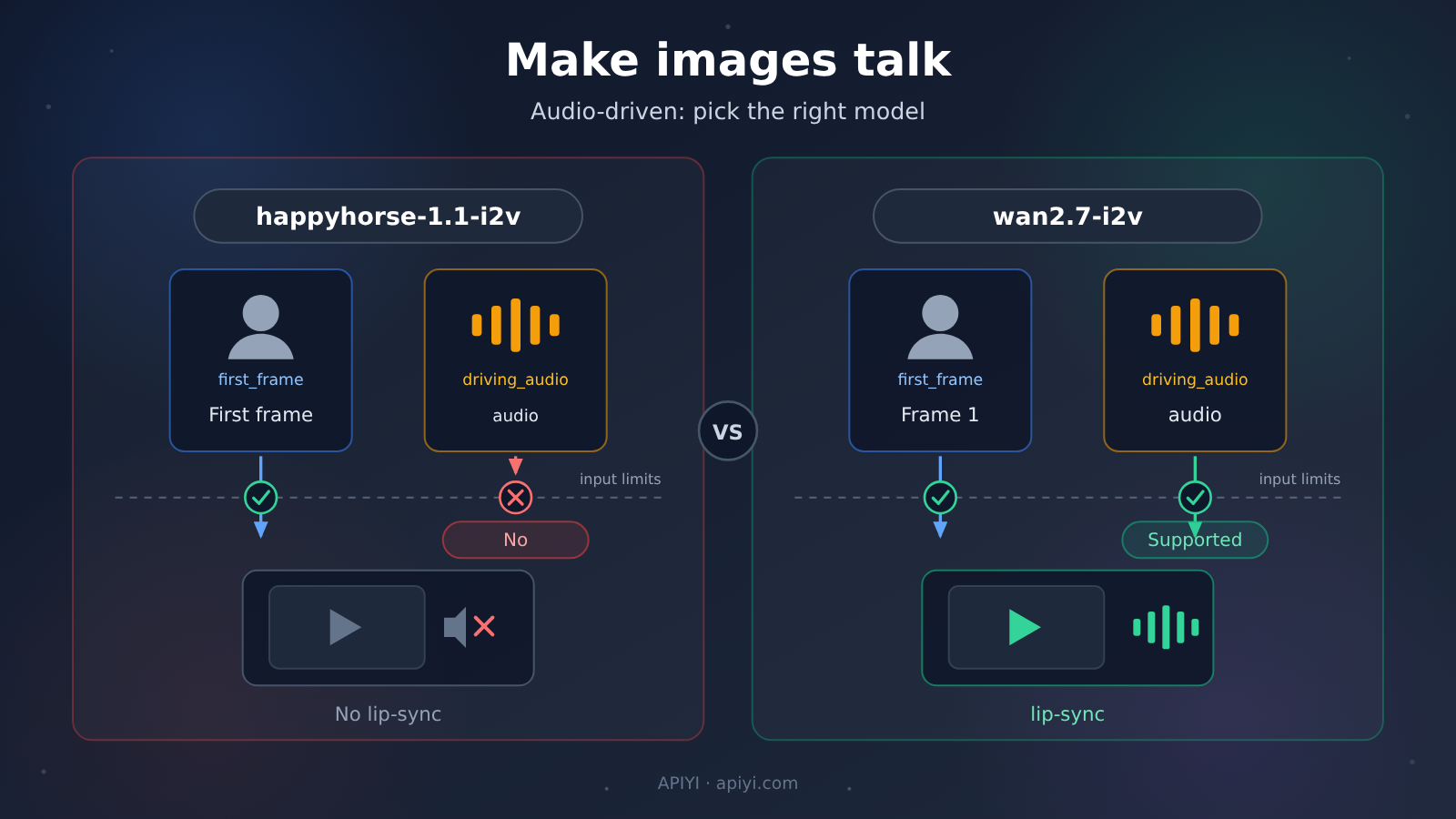
happyhorse-1.1-i2v Key Points
Here’s the bottom line first — details come after:
| Point | What the docs say | What it means for you |
|---|---|---|
| Only accepts the first-frame image | happyhorse-1.1-i2v accepts a first_frame input |
The image is its only driving entry point |
| No audio-driven support | The model doesn’t support driving_audio |
Passing it in has no effect, so don’t keep retrying |
| Lip-sync belongs elsewhere | The docs suggest switching to wan2.7-i2v for lip-sync scenarios |
Swapping models solves the problem faster than tweaking parameters |
The first point is where misjudgment happens most easily. driving_audio isn’t some hidden parameter of happyhorse-1.1-i2v, nor is it a capability waiting to be unlocked in a future version. The model docs explicitly mark it as unsupported, and the image-to-video entry on the overview page reaches the same conclusion. In other words, the problem isn’t how you’re calling it — the model’s capability boundary simply sits here.
The second point is about the alternative route. According to the docs, audio-driven is a capability exclusive to wan2.7-i2v, and HappyHorse’s i2v doesn’t take on this kind of task. So when a character needs to speak, the right move isn’t to keep adjusting parameters — it’s to switch models outright.
Core differences between happyhorse-1.1-i2v and wan2.7-i2v
Both models are first-frame image-to-video, so their positioning overlaps. What really sets them apart is the audio input row:
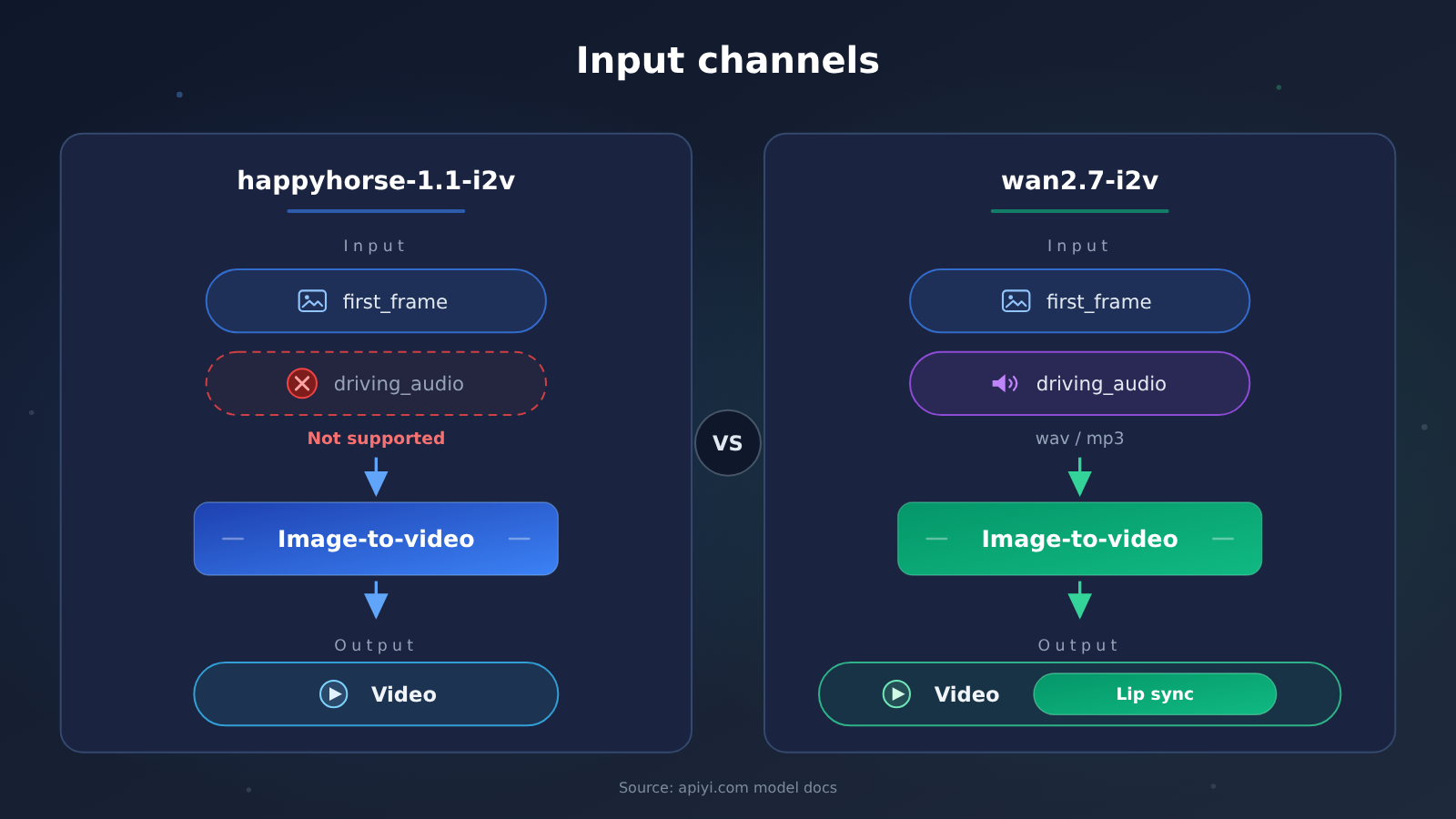
| Aspect | happyhorse-1.1-i2v |
wan2.7-i2v |
Takeaway |
|---|---|---|---|
| Task type | First-frame image-to-video | First-frame image-to-video | Positioning overlaps—don’t rank them by name |
first_frame |
Accepted | Must have exactly 1 | Image input is required on both sides |
driving_audio |
Not supported | Supported, optional, max 1 | The dividing line for lip sync |
| Audio format | Not applicable | wav or mp3 |
Confirm the format before passing parameters |
| Lip-sync scenario | Docs suggest switching to wan2.7-i2v |
Docs designate it for this scenario | This row alone is enough to settle your choice |
The table and the diagram above are both based on the APIYI model documentation (apiyi.com)—not on empirical guesswork.
happyhorse-1.1-i2v is the right path for “getting a static first frame to move”: give it a first_frame and it takes the scene from there. But audio isn’t on its input list—the docs note that audio-driven capability hasn’t been opened up for HappyHorse’s i2v. By contrast, wan2.7-i2v opens an extra door on top of the same first-frame input: driving_audio, so a character’s movement rhythm can follow the audio.
wan2.7-i2v‘s constraints are also more concrete: the media must contain exactly 1 first_frame, at most 1 driving_audio, and audio is limited to wav or mp3. These constraints are nailed down tight, and the upside is that if you assemble things per the docs, it’ll run on the first try—no guessing required.
Why happyhorse-1.1-i2v Doesn’t Accept driving_audio
Lay out the documentation clues, and at least four pieces of information point to the same conclusion:
- The model page states it plainly:
happyhorse-1.1-i2vis a first-frame image-to-video model and only acceptsfirst_frame. - The same page explicitly notes that
driving_audioisn’t supported. - The image-to-video entry on the overview page likewise notes that audio driving isn’t supported.
- For lip-sync or rap needs, the docs give a migration recommendation directly: switch to
wan2.7-i2v.
So you’re back in that classic scenario: you put driving_audio into the request, the result doesn’t match expectations, and you start checking your assets and parameters one by one. No matter what form the API’s feedback ultimately takes, there’s only one root cause — this field simply isn’t within the input scope of happyhorse-1.1-i2v. The docs leave no room for “just write it differently”; retries and swapping assets won’t change the input boundary.
If you’re calling through APIYI (apiyi.com), start troubleshooting by comparing the model ID and field names in your request against the docs item by item, then check the other steps. Most “audio didn’t take effect” problems can be pinpointed right at this step — no need to take a long detour.
Lip Sync with wan2.7-i2v’s driving_audio: Quick Start
Once you’ve confirmed the switch to wan2.7-i2v, the whole workflow comes down to four steps, with the focus entirely on assembling the media:
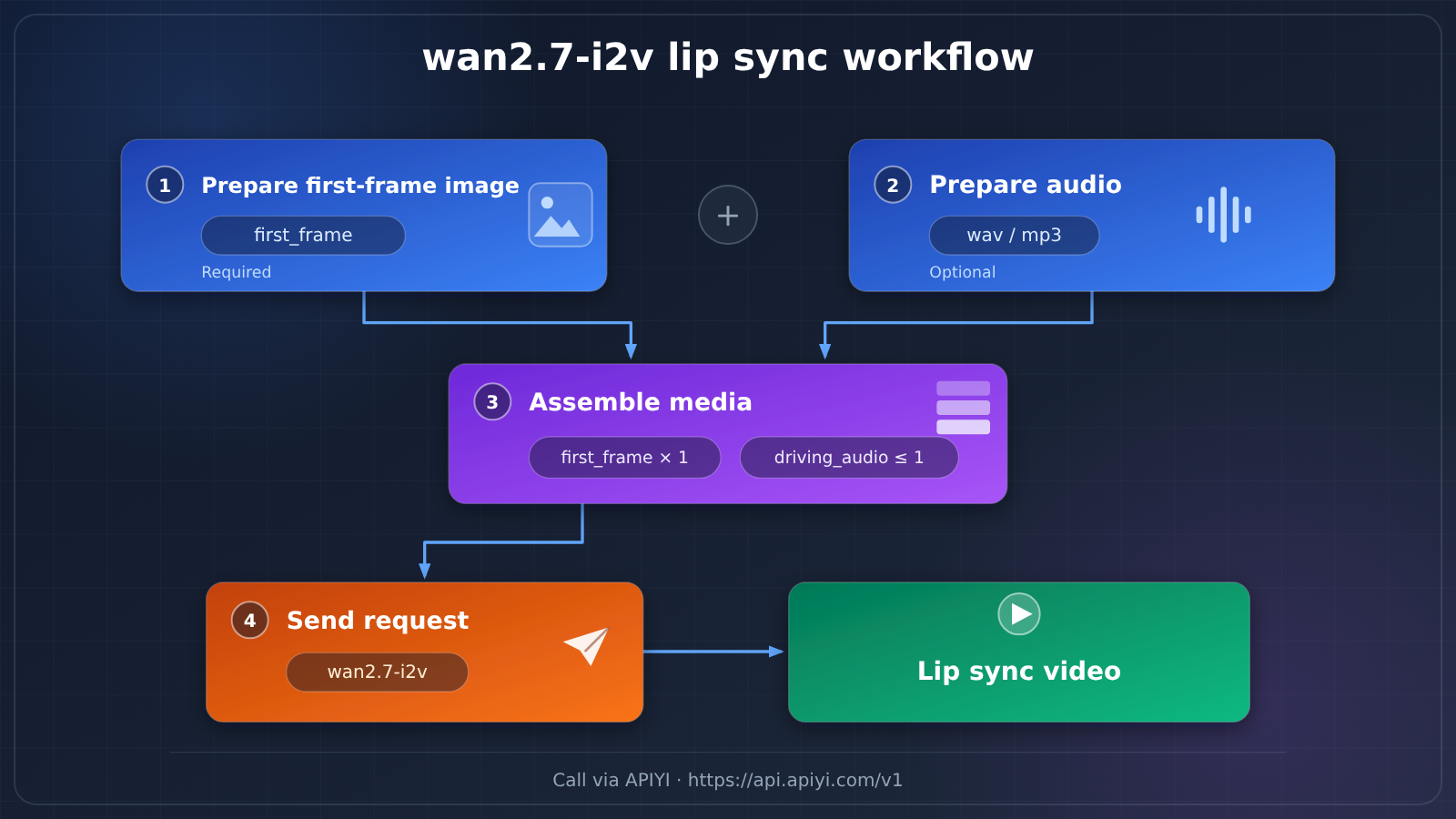
- Prepare the first frame image: a clear, well-composed image of a person, used as
first_frame. - Prepare the audio:
wavormp3format, used asdriving_audioto drive lip movement and rhythm. - Assemble the media: exactly 1
first_frameand at most 1driving_audio— don’t add extras. - Initiate the call: set the model to
wan2.7-i2v; when calling through APIYI, the base URL ishttps://api.apiyi.com/v1.
| Field | Required | Quantity Constraint | Format Requirement |
|---|---|---|---|
first_frame |
Required | Exactly 1 | First frame image |
driving_audio |
Optional | At most 1 | wav or mp3 |
The first two steps are straightforward — step 3 is what really determines success. The docs are very strict about quantities: first_frame must be present and exactly 1, while driving_audio is optional and at most 1. Passing extra images or audio can make the request non-conformant, so don’t bring the “more is better” instinct into parameter assembly.
🚀 Quick Start: We recommend validating this workflow directly through APIYI apiyi.com. The platform aggregates major model APIs including OpenAI, Claude, and Gemini — one key calls multiple models, pay-as-you-go billing, and free testing credits for new users, so getting lip sync working with
wan2.7-i2vcosts next to nothing.
happyhorse-1.1-i2v vs wan2.7-i2v: Scenario Recommendations
| Your Need | Recommended Model | Key Inputs |
|---|---|---|
| A person speaking with lip-sync to audio | wan2.7-i2v |
first_frame plus driving_audio |
| Rhythmic performances like rap or scripted dialogue | wan2.7-i2v |
first_frame plus driving_audio |
| Making a still image move naturally, no sound needed | happyhorse-1.1-i2v |
first_frame only |
Scenarios Where You Stay with happyhorse-1.1-i2v
For animation tasks that don’t involve sound, happyhorse-1.1-i2v is still the right choice. Its job is to turn a single first-frame image into a video with a sense of motion. The input is clean — it only takes first_frame. If you’re dubbing the final cut in post, or you don’t need audio at all, staying here is actually the simpler path.
- First-frame-driven motion: get people and scenery moving naturally out of a static image.
- Silent content production: dub the final cut in post, or use it for display scenarios that don’t need sound.
Scenarios Where You Switch to wan2.7-i2v
Whenever the final cut needs a person to “move with the sound,” the answer is wan2.7-i2v. Its documented audio-driven capability makes it the only option among these two models that accepts driving_audio, with lip movement and rhythm driven directly by the audio.
- Lip sync: a portrait plus a voice track produces a video of someone speaking.
- Audio-driven performance: rhythmic content like rap or scripted dialogue, where motion follows the audio.
If you have both kinds of needs, you can run the same set of assets through each model on APIYI. Switching models doesn’t require changing your key, so there’s no rush — compare the results first, then decide who handles what.
happyhorse-1.1-i2v vs. wan2.7-i2v: Decision Guide
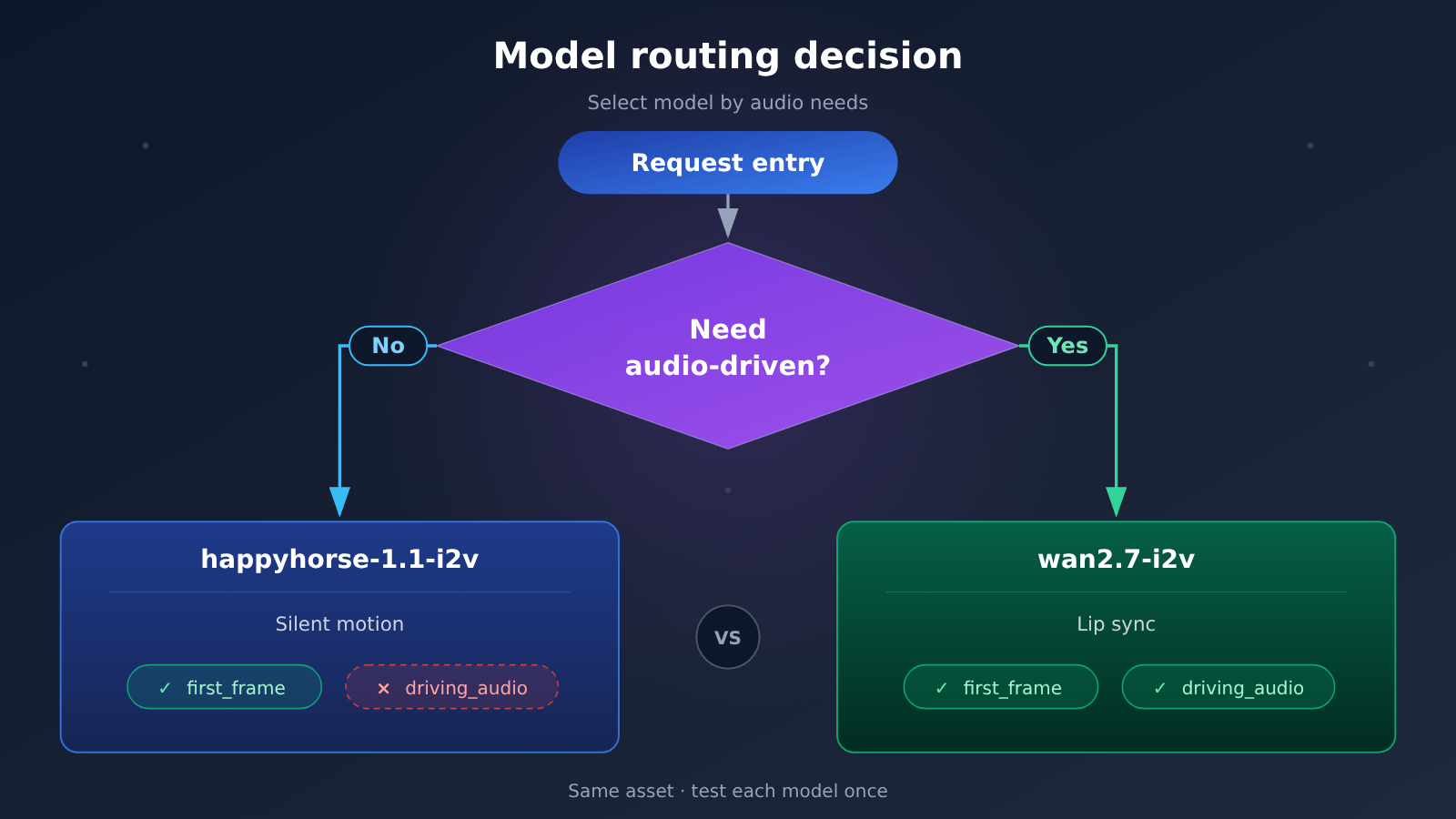
| Current situation | Recommended action |
|---|---|
| Lip sync is a hard requirement | Go straight to wan2.7-i2v and include driving_audio |
| You just need the image to move | Stay with happyhorse-1.1-i2v and pass only first_frame |
You already passed audio to happyhorse-1.1-i2v but it doesn’t take effect |
Stop retrying and switch to wan2.7-i2v—this isn’t a parameter issue |
The whole decision comes down to one question: “Does this video need someone to speak?” If sound is part of the performance, the answer is wan2.7-i2v; if not, happyhorse-1.1-i2v is still the right choice for first-frame image-to-video. Handing audio to the correct model saves more time than endlessly tweaking parameters on the wrong one.
💡 Recommendation: When you’re unsure about the result, don’t get stuck reasoning at the documentation level—run a minimal test case on each model at APIYI apiyi.com and make the decision based on two real outputs.
FAQ About driving_audio
Q1: What is happyhorse-1.1-i2v?
It’s a first-frame image-to-video model that only accepts `first_frame` as input. The docs explicitly state that it doesn’t support `driving_audio`; audio-driven generation is outside its capabilities.
Q2: How do happyhorse-1.1-i2v and wan2.7-i2v differ when it comes to audio-driven generation?
The docs mark audio-driven generation as a capability exclusive to `wan2.7-i2v`, and also state that HappyHorse i2v doesn’t support it. In other words, `wan2.7-i2v` accepts `driving_audio`, while `happyhorse-1.1-i2v` does not. For whether other models support it, check each model’s own docs rather than assuming based on the series name.
Q3: What happens if you pass driving_audio to happyhorse-1.1-i2v?
The docs are direct: it’s not supported, and the model only accepts `first_frame`. Instead of digging into every possible response detail, just send this set of assets to `wan2.7-i2v`—the same image and audio can be put to use right away.
Q4: What are the format and quantity requirements for driving_audio?
Audio must be in `wav` or `mp3` format; the media must contain exactly 1 `first_frame` and at most 1 `driving_audio`. Build requests according to these constraints for the best chance of getting it right on the first try.
Q5: How can I quickly invoke wan2.7-i2v through the API?
We recommend starting with an aggregation platform:
1. Register at APIYI apiyi.com and get an API key; new users get free testing credits.
2. Use `https://api.apiyi.com/v1` as the API base URL.
3. Build the media as “1 `first_frame` plus 1 `driving_audio`” and set the model to `wan2.7-i2v`.
Q6: Can all models in the Wan series accept audio this way?
No, you can’t generalize like that. The docs only assign audio-driven generation to `wan2.7-i2v`. For whether other models support it, refer to their respective docs—don’t guess capabilities from the series name.
Q7: Where can I verify the capability descriptions for these two models?
APIYI documents capability boundaries in its model docs. Go to docs.apiyi.com to check them one by one. Checking the docs before choosing a model is far cheaper than troubleshooting after you’ve hit a snag.
happyhorse-1.1-i2v and driving_audio: Key Takeaways
- Capability boundary:
happyhorse-1.1-i2vonly acceptsfirst_frame;driving_audiosimply isn’t among its inputs. - Dedicated capability: Audio-driven generation belongs to
wan2.7-i2v— that’s the model to reach for when you need lip sync. - Media constraints: Exactly 1
first_frame, at most 1driving_audio, and audio limited towavormp3. - Migration guidance: The docs suggest moving lip-sync or rap-style scenarios from
happyhorse-1.1-i2vtowan2.7-i2v. - How to verify: Run one minimal case with the same set of assets on each model; two results are enough to settle the choice.
Summary
When it comes to “making an image talk,” there are three conclusions worth taking away:
- Input boundary:
happyhorse-1.1-i2vdoesn’t acceptdriving_audio— it only recognizesfirst_frame. That’s the capability boundary spelled out in the docs. - The right destination: Lip sync and audio-driven generation are dedicated features of
wan2.7-i2v. One image plus awavormp3clip and you’re ready to go. - Troubleshooting mindset: When audio doesn’t take effect, check whether the model and the field actually match before retrying over and over.
If you’re unsure which model to pick, run a minimal case on each and then decide. We recommend validating quickly through APIYI apiyi.com — the platform offers free trial credits and unified access to multiple models, so switching models doesn’t mean switching your key.
📚 References
- APIYI Docs · HappyHorse Image-to-Video
- Link:
docs.apiyi.com/api-capabilities/happyhorse/image-to-video.md -
Description: The input definitions for
happyhorse-1.1-i2vand the original source stating thatdriving_audiois not supported. -
APIYI Docs · Wan Image-to-Video
- Link:
docs.apiyi.com/api-capabilities/wan/image-to-video.md -
Description: The quantity and format constraints
wan2.7-i2vplaces onfirst_frameanddriving_audio. -
APIYI Docs · HappyHorse Overview
- Link:
docs.apiyi.com/api-capabilities/happyhorse/overview.md - Description: The overall labeling of audio-driven capabilities for the image-to-video entry.
Author: APIYI Technical Team
Technical Discussion: Feel free to reach out to us on the APIYI website homepage. For more materials, visit the docs.apiyi.com documentation center.


