
Author’s note: Building on the idea presented at the Tencent Global Digital Ecosystem Conference that “individual productivity gains don’t automatically make an organization stronger,” this article breaks down five management practices teams need at the model invocation layer when using AI.
In early November 2026, the Tencent Global Digital Ecosystem Conference dedicated a stage to AI product launches, with more than 40 launches over two days. One observation stood out: Individual productivity gains don’t automatically make an organization stronger. Bridging that gap takes a whole set of organizational capabilities. The comment came from Zhang Xiyao, vice president of Tencent Cloud and head of WorkBuddy enterprise products.
This isn’t another recap of Agent product launches. Instead, we’ll look at a more fundamental question: When AI use expands from individuals to teams, everyone shares access to the same set of model capabilities. Who can invoke models, how much each person uses, and which projects incur the costs all need to be managed at the model invocation layer.
What you’ll take away: A checklist to consider before rolling out AI across your team. It covers model access, keys and permissions, cost allocation, invocation tracing, and sharing what works. It also makes clear what a unified gateway can—and can’t—solve.
Team AI: Key Facts at a Glance
Let’s start with the background. All the information in the table comes from GeekPark’s coverage of the conference.
| Item | Details |
|---|---|
| Event | AI product launch track at the Tencent Global Digital Ecosystem Conference: two days, seven sessions, and more than 40 product launches |
| Key takeaway | Individual productivity gains don’t automatically make an organization stronger; bridging that gap requires a full set of organizational capabilities |
| Enterprise edition upgrades | An open platform connects business systems; enterprise security solutions and an observability center help manage permissions, execution processes, and usage costs; hosted agents can run 24/7 |
| Companion suite | Buddy One offers a unified account, a shared Credit pool, and centralized management, aiming to make AI easier for enterprises to configure and roll out |
| Real-world example | Suning built an organization-wide agent platform spanning 14 departments and 48 collaboration scenarios, with 36 reusable agents |
| Scaling challenge | If each Agent needs its own execution environment, running 100,000 digital employees could mean 100,000 sandboxes |
Three Practical Questions for Teams Using AI
According to the report, enterprises rolling out Agents need to answer three questions: Can Agents connect to existing systems and access the data they need? How should permissions be managed for different employees and Agents? And how can a good method discovered by one person be made available for others to use directly? These questions apply to any team preparing to roll out AI, regardless of whose products it uses.
Notably, the enterprise edition upgrades address “permissions, execution processes, and usage costs” within the same module, while the shared Credit pool is also presented as a way to simplify rollout. This suggests that when AI shifts from a personal tool to a team resource, access control and cost allocation become infrastructure concerns, not afterthoughts.
Why the model invocation layer is the first checkpoint for teams using AI
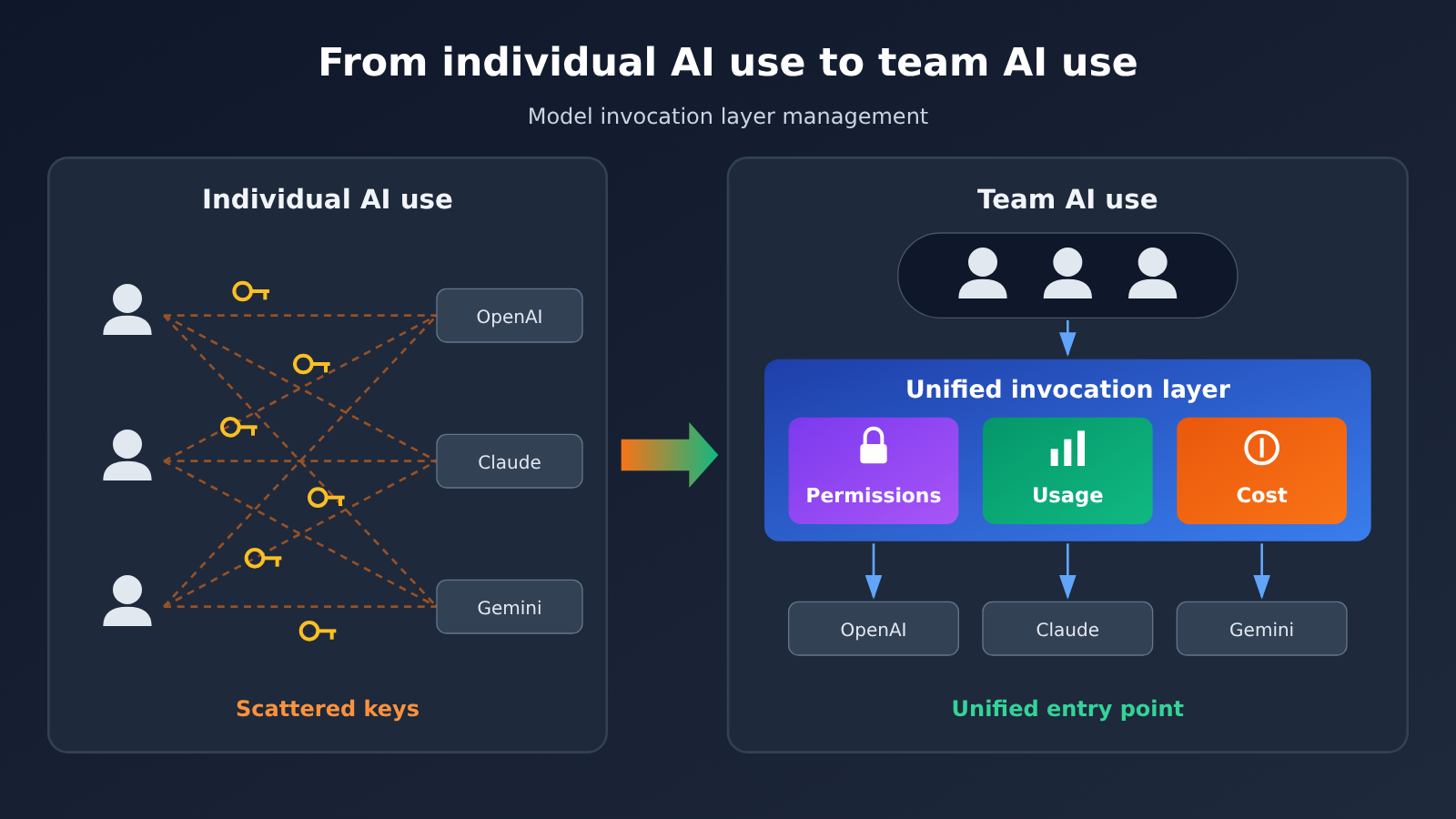
When individuals use AI, they typically sign up for a few model services, add their own payment cards, manage their own API keys, and hard-code API endpoints into their scripts or tools. This works well during exploration, but as the team grows, problems start to pile up.
Keys end up scattered across personal computers and chat histories, and no one can say how many are still in use when someone leaves. At the end of the month, the bill shows only a total, with no clear breakdown by project or person. If a model suddenly fails or raises its prices, every hard-coded endpoint has to be updated individually. None of these problems has anything to do with how capable an Agent is. At their core, they’re caused by a lack of centralized management at the model invocation layer.
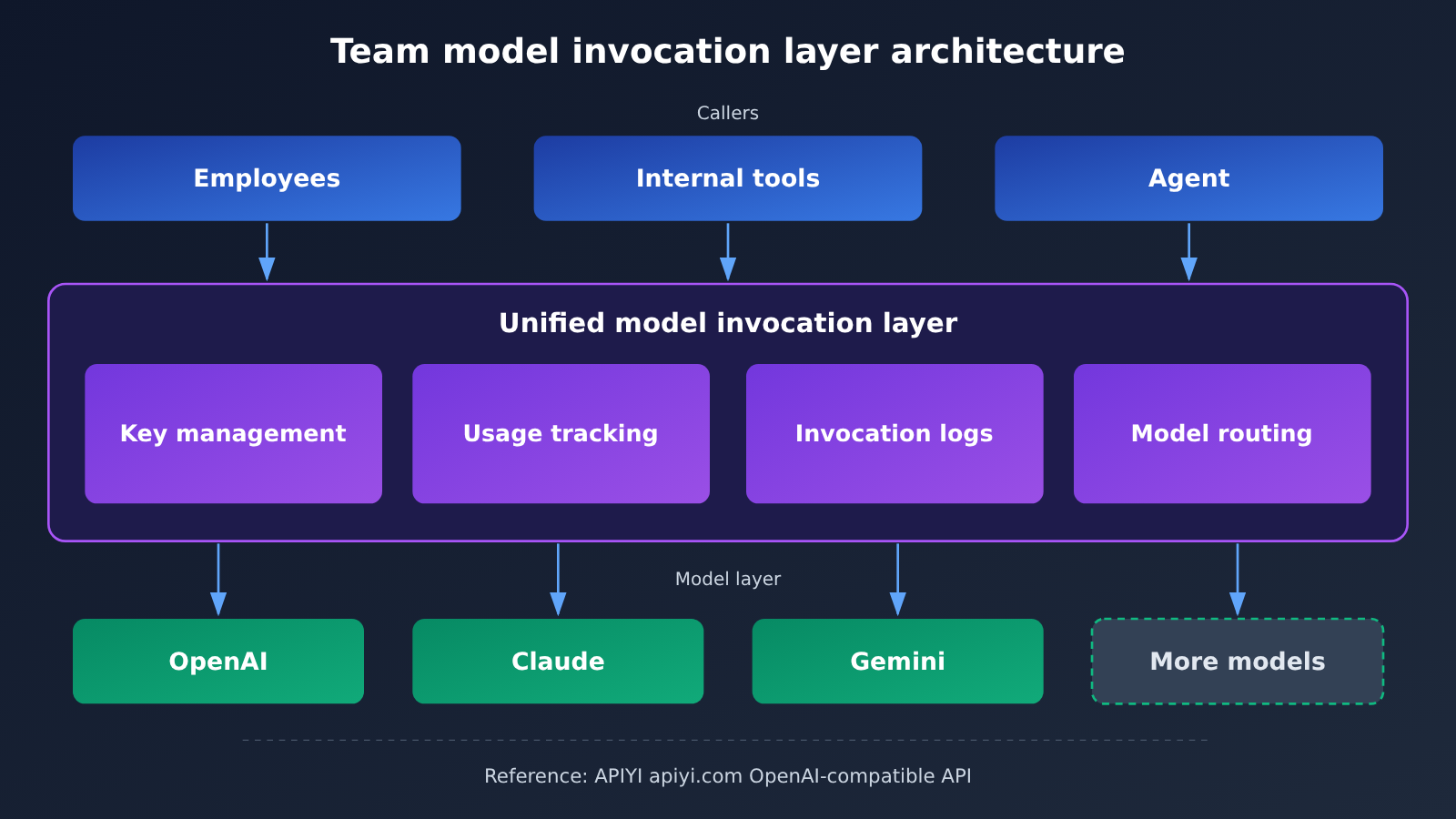
Once calls are consolidated into a single layer, the team has one place to apply consistent rules. “Getting it under control first” doesn’t mean building a complex approval process from day one. It means making sure every call goes through the same entry point, giving you a foundation for managing permissions, usage, and costs.
A 5-Point Model Invocation Checklist Before Your Team Uses AI
This checklist isn’t tied to any vendor. You can use it to evaluate a self-hosted gateway, a cloud provider’s solution, or a third-party aggregation platform.
| Check | Question to answer | Minimum viable approach |
|---|---|---|
| 1. Model access | Which models does the team need? How much code needs to change when switching models? | Use a consistent OpenAI-compatible interface and make the model name configurable |
| 2. API keys and permissions | Who holds the keys? Can they be revoked quickly if someone leaves or a key is leaked? | Issue keys by project or service, and prohibit personal keys in production code |
| 3. Cost allocation | How much does each project and team spend? | At minimum, track usage by key or project and provide an itemized monthly bill |
| 4. Invocation tracing | When something goes wrong, can you identify the invocation and model involved? | Log the request time, model, token count, and caller ID |
| 5. Sharing what works | Can others directly reuse effective prompts and workflows? | Turn validated prompts and parameters into shared templates or internal services |
Checks 1–2: Model Access and API Key Permissions
The key to model access is interchangeability. Different models excel at different tasks, and their prices and reliability can change. If your application code depends on a single compatible interface and the model name lives in a configuration file, switching models is just a configuration change—no redevelopment needed.
The key to API key permissions is revocability. A good rule is one key per service and one budget per project, rather than sharing a single super key across the whole team. If a key leaks, the impact is limited to that service, and revoking it won’t affect other applications.
Checks 3–5: Cost Allocation, Invocation Tracing, and Sharing What Works
Cost allocation determines whether business stakeholders can see the value of AI spending. If you can only see the total bill, you can’t tell which use cases are delivering value, and it’s harder to request a budget from management. Invocation tracing is essential for troubleshooting: when a user reports that “the AI gave a wrong answer,” you need to be able to find which model was used and what input it received.
Sharing what works reflects the approach in the Suning case: the team turned the new product launch process into a template and added working documents to a knowledge base. Preparation time dropped from 3 working days to 4 hours, and the method was preserved for the next launch. At the model invocation layer, this means packaging validated prompts, model choices, and parameter combinations instead of leaving them in one person’s head.
A Unified AI Invocation Example for Teams
Here’s a minimal example that calls a model through an OpenAI-compatible API. The model name is read from an environment variable, so your team can switch models in one place.
import os
import openai

client = openai.OpenAI(
    api_key=os.getenv("TEAM_PROJECT_KEY"),      # Key distributed per project
    base_url="https://api.apiyi.com/v1"          # APIYI unified API
)

resp = client.chat.completions.create(
    model=os.getenv("DEFAULT_MODEL", "gpt-4o-mini"),
    messages=[{"role": "user", "content": "总结本周项目进展"}]
)
print(resp.choices[0].message.content)
See the team wrapper with invocation logging
import os
import time
import json
import openai

client = openai.OpenAI(
    api_key=os.getenv("TEAM_PROJECT_KEY"),
    base_url="https://api.apiyi.com/v1"  # Access models from multiple providers with one key
)

def team_chat(prompt: str, project: str, caller: str,
              model: str = None, max_tokens: int = 1000) -> str:
    """Unified team invocation entry point: log the project, caller, model, and token usage"""
    model = model or os.getenv("DEFAULT_MODEL", "gpt-4o-mini")
    start = time.time()
    resp = client.chat.completions.create(
        model=model,
        messages=[{"role": "user", "content": prompt}],
        max_tokens=max_tokens,
    )
    usage = resp.usage
    record = {
        "ts": int(start),
        "project": project,
        "caller": caller,
        "model": model,
        "prompt_tokens": usage.prompt_tokens,
        "completion_tokens": usage.completion_tokens,
        "latency_ms": int((time.time() - start) * 1000),
    }
    # Write to a local log for later import into reports and cost tracking by project
    with open("ai_usage.log", "a", encoding="utf-8") as f:
        f.write(json.dumps(record, ensure_ascii=False) + "\n")
    return resp.choices[0].message.content

print(team_chat("生成一份周报大纲", project="marketing", caller="alice"))
This wrapper adds two dimensions on the application side: “project” and “caller.” Even if the platform already provides usage statistics, keeping your own invocation records is valuable because only your system knows which business use case each call belongs to.
🚀 Quick start: If your team is still at the “one set of keys per person” stage, you can start by using a single API key through APIYI at apiyi.com to access mainstream models such as OpenAI, Claude, and Gemini. The platform offers an OpenAI-compatible API and usage-based pricing, with free testing credits for new users—handy for getting a unified invocation entry point up and running.
What a Unified Model Invocation Layer Can and Can’t Solve
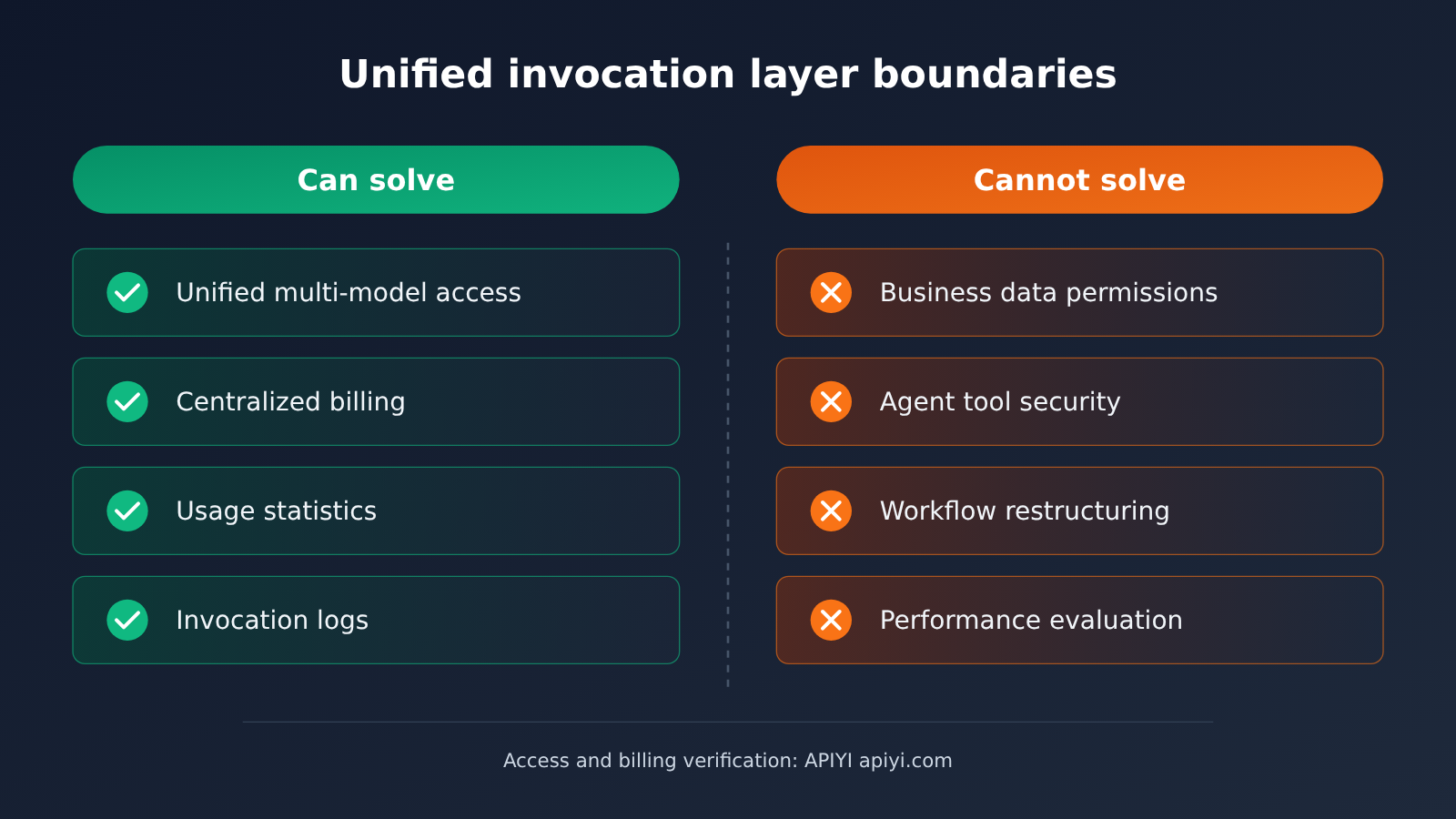
Many teams imagine a unified gateway as “the complete answer to AI governance.” In reality, it handles only the model invocation layer. The table below makes that boundary clear.
| Dimension | What a unified invocation layer can do | What other components still need to handle |
|---|---|---|
| Model access | Call models from multiple providers through one interface, making it easier to switch | Determine which model fits each business use case |
| Cost | Centralize balances and usage-based billing for easier reporting | Connect costs to business outcomes and evaluate ROI |
| Permissions | Control who can invoke models | Control what data an Agent can read and what actions it can take |
| Tracking | Log the model, tokens, and time for each invocation | Trace the Agent’s complete execution chain and the quality of its results |
| Reuse | Provide a stable entry point for model invocation | Build reusable prompts, workflow templates, and knowledge bases |
This also explains why Tencent announced a security solution, an observability center, Agent Runtime, and knowledge products at the same conference. As the report notes, Agents can independently call tools, access data, and even execute code. That makes it important to limit what they can do, protect sensitive information, and trace the cause when something goes wrong. Those are issues for the Agent runtime and data layers, beyond the reach of a model gateway.
The practical order is: first unify the model invocation layer so access and spending are visible; then add data permissions, Agent security, and workflow improvements on top. Without visibility into the underlying layer, there’s no foundation for governance at the layers above.
How AI Affects Teams
For Technical Leads
- Plan for a unified integration layer: When a new project connects to a Large Language Model, don’t hard-code a provider’s official endpoint. Route requests through the team’s agreed-upon compatible interface.
- Treat API key management as an operational responsibility: Manage API keys like database passwords, with records of issuance, rotation, and revocation.
- Design log fields early: At a minimum, you should be able to link the project, caller, model, and token usage. Otherwise, reconciling costs at the end of the month will be difficult.
For Business Decision-Makers and Procurement
When teams purchase AI capabilities, the question shifts from “Which model is the most powerful?” to “Can we manage it effectively?” The table below outlines priorities at each stage of adoption.
| Team Stage | Typical Situation | Model Invocation Layer Priorities |
|---|---|---|
| Individual exploration | A few people pay to experiment, each with their own keys | Choose a unified interface and consolidate scattered accounts |
| Team pilot | One or two projects start to depend on AI | Issue keys by project and establish basic usage tracking |
| Department-wide adoption | Multiple business lines invoke models at the same time | Attribute costs to projects and make invocation logs searchable |
| Organization-wide deployment | Agents enter core business workflows | Add data access controls, agent security, and performance evaluation |
Procurement teams should also check whether payment and invoicing processes meet company finance requirements, as well as the platform’s permission granularity, log fields, retention periods, and export options. These details vary widely between platforms, so confirm each one with the provider before signing and rely on its official documentation.
For the Industry
At the conference, Buddy One introduced a shared Credit pool and centralized management, suggesting that treating model credits as a shared team resource is becoming standard practice in enterprise AI products. Whether it’s a major vendor’s suite or an independent model aggregation platform, usage visibility and cost attribution are likely to become baseline requirements for enterprise customers, not optional extras.
💡 Choosing a model: Before rolling AI out broadly, run a small pilot using real business data. You can use APIYI apiyi.com to invoke models from multiple providers, compare their results and token consumption on the same task, and then choose your team’s default model.
Frequently Asked Questions
Q1: What is “model invocation layer governance” for teams using AI?
It means centrally managing how a team accesses Large Language Models: which models it uses, who holds the keys, how much each project uses, and whether each invocation can be traced. It doesn’t handle an Agent’s business logic. Instead, it ensures that all invocations go through a manageable entry point.
Q2: How does a unified model invocation layer differ from an enterprise Agent platform?
An enterprise Agent platform focuses on how Agents connect to business systems, access data, collaborate, and run over extended periods. The model invocation layer focuses only on the step of invoking a model. The former has a broader scope, but it still depends on stable, controllable access to the underlying models. They’re complementary layers, not replacements for each other.
Q3: Do small teams need to do this now?
Yes, but a lightweight approach is enough. The two most useful first steps are to unify the model invocation interface and keep personal keys out of production code. Both are inexpensive to implement, and fixing these issues after the team grows is much more troublesome.
Q4: How can a team quickly set up a unified model invocation entry point?
One simple approach is to use an OpenAI-compatible aggregation platform. For example, register at APIYI apiyi.com to get an API key, then replace the `base_url` in your code with `https://api.apiyi.com/v1`. You can then use the same code to invoke models from OpenAI, Claude, Gemini, and others, and use the wrapper function in this article to track usage by project.
Q5: Can an aggregation platform replace a team’s permission system?
Not entirely. A platform can manage model access and billing, but the granularity of member- and project-level permissions, usage limits, and log retention policies varies by platform, so check the platform’s documentation. The enterprise’s own systems must handle business data permissions and Agent operation permissions. You can check the specific capabilities in the APIYI apiyi.com documentation center before planning.
Key Takeaways for a Team AI Model Invocation Layer
- Individual productivity doesn’t automatically make the organization stronger: When teams share access to models, management issues often surface before model limitations do.
- Unify access before tackling governance: Permissions and cost rules need a common layer through which all model invocations pass.
- Issue keys by project: Give each service its own key so it can be revoked quickly if it’s leaked or someone leaves.
- Track costs by project: Add project and caller fields on the application side so you can reconcile costs at the end of the month.
- Know the gateway’s limits: Data permissions, Agent security, and process changes need to be handled elsewhere.
- Start small: Use APIYI apiyi.com to access multiple models with one key and get a pilot running.
Summary
The discussion about enterprise Agents at the Tencent conference wasn’t really about how powerful any one Agent is. It was about how organizations can put those capabilities to work. For leaders looking to bring AI to their teams, the model invocation layer is one of the easiest places to start—and one of the easiest to overlook:
- Make model integrations replaceable: Use a common compatible interface and make the model name configurable.
- Make permissions and costs visible: Issue keys and track usage by project to avoid an unclear bill.
- Make experience reusable: Turn tested prompts and workflows into shared team assets.
The hype will pass, but this checklist applies to teams of any size rolling out AI. Start with one or two business use cases, get the invocation entry point and usage tracking working, then expand gradually. Try APIYI apiyi.com to quickly test unified access to multiple models; the platform offers free test credits and pay-as-you-go pricing.
📚 References
- GeekPark – Why Can One Person Use AI Well, but a Whole Company Can’t?: Coverage of enterprise Agent announcements at the Tencent Global Digital Ecosystem Summit
- Link:
geekpark.net/news/373541 -
Notes: Covers the WorkBuddy Enterprise upgrade, Buddy One, the Suning case study, and Agent Runtime
-
OpenAI API Documentation: Documentation for the Chat Completions API and the usage field
- Link:
platform.openai.com/docs - Notes: Explains the request structure for compatible APIs and how tokens are counted
Author: APIYI Technical Team
Technical discussions: Contact us through the APIYI homepage at apiyi.com. For more integration resources, visit the documentation center at docs.apiyi.com.


