

Author’s note: This piece breaks down the five reasons DeepSeek Harness (DSH) is getting so much attention — from the perspective of Agent Harness architecture and its plugin ecosystem — and then walks through the steps for connecting a model API, plus some advice on choosing one.
Lately, developer communities have been talking a lot about DeepSeek Harness (DSH for short) and its plugin ecosystem. Some people compare it with office-oriented agents like Tencent’s WorkBuddy, while others wonder what role the core figure the community calls “Liang Sheng” (梁圣) played in all this. The discussion is loud, but not much of it actually explains why it’s good.
This isn’t a bandwagon praise piece. Public material on DSH is still scattered, so this article won’t invent version numbers, plugin counts, or release dates that can’t be verified. Instead, we’ll start from the general architecture of an Agent Harness, explain why the plugin ecosystem is the part most worth paying attention to, and show developers how to try it out.
Key takeaway: By the end of this article, you’ll understand where DeepSeek Harness fits and why its plugin ecosystem matters, know how it differs from an all-in-one office agent, and be able to connect models through platforms like APIYI that are compatible with both OpenAI and Anthropic API formats.
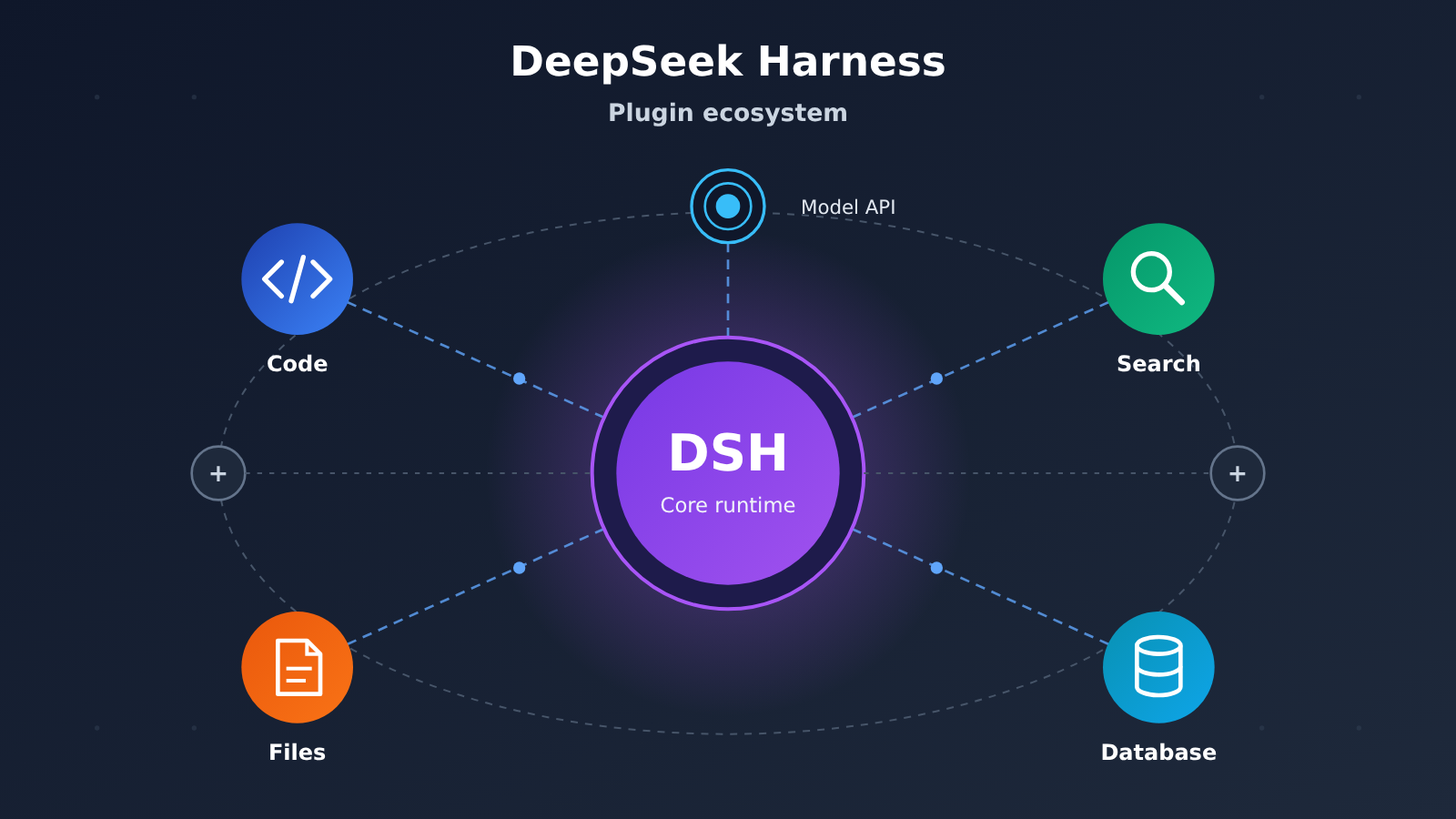
DeepSeek Harness (DSH): The Key Points
Here’s a quick table summing up the main reasons DSH is getting attention. These observations come from the general design patterns behind tools like Agent Harness, plus points that keep coming up in community discussion.
| Highlight | What it means | Value for developers |
|---|---|---|
| Harness positioning | The runtime framework wrapped around a Large Language Model, handling tool calls, context, and task orchestration | You don’t have to build an agent framework from scratch |
| Plugin ecosystem | Capabilities expand as plugins that the community can contribute and reuse | Combine capabilities as needed, with less duplicated work |
| Model affinity | Tuned to the reasoning and tool-calling traits of the DeepSeek model family | More efficient model invocation for the same task |
| Open and hackable | Developers can audit, modify, and build on top of it | Makes self-hosting and customization easier |
| Controllable cost | Pairs with cost-effective model APIs | A good fit for long-running tasks and high-frequency calls |
What “Harness” Actually Means in DeepSeek Harness
A harness originally meant the gear you strap onto a draft animal. In AI engineering, it refers to the runtime layer wrapped around a model that lets the model actually get work done. On its own, a model can only answer questions. Add a harness, and it can read files, call tools, run commands, remember context, and break a big task into multiple steps.
So when people talk about DeepSeek Harness, the interesting part isn’t “yet another chat interface” — it’s the way it organizes model capabilities, tool capabilities, and task flow together. How good a framework like this turns out to be depends heavily on whether the tool layer is open, which is to say, whether the plugin ecosystem is active.
Why the DSH Plugin Ecosystem Is the Center of Attention
No matter how many features a harness ships with, it can’t cover every team’s needs. The plugin mechanism hands “extending capabilities” over to the community: someone writes a database query plugin, someone writes a code review plugin, someone writes a connector for their company’s internal systems. Users just install what they need and turn a general-purpose agent into a tool that fits their own scenario.
Community discussion often mentions that DSH’s popularity has to do with core contributors pushing forward the plugin spec, examples, and documentation. A figure the internet calls “Liang Sheng” (梁圣) also comes up a lot. That said, verifiable first-hand material on the specific contributions is thin right now. We’d suggest going by the commit history and announcements in the official repository rather than trusting second-hand retellings.
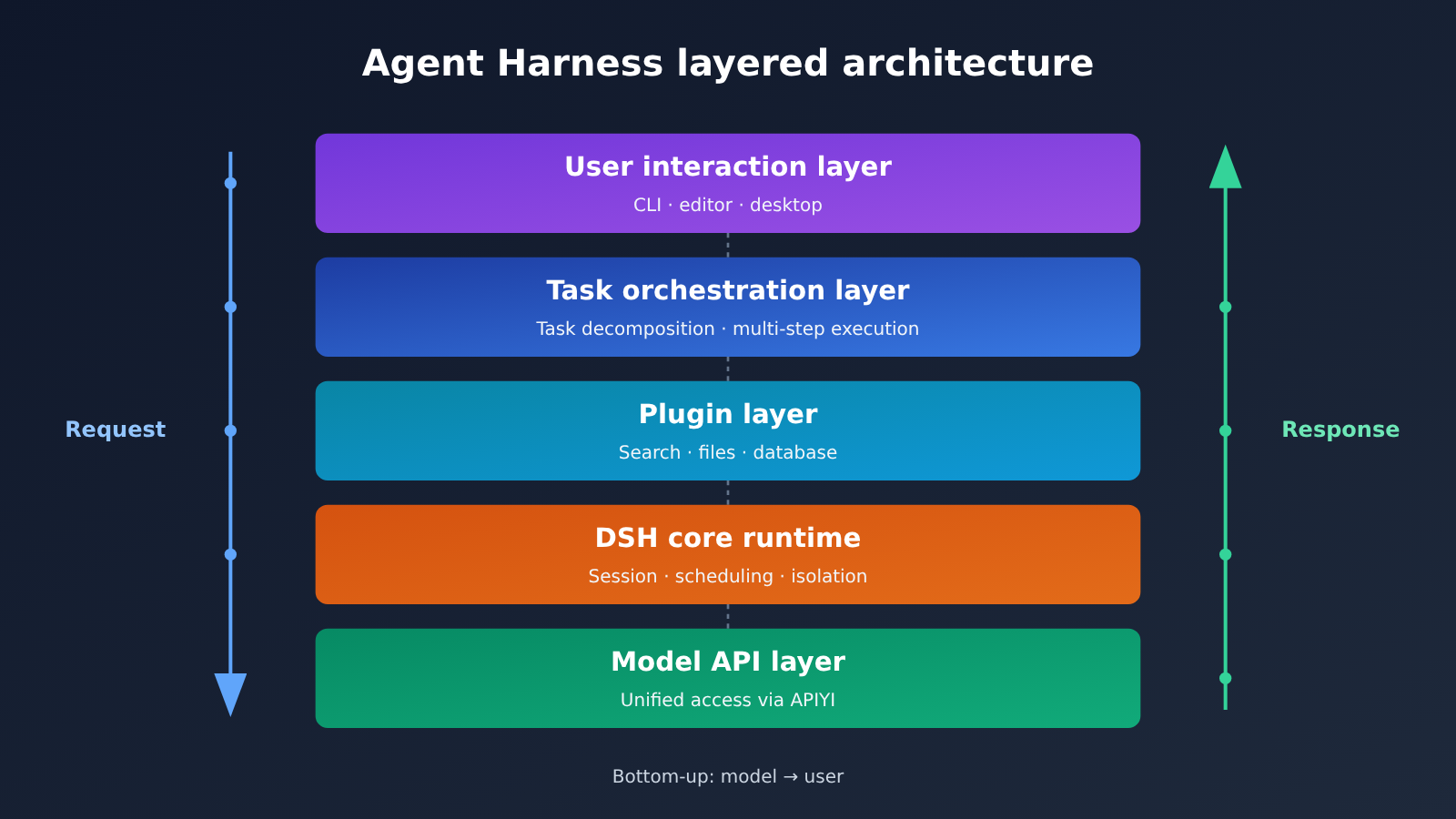
The diagram above shows the typical layers of an Agent Harness. The model API layer at the bottom can go straight to the official endpoints, or it can be accessed through a unified interface platform like APIYI (apiyi.com), which makes it easy to switch between and compare multiple models.
DeepSeek Harness Architecture and Plugin Layering Explained
To judge whether DSH’s plugin ecosystem is worth anything, you first need to understand which architectural layer the plugins sit at and what they’re responsible for. The table below breaks down each layer’s responsibilities using the structure of a general Agent Harness.
| Architectural Layer | Main Responsibilities | Relationship to Plugins |
|---|---|---|
| Model Layer | Understand instructions, reason, generate tool invocation requests | Tool descriptions provided by plugins get injected into the model |
| Runtime Layer | Manage sessions, schedule tool calls, handle exceptions | Responsible for loading, isolating, and invoking plugins |
| Plugin Layer | Encapsulate concrete capabilities like search, file read/write, API calls | The main body of the ecosystem |
| Memory Layer | Store context, project information, historical results | Some plugins can extend memory storage |
| Interaction Layer | Command line, editor, or desktop interface | Plugin results are displayed here |
Common Types of DSH Plugins
Looking at common practices in Agent tooling, plugins broadly fall into the following categories. Each solves a different problem, so teams can prioritize whichever one addresses their own pain points when choosing.
- Development plugins: code search, test execution, commit message generation, code review — good for day-to-day work in engineering teams.
- Data plugins: database queries, spreadsheet analysis, log search — good for data analysis and ops scenarios.
- Knowledge plugins: document retrieval, web search, knowledge base Q&A — good for tasks that need to cite sources.
- Office plugins: calendar, email, document collaboration integrations — good for plugging the Agent into everyday workflows.
- Connection plugins: integrations with internal enterprise systems or third-party services, usually requiring teams to build them themselves.
Three Layers of Value from the Plugin Ecosystem
The first layer of value is reuse. A well-written plugin can be used by hundreds or thousands of teams, each saving the time of building it again. The more plugins there are, the easier it is for new users to find ready-made solutions, and the more willing they are to join — creating a virtuous cycle.
The second layer of value is decoupling. The core runtime stays lean and stable, while new capabilities iterate through plugins, so you don’t have to upgrade the whole framework every time. When problems arise, they’re easier to pinpoint too — whether it’s a plugin issue or a core issue is immediately clear.
The third layer of value is control. An open plugin mechanism means enterprises can audit each plugin’s permissions and behavior, and enable only the parts they trust. This matters especially for teams with security and compliance requirements, and it’s also why many people favor the open ecosystem route.
DeepSeek Harness Quick Start
Here’s a general approach to getting started. Because DSH’s exact install commands and config file formats can change between versions, treat anything command-specific as “check the latest docs in the official repo.” What follows focuses on what each step actually needs to accomplish.
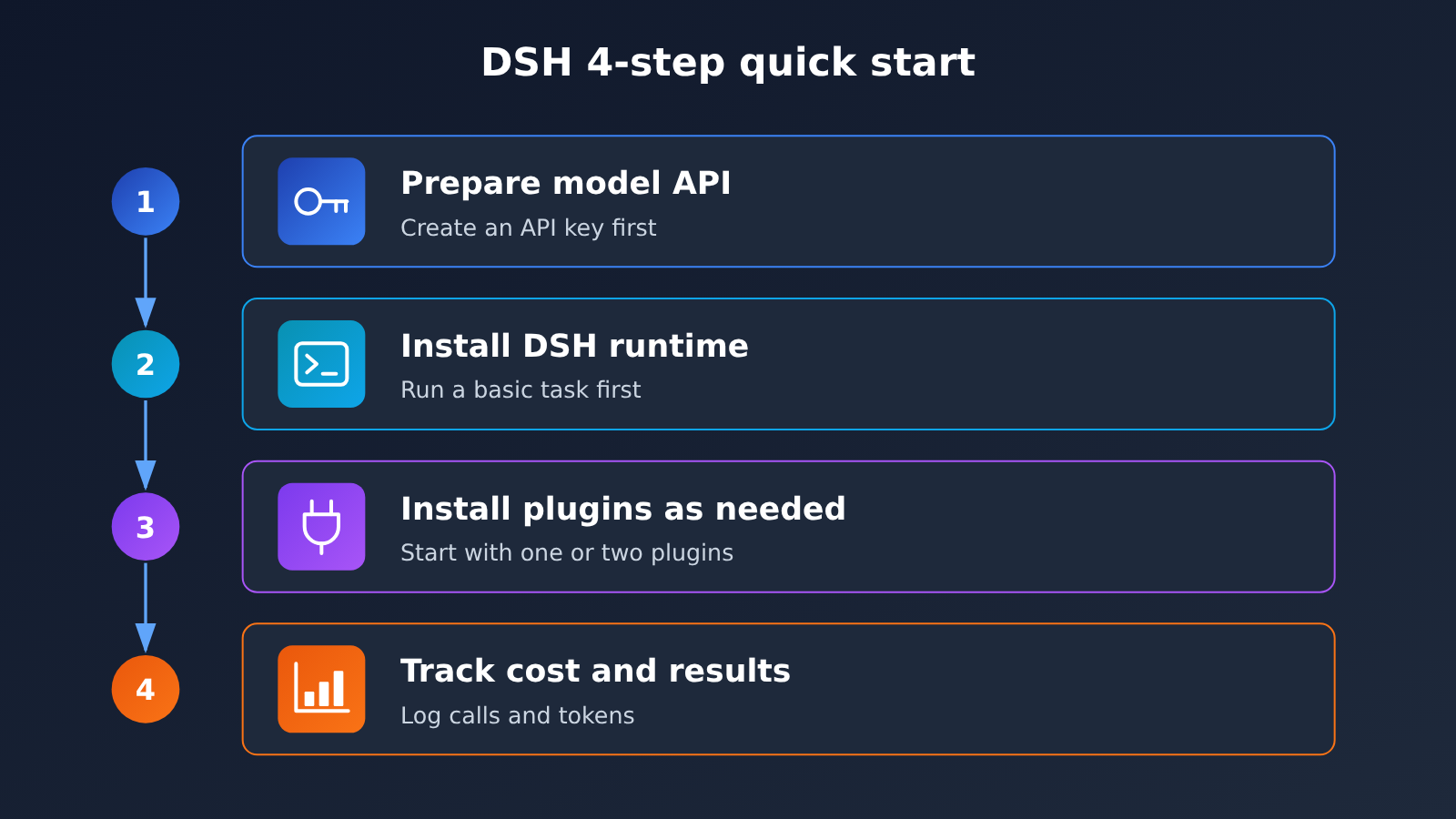
Step 1: Get a model API ready
Harness doesn’t ship with a model on its own — it has to connect to a model API. You can use DeepSeek’s official endpoint, or an aggregator platform like APIYI. APIYI offers model invocation for the DeepSeek family used in this article and is compatible with both the OpenAI and Anthropic API formats, so most agent frameworks can plug into it directly.
If your framework speaks the OpenAI-compatible protocol, you’ll typically configure three parameters: base_url, api_key, and model. The table below covers what the common settings mean.
| Setting | Meaning | Suggested value |
|---|---|---|
base_url |
Model API endpoint address | With APIYI, use https://api.apiyi.com/v1 — confirm against the APIYI docs |
api_key |
Call credentials | Create it in the platform console; never commit it to a public repo |
model |
Model name | Use the exact name from the APIYI model list |
| API protocol | OpenAI or Anthropic format | Pick whichever DSH supports — APIYI handles both |
| Timeout & retries | Stability settings for long tasks | Agent tasks run long, so loosen the timeout a bit |
Step 2: Install DSH and do the basic config
After installing the DSH runtime per the official instructions, write the parameters from the previous step into your config file or environment variables. Prefer environment variables for api_key so the key doesn’t leak along with your project files. Once configured, verify connectivity with a simple task — for example, ask it to summarize the docs in the current directory.
If connectivity fails, check three things: whether base_url includes the correct path, whether the model name matches the platform’s list, and whether the key has balance or permissions. Those three cover most integration problems.
Step 3: Install plugins as needed
Don’t install a pile of plugins right out of the gate. The more plugins you have, the longer the tool descriptions injected into the model get — that burns extra tokens and can make the model hesitant when picking a tool. Start with one or two plugins closest to your actual workflow, get them working, then expand gradually.
Before installing a third-party plugin, take a look at the permissions it requests. For anything that can execute commands, read/write files, or access the network, it’s best to run it in a test environment first and confirm it behaves as expected before using it on real projects.
Step 4: Watch cost and results
Agent tasks are characterized by many invocation rounds and long contexts, so they cost considerably more than ordinary chat. During the trial phase, log the number of calls and token consumption per task, then decide which model to use day to day. For billing details such as input/output unit prices and cache-hit pricing, go by the actual figures published on the APIYI pricing page at https://docs.apiyi.com/models — this article doesn’t quote specific numbers.
🚀 Quick-start tip: If you want to first validate how DSH performs with different models, create a key at APIYI apiyi.com and switch model names using the same config to compare. Integration details are in the APIYI docs center at https://docs.apiyi.com; pricing is based on https://docs.apiyi.com/models.
DeepSeek Harness vs. Tencent WorkBuddy
A lot of people put DSH and Tencent WorkBuddy side by side. Strictly speaking, they don’t follow the same path: DSH leans toward an open framework developers can reshape, while WorkBuddy leans toward an all-in-one product built for office scenarios. The table below compares them at the level of approach, and avoids specific parameters we can’t verify.
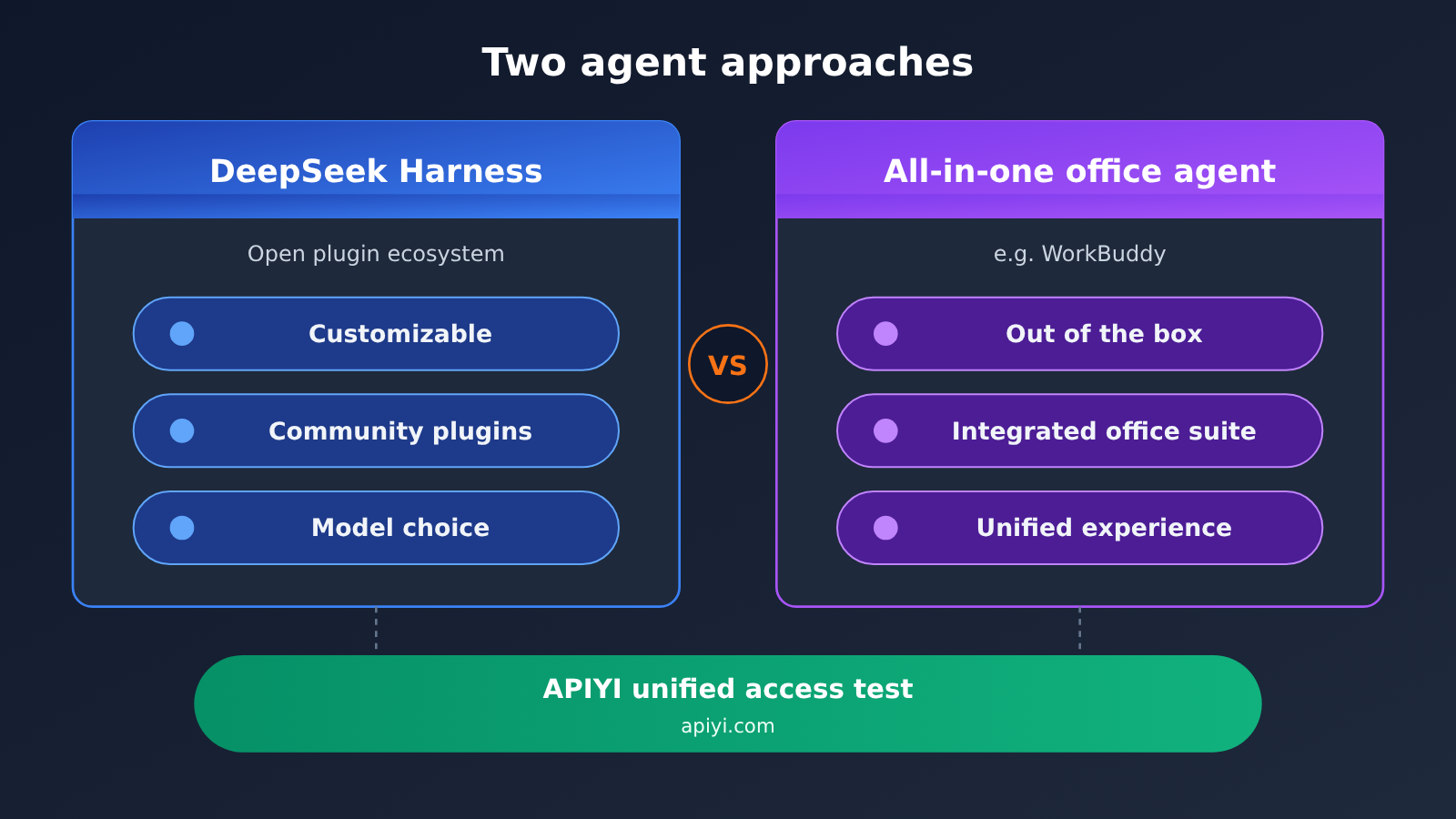
| Dimension | DeepSeek Harness (DSH) | All-in-one office agent (e.g., WorkBuddy) |
|---|---|---|
| Product form | Open framework, developer-oriented | Finished application, office-user-oriented |
| Capability extension | Community plugins, freely combined | Mostly capabilities provided officially |
| Model selection | Configure your own model API | Usually provided uniformly by the vendor |
| Learning curve | Requires some configuration ability | Out of the box, low barrier |
| Customization room | Large, supports secondary development | Relatively limited |
| Model access | Official API, compatible platforms like APIYI apiyi.com | Based on what’s built into the product |
Reading the comparison
WorkBuddy’s approach: All-in-one office agents have a clear edge in out-of-box experience and office ecosystem integration — ordinary users can basically use them without any configuration. But their capability boundaries are mostly decided by the vendor, so when you want to hook into internal systems or swap models, your freedom is relatively limited.
DSH’s approach: DeepSeek Harness has a higher barrier — you configure your own models, pick your plugins, and manage permissions. What you get in return is more room to customize: teams can embed it deeply into R&D and data workflows. For teams with technical chops and fairly unique needs, an open plugin ecosystem often pays off more in the long run.
💡 How to choose: Non-technical users who just want things to be easy can start with an all-in-one product; R&D teams that need customization and model choice are better served by an open framework like DSH. As for differences in model-level results, it’s worth running your actual tasks through a unified interface on APIYI apiyi.com before making a call.
Frequently Asked Questions (FAQ)
Q1: What is DeepSeek Harness (DSH)?
DeepSeek Harness is an agent runtime framework built around Large Language Models. It handles tool invocation, context management, and task orchestration, and extends its capabilities through a plugin mechanism. Its core value isn’t the conversation itself — it’s letting the model actually carry out multi-step tasks.
Q2: How is DSH’s plugin ecosystem different from ordinary tool invocation?
With ordinary tool invocation, developers typically hard-code a handful of functions, and the moment they switch to another project they have to rewrite them. A plugin ecosystem packages capabilities into distributable, reusable units that the community can share. The former solves a single project’s problem; the latter eliminates duplicated effort across the entire developer community.
Q3: Where can I check DSH’s latest version and release date?
Right now there’s a lot of secondhand information about DSH online, with conflicting version numbers and dates. We recommend going straight to the official code repository’s release records and official announcements. This article doesn’t cite dates or version information that can’t be verified.
Q4: What application scenarios is DeepSeek Harness best suited for?
It’s mainly suited to the following scenarios:
– **R&D assistance**: code search, batch refactoring, test execution, and result analysis.
– **Data processing**: log triage, database queries, preliminary report analysis.
– **Internal system integration**: connecting the agent to internal tools such as ticketing systems and knowledge bases through your own plugins.
Q5: How do I connect a model API to DSH?
The recommended workflow:
1. Sign up at APIYI apiyi.com and create an API key.
2. In the DSH configuration, fill in `base_url`, `api_key`, and `model`. Use the APIYI documentation at https://docs.apiyi.com as the source of truth for the endpoint URL and model names.
3. Verify connectivity with a simple task, then install plugins step by step.
APIYI is compatible with both OpenAI and Anthropic API formats, making it easy to switch between and compare different models.
Q6: How do I estimate costs when using DSH?
Agent tasks involve many invocation rounds and long contexts, so cost depends mainly on the model’s unit price, token consumption, and cache hit rate. For actual input/output pricing and cache rates, refer to the live data on the APIYI pricing page at https://docs.apiyi.com/models. During the trial phase, it’s a good idea to log the consumption of each task before deciding which model to use day to day.
Q7: What are the known limitations of DeepSeek Harness?
Objectively speaking, there are three main ones:
– **Learning curve**: you have to configure the model and plugins yourself, which isn’t very friendly to non-technical users.
– **Uneven plugin quality**: community plugins vary in quality, so you need to review permissions and stability yourself.
– **Scattered documentation**: public materials are currently fragmented, and some claims are hard to verify, so official channels should be your reference.
DeepSeek Harness Key Takeaways
- What Harness means: DSH is the runtime framework wrapped around the model, responsible for actually getting the model to execute tasks.
- The ecosystem is the core: The plugin mechanism makes capabilities reusable and composable — that’s the main reason it’s getting attention.
- Open and controllable: Developers can audit plugin permissions, which suits teams with security and compliance requirements.
- Different approach: Compared with all-in-one office agents, DSH has a higher barrier to entry but offers more room for customization.
- Few but focused plugins: Start with one or two plugins to avoid overly long tool descriptions that hurt performance and drive up costs.
- How to get started: Connect to models through the APIYI-compatible interface; pricing is based on the official pricing page.
Summary
The key points behind the attention DeepSeek Harness (DSH) is getting:
- Architectural value: It solves the “how does the model actually get work done” problem, rather than just providing conversation.
- Ecosystem value: The plugin mechanism lets the community share capabilities, creating a positive loop of reuse and extension.
- Selection value: For R&D teams, the combination of an open framework plus your choice of model is more flexible and makes cost control easier.
If you’re evaluating agent frameworks, I’d suggest first getting DSH running with one small, real task, then deciding based on results and consumption whether to go deeper. Model access can be handled through APIYI at apiyi.com; the platform is compatible with OpenAI and Anthropic interface formats. For integration docs, see https://docs.apiyi.com, and billing data is based on https://docs.apiyi.com/models.
📚 References
- APIYI Documentation Center: API format,
base_urlconfiguration, and model access instructions - Link:
docs.apiyi.com -
Note: The main reference for configuring the model API when integrating DSH
-
APIYI Models & Pricing page: Model list, input/output unit prices, and cache billing rules
- Link:
docs.apiyi.com/models -
Note: All pricing information in this article is based on this page
-
DeepSeek Official API Docs: Capabilities and parameter descriptions for the DeepSeek series models
- Link:
api-docs.deepseek.com - Note: First-hand material for understanding model tool calling and reasoning features
Author: APIYI Technical Team
Technical Discussion: Feel free to reach out to us on the APIYI apiyi.com homepage to share your Agent framework integration experience. For more resources, visit the docs.apiyi.com documentation center


