
OpenAI quietly opened a limited preview window for the GPT-5.6 family on June 26, 2026. The part engineers are most likely to miss, but should care about most, is the flagship model Sol’s newly added max reasoning and ultra mode. The former extends how long a single reasoning chain can think, while the latter gives Sol the ability to break down tasks, spawn sub-agents, run them in parallel, and then merge the results. In other words, AI isn’t just answering questions anymore — it’s starting to manage complex workflows on its own. In this article, I’ll take a deep look at what GPT-5.6 Sol Ultra mode actually solves from three angles: technical implementation, benchmark data, and long-term impact.
Core value: By the end of this article, you’ll understand the technical differences between max reasoning and ultra mode, make sense of the Terminal-Bench 2.1 benchmark results, and have a clear view of how multi-agent collaboration can be applied in real projects.
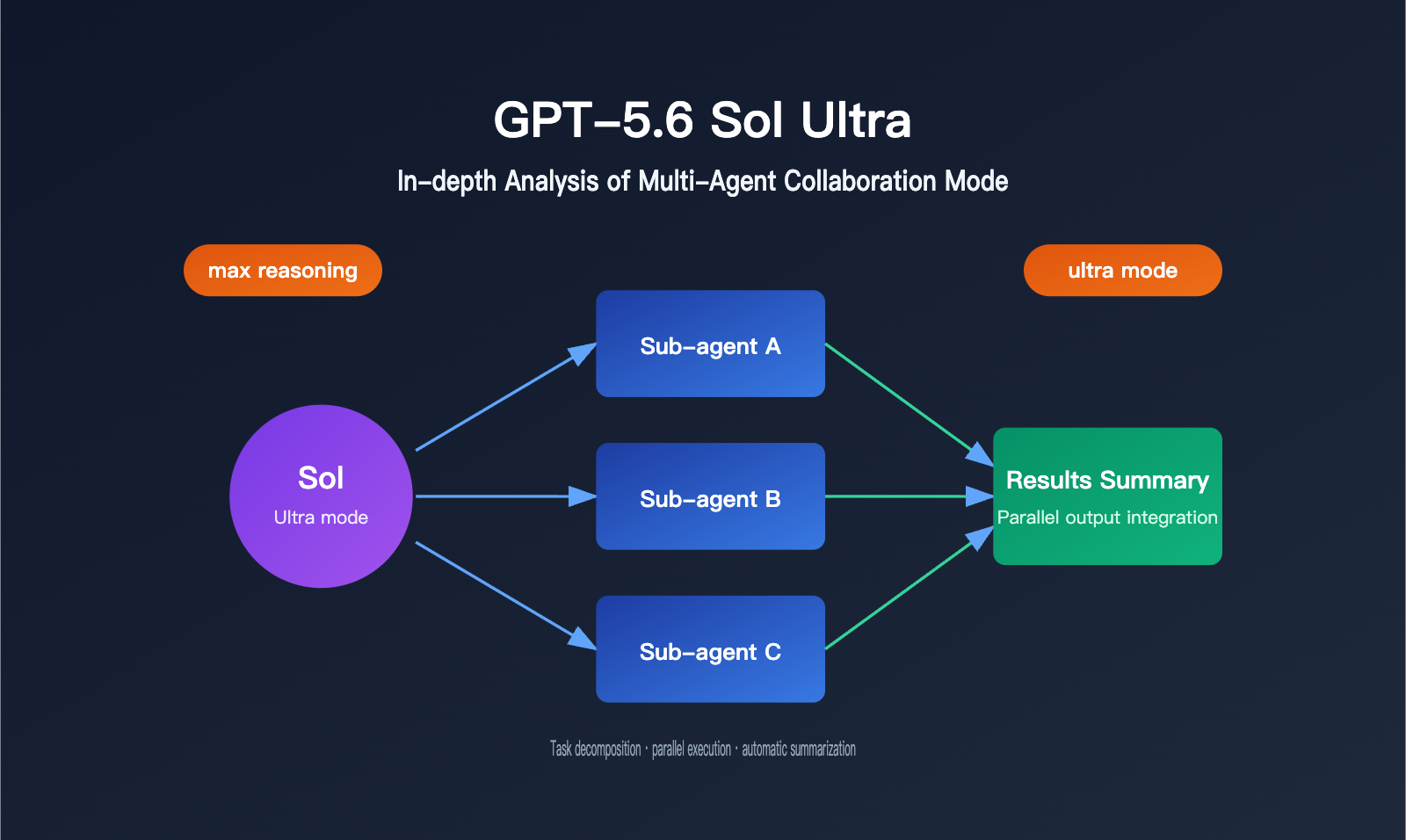
GPT-5.6 Sol Ultra Core Features: From Deep Reasoning to Multi-Agent Collaboration
Sol is the only tier in the GPT-5.6 family that unlocks both max reasoning and ultra mode, and it’s positioned for highly demanding tasks like complex coding and security research. These two capabilities solve completely different problems: max reasoning lets the model spend more time thinking within a single reasoning chain, which is a good fit for long logic chains and low-margin-for-error scenarios. ultra mode, on the other hand, steps outside the single-agent framework. Sol can break a task down on its own, spawn multiple parallel sub-agents to handle different subtasks, and then merge everything back together at the end.
The three operating modes differ a lot in how they allocate compute and in what kinds of tasks they’re suited for. Here’s a breakdown of the key differences:
| Operating Mode | Compute Allocation | Response Characteristics | Typical Use Cases |
|---|---|---|---|
| Standard mode | Regular single-chain reasoning | Fast responses | Everyday Q&A, simple code snippets |
| max reasoning | Much higher compute on a single reasoning chain | Longer thinking time, more rigorous output | Complex algorithm design, vulnerability analysis |
| ultra mode | Task decomposition + parallel sub-agents | Total time depends on the slowest subtask | Large refactors, multi-module integration, cross-system troubleshooting |
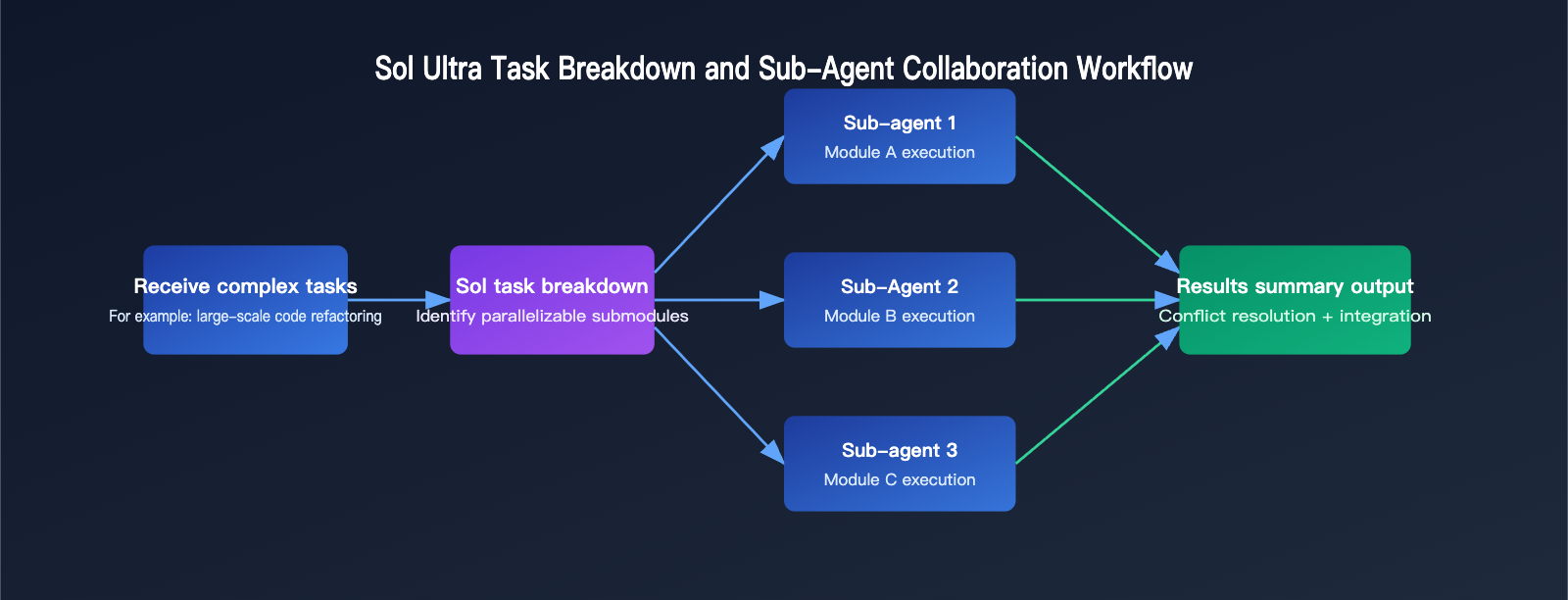
From an engineering perspective, the key breakthrough in ultra mode is that task orchestration is now “built in” at the model layer instead of being something developers have to assemble manually with an agent scheduling framework. In the past, teams that wanted something similar usually had to design their own task queue, subtask assignment logic, and result aggregation mechanism. Now that whole flow gets compressed into a single model call.
🎯 Technical tip: If your team is still building its own multi-agent orchestration system, it’s worth keeping an eye on APIYI apiyi.com for future GPT-5.6 support. Since the platform connects multiple models through a unified gateway, you’ll be able to switch to Sol Ultra’s multi-agent capabilities later without having to rewrite much of your existing code.
From a technical implementation standpoint, ultra mode can “autonomously break down a task” because Sol has an internal ability to judge task complexity. It first evaluates whether the incoming request can be split into relatively independent submodules. If it can, it spawns a sub-agent instance for each submodule, each with its own independent context window for reasoning and tool use. Then the main flow collects the outputs from all sub-agents, resolves conflicts, and integrates the final result. Functionally, this is similar to the “orchestration framework + multiple model calls” pattern developers are already familiar with, except the task decomposition and scheduling logic is wrapped into a single API call, which cuts down on a lot of glue code on the engineering side.
Beyond the reasoning upgrade, Sol also has targeted deployment optimizations. OpenAI plans to launch a Cerebras-hosted Sol variant in July, with throughput reaching up to 750 tokens per second. It’s aimed at latency-sensitive scenarios like real-time code completion and interactive troubleshooting tools. That means Sol Ultra isn’t just for slow, offline jobs that need careful work — with the right deployment setup, it can also fit product experiences that need fast responses.
| Deployment Form | Throughput | Use Cases |
|---|---|---|
| Standard cloud deployment | Normal inference speed | Complex tasks, batch processing |
| Cerebras-hosted variant | Up to about 750 tokens/second | Real-time code completion, interactive troubleshooting |
For developers who want to understand the calling pattern ahead of time, here’s a simple example showing how max reasoning and ultra mode are typically expressed at the parameter level:
import openai

client = openai.OpenAI(
    api_key="YOUR_API_KEY",
    base_url="https://api.apiyi.com/v1"  # Unified gateway for easy switching to the GPT-5.6 family later
)

response = client.chat.completions.create(
    model="gpt-5.6-sol",  # Example model identifier available after general release
    reasoning_effort="max",
    messages=[{"role": "user", "content": "Break down a multi-step refactor task involving database migration"}]
)
print(response.choices[0].message.content)
That said, GPT-5.6 is still in limited preview, so the example above is only for illustration. The exact parameter names will depend on OpenAI’s official documentation after general availability.
Sol Ultra Test Data: Terminal-Bench 2.1 Scores and the Truth Behind Limited Safe Release
Early preview feedback suggests that Sol performs fairly compactly and efficiently in code generation, with a competitive cost per token, and it’s already ranked near the top in publicly available agentic coding benchmarks. The real measure of ultra mode’s value, though, is Terminal-Bench 2.1, a benchmark focused on terminal and coding tasks.
This test usually requires the model to complete multi-step operations in a real terminal environment, such as installing dependencies, changing configs, running tests, and iterating fixes based on error messages. It doesn’t just measure the accuracy of a single code generation pass — it also tests how well the model manages the entire task chain. That’s why it reflects the practical value of ultra mode better than a simple code-completion benchmark: multi-step, feedback-driven tasks that require ongoing adjustment are exactly where parallel sub-agents can shine.
Sol Ultra Performance Test: Four-Tier Score Comparison
| Model Tier | Terminal-Bench 2.1 Score | Notes |
|---|---|---|
| Sol Ultra | 91.9% | Multi-agent collaboration mode, highest score |
| Sol | 88.8% | Standard/max reasoning mode |
| Luna | 84.3% | Low-cost tier, better than expected |
| Terra | 82.5% | Balanced tier, cost-performance first |
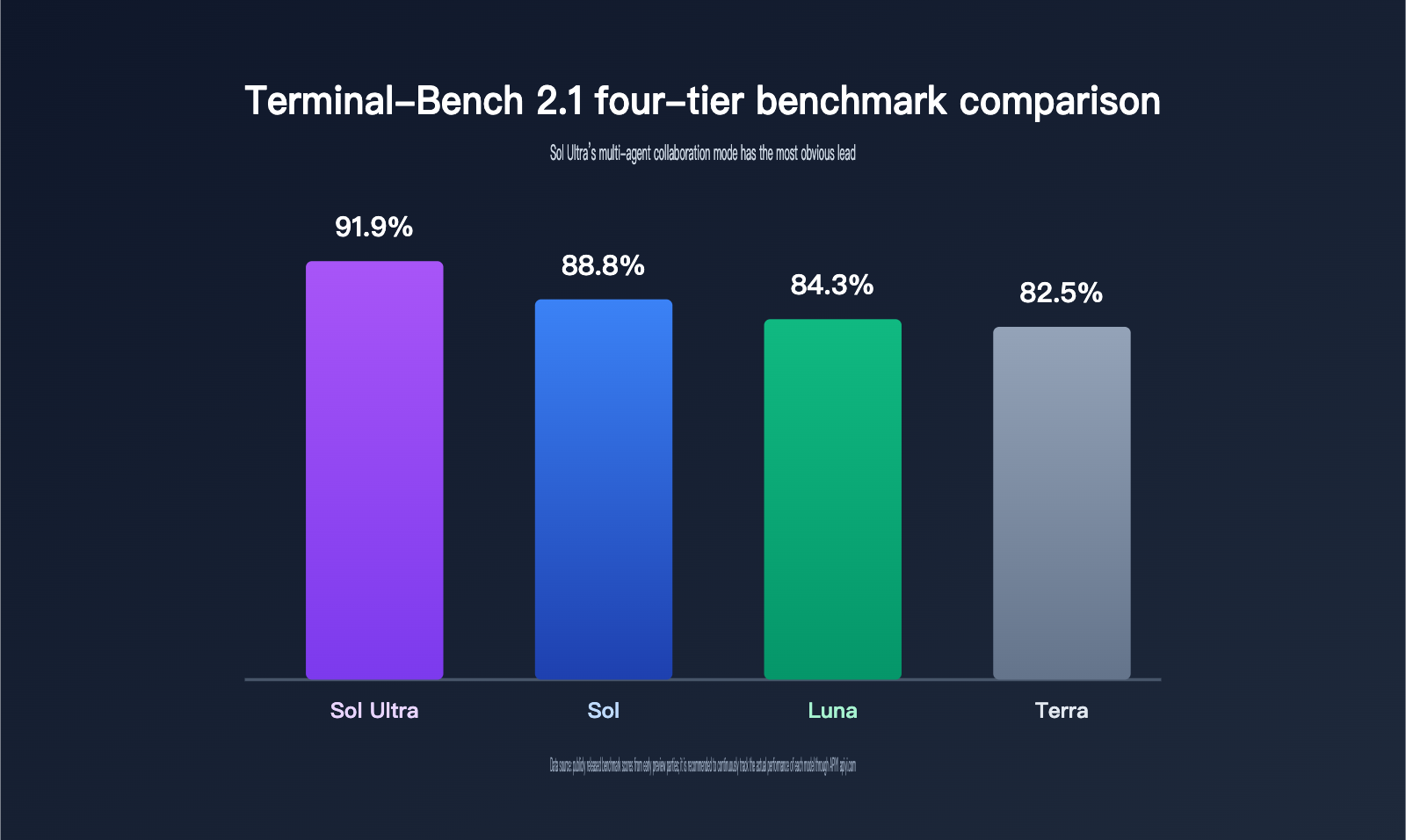
It’s worth noting that Luna actually outperformed the higher-positioned Terra in this test, which shows that tiering reflects a balance of overall capability and cost, not a simple linear ranking on any single task. It also reminds developers not to choose based only on “tier level,” but to compare real benchmark data against the task at hand.
Sol Ultra improves by about 3.1 percentage points over standard Sol. That may not sound huge, but in long-chain, multi-module tasks, the extra fault tolerance and broader coverage from parallel sub-agents often matter more than a single reasoning chain.
Safety is the other key to understanding the rollout pace. Sol’s capabilities in cybersecurity, biological risk areas like GeneBench v1, and other high-risk domains have improved significantly. If misused, these capabilities could cause far greater harm than ordinary text-generation mistakes. That’s why OpenAI strengthened real-time classifiers, model-level refusal training, and account-level behavioral review, while also running several weeks of red-team stress testing to find weak points that might be bypassed before a broader release.
That also explains why this rollout wasn’t opened directly to all API users like many previous model updates. Instead, OpenAI first limited access to a manageable group of partners for validation. For engineering teams, this “limited first, broader later” approach is itself a signal: the stronger the model gets, the more the safety review and usage policies need to keep up. It’s not enough to just plug the model into production and call it done.
| Key Info | Details |
|---|---|
| Preview launch date | June 26, 2026 |
| Partner scale | About 20 trusted partner organizations |
| Access channels | OpenAI API, Codex |
| Safety measures | Real-time classifiers, model-level refusal training, account-level behavioral review |
| General availability plan | “In the coming weeks” (official wording) |
💡 Recommendation: Before general availability, instead of waiting for Sol Ultra’s full capability, use the APIYI apiyi.com platform to sort out your multi-model invocation architecture now so you’re ready at the interface layer later.
Sol Ultra Pros and Cons: The Real Boundaries of Multi-Agent Collaboration
Advantages
- Built-in task orchestration: Developers no longer need to design subtask assignment and result aggregation logic themselves. The model handles the breakdown of complex tasks directly.
- Better coverage for long-chain tasks: Multiple sub-agents can work on different modules in parallel, reducing the chance that a single reasoning chain misses key details.
- Controllable reasoning depth: Max reasoning lets developers allocate inference compute based on task complexity, rather than using the same intensity for every request.
Limitations
- High access barrier: Right now, only about 20 organizations can use it. Regular API users and ChatGPT users still have to wait for general availability, so large-scale validation won’t happen soon.
- Higher cost and latency: Ultra mode’s total response time depends on the slowest subtask, and parallel scheduling adds extra token usage. You’ll need to decide whether that tradeoff is worth it based on task value.
- Greater observability requirements: When multiple sub-agents work in parallel, tracking each subtask’s intermediate output and failure reasons becomes an engineering issue that teams need to plan for upfront.
The access barrier is hard to avoid in the short term, since safety evaluation takes time — it’s not something you solve by just adding a few rules. Cost and latency are mostly a matter of tradeoffs: if the task itself isn’t very valuable, ultra mode can be overkill; but for a major refactor where one issue can cascade through the whole system, spending more tokens for broader coverage is usually worth it. Observability is the one area teams should plan for early. During evaluation, it’s better to build in logging and subtask tracking from the start instead of trying to add them after problems show up.
💰 Cost optimization: For teams on a budget, it’s a good idea to first validate business logic on the APIYI apiyi.com platform using the Terra or Luna tier, then decide whether you really need to upgrade to Sol Ultra’s multi-agent capabilities. That way, you don’t take on high usage costs right away.
Multi-Agent Collaboration Paradigm: The Long-Term Impact of Sol Ultra on AI Application Development
In the short term, because of access barriers, most developers won’t be able to use Sol Ultra yet. The more practical option to evaluate first is probably Terra, which offers better cost performance. But over a longer horizon, the model-native multi-agent capability represented by ultra mode may turn out to be the key variable in the next stage of AI application development.
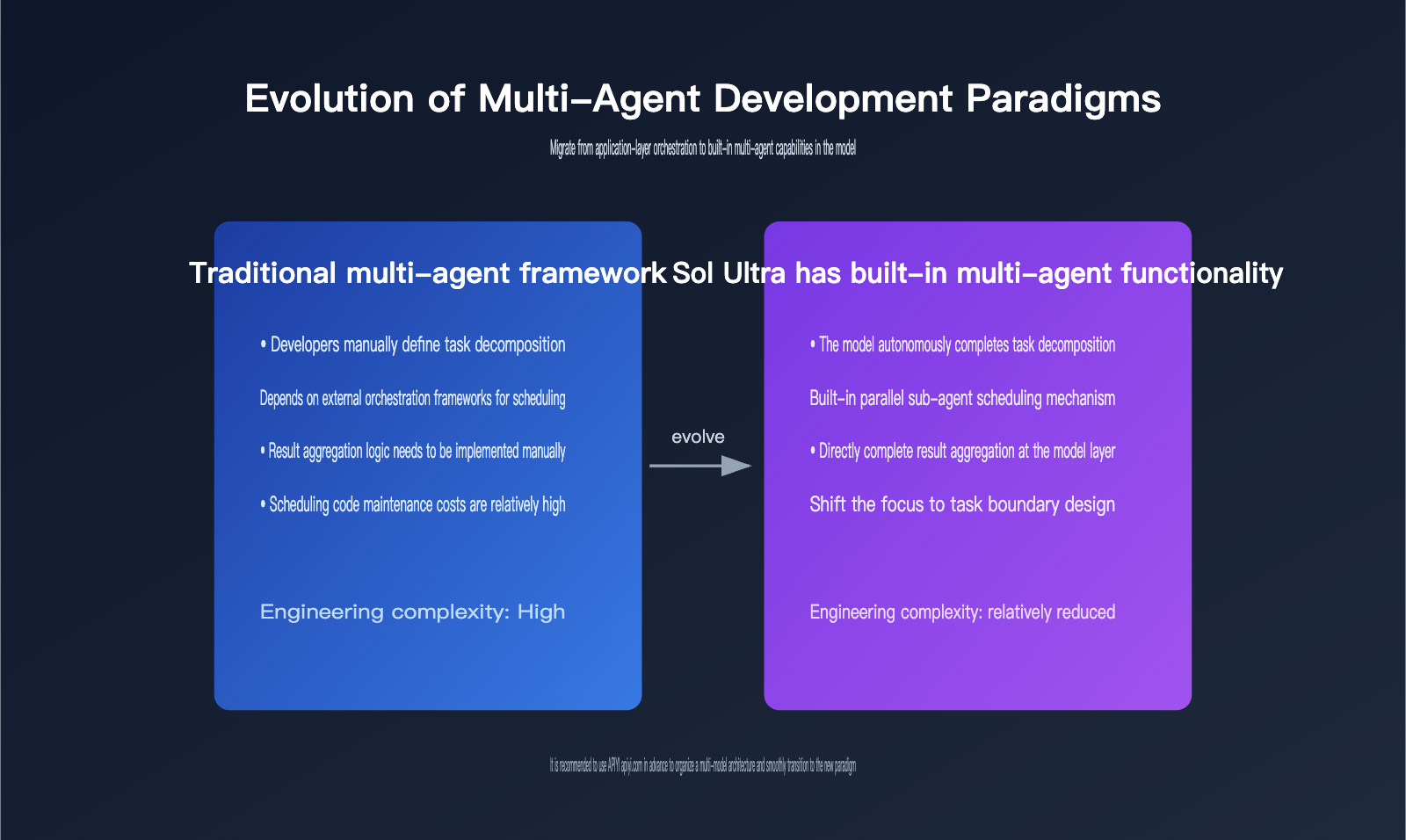
Over the past two years, most multi-agent systems have been application-layer engineering work: developers use orchestration frameworks to chain together multiple model invocations, then handle task allocation, state management, and retry logic themselves. Sol Ultra pushes part of that capability down into the model layer. That means the center of gravity in application development may shift from “how do we orchestrate agents?” to “how do we define task boundaries and acceptance criteria?”
| Application Scenario | Traditional Multi-Agent Framework | Sol Ultra Built-In Multi-Agent |
|---|---|---|
| Task decomposition | Must be defined manually by the developer | Decomposed autonomously by the model |
| Subtask scheduling | Relies on an external orchestration framework | Built-in parallel scheduling mechanism |
| Result aggregation | Requires extra aggregation logic | Summarized directly at the model layer |
| Engineering complexity | Higher, with scheduling code to maintain | Lower overall, more focused on business logic |
This kind of migration won’t happen overnight. Enterprise applications usually involve access control, audit logs, and compliance requirements, and the model-native multi-agent capability still needs to integrate with existing enterprise systems. For teams evaluating a multi-model architecture, it’s a good idea to use a unified interface platform like APIYI apiyi.com to sort out model switching and cost accounting in advance. That way, once Sol Ultra becomes generally available, you can move faster on technical validation and launch assessment.
Different team sizes should also take different starting points when they run into a new capability like Sol Ultra. Smaller teams don’t need to jump straight into the most complex multi-agent orchestration. Instead, they should get the current workflow working first, then gradually introduce automated decomposition. Larger teams that already have mature agent frameworks are better off treating ultra mode as a complement to the existing orchestration system, not a rip-and-replace reset.
| Team Type | Recommended Starting Point | Priority Focus |
|---|---|---|
| Individual developers / small teams | Start with standard mode or Terra to validate business logic | Cost control, rapid iteration |
| Teams with existing multi-agent frameworks | Use ultra mode as a complement to current orchestration | Compatibility with existing scheduling systems |
| Enterprise teams | Plan for access control, audit, and compliance integration early | Security review, observability setup |
Frequently Asked Questions
Q1: Can ordinary developers use GPT-5.6 Sol Ultra right now?
Not yet. GPT-5.6 Sol Ultra is currently available only to about 20 approved partner organizations. Regular API users and ChatGPT users will need to wait for the official general-availability announcement. In the meantime, you can use other available models on the APIYI apiyi.com platform to validate your business logic and prepare for the switch later.
Q2: How should I choose between max reasoning and ultra mode?
If the task is a single chain of deep logical reasoning, such as complex algorithm design, max reasoning is the better choice. If the task can be broken into multiple relatively independent subtasks, such as a large-scale codebase refactor, ultra mode’s parallel processing will usually have the edge. In practice, it’s best to test both on a small scale through the APIYI apiyi.com platform before making a final call.
Q3: What should enterprises prepare before integrating Sol Ultra?
Start by mapping out access control, audit logging, and data compliance requirements. Make it clear which tasks can be handed over to multi-agent automatic decomposition and which steps still need human review. It’s also a good idea to build observability for subtasks in advance so that problems are easier to trace when multiple sub-agents are working in parallel.
Summary: Is Sol Ultra Worth Investing in Right Now?
The signals from GPT-5.6 Sol Ultra are pretty clear: LLM competition has already moved beyond “who’s smarter” and into a new phase of “who can let AI manage complex tasks on its own while still proving it’s safe and controllable.” The 91.9% Terminal-Bench 2.1 score shows the real-world value of multi-agent collaboration on complex coding tasks, but the preview rollout to only about 20 organizations also shows that this capability is still a ways off from broad deployment.
For most developers, the more practical move right now is to keep an eye on more cost-effective tiers like Terra, while planning a solid multi-model invocation architecture in advance. We recommend using APIYI apiyi.com to centrally manage interfaces and costs, then reevaluating whether to bring in this multi-agent collaboration capability once Sol Ultra becomes generally available.
Looking at the longer term, the real turning point in this release isn’t the benchmark score itself, but the fact that OpenAI has moved “task orchestration” from the application layer into the model layer. No matter how many teams end up using Sol Ultra, this direction is worth tracking closely: it could mean that future AI application development will gradually shift from “how to call the model” to “how to design task boundaries, acceptance criteria, and safety guardrails.”
This article was written by the APIYI technical team. If you have more questions about the GPT-5.6 series or multi-agent application architectures, feel free to discuss them on the APIYI apiyi.com platform.


