
"Why does my Claude Code request 400k input tokens every time? Why is my bill so high?"—this is the first reaction many Claude Code users have when checking their usage stats. In reality, the vast majority of those 400k tokens have likely been cached, and the actual cost might only be 1/10th of the surface figure. However, if the cache isn't hit, that bill can definitely be painful.
Core Value: After reading this article, you'll understand Claude Code's automatic caching mechanism, the 8 common reasons for cache misses, and 6 practical tips to slash your input tokens from 400k down to 50k.
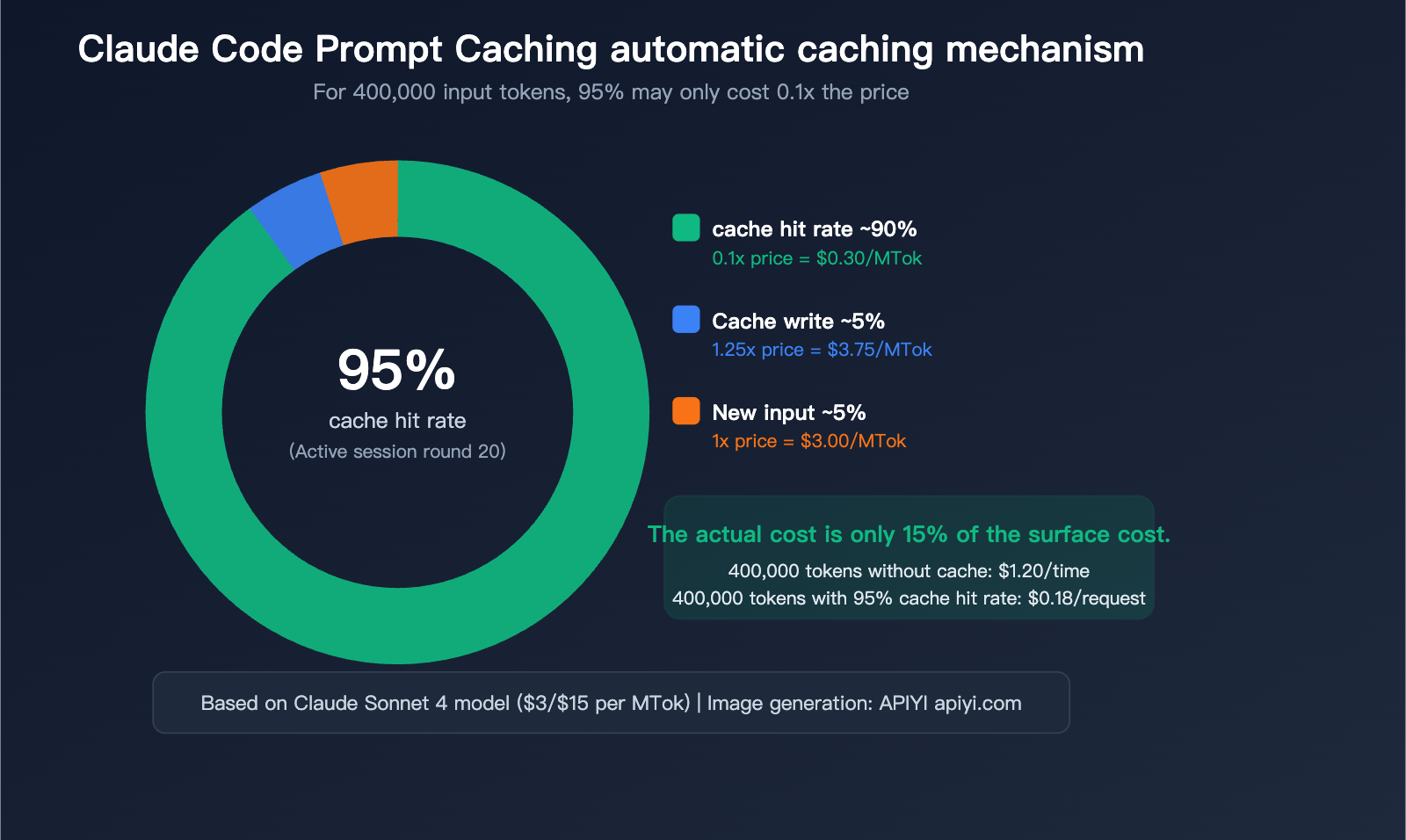
A Deep Dive into Claude Code's Automatic Prompt Caching
Does Claude Code automatically hit the cache?
Yes, it does. Claude Code automatically enables Anthropic's Prompt Caching for every API request without requiring any configuration. This is a built-in behavior, not an optional feature.
Every time you send a message in Claude Code, the content sent to the API is assembled in the following order:
| Assembly Order | Content | Estimated Size | Caching Behavior |
|---|---|---|---|
| Layer 1 | Tool definitions (Read/Edit/Bash, etc.) | ~5,000 tokens | Nearly static, high hit rate |
| Layer 2 | System prompt + CLAUDE.md | ~3,000-10,000 tokens | Static within a session, high hit rate |
| Layer 3 | Conversation history (all previous messages) | Constantly growing | Prefix matching, builds up gradually |
| Layer 4 | Current new message | Variable | Never hits the cache |
Key Mechanism: Caching is based on prefix matching—as long as the first N tokens of a request are identical to previously cached content, those N tokens will hit the cache. In a continuous conversation, by the 20th turn, 95%+ of input tokens are typically served from the cache.
Cache Pricing: Why Cache Hits Matter
| Operation Type | Relative Base Input Price | Sonnet 4 Actual Price/MTok | Opus 4 Actual Price/MTok |
|---|---|---|---|
| Standard Input (No Cache) | 1x | $3.00 | $15.00 |
| 5-min Cache Write | 1.25x | $3.75 | $18.75 |
| 1-hour Cache Write | 2x | $6.00 | $30.00 |
| Cache Hit/Read | 0.1x | $0.30 | $1.50 |
| Output | — | $15.00 | $75.00 |
A concrete example: If your request has 400,000 input tokens:
Scenario A: No Caching
├── 400k tokens × $3/MTok (Sonnet) = $1.20 per request

Scenario B: 95% Cache Hit (Typical Claude Code session)
├── Cache Hit 380k tokens × $0.30/MTok = $0.114
├── Cache Write 10k tokens × $3.75/MTok  = $0.0375
├── New Input 10k tokens × $3/MTok       = $0.03
├── Total = $0.18 per request
└── Actual cost is only 15% of the non-cached version
🎯 Pro Tip: Using Claude API via APIYI (apiyi.com) also supports the Prompt Caching mechanism, reducing input costs by 90% on cache hits. If your project integrates Claude via API, it's recommended to design your prompt structure to maximize the cache hit rate.
Cache TTL: The Hidden Perk for Max Users
| Subscription Plan | Cache TTL | Write Cost | Note |
|---|---|---|---|
| API Pay-as-you-go | 5 minutes | 1.25x | Cache expires after 5 mins of inactivity |
| Pro / Team | 5 minutes | 1.25x | Same as above |
| Max 5x / 20x | 1 hour | 2x | Higher write cost, but 12x longer window |
While Max users pay a 2x write cost (higher than the standard 1.25x), the 1-hour TTL means your cache is still there after you grab a coffee. For developers who work intermittently, this difference is significant.
Every cache hit resets the TTL timer, so as long as you remain active, the cache effectively won't expire.
Cache Miss? 8 Common Causes and Solutions
{8 categories of reasons for cache invalidation}
{Understand the cause → proactively avoid → improve cache hit rate}
{Category 1: TTL expired}
{The most common reasons for failure}
{1. Idle timeout}
{API: >5 minutes of inactivity}
{Max: >1 hour of inactivity}
{influence}
{All cache invalidated ⚠️}
{Solution}
{Keep active / Accept reconstruction}
{Category 2: Content change}
{Upper layer changes → lower layer cascading failure}
{2. Switch model /model}
{Cache is isolated by model, all invalidated}
{3. Add or delete MCP tools}
{Tool layer change, cascading failure ⚠️}
{4. Switch Web Search}
{System-level changes, downstream failure}
{5. Modify CLAUDE.md}
{Restart required, system level failure}
{Tool → System → Messages}
{Changes at the upper layer cause all lower layers to fail}
{Category 3: Operation trigger}
{caused by user action}
{6. /clear new chat}
{Clear all history, rebuild cache ⚠}
{7. /compact compress}
{History is summarized and replaced, and the prefix is changed.}
{8. /rewind undo}
{Message history prefix changed}
{Optimization suggestions}
{Do not use /clear frequently}
{/compact use when necessary}
{⚠ = All cache invalidated | Chart: APIYI apiyi.com}
The root cause of a cache miss is always the same: the request prefix does not match the cached content. Specifically in Claude Code, the following 8 scenarios will cause cache invalidation:
Category 1: TTL Expiration
| Reason | Trigger Condition | Impact | Solution |
|---|---|---|---|
| 1. Idle Timeout | >5 mins (API users), >1 hour (Max users) | Entire cache invalidated | Stay active or accept rebuild costs |
This is the most common reason for cache misses. If you step away for longer than 5 minutes (API users) or 1 hour (Max users) while coding, your next request will trigger a full cache rebuild.
Category 2: Cascade Invalidation due to Content Changes
Caching follows a strict hierarchical structure: Tool definitions → System prompt → Conversation history. Changes to upper layers invalidate everything below them.
| Reason | Trigger Condition | Impact | Severity |
|---|---|---|---|
| 2. Switching Models | Using /model command |
Entire cache (cache is model-isolated) | ⚠️ High |
| 3. Adding/Removing MCP Tools | Installing/uninstalling MCP Server | Tool layer + everything below | ⚠️ High |
| 4. Toggling Web Search | Enabling/disabling web search | System layer + everything below | ⚠️ Medium |
| 5. Modifying CLAUDE.md | Editing config and restarting | System layer + everything below | ⚠️ Medium |
Category 3: Operation-Triggered Invalidation
| Reason | Trigger Condition | Impact | Severity |
|---|---|---|---|
| 6. New Conversation | /clear or starting a new session |
Entire cache (history cleared) | ⚠️ High |
| 7. Using /compact | Manually compressing history | History layer cache invalidated | ⚠️ Medium |
| 8. Using /rewind | Undoing previous messages | History prefix changed | ⚠️ Medium |
An Overlooked Technical Limit: Minimum Cache Length
If your prompt is shorter than the following token counts, the cache will be silently skipped without any error:
| Model | Minimum Cacheable Length |
|---|---|
| Claude Opus 4.6 / Haiku 4.5 | 4,096 tokens |
| Claude Sonnet 4.6 | 2,048 tokens |
| Claude Sonnet 4.5 / 4 | 1,024 tokens |
For Claude Code, since the Tool definitions + system prompt already exceed 5,000 tokens, this limit is rarely hit. However, if you are building your own application via API, keep this lower bound in mind.
💡 Recommendation: If you are building an application via APIYI (apiyi.com) to call the Claude API, ensure your system prompt length exceeds the model's minimum cache threshold; otherwise, caching will not take effect.
Why You're Seeing 400k Input Tokens: The Context Composition of Claude Code
Now that we've covered the caching mechanism, let's break down what actually makes up that staggering "400k input tokens" figure you're seeing.
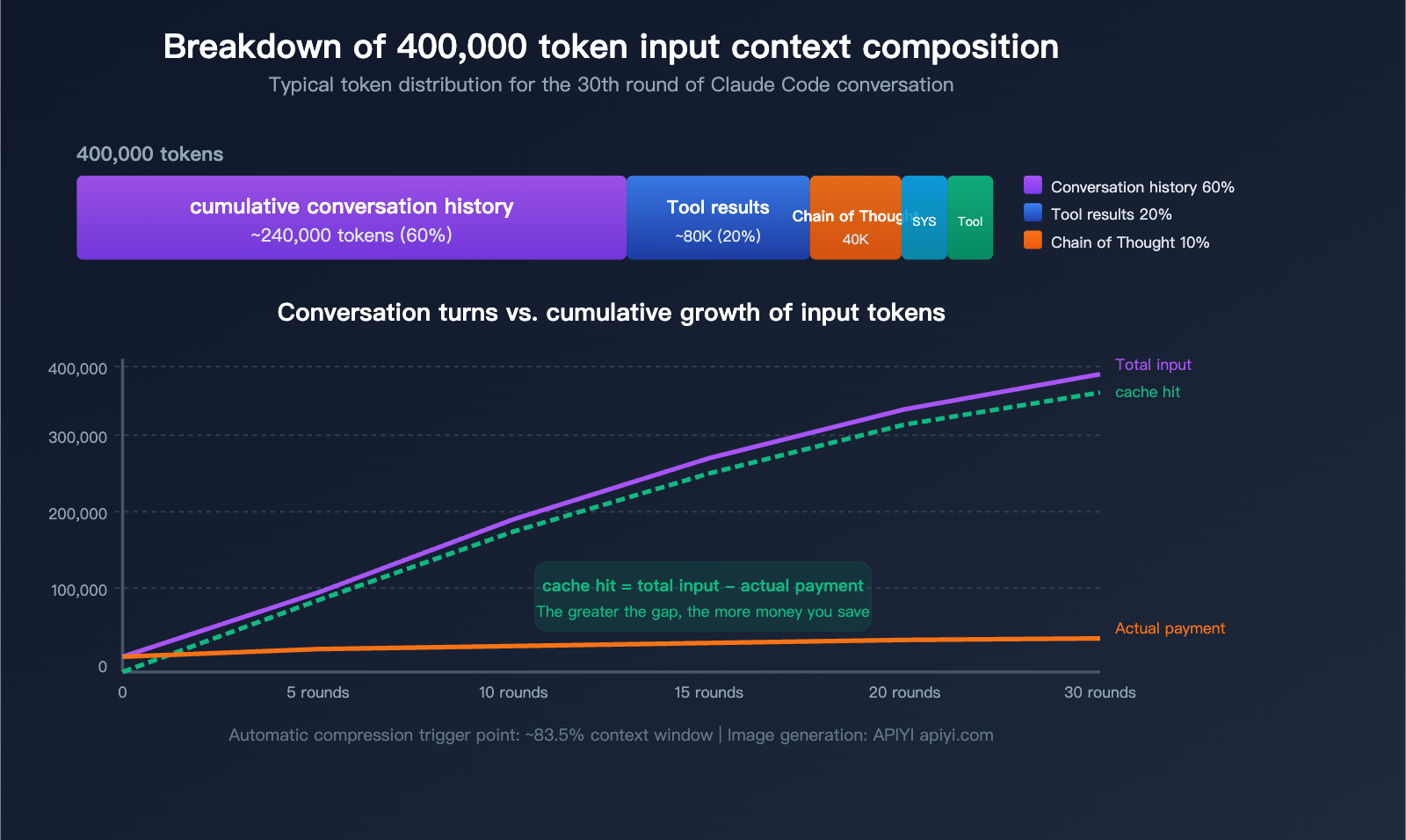
5 Main Sources of Token Consumption
| Source | Share | Approx. in 400k | Characteristics |
|---|---|---|---|
| Conversation History | ~60% | ~240k | Full history resent every turn |
| Tool Invocation Results | ~20% | ~80k | File reads, grep search results stay in context |
| Extended Chain of Thought | ~10% | ~40k | Previous turns' thinking blocks become input |
| System Prompt + CLAUDE.md | ~5% | ~20k | Included in every message |
| Tool Definitions | ~5% | ~20k | Schema for all available tools |
The Core Truth: The Longer the Conversation, the Larger the Input
Claude Code works by resending the complete conversation history with every request. This means:
- Turn 1: ~20k tokens input (System prompt + tool definitions + your question)
- Turn 5: ~100k tokens input (Accumulated 4 turns of history)
- Turn 15: ~250k tokens input (Includes significant file read results)
- Turn 30: ~400k+ tokens input (Approaching the automatic compression threshold)
But keep in mind: The vast majority of these inputs are cache hits. In that 400k token count at turn 30, perhaps only 10k–20k are actually new, non-cached content.
Special Considerations for Large Codebases
Claude Code does not automatically load your entire codebase into the context. It reads files on demand. However, in large codebases:
- A single
grepsearch might return massive results, all of which enter the context. - Exploratory reading of multiple files means each file's content stays in the conversation history.
- In Agent mode, autonomous multi-step operations cause tool invocation results to accumulate.
If you're seeing 400k tokens every time, it's likely due to a combination of these factors:
- The codebase is large, and Claude Code has read many files for analysis.
- There are many conversation turns, leading to history accumulation.
- You might not be using
/compactor/clearfrequently enough. - Your
CLAUDE.mdfile might be quite long.
6 Practical Tips: Reducing Input Tokens from 400k to 50k
Tip 1: Be Precise, Avoid Global Scans
This is the most important and easiest optimization to implement.
❌ Vague instructions (triggers wide-range file scanning):
"Help me optimize the performance of this project"
"Check for bugs in the code"
"Refactor this module"

✅ Precise instructions (reads only necessary files):
"Optimize the response time of the processRequest function in src/api/handler.ts"
"Fix the null pointer exception on line 45 of src/auth/login.ts"
"Migrate the formatDate function in src/utils/format.ts from moment to dayjs"
Vague instructions force Claude Code to use Glob + Grep + Read on a large number of files to "understand" your request, and the content of every file stays in your conversation history permanently. Precise instructions ensure it only reads the 1-2 relevant files.
Token Savings: Reduces tool invocation result tokens by 60-80%.
Tip 2: Use /clear and /compact Promptly
# Clear the conversation when switching to an unrelated task
/clear

# Compress history when the conversation is long but the task isn't finished
/compact

# Compress with instructions to keep specific information
/compact Keep code examples and API interface definitions; everything else can be summarized
| Command | Effect | Best For | Note |
|---|---|---|---|
/clear |
Clears entire conversation history | Switching to a completely different task | All cache is invalidated |
/compact |
AI summarizes history, replaces original text | Mid-stage of long conversations | Partial cache invalidation, but significantly shrinks context |
Actual Impact: A 400k token conversation can typically be compressed to 50k-80k tokens after using /compact.
Tip 3: Optimize Your CLAUDE.md File
CLAUDE.md is loaded with every message. A 10,000-token CLAUDE.md sent over 30 turns adds up (even if cache hits reduce the cost to 0.1x, it still occupies valuable context space).
Optimization Tips:
├── Keep CLAUDE.md under 500 lines (core rules only)
├── Move detailed workflows to Skills (loaded on demand)
├── Put reference documentation in knowledge-base/ (Read when needed)
└── Avoid large code examples in CLAUDE.md
🚀 Pro Tip: Streamlining CLAUDE.md doesn't just save tokens;
it helps Claude Code focus on the core rules.
If you're building similar AI coding assistants using APIYI (apiyi.com),
we recommend keeping your system prompts concise as well.
Tip 4: Use Subagents to Isolate Verbose Output
When performing actions that generate massive output, use a Subagent instead of executing directly:
❌ Executing directly in the main conversation (output enters main context):
"Run the test suite and analyze the failures"
→ Test output could be 50,000+ tokens, staying in history permanently

✅ Letting Claude Code use a Subagent (output isolated in a sub-process):
"Use a sub-task to run the test suite, and only summarize the failed test names and reasons for me"
→ Main context only increases by ~500 tokens for the summary
Token Savings: Can prevent 10,000-50,000 tokens from entering the main context per operation.
Tip 5: Choose the Right Model and Effort Level
| Task Type | Recommended Model | Effort Level | Note |
|---|---|---|---|
| Simple edits/formatting | Sonnet | low | No deep thinking required |
| General development | Sonnet | medium | Best cost-performance ratio |
| Complex architecture design | Opus | high | Requires deep reasoning |
| Code review | Sonnet | medium | Better cost-performance than Opus |
# Lower thinking depth to reduce thinking tokens (which become input later)
# Set a lower effort for simple tasks
/effort low

# Or control the thinking token limit via environment variables
MAX_THINKING_TOKENS=8000
Extended chain-of-thought (thinking) becomes part of the input tokens in subsequent turns. Lowering the effort level significantly reduces cumulative tokens over time.
Tip 6: Monitor Token Distribution with /context
# View current token usage distribution
/context
The /context command displays the token breakdown of your current context, helping you pinpoint exactly what is consuming space. Common findings include:
- A grep search returned 20,000 tokens, but only 5% were useful.
- A large file read earlier is no longer needed but remains in context.
- CLAUDE.md is taking up more space than expected.
Once identified, use /compact or /clear to address the issue.
💰 Cost Tip: For users on pay-as-you-go API plans, these optimizations directly lower your bill.
Through the usage statistics on the APIYI (apiyi.com) platform, you can clearly see the token distribution for every request, helping you identify cost hotspots.
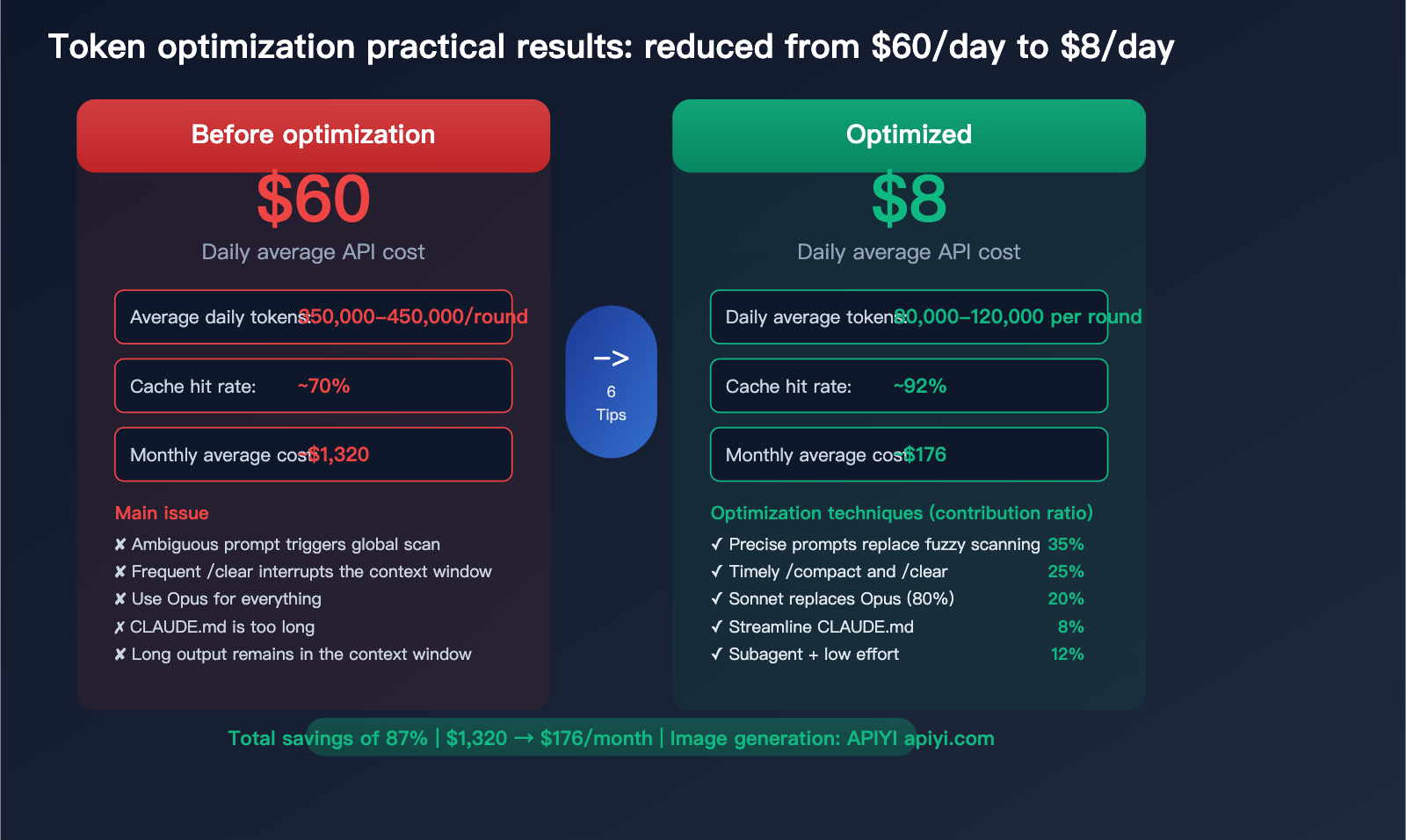
Practical Case: Reducing Daily Costs from $60 to $8
Here is a real-world optimization process:
Before Optimization (Large Python project, heavy Claude Code user)
Daily usage:
├── Conversation turns: ~50 turns/day
├── Average input tokens: 350k-450k/turn
├── Cache hit rate: ~70% (due to frequent /clear and model switching)
├── Daily API cost (Opus 4): ~$60
└── Monthly: ~$1,320
After Optimization (Applying 6 techniques)
Daily usage:
├── Conversation turns: ~40 turns/day (more precise, fewer turns needed)
├── Average input tokens: 80k-120k/turn (precise instructions + periodic compacting)
├── Cache hit rate: ~92% (reduced unnecessary cache interruptions)
├── Daily API cost (mostly Sonnet 4, Opus used only for complex tasks): ~$8
└── Monthly: ~$176
| Optimization Item | Savings Share | Description |
|---|---|---|
| Precise prompts vs. fuzzy scanning | ~35% | Largest contributor |
| Timely /compact and /clear | ~25% | Controls cumulative bloat |
| Sonnet replacing Opus (80% of tasks) | ~20% | Zero-perception model downgrade |
| Streamlining CLAUDE.md | ~8% | Reduces fixed overhead per turn |
| Subagent isolation for long outputs | ~7% | Prevents large results from polluting context |
| Lowering effort level | ~5% | Reduces thinking token accumulation |
FAQ
Q1: Is the 400k token count shown in Claude Code what I’m actually billed for?
No. Claude Code automatically enables Prompt Caching. In an active session, 95%+ of input tokens are usually cache hits, billed at only 0.1x the base price. Out of 400k tokens, perhaps only 20k-40k are billed at full price. You can use /context to check your actual cache hit rate. API calls made via APIYI (apiyi.com) also support this caching mechanism.
Q2: Do I still need to worry about token consumption if I have a Max monthly subscription?
Yes, but for a different reason. The Max subscription isn't billed by tokens, but it does have a weekly usage limit. High token consumption will cause you to hit that limit faster. Streamlining your context not only extends your usage time but also helps Claude Code understand your needs more accurately (the more precise the context, the better the response).
Q3: Which is better, /compact or /clear?
It depends on the scenario. If you are about to start a completely different task, /clear is better to wipe the slate clean. If you are still working on the same task but the conversation has become very long, use /compact to keep the essential context while compressing the volume. /compact supports custom instructions, such as /compact keep all code modification history and API interface definitions.
Q4: Will upgrading to the latest version of Claude Code automatically optimize token usage?
Yes, it's recommended to always stay on the latest version. Anthropic continuously optimizes Claude Code's context management strategy, including automatic compression triggers (currently triggered at ~83.5% context occupancy) and lazy loading of MCP tool definitions (loading only tool names, with full schemas loaded only when needed). New versions generally bring better cache hit rates and smarter context management.
Summary: Understanding Caching + Precise Usage = Controlled Costs
Prompt Caching in Claude Code is a powerful automated optimization mechanism—it saves you money without requiring any configuration. However, understanding how it works and what causes it to invalidate can help you boost your savings from "an automatic 70%" to "an active 95%."
Keep these 3 core principles in mind:
- Keep the cache active: Avoid unnecessary actions that disrupt the cache (like frequently switching models or using
/clearindiscriminately). - Control context bloat: Use precise prompts and regular
/compactcommands to prevent your conversation history from growing indefinitely. - Choose the right tools and models: Sonnet is sufficient for 80% of tasks; save Opus for scenarios that truly require it.
For users on pay-as-you-go plans, we recommend managing your Claude API calls through APIYI (apiyi.com) to leverage the platform's usage monitoring features for continuous Token consumption optimization. For heavy interactive users, we suggest opting for the Claude Max monthly subscription, combined with the optimization tips in this article, to achieve the best value for your money.
📝 Author: APIYI Technical Team | APIYI apiyi.com – A unified access platform for 300+ AI Large Language Model APIs.
References
-
Anthropic Prompt Caching Documentation: Detailed explanation of the official caching mechanism.
- Link:
docs.anthropic.com/en/docs/build-with-claude/prompt-caching - Note: Covers cache TTL, pricing multipliers, and minimum length requirements.
- Link:
-
Claude Code Cost Management Guide: Official Token optimization suggestions.
- Link:
code.claude.com/docs/en/costs - Note: Cost control strategies recommended by Anthropic.
- Link:
-
Claude Code Best Practices: Context management and efficiency optimization.
- Link:
anthropic.com/engineering/claude-code-best-practices - Note: Includes practical advice on precise prompting, using
/compact, and more.
- Link:


