
By 2026, 92% of developers are already using AI programming tools, with 41% of code being AI-assisted. However, there’s an awkward reality: while developers report saving 30-60% of their time, actual organizational productivity has only increased by about 10%. Where’s the gap? It’s the workflow.
If you use the right model combinations and workflows, AI programming is a 10x efficiency booster; use it wrong, and it’s just a "looks like it works but will explode at any moment" code generator.
Core Value: After reading this, you’ll master a proven multi-model AI programming workflow—using cost-effective models (like GLM-5) for code generation, top-tier models (like Claude Sonnet 4.6) for code review, and how to use Claude Code to achieve full-chain automation.
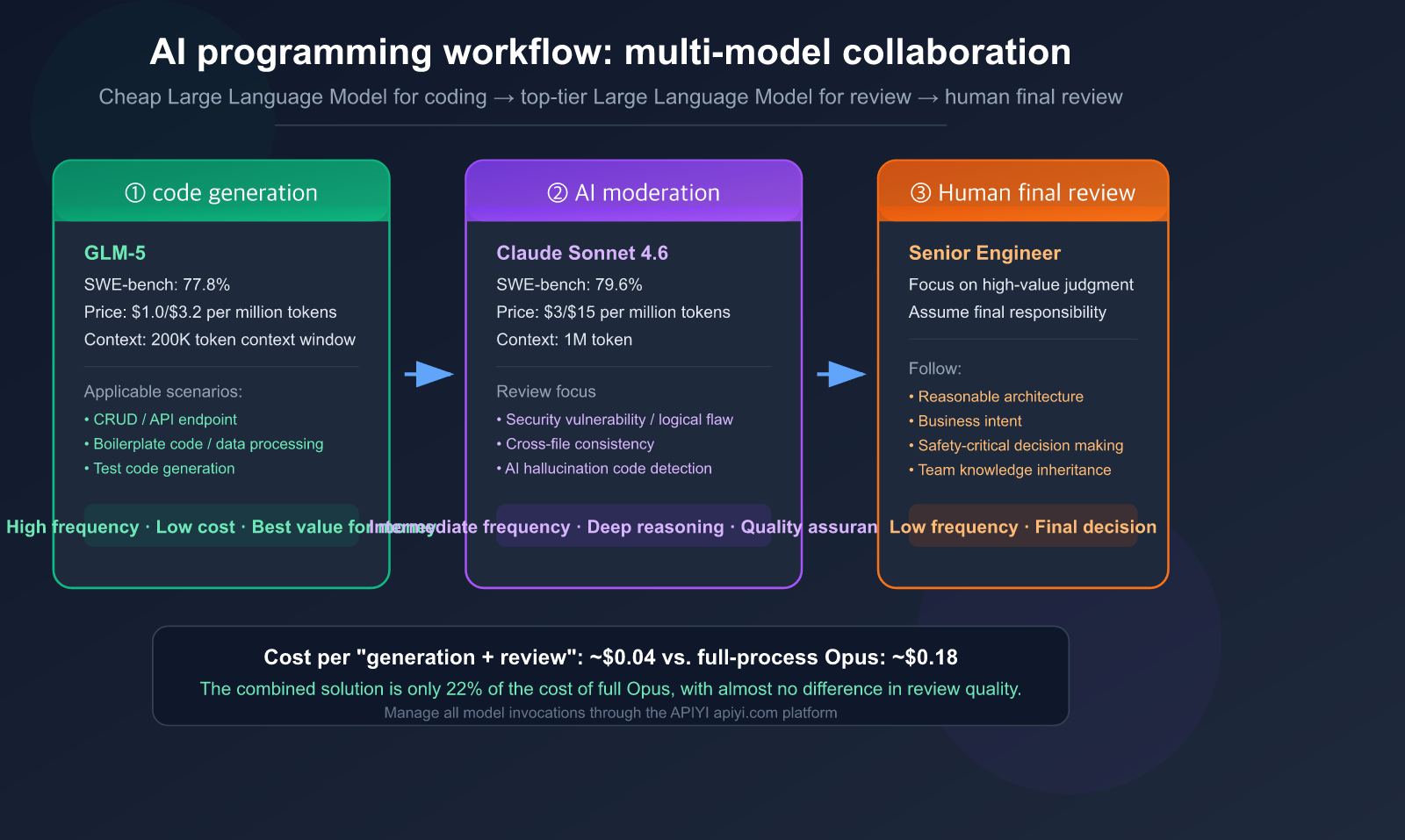
The Fundamental Shift in AI Programming Workflows
The Evolving Developer Role: From "Coder" to "AI Orchestrator"
In 2026, software development is no longer about writing code line-by-line. Instead, a developer's core work involves:
- Specification Engineering — Defining requirements, constraints, and architectural preferences.
- Model Selection — Choosing the right model for each specific stage of development.
- Review and Oversight — Ensuring AI outputs meet rigorous engineering standards.
- Taking Final Responsibility — AI is just a tool; humans remain the ones accountable.
As Addy Osmani (Technical Lead at Google Chrome) famously put it: "Plan first, code second. Plans are cheap to change, code is expensive to change."
New Workflow vs. Traditional Workflow
| Dimension | Traditional Workflow | AI-Driven Workflow |
|---|---|---|
| Core Activity | Writing code line-by-line | Writing specs + Reviewing AI output |
| Developer Role | Coder | Orchestrator |
| Code Generation | 100% Manual | ~40% AI-generated + manual edits |
| Review Focus | Logic and style | AI output quality + architectural consistency |
| Toolchain | IDE + Git | AI Agent + IDE + Git + Multi-model |
| Bottleneck | Coding speed | Review speed and judgment |
Key Data: The Reality of AI Programming
| Data Point | Source |
|---|---|
| 92% of developers use AI coding tools | 2026 Industry Survey |
| 41% of code commits are AI-assisted | GitHub Data |
| Only 30% of AI suggestions are accepted directly | CodeRabbit Report |
| Only 29-46% of developers trust AI output | Multiple Surveys |
| Organizational productivity increased by ~10% | Consensus of 6 independent studies |
| AI-generated code has 1.7x higher defect rate | Analysis of 470 PRs |
🎯 Core Insight: Productivity gains don't come from how much code AI can generate, but from having an efficient review and validation system. Through the APIYI (apiyi.com) platform, you can flexibly combine different models to build this exact system.
Model Selection Strategy: Use Cheap Models for Writing, Top-Tier for Reviewing
This is the core methodology of this article—use different models for different stages. Just as a racing team wouldn't use an F1 car for deliveries or a delivery truck for a race, you shouldn't use the same model for everything.
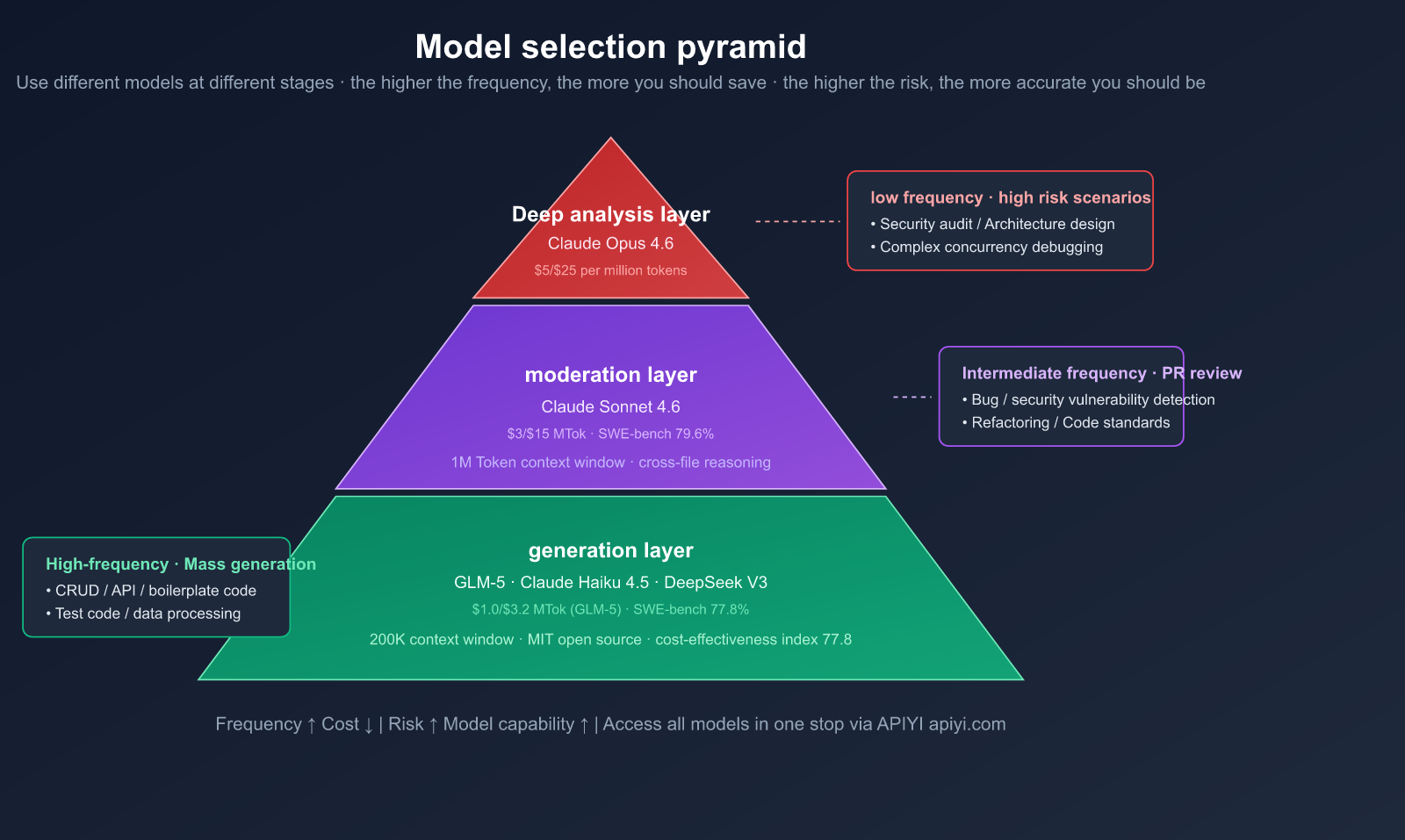
The Three-Layer Model Pyramid
| Layer | Purpose | Recommended Model | Input/Output Price | Frequency |
|---|---|---|---|---|
| Generation | Coding, CRUD, boilerplate | GLM-5, Claude Haiku 4.5 | $1.0/$3.2 (GLM-5) | High |
| Review | PR review, bug detection, refactoring | Claude Sonnet 4.6 | $3/$15 | Medium |
| Deep Analysis | Architecture, security, debugging | Claude Opus 4.6 | $5/$25 | Low |
Why Choose GLM-5 for Code Generation?
GLM-5, released by Zhipu AI in February 2026, is an open-weights Large Language Model that offers incredible value for code generation.
GLM-5 Key Specs:
- Parameters: 744B (MoE architecture, 256 experts, 8 active per token, ~40B active parameters)
- Context Window: 200K tokens
- SWE-bench Verified: 77.8% (Top among open-weights models)
- License: MIT (Fully commercial)
- Input Price: $1.00/million tokens — just 1/3 the price of Claude Sonnet 4.6
GLM-5 vs. Closed-Source SWE-bench Comparison:
| Model | SWE-bench Verified | Input Price (per million tokens) | Value Index |
|---|---|---|---|
| Claude Opus 4.6 | 81.4% | $5.00 | 16.3 |
| Claude Sonnet 4.6 | 79.6% | $3.00 | 26.5 |
| GPT-5.2 | 80.0% | — | — |
| GLM-5 | 77.8% | $1.00 | 77.8 |
GLM-5's Value Index (SWE-bench score / input price) is nearly 3x higher than Claude Sonnet 4.6. For high-frequency tasks like code generation, these cost savings scale rapidly.
Why Choose Claude Sonnet 4.6 for Code Review?
Code review requires deep understanding and precise judgment rather than raw speed. Sonnet 4.6 excels here:
- 1M Token Context Window: Load your entire codebase, PR diffs, and dependency maps at once.
- Cross-file Reasoning: Superior ability to detect how changes in File A break logic in File B.
- SWE-bench 79.6%: Only 1.8 percentage points behind Opus 4.6.
- Developer Preference: In Claude Code testing, developers preferred Sonnet 4.6 over the previous flagship Opus 4.5 by 59%.
- Less Over-engineering: Compared to previous generations, Sonnet 4.6 is less prone to "over-engineering" or "laziness."
Cost Comparison: Using Sonnet 4.6 for reviews costs only 1/5th of Opus 4.6, while providing near-identical quality. For most PR reviews, it's the optimal choice.
💡 Selection Tip: Through the APIYI (apiyi.com) platform, you can access both GLM-5 and Claude Sonnet 4.6 APIs, managing multiple models with a single key. Use GLM-5 for generation to cut costs, and switch to Sonnet 4.6 for reviews to ensure quality.
6-Step Practical Workflow: From Requirements to Merge
Here’s a battle-tested workflow to keep your development on track. The core philosophy is simple: Explore → Plan → Generate → Review → Test → Commit.
Step 1: Specification
Before you write a single line of code, draft a clear set of requirements:
## Requirements
Implement a user registration API endpoint
Constraints
- Use the FastAPI framework.
- Encrypt passwords using bcrypt.
- Email must be unique; return a 409 Conflict status if it isn't.
- Write to PostgreSQL using SQLAlchemy ORM.
- Return a JWT token.
Exclusions
- Email verification flow (to be handled in future iterations).
- Social login.
### Step 2: AI Planning (Plan)

Use Claude Sonnet 4.6 for architectural planning (it's worth using a high-quality model for the planning phase):

```python
import openai

client = openai.OpenAI(
    api_key="YOUR_API_KEY",
    base_url="https://api.apiyi.com/v1"  # APIYI unified interface
)

response = client.chat.completions.create(
    model="claude-sonnet-4-6",
    messages=[
        {"role": "system", "content": "You are a senior architect. Based on the requirements, output an implementation plan, including file structure, key function signatures, and data flow. Do not write the full code."},
        {"role": "user", "content": spec_content}
    ]
)
print(response.choices[0].message.content)
Step 3: AI Code Generation (Generate)
Once the plan is confirmed, use GLM-5 to generate the implementation code:
# Switch to a cost-effective model for code generation
response = client.chat.completions.create(
    model="glm-5",
    messages=[
        {"role": "system", "content": f"Implement the code according to the following architectural plan:\n{plan}"},
        {"role": "user", "content": "Please implement the complete code for the user registration API"}
    ],
    max_tokens=8192
)
Key Principles:
- Generate only one function/module at a time; don't generate the entire project at once.
- Perform a
git commitimmediately after generation to create a "checkpoint" for rollbacks. - Feel free to let AI handle repetitive code (CRUD, form validation).
- Manually write or double-check security-sensitive code (authentication, encryption, permissions).
Step 4: AI Review (Review)
After the code is generated, switch to Claude Sonnet 4.6 for review:
# Switch to the review model
generated_code = open("app/routes/auth.py").read()

response = client.chat.completions.create(
    model="claude-sonnet-4-6",
    messages=[
        {"role": "system", "content": REVIEW_PROMPT},
        {"role": "user", "content": f"Please review the following code:\n\n{generated_code}"}
    ],
    max_tokens=4096
)
View Full Review Prompt Template
REVIEW_PROMPT = """You are an expert code reviewer. This code was generated by AI, so please pay special attention to:

1. **Common AI Issues**: Hallucinated APIs, non-existent library functions, code that looks correct but has logical errors.
2. **Security**: Injection, hardcoded keys, insecure encryption, permission bypasses.
3. **Edge Cases**: Null values, concurrency, large data volumes, network timeouts.
4. **Architectural Consistency**: Does it match the project's existing style? Naming, layering, error handling.
5. **Testability**: Is it easy to write unit tests? Are dependencies injectable?

Categorize your output by severity:
- 🔴 Must fix (security/logical errors)
- 🟡 Recommended fix (code quality)
- 💡 Improvement suggestions (optional optimizations)

If there are no issues, explicitly state "Review passed." Do not fabricate non-existent problems."""
Step 5: Test Verification (Test)
Once the review passes, generate test code (still using GLM-5 to keep costs down):
response = client.chat.completions.create(
    model="glm-5",
    messages=[
        {"role": "system", "content": "Write pytest unit tests for the following code, covering normal paths and edge cases."},
        {"role": "user", "content": generated_code}
    ]
)
Step 6: Human Final Review + Merge
After AI review and testing are complete, perform a final human check:
- Are the architectural decisions sound?
- Does it align with the business intent?
- Are there any contextual risks that the AI might not perceive?
🚀 Efficiency Data: The core advantage of this workflow is focusing human attention on the most valuable stages. AI handles 80% of the mechanical work (generation, style checking, basic bug detection), while humans focus on the 20% that requires high-level judgment (architecture, security, business logic). By using the APIYI (apiyi.com) platform to manage API calls for both GLM-5 and Claude 4.6, you save the hassle of registering and managing multiple accounts separately.
Claude Code: The Ultimate Solution for End-to-End AI Programming
If you're not keen on building your own multi-model workflow, Claude Code offers an "all-in-one" solution. It’s an AI programming agent that runs directly in your terminal, capable of autonomously reading your codebase, editing files, executing commands, and solving complex problems.
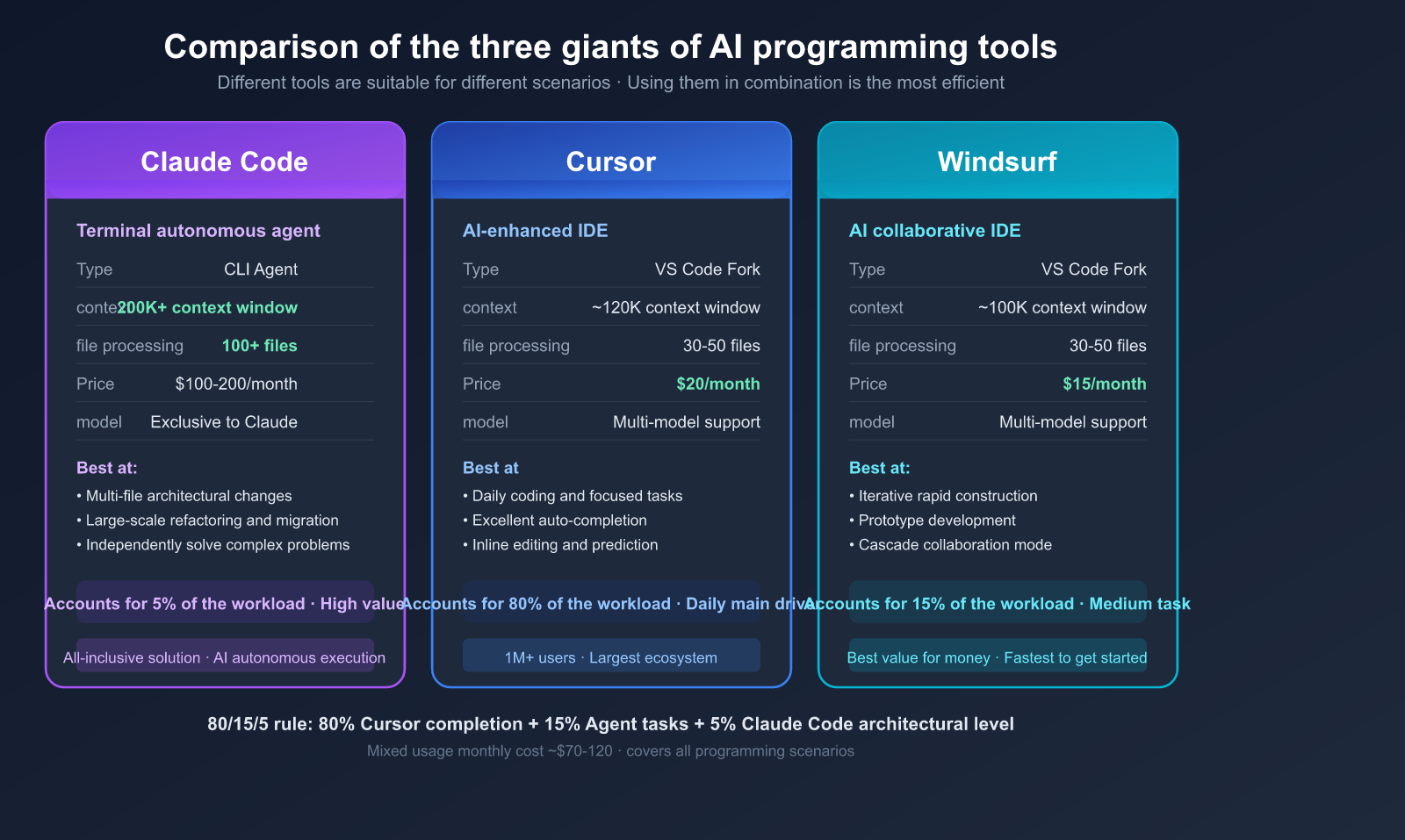
Core Advantages of Claude Code
| Capability | Claude Code | Cursor | Windsurf |
|---|---|---|---|
| Type | Terminal Autonomous Agent | VS Code Enhanced | VS Code Enhanced |
| Philosophy | AI Autonomous Execution | AI-Assisted Editing | AI Collaborative Coding |
| Context | 200K+ tokens | ~120K tokens | ~100K tokens |
| File Handling | 100+ files | 30-50 files | 30-50 files |
| Best For | Multi-file architectural changes | Daily coding, focused tasks | Iterative builds, prototyping |
| Pricing | $100-200/mo or API-based | $20/mo | $15/mo |
Best Practices for Claude Code
1. Give the AI a way to verify its own work
This is the highest-leverage practice emphasized in the official documentation:
# Good prompt
"Implement the user registration feature, write the corresponding pytest tests, and ensure the tests pass before submitting."

# Poor prompt
"Implement the user registration feature."
2. Writer/Reviewer Dual-Session Mode
Run two Claude Code sessions:
- Session A (Writer): Focuses on implementing the feature.
- Session B (Reviewer): Uses a fresh context to review the Writer's output.
This "AI reviewing AI" pattern is highly effective at catching blind spots that a single AI might miss.
3. Make the most of CLAUDE.md project configuration
# CLAUDE.md
Project Tech Stack
Python 3.12 + FastAPI + SQLAlchemy + PostgreSQL
Code Standards
- Type Annotations: All functions must include type annotations.
- Error Handling: Use the custom
AppErrorclass. - Logging: Use
INFOfor business events andDEBUGfor debugging purposes.
Prohibitions
- Do not use
print(); useloggerinstead. - Do not hardcode configurations; use environment variables.
- Do not write SQL directly within route functions.
4. The 80/15/5 Tool Mix Rule
Experienced developers recommend the following tool allocation:
- 80%: Autocomplete and inline editing (Cursor/Copilot) — for daily coding.
- 15%: Medium-complexity agent tasks (Cursor Agent/Windsurf) — for feature implementation.
- 5%: Complex multi-file architectural changes (Claude Code) — for major refactoring.
💰 Cost Tip: Claude Code's API mode is billed by token. If you connect via APIYI (apiyi.com), you can enjoy more competitive pricing on Claude models compared to the official rates. For scenarios that don't require the full functionality of Claude Code, you can also call Claude Sonnet 4.6 directly via API for code reviews.
Practical Case: A Complete Code Generation + Review Workflow
Below is a demonstration of a real-world scenario: using GLM-5 to generate a FastAPI user authentication module, followed by a review using Claude Sonnet 4.6.
Workflow Code
import openai

client = openai.OpenAI(
    api_key="YOUR_API_KEY",
    base_url="https://api.apiyi.com/v1"  # APIYI unified interface
)

# ===== Step 1: Generate code using GLM-5 =====
gen_response = client.chat.completions.create(
    model="glm-5",
    messages=[
        {"role": "system", "content": "You are a Python backend expert."},
        {"role": "user", "content": """
Implement a FastAPI user registration endpoint:
- POST /api/v1/register
- Receive email and password
- Hash password with bcrypt
- Store in PostgreSQL
- Return a JWT token
"""}
    ],
    max_tokens=4096
)
generated_code = gen_response.choices[0].message.content

# ===== Step 2: Review using Claude Sonnet 4.6 =====
review_response = client.chat.completions.create(
    model="claude-sonnet-4-6",
    messages=[
        {"role": "system", "content": REVIEW_PROMPT},
        {"role": "user", "content": f"Review the following AI-generated code:\n\n{generated_code}"}
    ],
    max_tokens=4096
)
review_result = review_response.choices[0].message.content
logger.info("=== Review Results ===")
logger.info(review_result)
Cost Analysis
| Step | Model | Input Tokens | Output Tokens | Cost |
|---|---|---|---|---|
| Generate Code | GLM-5 | ~500 | ~2000 | ~$0.007 |
| Review Code | Sonnet 4.6 | ~3000 | ~1500 | ~$0.032 |
| Total | — | — | — | ~$0.04 |
The total cost for a single "generate + review" cycle is less than $0.04. Even if you run this loop 50 times a day, your monthly cost would only be about $60.
If you were to use Claude Opus 4.6 for the entire workflow, the cost would be approximately $0.18 per cycle—4.5 times higher than this combined approach.
🎯 Key Takeaway: The combination of GLM-5 for generation and Sonnet 4.6 for review costs only 22% of using Opus 4.6 for the entire process, while the review quality remains virtually identical. You can handle all these calls using a single API key from the APIYI (apiyi.com) platform.
FAQ
Q1: Is the code quality from cheaper models good enough?
GLM-5 scores 77.8% on SWE-bench Verified, just about 2 percentage points lower than Claude Sonnet 4.6, yet it costs only one-third as much. For most code generation tasks (CRUD, API endpoints, data processing), the quality is perfectly sufficient. The key is having a follow-up review process as a safety net. You can access both models simultaneously and switch between them flexibly via APIYI (apiyi.com).
Q2: In what scenarios should I avoid using cheaper models for code generation?
Avoid them for security-critical code (authentication, encryption, permission control), concurrency and distributed logic, and precision-sensitive code involving financial calculations. For these scenarios, we recommend using Claude Sonnet 4.6 or Opus 4.6 directly, or writing the code manually followed by an AI review.
Q3: Is Claude Code suitable for everyone?
Claude Code is best suited for experienced developers handling complex, multi-file architectural tasks. If your work primarily involves single-file modifications and daily coding, Cursor or Windsurf might be more appropriate (and cost-effective). Many senior developers use a hybrid approach: Cursor for daily tasks and Claude Code for complex ones.
Q4: How do I measure the effectiveness of this workflow?
Track these four metrics: (1) Change in code output per capita; (2) Change in bug rate (defects after deployment); (3) Change in review time; (4) API invocation costs. We suggest running a two-week pilot and comparing the data before and after. You can easily track API costs using the usage statistics feature on APIYI (apiyi.com).
Q5: Besides GLM-5, what other cost-effective code generation models are there?
Claude Haiku 4.5 (extremely fast, great for simple tasks), DeepSeek V3 (open-source, strong in Chinese contexts), and GPT-5.3 Codex (specialized for code). The right choice depends on your language preferences and specific use cases. You can access all these models in one place via APIYI (apiyi.com), saving you the hassle of managing multiple platforms.
Conclusion: The Right Way to Approach AI Programming
The core of AI programming isn't about "letting AI write all the code," but rather building an efficient multi-model collaboration workflow. The best practice for 2026 is:
Model Selection Formula:
- 🟢 High-frequency, low-risk (boilerplate code, CRUD) → Cost-effective models like GLM-5
- 🟡 Medium-frequency, medium-risk (PR reviews, refactoring) → Claude Sonnet 4.6
- 🔴 Low-frequency, high-risk (security audits, architectural design) → Claude Opus 4.6
Workflow Formula:
- Define specs, plan, generate, review, test, and finally, perform a human final sign-off.
- Let AI handle 80% of the mechanical work, while humans focus on the 20% that requires high-value judgment.
We recommend using APIYI (apiyi.com) for one-stop access to all mainstream models, including GLM-5, Claude Sonnet 4.6, and Opus 4.6, to build a complete multi-model AI programming workflow on a single platform.
References
-
Addy Osmani: LLM Coding Workflow 2026
- Link:
addyosmani.com/blog/ai-coding-workflow
- Link:
-
Claude Code Official Best Practices: Agentic Coding Guide
- Link:
code.claude.com/docs/en/best-practices
- Link:
-
GLM-5 Technical Paper: From Vibe Coding to Engineering AI Programming
- Link:
arxiv.org
- Link:
-
Anthropic Official: Claude Sonnet 4.6 Release Announcement
- Link:
anthropic.com/news/claude-sonnet-4-6
- Link:
-
MIT Technology Review: Generative Programming – 2026 Breakthrough Technology
- Link:
technologyreview.com
- Link:
Author: APIYI Team | Exploring best practices for AI-powered software development. Visit APIYI at apiyi.com to access unified API interfaces for the full range of GLM-5 and Claude 4.6 models.


