
One-sentence summary: This article compares the local, SSH, and cloud entry points for Google Antigravity, OpenAI Codex, Anthropic Claude Code, and Cursor to determine whether tasks can continue after you close the window, your laptop sleeps, or the execution host shuts down—and how to retrieve code and logs afterward.
“Will the task keep running after I turn off my computer?” depends on two conditions. First, whether the computer you turn off is also the one running the agent loop, tools, and shell commands. Second, whether the access method you chose can keep those processes alive when the front end disconnects. Based on official documentation checked on November 23, 2026: the Antigravity App’s SSH remote service keeps running after you close the window or the laptop sleeps; in Cursor editor’s Remote SSH, the current turn is still driven by the desktop app, so quitting the app stops that turn; for Codex desktop SSH, public docs don’t promise whether it will continue after a disconnect, so it depends on your actual deployment; Claude Code officially recommends starting inside tmux or screen on an SSH host that stays powered on. All four vendors’ managed cloud tasks can run independently of your laptop, provided the cloud environment has access to the correct repository version, dependencies, network, and credentials.
To be clear, this article is a documentation comparison. We didn’t run shutdown, network-disconnect, or paid-startup tests in four real workspaces. Section 4 provides a procedure readers can use to retest it themselves.
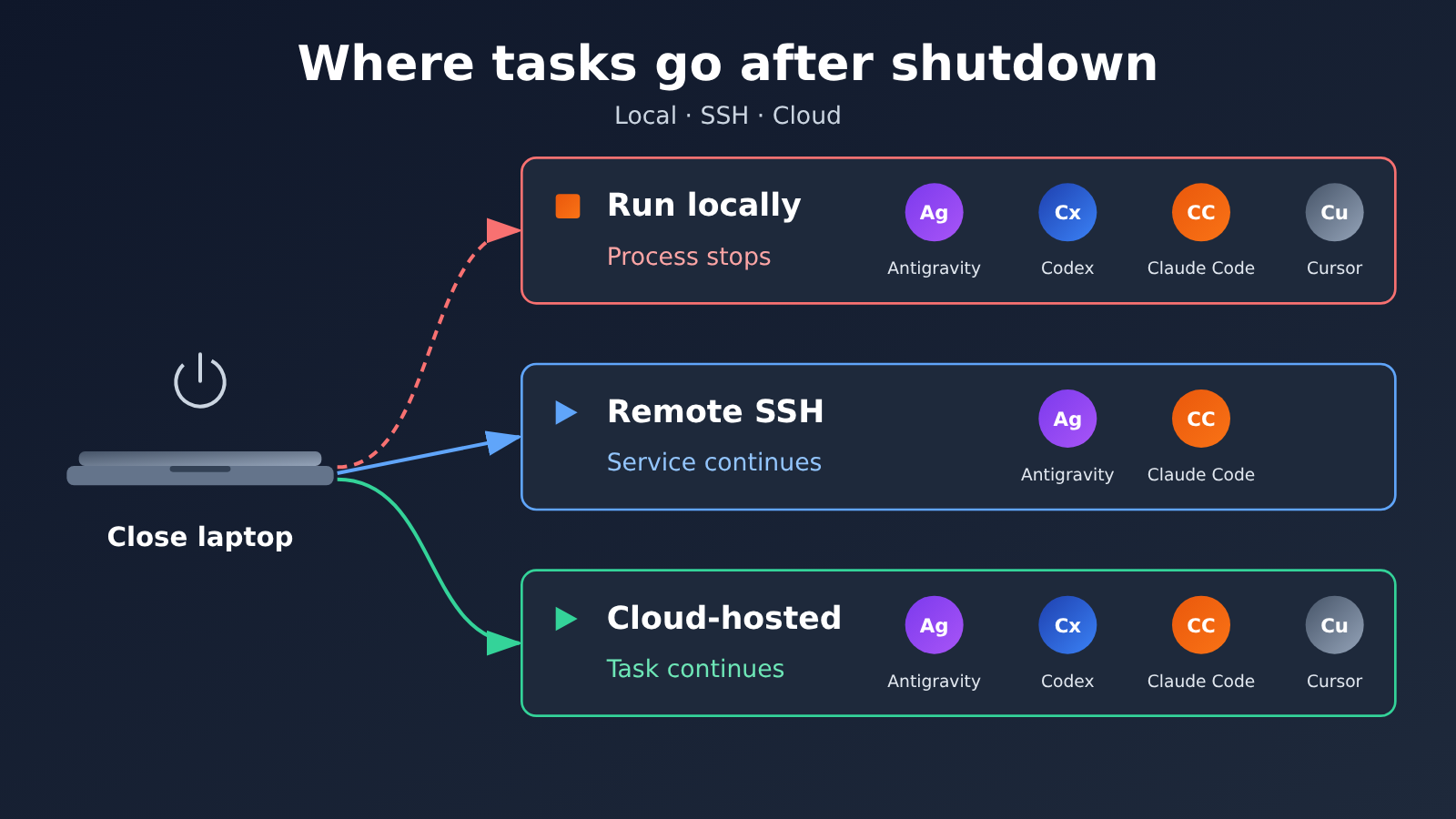
At a Glance: Where Tasks Go in 4 Coding Tools After You Shut Down Your Computer
The table below breaks down each entry point by three things: what I shut down, where the Agent lives, and how to reconnect. “Continues” means the docs explicitly say it keeps going; “Not promised” means public documentation doesn’t cover it—which doesn’t mean it’s unsupported.
| Tool & Entry Point | What I Shut Down | Where the Agent Loop and Commands Live | Result | How to Reconnect |
|---|---|---|---|---|
| Antigravity App SSH | App window or laptop sleep | Remote 64-bit Linux host | Continues | Reconnect to the same host; Stop SSH Server… stops the service |
| Antigravity Remote Agents | Browser or computer sleep | Google-hosted isolated environment | Continues | Reopen the remote project session from the App, CLI, or web |
| Codex desktop SSH | Desktop SSH session | Remote app-server and remote commands | Not promised | Check against your deployment setup; if you need uninterrupted runs, use Cloud or a standalone remote job instead |
| Codex Cloud | Local machine sleep | OpenAI cloud environment | Continues | Review the diff, create a PR, or fetch it with the CLI |
| Claude Code CLI + tmux (SSH host) | SSH connection | tmux session on the remote host | Continues (while the host is on) | tmux attach to return to the original session |
| Claude Code Remote Control | Closing the phone page | The original computer | Continues; goes offline if you close the terminal or exit the process | Return to the original host or reconnect to the controller |
| Claude Code Cloud | Laptop | Anthropic-hosted VM or self-hosted environment | Continues | Push a branch, Changes, PR, or --teleport |
| Cursor editor Remote SSH | Quit the desktop App | Commands and files on the remote; turns driven by the desktop | Current turn stops | Restart the client within a few hours and use Continue Interrupted Agents to recover |
| Cursor Cloud Agents | Laptop | Cursor-hosted VM | Continues | Manage from web, iOS, or desktop; results land on a separate branch |
Suggested reading order: Start with Section 1 to tell the three meanings of “shutting down your computer” apart. Section 2 walks through the local and SSH entry points one by one. If you’re about to close your laptop, read Section 3 to check whether the code can move to the cloud. Finally, use Section 4 to verify and sign off. The four tools stand on their own, so feel free to jump straight to the one you use.
To Know: Understanding Local, SSH, and Cloud Terminology in Coding Tools
| Term | Concise Explanation |
|---|---|
| Execution host | The machine that actually runs the Agent loop or executes shell commands; the two may not be on the same machine |
| Local session | A session that uses the current computer’s processes, project directory, network, and permissions |
| SSH | A way to securely log in to another host from one device and transfer commands and data |
| Remote Control | A control entry point for sending commands, approving actions, and viewing results from another device to the original execution host |
| Worktree | An independent checkout directory of the same Git repository, used to isolate parallel changes |
| Agent loop | The control flow that initiates model requests, executes tools, and then decides the next step based on the results |
| tmux | A terminal multiplexer that keeps terminal sessions alive on a host, so clients can reconnect after disconnecting |
| Daemon | A service running in the OS background that can host sessions independently of foreground windows |
| Managed cloud environment | An execution environment managed by a provider, with its own working directory, dependencies, and network configuration |
| Environment credentials | Authorization information that lets an execution environment access repositories, services, or model gateways |
| Session recovery | Resuming work after reopening a task or conversation; whether the old process and state still exist must be verified separately |
1 The Same “Shut Down the Computer” Instruction Yields Three Different Results in Coding Tools
1.1 Using a Single Overnight Build Task to Set a Common Baseline
We’ll use the same case throughout: before leaving work in the evening, you have a coding Agent install dependencies, build, and run the full test suite on an isolated branch, then come back the next morning to review the diff and test logs. This task involves at least four roles: the control end that sends instructions, the process that runs the Agent loop, the shell that executes commands like npm install and make test, and the working directory that stores the code and logs.
In pure local mode, all four roles live on your laptop. In SSH mode, commands and files have usually already moved to the remote side, but the Agent loop may stay on the local machine or may run remotely — it varies from vendor to vendor. In hosted cloud mode, only the control end is still in your hands out of all four roles. So “does the task keep running after I shut down the computer?” is really asking which of these roles the machine you turned off was handling.
1.2 How the Three Kinds of Shutdown Actions Affect Coding Tools
| User Action | Affected Components | How to Tell |
|---|---|---|
| Closing the foreground window, disconnecting SSH, leaving the mobile remote-control page | The frontend connection disappears; whether the Agent and commands stop depends on the lifecycle of the session and the background service | Where you chose to run when creating the task, and where the client and host process each live |
| Putting the computer that started the task to sleep or shutting it down | If this computer is the execution host, local processes will stop; if it’s only responsible for sending instructions, an independent host can keep going | First determine whether it’s local execution, SSH remote execution, or a hosted task |
| Stopping the remote service, shutting down the remote host, or having the cloud task reclaimed | The Agent, tool commands, or remote working directory are affected; whether work can continue depends on what was preserved | Remote service state, session records, Git branches, and final task state |
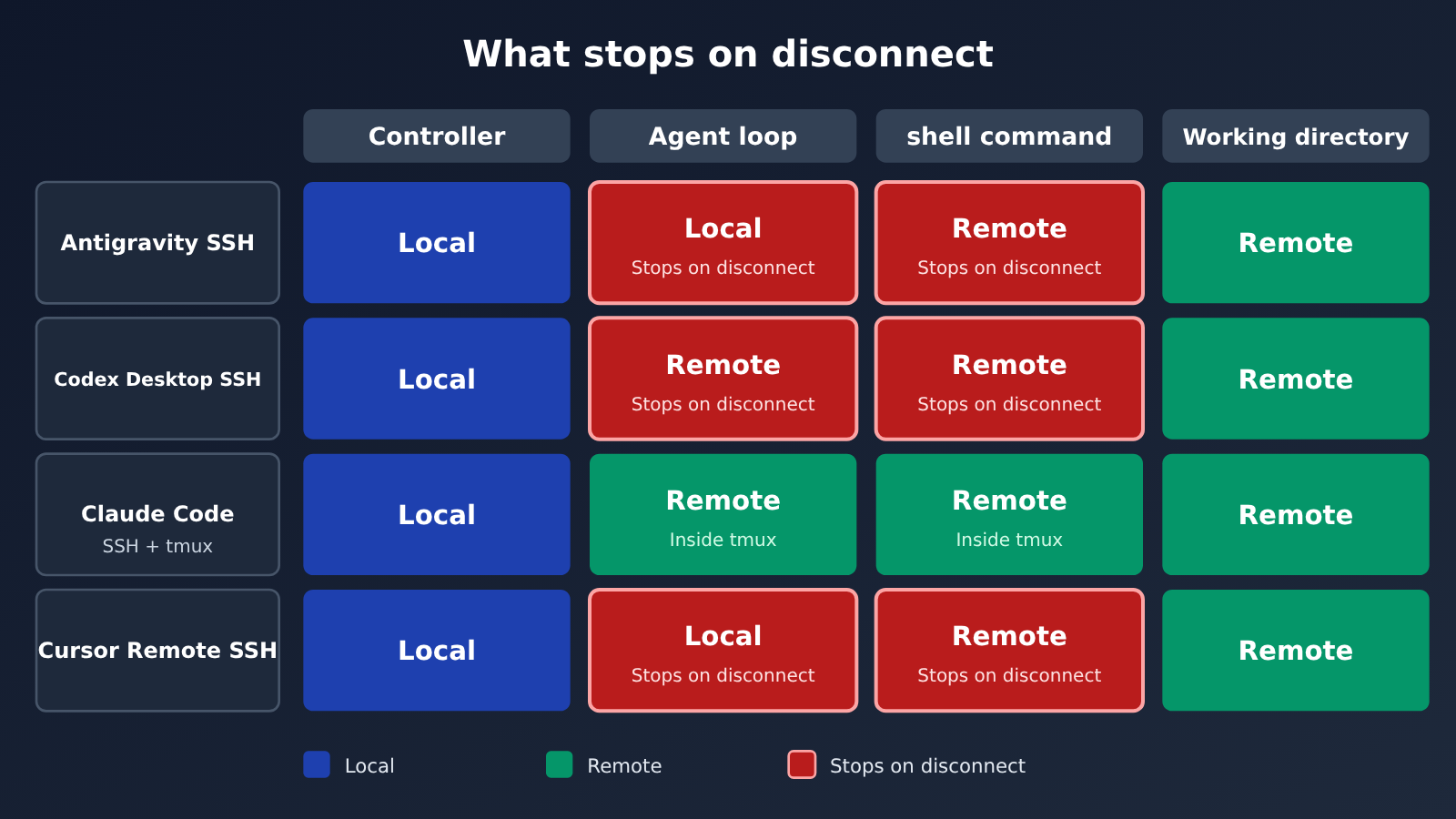
Suppose you use the Cursor editor’s Remote SSH to connect to a company build machine, then close your laptop. The test commands run on the build machine, but according to a November 13 response from Cursor support, what drives this round is still the desktop App. Closing the lid prevents the App from continuing to drive, so this round gets interrupted — even if the build machine stays on the entire time. Switch to Antigravity App SSH, and the Agent itself lives on the remote side, so the same lid-closing action won’t affect it.
1.3 Continued Execution, Returning to Old Logs, and Re-running from a Conversation Are Three Different Observations
Opening the tool the next day and seeing a complete conversation doesn’t directly prove the task ran all night. You need to distinguish at least three situations:
- Continuous progress: during the time you were shut down, the log timestamps keep increasing, and commits or test results were produced after you left.
- Returning to old logs: the process had already stopped when you disconnected, and what you see is just the output left behind before it stopped.
- Re-running from a saved conversation: commands like
codex resumereopen a past conversation, and the Agent starts a new step based on history and file state; whether the old process kept running needs to be checked separately.
These three situations can look pretty similar in the chat interface, so the acceptance check in Section 4 uses log timestamps and Git state as the standard — not whether there’s a chat history in the interface.
2 Local vs. SSH for the Four Coding Tools
| Tool and mode | Where files and terminal live | Who drives the current turn | Can you still check on it after closing the window | How to reconnect after a disconnect |
|---|---|---|---|---|
| Antigravity local App/CLI | Local machine | Local machine | Stops on shutdown or sleep | Reopen after the local machine comes back |
| Antigravity App SSH | Remote Linux | Remote service | Yes, the remote keeps running | Reconnect to the same host |
| Codex Local/Worktree | Local machine, or a worktree on it | Local machine | Follows the local machine | codex resume to reopen the conversation |
| Codex Desktop SSH | Remote | Remote app-server | Not promised | Check against your deployment; Handoff is available |
| Claude Code local + Remote Control | Original computer | Process on the original computer | Closing the control page has no effect; closing the terminal goes offline | Go back to the original terminal |
| Claude Code SSH + tmux | Remote | CLI inside remote tmux | Yes | tmux attach |
| Cursor editor Remote SSH | Remote | Desktop App | Quitting the App stops the current turn | Continue Interrupted Agents |
| Cursor CLI + tmux (remote) | Remote | Remote CLI | Yes | tmux attach |
2.1 Antigravity: Closing the SSH Window vs. Stop SSH Server
Antigravity App 2.33.0 added SSH connections on November 17. The remote side has to be 64-bit Linux; the official requirements are glibc 2.26 or later, reachable OpenSSH, working port forwarding, outbound network access from the remote, and a home directory that’s writable and executable. The App installs a service on the remote over SSH, so in a remote window the projects, worktrees, agents, terminals, tools, and custom config all live on the remote host. That’s why closing the window, putting your laptop to sleep, or losing the network leaves the remote running and reconnectedable. Only choosing Stop SSH Server… actually stops the remote service and the agents inside it.
Two things to watch out for. First, Antigravity disables SSH agent forwarding — just because you can SSH into a machine doesn’t mean the remote can pull private repos. The remote needs its own Git credentials. Second, the built-in browser currently doesn’t work in SSH workspace windows, so if an overnight task includes a browser verification step, you’ll need to verify some other way. Remote Control for the local App or CLI still uses the original host: interactive CLI remote control tears down the tunnel when the terminal hosting it exits, and daemon mode also requires its host to stay online.
2.2 Codex: worktree, remote app-server, and official coverage
The Codex desktop app’s Local mode uses the current project directory, while Worktree mode opens a separate Git checkout — both run on your local machine. The CLI’s daemon mode is hosted by a background service that can persist across multiple foreground sessions, but restarting that background service may interrupt work that’s currently running or queued in other conversations.
Desktop SSH requires that the client can reach the host, and that the remote login shell’s PATH can find an installed and authenticated Codex. The app launches a remote app-server over SSH, reading and writing remote files and executing remote commands. Matching projects in the same Git repository can Handoff between two hosts, but if the current response is running, it’s interrupted first, then the Git state and chat are transferred. The public help pages cover where it runs, installation, and Handoff, but they don’t promise that the current turn will necessarily continue after the desktop SSH connection drops. When uninterrupted operation is required, the official guidance points to independent remote jobs or Codex Cloud. On mobile, Remote connections is a way to access the original host — the host desktop app must stay running, online, and awake.
2.3 Claude Code: Remote Control offline behavior and the CLI inside remote tmux
Remote Control turns a browser or phone into a control surface, while the files and shell stay on the host running Claude Code. Closing the phone page and quitting the local Claude process are two different things: the official docs state clearly that closing the terminal hosting the session, quitting the corresponding client, or stopping the process all cause the session to go offline. If the host stays awake but loses network for a long time, the standalone Remote Control server mode exits after roughly ten minutes; interactive mode will try to reconnect, and the terminal remains usable. That ten minutes applies only to server mode and can’t be generalized to all sessions.
When launching over SSH on a remote machine, the official recommendation is to start Claude inside tmux or screen, so the process survives after SSH exits. Among the four tools, this is the most direct piece of official advice on long-running tasks over SSH.
2.4 Cursor: Editor Remote SSH Continue Execution and Reopen Recovery
Cursor support staff answered in the community forum on November 13: with the editor’s Remote SSH, terminal commands and file changes go through the remote host, but the current Agent turn is driven by the desktop App, so quitting the App stops that turn. The same reply mentioned that if you restart the client within a few hours, you can use Continue Interrupted Agents to recover the interrupted work. Here you need to distinguish “continue execution” from “resume after reopening”: the former means it keeps running overnight, while the latter means you come back in the morning and pick up where you left off — the test only continues after you reopen.
If you need to run long tasks on a private remote host detached from the editor, the support staff’s suggestion is to use Cursor CLI directly on the remote host together with tmux, provided the remote account, connection, tools, and permissions are all set up. Agents Window also supports remote SSH execution environments, but the reply above was about the editor’s Remote SSH; Agents Window’s behavior needs to be verified separately.
2.5 Which Coding Tool Processes tmux Can Protect
tmux only protects processes started inside it. Here’s a typical usage on a remote host:
# After logging into a remote host that stays powered on
tmux new -s nightly          # Create a new session
# Inside the session, start an approved CLI, such as Claude Code or Cursor CLI
# Press Ctrl-b then d to detach, after which you can disconnect SSH

# The next day, SSH in again
tmux ls                      # List existing sessions
tmux attach -t nightly       # Reattach to the original session
An Agent managed by the IDE itself won’t automatically migrate into a tmux session just because you opened one alongside it, and when the host shuts down, tmux can’t keep the task running either. After reattaching, check the output and the files that were changed first, then decide whether to rerun.
3 When you’re ready to close the laptop, move coding tasks to a cloud execution environment
3.1 Eligibility and repository access for the four hosted cloud task services
| Hosted option | Eligibility (per current documentation) | Repository source | Private network and credentials | Artifacts and retrieval |
|---|---|---|---|---|
| Antigravity Remote Agents | Gradually rolling out to individual Google AI Pro and Ultra; Free, Plus, Workspace, and Google Cloud business accounts are not included | GitHub repositories attached to the project, Drive files, or uploaded materials | Resource and authorization connections for remote projects are checked per environment | App, CLI (1.4.12 or later, agy --remote-agent), or reopen the session on the web |
| Codex Cloud | Based on ChatGPT account entitlements; enterprises use published environments they’re authorized to access | GitHub.com authorization; GitLab.com based on permissions | Program variables and HTTPS network secrets for specified domains are two separate configurations | Review diffs, create a PR, or retrieve and apply via CLI |
| Claude Code Cloud | Pro, Max, Ultra, Team, and eligible Enterprise seats; organizations may require the Cloud Sessions role | Usually clones pushed commits from GitHub; there’s also a local repository upload path when GitHub isn’t available | Configure network permissions, dependencies, and variables in the Cloud environment | Push branches, Changes, PRs, or --teleport |
| Cursor Cloud Agents | New individual plans start at Premium; legacy paid plans follow the old rules | GitHub, GitLab, Bitbucket Cloud, Azure DevOps; an admin must connect the source | Cloud Secrets are managed separately from host-owned variables | Separate branches with screenshots, videos, and logs; Slack notifications optional |
Cursor also offers an intermediate form: self-hosted Machines. Cursor retains the agent loop and planning, while approved workers on your own infrastructure handle executing files and commands. The original laptop can go offline, but the worker must stay online and be able to access the project and dependencies. Organizations can also configure Claude Code cloud sessions as self-hosted environments.
3.2 Three typical failure paths when moving coding tasks to the cloud
Handing a task off to the cloud doesn’t guarantee it’ll run successfully. These three situations are the most likely to fail overnight:
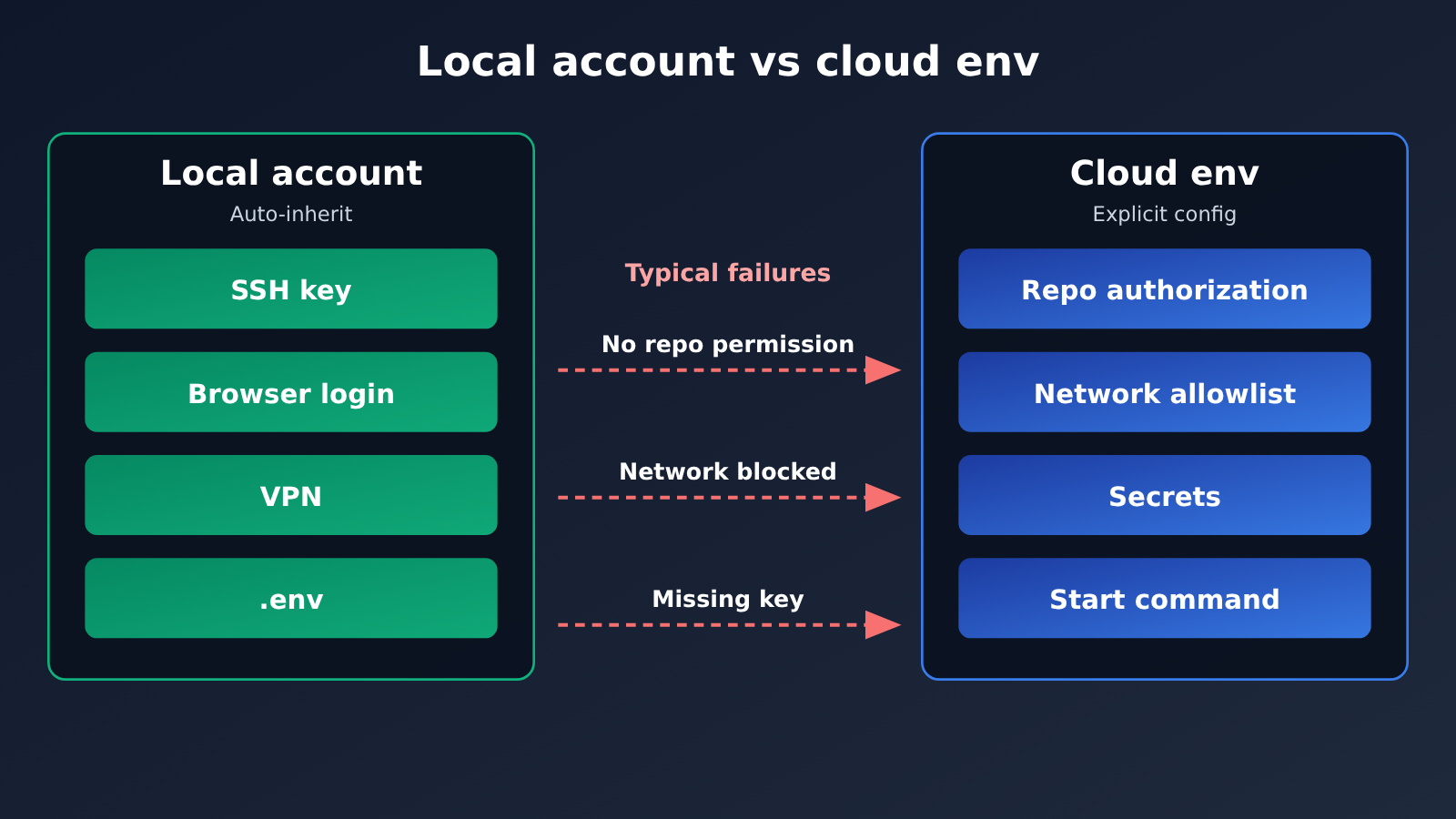
- Uncommitted changes that exist only on your laptop. Codex Cloud tasks have their own working directory, and uncommitted code on your personal machine won’t be carried over automatically. Claude Code’s
claude --cloudsingle-repo path also won’t bring along commits or uncommitted changes that exist only on your local machine. What you see in the morning might be a “tests passed” result based on an old commit. Before you leave, commit and push to an isolated branch, and note the baseline commit hash. - A database only accessible from your local machine. Integration tests connect to a database on
localhost, or require the company VPN. The cloud environment has neither that service nor your VPN, so the tests fail at the connection stage. You can either spin up the test database in the cloud environment’s startup command, or move these tests to a self-hosted worker that can access the private network. - Third-party model keys. The project scripts need to call a model gateway, but the key is only written in your laptop’s shell config. The cloud environment can’t read that variable, so the script throws an authentication error. Claude Code’s docs also note that cloud sessions can’t be started using a third-party provider’s login method.
3.3 Permission setup differences between your everyday local account and the cloud environment
A local session inherits everything that belongs to you: SSH keys, browser login state, VPN, and .env files. A cloud environment has none of that by default, and you need to grant each item explicitly: repository read/write permissions (Cursor requires this to cover dependency repositories and submodules), network egress allowlists, Secrets, and permission to create PRs. This difference is good for security, but the cost is the setup work the first time around.
If the overnight task involves model invocation, first figure out which kind of invocation it is: the Agent choosing a model itself, or the Agent running a script on behalf of the project that explicitly calls an API. The former depends on whether the client and the specific mode support custom channels, authentication methods, and endpoints. For example, Codex’s custom gateway currently only supports responses as the wire API, while a Claude Code gateway needs to be checked against interfaces such as Anthropic Messages. The latter needs to be configured separately on the actual execution host. Take APIYI as an example: it’s only suitable to include when the target mode supports that protocol, or when the project script itself calls a compatible interface. The corresponding API key should go into that execution environment’s secret management, and you should verify that it can reach the same gateway using the actual model and protocol. Environment variables set on your laptop won’t be injected automatically into a remote or cloud environment.
4 How to verify that the coding tool’s task truly continues after closing the window
4.1 A safe disconnect retest
This process only disconnects the controller and leaves the execution host alone, so it works for retesting on any tool:
- Prepare an authorized practice repository that you can clean up at any time, and create an independent branch from a clearly defined base commit.
- Record the starting version, repository, base commit, Host, session or task ID, environment state, and planned network access.
- Choose a task that will continuously produce records, such as build plus test, and have every step print a timestamp.
- Once the first log line has appeared, close only the local window, or pause the initiator’s network, while keeping the execution host online.
- After restoring the connection, use the timestamped logs on the execution host or platform events to determine whether it continued, paused, or finished while you were disconnected.
- Before reconnecting, check whether the old task is still running, to avoid two processes writing to the same branch at the same time.
You can generate log timestamps with a simple wrapper command:
BASE=$(git rev-parse HEAD); echo "base=$BASE" > run.log
( make build && make test ) 2>&1 | while IFS= read -r l; do
  echo "$(date -Is) $l"; done >> run.log
# Check after reconnecting
tail -n 20 run.log
git log --oneline "$BASE"..HEAD
git diff --stat "$BASE"
If there are still new timestamps after the disconnect moment, the task really is continuing; if the last line stops before the disconnect, the process has already stopped, and the “Resume” in the UI is just a restart or rerun.
4.2 Six-column handoff table for coding tasks
Before handing a task to an unattended execution location each time, fill out this table:
| Execution host | Code version | Dependencies | Accessible services and credential sources | Approval entry point | Result output point |
|---|---|---|---|---|---|
| Example: remote build machine / Codex Cloud environment name | Branch name + base commit ID | Lock file version, startup command | Test database address, where Secrets are stored | Which writes need manual confirmation, and where to confirm them | PR, branch, log file path |
This table answers “what does this machine rely on to run overnight?” As long as one cell can’t be filled in, the task is very likely to get stuck on that item.
4.3 Next-day review order
When you come back in the morning, check in this order: first look at the task’s final state and the last timestamp in the log to confirm whether the task finished or stopped midway; then check whether the scope of git diff exceeds expectations and whether unrelated files were changed; next, look at the last successful test output and the corresponding commit; finally, verify where the result came from and confirm that the test really ran against the base commit you recorded. A complete chat transcript can’t replace these acceptance checks. Based on the results, decide whether to reconnect and continue, rerun on the branch, or just roll back.
Back to the question in the title: first confirm whether the machine you closed was the execution host. If it was, the task will stop. If not, then check whether the agent loop is also remote or in the cloud. Antigravity SSH, the CLI in remote tmux, and cloud tasks from various providers can all survive closing the lid; Cursor editor’s Remote SSH won’t survive quitting the app; Codex desktop SSH requires you to verify it yourself. If any one of private-network dependencies, unpushed commits, or local credentials changes, the recommended execution location should be adjusted accordingly.
References
- Google Antigravity SSH documentation: runtime requirements and the difference between closing the window and stopping the service
- Links:
antigravity.google/docs/ssh/
- Links:
- Google Antigravity Remote Agents and Remote Control: managed task eligibility and remote control methods
- Links:
antigravity.google/docs/remote-agents,antigravity.google/docs/remote-control/
- Links:
- Codex run modes, remote connections, and Cloud environments
- Links:
learn.chatgpt.com/docs/environments/modes,learn.chatgpt.com/docs/remote-connections,learn.chatgpt.com/docs/environments/cloud-environments
- Links:
- Claude Code Remote Control and cloud sessions
- Links:
code.claude.com/docs/en/remote-control,code.claude.com/docs/en/claude-code-on-the-web
- Links:
- Cursor support forum reply (2026-11-13) and Cloud Agents documentation
- Links:
forum.cursor.com,cursor.com/docs/cloud-agent
- Links:
- tmux getting started: session detaching and reattaching
- Links:
github.com/tmux/tmux/wiki/Getting-Started
- Links:
Author: APIYI Technical Team


