
Straight answer: If each subtask’s result can be handed back to the main session independently, Claude Code’s regular subagents are all you need — they’re lighter and cheaper. Only when multiple sessions need to actively communicate, share task state, and coordinate repeatedly around interface contracts is it worth turning on the still-experimental Agent Teams. One more thing: “can they message each other” isn’t the dividing line. According to Anthropic’s current docs, named regular subagents may also be able to message each other under certain tool settings. The real difference is the shape of the work: is delivery “everyone reports back” or “continuous negotiation”?
What you’ll get from this article
- The structural differences between Claude Code regular subagents and Agent Teams in terms of participants, where messages go, and task state.
- How the same CSV export refactor plays out under each approach: how to write the prompts, how to split the work, and how to align acceptance checks.
- How to enable the experimental feature through
settings.json, how to shut off teammates and fall back to regular delegation, and what limits apply to session recovery. - The full set of preconditions behind the official “roughly 7x token usage” figure, and how to use a single tracking table to judge whether the extra cost is worth it.
Index
The “Objective facts” section walks through, in order, the official definitions of both structures, the two prompt sets for the CSV refactor example, the experimental flag and the exit boundary, and the usage notes plus how to connect through APIYI. The “Analysis and judgment” section covers selection criteria, a cost-tracking method, and the conditions for sticking with it. The FAQ at the end focuses on misjudgment risks and billing conventions.
Claude Code Subagents and Agent Teams: Key Concepts to Know
These terms come up again and again. Let’s align on what they mean first, and the comparison later will be much clearer.
| Concept | Brief explanation |
|---|---|
| Subagent | Runs in an isolated context for a scoped subtask and hands the result back to the main session |
| Agent Teams | An experimental feature where a lead session coordinates multiple Claude Code sessions, off by default |
| Lead | The fixed main session responsible for creating and coordinating teammates and aggregating results |
| Teammate | A Claude Code session with its own independent context that can communicate directly with other teammates and the operator |
| Shared task list | A set of task states that members with the Task tool can view, claim, and update |
| in-process mode | The default display mode for Agent Teams, where you view each teammate through a panel within the current terminal process |
| Plan mode | A work mode where you analyze and submit a plan before executing |
SendMessage |
A tool for sending messages between sessions; its availability depends on tool settings, and ordinary subagents may have it too |
| Usage-based estimate | The client-side estimated amount that /usage calculates from model and token unit prices—it’s separate from the actual bill |
Claude Code Subagents vs. Agent Teams: Impact at a Glance
How much this choice affects you depends on how you use Claude Code.
- Mid-level developers using Claude Code for daily coding: For most “look it up, run it, double-check it” delegations, an ordinary subagent is enough. Before turning on Agent Teams, confirm that the task really has boundaries that need back-and-forth negotiation.
- Developers paying for the API on a usage basis: Every teammate in Agent Teams is an independent session carrying its own context. The roughly 7x usage figure from the official docs comes with clear preconditions, but it’s enough to show that you should do the math before forming a team.
- People writing automation scripts: Non-interactive execution via
claude -pand the Agent SDK won’t start Teams teammates, and named delegations fall back to ordinary subagents. In CI scenarios, you don’t need extra hooks for Teams—but you won’t get any benefit from it either. - Team leads: After enabling the experimental variable, some existing named delegations may be launched as teammates. Before adding this variable to shared configuration, you need to give the team a heads-up.
The Facts: What Anthropic Officially Says About Claude Code Subagents and Agent Teams
The following is compiled from Anthropic’s official documentation and APIYI’s public docs, verified on November 23, 2026. Agent Teams is still an experimental feature, so its interface and limitations may shift between releases — always check the docs for the version you’re actually running.
How do regular subagents and Agent Teams differ in how the work is structured?
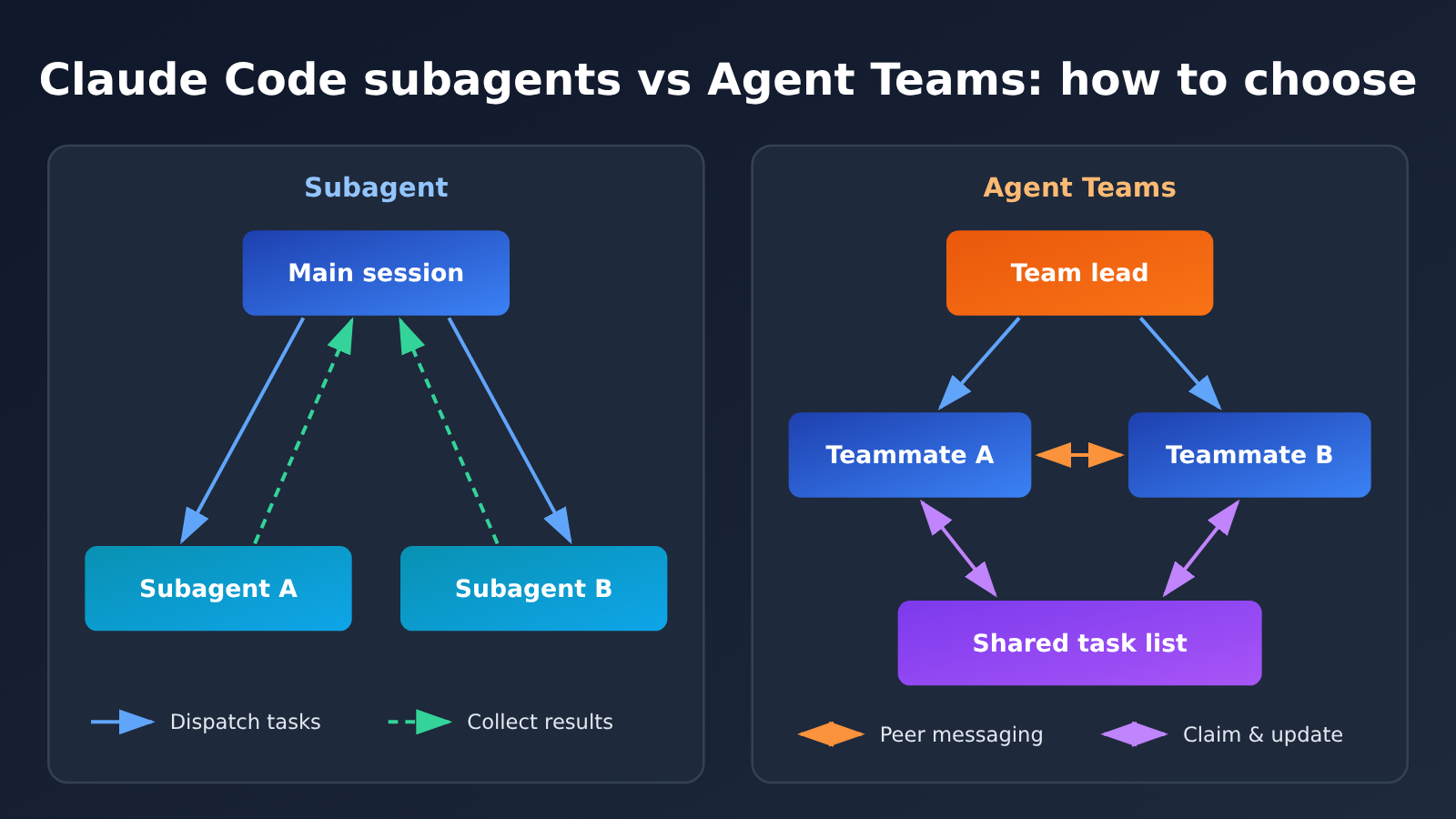
Regular subagents each get their own context, which makes them a good fit for tightly scoped jobs: reading code, checking logs, running one test, verifying one fact. They hand their results back to the main session, and the main session makes the final call. You can delegate in plain language, or manage subagent definitions with /agents; a definition can specify the model, tools, and permissions. Subagent requests count toward the same usage limit or API bill.
One thing worth calling out: the current official docs state that, depending on tool settings, named regular subagents may also exchange messages through SendMessage. So “can it send messages?” on its own isn’t enough to tell the two apart.
Agent Teams, on the other hand, describes a roster of Claude Code sessions: one fixed main session acts as team lead and distributes tasks to teammates, who can message each other directly and can also talk to the operator directly. Teammates with the Task tool can claim and update tasks in a shared task list. Tasks have three states — pending, in progress, and completed — and a task whose dependencies aren’t finished yet gets marked as blocked; members without the Task tool coordinate through messages instead.
| Aspect | Regular Subagents | Agent Teams |
|---|---|---|
| Feature status | Generally available; managed with /agents |
Experimental; off by default |
| Participants | Main session + several independent contexts | Team lead + several independent Claude Code sessions |
| Message flow | Results go back to the main session; named subagents may also message each other depending on tool settings | Teammates can talk to each other and to the operator directly |
| Task state | Tracked by the main session itself | Shared task list with claiming, dependencies, and blocking |
| Non-interactive execution | Available via claude -p and the Agent SDK |
Doesn’t spin up teammates; falls back to regular subagents |
| Best for | Search, analysis, and verification that can be delivered independently | Multi-party collaboration whose boundaries need ongoing negotiation |
Solving the Same CSV Export Task in Two Ways
Imagine this scenario: the existing command-line report can only export plain text, and now we need to add CSV format. The repo already has order data, field definitions, and export tests. To compare the two approaches fairly, we fix the acceptance criteria at these four items, and both approaches are limited to read-only inspection of configuration, code, and tests: produce a plan first, don’t write files.
- The header columns match the field definitions.
- An empty list outputs only the header row.
- Commas and quotes are escaped correctly.
- The default plain-text output stays unchanged.
The prompt for an ordinary subagent could look like this:
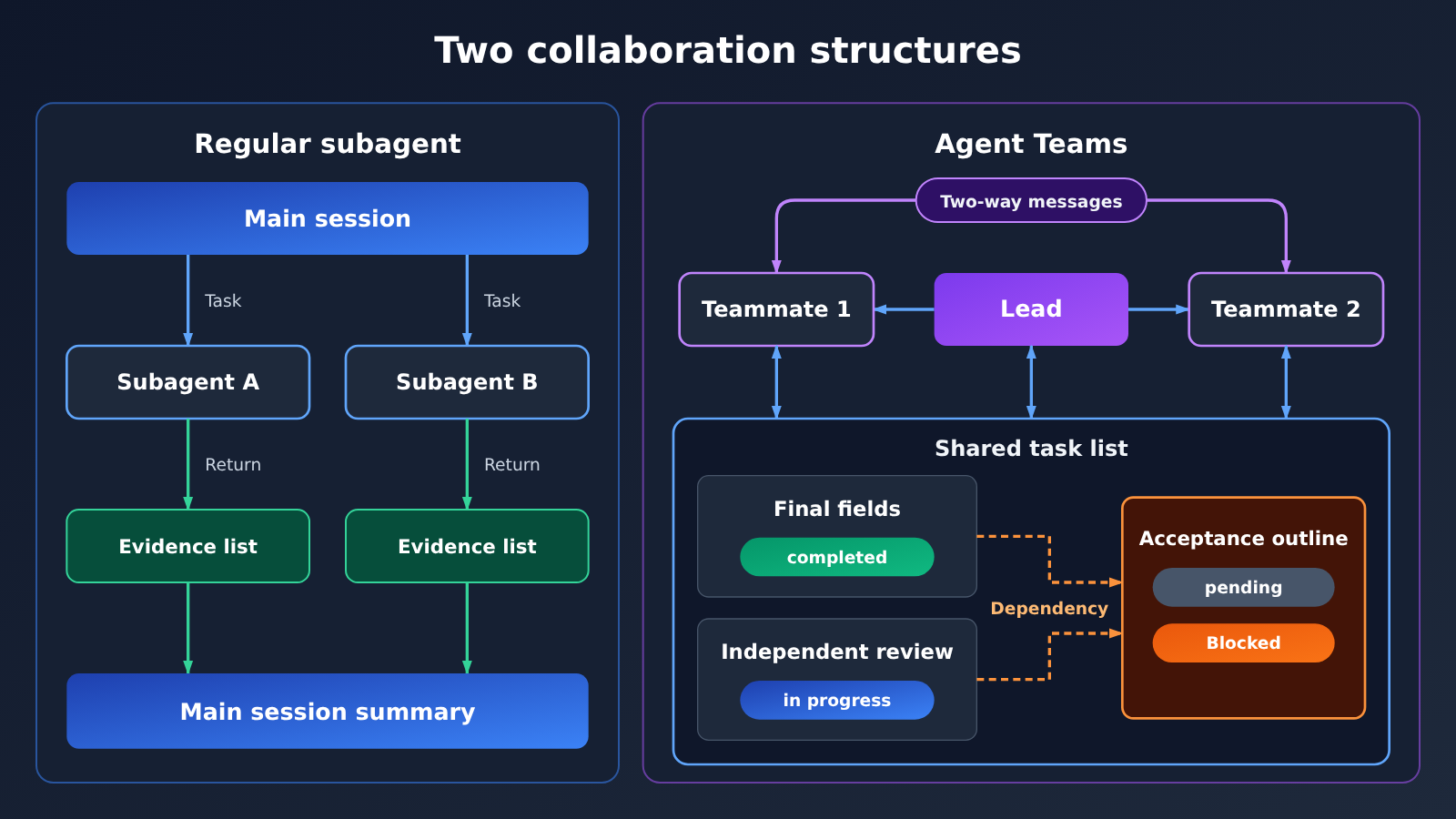
Delegate one subagent to check the field definitions and ordering, and another to check the existing tests and compatibility conditions.
Have each return an evidence checklist. The main session consolidates conflicts and gives me an acceptance plan; do not change code.
Here, the two investigations can run their searches independently. Two short results are enough; they don’t need to talk to each other.
The prompt for Agent Teams needs to encode the coordination relationship in the task structure:
Organize two teammates: one responsible for settling the unified fields and null-value rules, and one responsible for validating downstream import constraints.
Put field finalization, independent review, and the acceptance outline into the shared task; the acceptance items depend on the fields and import constraints.
The two teammates communicate directly about the conflict over the first column for customer imports and quote escaping.
The main session waits for both items to be completed, then records the adoption and exclusion rationale. Read-only investigation; do not write files.
In this example, the reason to form a team is that two questions—“What should the first column be for customer imports?” and “Whose rule should quote escaping follow?”—must be confirmed back and forth by the field owner and the import owner. If the two people just write a separate report each in the end, there’s no need to organize an extra team.
| Coordination element | Ordinary subagent approach | Agent Teams approach |
|---|---|---|
| Role A | Check field definitions and ordering | Settle unified fields and null-value rules |
| Role B | Check existing tests and compatibility conditions | Validate downstream import constraints |
| Conflict handling | Main session reads both checklists and decides | Two teammates communicate directly; main session records the conclusion |
| Task dependency | Main session controls the order itself | Acceptance outline in the shared task depends on the first two items |
| Deliverables | Two evidence checklists + one acceptance plan | Shared task status + adoption and exclusion rationale |
| Acceptance criteria | The four items above, identical | The four items above, identical |
How to Enable the Agent Teams Experimental Feature and Shut Down Teammates
Before you turn it on, first run claude --version to confirm your current client version, then check the official feature page to see whether that version supports it. Agent Teams is off by default. According to the current documentation, you can add the following entry to the existing env object in settings.json — just be careful to keep the other settings in the file — or set an environment variable with the same name in an interactive shell.
{
  "env": {
    "CLAUDE_CODE_EXPERIMENTAL_AGENT_TEAMS": "1"
  }
}
Once it’s enabled, just explicitly invite two teammates in a supported interactive session. The in-process display mode is used by default; in the teammate panel you can move up and down to select and enter a particular teammate, and use Ctrl+T to switch the shared task list.
One thing that’s easy to overlook: after the feature is enabled, some sub-agents you invoke by name in the main session will be launched as teammates by the runtime. In other words, what you intended as an ordinary delegation can turn into team formation. For the exact exceptions (fork, isolation, non-interactive), refer to the list on the official site. Non-interactive execution via claude -p and the Agent SDK won’t start Teams teammates, and named delegation still behaves as an ordinary sub-agent. When you want to go back to ordinary delegation, set the variable back to 0, or restore your original settings.
As for how to wrap things up, the official documentation lays out a few boundaries:
| Action | How to do it | Things to keep in mind |
|---|---|---|
| Set stop conditions | Tell the lead at the start what counts as done | Prevents the team from discussing indefinitely |
| Shut down teammates | After completion, have the lead send shutdown requests to each teammate by name | Teammates may finish their current work first, so shutdown isn’t necessarily immediate |
| Save progress | Save the acceptance summary and pending tasks before shutting down | In-process teammates can’t be automatically restored via /resume or /rewind |
| Access control | Set the prompt’s “read-only” alongside workspace permissions | Permissions follow the actual run mode; a prompt isn’t a substitute for permissions |
| Revert to ordinary delegation | Set the variable to 0 or restore the original settings |
After changing it, restart the session and verify again |
Preconditions Behind Agent Teams’ ~7x Usage and How to Connect Through APIYI
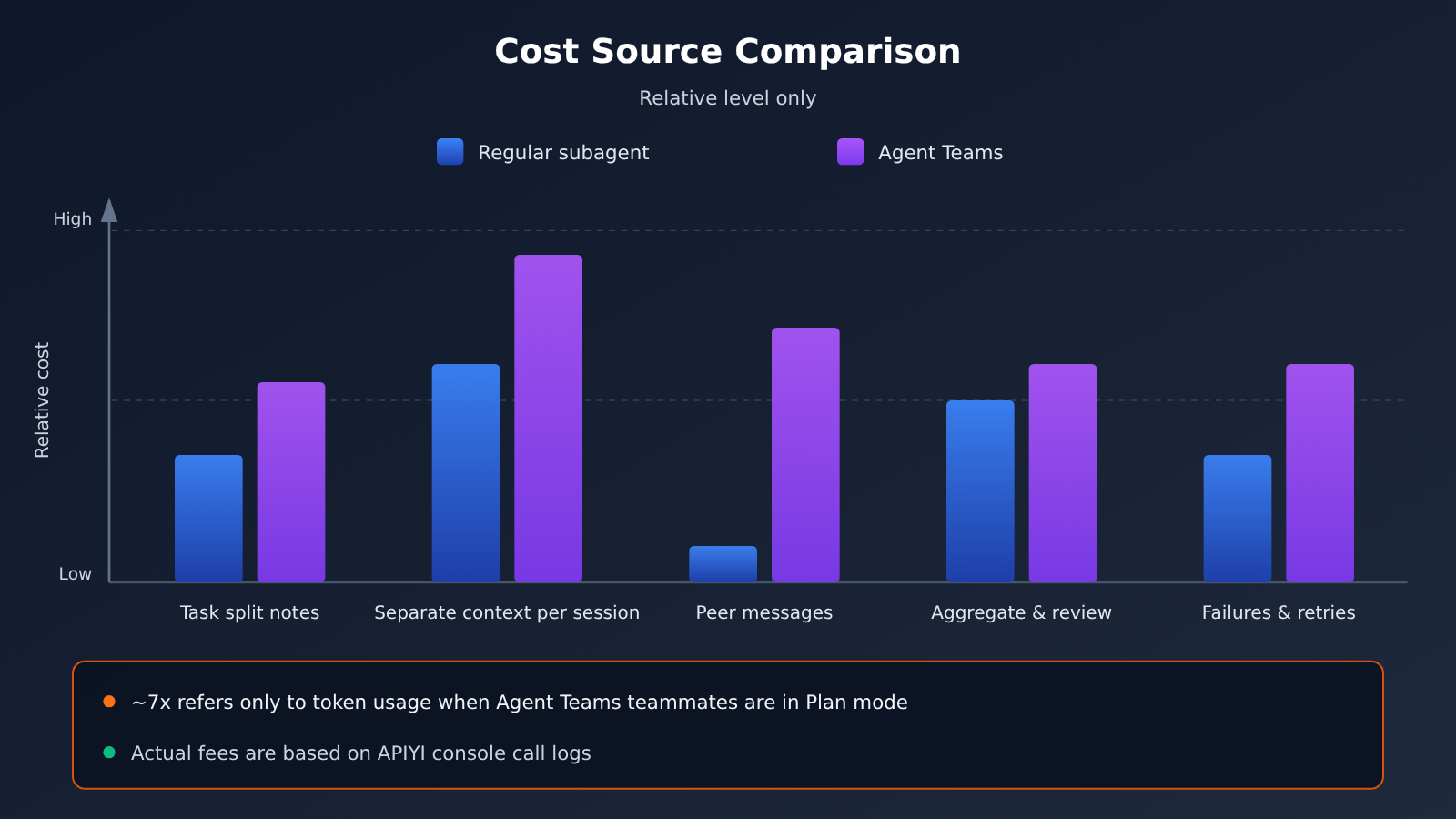
What Anthropic’s cost documentation is actually saying is this: when teammates are in Plan mode, Agent Teams uses about 7 times as many tokens as a standard session, because each teammate is a separate session carrying its own context. That statement comes with three qualifications: it’s about Agent Teams, it applies when teammates are in Plan mode, and it measures token usage. It’s not a fixed multiplier for regular subagents, and it can’t be directly converted into a dollar bill for anyone.
If you’re using APIYI’s Claude Code route, follow the APIYI integration docs to set ANTHROPIC_BASE_URL (the root domain, with the Messages path appended automatically by the client) and ANTHROPIC_AUTH_TOKEN. In the public model list dated November 23, 2026, you can see claude-opus-5-5, with the protocol marked as messages / chat. But a model listing only tells you that the model and protocol are available. The specific API key, subagent model mapping, fallback behavior, and billing still need to be validated in your own environment.
You need to keep three types of numbers separate: /usage shows the client’s estimated cost at list price; subscribers see plan usage; APIYI console call logs reflect actual quota deduction, with the group multiplier already applied. The equivalent discount from top-up bonuses needs to be calculated separately.
Analysis and Judgment: How to Choose Between Claude Code Subagents and Agent Teams
This section is the author’s judgment based on the facts above, not an official conclusion.
Selection Criteria: Look at the Delivery Format, Not the Number of Features
You can make a quick judgment with one question: After the result of a subtask is returned to the main session, does another team member still need to respond to it? If not, for example “find the call path” or “list test coverage,” that’s a typical subagent scenario. If one member’s conclusion changes another member’s work, and this back-and-forth happens more than once—for example, field rules affect import constraints, and import constraints in turn restrict field naming—then a shared task list and peer-to-peer communication can truly add value.
There are also two situations where forming a team is not recommended. One is a single short task: the startup overhead of forming a team and the cost of repeatedly reading context often outweigh the benefits of collaboration. The other is the need to sequentially modify the same file: multiple sessions stepping in at the same time only increases merge overhead. In this case, a single agent or standard subagents are easier to manage.
How to record usage and coordination costs
To judge whether it’s “worth it,” gut feeling isn’t reliable. It’s better to run the same task both ways and record the results. Here’s how: lock in the same model, billing tier, and discount terms; create a dedicated token for the experiment, or use a separate time window; and make sure the actual requests from the main session and all sub-sessions are captured, including failed requests that were already billed and retries.
Before you start, you can use a short script to confirm the token and model are available on the current route:
import time
import openai

client = openai.OpenAI(
    api_key="YOUR_APIYI_TOKEN",          # Recommended: create a dedicated token for this experiment
    base_url="https://api.apiyi.com/v1"  # APIYI OpenAI-compatible endpoint
)

start = time.time()
resp = client.chat.completions.create(
    model="claude-opus-5-5",
    messages=[{"role": "user", "content": "只回复 OK"}],
    max_tokens=10,
)
print(resp.choices[0].message.content)
print("usage:", resp.usage)
print("耗时秒:", round(time.time() - start, 2))
This code uses the OpenAI-compatible chat endpoint and is only meant to verify that the token and model can connect. Claude Code itself accesses the service through the Messages protocol, so you need to configure environment variables separately:
export ANTHROPIC_BASE_URL="https://api.apiyi.com"
export ANTHROPIC_AUTH_TOKEN="YOUR_APIYI_TOKEN"
claude --version
Tip: You can create dedicated tokens for “standard delegation” and “Teams” separately at APIYI apiyi.com, so the actual charges for the two approaches will show up directly in different log groups. When reconciling, you won’t need to manually split them by time window. New users can also use free trial credits to get the workflow working end to end.
After each experiment, append the results to a log. The script below writes one CSV row—and conveniently also tests the escaping requirements of this article’s example along the way:
View the usage logging script
import csv
from datetime import date
from pathlib import Path

FIELDS = ["日期", "Claude Code 版本", "方式", "模型与路由", "队友个数",
          "已验收项", "墙钟分钟", "人工复核分钟", "控制台实际费用", "需恢复的事项"]

def append_record(row: dict, path: str = "agent_usage_log.csv") -> None:
    file = Path(path)
    is_new = not file.exists()
    with file.open("a", newline="", encoding="utf-8") as f:
        writer = csv.DictWriter(f, fieldnames=FIELDS)
        if is_new:
            writer.writeheader()
        writer.writerow(row)  # The csv module automatically handles comma and quote escaping

append_record({
    "日期": date.today().isoformat(),
    "Claude Code 版本": "填写 claude --version 输出",
    "方式": "Teams",
    "模型与路由": "claude-opus-5-5 / APIYI",
    "队友个数": 2,
    "已验收项": "4/4",
    "墙钟分钟": "",
    "人工复核分钟": "",
    "控制台实际费用": "从调用日志查得",
    "需恢复的事项": "导入首列规则待确认",
})
| Record field | Where to fill it in | Purpose |
|---|---|---|
| Claude Code version | claude --version |
Experimental features change from version to version, so this makes reproduction easier |
| Mode and number of teammates | Config used for this run | Distinguishes plain delegation from Teams |
| Model and routing | Environment variables and console | Keeps both comparisons on the same footing |
| Accepted items | Checked against the four acceptance criteria | Measures result quality; a zero-pass run needs to be called out separately |
| Wall-clock minutes / manual review minutes | Timing | Shows whether collaboration saves machine time or human time |
| Actual console cost | Call logs | Real cost — don’t substitute an estimate from /usage |
| Items needing recovery | Summary written before shutdown | Compensates for in-process teammates that can’t recover automatically |
The cost calculation works like this: go request by request, sort uncached input, cache reads, applicable cache writes, and output into the categories the platform uses, multiply each by its corresponding rate, then add any applicable standalone tool fees. If reasoning tokens are already counted in the total output, don’t count them a second time. When comparing a single task, just look at the total; when comparing a batch of tasks, divide the total spend by the number of tasks that met the bar.
When Is It Worth Continuing to Use Agent Teams
Here’s a rule of thumb — a prediction, not a hard rule: if your records show that shared task state and horizontal communication led to faster handoffs, fewer missed checks, and enough saved manual review time to offset the extra token cost, then it makes sense to keep Agent Teams for the same kind of task. If handing the result back to the main session is all you need, turn off the experimental option and restore your previous settings.
Given that it’s still an experimental feature, behaviors like auto-resume and how things are displayed may change with each version. The safer approach is to enable it only on your local machine or in personal settings, and hold off on adding it to shared team configs for now.
Claude Code Subagents and Agent Teams: Common Questions
Q1: Regular subagents can send messages to each other too — is Agent Teams still necessary?
Yes, but only in specific scenarios. Even if regular subagents can send messages, they don’t have a shared task list, dependency and blocking states, or a fixed team-lead coordination structure. Teams’ structural advantage only becomes apparent when tasks have boundaries that require multiple rounds of negotiation.
Q2: Will enabling the experimental variable affect my regular delegations?
It might. Once enabled, some named subagents get launched as teammates — check the official docs for the specific exceptions. If you only want regular delegation, set the variable back to `0` or restore your original settings, then re-verify.
Q3: Does roughly 7x usage mean the bill will be 7x?
No. That number refers only to Agent Teams’ token usage when a teammate is in Plan mode. The actual cost is also affected by caching, model unit price, and group multipliers. Running the same task once with a dedicated token from APIYI apiyi.com and then checking the invocation logs is more accurate than applying a multiplier.
Q4: What extra verification is needed when using Claude Code through a third-party gateway?
You need to confirm your machine’s authentication mode, actual routing, the model mapping used by subagents, and fallback behavior. APIYI apiyi.com’s integration documentation covers the configuration of `ANTHROPIC_BASE_URL` and `ANTHROPIC_AUTH_TOKEN`, and the model master list can be used to verify listing status and protocol. Ultimately, you should still run a complete acceptance test in your own environment.
Back to the original question: how to choose between Claude Code subagents and Agent Teams depends on whether the subtasks still need to respond to each other after delivery. Most delegations can be handled with regular subagents; when there really are interface boundaries that require ongoing negotiation, then turn on Agent Teams, and use the same acceptance criteria plus a usage log table to check whether it’s worth it. If you need to compare the cost of different models and approaches under the same routing, you can do it all through APIYI apiyi.com with a single key and aggregate the results by log.
References
-
Anthropic · Create custom subagents: Context, model, tools, and usage notes for regular subagents
- Link:
code.claude.com/docs/en/sub-agents - Notes: Includes a note that named subagents may communicate via
SendMessage
- Link:
-
Anthropic · Orchestrate teams of Claude Code sessions: Agent Teams experimental feature documentation
- Link:
code.claude.com/docs/en/agent-teams - Notes: Toggle variables, in-process mode, and shutdown and resumption limitations
- Link:
-
Anthropic · Manage costs effectively: Subscription and API usage, and the roughly 7x qualifier
- Link:
code.claude.com/docs/en/costs - Notes: Distinguishes client-side estimates from actual billing
- Link:
-
APIYI · Claude Code integration: Root domain and environment variable configuration
- Link:
docs.apiyi.com/scenarios/programming/claude-code - Notes: The Messages path is appended by the client
- Link:
-
APIYI · How invocation logs are billed: Actual quota, group multiplier, and top-up discount basis
- Link:
docs.apiyi.com/faq/log-billing-explained - Notes: Use when reconciling
- Link:
-
APIYI · Public model list: Model listings and protocol tags, read back on 2026-11-23
- Link:
docs.apiyi.com/models.md - Notes: Verify model availability
- Link:
Author: APIYI Technical Team
Technical contact: For more integration resources, visit the APIYI Documentation Center at docs.apiyi.com


