

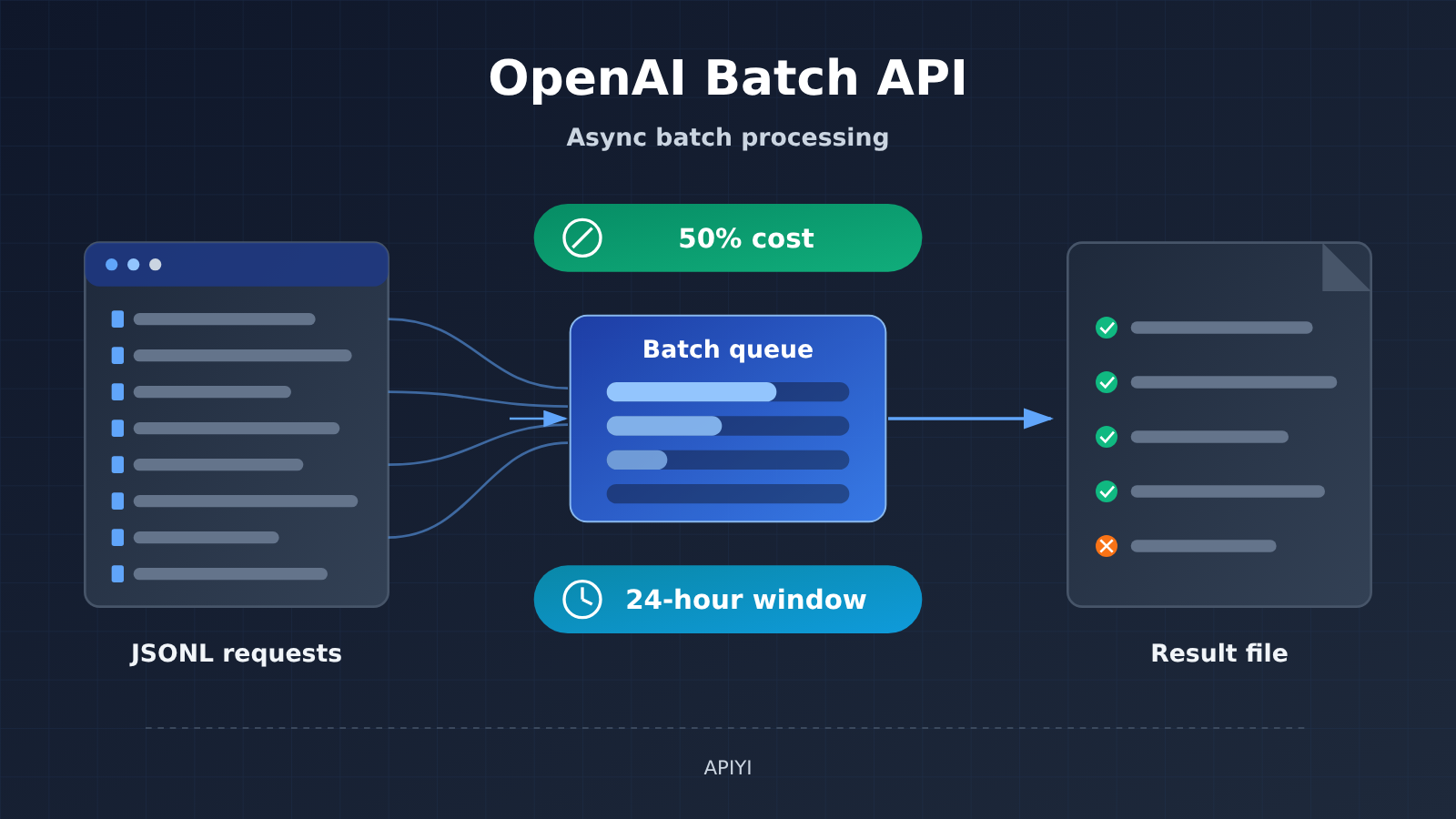
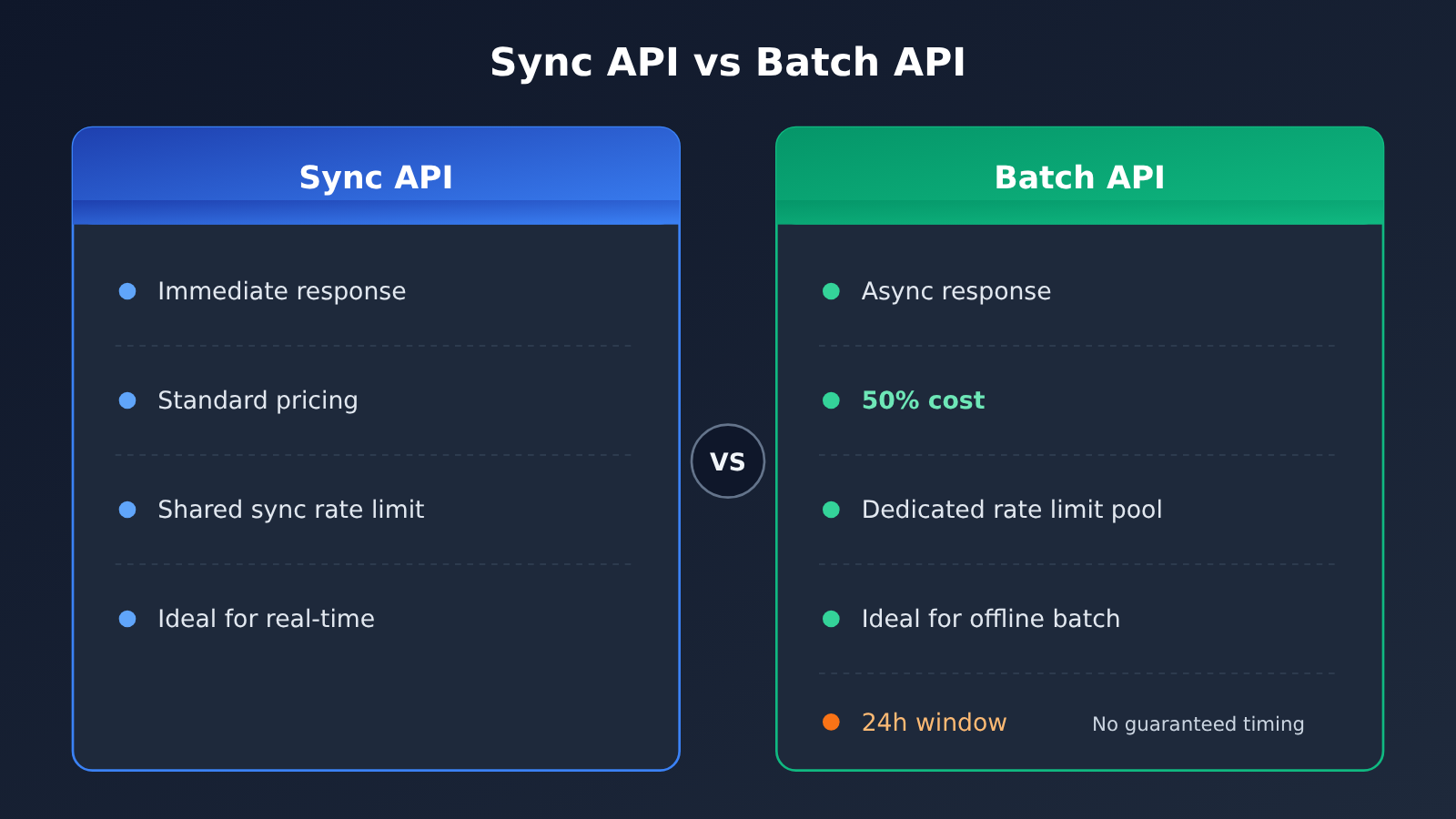
Short answer: the OpenAI Batch API is built for jobs where you can wait a bit for results, the requests are independent of each other, and the batch is large. It costs half the price of the synchronous API, and it runs on its own separate rate-limit pool. What you give up is a 24-hour processing window — and that window doesn’t promise delivery at any specific moment. Offline work like classification under fixed rules, knowledge base processing, and model evaluation can go to Batch first. Real-time customer support, interactions that need an instant reply, and dependent pipelines where one step’s output decides the next step’s input shouldn’t be handed to the Batch API.
What will you learn from this article?
- The core rules of the OpenAI Batch API: discount, rate limits, window, file format, and size caps.
- The difference between a successful submission, a successful generation, and on-time delivery.
- How batches are billed after they expire, and how to re-run only the failed requests.
- Exactly which part of the cost the 50% discount saves, and which costs don’t get cut in half along with it.
- A practical way to judge whether a task fits Batch.
Index: Before the main text, a concept table and an impact-at-a-glance summary will help you build a baseline understanding. The “Objective Facts” section walks through the rules in the official documentation one by one; the “Analysis and Judgment” section discusses what those rules mean for task selection, cost estimation, and engineering design, and lays out which task types fit and which don’t.
One note up front: this article is based on OpenAI’s continuously maintained Batch guide, checked on 2026-11-17. That document has no clear original publication date, so we won’t treat it as a new feature launched that day — instead, it’s a reading of the rules for an existing capability.
To Know: Key Concepts for Understanding the OpenAI Batch API
| Concept | Brief explanation |
|---|---|
| Synchronous API | The conventional way of calling: you send a request and wait for the result immediately |
| Batch API | An interface where you submit a large number of requests at once, they’re processed asynchronously, and you retrieve all the results later |
| JSONL | A text format where each line is a standalone JSON object; in Batch, each line corresponds to one request |
| custom_id | A unique identifier you set for each request, used to match the output results back to the original request |
| Separate rate-limit pool | Batch request rate limits are calculated separately from synchronous requests, so the two don’t compete for capacity |
| 24-hour processing window | The time limit for processing a batch; requests not finished by the deadline are canceled |
| Expired batch | A batch that still isn’t fully complete after the processing window has passed |
OpenAI Batch API Impact at a Glance
- Developers: You can estimate API costs for offline batch jobs at half the synchronous price, and it won’t eat into your online service’s synchronous rate-limit quota. But you’ll need to implement custom_id matching, retry on failure, and result validation yourself.
- Content and data teams: Large-scale classification, summarization, and knowledge base cleanup get much cheaper. The trade-off is giving up “results on the spot” — you’ll want to build some slack into delivery timelines.
- Evaluation and research: Running large test sets is a perfect fit for Batch. Just note that a single file can only use one model, so multi-model comparisons need to be split into multiple files.
- Product and operations leads: Don’t read “24 hours” as “it’ll definitely be delivered by tomorrow morning.” When committing to turnaround times externally, treat Batch as a best-effort channel.
The Objective Facts About the OpenAI Batch API
Batch API Billing and Rate-Limit Rules
Per the official Batch guide (OpenAI docs: developers.openai.com/api/docs/guides/batch), the Batch API has three core characteristics:
- Cost discount: a 50% discount compared to the synchronous API.
- Separate rate limits: it uses its own rate-limit pool that isn’t shared with synchronous requests.
- Processing window: batches are processed within a 24-hour window.
Which models and endpoints are supported depends on the list in the official docs. You can’t broadly claim that “every model supports Batch” right now.
Batch API File Format and Count Limits
| Rule | Official requirement | What it actually means |
|---|---|---|
| File format | JSONL, one request per line | Each line is an independent job |
| Request identifier | Every request has a unique custom_id | That’s the only thing results are matched back on |
| Model constraint | A single file can only use one model | Multi-model jobs have to be split across multiple files |
| Count limit | Up to 50,000 requests per batch | Anything beyond that must be submitted in multiple batches |
| Size limit | Max 200MB per batch file | Long-context jobs may hit the size limit first |
| Output order | Not guaranteed to match input order | You can’t map results by line number |
Below is an illustrative structure for a single request line, just to show where custom_id sits. For the exact endpoints and parameters, refer to the support list in the official docs:
{"custom_id": "article-001", "method": "POST", "url": "/v1/chat/completions", "body": {"model": "MODEL_NAME", "messages": [{"role": "user", "content": "为以下主题写一段摘要:..."}]}}
Batch API Expiry and Billing Rules
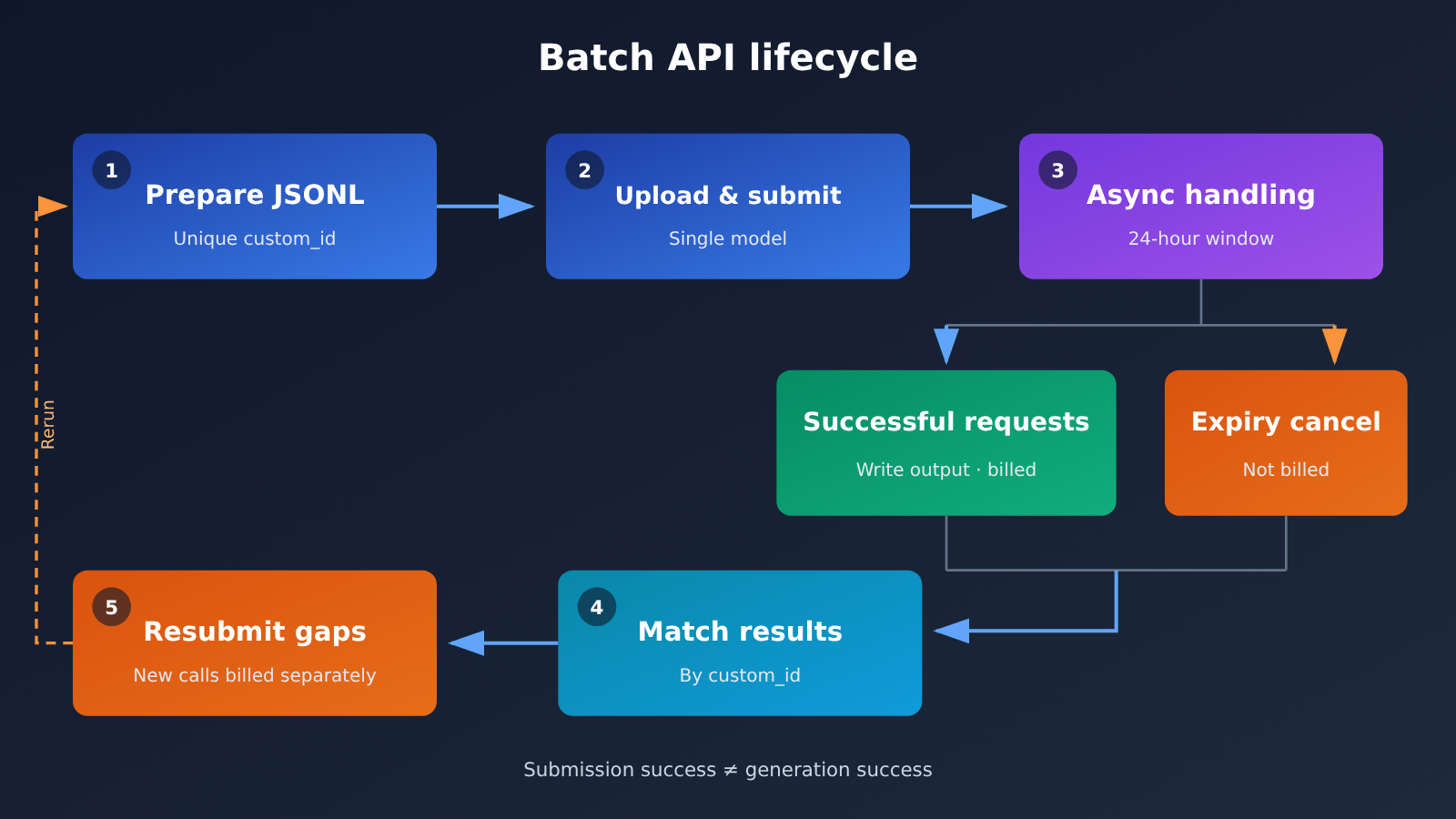
If a batch runs past the processing window, any requests that haven’t finished get cancelled. Results that already succeeded can still be downloaded, and billing only applies to the successful requests.
The docs also remind you of one thing: a successful submission doesn’t mean successful generation. A batch being accepted only means it entered the processing pipeline — it doesn’t mean every line will produce a result. The 24-hour window also isn’t a promise that “your draft lands at some point tomorrow morning.”
OpenAI Batch API Analysis
Which Part of the Cost Does the 50% Discount Actually Cover?
The “50% discount” applies to the model invocation costs of the Batch processing itself. Here’s a hypothetical example to illustrate — the numbers aren’t measured data.
Suppose a task is billed 100 yuan for synchronous requests; the illustrative cost for the same request via Batch is 50 yuan. The total cost of the whole project, however, isn’t necessarily halved, because several types of costs don’t automatically get the discount:
| Cost Item | Discounted 50% with Batch? | Notes |
|---|---|---|
| Model invocation fee for batch requests | Yes | Illustrative: 100 yuan synchronous corresponds to 50 yuan Batch |
| Tool calls for upfront research | No | e.g., retrieval and investigation first to decide what to write |
| Human review | No | Labor cost has nothing to do with the billing method |
| Additional retries | No, calculated separately | Re-runs after failures or expirations generate new calls |
| Engineering development and maintenance | No | File generation, result matching, and resubmission logic all require investment |
So when budgeting, apply the 50% discount only to “the portion of calls that can be batched,” and don’t just slash the total project budget in half. If a project has a high proportion of research and review, the overall savings from Batch will be noticeably less than 50%.
How Should You Understand the 24-Hour Window?
The 24-hour window describes a processing deadline, not a delivery guarantee. The safer approach is to treat Batch results as “very likely available within the window, but potentially partially missing,” and to leave time in your schedule for reruns.
If the business side says “all results must be in hand before 9 a.m. tomorrow,” relying on a single Batch submission is risky. For tasks with hard timing requirements, you can submit early, reserve a window for reruns, or move the critical parts over to synchronous requests.
custom_id Is the Core of Batch Engineering Design
Because output order isn’t guaranteed, collecting results has to rely entirely on custom_id. That means custom_id needs to carry business meaning from the design stage and must be globally unique — something like “task-type-batch-number-sequence”.
The design example below is also not an actual test: to generate 20 independent articles from the same model, you can write 20 lines of JSONL. If 18 end up succeeding and 2 are cancelled because they expired, you only need to find the 2 missing ones via custom_id and resubmit — no need to rerun all 20. The 18 that succeeded are billed as successful requests, and the 2 cancelled ones aren’t billed.
The key points of this workflow can be summarized as:
- Validate that each line’s custom_id is unique before submitting.
- After collecting results, subtract the output custom_id set from the input custom_id set to get the missing list.
- Generate a new JSONL only for the missing list and submit it.
- Reruns generate new invocation charges, so budget for them.
Multi-model and dependent workflows need to be handled separately
A single file can only use one model. If the same project wants Model A to handle classification and Model B to handle summarization, you’ll need to prepare two separate files, submit each one, and collect each one.
Dependencies are even more worth noting. If the workflow is “research the materials first, then decide what to write based on the research conclusions,” the second step depends on the output of the first step—and Batch won’t orchestrate those two steps for you automatically. You need to generate the second batch of requests and submit them yourself after the first batch’s results come back. That also means the total time for the whole chain can stack up across multiple processing windows.
Which tasks are suited for the OpenAI Batch API
| Task type | Suitable for Batch | Reason |
|---|---|---|
| Batch classification according to fixed rules | Suitable | Fixed rules, independent items, no urgent need for real-time return |
| Knowledge base processing (summarization, cleaning, structuring) | Suitable | Large data volume, can be done offline |
| Model evaluation, batch inference on test sets | Suitable | Naturally batch-oriented, insensitive to timeliness |
| Batch generation of independent content with the same model | Suitable | Each line is independent, failures can be retried by custom_id |
| Real-time customer service, conversational interaction | Not suitable | Users need immediate replies; use synchronous methods instead |
| Tasks with strict delivery deadlines | Be cautious | The 24-hour window doesn’t guarantee a specific time |
| Multi-step workflows that research first, then decide content | Requires your own orchestration | Batch doesn’t automatically handle inter-step dependencies |
A simple way to judge is to ask three questions in a row: Can the results be obtained a bit later? Is each request independent of the others? Is the volume large enough to be worth writing file-handling and collection logic? If all three answers are “yes,” Batch is usually the more cost-effective choice. If even one answer is “no,” you should split the task first, or stick with synchronous calls.
Changes Worth Watching
Because this is an actively maintained official document, the range of supported models and endpoints, along with the count and size limits, may change. The following observations are predictions: as more models and endpoints are added to Batch, offline evaluation and data-processing workflows will increasingly default to batch processing. When actually integrating, follow the rules listed in the documentation at that time rather than assuming the numbers in this article as of its verification date will still apply.
The value of the Batch API is that it forces you to think through which tasks can wait. Tasks you’re willing to wait on trade in exchange for half the price and an undisturbed rate-limit allowance; tasks that need an immediate response should stay with synchronous requests.
“Don’t rush; don’t chase small gains. Rushing defeats the goal, and chasing small gains keeps great things from being accomplished.” — The Analects, Zi Lu


