

Author’s note: Two worked-by-hand examples that make GPT-6.2 Astra’s short-context vs. long-context pricing clear, along with the multipliers for Batch, Fast, and Ultrafast.
OpenAI released GPT-6.2 Astra and GPT-6.2 Sol on 2026-11-17, with model IDs gpt-6.2-astra and gpt-6.2-sol respectively. The short-context standard pricing on the official model page looks straightforward, but when it comes time to actually estimate a bill, you can’t just take the short-context standard price and multiply it for long-context, Fast, or Ultrafast. Once a single request’s input exceeds 272K tokens, the unit price changes for the entire request; and if you’ve picked Fast or Ultrafast, you need to apply another multiplier on top of the corresponding context tier.
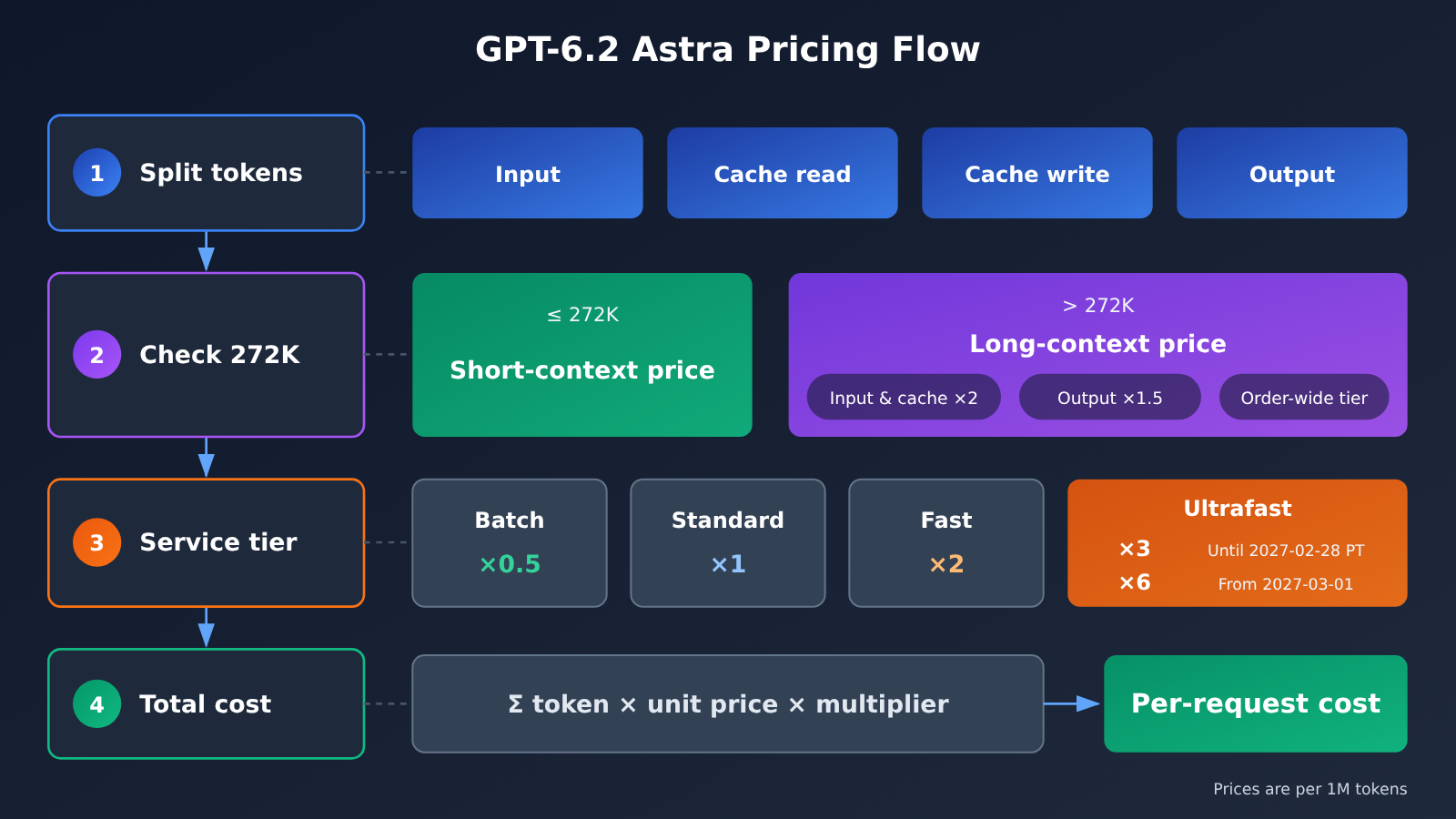
This isn’t a restatement of a price list — it’s a set of rules you can work through with pen and paper: first split the tokens into four categories (input, cache read, cache write, output), then determine whether the request falls under short context or long context, and finally apply the service-tier multiplier.
Key takeaway: By the end of this article, you’ll be able to independently estimate the cost of a single GPT-6.2 Astra request and batch jobs, and you’ll know which numbers are official list prices and which come from third-party benchmark reporting — so you won’t mix the two up.
GPT-6.2 Astra Pricing Essentials
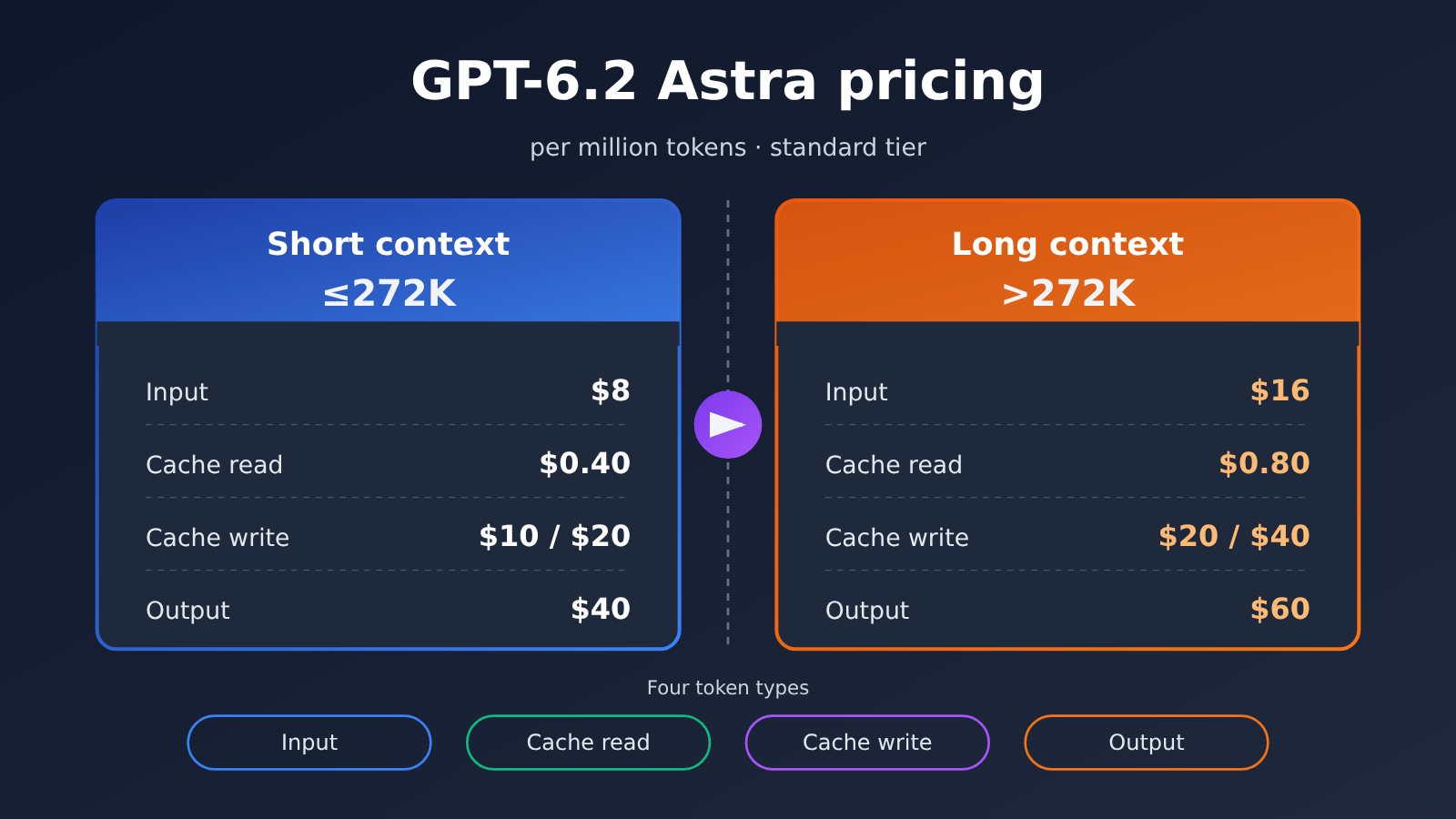
Let’s get the rules straight first. The table below is compiled from OpenAI’s official model page (their own listed prices), with all figures per 1 million tokens at the standard tier.
| Billing item | Short context (input ≤272K) | Long context (input >272K, entire request) | Notes |
|---|---|---|---|
| Input | $8 | $16 | Long-context input doubles |
| Cached read | $0.40 | $0.80 | Cache unit price doubles too |
| Cache write (30-min retention) | $10 | $20 | Cache category, doubled |
| Cache write (12-hour retention) | $20 | $40 | Cache category, doubled |
| Output | $40 | $60 | Output at 1.5× the short-context rate |
The long-context column is derived from the model page’s original wording: when a request’s input exceeds 272K tokens, input and cache rates double, output is priced at 1.5× the short-context rate, and the whole request is billed that way. In other words, it’s not just “the portion beyond 272K that gets doubled” — every token in that request switches over to the rates in the right-hand column.
gpt-6.2-astra and gpt-6.2-sol aren’t in APIYI’s model catalog yet (data timestamp 2026-11-17 15:54, UTC+8) or in the public pricing endpoint: they haven’t been listed so far, and we’ll add this model as soon as possible; model names and prices are subject to the platform’s model list. Before you integrate officially, check the listing status and actual prices on apiyi.com’s model list first, then apply the calculation method in this article.
Why GPT-6.2 Astra’s Four Token Types Are Billed Separately
A single request’s bill usually breaks down into four parts. Regular input is the portion of the prompt that neither hit the cache nor got written to it this time; cached read is the part that hit existing cache, priced at just one-twentieth of the input rate; cache write is the portion of the prompt written into the cache on this call, split into 30-minute and 12-hour retention tiers; and output is the content the model generates. GPT-6.2 Astra supports reasoning tokens, and tokens produced during reasoning generally land on the output side — go by the usage breakdown on your bill for the specifics.
The four rates are worlds apart: cached read is $0.40, input is $8, cache write is $10 or $20, and output is $40. If you bill every token at the input rate, you’ll underestimate output-heavy tasks; if you ignore cache writes, you’ll undercount what the first invocation costs. So when estimating, you have to split the tokens first, then multiply each category by its own rate.
How to Determine GPT-6.2 Astra’s 272K Threshold
The criterion is the total input token count for that one request — cached hits count as input too — so defer to the official documentation and your actual usage figures. The model’s context window is 1,050,000, with a maximum input of 922,000 and maximum output of 128,000, so long-context requests can absolutely go through; you just pay at a different set of rates.
A practical way to judge: add up the system prompt, conversation history, retrieved documents, and tool return results. If the total is creeping toward 272K, decide ahead of time whether to compress the context, split the work into multiple requests, or accept the whole request switching tiers.
How to Apply GPT-6.2 Astra Service Tier Multipliers
The context tier determines the base unit price, and the service tier determines what multiple gets applied on top of that base. The table below also comes straight from the official model page.
| Service Tier | Multiplier | Scope | Notes |
|---|---|---|---|
| Batch | 50% of standard price | Asynchronous batch processing | Great for large batches that aren’t time-sensitive |
| Standard | 1x | Default | The baseline for both examples in this article |
| Fast | 2x | Standard price for the same context length | Long-context requests should use the long-context unit price, then multiply by 2 |
| Ultrafast | 3x | Through 2027-02-28 (Pacific Time) | Expires on that date |
| Ultrafast | 6x | From 2027-03-01 onward | Budgets need to be recalculated at the new multiplier |
The Fast tier’s scope is spelled out clearly on the model page: it’s 2x the “standard price for the same context length.” So for a long-context request with Fast enabled, input comes to $16 × 2 = $32, and output comes to $60 × 2 = $120. You’d apply the same logic to Ultrafast’s multipliers, but pay close attention to the timeline: if your project budget extends into March 2027 or beyond, the Ultrafast portion needs to be re-estimated at 6x—you can’t just carry over the 3x figures.
There’s also one restriction that indirectly affects cost: the API doesn’t let you set reasoning effort to none. That means reasoning tokens will always be part of the mix, so when you’re estimating output volume, leave some headroom for reasoning—don’t budget based solely on the length of the final answer.
GPT-6.2 Astra Quick Start: Two Hand-Calculated Examples
Both examples below use only multiplication and addition, with unit prices quoted “per 1 million tokens,” so the formula for every line is “token count × unit price ÷ 1,000,000.”
Example 1: GPT-6.2 Astra Short-Context Request
The scenario is a Q&A assistant with a long system prompt. Each request has a total input of 100,000 tokens, of which 60,000 are the fixed system prompt and knowledge snippets — a good fit for caching. The other 40,000 are user content that changes with every request, and the output (including reasoning) comes to about 5,000 tokens. Total input is 100K, under the 272K threshold, so it’s billed at the short-context rate.
| Billing Item | First Request (Writing to 30-Minute Cache) | Subsequent Requests (Cache Hit) |
|---|---|---|
| Regular input 40,000 × $8 | $0.32 | $0.32 |
| Cache write 60,000 × $10 | $0.60 | — |
| Cache read 60,000 × $0.40 | — | $0.024 |
| Output 5,000 × $40 | $0.20 | $0.20 |
| Total per request | $1.12 | $0.544 |
As you can see, the per-request cost nearly halves once the cache is hit, while the first request that writes to the cache is actually more expensive than skipping the cache entirely (without caching, 100,000 × $8 = $0.80, plus output for a total of $1.00). If you switch to the 12-hour cache write instead, that write line becomes 60,000 × $20 = $1.20 — only worth it if you’ll be hitting the cache repeatedly within those 12 hours.
Based on the post-cache-hit $0.544, 1,000 requests would run about $544. Now apply the tier multipliers: Batch comes to roughly $272, Fast to about $1,088, and Ultrafast to about $1,632 before 2027-02-28, or about $3,264 from 2027-03-01 onward. As for exactly how Batch and caching interact on your bill, it’s best to defer to the official billing documentation — these figures are just rough estimates based on the multipliers.
Example 2: GPT-6.2 Astra Long-Context Request Over 272K
The scenario: stuffing an entire code repository or a batch of contracts into the context for analysis. Total input for a single request is 400,000 tokens — 300,000 hit the cache, 100,000 are regular input — with roughly 8,000 tokens of output. Since total input exceeds 272K, the entire request switches to long-context pricing.
| Billing Item | Correct Calculation (Whole-Request Long Context) | Incorrect Calculation (All Short Context) |
|---|---|---|
| Regular input 100,000 | × $16 = $1.60 | × $8 = $0.80 |
| Cached reads 300,000 | × $0.80 = $0.24 | × $0.40 = $0.12 |
| Output 8,000 | × $60 = $0.48 | × $40 = $0.32 |
| Total per request | $2.32 | $1.24 |
The two calculations differ by nearly 2x. Another common mistake is “doubling only the 128K that exceeds 272K” — that doesn’t match the model page’s wording either, which says pricing is “calculated per request.” There’s only one correct approach: once you cross the threshold, everything in that request — input, cached reads, and cached writes — is charged at 2x, and output at 1.5x.
Layer the tiers on top of that: Fast comes to $2.32 × 2 = $4.64; Ultrafast is $6.96 through 2027-02-28 and $13.92 from 2027-03-01 onward; Batch is roughly $1.16. If this task runs 200 times a day, the standard tier costs about $464 per day, while turning on Ultrafast (after March 2027) runs about $2,784 per day — a gap big enough to change your technical approach.
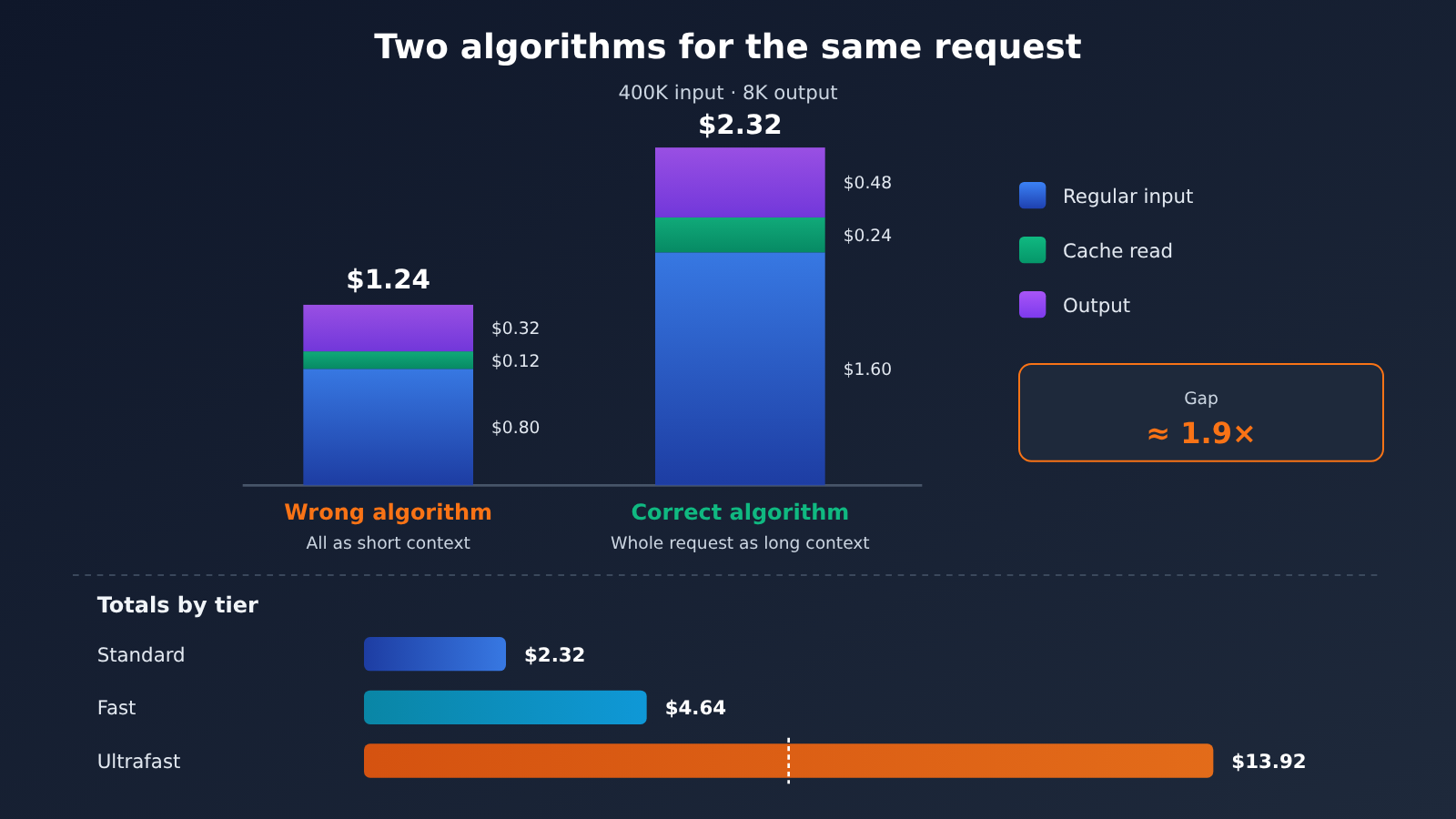
🎯 Pricing tip: Plug your own actual token counts into the two examples above and you’ll get a first-pass budget. All figures in the chart are extrapolated from the list prices on OpenAI’s official model page; once GPT-6.2 Astra goes live on APIYI, the actual unit prices in the model list at apiyi.com take precedence.
Preparation Steps for Invoking on APIYI
gpt-6.2-astra isn’t listed on the platform yet, but we’ll add it as soon as possible. Model naming and pricing follow the platform’s model list. Once it’s live, the integration process will be the same as other OpenAI-compatible models, so here’s how you can prepare:
- Create an API key in the APIYI console, and use the free trial credits for new users to run a few small test samples first.
- Set the base_url in your client to
https://api.apiyi.com/v1, and entergpt-6.2-astraas the model ID. - The official model page shows this model supports the Chat Completions and Responses endpoints, plus Batch; it doesn’t support Realtime, Assistants, fine-tuning, image generation, video, or audio. If your workflow needs any of those capabilities, you’ll have to pick a different model.
- Don’t set the reasoning effort to
none—the API will reject the request. Start with a lower setting and watch how the output token count changes. - After each invocation, read the usage object from the response and record input, cache hits, and output separately, then plug the numbers into the tables in this article to verify the costs.
🚀 Quick Start: Before the model goes live, you can use
gpt-6-astra, the previous version that’s already available, to get your integration and usage tracking logic working end to end. Once 6.2 launches, you’ll only need to swap the model ID.
GPT-6.2 Astra vs. Related Models: List Price Comparison
The table below puts official list prices side by side with the catalog prices of models already available on APIYI, so you can compare them at a glance. Just note that these are two different sources: official prices are set by the vendors, while platform prices come from APIYI’s master price list (2026-11-17 15:54, UTC+8).
| Model | Input / Output / Cached Input (per 1M tokens) | Price Source | Availability |
|---|---|---|---|
| gpt-6.2-astra | $8 / $40 / $0.40 | OpenAI official list price | Not yet on APIYI—check the platform’s model list |
| gpt-6.2-sol | $2 / $10 / $0.10 | OpenAI official list price | Not yet on APIYI—check the platform’s model list |
| gpt-6-astra (previous generation) | $10 / $50 / $1; over 272,000 input tokens: $20 | APIYI master price list | Listed on APIYI (apiyi.com) |
| gpt-6.1-sol | $2 / $10 / $0.1; over 272,000 input tokens: $4 | APIYI master price list | Listed on APIYI |
| gemini-4-carbon | $2 / $10 / $0.1 (introductory price) | APIYI master price list | Listed on APIYI |
About GPT-6.2 Sol: the official standard short-context pricing is $2 input, $0.10 cached input, $2.50 for 30-minute cache writes, $5 for 12-hour cache writes, and $10 output. The 272K whole-request rule and tier multipliers are identical to Astra’s. It’s not listed yet—we’ll add the model as soon as we can. For model names and prices, the platform’s model list is authoritative.
When comparing against gpt-6-astra, remember it’s the previous generation: $10 input, $50 output, and $1 cached input on APIYI’s master price list. According to the official announcement, GPT-6.2 Astra’s input and output are 20% cheaper than GPT-6 Astra’s, with cached input 60% lower—which lines up with the $8 / $40 / $0.40 figures. Don’t treat the platform prices of gpt-6-astra or gpt-6.1-sol as 6.2 pricing.
One more timing detail on Gemini 4 Carbon: under Google’s official standard tier, pricing is $2 input and $10 output through 2026-11-30, then switches to $4 input and $20 output starting 2026-12-01. APIYI’s documentation page currently shows the introductory price, so for actual pricing after December 1st, go by the platform’s model list. Also, Google’s price sheet has no “double the whole request above 272K” line, so GPT-6.2’s long-context rule doesn’t carry over when you’re comparing across vendors.
💡 Choosing tip: the same workload burns different amounts of tokens on different models, so a lower unit price doesn’t necessarily mean a lower bill. A good approach is to run the same batch of samples through the models available on APIYI, total up the costs from actual usage, and then decide.
How to Read GPT-6.2 Astra’s Official Data vs. Third-Party Data
Estimating your bill only requires the sticker price, but plenty of people casually cite “per-task cost” along the way — and that’s where you need to know the source.
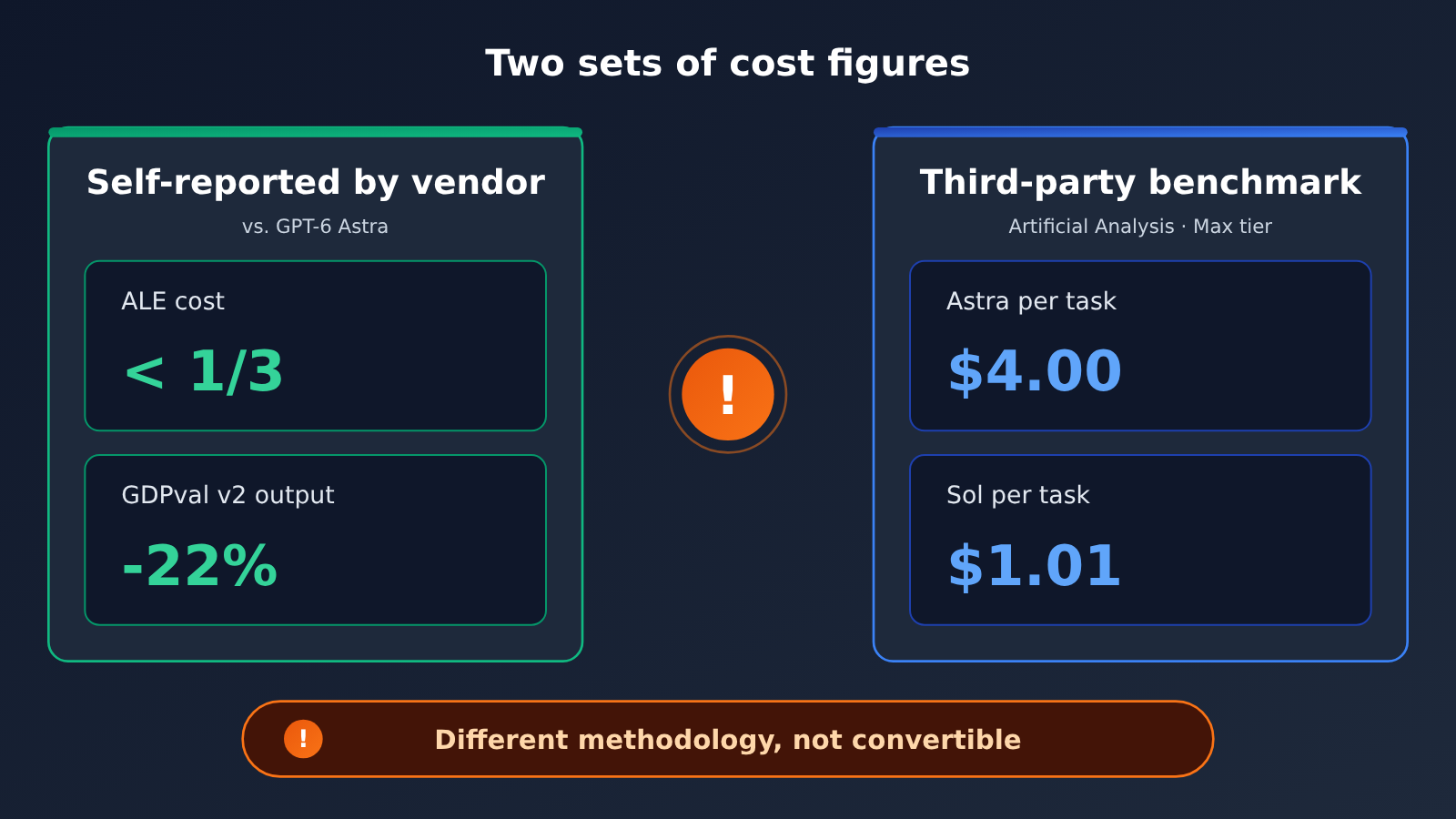
Official self-reported figures: OpenAI’s launch post claims that on Agents’ Last Exam, GPT-6.2 Astra scores 5.2 points higher than GPT-6 Astra at less than one-third the cost, and on the internal GDPval v2 it beats GPT-6 Astra by 6.2 percentage points while producing 22% fewer output tokens. These are all official numbers on self-selected tasks — they show that token usage dropped on those tasks, but they can’t be directly converted into your business costs.
Third-party figures: On Intelligence Index v5.0.1, Artificial Analysis measured GPT-6.2 Astra (Max reasoning effort) at a composite-index per-task cost of about $4.00, and GPT-6.2 Sol (Max reasoning effort) at about $1.01. That’s an average across its own suite of benchmark tasks at the highest reasoning effort — not GPT-6.2 Astra’s unit price, and it doesn’t mean your tasks will cost $4.00 every time. Lowering the reasoning effort significantly changes token consumption, and the High, Medium, and Low effort scores the third party also publishes are all different.
The two sets of numbers differ in tasks, reasoning effort, and methodology, so don’t convert between them or merge them into a single conclusion. For estimating your own bill, go back to those three steps: break down tokens, check the threshold, and multiply by the rate.
FAQ
Q1: What’s the standard pricing for GPT-6.2 Astra?
According to OpenAI’s official model page, the standard short-context rate per 1M tokens is: $8 for input, $0.40 for cache reads, $10 for 30-minute cache writes, $20 for 12-hour cache writes, and $40 for output. The model isn’t listed yet, but we’ll add it as soon as we can; the platform’s model list is the authoritative source for model IDs and pricing.
Q2: Does the price premium only apply to tokens beyond 272K?
No. The model page states that billing is calculated per request: once a request’s input exceeds 272K tokens, the input and cache unit prices double for the entire request, and output is charged at 1.5x the short-context rate. In Example 2, the same request calculated correctly comes to $2.32, but if you priced everything at short-context rates it would be only $1.24.
Q3: When does the Ultrafast multiplier change?
Through 2027-02-28 (Pacific Time), Ultrafast costs 3x the standard rate; from 2027-03-01 onward, it’s 6x. When budgeting for long-term projects, you should account for Ultrafast usage after March separately at the 6x rate.
Q4: Which scenarios make it easiest to miscalculate GPT-6.2 Astra costs?
– **Code repository analysis**: Fitting an entire repo into a single request easily pushes past 272K, moving the whole request into the higher tier.
– **Multi-turn Agent tasks**: Conversation history and tool results keep piling up, so later requests can quietly cross the threshold.
– **First cache write**: The cache write price on the first request is higher than regular input, so cold-start costs need to be budgeted separately.
– **Long-context requests with Fast or Ultrafast enabled**: The two surcharge factors stack multiplicatively.
Q5: How do I call GPT-6.2 Astra through APIYI?
`gpt-6.2-astra` isn’t listed yet, but we’ll add it as soon as we can; the platform’s model list is the authoritative source for model IDs and pricing. In the meantime, you can register at apiyi.com and claim free test credits, then use the already-listed `gpt-6-astra` (input $10, output $50, cache read $1) to get Responses or Chat Completions calls and usage tracking working end to end. Once the new model goes live, just swap in the new model ID.
Q6: Can Artificial Analysis’s $4.00 figure be used as a unit price?
No. That’s a third-party composite per-task cost measured on the Intelligence Index task suite at the Max reasoning tier, and it only reflects the average consumption of that particular set of tasks. Your task lengths, cache hit rates, and reasoning tier will all differ, so you should break down costs yourself using the official unit prices.
Q7: What known limitations of GPT-6.2 Astra affect cost?
Reasoning effort can’t be set to `none`, so reasoning tokens can’t be avoided entirely; it only supports text and image input with text output — no audio or video; and Realtime, Assistants, and fine-tuning aren’t supported. The official system card also notes that in some tests it’s more likely to under-report blocking issues (like missing files). In Agent workflows, every retry means another billed request, so your prompt should explicitly ask the model to report these situations clearly.
GPT-6.2 Astra Pricing Key Takeaways
- Four categories, priced separately: Input, cache read, cache write, and output unit prices vary a lot — you have to multiply each one out separately.
- 272K is an order-wide threshold: Once you cross it, input and cache go ×2 and output ×1.5 — for the entire request, not just the portion above the line.
- Tiers stack on top: Batch gets 50% off, Fast doubles (×2) at the same context length, and Ultrafast is priced separately.
- Ultrafast has a cutoff date: ×3 before 2027-02-28 (PT), then ×6 from 2027-03-01 onward.
- Cache costs more upfront, saves later: The first write costs more than the input price, but once you hit the cache, per-request costs can drop to nearly half.
- Don’t mix metrics: Official self-reported figures and third-party single-task costs aren’t unit prices.
- Availability follows the model list: Neither 6.2 model is on APIYI yet — you can use the previous one to verify your workflow in the meantime.
Summary
GPT-6.2 Astra’s pricing boils down to three steps:
- Break down the tokens: Split each request into regular input, cache read, cache write, and output. Reasoning tokens are billed on the output side.
- Check the threshold: If a request’s total input exceeds 272K, the whole order switches to long-context unit prices — input and cache ×2, output ×1.5.
- Apply the multiplier: Choose your multiplier based on Batch, Standard, Fast, or Ultrafast. Keep in mind that Ultrafast jumps to 6× starting 2027-03-01.
When budgeting, plug your own token counts into the Example 1 and Example 2 tables, then run the numbers once at the standard tier and once at whichever accelerated tier you plan to use — the gap is usually bigger than you’d expect. GPT-6.2 Astra and GPT-6.2 Sol aren’t on APIYI yet, and we’ll add them as soon as we can; model names and prices are subject to the platform’s model list. Until then, you can use the free credits and already-listed models on apiyi.com to get your usage tracking and cost reconciliation workflow in place.
📚 References
-
OpenAI Release Announcement: GPT-6.2 Astra and Sol release notes
- Link:
openai.com/index/introducing-gpt-6-2-astra-sol - Notes: Summary of standard pricing and officially reported capability data
- Link:
-
OpenAI Model Page – gpt-6.2-astra: Specs and complete pricing rules
- Link:
platform.openai.com/docs/models/gpt-6.2-astra - Notes: The authoritative source for cache write pricing, the 272K whole-order rule, and Batch/Fast/Ultrafast multipliers
- Link:
-
OpenAI Model Page – gpt-6.2-sol: Sol specs and list pricing
- Link:
platform.openai.com/docs/models/gpt-6.2-sol - Notes: Sol’s short-context standard pricing and the same pricing rules
- Link:
-
OpenAI System Card: Safety and alignment evaluations
- Link:
deploymentsafety.openai.com/gpt-6-2-astra-sol - Notes: Known limitations, including the underreporting blocking issue
- Link:
-
Artificial Analysis Review Article (third-party): Intelligence Index results
- Link:
artificialanalysis.ai/articles/openai-has-the-2-model-in-the-intelligence-index-with-the-release-of-gpt-6-2-astra-and-gpt-6-2-sol - Notes: Third-party data such as per-task cost at the Max reasoning tier
- Link:
-
APIYI Model Master List and Pricing API: Listed models and platform pricing
- Link:
docs.apiyi.com/models.md,api.apiyi.com/api/pricing - Notes: The authoritative source for the two 6.2 models’ listing status and comparison model prices
- Link:
Author: APIYI Technical Team
Technical discussions: Feel free to reach out via the APIYI homepage. For more integration resources, visit the docs.apiyi.com documentation center.


