

When gpt-image-2.6-all went live at 20:30 on 2026-11-11, the all in the name led a lot of people to assume the whole 2.6 family had been merged into one model. That’s not what happened. APIYI (apiyi.com) says clearly in its release notes that this model maps to the official reverse-engineered line of ChatGPT web Images 2.6. It follows the web version’s invocation logic, and it’s a separate channel from the pay-per-token line that flare and sunburst use.
This isn’t just a version-number bump. flare and sunburst are the other 2.6 line and are billed by token usage. all is billed per call at $0.025 each. Different billing models mean the underlying services aren’t the same.
What you’ll get from this post: four parameters that let you tell in 30 seconds which line a model name belongs to, so you don’t price the per-call all model as if it were the per-token flare.
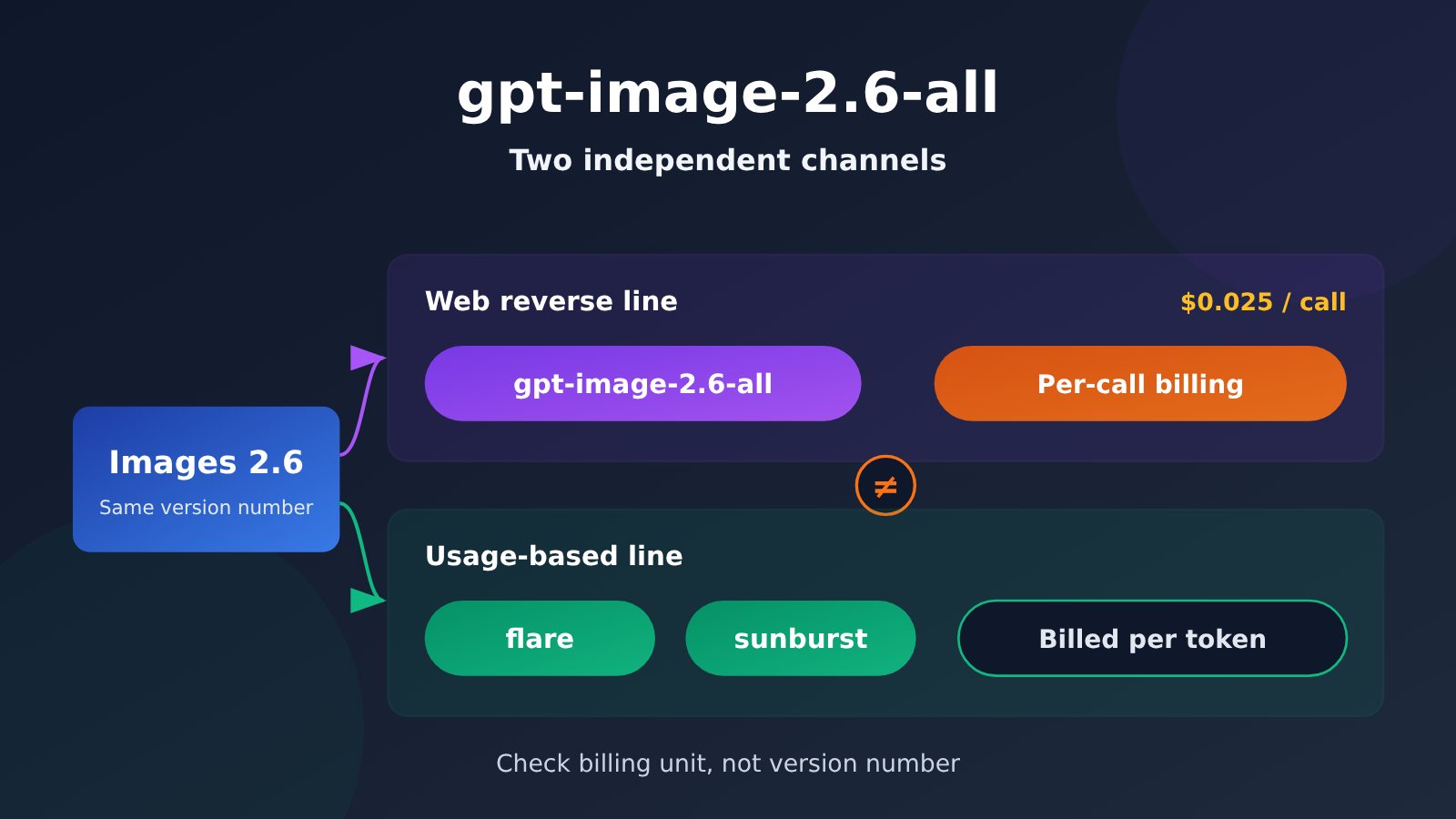
gpt-image-2.6-all at a Glance
Let’s lay out the key details from the announcement first, so the shared name doesn’t cause any confusion.
| Item | Details | Notes |
|---|---|---|
| Launch time | 2026-11-11 20:30 | Announcement time; data as of 2026-11-12 |
| Line | ChatGPT web Images 2.6 official reverse-engineered line | Same invocation logic as the web version |
| Billing | Per call, $0.025 / call | Unrelated to token usage |
| Supported request parameters | size, n, background, output_format | New compared to 2.5-all |
| Other models in the family | gpt-image-2.6-flare, gpt-image-2.6-sunburst | Pay-per-token line |
| Available platform | APIYI (apiyi.com) | Unified interface |
The term “official reverse-engineered” (官逆) deserves a quick explanation. It refers to an invocation line built by reverse-engineering the official web client’s interface, so the request structure matches the web version. That means parameters you can control on the web usually work on this line too. It also explains why all supports more parameters than 2.5-all: it follows the web client’s behavior, not the parameter conventions of the pay-per-token line.
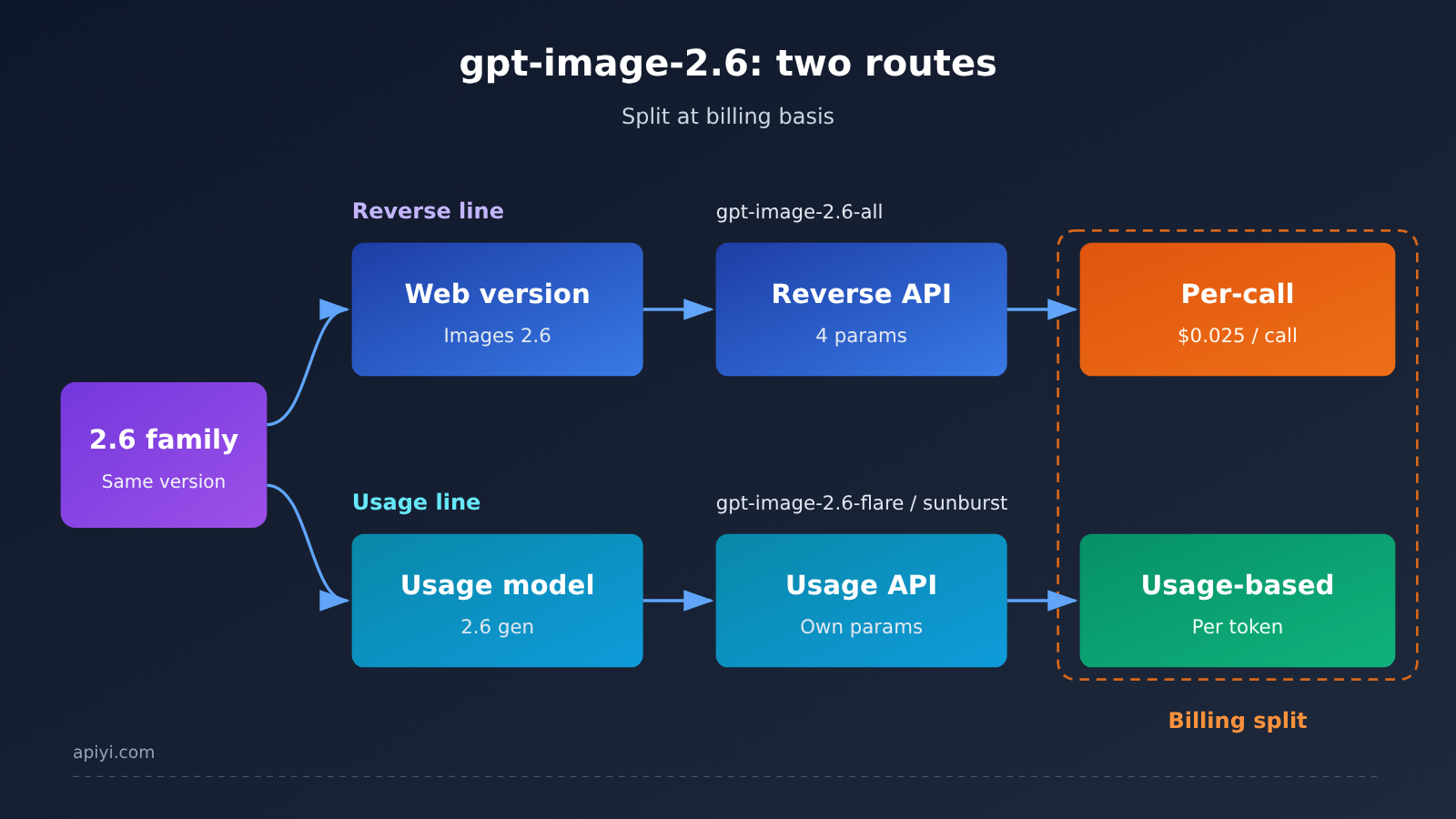
About the diagram: the two lines diverge at the billing model, not at the model version number. To verify which line a model belongs to, compare it item by item against the release notes on APIYI (apiyi.com).
Key Differences Between gpt-image-2.6-all and Flare
The easiest mistake to make is treating 2.6 as a single unit. Once you split things out by route, the differences show up in three areas.
| Dimension | gpt-image-2.6-all | gpt-image-2.6-flare / sunburst |
|---|---|---|
| Route type | Web-version reverse-engineered official route | Pay-as-you-go route |
| Billing unit | Per request, $0.025 / request | Billed by token volume |
| Parameter control | Supports size, n, background, output_format | Follows the pay-as-you-go route’s own parameter conventions |
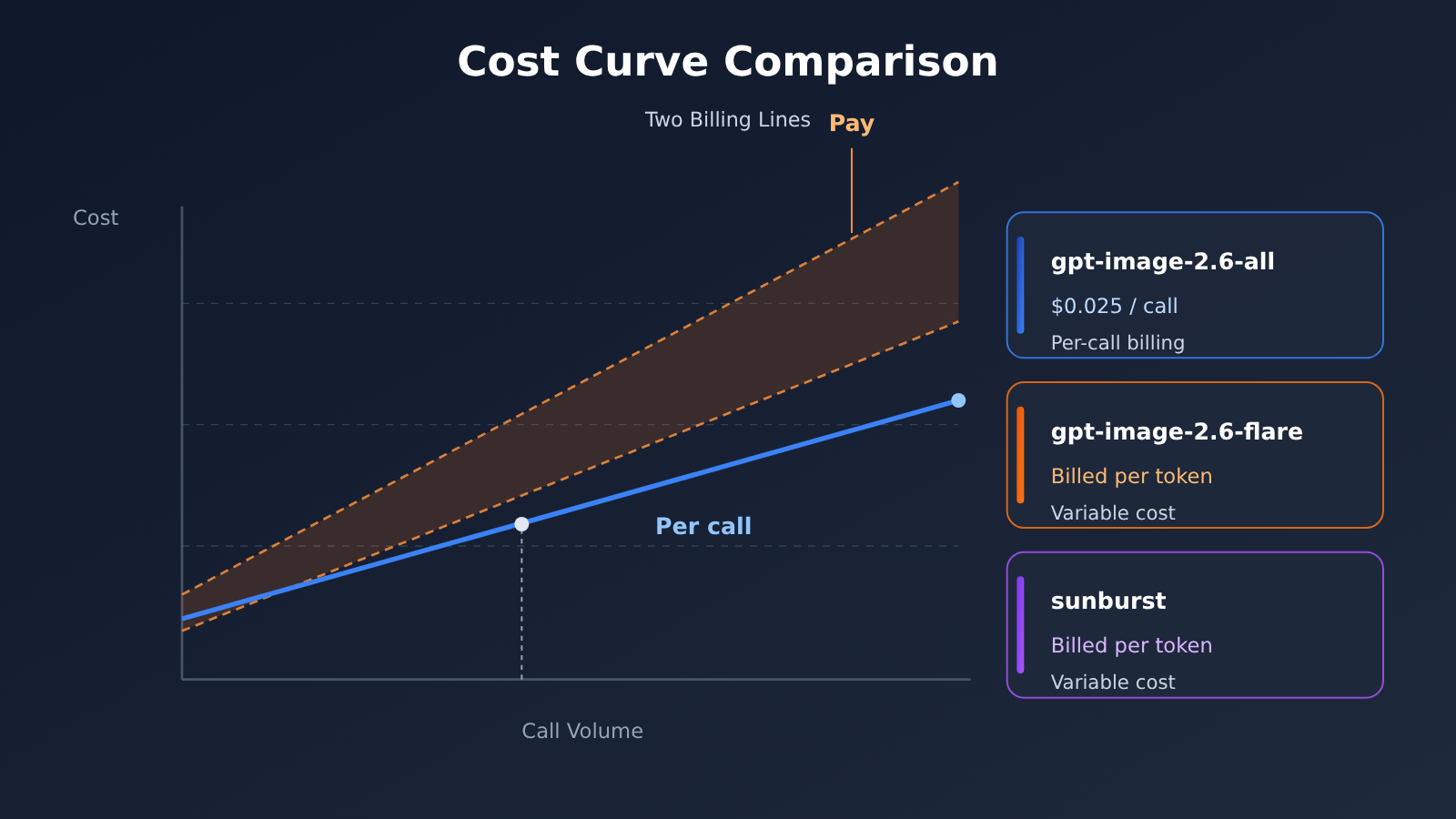
| How cost scales | Linear with the number of calls | Follows the actual number of tokens consumed |
| Best budgeting method | Budget by image count | Budget by usage volume |
gpt-image-2.6-flare is more flexible when it comes to usage-based billing, and it suits workloads where request volume swings a lot and you’re fine with cost varying by content length. The catch is that its cost doesn’t track image count, so you’ll need to estimate token consumption before you set a budget. By comparison, gpt-image-2.6-all is more predictable on cost: 1,000 calls means exactly 1,000 times the per-call price, with no extra conversion needed.
This difference gets magnified in batch scenarios. A per-request project can write the cost per image straight into a quote, while a usage-based project has to run a sample batch first and work backward from there. Neither is better than the other. What matters is whether the billing method fits your business model.
💡 Tip: If you can’t tell which route a model belongs to, look at the billing unit first rather than the version number. The model list on APIYI (apiyi.com) shows the entry points for both routes side by side, so you can validate them in parallel.
What the 4 Parameters in gpt-image-2.6-all Tell Us
The announcement says, “Unlike 2.5-all, it accepts size, n, background, and output_format.” That line carries more information than it seems to.
| Parameter | What it does | Why it matters |
|---|---|---|
size |
Sets the output dimensions | Lets you reproduce the aspect ratios available in the web version at the API level |
n |
Returns multiple images per request | Batch generation in a single call, which is more cost-effective with per-call pricing |
background |
Controls how the background is handled | The key switch for transparent-background use cases |
output_format |
Sets the output format | Directly determines whether you need to transcode afterward |
All 4 of these parameters are “request-time controls.” In other words, you tell the server what you want at the moment you place the order, rather than fixing things in post-processing. Pay-as-you-go lines usually have their own parameter sets too, but not this one. So if a model name supports these 4 parameters, you can be fairly confident it sits on the reverse-engineered official web-version line.
Conversely, the fact that 2.5-all doesn’t support these 4 parameters shows that parameter coverage on the reverse-engineered line gets filled in gradually as the web version evolves. The 2.6 generation closes that gap. The “all” in the name refers to complete parameter support, not to merging the entire model family.
🎯 Technical tip: Add a parameter validation layer to your own service and use
size,n,background, andoutput_formatas routing criteria. That way, requests can be sent to the right line automatically. APIYI (apiyi.com) provides an OpenAI-compatible interface, so switching models only requires changing themodelfield.
How to Call gpt-image-2.6-all
Calling it works the same as any standard image endpoint. Point base_url at the unified entry and make sure you get the model name right.
- Endpoint:
https://api.apiyi.com/v1 - Model name:
gpt-image-2.6-all - Recommended parameters:
size,n,background,output_format
These fields in the request body are what set the lines apart. If the server returns an unsupported-parameter error, it’s usually because the model name is flare or sunburst while the request carries the web-version parameter combination.
🚀 Quick start: APIYI (apiyi.com) offers free test credits. New users can get an API key right after signing up. Swap
base_urlforhttps://api.apiyi.com/v1, then use the same code to switch between all and flare and compare. In a few minutes you’ll know which line fits your cost structure better.
What the gpt-image-2.6-all Launch Means for Developers
The launch affects three areas.
- Cost accounting changes: At $0.025 per call, the cost per image becomes a constant. For batch projects, you can multiply out the budget directly instead of running samples first to estimate tokens. For teams that need to quote clients, this matters more than performance specs.
- Parameters now match the web version: With
size,n,background, andoutput_formatfilled in, most of the controls available on the web can be reproduced at the API level. That closes the gap of “I can tweak it on the web, but not through the API.” - Identifying the line is now a must: With per-call and pay-as-you-go lines under the same model generation, the suffix in the model name is the only way to tell them apart. Recording just the version number in your config management isn’t enough anymore.
One easily overlooked point: when n is combined with per-call billing, the unit cost drops further when a single call produces multiple images. This doesn’t change how billing works, but it does change the strategy question of how many images each request should generate.
💰 Cost optimization: For budget-sensitive projects, start by using the free credits at APIYI (apiyi.com) to get your call chain working. Then work backward from the actual number of images to project monthly spend. That gets you closer to real numbers than estimating from a price sheet.
gpt-image-2.6-all FAQ
Q1: What exactly is gpt-image-2.6-all?
It’s a reverse-engineered official-channel model for Images 2.6 on the ChatGPT web app, billed per call at $0.025 each. The `all` in the name means it supports the full set of parameters, not that it merges the whole model family.
Q2: What’s the difference between gpt-image-2.6-all and gpt-image-2.6-flare?
They differ in both routing and billing. The all model runs on the web-app reverse-engineered channel and is billed per call. Flare and sunburst belong to the usage-based channel and are billed by token volume. They aren’t different tiers of the same model; they’re two separate channels.
Q3: Why does all support size, n, background, and output_format?
Because it reproduces the request structure of the web app’s interface. Whatever you can control in the web app, the reverse-engineered channel can usually control too. Version 2.5-all doesn’t have this set of parameters, which suggests the parameter coverage has been filled in as the web app has evolved.
Q4: What scenarios suit per-call billing?
It works best when you can estimate your call volume and need to put a per-image cost into a quote. Usage-based billing is a better fit for projects with fluctuating traffic, where you can accept costs that vary with the content.
Q5: How do I quickly start calling gpt-image-2.6-all?
Sign up on a platform that supports the model and get an API key. Then set `base_url` to `https://api.apiyi.com/v1` and set the model name to `gpt-image-2.6-all`. APIYI (apiyi.com) offers an OpenAI-compatible interface and free test credits, and with the same code you can switch between all and flare just by changing the `model` field, so it’s easy to compare them.
Q6: Is there anything to watch out for with this launch?
The most important thing is not to treat `2.6` as a single unit. Per-call and usage-based channels coexist under the same generation, so if your config only records the version number, it’s easy to get your cost accounting wrong. Also, the announcement focuses on three areas: channel ownership, parameters, and billing. For any other details, refer to later documentation.
gpt-image-2.6-all Key Takeaways
- Which line it belongs to: It maps to the reverse-engineered official line for ChatGPT web Images 2.6, not the pay-as-you-go line.
- Billing: Billed per call at $0.025 each, regardless of token consumption.
- Parameter support: Supports size, n, background, and output_format, which 2.5-all doesn’t.
- Telling it apart from the same family: flare and sunburst belong to a different pay-as-you-go line with completely different billing.
- How to identify it: The billing unit and parameter combination are more reliable than the version number.
- Getting started: Point
base_urltohttps://api.apiyi.com/v1through the unified interface at APIYI (apiyi.com) to verify it yourself.
Summary
There are just three things to remember about gpt-image-2.6-all:
- It’s the web-version reverse-engineered line, not Flare: It runs on a different channel from flare and sunburst. They aren’t different tiers of the same model.
- Per call, not per token: At $0.025 per call, cost scales linearly with the number of calls, so budgeting is simpler than on the pay-as-you-go line.
- The four parameters are the giveaway: If size, n, background, and output_format show up in the model’s capabilities, it’s almost certainly on the web-version reverse-engineered line.
The same version number doesn’t mean the same line. Next time you see a model name starting with 2.6 in your config, check the billing basis first, then decide where it belongs.
If you want to compare how the two lines actually perform side by side, we’d recommend a quick test through APIYI (apiyi.com). The platform offers free credits and a unified interface for multiple models, so switching takes just a change to the model field.
References
- APIYI Release Notes – gpt-image-2.6-all Launch: The original source for route assignment, parameter support, and billing details
- Link:
docs.apiyi.com/live/2026-11/gpt-image-2-6-all-launch -
Notes: Covers the launch date, per-call pricing, and details on models in the same family. Data as of 2026-11-12
-
APIYI Model List: Lets you look up models currently on sale and their invocation entry points
- Link:
apiyi.com - Notes: Used to verify which routes the all, flare, and sunburst models belong to
Author: APIYI Technical Team
Technical Discussion: Feel free to reach out to us on the APIYI apiyi.com homepage. For more resources, visit the docs.apiyi.com documentation center.


