

Author’s note: This post breaks down the model access in Google AI Ultra’s $200 tier for Antigravity, how the 20x quota works, the AI Credits overage mechanism, and the bundled perks, so you can decide between Pro, the $100 tier, and the $200 tier.
On November 10, 2026, Google expanded access to Gemini 4 Carbon and launched a preview of its multi-agent /swarm capability. That’s prompted a lot of developers to take another look at the $200 Google AI Ultra tier, which the community calls “Antigravity Ultra.” In this post, we’ll evaluate whether it’s worth it from three angles: benefits, quota, and who it’s actually for.
This isn’t a rehash of the official marketing, and it isn’t a “just max everything out” recommendation. We’ll keep the official plan rules, independent review data, and community authors’ subjective experiences separate. We’ll also say plainly what the $200 tier adds over the $100 tier, and where it falls short.
What you’ll get out of this: By the end, you’ll know what capabilities $200 actually buys, how to think about the 20x quota, and whether Pro, the $100 Ultra, or the $200 Ultra fits your usage level.
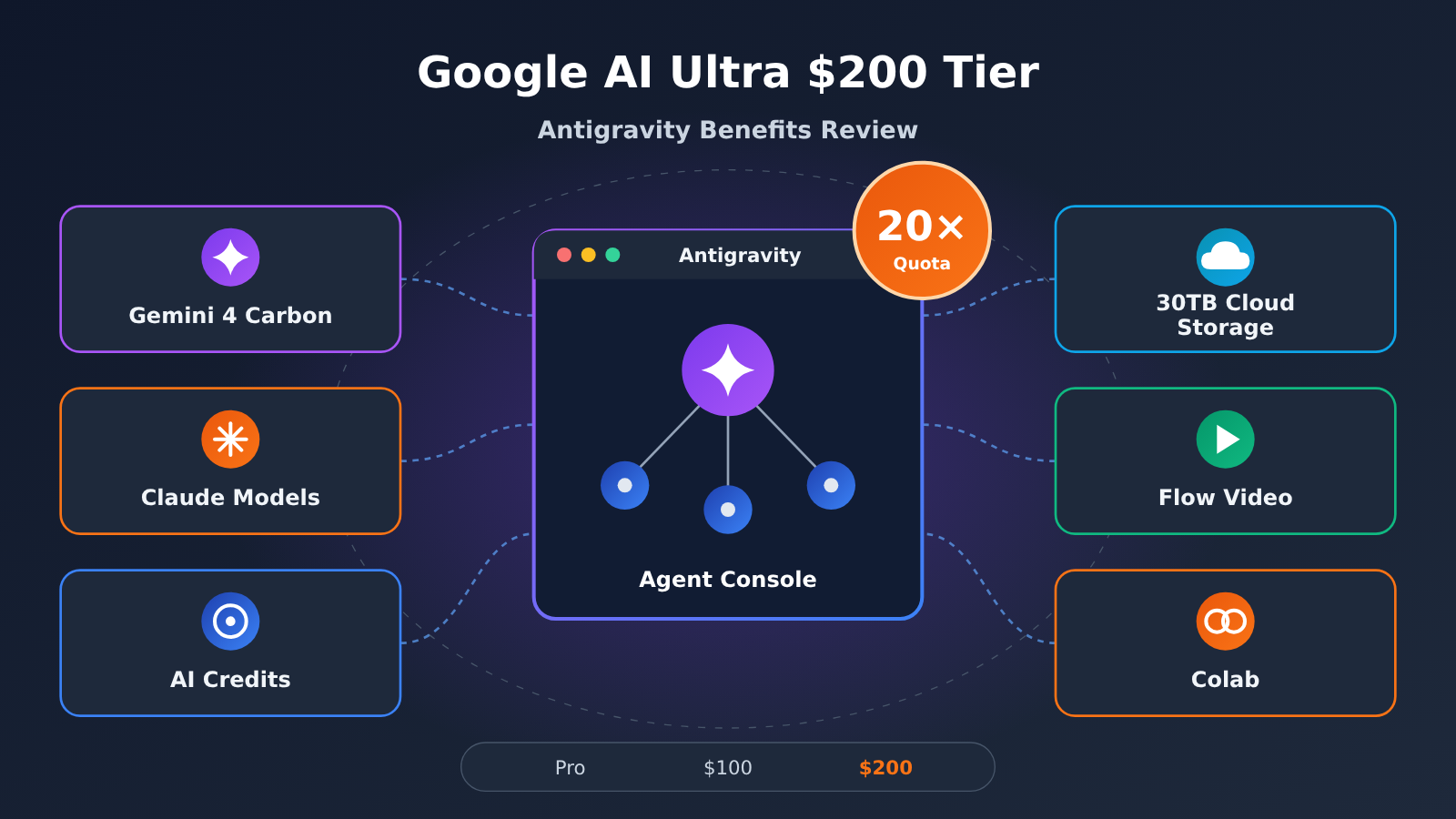
Google Antigravity Ultra $200 Tier: Key Takeaways
Here’s a quick-reference table for readers in a hurry. I’ll break down each item in more detail below.
| Key Point | Details | What It Means for You |
|---|---|---|
| Price change | In May 2026, the top Ultra tier dropped from $250 to $200, and a new $100 tier was added | The barrier for heavy users is lower, and mid-level users get a new option |
| Quota multiplier | Using the $20 Pro plan as the baseline, the $100 tier offers roughly 5x and the $200 tier roughly 20x the base quota | The main upgrade in the $200 tier is capacity, not exclusive access to models |
| Quota structure | Gemini models share one quota pool, while Claude and other third-party models have a separate, fixed quota | When one pool runs out, you can switch to the other type of model and keep working |
| Refresh rules | Quota recovers on a five-hour window and is also subject to a weekly cap | Usage isn’t unlimited, and sustained heavy use will still hit the ceiling |
| Bundled perks | 30TB of cloud storage, Flow, Colab, YouTube Premium, and more | Real offset value if you already use the Google ecosystem |
Why Google Priced Antigravity Ultra at $200
The plan change on May 19, 2026 is the key to understanding the $200 tier. Google cut its top $250 tier to $200 and added a new $100 Ultra tier, creating three main paid levels: $20, $100, and $200. The intent is pretty clear: the middle tier catches people who use agents often but not intensively, leaving the top tier to focus on heavy users.
One thing worth clarifying: Google hasn’t launched a standalone subscription called “Antigravity Ultra.” Antigravity is Google’s agent development platform, and it’s one of the development tools included in the Google AI Ultra subscription. In other words, the $200 you pay is the price of a Google AI plan, and what you get is a bundle of cross-product benefits, not a single model or a single editor.
This directly affects your buying decision. If all you want is an AI coding tool, a fair chunk of that $200 goes toward cloud storage, video creation, and other perks you may not need. But if you’re already paying for several Google products, the plan’s overall value looks a lot better.
Google Antigravity Ultra Core Features: What Development Capabilities Does $200 Get You?
Model Access in Antigravity Ultra: Carbon, Argon, and Claude
According to Google’s positioning, Gemini 4 Carbon is better suited to complex, long-running reasoning tasks, while Gemini 4 Argon fits most everyday development and knowledge work. The official model documentation also lists third-party models such as Claude Sonnet 5.5 and Claude Opus 5.5, and the model interface shows quotas for Gemini models separately from Claude and GPT-class models.
There are three easily confused concepts you’ll want to keep apart: whether a model shows up in the list, whether your subscription tier actually has permission to use it, and how much of your account’s current five-hour and weekly quota is left. Per the official documentation, paid Pro users can also get access to some Claude 5.5 models. Carbon is rolling out to Google AI Ultra subscribers, and the $100 tier supports it too, just subject to quota and release-scope limits. So neither “you can use Opus” nor “you can use Carbon” is a selling point exclusive to the $200 tier.
As for model capability, the community author of the original post claims Carbon sits in the same tier as Opus 5.5 on third-party leaderboards, and finds its Chinese writing and front-end design sense especially strong. These are the author’s subjective impressions plus citations of live leaderboards, and rankings change constantly, so we recommend testing the models on your own tasks and judging for yourself.
Antigravity’s Editor, Terminal, and Browser Working Together: Building a Complete Website
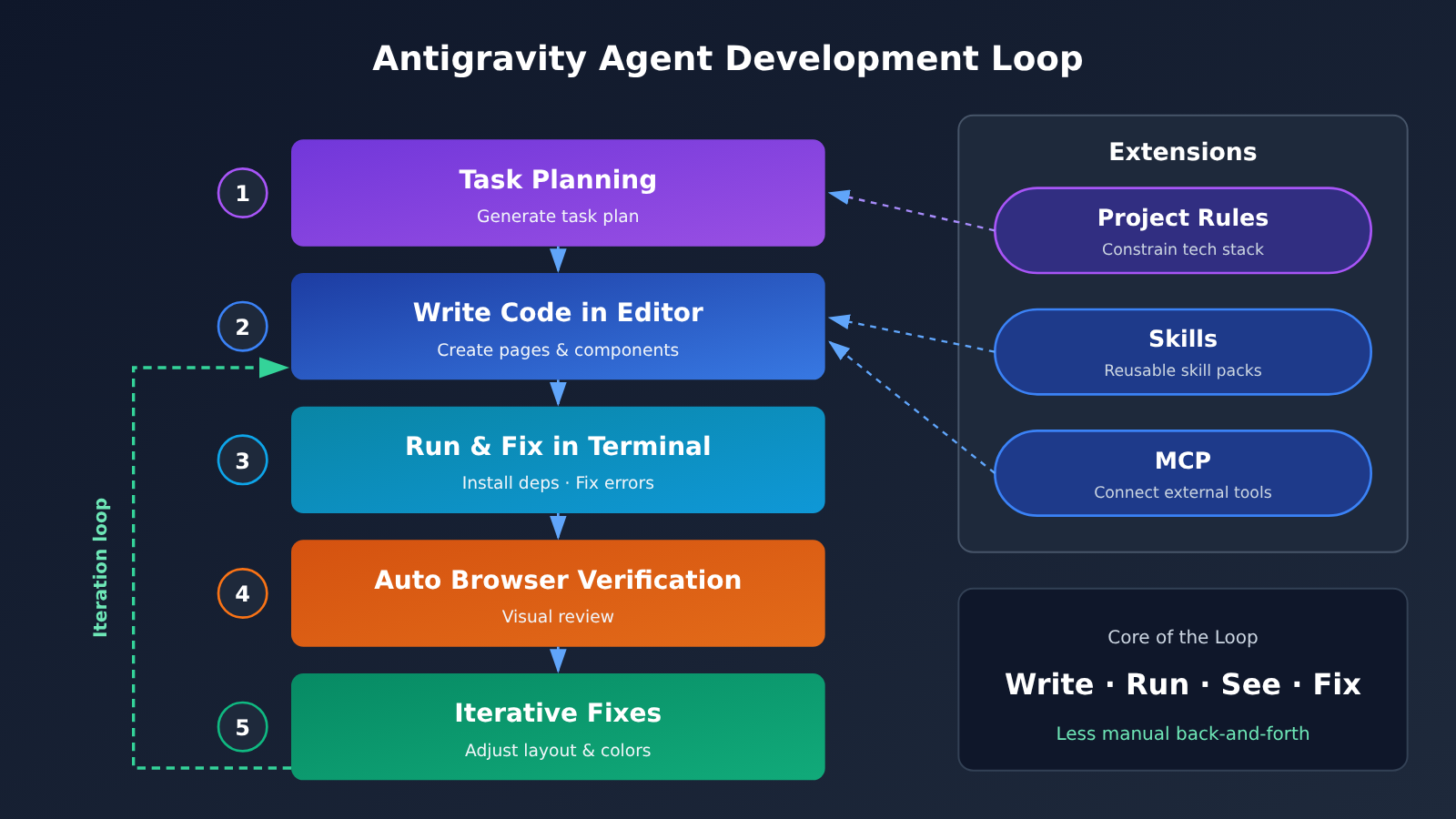
Antigravity isn’t just an AI code editor. According to the official docs, it comes in several forms: a desktop client, the agy CLI, and extensions for development environments like VS Code and JetBrains. Its core strength is that the agent can drive the editor, terminal, and browser at the same time, turning “writing code” into a full “write, run, look, fix” loop.
Take building a complete product website as an example. A typical workflow looks roughly like this:
- Task planning: You describe the page structure, style, and features, and the agent first generates a task plan. You can pair this with project-level rules to constrain the tech stack and coding standards.
- Writing code: The agent creates pages, components, and style files in the editor, and connects to external capabilities through Skills or MCP when needed.
- Terminal execution: It installs dependencies and starts the local dev server automatically. If a build error pops up, it reads the logs and fixes the problem.
- Browser verification: It opens the page for automatic verification, records the browser session, and does a visual review of typography, spacing, and interactions.
- Iterative refinement: Based on the review, it adjusts letter spacing, colors, or layout until the result meets your preset requirements.
One community author mentioned that after Carbon finishes building an interface, it “renders it and takes a look” before making adjustments. That lines up with the automatic verification and visual review capabilities described in the official docs. What really saves time isn’t how fast any single line of code gets written. It’s cutting out all the back-and-forth of switching windows, taking screenshots, and describing problems by hand.
/swarm and Multi-Agent: The Capability That Burns the Most Quota on the $200 Tier
Running multiple agents in parallel is another major focus of Antigravity. Each agent works in an isolated Git Worktree, meaning a separate working directory under the same repository, so their changes don’t interfere with each other. The results get merged at the end. This makes “editing several modules at once” possible, instead of waiting in line for a single agent to finish them one by one.
On November 10, 2026, Google introduced the /swarm preview alongside the expanded Carbon rollout. According to the official description, Carbon handles the complex coordination and review, while lightweight agents run the individual tasks in parallel. As you’d expect, running multiple agents at the same time eats through quota many times faster, and that’s exactly where the 20x capacity of the $200 tier earns its keep. That said, /swarm is still in preview, so its behavior and availability may change.
Google Antigravity Ultra Test Data: What Does 20x Quota Actually Mean?
Evaluation Methodology
The “data” in this section comes mainly from Google’s officially published plan rules. It doesn’t include task counts we can’t reproduce. Google hasn’t published any official table that converts quota directly into “how many development tasks you can run,” so any claim like “$200 gets you N projects” has nothing to back it up. Where community authors share their own experiences, we’ll cite them separately and name the source.
Key Data Across the Three Plans
| Item | Google AI Pro ($20) | Ultra ($100) | Ultra ($200) |
|---|---|---|---|
| Base quota relative to Pro | 1x (baseline) | ~5x | ~20x |
| Google One cloud storage | See the official page | 20TB | 30TB |
| Gemini 4 Carbon | See official docs and your account display | Supported, subject to quota and rollout limits | Supported, with higher quota |
| Antigravity | Supported | Supported | Supported, with higher quota |
| Google Colab monthly compute units | See the official page | 200 | 2,000 |
As the table shows, the $100 and $200 tiers don’t differ much in what you can use. The real gap comes down to three numbers: base quota (5x vs. 20x), cloud storage (20TB vs. 30TB), and Colab compute units (200 vs. 2,000). The price doubles, but base quota goes up 4x and Colab goes up 10x, so for heavy users the marginal return is clear.
Antigravity Ultra Quota Pool Breakdown
| Mechanism | Official Rule | Real-World Impact |
|---|---|---|
| Shared Gemini pool | Different Gemini models are converted based on their API pricing and share the base quota | Using Carbon burns through quota faster than Argon, so each model doesn’t get its own pool |
| Fixed third-party pool | Claude and other non-Gemini models are subject to a separate, fixed quota | Running out of Opus doesn’t affect the Gemini pool, and vice versa |
| Five-hour window | Ultra base quota refreshes on a five-hour window | After a burst of heavy use, you have to wait for it to recover |
| Weekly limit | A weekly limit also applies | Once you hit the weekly limit, a five-hour refresh doesn’t mean you can keep going |
| Usage tied to workload | Simple tasks generally use less quota than complex ones | The same quota lasts very differently for a refactor than for copy edits |
One key detail is worth stressing: the 20× figure is Google’s definition of the plan’s base quota, and you shouldn’t apply it directly to how many tasks you can run on Claude Opus. Community authors also admit that the Opus pool in Antigravity “drains pretty fast.” The real value of the dual-pool structure is that each side backs up the other: when your Claude quota maxes out, you can switch back to Gemini and keep working. But both sides are bound by the weekly limit, so “never running dry” is an idealized way to put it.
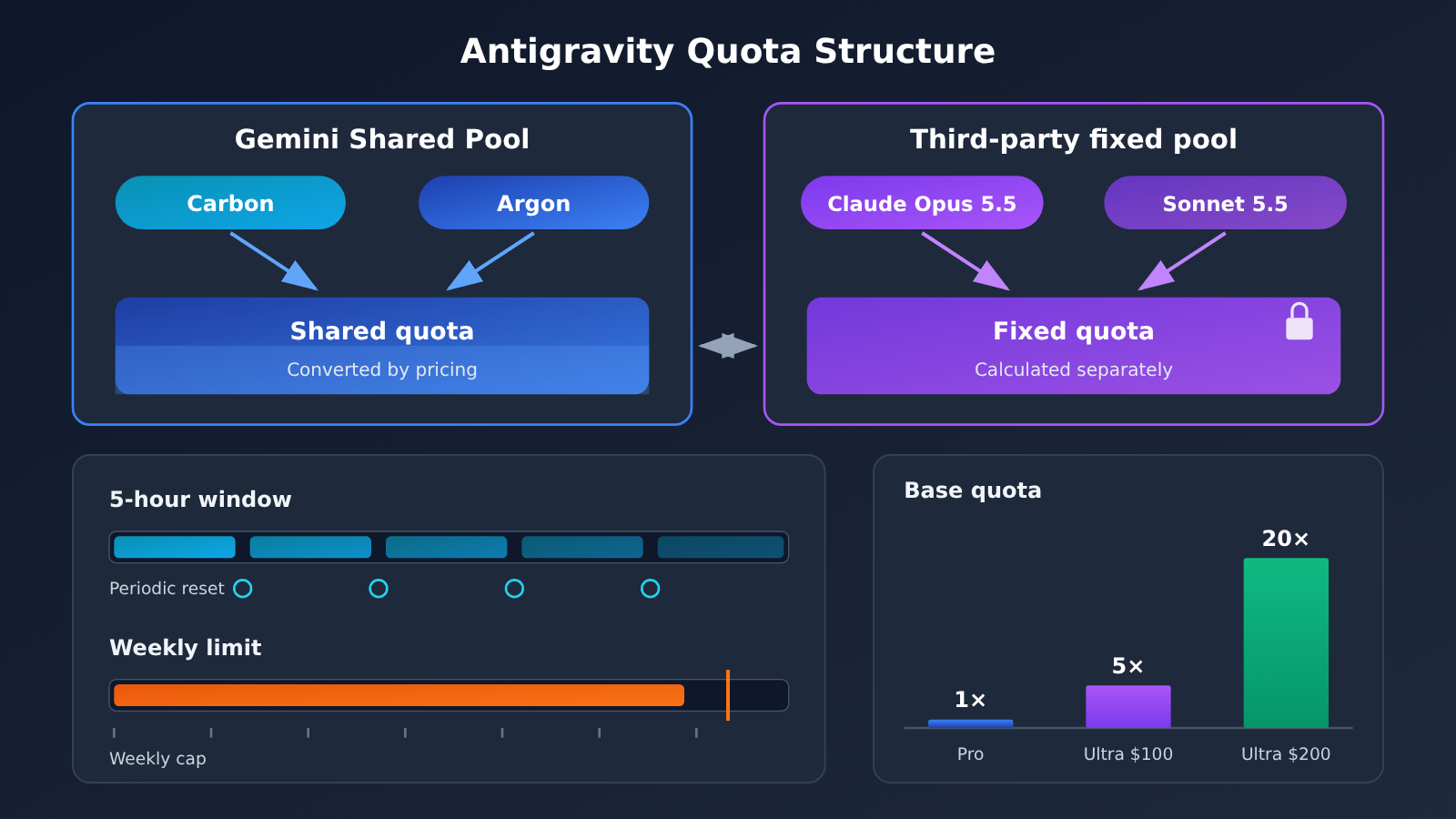
Data note: The chart above is based on the official Antigravity plan documentation. If you want to quantify actual token consumption across models outside of your subscription, you can use APIYI (apiyi.com) to call several models with the same prompt and compare the billing data to estimate your real usage.
What Happens After You Hit Your Limit: How AI Credits Are Billed
Once your base quota runs out, Pro and Ultra users can keep using certain models by purchasing additional AI Credits. There are two options in Settings. With Never, calls stop as soon as your quota is used up, and you wait for it to reset. With Always, AI Credits are spent automatically once your quota runs out, and usage switches back to your base quota when it resets. Any overage is billed at the standard rates for the specific model and task.
One thing to keep in mind: when Google overhauled the plans in May 2026, it moved AI Credits out of the base subscription benefits and handled them separately as an overage mechanism. The $100 temporary credit promotion announced at the time ended on May 25, 2026, so it isn’t a standing benefit. I’d suggest leaving the setting on Never by default. Once you understand your usage patterns, you can decide whether to switch to Always, so you don’t get surprised by your bill.
What You Get with the Google Antigravity Ultra Bundle Beyond Coding
| Benefit | Main Use | Best For | Notes |
|---|---|---|---|
| Google One 30TB storage | Project backups, asset archives, large file storage | Users with lots of data or media assets | The $100 tier gets 20TB |
| Google Flow | Video creation with higher usage limits | Short-video and ad creative creators | Quota is calculated separately and isn’t shared with Antigravity |
| Google Colab | 2,000 compute units per month for experiments and data processing | Algorithm engineers, data analysts | The $100 tier gets 200 units |
| AI Studio and other Gemini access | Prototyping, prompt experiments | Developers who need to quickly validate model performance | Separate from pay-as-you-go API billing |
| YouTube Premium Individual | Ad-free video, background playback | Heavy daily YouTube users | Subject to region and eligibility restrictions |
| Developer program and other benefits | Subscription benefits for other Google products | Users in the Google ecosystem | Refer to the official benefits page for details |
Even though these benefits all come with the Ultra subscription, they don’t share a single AI request quota. Google states clearly that each product has its own usage limits. Family sharing lets eligible family members get some of the benefits, but that doesn’t mean every member gets a full, high-capacity Antigravity allowance.
Looking at it by user type, there are three groups who can each get what they need. Developers will care most about Antigravity’s 20x capacity and Colab’s 2,000 compute units, which are well suited for moving model training and data cleaning to the cloud. Video creators benefit mainly from Flow’s higher limits, paired with 30TB of storage for managing assets. Cloud tool users can combine Google One, Colab, and AI Studio into a lightweight cloud workspace. If you only fit into one of these groups, you’ll want to think carefully about whether the remaining benefits are actually worth anything to you.
Google Antigravity Ultra: Pros and Cons
Advantages
- Clear capacity gap: 20x base quota versus 5x on the $100 tier, so long, complex development sessions and parallel
/swarmruns are less likely to get interrupted. - Complementary dual-quota structure: The Gemini shared pool and the third-party fixed pool are counted separately. When one hits its cap, you can switch models and keep working.
- Complete development loop: The editor, terminal, and browser work together with automatic verification, which cuts down on manual back-and-forth.
- Rich cross-product perks: 30TB of storage and 2,000 Colab compute units offer real value for heavy Google users.
- Low barrier to entry: Subscribe with a Google account and you can use models from multiple providers in the official client or CLI, so switching costs are low.
Limitations
- Not unlimited: A five-hour window and a weekly cap both apply, and going over requires purchasing AI Credits. The fix is to choose Never or Always in settings, depending on your needs.
- Claude quota is relatively tight: Third-party models run on a fixed quota pool, so the 20x multiplier doesn’t apply directly. If you rely heavily on Opus, you’ll want to consider other supplementary options.
- Opaque quotas: There’s no official, published task-conversion table, so you’ll have to track your own usage patterns.
- Region and eligibility restrictions: Some perks are limited by region, and available models may change depending on capacity.
- Subscription can’t be turned into an API: Antigravity quota can only be used inside the official tools. Community authors explicitly warn that using third-party reverse proxies to turn the subscription into an external API violates the terms and puts your account at risk.
How Google Antigravity Ultra and Pay-As-You-Go API Calls Work Together
A subscription covers the “developer sitting in front of an IDE” use case. But many teams also have CI pipelines, batch copywriting jobs, automated test reports, and other scenarios that need programmatic calls. Those workloads shouldn’t eat into your subscription quota, and in many cases you aren’t allowed to run them that way. The compliant approach is to use pay-as-you-go API billing, which complements the subscription.
A Minimal Invocation Example
The example below uses an OpenAI-compatible interface and runs in about 10 lines:
import openai

client = openai.OpenAI(
    api_key="YOUR_API_KEY",
    base_url="https://api.apiyi.com/v1"  # APIYI unified endpoint: one key for models from multiple providers
)

response = client.chat.completions.create(
    model="YOUR_MODEL_NAME",  # Enter a Gemini / Claude model name from the console's model list
    messages=[{"role": "user", "content": "为这段 PR 描述生成测试要点"}]
)
print(response.choices[0].message.content)
View the full implementation: automatically choosing a model by task difficulty in CI
import openai
from typing import Optional

# Use the model names from the APIYI console's model list
MODEL_MAP = {
    "simple": "YOUR_LIGHT_MODEL",    # Routine tasks: lightweight model to save cost
    "complex": "YOUR_STRONG_MODEL",  # Complex reasoning: flagship model
}

client = openai.OpenAI(
    api_key="YOUR_API_KEY",
    base_url="https://api.apiyi.com/v1"
)

def run_task(
    prompt: str,
    level: str = "simple",
    system_prompt: Optional[str] = None,
    max_tokens: int = 2000
) -> str:
    """Pick a model based on task difficulty; suitable for CI or batch scripts"""
    messages = []
    if system_prompt:
        messages.append({"role": "system", "content": system_prompt})
    messages.append({"role": "user", "content": prompt})

    try:
        resp = client.chat.completions.create(
            model=MODEL_MAP.get(level, MODEL_MAP["simple"]),
            messages=messages,
            max_tokens=max_tokens
        )
        usage = resp.usage
        print(f"tokens: in={usage.prompt_tokens}, out={usage.completion_tokens}")
        return resp.choices[0].message.content
    except Exception as e:
        return f"Error: {e}"

if __name__ == "__main__":
    print(run_task(
        prompt="审查以下 diff 中可能的边界条件问题:...",
        level="complex",
        system_prompt="你是资深代码审查工程师,输出简洁的问题清单"
    ))
🚀 Best practice: Leave interactive development to your Antigravity subscription, and hand batch and automation tasks to the API. We recommend first running through the workflow on APIYI (apiyi.com) with the free credits for new users, then setting your budget based on the token usage in your logs. That way the two lines of usage never compete with each other.
$200, $100, or Pro: Which Google Antigravity Plan Should You Buy?
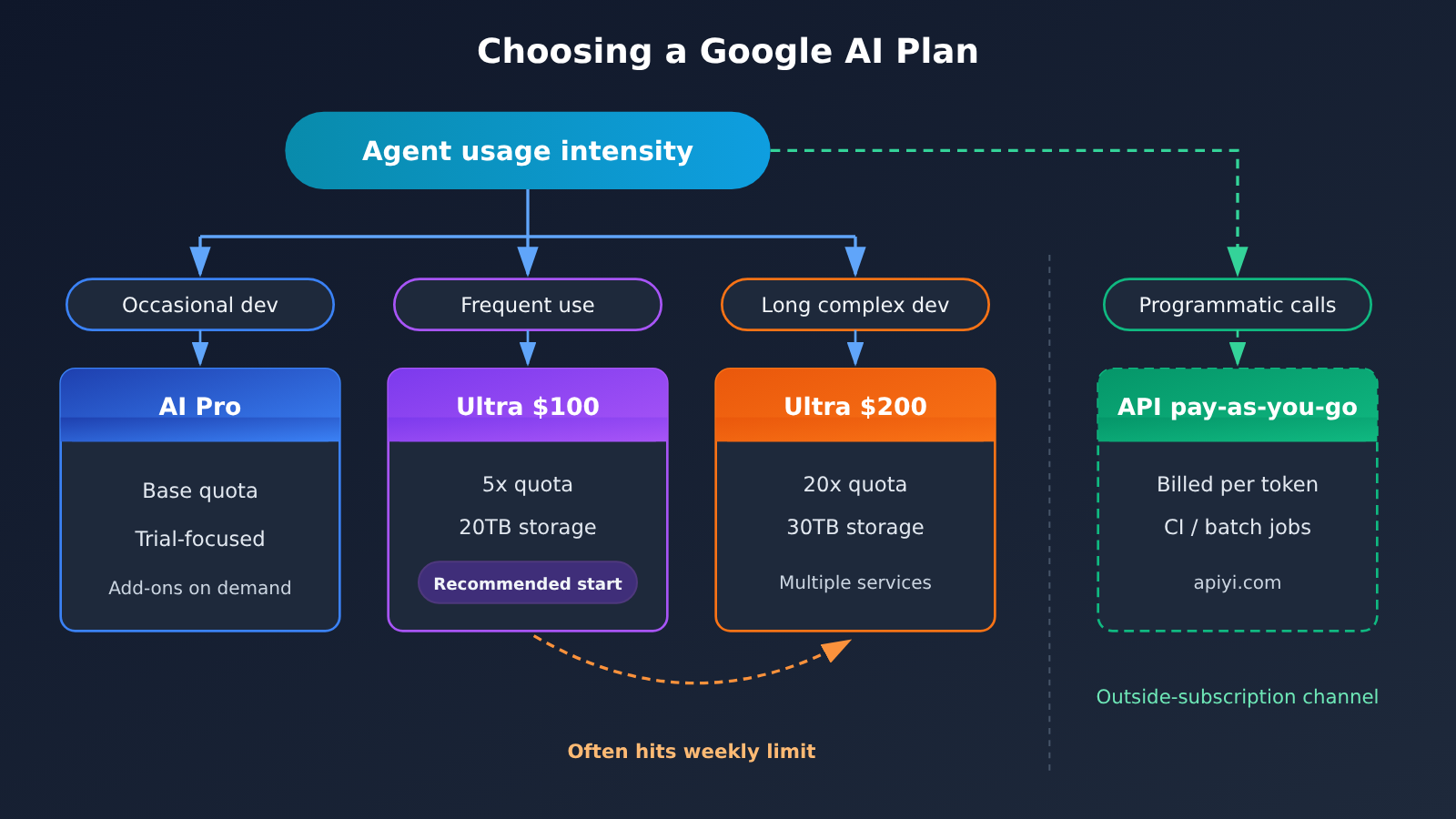
| User Profile | Recommended Plan | Key Reason | Add-on Option |
|---|---|---|---|
| Occasional development, mostly exploring | Google AI Pro | The base quota is enough, and you can try some Claude 5.5 models | Buy AI Credits as needed |
| Frequent Agent use, moderate task size | Ultra $100 | 5x quota, Carbon support, 20TB storage, and the best balance of value | Watch whether you hit the weekly limit often |
| Long, complex development, frequent use of /swarm | Ultra $200 | 20x quota absorbs the consumption of parallel multi-Agent runs | Set to Never to avoid accidental overages |
| Heavy use of both Flow and Colab | Ultra $200 | 30TB of storage and 2,000 Colab units add up in value | Confirm benefit eligibility in your region |
| Programmatic calls such as CI and batch processing | Pay-as-you-go API billing | Subscription quota can’t be converted to API usage, so pay-as-you-go is more compliant and easier to control | APIYI apiyi.com unified interface |
A simple rule of thumb: start with the $100 tier. If you hit the weekly limit midweek for several weeks in a row, and you genuinely need high-consumption features like /swarm, upgrade to the $200 tier. On the flip side, if you’ve never used up the 5x quota, the extra capacity in the $200 tier will just sit idle.
FAQ
Q1: What is Google Antigravity Ultra?
It’s the community’s nickname for the Antigravity usage benefits included in the Google AI Ultra subscription. There’s no separate Antigravity Ultra plan. Antigravity is Google’s agent development platform, and $200 is the price of the top Google AI Ultra tier, which also bundles cloud storage, Flow, Colab, and several other perks.
Q2: What’s the biggest difference between the $100 Ultra and the $200 Ultra?
The main difference is capacity, not whether you can use Carbon. Both tiers support Carbon and Antigravity, but their base quotas are roughly 5x and 20x that of Pro. Cloud storage is 20TB vs. 30TB, and Colab compute units are 200 vs. 2,000.
Q3: When did Gemini 4 Carbon and /swarm become available?
Gemini 4 Carbon began rolling out more widely to Google AI Ultra subscribers on November 10, 2026, and /swarm was introduced as a preview feature on the same day. The plan restructuring happened on May 19, 2026.
Q4: Is the quota on the $200 tier unlimited?
No. Quota refreshes on a five-hour window and is also subject to a weekly limit. Once you hit the weekly limit, the five-hour refresh won’t let you keep going. Third-party models like Claude also have their own separate fixed quotas, so you can’t just apply the 20x multiplier to Opus. If you go over, you’ll need to buy additional AI Credits.
Q5: How do I call Gemini or Claude models from scripts or CI?
Subscription quota only works inside the official tools, so don’t try to turn it into an API with a reverse proxy. Here’s the recommended workflow:
1. Sign up at APIYI (apiyi.com) and get an API key
2. Claim the free test credits for new users
3. Pick a model name from the console’s model list, then run the code examples in this article directly
The platform offers an OpenAI-compatible interface, so switching models only requires changing the `model` parameter.
Q6: What’s the difference between the subscription fee, AI Credits, and API costs?
The subscription fee is the fixed monthly plan price, covering your base quota and the bundled perks. AI Credits are a pay-as-you-go overage mechanism for continuing to use Antigravity after your base quota runs out. API costs are usage-based billing for programmatic calls, completely independent of your subscription quota. If you want to compare API costs across models, you can test them with the same prompt through APIYI’s unified interface and compare the bills directly.
Q7: What are the known limitations of the $200 tier?
There are four main ones: the quota rules aren’t transparent, since Google hasn’t published a task-conversion table; the Claude pool’s quota is relatively tight; perks like YouTube Premium are subject to regional and eligibility restrictions; and available models and usage limits may change depending on capacity. Family sharing also only covers some of the perks, so it won’t give each member a full high-quota allowance.
Google Antigravity Ultra Key Takeaways
- Pricing structure: In May 2026, the top tier dropped to $200, and a new $100 tier was added, creating a three-level ladder.
- What you actually get: The $200 tier gives you more capacity than the $100 tier, but model access is largely the same.
- Quota rules: A shared Gemini pool plus a fixed third-party pool, with a five-hour window and weekly limits running side by side.
- Overage mechanism: AI Credits are billed under standard rules, so we recommend defaulting to Never.
- Bundle value: 30TB of storage, 2,000 Colab units, and Flow video credits are each calculated independently.
- Automation add-on: Programmatic calls go through APIYI (apiyi.com) on pay-as-you-go billing, so they don’t eat into your subscription quota.
Summary
Here are the key points on the $200 Google AI Ultra tier:
- It buys you development capacity: The 20x base quota gives you more breathing room for long, complex development sessions and parallel multi-agent work with /swarm, but it isn’t unlimited.
- It isn’t exclusive to any model: Carbon and Claude 5.5 are also available on other tiers, with varying levels of access. When judging value, look at the quota rather than the model name.
- It’s a bundle of perks: The value of cloud storage, Colab, and Flow depends on whether you’ll actually use them, so you shouldn’t count all of them as Antigravity features.
Our recommendation is clear: choose Pro if you only develop occasionally, the $100 Ultra tier if you use agents often but your tasks are moderate in size, and the $200 Ultra tier only if you do long, complex development and also make heavy use of Google’s other services. Before you buy, check the official model quotas, your region’s eligibility, and any subscriptions you already have so you don’t pay twice.
For automation and batch-processing scenarios that your subscription doesn’t cover, we recommend trying APIYI (apiyi.com) to quickly validate results. The platform offers free test credits and a unified interface for multiple models, so it works well alongside an Antigravity subscription.
📚 References
- Google Antigravity Official Blog: May 2026 plan changes announcement
- Link:
antigravity.google/blog/changes-to-antigravity-plans -
Notes: Pricing and quota multipliers for the $100 and $200 Ultra tiers
-
Antigravity Plans and Quota Documentation: Quota rules and overage mechanics
- Link:
antigravity.google/docs/plans -
Notes: Shared Gemini pool, fixed third-party pool, five-hour and weekly limits, AI Credits settings
-
Antigravity Models Documentation: Model selection and permissions
- Link:
antigravity.google/docs/models -
Notes: Which models are available on each tier
-
Antigravity Development Environment Overview: Product capabilities
- Link:
antigravity.google/docs/ide/overview -
Notes: How the editor, terminal, and browser work together, plus multi-agent workflows
-
Google Official Blog: Gemini 4 Carbon general availability announcement
- Link:
blog.google/innovation-and-ai/models-and-research/gemini-models/gemini-4-carbon-now-available -
Notes: Carbon’s positioning and a look at the /swarm preview feature
-
Google One Plan Comparison Page: Full list of benefits
- Link:
one.google.com/intl/en/about/google-ai-plans -
Notes: Comparison of storage, Colab compute units, and other benefits
-
Google One Help Center: Google AI Ultra benefits explained
- Link:
support.google.com/googleone/answer/16286513 - Notes: Cross-product benefits, regional restrictions, and family sharing rules
Author: APIYI Technical Team
Technical Discussion: Feel free to reach out via the APIYI website homepage. For more model integration resources, visit the docs.apiyi.com documentation center.


