

Summary: This article helps you determine whether your ChatGPT Pro account has already switched to shared quotas between ChatGPT and Codex, explains how to read Codex quota in each state and how it’s deducted, and covers the options you have once it runs out.
Bottom line first: To tell whether you’ve been included in the gradual rollout, look only at the metering label in Settings → Usage—not at the interface layout. OpenAI’s public statement says that starting December 2026, ChatGPT and Codex quotas are shared across Plus, Pro, and Business, and a small number of accounts may see the change before that. Today is November 25, 2026, so whether your account changed early or is still metered under the old rules can only be confirmed by what your own account displays.
Here’s how to read each case:
- Usage already clearly shows remaining usage and reset information after ChatGPT and Codex are combined: shared quota is now in effect for you.
- Usage still shows Work / Codex metering, and Chat still has a separate model prompt: metering is still separate, and the two reset independently.
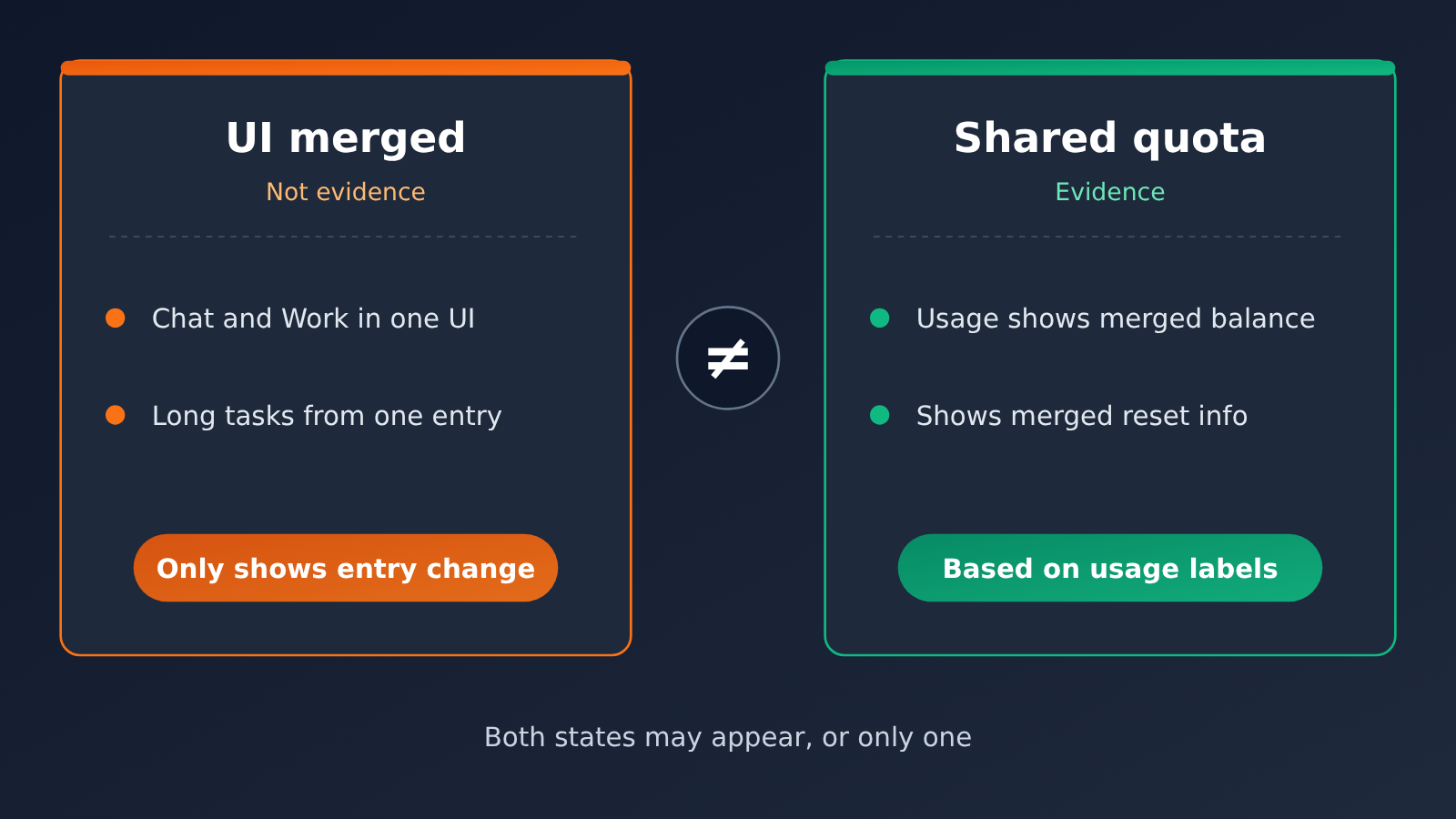
Chat and Work showing up in the same interface only means the entry points have been merged—you can’t infer from that that quotas are shared.
ChatGPT Pro Rollout Check Knowledge Map
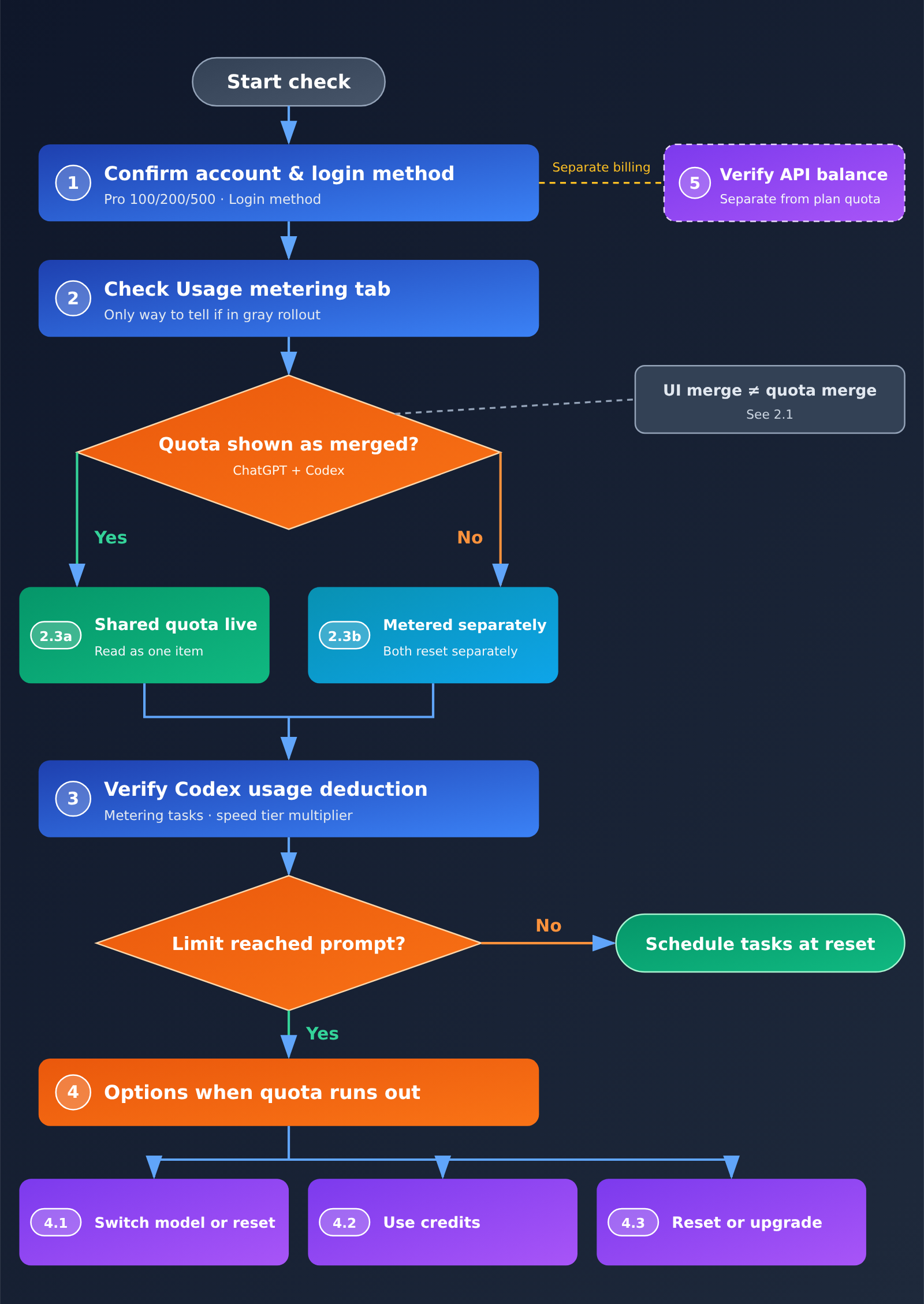
Figure caption: The main line unfolds in the order “confirm account → read the metering tab → verify how usage is deducted → handle hitting the limit”. There’s only one basis for deciding whether you’re in the rollout: the metering tab in node 2. Whether the UI is merged is just a side note and doesn’t factor into the decision. Node 5’s API balance and the subscription quota are two separate bills, so it sits outside the main line and gets checked on its own.
Index
| No. | Section | What It Provides for the Next Step | Expected Outcome |
|---|---|---|---|
| 1 | Confirm the account and sign-in method | Make sure later checks are looking at the same account and the same metering | Know which Pro tier you’re on and how Codex is billed |
| 2 | Determine whether you’re in the shared quota rollout | Decide whether quota should be read as one pool or two | Reach a conclusion: “shared” or “still separate” |
| 3 | Check how Codex quota is deducted | Understand which tasks are metered and how quickly they consume quota | Estimate how much quota a task will use |
| 4 | Options after quota runs out | Choose a recovery method based on Sections 2 and 3 | Pick waiting, credits, reset, or upgrade |
| 5 | Check API balance separately | Runs parallel to the main path; consult as needed | Distinguish subscription quota from API balance |
| 6 | Self-check acceptance method | Summarize the earlier checkpoints | Get a record you can review |
Section 1 is the prerequisite. If you’re looking at the wrong account or workspace, the later measurements can’t be trusted. Section 5 runs parallel to the main path, so readers who only use an API Key can jump straight there.
To Know
| Term | Brief Explanation |
|---|---|
| Gradual rollout | New rules take effect for a small number of accounts first. Here it means that before the official rollout in December, some accounts see shared quota early |
| Shared quota | ChatGPT and Codex share one token-metered usage pool, with a unified remaining amount and reset information |
| Metered item / label | Each metered name on the Usage page, such as weekly Work/Codex usage; it’s the basis for determining the rules |
| Instant | Chat’s instant mode; official docs say it doesn’t count against shared quota |
| credits | Usage balance purchased separately in personal plans; after subscription quota is exhausted, eligible tasks can draw from it |
| Saved resets | Reset counts saved in the account that can restore quota early; view Available in Usage |
1. Confirming Your ChatGPT Pro Account and Codex Login Method
1.1 Verify Your Pro Tier and Current Workspace
In your personal ChatGPT workspace, open Settings → My Plan and check whether you’re actually subscribed to Pro 100, Pro 200, or Pro 500. If you have both a personal workspace and an organization workspace in the interface, confirm which one you’re currently in first — otherwise you might read the org’s allowance as your personal one. For subscriptions purchased on the web, you can check the billing details under Settings → Billing.
1.2 Confirm How Codex Is Logged In
Run codex login status in the Codex CLI to see whether you’re logged in with ChatGPT or with an API key. This step determines which ledger to look at later:
- ChatGPT login: Codex usage counts toward your subscription allowance or the applicable ChatGPT credits.
- API key login: Local Codex is billed at the standard OpenAI API organization rate and has nothing to do with the subscription allowance.
codex login status # Check whether you're logged in with ChatGPT or an API key
2. How to Tell Whether ChatGPT Pro Has Entered the Shared-Quota Gradual Rollout
2.1 UI Merging and Quota Sharing Are Two Different Things
A lot of people see Chat and Work features appear in the same interface and assume the quotas have already been merged. The official line is: even when both live in the same UI, you still have to judge whether the quotas are merged by looking at the metering labels and the account notices. So handing a long-running task to ChatGPT from the same entry point doesn’t mean you’ve switched to shared quota.
2.2 Where to Find the Metering Labels
All of these entry points show the metering for the same account, so you can cross-check them against each other:
- ChatGPT web or desktop app: Settings → Usage.
- Desktop Codex: Usage & Billing.
- Official Codex web usage page:
chatgpt.com/codex/settings/usage. - An open Codex CLI session: type
/statusto see the remaining allowance.
When you check, compare the restricted items, remaining balance, purchased credits balance, and reset time shown in the notice. When you note down the reset time, note the time zone the page uses as well. If you’re comparing across devices, it has to be the same account and the same metering item.
2.3 How to Read the Two States
| What you see in Usage | What it means | How to read your allowance |
|---|---|---|
| Clearly shows combined remaining usage and reset info for ChatGPT and Codex | Shared quota is active for this account | Treat it as one shared item; Chat and Codex both draw from the same pool |
| Only shows Codex weekly usage, while conversations show a separate Chat model notice | Still metered separately | Read each one separately; each recovers on its own reset schedule |
| The UI is merged, but metering is still two separate items | Only the interface changed | Treat it as separate metering; don’t add them together |
If the page has just reset, the numbers may not have updated yet — refresh or reopen it and check again. The public statement only gave the rollout month and the scope of “a small number of accounts getting it early”; it didn’t publish a list or the criteria. So there’s no rule like “a certain button appearing means you’re in the rollout” — just go by what your account actually shows.
3. Has the Codex quota changed? Checking the deduction rules item by item
3.1 Current quota for Work / Codex
According to the current public Work / Codex documentation, Pro 100, Pro 200, and Pro 500 do not have a five-hour limit, but the subscription still includes a quota. For accounts that are still metered separately under the old rules, GPT‑6 Pro in Chat has its own weekly message cap, and once you hit it, that model may be temporarily unavailable.
The weekly quota reset and the monthly subscription bill run on two separate schedules, so don’t mistake your billing date for the day your quota resets. For the fixed reset time after sharing and the quotas for each tier, the official guidance is to go by the rules shown in your account. This article won’t give specific numbers; please go by the values on your own Usage page.
3.2 Which tasks consume quota
| Usage | Counts toward quota? | Notes |
|---|---|---|
| Instant mode in Chat | Does not consume the shared quota | Depends on the mode and task type shown in the product |
| Metered Chat models | Metered by tokens | Advanced models and complex tasks usually consume more |
| Image generation, file uploads, and voice in Chat | Each has its own usage indicator | When you see an indicator, troubleshoot the corresponding feature; for Deep research, check the counter on its page |
| Local Codex messages and cloud tasks | Count toward the same subscription usage | Editing code with the CLI and launching cloud tasks draw on the same quota |
| Generating images in a Codex session (ChatGPT login) | Counts toward the shared quota | Consumption depends on image quality and size; when using an API key, billing follows API pricing |
| Word, Excel, and PowerPoint agent tasks | Count toward agent task quota under the applicable rules | See the scope listed in the individual plan docs |
| Tasks started by voice in desktop Work / Codex | Draw on the agent task quota | Voice connection time is metered separately under the applicable rules; regular Chat Voice has its own limits |
| auto-review safety checks | Free | The model running the task itself is still metered as usual |
The same single message can consume vastly different amounts. A request that tweaks one small file and a task that spans multiple files, runs tests, and searches repeatedly can both send only one message. The factors Codex officially lists include: context processed, reasoning effort, tool calls, retrieval, caching, and speed tier.
🎯 Technical tip: If you have script tasks like batch translation, summarization, or structured extraction that don’t need Codex to read a codebase, you can avoid using your subscription quota and switch to API calls instead. APIYI apiyi.com provides an OpenAI-compatible interface; with a single key you can switch between multiple model providers, making it a good fit for separating these tasks from your subscription quota.
3.3 Speed tier multipliers: calibrate expectations with official numbers
Take Codex’s GPT‑6.2 Sol as an example — the official multipliers are as follows (dates in Pacific Time):
| Setting | Subscription quota consumption (relative to Standard) | Purchased credits consumption (relative to Standard) |
|---|---|---|
| Standard | 1x | 1x |
| Fast | 2x | 2x |
| Ultrafast (available in Codex with Pro 200) | 6x | 3x during the promotion through February 28, 2027; 6x starting March 1, 2027 |
This table compares how fast quota is consumed; it does not represent your remaining balance. The Standard-tier credit pricing is per million tokens: 50 credits for uncached input, 2.5 credits for cached input, and 250 credits for output. How much subscription quota you have left and when it resets — that still comes down to Usage.
4. Your options when the ChatGPT Pro and Codex quotas run out
4.1 First, figure out which item is limited
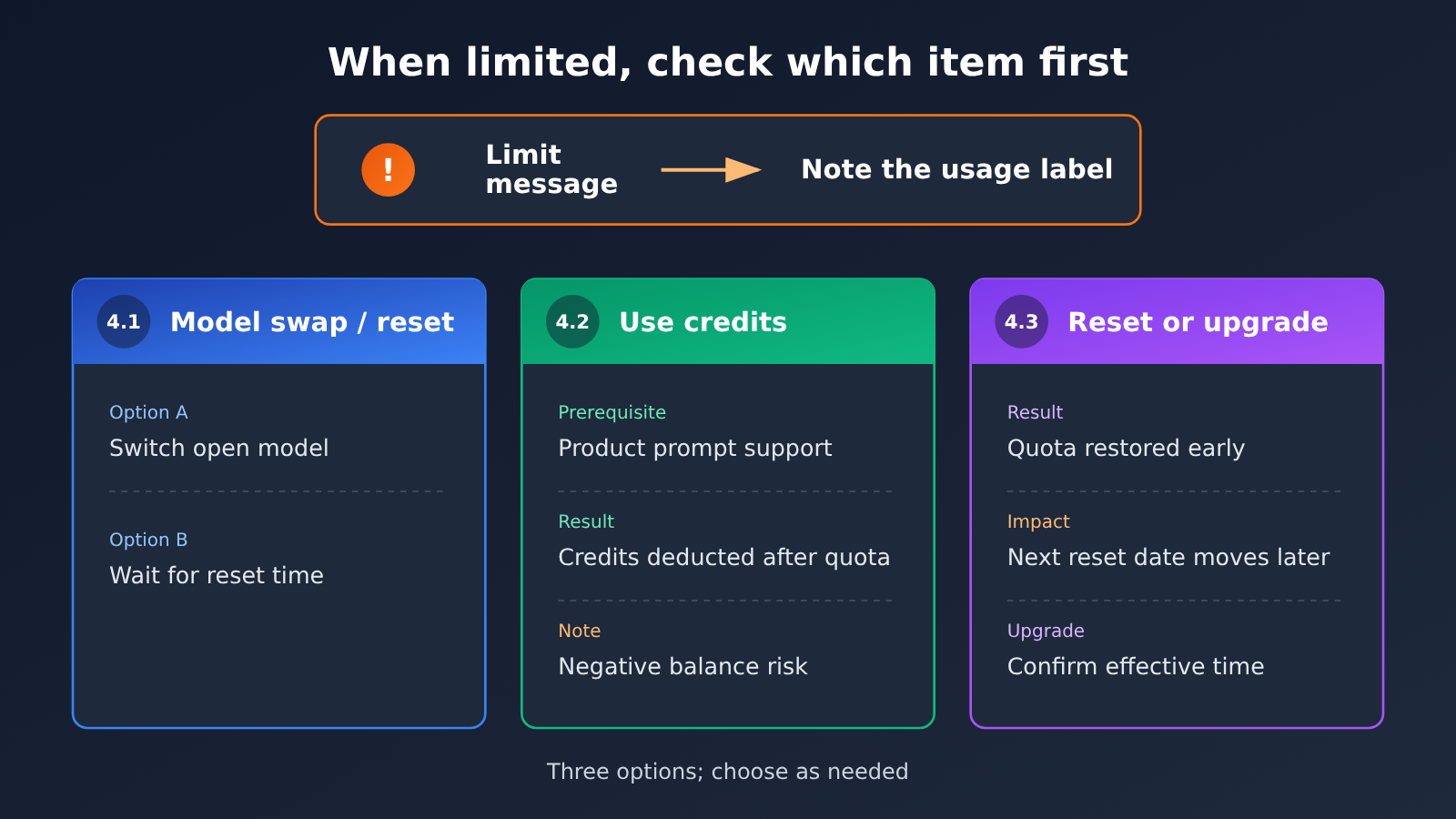
When you see a limit notice, note which metering item triggered it. If a particular model in Chat has run out, you can switch to a model that’s still available in the UI, or wait until the displayed reset time. Under the old separate metering, the official examples were: after Pro 200’s GPT‑6 Pro weekly quota is used up, it automatically switches to GPT‑5.6 Thinking at Medium; Pro 100’s GPT‑6 Pro and GPT‑5.6 Sol Pro share a single weekly quota, so switching between the two still deducts from the same metering item.
For Codex, if a task hits the limit partway through a turn, the docs say it can finish the current turn under fair use rules, and you’ll see the options in the limit notice before the next turn starts. Starting a new chat doesn’t get around the quota — it still draws on the account’s metering. It’s worth noting how far the task got, so next time you only bring along the context you actually need.
4.2 How credits are charged
The system uses your subscription quota first. Once you hit the cap, eligible tasks can automatically draw on existing credits. You can find your balance, usage, and the Add credits entry point on the Usage page or in Codex’s Usage & Billing. If your account supports auto-recharge, it automatically starts a new purchase when the balance drops below the threshold. If you turn auto-recharge off, your existing balance is still used according to the product rules; typing an instruction in chat won’t let you set up deduction approval.
Keep in mind that concurrent tasks can push your balance negative. Credits purchased afterward first offset the negative amount, and only the remainder is usable. Purchase amounts and applicable features are governed by your account page.
💰 Cost optimization: Subscription quota works well for interactive coding. For budget-sensitive automation tasks that need precise per-call accounting, you can call on a pay-as-you-go basis through APIYI apiyi.com, which gives new users free test credits — start with a small sample to estimate costs.
4.3 Paid resets, stored resets, and upgrades
For an eligible Work/Codex instant paid reset, the official rule is: the new week starts from your first Work or Codex request after the reset, and the next automatic reset comes seven days after that request. In other words, a paid reset restores quota early and pushes the next reset date back.
If your account has stored free resets, you can check Available and the covered windows in desktop Usage & Billing or the web Usage page. Pro’s full stored reset covers the main Codex weekly quota. History under Usage limit resets on desktop shows when stored resets were received and used. The shared announcement also lists upgrades as an option; before upgrading, confirm the tier change and effective time in your account.
If the task can wait, schedule the start around the current expiry time. If only a small amount of quota is left, hand the parts that just need an answer to Instant, and the parts that must read code or run validation to Codex, specifying the relevant files, output length, and acceptance requirements. For tasks that fit the requirements, prefer smaller models, lower reasoning effort, or the Standard tier.
5. Reconciling ChatGPT Pro’s API balance separately
5.1 Three balance pools that never mix
OpenAI maintains three separate balances: the ChatGPT subscription, usage credits you buy yourself, and the API organization balance. Eligible Pro users who have activated the benefit can link promotional API credits — granted per billing cycle — to an API organization. The requirements for claiming them are:
- The eligible paid subscription has been active for at least seven days.
- The person claiming is the owner of both the subscription and the receiving organization, using the same email address.
- The person claiming has billing management permissions on the API organization.
The claim entry point is ChatGPT Settings → Billing. Once linked, check the balance under Billing → Credit grants in the API Platform. The first period of the benefit is prorated by the remaining billing cycle and applies to eligible API services, but it does not cover the cost of running Codex with an API key.
| Balance type | Where to check it | What it covers | Platform |
|---|---|---|---|
| Subscription quota | Settings → Usage, Codex /status |
ChatGPT and Codex (ChatGPT login) | ChatGPT official |
| Personal credits | Usage or Usage & Billing | Eligible tasks after the subscription quota runs out | ChatGPT official |
| API organization balance | API Platform → Billing → Credit grants | API calls; promotional credits don’t cover running Codex with an API key | OpenAI API |
| Third-party API balance | Platform console | Scripts and batch jobs calling multiple models | Aggregators such as APIYI apiyi.com |
5.2 Moving scripted tasks out of the subscription quota
Tasks that need stable, programmatic invocation are much easier to account for when you run them through the API. The example below uses an OpenAI-compatible endpoint — you only need to swap out base_url:
import openai

client = openai.OpenAI(
    api_key="YOUR_API_KEY",
    base_url="https://api.apiyi.com/v1"  # APIYI OpenAI-compatible endpoint
)

response = client.chat.completions.create(
    model="gpt-4o-mini",  # Model names follow the platform's model list
    messages=[{"role": "user", "content": "把这段日志归纳成三条要点"}]
)
print(response.choices[0].message.content)
print(response.usage)  # Every call logs token usage, making it easy to track costs
View the full implementation (with usage accumulation)
import openai
from typing import Optional

client = openai.OpenAI(
    api_key="YOUR_API_KEY",
    base_url="https://api.apiyi.com/v1"
)

usage_log = {"prompt_tokens": 0, "completion_tokens": 0}

def ask(prompt: str,
        model: str = "gpt-4o-mini",
        system_prompt: Optional[str] = None,
        max_tokens: int = 800) -> str:
    """Call the model and accumulate token usage"""
    messages = []
    if system_prompt:
        messages.append({"role": "system", "content": system_prompt})
    messages.append({"role": "user", "content": prompt})
    try:
        resp = client.chat.completions.create(
            model=model,
            messages=messages,
            max_tokens=max_tokens
        )
        usage_log["prompt_tokens"] += resp.usage.prompt_tokens
        usage_log["completion_tokens"] += resp.usage.completion_tokens
        return resp.choices[0].message.content
    except Exception as e:
        return f"Error: {e}"

tasks = ["总结需求文档第一节", "列出接口变更点", "生成测试用例标题"]
for t in tasks:
    print(ask(t, system_prompt="你是严谨的技术助理,回答简洁"))

print("累计用量:", usage_log)
🚀 Quick start: Sign up at APIYI apiyi.com to grab an API key, and you’ll have the code above running within minutes. You can also point the same prompt at different models to compare results, then decide which tasks stay in Codex and which go to the API.
6. Acceptance Method for the ChatGPT Pro Grayed-Out Feature Self-Check
After completing your self-check, you should be able to write a verifiable record that includes the following:
- The account and workspace, the Pro tier, and how Codex is logged in.
- The original metering labels in Usage, along with the conclusion you draw from them: “shared” or “still separate”.
- The remaining balance, reset time, and time zone for each metered item.
- The item that most recently hit a limit prompt, the model used, and the speed tier.
To check whether a task is consuming quota, compare the task type, selected model, and speed against your existing usage records. If multiple tasks are running at the same time, the change in total percentage only reflects their combined consumption for that period and can’t be broken down per task. If the displayed reset time has already passed but the feature hasn’t been restored, or if purchase records and balance don’t match up, you can contact OpenAI support and include redacted screenshots, the full text of the prompt, the specific date and time zone, and the client and model. The support team can check whether metering or restoration is abnormal; routine quota restoration is still done through the reset options already available in the product.
If, after checking, you find that your subscription quota is mainly being used by tasks you can script, you can migrate that part to the API. Start with a small-scale test using APIYI’s unified interface at apiyi.com to validate the results and cost, then decide whether to use it long-term.
References
- OpenAI shared quota overview: Timing and rules for sharing quota between ChatGPT and Codex
- Link:
help.openai.com/en/articles/20001625-understanding-chatgpt-and-codex-usage-limits
- Link:
- ChatGPT Pro tiers: Pro 100/200/500 and weekly model limits
- Link:
help.openai.com/en/articles/9793128-about-chatgpt-pro-tiers
- Link:
- Using Codex with your ChatGPT plan: Checking usage, hitting limits, and troubleshooting
- Link:
help.openai.com/en/articles/11369540-using-codex-with-your-chatgpt-plan
- Link:
- Codex usage and pricing: Speed multipliers and credits rates
- Link:
learn.chatgpt.com/docs/pricing
- Link:
- Personal plan credits help: Deduction order, auto-recharge, and negative balances
- Link:
help.openai.com/en/articles/12642688-using-credits-for-flexible-usage-in-chatgpt-personal-plans
- Link:
- Codex reset mechanics and paid resets: Saved resets, History, and the seven-day rule
- Link:
help.openai.com/en/articles/20001498-how-resets-work-in-codex - Link:
help.openai.com/en/articles/20001507-paid-weekly-work-and-codex-rate-limit-resets
- Link:
- API credits benefit eligibility: Claim requirements and scope of use
- Link:
help.openai.com/en/articles/20001626-api-credits-benefit-for-eligible-chatgpt-subscriptions
- Link:
Author: APIYI Technical Team
Technical discussion: If you have questions about multi-model integration or cost accounting, feel free to contact us through the APIYI apiyi.com homepage.


