
If you've just integrated gpt-image-2 into your production environment, you've likely hit a wall with two major issues: rate limits and stability. The official OpenAI rate limit for gpt-image-2 is notoriously strict—Tier 1 accounts are capped at just 5 requests per minute, meaning even light batch processing triggers 429 errors. Plus, when you run into 5xx server-side jitters, you're often looking at a string of consecutive failures. To solve this, many teams turn to "official reverse-engineered channels"—reversing the gpt-image-2 backend built into ChatGPT Pro/Codex CLI to leverage higher RPM quotas and more stable connection paths.
The gpt-image-2-vip model available on APIYI (apiyi.com) utilizes this exact Codex reverse-engineered route. This article breaks down its 5 core features, 30 size options, 3 compatible endpoints, and provides production-ready code so you can get up and running immediately.
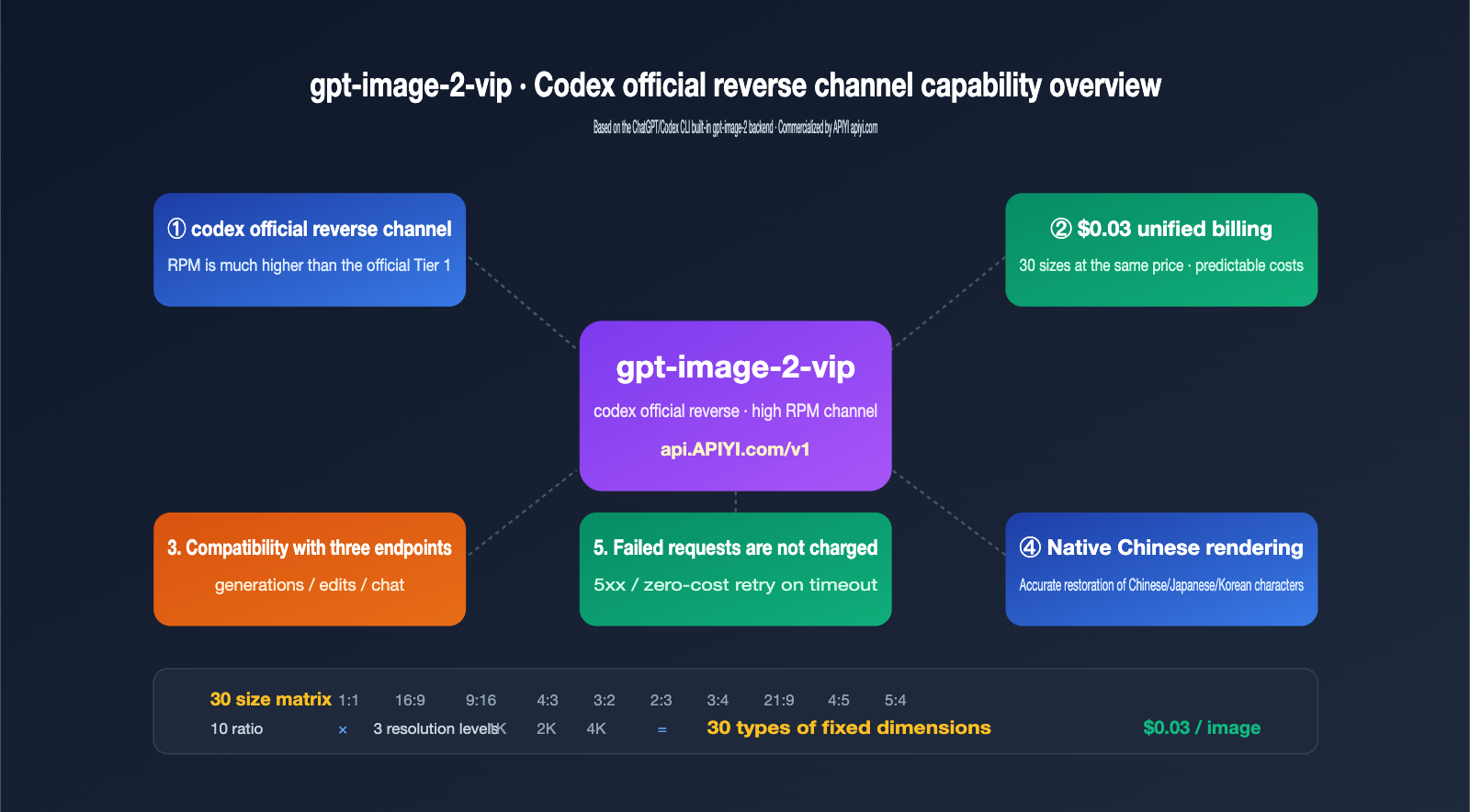
What is the Codex reverse-engineered API: 3 fundamental differences from official direct connection
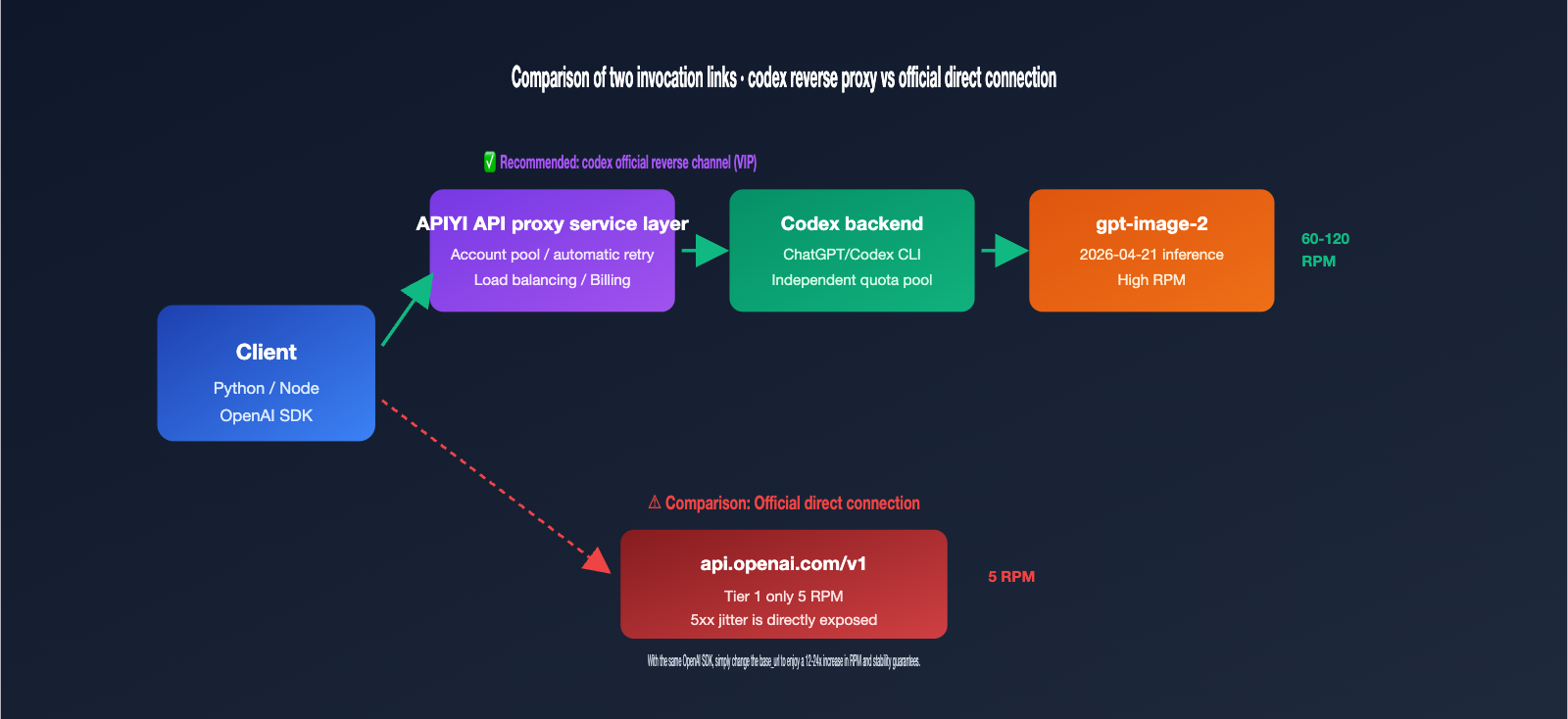
Many developers hear "Codex reverse-engineered" and assume it's an illicit interface. In reality, it refers to reverse-engineering the gpt-image-2 call chain embedded within OpenAI's own Codex CLI and ChatGPT Pro. When OpenAI released gpt-image-2 in April 2026, they simultaneously built it into the Codex CLI ($imagegen skill) and the ChatGPT client. These two entry points share an independent rate quota pool, which operates under different throttling policies than the public API.
The Codex reverse-engineered channel works by exposing that internal data stream as a REST API, allowing you to use gpt-image-2 just like a standard OpenAI API, but routing through the ChatGPT backend. The gpt-image-2-vip model is one such implementation. Here are the 3 fundamental differences compared to an official direct connection:
| Dimension | Official OpenAI Direct | Codex Reverse-Engineered (gpt-image-2-vip) |
|---|---|---|
| Rate Limit | Tier 1: 5 RPM, requires top-up to unlock | Uses Codex shared pool, significantly higher than Tier 1 |
| Billing Model | Tiered pricing based on image size/quality | Flat $0.03/image, same price for all 30 sizes |
| Stability | Directly affected by official 5xx fluctuations | Multi-account pool + auto-retry, masks underlying jitters |
quality param |
Supports low/medium/high/auto | Not supported (uses Codex internal strategy) |
n batch param |
Supports 1-4 images | Not supported, returns 1 image per request |
| URL Expiry | 60 minutes | ~24 hours |
🎯 Key Takeaway: Reverse-engineering isn't "hacking"; it's exposing the internal call chain of OpenAI's own product (Codex CLI) as a REST interface. APIYI (apiyi.com) has commercialized this channel, but its core value isn't about bypassing OpenAI—it's about providing API users with the more stable rate quotas found on the Codex side.
5 Core Features of gpt-image-2-vip
Once you understand the channel differences, the specific features become much clearer. The following 5 points are the most critical distinctions between gpt-image-2-vip and its siblings, gpt-image-2-all and the official gpt-image-2. These are the details that are often scattered across documentation but are essential to highlight.
Feature 1: 30 Freely Lockable Sizes, Unified $0.03 Billing
The greatest engineering value of gpt-image-2-vip is that it treats "size" as a first-class parameter. The model supports 10 aspect ratios × 3 resolution tiers = 30 fixed sizes. You simply specify them in the size parameter—no need to jump through hoops adjusting your prompt. The billing is even more straightforward: all 30 sizes are a flat $0.03 per image, eliminating the hidden costs of "larger sizes cost more." For teams building template-based generation or batch thumbnail pipelines, this provides a massive boost in cost predictability.
| Resolution Tier | Short Edge (px) | Long Edge (Max px) | Use Case |
|---|---|---|---|
| 1K | ~1024 | ~1820 | Thumbnails, feed covers, social media |
| 2K | ~2048 | ~3640 | Posters, e-commerce hero images, content cards |
| 4K | ~2880 | ~3840 | High-res printing, video assets, print materials |
The 10 aspect ratios cover mainstream composition needs like 1:1 squares, 16:9 landscape, 9:16 portrait, 4:3, 3:2, and 21:9, meaning you rarely need post-generation cropping. Another hidden value of unified pricing is that you can switch resolutions in your production pipeline based on business needs without affecting your financial model—for example, running both 1K and 4K versions of the same prompt for A/B testing. Costs remain fully predictable, and you won't have to worry about a sudden spike in your end-of-month bill just because one branch used a larger size.
Feature 2: Full Compatibility with Three Endpoints
gpt-image-2-vip simultaneously supports the three standard OpenAI image endpoints: /v1/images/generations (text-to-image), /v1/images/edits (image-to-image and editing), and /v1/chat/completions (image generation via chat). This is crucial because it means you don't need to rewrite your existing SDK code. Simply change the model from gpt-image-2 to gpt-image-2-vip and point your base_url to the API proxy service.
Feature 3: Multi-Image Fusion and Image-to-Image
By uploading 1-N images via the /v1/images/edits endpoint and providing a prompt to describe your intent, the model can perform style transfer, content fusion, and layout rearrangement. For example, you can combine a "product image + model image + background image" into a single e-commerce hero shot. We recommend compressing each image to under 1.5MB to avoid significant increases in input token consumption.
Feature 4: Native Chinese Understanding
gpt-image-2-vip shares the same inference backend as the official gpt-image-2, inheriting its native rendering capabilities for Chinese, Japanese, Korean, Hindi, and Bengali text. You don't need to translate your Chinese prompts into English; the Chinese titles and button text in your posters will be rendered with high precision—something Midjourney and Stable Diffusion struggle to achieve.
Feature 5: No Charges for Failed Requests
This is a billing detail, but it’s a huge money-saver for large-scale production. Any request that returns a 5xx error, times out, or is blocked by safety policies will not be charged. Only calls that successfully return an image count toward your usage. This allows you to implement exponential backoff retries with peace of mind, without worrying that the retries themselves will blow up your bill. Combined with the flat "$0.03/image" pricing, cost estimation becomes incredibly simple: if you plan to generate 10,000 images, it will cost roughly $300. You no longer need to model costs based on size or quality, making it easy for both finance and product teams to sign off.
Workflow and Code Example: Starting with 5 Lines of Python
The integration logic is straightforward and identical to the official OpenAI SDK; you only need to switch the base_url and model. Below is a minimal, runnable example for text-to-image, with the base_url pointing to the unified APIYI (apiyi.com) entry point.
from openai import OpenAI
import base64

client = OpenAI(
    api_key="your-apiyi-key",
    base_url="https://api.apiyi.com/v1"
)

resp = client.images.generate(
    model="gpt-image-2-vip",
    prompt="Dark tech-style launch event visual, central neon title 'APIYI · gpt-image-2 Launch', small text in bottom left 2026",
    size="2048x1152"
)

img_b64 = resp.data[0].b64_json
with open("poster_2k.png", "wb") as f:
    f.write(base64.b64decode(img_b64))
If you want to perform image-to-image or multi-image fusion, simply replace client.images.generate with client.images.edit and add image=[open("a.png","rb"), open("b.png","rb")]. The request body format for all three endpoints follows the official OpenAI specification.
🎯 Quick Start Tip: To get this workflow running in 30 seconds, we recommend creating an API key on APIYI (apiyi.com) and running a test image using
gpt-image-2-vipwith any size. Failed requests aren't charged, so you can debug your parameters with confidence.
How to Choose from 30 Sizes: A Quick Reference Guide
When faced with 30 different size options, most people's first reaction is, "Which one should I pick?" We've categorized them by business scenario to make it easier. The most important thing to know is: all sizes cost the same, so you should choose based entirely on your business needs without worrying about sacrificing clarity to save money.
| Business Scenario | Recommended Ratio | Recommended Resolution | Typical Size |
|---|---|---|---|
| Official Account Cover / Zhihu Header | 16:9 / 3:2 | 2K | 2048×1152 |
| Xiaohongshu / TikTok Vertical | 9:16 / 4:5 | 2K | 1152×2048 |
| E-commerce Main Image / Detail Page | 1:1 | 2K or 4K | 2048×2048 or 2880×2880 |
| Website Hero Image | 21:9 / 16:9 | 4K | 3840×1640 or 3840×2160 |
| PPT Slide Illustration | 16:9 | 1K or 2K | 1820×1024 |
| Print / Poster | 3:4 / 2:3 | 4K | 2880×3840 |
| Feed Thumbnail | 1:1 | 1K | 1024×1024 |
| Banner Strip | 21:9 | 1K | 1820×780 |
🎯 Size Selection Tip: We recommend using the 2K tier for production environments. Each image is about 1-3MB, offering the best balance between loading speed and visual quality. Only use 4K for printing or large-screen displays, and reserve 1K for small-scale scenarios like feed thumbnails.
Comparing the Three Channels of the gpt-image-2 Series: VIP / ALL / Official
There are actually three gpt-image-2 related models available on APIYI (apiyi.com). It's easy to pick the wrong one, so let's break down the differences to save you from having to rework your integration later.
gpt-image-2 (Official Direct) uses the public OpenAI API. It supports quality and n parameters, but you'll have to handle the low 5 RPM rate limit yourself. gpt-image-2-all is an aggregated channel; it supports all parameters, but size is controlled via the prompt and isn't always precise. gpt-image-2-vip is the star of this article; it uses the official reverse-engineered codex, with its strengths being precise size locking, unified pricing, and high RPM.
| Model ID | Channel Type | Rate | Size Control | Quality Parameter | Images per Request | Recommended Scenario |
|---|---|---|---|---|---|---|
gpt-image-2 |
Official Direct | Tier-limited | Precise size | ✅ | 1-4 | Quality-sensitive, low-frequency calls |
gpt-image-2-all |
Aggregated | Medium | Prompt-based | ✅ | 1-4 | Legacy code migration, requires quality param |
gpt-image-2-vip |
Official Reverse | High RPM | Precise size | ❌ | 1 | Batch production, fixed size, stability first |
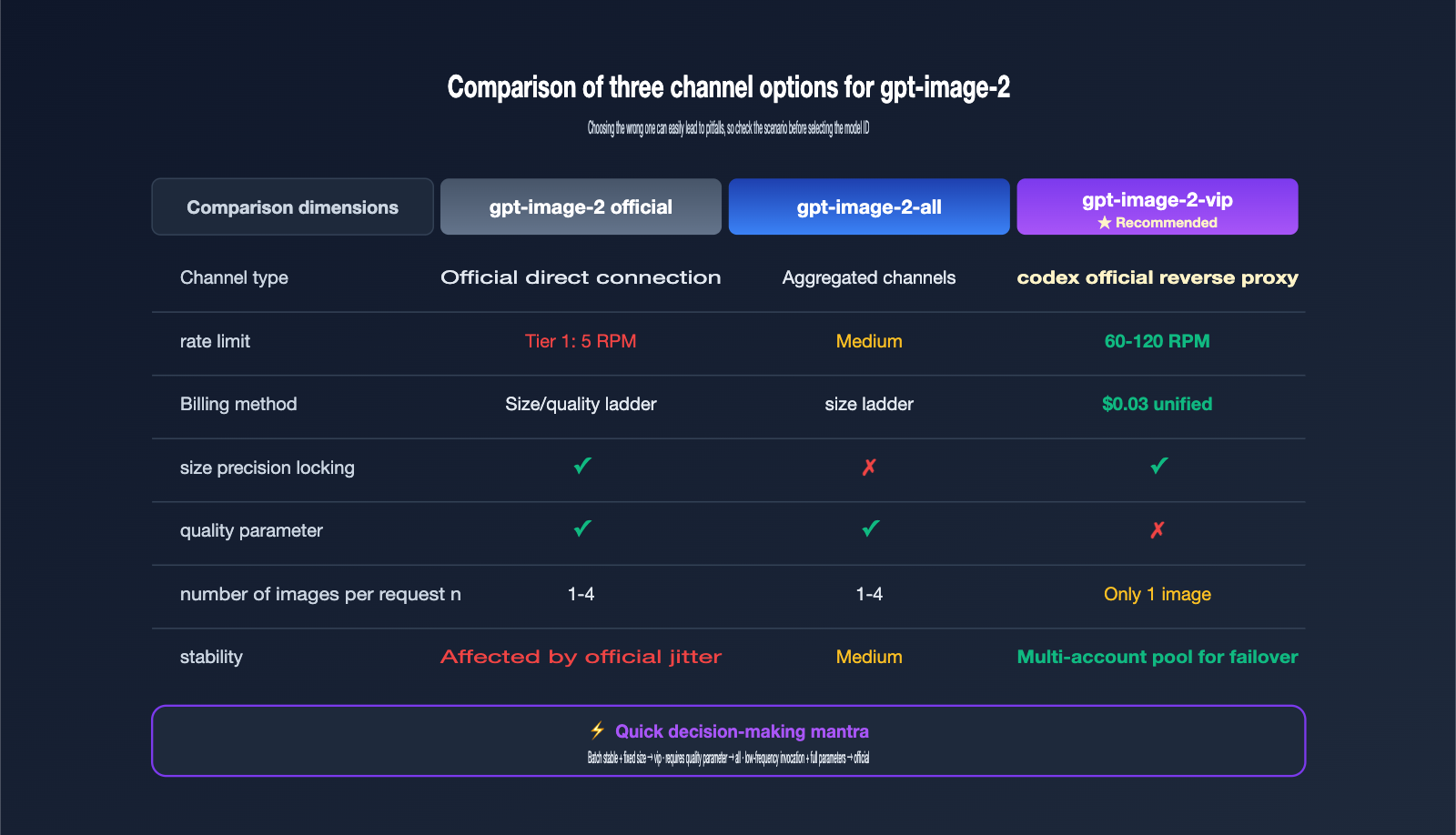
Simple decision: If you need stability for high-volume, fixed-size, and predictable billing, choose gpt-image-2-vip. If you absolutely must use quality=high for high-fidelity results, choose gpt-image-2-all. Only consider gpt-image-2 if you have low-frequency, occasional calls and require the full set of parameters.
Stability Best Practices: Timeouts, Retries, and URL Expiration
While the gpt-image-2-vip model offers higher throughput than the official version, it has a longer generation time: official inference typically takes 30–60 seconds, but the VIP channel—due to an extra layer of API proxy service and retries—usually takes 90–150 seconds. Your production code must be configured to account for this duration, or you'll run into widespread timeout failures.
Practice 1: Set Timeout to 300 Seconds
The OpenAI SDK defaults to a 60-second timeout, which is far from enough for gpt-image-2-vip. I recommend explicitly passing timeout=300 to the client. A very small number of complex prompts may approach 200 seconds, so leaving a 300-second buffer is the safer bet.
client = OpenAI(
    api_key="your-apiyi-key",
    base_url="https://api.apiyi.com/v1",
    timeout=300,
    max_retries=2
)
Practice 2: Use Exponential Backoff for 5xx Errors
Although the API proxy service layer already handles some retries, adding an extra layer of exponential backoff (1s → 2s → 4s) on the client side can further boost your success rate. Failed requests are not billed, making these retries essentially cost-free.
Practice 3: Download and Persist URLs Within 24 Hours
The image URLs returned by gpt-image-2-vip are valid for about 24 hours and will return a 404 error once expired. Therefore, you should immediately download the image to your own OSS/S3 after receiving the URL; don't store the raw URL in your database for long-term reference. For batch tasks, it's best to complete the download within 5 minutes of generation.
Practice 4: Compress Input Images to Under 1.5MB
Input images for the /v1/images/edits endpoint are processed with high fidelity, and input tokens are directly tied to the image pixel count. A 4K reference image and a 1024px reference image can have a 4x difference in token consumption. Resizing your images to a 1024–2048px long edge on the client side before uploading will save you money and speed up inference.
Practice 5: Use Asynchronous Queues Instead of Blocking
Since each image takes 90–150 seconds to generate, you absolutely must avoid synchronous loops for serial calls, or 100 images will take two to three hours to process. The recommended approach is to push image generation requests into an asynchronous task queue (like Celery or asyncio). Your business thread should return a task ID immediately, and the frontend can retrieve the final result via polling or WebSockets. This allows you to fully utilize the 60 RPM throughput and take full advantage of the VIP channel's high concurrency.
Three Practical Integration Scenarios
Now that we've covered the theory, let's look at how to put gpt-image-2-vip to work in real-world business scenarios. These three use cases are the most frequently asked about in our support groups, and the code frameworks are quite concise.
Scenario 1: Batch Generation of E-commerce Product Images
Input: A product image with a white background + a piece of Chinese marketing copy. Output: 30 product images in different styles. The workflow uses a fixed prompt template, swapping only the "style" placeholder, and runs 30 batches of /v1/images/edits, with each image size locked at 2048x2048 (the standard size for e-commerce main images). 30 images cost $0.9 with a total duration of about 2 minutes (at 60 RPM concurrency).
Scenario 2: Multilingual Poster Localization
Input: A base English poster image + localized copy. Output: Chinese, Japanese, and Korean versions of the poster. By leveraging the multilingual text rendering capabilities of gpt-image-2-vip, you can use a prompt like "Change the title to 'New Arrival', use Source Han Sans, and keep the original layout." You get the localized version in a single call, eliminating the need for manual PSD editing.
Scenario 3: PPT Slide Illustration Pipeline
Input: Chapter descriptions generated by an LLM. Output: One illustration per page. This is the core of "one-click PPT" tools. By standardizing all illustrations to 1820x1024 (the 16:9 PPT standard ratio) and locking the quality to high via the VIP channel, the cost per page is $0.03, making the total cost for a 20-page PPT only $0.6. Combined with LLM-generated copy, you can produce a complete PPT for less than $1.
The common engineering structure for these three scenarios is: use a task queue for scheduling, call gpt-image-2-vip in the background, and immediately persist the image to OSS upon completion. The frontend should display the permanent OSS link rather than the 24-hour temporary URL returned by the model.
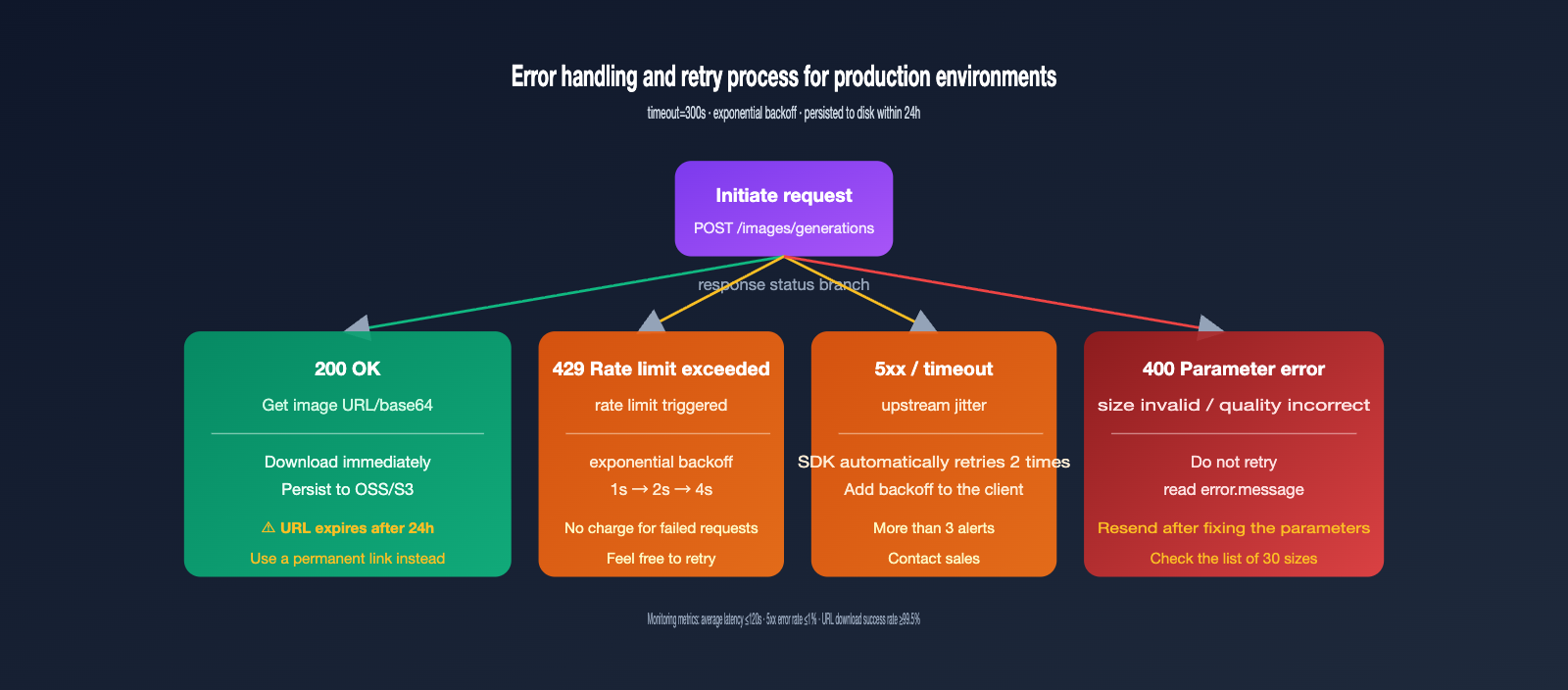
Common Errors and Troubleshooting
The table below covers the most frequently asked error types in our customer support groups. You can resolve 90% of integration issues just by checking against this list.
| Error Phenomenon | Root Cause | Solution |
|---|---|---|
| 408 / 504 Timeout | Timeout setting is too short | Increase timeout to 300 seconds |
| 400 invalid size | Size is not among the 30 supported options | Use the standard sizes listed in the documentation |
| 400 unsupported_parameter | quality or n>1 was passed |
VIP channels don't support these; remove these fields |
| Image URL 404 | URL expired after 24 hours | Download the image to your own storage immediately after generation |
| Chinese characters render as garbled text or boxes | Rare characters used in the prompt | Use common characters, or describe "use Source Han Sans" in the prompt |
| input_tokens higher than expected | Reference image is too large | Compress the image to under 1.5MB on the client side |
FAQ
Q1: Is there a difference in image quality between gpt-image-2-vip and the official version?
The underlying model is identical; both use the gpt-image-2-2026-04-21 snapshot. The only difference is the routing path: the official version uses the API quota pool, while the VIP version uses the Codex quota pool. There is no difference in visual quality, and large-scale blind tests show they are indistinguishable.
Q2: Why is the quality parameter not supported?
The Codex CLI internal call uses a fixed quality=high strategy. The VIP channel reuses this path, so we cannot expose the quality option to the upper layer. If your business needs to reduce costs with low/medium settings, please use gpt-image-2-all instead.
Q3: Are failed requests really not charged?
That's correct. APIYI (apiyi.com) uses a "pay-for-success" billing policy. 4xx parameter errors, 5xx service errors, and timeouts are not counted toward your consumption. You can verify this line-by-line in your billing statement.
Q4: Can I call it directly from a domestic server?
Yes. The api.apiyi.com domain uses a compliant domestic route, so no VPN is required. This is one of the main reasons many teams choose our API proxy service.
Q5: What is the RPM limit for the VIP channel?
There is no public hard limit; it actually depends on the account pool capacity. Generally, business testing shows it can stably reach 60-120 RPM, which is far higher than the official Tier 1 limit of 5 RPM. Please contact our sales team for whitelisting if you need higher concurrency.
Q6: It only returns one image at a time; what about batching?
You can handle this by using concurrent loops on the client side. Python's asyncio.gather or concurrent.futures.ThreadPoolExecutor can easily reach 60 RPM. Since the VIP channel uses asynchronous inference, concurrent submissions are not CPU-bound, and the bottleneck is only the RPM limit of the proxy layer.
Q7: Will the same prompt produce the same result every time?
Not exactly. gpt-image-2-vip follows the built-in Codex strategy and does not expose a seed parameter, so there is randomness in every generation. If your business requires reproducible results, you can make your prompt very specific (e.g., fixed color codes, fixed composition descriptions) or use the first satisfactory image as a reference image and pass it to the /v1/images/edits endpoint for fine-tuning.
Q8: How can I monitor the stability of the production environment?
We recommend tracking three metrics on the client side: average generation time, 5xx error rate, and URL download success rate. Under normal conditions, the average generation time should be within 120 seconds, the 5xx error rate should be <1%, and the URL download success rate should be >99.5%. If any of these are abnormal, it indicates that the account pool capacity is low, and you should contact our sales team to adjust resources.
Summary
gpt-image-2-vip is a commercial image generation product built on the official Codex reverse channel. It tackles the pain points of direct official connections with five core features: 30 aspect ratios + $0.03 flat-rate billing + triple-endpoint compatibility + native Chinese support + no charges for failed requests. For teams working on content production, e-commerce assets, automated PPT generation, or batch poster creation, this is currently one of the most cost-effective ways to integrate gpt-image-2.
Integration only requires updating the base_url and model fields; your existing SDK code remains fully compatible with the official OpenAI implementation. For production environments, we recommend setting the timeout to 300 seconds, implementing exponential backoff for 5xx errors, and saving image URLs to your local storage within 24 hours. Avoiding these three common pitfalls will ensure stable, high-volume performance. If you're currently evaluating a production integration for gpt-image-2, head over to APIYI at apiyi.com to create an account and run a few rounds of real-world business data through the VIP channel before making your decision.
About the Author: The APIYI team specializes in multi-model aggregation and high-concurrency inference infrastructure, handling a high volume of image generation API integration inquiries daily. This article is based on real production data. For detailed parameters regarding gpt-image-2-vip, please visit docs.apiyi.com.


