
Author's Note: The Nano Banana 2 image generation model has officially arrived on the Gemini app. With the default resolution bumped up to 2K and text rendering that outshines Nano Banana Pro, here's our hands-on review and API guide.
At 9 PM Beijing time on February 26, 2026, Nano Banana 2 made its debut on the Gemini app. If you open the Gemini mobile client and head to the image generation feature, you'll see the model name displayed directly as "Nano Banana 2"—Google skipped the hype and the press conferences, opting for a quiet rollout instead.
Two immediate upgrades stand out: the default generation resolution has jumped from 1K to 2K, and text rendering is noticeably sharper than what we saw with the previous Nano Banana Pro.
Core Value: We've run the tests to show you how Nano Banana 2 actually performs in the Gemini app and what that 2K default resolution and text boost really mean for your workflow.
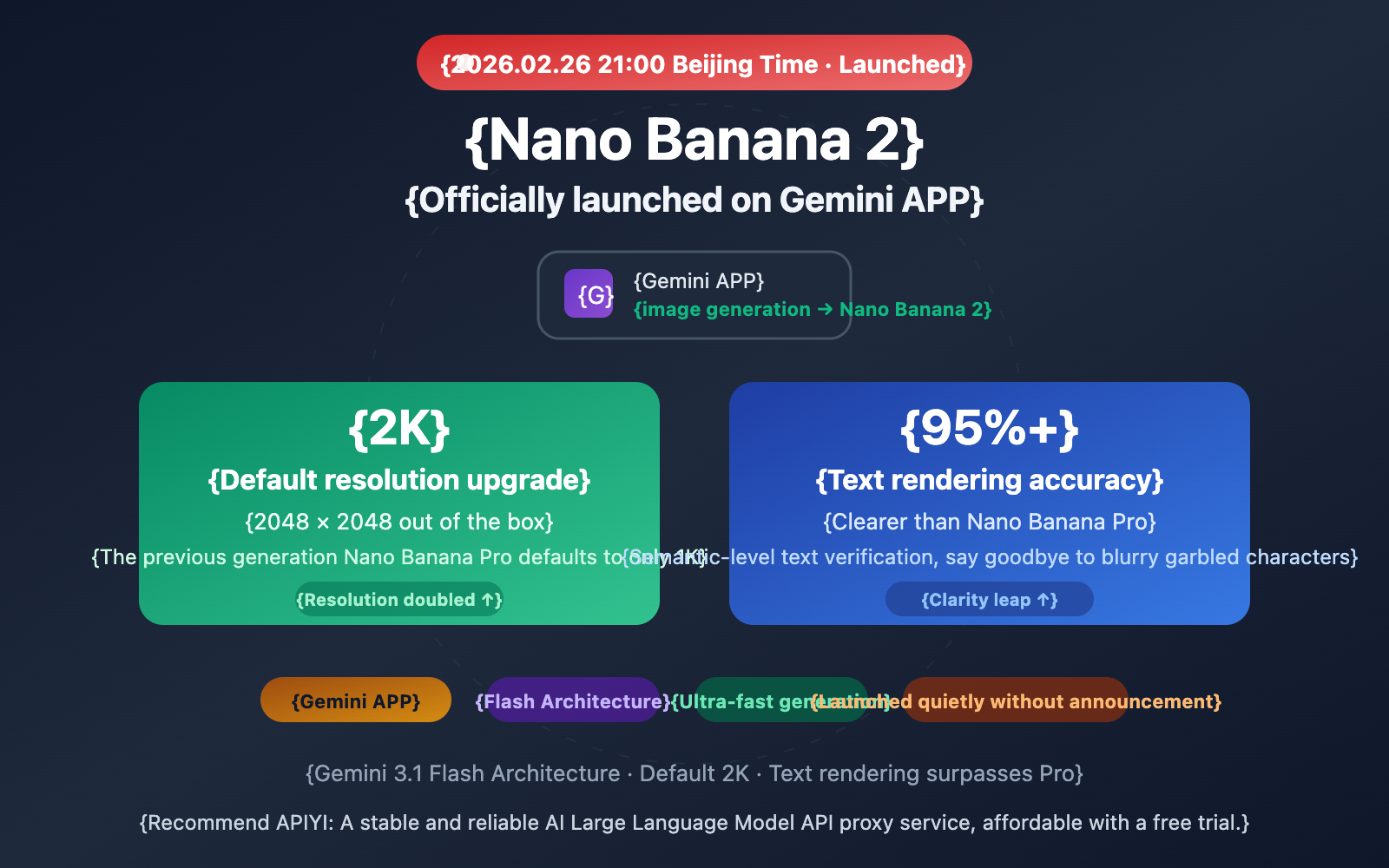
Key Changes in Nano Banana 2 on the Gemini App
| Feature | Nano Banana Pro (Previous) | Nano Banana 2 (Current) | Improvement |
|---|---|---|---|
| Default Resolution | 1K (1024×1024) | 2K (2048×2048) | 4x Pixels |
| Max Resolution | 4K (4096×4096) | 4K (4096×4096) | Same |
| Text Rendering | 94% Accuracy | 95%+ Accuracy, Sharper | Noticeable improvement |
| Generation Speed | 8-12 Seconds | Significantly faster | Major boost |
| Access Point | Gemini App Image Gen | Gemini App Image Gen | Seamless replacement |
| Model Name Display | — | "Nano Banana 2" | First public naming |
Why Nano Banana 2's Default 2K Resolution Matters
This is a seemingly simple but far-reaching change. Previously, whether using the original Nano Banana or Nano Banana Pro, the default output in the Gemini app was 1K (1024×1024). If you wanted a higher resolution, you had to configure it manually.
By setting the default resolution to 2K (2048×2048), Nano Banana 2 ensures:
- Average users get 2K quality out of the box without touching a single setting, providing four times the pixel density of 1K.
- 2K resolution is more than enough for most daily scenarios, including social media posts, presentation illustrations, and e-commerce hero images.
- For professional users who need 4K, manual configuration for up to 4096×4096 is still available.
This shift also sends a clear signal: Google is incredibly confident in Nano Banana 2's inference efficiency under the Flash architecture. Since a 2K image requires about four times the computation of a 1K image, making it the default means speed and costs are now fully optimized.
Why Nano Banana 2's Text Rendering is Sharper
The boost in Nano Banana 2's text rendering comes from a generational leap in its underlying technology. The original Nano Banana treated text as a visual texture, which often led to distortions and gibberish. Nano Banana Pro improved this by hitting 94% text accuracy, but visible flaws remained.
Nano Banana 2 introduces a semantic-level text verification mechanism. The model now understands that "OPEN" consists of four specific letters in a precise order, rather than just being a visual pattern. This shift from "drawing what it sees" to "understanding the text" allows generated text in charts, posters, and infographics to achieve near print-quality clarity.
🎯 Developer Tip: The text rendering improvements in Nano Banana 2 are a game-changer for e-commerce product shots, social media posters, and technical diagrams. We recommend keeping an eye on the APIYI (apiyi.com) platform for API release updates so you can start testing immediately.
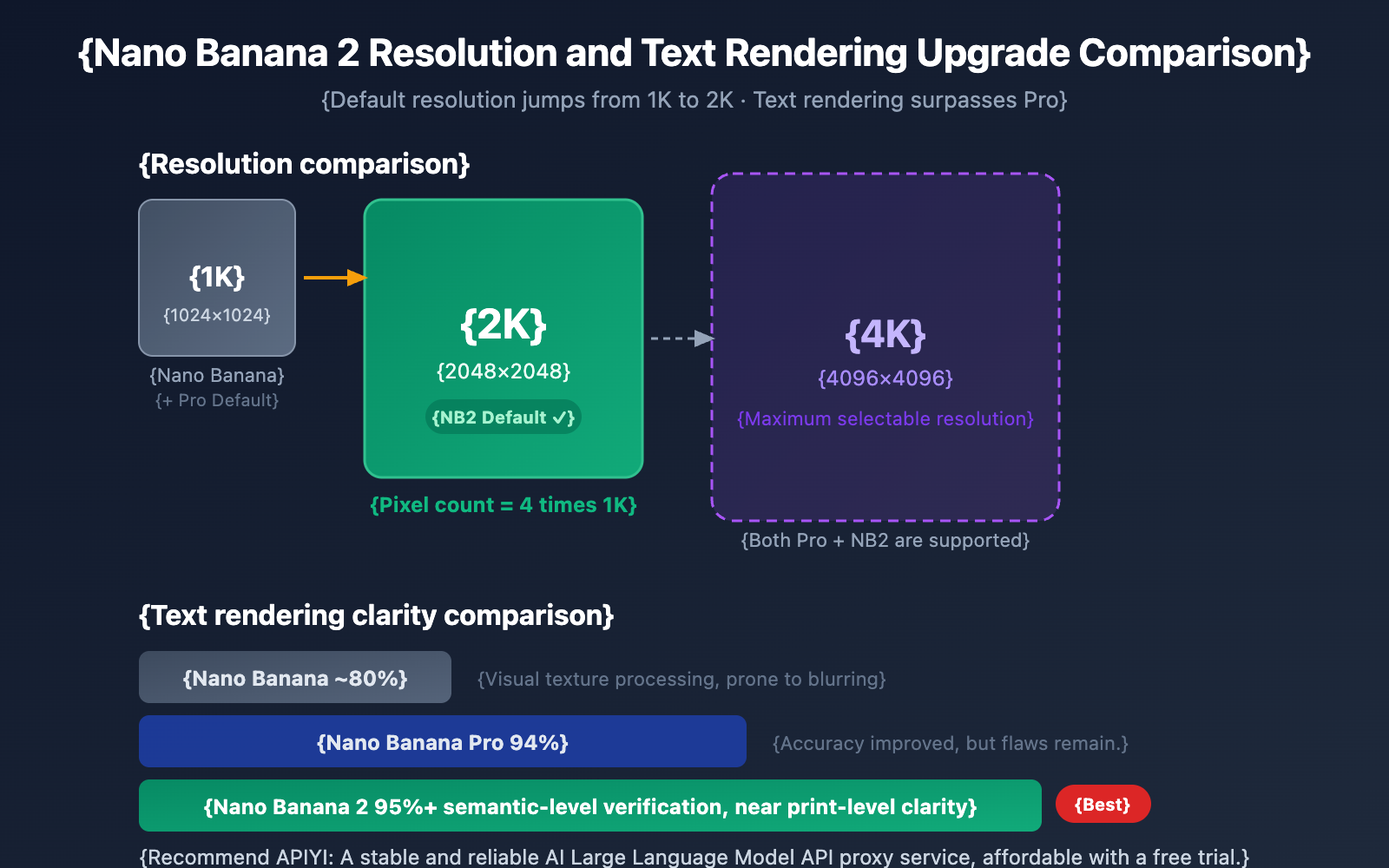
How to Use Nano Banana 2 in the Gemini App
Steps to Use Nano Banana 2
Using Nano Banana 2 in the Gemini app is incredibly straightforward—no complex setup required:
- Open the Gemini mobile app (iOS or Android).
- Tap Image Generation in the feature selection.
- Enter your image description prompt.
- The model will automatically use Nano Banana 2, and the name will be displayed directly in the interface.
- Wait a few seconds to receive a high-quality image with a default 2K resolution.
Unlike the web version, where you previously had to manually select "Fast mode," the image generation feature in the Gemini app now uses Nano Banana 2 as the default model.
Prompt Optimization Tips for Nano Banana 2
| Scenario | Recommended Prompt Strategy | NB2 Advantage Leveraged |
|---|---|---|
| Posters with text | Clearly specify the text content and style in the prompt | 95%+ text rendering accuracy |
| Product showcases | Specify lighting, angles, and background | 2K default resolution for fine details |
| Data visualization | Describe chart types and data relationships | Semantic-level text + chart understanding |
| Social media graphics | Specify aspect ratios (e.g., 16:9 vertical) | Multi-ratio support + fast generation |
🎯 Pro Tip: Nano Banana 2's text rendering capability is a standout feature. Try asking for images with titles, labels, or data annotations directly in your prompt—the results will pleasantly surprise you. If you need to perform batch model invocations via API, keep an eye on APIYI (apiyi.com) for launch notifications.
Nano Banana 2 Hands-on Comparison: What's the Real Difference from the Pro Version?
From actual usage, the improvements in Nano Banana 2 compared to Nano Banana Pro are concentrated in three dimensions:
| Comparison Dimension | Nano Banana Pro | Nano Banana 2 | Real-world Perception |
|---|---|---|---|
| Default Resolution | 1K, requires manual 2K/4K config | 2K out of the box | Noticeable difference; saves setup steps |
| Text Clarity | 94%, slight aliasing up close | 95%+, near-print quality | Visually distinct, especially for posters |
| Generation Speed | 8–12 seconds | Significantly faster | Feels almost like instant feedback |
| Underlying Architecture | Gemini 3 Pro (Heavyweight) | Gemini 3.1 Flash (Lightweight) | Flash architecture provides a speed boost |
| Inference Cost | Higher | Estimated 30–50% lower | Significant for developers |
It's worth noting that while Nano Banana 2 is based on the Flash architecture, it actually outperforms the Pro-based predecessor in text rendering. This suggests that Google has made fundamental improvements to the underlying image generation capabilities in the Gemini 3.1 generation, rather than just focusing on inference efficiency.
🎯 Selection Advice: For most users, Nano Banana 2 is already the better choice—it's faster, has a higher default resolution, and offers clearer text. Nano Banana Pro might still be suitable for a few professional scenarios requiring extreme detail control. We recommend using APIYI (apiyi.com) to run side-by-side tests between the two models to find the best fit for your specific use case.
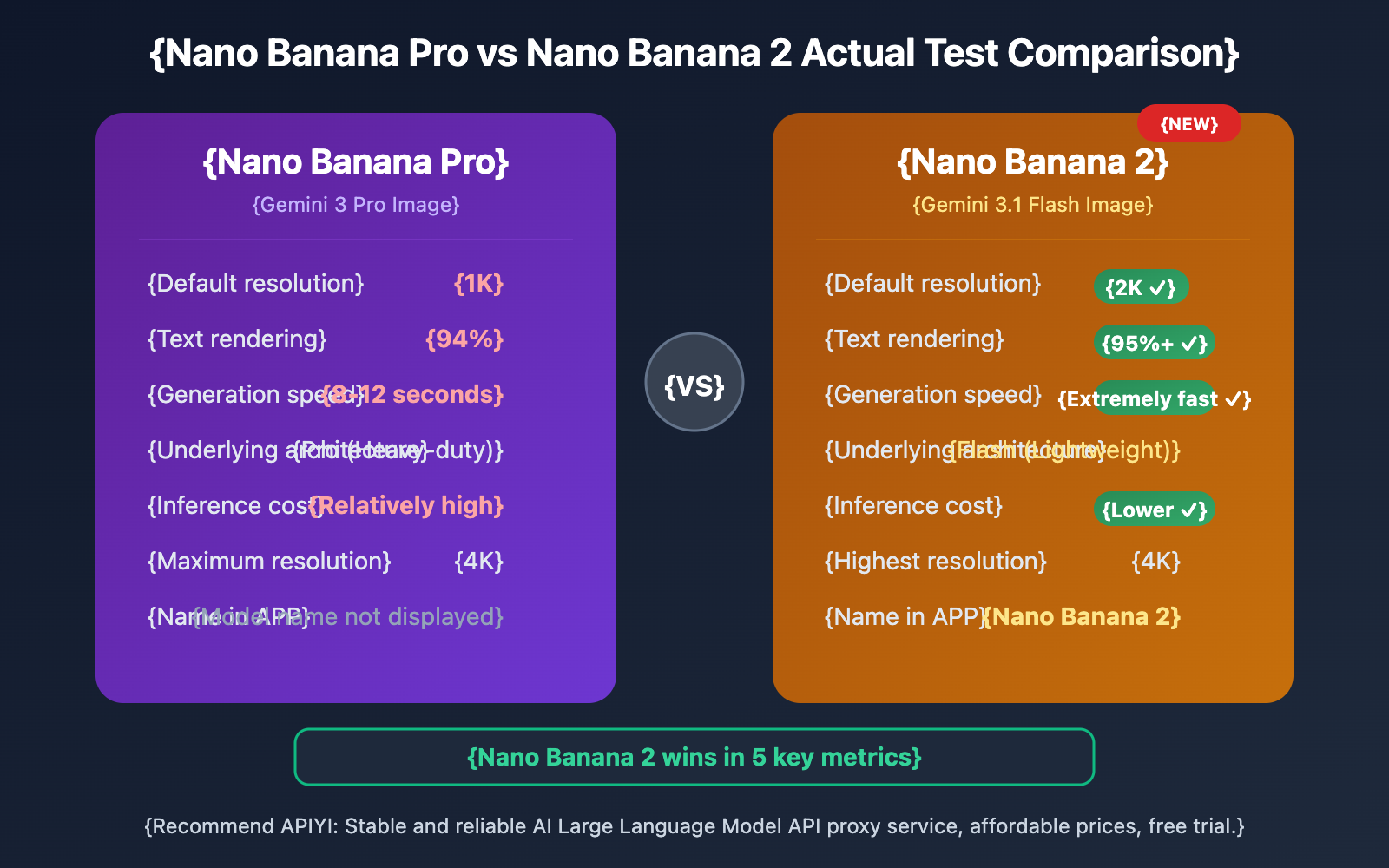
Nano Banana 2 API Access Preparation
Expected API Invocation Method
Nano Banana 2 is already live on the Gemini app, and API access is expected to follow soon. Based on the consistent design of Google's Gemini image generation API, here's how it'll likely look:
import openai

client = openai.OpenAI(
    api_key="YOUR_API_KEY",
    base_url="https://vip.apiyi.com/v1"
)

# Expected Nano Banana 2 invocation method (available after API release)
response = client.chat.completions.create(
    model="gemini-3.1-flash-image-preview",
    messages=[{"role": "user", "content": "A laptop by a cafe window, screen showing code, warm tones, 2K HD"}]
)
View currently available Nano Banana Pro code
import openai

client = openai.OpenAI(
    api_key="YOUR_API_KEY",
    base_url="https://vip.apiyi.com/v1"
)

# Currently available Nano Banana Pro
response = client.chat.completions.create(
    model="gemini-3-pro-image-preview",
    messages=[
        {
            "role": "user",
            "content": "Generate an e-commerce promotional poster with 'SALE 50% OFF' text, red theme"
        }
    ],
    max_tokens=4096
)

if response.choices[0].message.content:
    print("Image generated successfully")
Pro Tip: Get your API key through APIYI (apiyi.com). The platform supports OpenAI-compatible formats. Nano Banana Pro is available now, and you'll likely be able to switch directly to the new model ID once Nano Banana 2 API goes live.
Impact of Nano Banana 2 on Developers
Nano Banana 2 Pricing Forecast
| Resolution | Nano Banana Pro Price | Nano Banana 2 Predicted Price | Expected Reduction |
|---|---|---|---|
| 1K | $0.134/image | ~$0.05-0.07/image | ~50% |
| 2K | $0.134/image | ~$0.07-0.10/image | ~30% |
| 4K | $0.24/image | ~$0.12-0.18/image | ~30-50% |
The inference cost of the Flash architecture is naturally lower than the Pro architecture. Combined with Google's decision to make 2K the default output for Nano Banana 2, we can expect the price-to-performance ratio for 2K images to be outstanding. For developers who use 2K resolution daily, the total cost for Nano Banana 2 might be only about half that of Nano Banana Pro.
🎯 Cost Optimization Tip: Invoking Google's image generation models through aggregation platforms like APIYI (apiyi.com) usually gets you better pricing than official rates, plus you can take advantage of free test credits.
FAQ
Q1: How can I confirm I’m using Nano Banana 2 in the Gemini APP?
Once you select the image generation feature in the Gemini APP, the interface will directly display the model name as "Nano Banana 2." If you're still seeing a different name, the update might not have rolled out to your device yet. We recommend updating your Gemini APP to the latest version.
Q2: Does Nano Banana 2 generate 2K images by default?
Yes, it does. Unlike the previous generation which defaulted to 1K, Nano Banana 2's default output resolution in the Gemini APP is 2K (2048×2048). You don't need any extra configuration to get 2K quality. If you need 4K, you'll likely need to specify that via the API or through specific settings.
Q3: When will the Nano Banana 2 API be available for model invocation?
While Nano Banana 2 is already live on the Gemini APP, the official API release is expected within a few days to a few weeks. We recommend keeping an eye on APIYI (apiyi.com) for launch notifications. The platform will be among the first to integrate it and will offer free test credits. In the meantime, you can use Nano Banana Pro (gemini-3-pro-image-preview) to get familiar with the interface.
Summary
Here are the key takeaways from Nano Banana 2's arrival on the Gemini APP:
- Default 2K Resolution: A direct upgrade from 1K to 2K, quadrupling the pixel density without requiring any extra configuration.
- Text Rendering Surpasses Pro: Featuring a semantic-level text verification mechanism, it hits 95%+ accuracy with print-level clarity.
- Excellent Speed: Built on the Gemini 3.1 Flash architecture, the generation speed is noticeably faster than Nano Banana Pro.
Google chose a "stealth launch" for Nano Banana 2—no press conference, no teasers—but the product's performance speaks for itself. For developers, the immediate priority is to set up your API integration environment through APIYI (apiyi.com) so you're ready to dive in the moment the Nano Banana 2 API officially opens.
📚 References
-
Google Gemini Image Generation Documentation: Official Google Gemini Image Generation API developer documentation
- Link:
ai.google.dev/gemini-api/docs/image-generation - Description: Official API integration guide and model parameter specifications
- Link:
-
Google DeepMind Image Generation Models: Official introduction to the Nano Banana series models
- Link:
deepmind.google/models/gemini-image/ - Description: Technical specifications and capabilities for each model generation
- Link:
-
TestingCatalog Nano Banana 2 Technical Analysis: GEMPIX2 internal codename and technical details
- Link:
testingcatalog.com/google-is-preparing-nano-banana-2-for-the-upcoming-release/ - Description: Release timeline and architectural analysis
- Link:
-
Nano Banana Wikipedia: Complete history and technical evolution of the Nano Banana series
- Link:
en.wikipedia.org/wiki/Nano_Banana - Description: Comprehensive overview from naming origins to various model generations
- Link:
Author: APIYI Technical Team
Technical Discussion: Feel free to share your Nano Banana 2 experience in the comments. For more AI model resources, visit the APIYI documentation center at docs.apiyi.com.


