
When using Nano Banana 2 for image generation, you might have encountered this error: The input token count exceeds the maximum number of tokens allowed (65536). This is one of the most common confusions developers face when calling the Gemini image generation API — the official model card clearly states an Input token limit of 131,072, so why is the actual limit 65,536?
Core Value: By the end of this article, you'll fully understand Nano Banana 2's input and output token limits, the precise formula for image token calculation, and 6 practical methods to resolve the 65536 error.
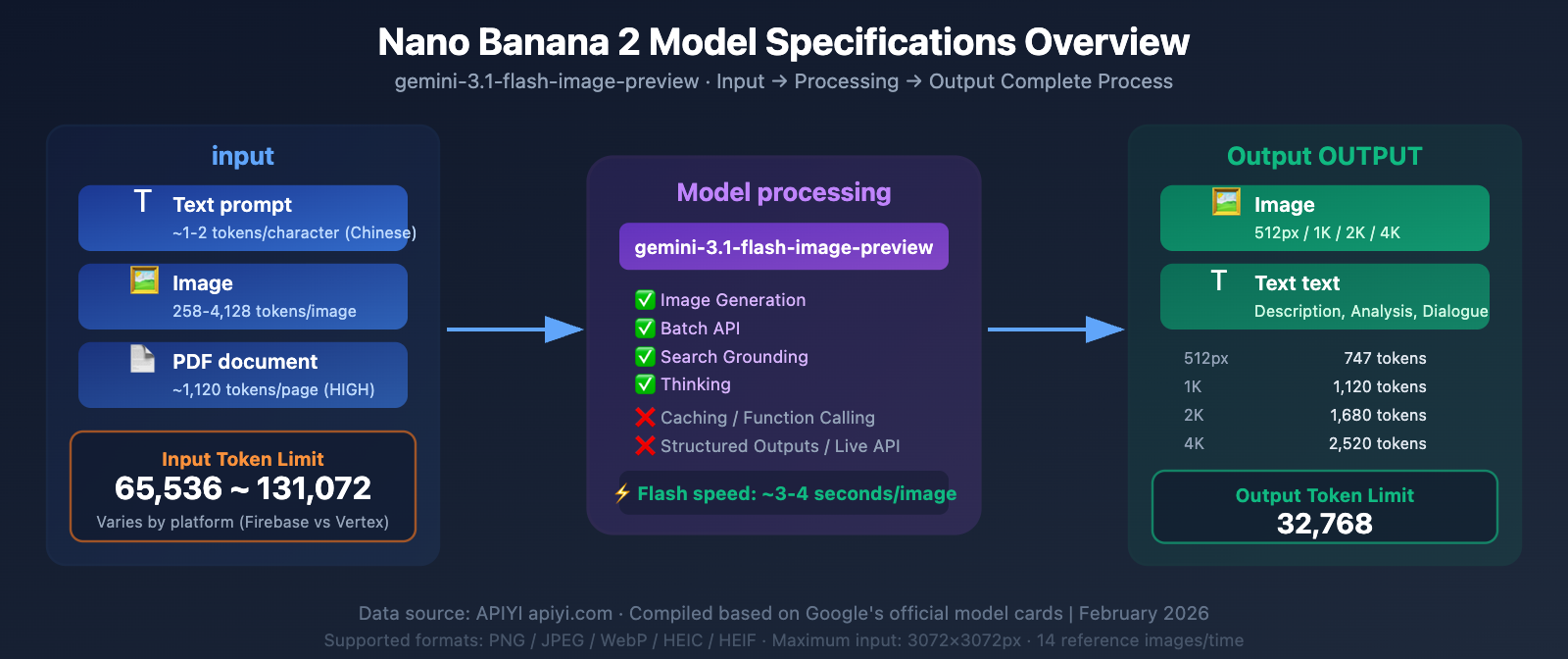
Nano Banana 2 Model Specifications: Complete Parameter Table
Nano Banana 2's underlying model ID is gemini-3.1-flash-image-preview. Here are the complete specifications extracted from the official model card:
| Parameter | Value | Description |
|---|---|---|
| Model Code | gemini-3.1-flash-image-preview |
Model parameter used for API calls |
| Input Type | Text / Image / PDF | Supports text, images, and PDF files |
| Output Type | Image / Text | Can generate images or text |
| Input Token Limit | 65,536 ~ 131,072 | Varies by platform (see below for details) |
| Output Token Limit | 32,768 | Includes image and text tokens |
| Max Input Images | 14 (10 objects + 4 characters) | Per request |
| Max Output Resolution | 4096×4096 (4K) | Supports various aspect ratios |
| Input Image Limit | 3072×3072 px | Automatically scaled if exceeded |
Nano Banana 2 Feature Support Matrix
| Feature | Support Status | Description |
|---|---|---|
| Image generation | ✅ Supported | Core capability |
| Batch API | ✅ Supported | Batch processing, 50% discount |
| Search grounding | ✅ Supported | Search-enhanced generation |
| Thinking | ✅ Supported | Adjustable reasoning level |
| Audio generation | ❌ Not supported | — |
| Caching | ❌ Not supported | Cannot cache context |
| Code execution | ❌ Not supported | — |
| File search | ❌ Not supported | — |
| Function calling | ❌ Not supported | — |
| Google Maps | ❌ Not supported | — |
| Live API | ❌ Not supported | — |
| Structured outputs | ❌ Not supported | — |
| URL context | ❌ Not supported | — |
🎯 Key Reminder: Nano Banana 2 doesn't support Caching (context caching), which means you'll need to resend the complete input content with every request. For scenarios involving many reference images, this can significantly increase token consumption. When making model invocations through the APIYI apiyi.com platform, we recommend optimizing your input content to control token usage per request.
Nano Banana 2 Token Limit: The Core Question – 65536 or 131072?
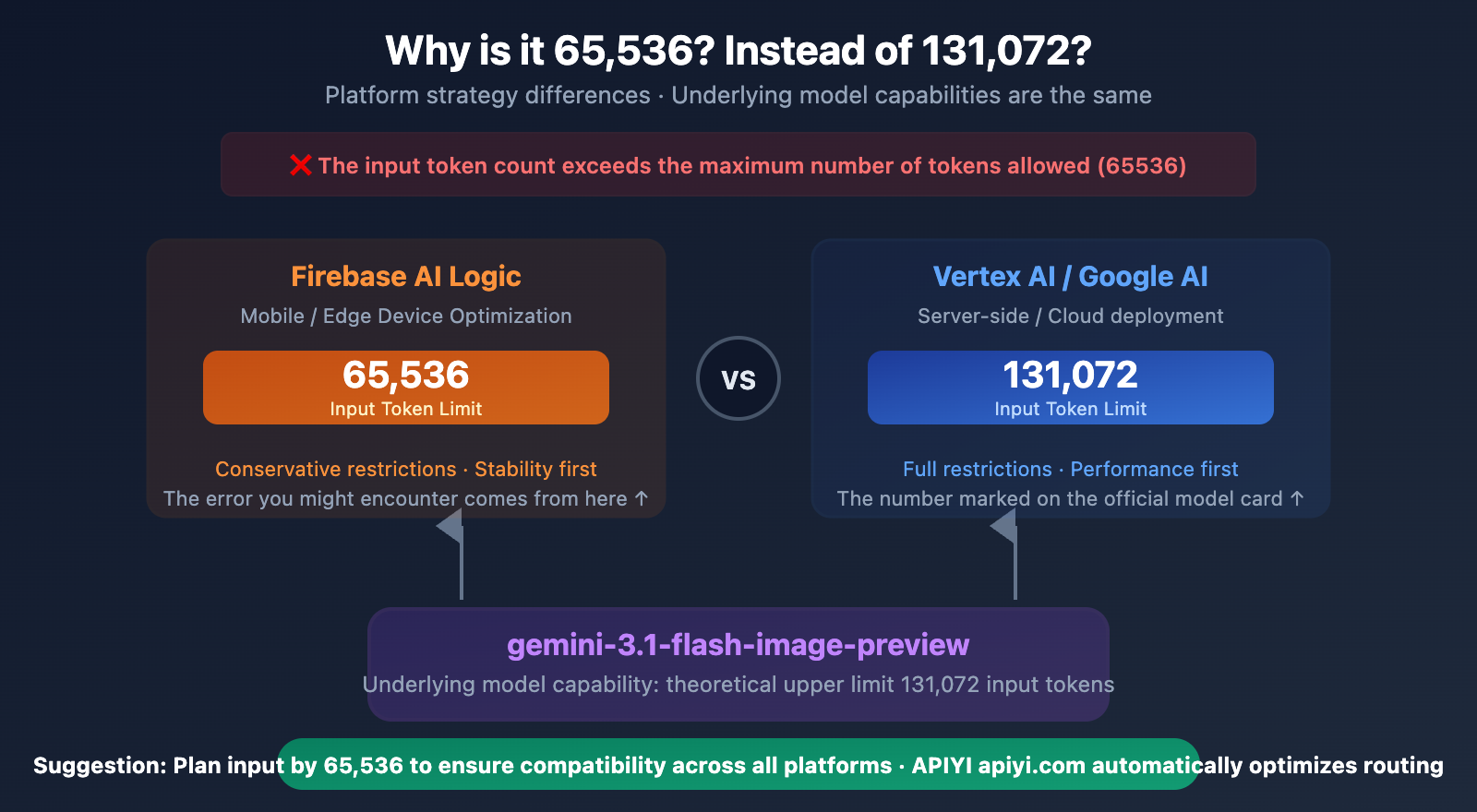
Here's the most common developer confusion: official documentation states 131,072, but the API returns an error saying the limit is 65,536.
The Truth: It's Platform Policy Differences, Not Model Capability Differences
| Documentation Source | Input Token Limit | Output Token Limit |
|---|---|---|
| Firebase AI Logic | 65,536 | 32,768 |
| Google AI Studio / Gemini API | 131,072 | 32,768 |
| Vertex AI | 131,072 | 32,768 |
| Gemini 3 Flash (text-only) | 1,048,576 | 65,536 |
Why the discrepancy?
As an image generation model, Nano Banana 2 needs to allocate a significant amount of computational resources to the image synthesis process (the diffusion head). Unlike pure text models that can dedicate their entire context window to understanding input, image generation models need to simultaneously maintain the generation pipeline.
- Firebase AI Logic adopts a more conservative 65,536 limit, likely considering the stability for mobile and edge devices.
- Vertex AI / Google AI provides the full 131,072 limit, targeting server-side and cloud development.
Practical Impact: If you're calling the standard Gemini API and receiving a 65,536 error, it could be due to:
- Your SDK version defaulting to the Firebase channel.
- Platform limits not yet being unified during the preview phase.
- Quota restrictions specific to a region or tier.
💡 Real-world Tip: When invoking Nano Banana 2 via the APIYI (apiyi.com) platform, we recommend keeping your input tokens under 65,536. This way, you won't trigger limits regardless of which underlying platform your request is routed to. The APIYI platform automatically selects the optimal model invocation path.
Nano Banana 2 Input Image Token Calculation Formula
Understanding how images are converted into tokens is key to solving input size issues. Gemini uses a tiling strategy to calculate an image's token consumption.
Basic Calculation Rules
Rule One: Small Images (Both sides ≤ 384px)
Token consumption = 258 tokens (fixed value)
Any image where both sides are no more than 384 pixels, regardless of its actual dimensions, will consume a fixed 258 tokens. This is the most economical choice.
Rule Two: Large Images (Any side > 384px)
Token consumption = ceil(width ÷ 768) × ceil(height ÷ 768) × 258
Large images are divided into 768×768 tiles, with each tile consuming 258 tokens.
Quick Reference Table for Common Image Sizes and Token Consumption
| Image Size | Tile Calculation | Token Consumption | Description |
|---|---|---|---|
| 256×256 | 1×1 | 258 | Fixed for small images |
| 384×384 | 1×1 | 258 | Small image upper limit |
| 512×512 | 1×1 | 258 | Still within one tile |
| 768×768 | 1×1 | 258 | Exactly one tile |
| 1024×1024 | 2×2 | 1,032 | Common input size |
| 1920×1080 | 3×2 | 1,548 | Full HD image |
| 2048×2048 | 3×3 | 2,322 | 2K image |
| 3072×3072 | 4×4 | 4,128 | Maximum input resolution |
| 4096×4096 | — | Auto-scaled to 3072 | Exceeds limit, automatically handled |
media_resolution Parameter Control
Gemini 3 series models support the media_resolution parameter, allowing precise control over the token consumption for each input image:
| Parameter Value | Tokens/Image (Gemini 3) | Tokens/Image (Gemini 2.5) | Use Case |
|---|---|---|---|
LOW |
280 | 64 | Quick preview, no detail needed |
MEDIUM |
560 | 256 | General reference |
HIGH (default) |
1,120 | 256 + Pan&Scan (~2,048) | Detailed analysis required |
ULTRA_HIGH |
2,240 | — | Highest precision |
Key Insight: The default HIGH setting consumes 1,120 tokens per image. If you pass 14 reference images in a single request (Nano Banana 2's limit), the images alone consume 15,680 tokens — add in your text prompt, and you'll easily approach the 65,536 limit.
Nano Banana 2 Output Token Consumption Explained
The output also has a Token limit: 32,768 Tokens. Each generated image consumes a different number of output Tokens depending on its resolution:
| Output Resolution | Token Consumption | Price per Image (Official) | Price per Image (APIYI) |
|---|---|---|---|
| 512px | ~747 tokens | $0.045 | ~$0.02 |
| 1K (1024×1024) | ~1,120 tokens | $0.067 | $0.03 |
| 2K (2048×2048) | ~1,680 tokens | $0.101 | ~$0.04 |
| 4K (4096×4096) | ~2,520 tokens | $0.151 | ~$0.06 |
Maximum Output per Single Request
Based on the 32,768 output Token limit:
| Output Resolution | Tokens per Image | Max Images per Request | Description |
|---|---|---|---|
| 512px | 747 | ~43 Images | Ideal for batch thumbnails |
| 1K | 1,120 | ~29 Images | Regular batch image generation |
| 2K | 1,680 | ~19 Images | High-res batch |
| 4K | 2,520 | ~13 Images | Large format batch |
🚀 Batch Generation Tip: If you need to generate a large number of images, we recommend using the Batch API (50% price discount) instead of cramming many images into a single request. The APIYI apiyi.com platform supports Batch API calls, where each 1K image costs only about $0.015.
Nano Banana 2 Input Formats and Limitations Explained
Supported Input Image Formats
| Format | Supported | Description |
|---|---|---|
| PNG | ✅ | Recommended, lossless quality |
| JPEG | ✅ | Recommended, small file size |
| WebP | ✅ | Modern format, balances quality and size |
| HEIC | ✅ | iOS native format |
| HEIF | ✅ | High Efficiency Image Format |
| GIF | ❌ | Animated images not supported |
| BMP | ❌ | Not supported |
| TIFF | ❌ | Not supported |
File Size Limits
| Upload Method | Size Limit | Use Case |
|---|---|---|
| Inline (base64) | 7 MB | Directly passed via SDK |
| Files API | 20 MB → 100 MB | Large file uploads |
| Cloud Storage | 30 MB | Google Cloud Storage |
| Total Request Body | 500 MB | Includes all content |
Input Image Resolution Limits
- Maximum Input Resolution: 3072×3072 pixels
- Images exceeding this resolution will be automatically scaled proportionally down to 3072×3072.
- The aspect ratio is maintained after scaling.
PDF Input Support
Nano Banana 2 supports PDF as input, but you'll need to pay attention to Token consumption:
- Each PDF page is treated as an image, consuming the same number of Tokens as an image.
- At
HIGHresolution (default), each page consumes approximately 1,120 Tokens. - With a 65,536 Token limit, it supports a maximum of approximately 58 PDF pages.
- Recommendation: Only pass in the pages you need, don't send the entire document.
Supported Aspect Ratios for Nano Banana 2
Nano Banana 2 introduces several extreme aspect ratios compared to Nano Banana Pro:
| Aspect Ratio | Example Size (1K) | Use Case | Nano Banana 2 | Nano Banana Pro |
|---|---|---|---|---|
| 1:1 | 1024×1024 | Social avatars, product images | ✅ | ✅ |
| 16:9 | 1024×576 | Video covers, banners | ✅ | ✅ |
| 9:16 | 576×1024 | Mobile wallpapers, Stories | ✅ | ✅ |
| 4:3 | 1024×768 | Traditional screen ratio | ✅ | ✅ |
| 3:4 | 768×1024 | Vertical posters | ✅ | ✅ |
| 3:2 | 1024×683 | Common photo ratio | ✅ | ✅ |
| 2:3 | 683×1024 | Vertical photos | ✅ | ✅ |
| 4:5 | 1024×1280 | Instagram recommended | ✅ | ✅ |
| 5:4 | 1024×819 | Close to square | ✅ | ✅ |
| 21:9 | 1024×439 | Ultrawide screen | ✅ | ✅ |
| 4:1 | 1024×256 | Ultrawide banner | ✅ | ❌ |
| 1:4 | 256×1024 | Ultra-narrow vertical banner | ✅ | ❌ |
| 8:1 | 1024×128 | Extremely wide banner | ✅ | ❌ |
| 1:8 | 128×1024 | Extremely narrow vertical banner | ✅ | ❌ |
💡 New Aspect Ratios Explained: The new extreme aspect ratios in Nano Banana 2 (4:1, 1:4, 8:1, 1:8) are perfect for generating website banners, long infographic strips, sidebar images, and other special use cases. You can use all these ratios directly through the APIYI apiyi.com platform.
6 Ways to Solve the Nano Banana 2 Token Limit 65536 Error
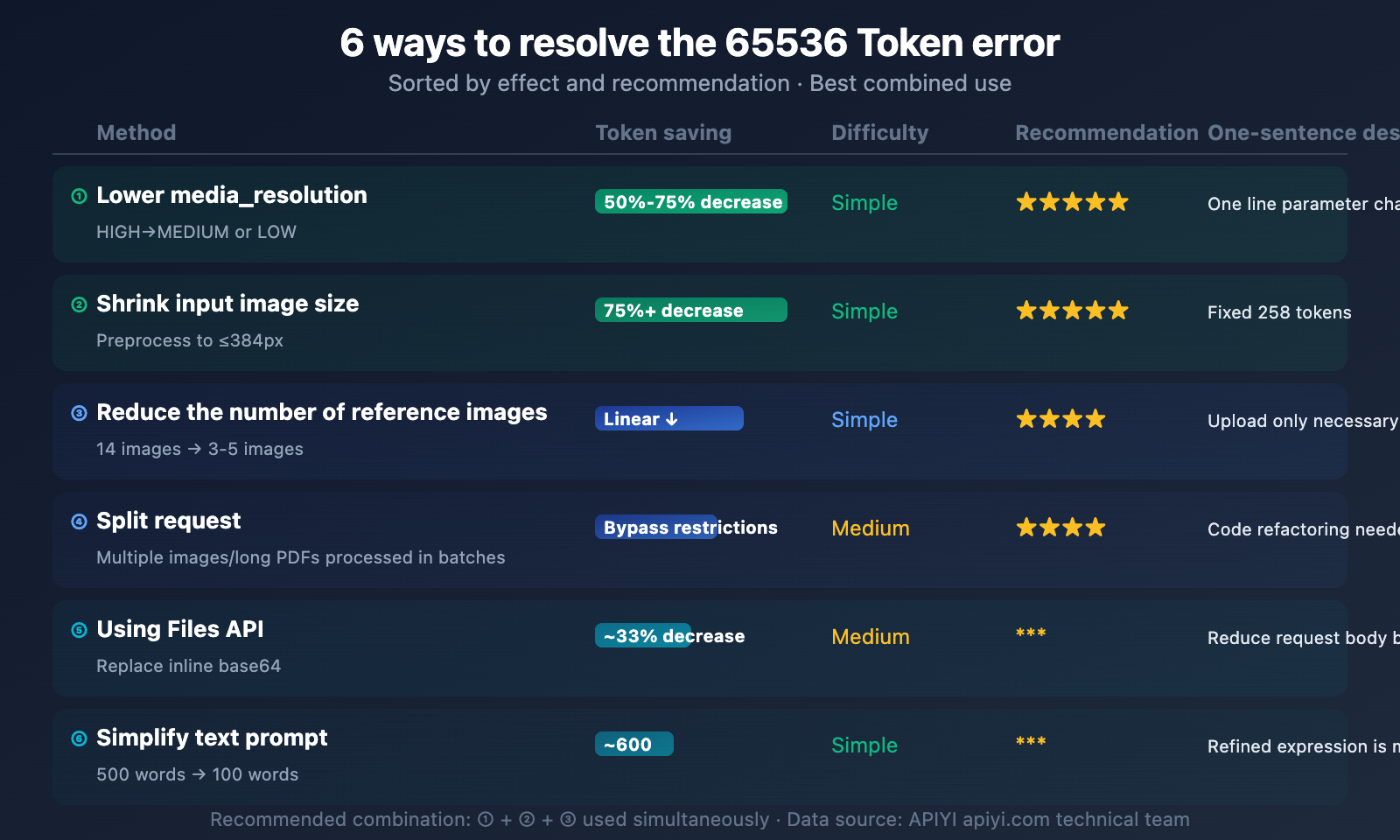
When you encounter the The input token count exceeds the maximum number of tokens allowed (65536) error, here are 6 methods that can help you resolve it:
Method One: Lower the media_resolution Parameter (Recommended)
Effect: Reduces token consumption by 50%-75%
import openai

client = openai.OpenAI(
    api_key="YOUR_API_KEY",
    base_url="https://api.apiyi.com/v1"  # APIYI unified interface
)

# Reduce token consumption by lowering the input image resolution
# HIGH (default) = 1,120 tokens/image
# MEDIUM = 560 tokens/image (50% reduction)
# LOW = 280 tokens/image (75% reduction)
See Gemini Native API `media_resolution` Setting Example
import google.generativeai as genai

genai.configure(api_key="YOUR_API_KEY")

model = genai.GenerativeModel("gemini-3.1-flash-image-preview")

# Specify resolution when uploading images
image = genai.upload_file("input.jpg")

response = model.generate_content(
    contents=[
        "Edit this image to add a sunset background",
        image
    ],
    generation_config={
        "response_modalities": ["IMAGE", "TEXT"],
        "media_resolution": "MEDIUM"  # Changed from HIGH to MEDIUM
    }
)

# MEDIUM: 560 tokens/image (compared to HIGH: 1,120 tokens/image)
# 14 images: 7,840 tokens (compared to 15,680 tokens)
Method Two: Shrink Input Image Dimensions
Effect: Extreme compression to 258 tokens/image
Before sending to the API, shrink your reference images to within 384×384 pixels:
from PIL import Image

def optimize_for_token(img_path, max_size=384):
    """Shrinks the image to within 384px, fixing token consumption at 258"""
    img = Image.open(img_path)
    img.thumbnail((max_size, max_size), Image.LANCZOS)
    optimized_path = img_path.replace(".", "_optimized.")
    img.save(optimized_path, quality=85)
    return optimized_path

# Before optimization: 1024x1024 = 1,032 tokens
# After optimization: 384x384 = 258 tokens (75% savings)
Method Three: Reduce the Number of Reference Images
Effect: Linearly reduces token consumption
Nano Banana 2 supports up to 14 input images, but most scenarios don't need that many:
| Number of Reference Images | Token Consumption (HIGH) | Token Consumption (MEDIUM) | Token Consumption (Optimized 384px) |
|---|---|---|---|
| 1 | 1,120 | 560 | 258 |
| 3 | 3,360 | 1,680 | 774 |
| 7 | 7,840 | 3,920 | 1,806 |
| 14 | 15,680 | 7,840 | 3,612 |
Recommendation: Only pass in truly necessary reference images. For character consistency scenarios, 2-3 images are usually enough; you don't need to send all 14.
Method Four: Split Requests
Effect: Bypasses single request limits
If you need to process a large number of images or long PDFs, split your requests into multiple smaller ones:
def split_process(images, prompt, batch_size=3):
    """Splits multi-image requests into smaller batches"""
    results = []
    for i in range(0, len(images), batch_size):
        batch = images[i:i+batch_size]
        response = client.images.generate(
            model="nano-banana-2",
            prompt=prompt,
            # Only pass batch_size images at a time
        )
        results.append(response)
    return results
Method Five: Use the Files API Instead of Inline Base64
Effect: Avoids excessively large request bodies, allows uploading larger files
Inline Base64 encoding can inflate your request body by about 33%. With the Files API, you can upload files first to get a reference, then use that reference in your requests:
# Use the Files API to upload large images (supports 20-100MB)
file = genai.upload_file("large_image.png")

# Reference the file in the request, instead of inlining it
response = model.generate_content([
    "Based on this reference, generate a similar style image",
    file  # Reference instead of base64
])
Method Six: Streamline Text Prompts
Effect: Frees up more tokens for images
Don't forget that text prompts also consume tokens. Lengthy prompts can eat into your valuable token budget:
- ❌ 500-word detailed description → ~750 tokens
- ✅ 100-word concise prompt → ~150 tokens
- Savings: ~600 tokens, equivalent to adding one more MEDIUM resolution image
🎯 Combined Recommendation: In practical development, we recommend combining Method One + Method Two + Method Three. When invoking Nano Banana 2 via the APIYI apiyi.com platform, set
media_resolutionto MEDIUM, preprocess input images to 384px, and only pass in necessary reference images. This way, you can keep token consumption under 5,000, staying well clear of the 65,536 limit.
Nano Banana 2 and Other Models Token Limit Comparison
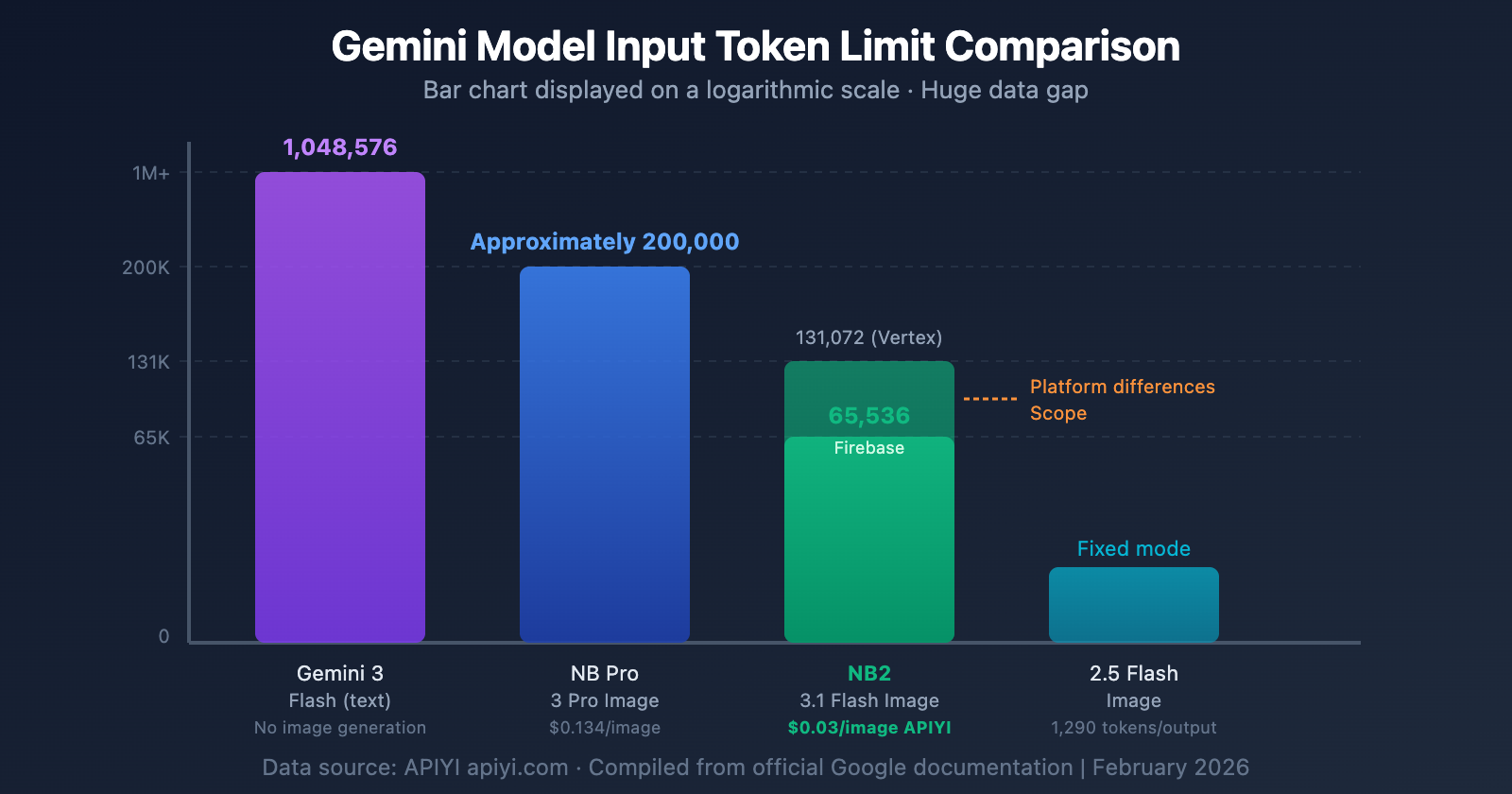
| Model | Input Token Limit | Output Token Limit | Output Image Tokens | Price/Image (1K) |
|---|---|---|---|---|
| Gemini 3 Flash (Text) | 1,048,576 | 65,536 | — | — |
| Nano Banana Pro | ~200,000 | 32,768 | ~1,120 | $0.134 |
| Nano Banana 2 | 65,536-131,072 | 32,768 | ~1,120 | $0.067 (Official) |
| Nano Banana 2 (APIYI) | 65,536-131,072 | 32,768 | ~1,120 | $0.03 |
| Gemini 2.5 Flash Image | — | 1,290/Image | 1,290 Fixed | $0.039 |
| Imagen 4 Fast | — | — | — | $0.020 |
Key Differences:
- Nano Banana 2's input token limit is significantly smaller than the text-only Gemini 3 Flash (65K vs 1M). This is a limitation of its image generation architecture.
- Nano Banana Pro has a higher input limit (~200K) than Nano Banana 2, making it suitable for complex edits that require a large context window.
- Gemini 2.5 Flash Image uses a simplified model with a fixed token count per image, so there's no complex token calculation involved.
Frequently Asked Questions
Q1: Why does the official documentation state 131,072, but the API returns an error for 65,536?
This is due to differences in platform policies. Firebase AI Logic documentation specifies 65,536, while Vertex AI / Google AI documentation states 131,072. Both numbers are "correct," depending on which platform you're using for your model invocation. During the preview phase, we recommend planning your input tokens based on 65,536 to ensure it works consistently across all platforms. When you use the APIYI (apiyi.com) platform, routing is automatically optimized.
Q2: How can I quickly estimate how many tokens my request will consume?
Here's a simple formula: Total Input Tokens ≈ Text Tokens + Number of Images × Tokens per Image. For text, it's roughly 1 token per 4 English characters, and about 1-2 tokens per Chinese character. Image tokens depend on media_resolution: LOW=280, MEDIUM=560, HIGH=1120. For example, a 200-character Chinese prompt (~300 tokens) + 5 MEDIUM resolution images (2,800 tokens) ≈ 3,100 tokens, which is well within the 65,536 limit.
Q3: How many pages does PDF input support at most?
Calculated at HIGH resolution (which is the default), each page consumes approximately 1,120 tokens. With a 65,536 limit, that's about 58 pages maximum. If you reduce it to MEDIUM resolution, each page is 560 tokens, supporting around 117 pages. We recommend only including the pages you truly need as reference images. When you make a model invocation via APIYI (apiyi.com), token usage will be detailed in the call logs.
Q4: Are large images automatically scaled down when passed in?
Yes, they are. Images exceeding 3072×3072 pixels will be automatically scaled down proportionally to fit within 3072×3072. However, even after scaling, tokens are still calculated based on the actual (scaled) dimensions. For optimal token efficiency, we recommend manually resizing images to 384×384 (only 258 tokens) or 768×768 (also 258 tokens) before sending them.
Q5: Which has a larger input limit, Nano Banana 2 or Pro?
Nano Banana Pro's input token limit (~200,000) is roughly 1.5-3 times larger than Nano Banana 2's (65,536-131,072). If your use case involves passing in many reference images or long PDFs, Nano Banana Pro is a better fit. However, for most standard text-to-image and simple image-to-image scenarios, Nano Banana 2's input limit is perfectly adequate, plus it's half the price and 2-3 times faster. The APIYI (apiyi.com) platform supports both, so you can switch between them anytime.
Summary
Nano Banana 2's token limit isn't a hurdle; it's a mechanism that needs understanding. Master these key points, and you'll easily manage it:
- Input limit 65,536-131,072 — Planning for 65,536 is safest.
- Image Token Calculation — Small images are a fixed 258 tokens; large images are chunked by 768×768.
- media_resolution is the most effective adjustment method — HIGH→MEDIUM directly drops token usage by 50%.
- Output limit 32,768 — A single model invocation can generate up to 43 images at 512px or 13 images at 4K.
- 6 Solutions — Combining them works best.
We recommend calling Nano Banana 2 through the APIYI apiyi.com platform to enjoy the full model capabilities at $0.03/image. The platform provides detailed token usage statistics to help you precisely optimize each model invocation.
📝 Author: APIYI Team | APIYI Technical Team
🔗 Technical Exchange: Visit apiyi.com for the complete Nano Banana 2 integration guide
📅 Update Date: February 27, 2026


