
Encountering an IMAGE_SAFETY error while using Nano Banana Pro for image editing is a common point of confusion for many developers. This article dives deep into Nano Banana Pro's five major minor protection mechanisms to help you understand why images suspected of featuring minors are rejected by the system.
Core Value: By the end of this article, you'll have a comprehensive understanding of Nano Banana Pro's child safety protection system, understand the triggers for IMAGE_SAFETY errors, and master best practices for compliant image editing API usage.
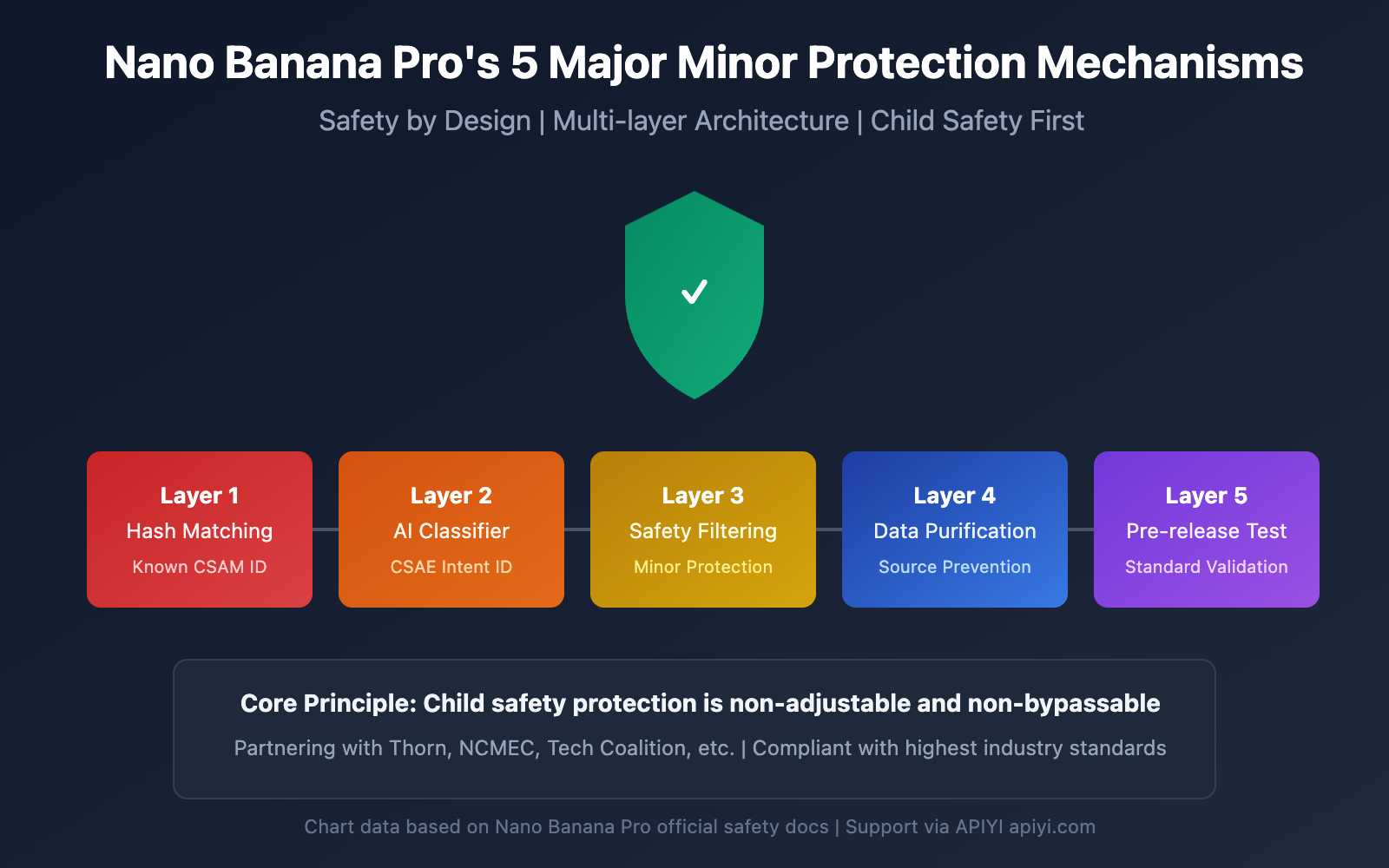
Key Points of Nano Banana Pro Minor Protection Mechanisms
Before diving into the technical details, let's look at the core architecture of Nano Banana Pro's child safety mechanisms.
| Protection Level | Technical Method | Protection Goal | Trigger Timing |
|---|---|---|---|
| Layer 1 | Hash Matching Detection | Identify known CSAM content | During image upload |
| Layer 2 | AI Classifier | Identify CSAE-seeking prompts | During request parsing |
| Layer 3 | Content Safety Filtering | Block edits involving minors | During processing execution |
| Layer 4 | Training Data Purification | Eliminate problematic content at source | During model training |
| Layer 5 | Pre-release Testing | Ensure child safety standards | During version release |
Core Principles of Nano Banana Pro Child Safety Protection
Nano Banana Pro adopts the Safety by Design philosophy, an industry standard developed by Google in collaboration with child protection organizations like Thorn and All Tech Is Human.
The core protection principles include:
- Zero-Tolerance Policy: Content related to child sexual abuse or exploitation is always blocked and cannot be bypassed via any parameter adjustments.
- Proactive Identification: The system actively detects content that might involve minors rather than just reacting to reports.
- Multi-layer Verification: Multiple security mechanisms work in tandem to ensure there are no loopholes.
- Continuous Updates: Safety models are continuously iterated to address emerging threats.
🎯 Technical Tip: In actual development, understanding these protection mechanisms helps you design more compliant application workflows. We recommend testing your API calls through the APIYI (apiyi.com) platform, which provides detailed error code documentation and technical support.
Deep Dive into the IMAGE_SAFETY Error
When Nano Banana Pro detects a suspected minor in an image, it returns an IMAGE_SAFETY error. Let's take a deep dive into how this mechanism works.
Detailed IMAGE_SAFETY Trigger Conditions
| Error Type | Trigger Condition | Error Code | Can it be bypassed? |
|---|---|---|---|
| PROHIBITED_CONTENT | Known CSAM hash detected | 400 | No |
| IMAGE_SAFETY | Image contains a suspected minor | 400 | No |
| SAFETY_BLOCK | Prompt involves content related to minors | 400 | No |
| CONTENT_FILTER | Multiple safety rules triggered in combination | 400 | No |
Technical Principles of IMAGE_SAFETY
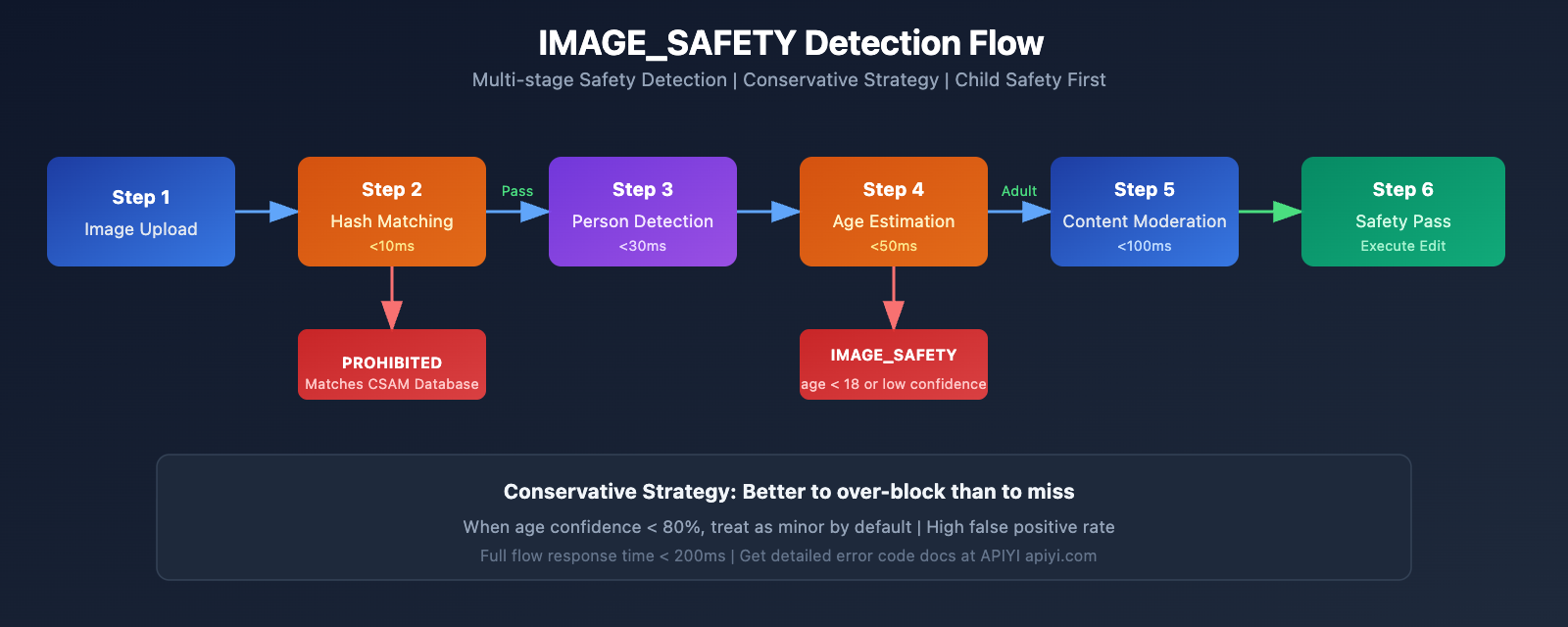
Nano Banana Pro's IMAGE_SAFETY detection system uses multimodal analysis technology:
1. Facial Feature Analysis
The system analyzes the facial features of people in the image to evaluate whether they might be minors:
# Pseudo-code: IMAGE_SAFETY detection flow
def check_image_safety(image_data):
    """
    Schematic of Nano Banana Pro IMAGE_SAFETY detection logic
    Note: This is a simplified flow; the actual implementation is more complex
    """
    # Step 1: Hash matching detection
    if hash_match_csam_database(image_data):
        return {"error": "PROHIBITED_CONTENT", "code": 400}

    # Step 2: Person detection
    persons = detect_persons(image_data)

    # Step 3: Age estimation
    for person in persons:
        estimated_age = estimate_age(person)
        confidence = get_confidence_score(person)

        # Conservative strategy: Better to over-block than to miss
        if estimated_age < 18 or confidence < 0.8:
            return {"error": "IMAGE_SAFETY", "code": 400}

    return {"status": "safe", "code": 200}
2. Conservative Strategy Principles
To ensure child safety, the system adopts a conservative strategy:
- When age confidence is low, the system treats the person as a minor by default.
- Any scenario potentially involving minors will be blocked.
- The false positive rate is intentionally high; protecting children is the top priority.
Common IMAGE_SAFETY Error Scenarios
Based on developer community feedback, the following scenarios are most likely to trigger an IMAGE_SAFETY error:
| Scenario | Trigger Reason | Suggested Solution |
|---|---|---|
| Family photo editing | Image contains children | Remove children before editing |
| Campus scene processing | May contain students | Use backgrounds without people |
| Young face retouching | Conservative age estimation | Ensure subjects are adults |
| Cartoon/Anime style | AI misidentifies as real children | Use clearly non-realistic styles |
| Historical photo restoration | Minors in the photo | Select portions containing only adults |
💡 Pro-tip: When designing image editing features, it's a good idea to inform users about these restrictions upfront. You can find the full list of error codes and handling suggestions on the APIYI (apiyi.com) platform.
CSAM Protection Technology: A Deep Dive
CSAM (Child Sexual Abuse Material) protection is a core component of the Nano Banana Pro security ecosystem.
CSAM Protection Architecture
Nano Banana Pro employs industry-leading CSAM protection technologies:
1. Hash Matching Technology
# Example: Hash matching detection logic
import hashlib

def compute_perceptual_hash(image):
    """
    Calculates the perceptual hash of an image.
    Used to match against known CSAM databases.
    """
    # Normalize image size and color
    normalized = normalize_image(image)
    # Compute perceptual hash
    phash = compute_phash(normalized)
    return phash

def check_csam_database(image_hash, csam_database):
    """
    Checks for matches against known CSAM.
    """
    # Fuzzy matching to allow for certain variations
    for known_hash in csam_database:
        if hamming_distance(image_hash, known_hash) < threshold:
            return True
    return False
2. AI Classifier Technology
AI classifiers are specifically trained to identify:
- CSAE (Child Sexual Abuse or Exploitation) solicitation prompts
- Request variations attempting to bypass security detection
- Suspicious patterns in image-text combinations
3. Multi-layered Protection Synergy
| Detection Level | Technical Implementation | Detection Target | Response Time |
|---|---|---|---|
| Input Layer | Hash Matching | Known violating content | < 10ms |
| Understanding Layer | AI Classifier | Intent recognition | < 50ms |
| Execution Layer | Content Filter | Output moderation | < 100ms |
| Monitoring Layer | Behavior Analysis | Abnormal patterns | Real-time |
Industry Collaboration and Standards
Nano Banana Pro's CSAM protection system collaborates with several industry organizations:
- Thorn: An organization dedicated to building technology to fight child exploitation.
- All Tech Is Human: A tech ethics initiative.
- NCMEC: National Center for Missing & Exploited Children.
- Tech Coalition: An alliance of tech companies working together to combat CSAM.
🔒 Security Note: NCMEC reports show that over 7,000 cases of GAI (Generative AI) related CSAM have been confirmed within two years. Nano Banana Pro's strict protections are a necessary measure to address this serious situation.
Nano Banana Pro Image Editing Restrictions: Complete List
Beyond minor protection, Nano Banana Pro has other image editing restrictions in place.
Classification of Image Editing Restrictions
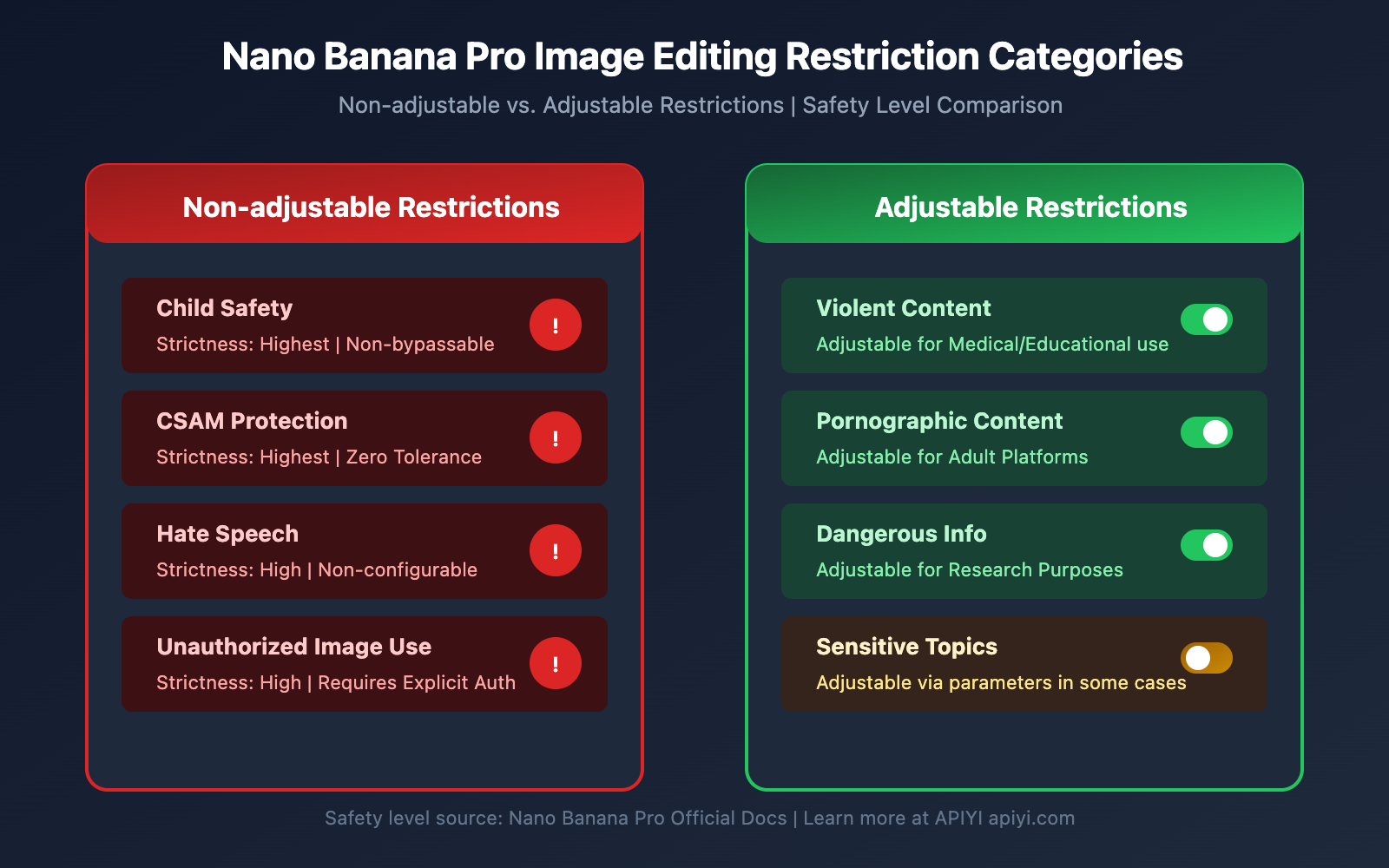
| Restriction Category | Strictness Level | Adjustable? | Applicable Scenarios |
|---|---|---|---|
| Child Safety | Highest | No | All scenarios |
| CSAM Protection | Highest | No | All scenarios |
| Violent Content | High | Partially | Medical, Education |
| Pornographic Content | High | Partially | Adult Platforms |
| Dangerous Info | Medium | Partially | Research Purposes |
| Hate Speech | High | No | All scenarios |
Non-adjustable Core Protections
Nano Banana Pro explicitly states that the following harm categories are always blocked and cannot be adjusted through any API parameters or settings:
-
CSAM Related Content
- Prohibits generating any content related to child sexual abuse.
- Prohibits using AI to generate inappropriate content involving minors.
- CSAM inputs will be flagged as
PROHIBITED_CONTENT.
-
Non-consensual Image Use
- Prohibits unauthorized use of others' images.
- Prohibits deepfaking faces of others.
- Explicit authorization is required when real people are involved.
-
Child Exploitation Content
- Prohibits any form of child exploitation content generation.
- Includes, but is not limited to, sexual exploitation and labor exploitation.
- Covers both real and fictional depictions of minors.
Safety Parameter Configuration Guide
While core child safety protections are non-adjustable, Nano Banana Pro provides configuration options for other safety parameters:
from openai import OpenAI

# Initialize client
client = OpenAI(
    api_key="YOUR_API_KEY",
    base_url="https://api.apiyi.com/v1"  # Using APIYI unified interface
)

# Image editing request example
response = client.images.edit(
    model="nano-banana-pro",
    image=open("input.png", "rb"),
    prompt="Change background color to blue",
    # Safety parameters (Note: Child safety related settings are non-adjustable)
    safety_settings={
        "harm_block_threshold": "BLOCK_MEDIUM_AND_ABOVE",
        # The following setting is invalid for child safety; it's always at the highest level
        # "child_safety": Non-configurable
    }
)
View full safety configuration code
"""
Nano Banana Pro Full Safety Configuration Example
Demonstrates configurable and non-configurable safety parameters
"""

from openai import OpenAI
import base64

# Initialize client
client = OpenAI(
    api_key="YOUR_API_KEY",
    base_url="https://api.apiyi.com/v1"  # Using APIYI unified interface
)

def safe_image_edit(image_path: str, prompt: str) -> dict:
    """
    Safe image editing function
    Includes complete error handling
    """
    try:
        # Read image
        with open(image_path, "rb") as f:
            image_data = f.read()

        # Send edit request
        response = client.images.edit(
            model="nano-banana-pro",
            image=image_data,
            prompt=prompt,
            n=1,
            size="1024x1024",
            response_format="url"
        )

        return {
            "success": True,
            "url": response.data[0].url
        }

    except Exception as e:
        error_message = str(e)

        # Handle IMAGE_SAFETY errors
        if "IMAGE_SAFETY" in error_message:
            return {
                "success": False,
                "error": "IMAGE_SAFETY",
                "message": "Image contains suspected minors and cannot be processed",
                "suggestion": "Please use images containing only adults"
            }

        # Handle PROHIBITED_CONTENT errors
        if "PROHIBITED_CONTENT" in error_message:
            return {
                "success": False,
                "error": "PROHIBITED_CONTENT",
                "message": "Prohibited content detected",
                "suggestion": "Please check if the image content is compliant"
            }

        # Other errors
        return {
            "success": False,
            "error": "UNKNOWN",
            "message": error_message
        }

# Usage example
result = safe_image_edit("photo.jpg", "Change the background to a beach")
if result["success"]:
    print(f"Edit successful: {result['url']}")
else:
    print(f"Edit failed: {result['message']}")
    print(f"Suggestion: {result.get('suggestion', 'Please try again')}")
🚀 Quick Start: We recommend using the APIYI (apiyi.com) platform to quickly experience Nano Banana Pro. The platform provides out-of-the-box API interfaces without complex configuration, along with comprehensive error-handling documentation.
Nano Banana Pro Compliance Best Practices
Now that we've covered the safety mechanisms, let's look at how to use Nano Banana Pro compliantly.
Pre-development Checklist
Before integrating Nano Banana Pro into your app, make sure to check off these items:
| Item | Necessity | Method | Recommendation |
|---|---|---|---|
| User Age Verification | Mandatory | Verify at registration | 18+ restriction |
| Image Source Confirmation | Mandatory | Upload agreement | Require users to confirm copyright |
| Usage Scenario Limitation | Recommended | Feature design | Clearly state usage restrictions |
| Error Handling Mechanism | Mandatory | Code implementation | Provide friendly user prompts |
| Content Moderation Process | Recommended | Backend system | Human review mechanism |
User Prompt Best Practices
To avoid user confusion, we recommend adding the following prompts within your application:
Upload Prompt:
Friendly reminder: To protect the safety of minors, images containing children cannot be edited.
Please ensure all individuals in the uploaded image are adults.
Error Prompt:
Sorry, this image cannot be processed.
Reason: The system detected that the image may contain minors.
Suggestion: Please use an image containing only adults, or remove the parts of the image featuring minors and try again.
Application Design Recommendations
-
Be Clear About Usage Scenarios
- State clearly in product documentation that processing photos of children isn't supported.
- Include relevant clauses in your User Agreement.
-
Optimize User Experience
- Provide friendly error messages.
- Explain the reason for the restriction instead of just showing an error code.
- Offer actionable alternative suggestions.
-
Prepare Compliance Documentation
- Keep API call logs.
- Record instances where safety filters were triggered.
- Establish a reporting mechanism for abnormal situations.
💰 Cost Optimization: For projects that need to call the image editing API frequently, consider using the APIYI (apiyi.com) platform. It offers flexible billing and better pricing, making it a great fit for small-to-medium teams and individual developers.
FAQ
Q1: Why does a photo of a clear adult still trigger IMAGE_SAFETY?
Nano Banana Pro takes a conservative approach to age estimation. When the system's confidence in an age judgment is low, it defaults to treating the subject as a minor to ensure safety.
Possible triggers include:
- Youthful facial features (e.g., "baby face")
- Poor lighting or angles affecting the assessment
- Cartoon or anime-style filters
We recommend using photos that clearly display facial features. You can get more detailed diagnostic information through the APIYI (apiyi.com) platform.
Q2: Can I fix IMAGE_SAFETY errors by adjusting parameters?
No. Child safety protections are core safety mechanisms of Nano Banana Pro and fall under non-adjustable protection categories.
This is an industry standard developed by Google in collaboration with child protection organizations. No API parameter or configuration can bypass this limit. It's not a bug; it's a deliberate safety design.
If you need to process a large volume of images, we suggest pre-screening them and using the test credits on the APIYI (apiyi.com) platform to verify image compliance.
Q3: How can I tell if an image will trigger safety limits?
We recommend performing a pre-check before formal processing:
- Confirm there are no obvious images of minors.
- Avoid using scenes common to children, such as schools or playgrounds.
- Test with a low-resolution preview version first.
- Establish an internal review process to filter sensitive images.
Q4: Does CSAM detection have false positives for normal content?
Hash matching technology targets known CSAM databases, so the false positive rate is extremely low. However, AI age estimation can sometimes result in misjudgments.
If you're certain the image content is compliant but it's still being rejected, it's likely due to the conservative age estimation strategy. The system is designed to prefer rejecting normal content over letting anything potentially involving a minor slip through.
Q5: Are anime or virtual characters restricted?
Yes, Nano Banana Pro's protection mechanisms apply to anime, illustrations, and virtual characters as well.
If a virtual character is depicted as a minor, it'll trigger the IMAGE_SAFETY restriction. We recommend using virtual characters that are clearly adults or avoiding editing operations involving people altogether.
Summary and Recommendations
Nano Banana Pro's 5 major minor protection mechanisms reflect the AI industry's high priority on child safety:
| Key Point | Description |
|---|---|
| Core Principles | Safety by Design; child safety comes before everything else. |
| Technical Architecture | Multi-layered protection including hash detection, AI classifiers, and content filtering. |
| Unbypassable | Child safety restrictions cannot be bypassed or adjusted through any parameters. |
| Industry Standards | Developed in collaboration with organizations like Thorn and NCMEC. |
| Compliance Advice | Clearly inform users about restrictions and provide friendly error messages. |
Action Recommendations
- Developers: Build logic into your application design to handle safety restriction triggers gracefully.
- Product Managers: Incorporate child safety restrictions into your product's feature roadmap and planning.
- Operations Staff: Prepare standardized response templates for user inquiries regarding these restrictions.
We recommend using APIYI (apiyi.com) to quickly test Nano Banana Pro's features and get a feel for the actual safety boundaries.
References:
-
Google AI Safety Policies: Official safety policy documentation
- Link:
ai.google.dev/gemini-api/docs/safety-policies
- Link:
-
Thorn – Safety by Design: Child safety technology initiative
- Link:
thorn.org/safety-by-design
- Link:
-
NCMEC Reports: National Center for Missing & Exploited Children reports
- Link:
missingkids.org/gethelpnow/csam-reports
- Link:
📝 Author: APIYI Team | 🌐 Technical Exchange: apiyi.com
This article was compiled and published by the APIYI technical team. If you have any questions, feel free to visit APIYI (apiyi.com) for technical support.


