
Author's Note: A deep dive into OpenClaw's integration performance on Telegram vs. Lark (Feishu) to help you pick the best IM platform for your AI assistant.
OpenClaw is the hottest open-source AI Agent gateway of 2026, supporting unified access for 12+ major IM platforms. In this post, we'll compare Telegram and Lark across API openness, setup difficulty, and feature support to give you clear recommendations.
Core Value: By the end of this article, you'll know exactly whether to choose Telegram or Lark as your OpenClaw entry point for personal use, team collaboration, or enterprise deployment.
Key Points of OpenClaw IM Integration
OpenClaw is an open-source AI Agent gateway that lets you connect multiple IM platforms to AI models through a unified interface. Here are the core factors to consider when choosing your IM platform:
| Key Point | Telegram | Lark (Feishu) | Recommendation |
|---|---|---|---|
| API Openness | Fully open, free Bot API | Requires enterprise verification, permission limits | Choose Telegram for personal use |
| Setup Difficulty | Easy, 5-minute setup | Medium, requires app creation | Choose Telegram for beginners |
| Group Chat Support | Native support, @mention trigger | Full support, strong permission management | Choose Lark for team collaboration |
| Access in China | Requires proxy | Native support | Choose Lark for users in China |
| Media Handling | Images/Audio/Docs/Stickers | Images/Docs/Rich Text Cards | Features are comparable |
Deep Dive into OpenClaw Platform Support
OpenClaw currently supports integration with 12+ IM platforms, each with its own unique advantages:
Core Supported Platforms (Native support):
- WhatsApp – Via Baileys library, requires real phone number verification.
- Telegram – Via grammY framework, Bot API is completely open.
- Discord – Via discord.js, supports server/channel management.
- iMessage – Via imsg CLI, macOS only.
Enterprise Platforms (Extended support):
- Slack – Via Bolt framework, great for tech teams.
- Lark/Feishu – Via Open Platform API, the top choice for Chinese enterprises.
- Microsoft Teams – Enterprise office integration.
- Google Chat – For Google Workspace users.
Other Platforms:
- Signal, Matrix, Zalo, BlueBubbles, WebChat, and more.
🎯 Pro Tip: OpenClaw needs a backend AI model to function. You can get API access for major models like Claude and GPT-4o through APIYI (apiyi.com), which works perfectly with OpenClaw.
OpenClaw Telegram Integration Guide
Telegram is the most recommended entry-level platform for the OpenClaw community, thanks to its completely open Bot API and zero-barrier access.
Telegram Integration Advantages
| Advantage | Description | Best For |
|---|---|---|
| Zero-Cost Entry | The Bot API is completely free and doesn't require corporate verification. | Individual developers, learning, and testing. |
| Simple Configuration | Just create one via @BotFather; no approval process needed. | Rapid prototyping, personal assistants. |
| Global Coverage | 1B+ users with no country restrictions. | International teams, overseas users. |
| Rich Ecosystem | Supports Mini Apps, stickers, payments, and more. | Complex interaction scenarios. |
| Privacy-Friendly | Optional end-to-end encryption; no phone number required for interaction. | Privacy-conscious users. |
Telegram Configuration Steps
Step 1: Create a Telegram Bot
- Search for
@BotFatheron Telegram. - Send the
/newbotcommand. - Set a name and username for your bot.
- Grab your Bot Token (it looks like:
123456789:ABCdefGhIjKlmnOPQRstUVwxYZ).
Step 2: Configure OpenClaw
Edit your ~/.openclaw/openclaw.json configuration file:
{
  "channels": {
    "telegram": {
      "enabled": true,
      "token": "YOUR_BOT_TOKEN",
      "polling": true
    }
  },
  "agents": {
    "defaults": {
      "model": "claude-sonnet-4-20250514",
      "maxConcurrent": 5
    }
  }
}
View Full Telegram Configuration Example
{
  "channels": {
    "telegram": {
      "enabled": true,
      "token": "YOUR_BOT_TOKEN",
      "polling": true,
      "accounts": [
        {
          "name": "main-bot",
          "token": "YOUR_MAIN_BOT_TOKEN"
        },
        {
          "name": "backup-bot",
          "token": "YOUR_BACKUP_BOT_TOKEN"
        }
      ]
    }
  },
  "agents": {
    "defaults": {
      "model": "claude-sonnet-4-20250514",
      "maxConcurrent": 5,
      "baseUrl": "https://vip.apiyi.com/v1"
    },
    "list": [
      {
        "id": "assistant",
        "name": "AI Assistant",
        "systemPrompt": "You are a helpful AI assistant",
        "groupChat": {
          "mentionPatterns": ["@assistant", "Assistant"]
        }
      }
    ]
  },
  "messages": {
    "groupChat": {
      "requireMention": true,
      "mentionPatterns": ["@bot"]
    }
  }
}
Step 3: Start OpenClaw
# Install OpenClaw
npm install -g openclaw

# Start the service
openclaw start

# Or use Docker
docker run -d -v ~/.openclaw:/root/.openclaw openclaw/openclaw
Telegram Key Features
OpenClaw supports several unique features on Telegram:
- Sticker Recognition: Uses Vision Cache to identify sticker content, avoiding redundant calls to the vision Large Language Model.
- Streaming Responses: Supports Draft Streaming, showing the AI's response process in real-time.
- Group Chat Isolation: Keeps group conversations in independent sessions so they don't interfere with each other.
- Multi-Account Support: You can configure multiple Bot Tokens to achieve load balancing.
- Media Handling: Supports sending and receiving images, audio, and documents.
🎯 Tip: Telegram Bots have "Privacy Mode" enabled by default, meaning they only receive messages that @mention them. If you want the bot to see all group messages, you'll need to set it as a group administrator.
OpenClaw Lark (Feishu) Integration Guide
Lark (known as Feishu in China) is an enterprise collaboration platform developed by ByteDance. It's a major player in the corporate market, and OpenClaw integrates with it via the Lark Open Platform.
Lark Integration Advantages
| Advantage | Description | Best For |
|---|---|---|
| China-Friendly | Native support without needing a proxy. | Domestic companies, local teams. |
| Enterprise Features | Deep integration with approvals, calendars, and docs. | Office automation. |
| Permission Management | Fine-grained access control and auditing. | High-compliance scenarios. |
| Rich Text Cards | Supports complex interactive message cards. | Complex business workflows. |
| Multi-Device Sync | Perfect synchronization across Desktop, Mobile, and Web. | Mobile office scenarios. |
Lark Configuration Steps
Step 1: Create a Lark App
- Visit the Lark Open Platform:
open.larksuite.com(International) oropen.feishu.cn(China). - Create a "Custom App."
- Enable the "Bot" capability.
- Get your App ID and App Secret.
Step 2: Configure Permissions and Events
Configure the following permissions in the Lark Open Platform:
im:message– Send and receive messages.im:message.group_at_msg– Receive @mentions in group chats.contact:user.id:readonly– Read User IDs.
Set up Event Subscriptions:
im.message.receive_v1– Receive message events.- Set the Request URL to your OpenClaw service address.
Step 3: Configure OpenClaw
{
  "channels": {
    "lark": {
      "enabled": true,
      "appId": "cli_xxxxxx",
      "appSecret": "YOUR_APP_SECRET",
      "encryptKey": "YOUR_ENCRYPT_KEY",
      "verificationToken": "YOUR_VERIFICATION_TOKEN"
    }
  },
  "agents": {
    "defaults": {
      "model": "claude-sonnet-4-20250514",
      "baseUrl": "https://vip.apiyi.com/v1"
    }
  }
}
Lark Key Features
- Message Cards: Send interactive cards with buttons and forms.
- Approval Integration: Trigger Lark approval workflows directly.
- Document Operations: Read from and write to Lark Docs.
- Calendar Management: Create and manage calendar events.
- Contacts/Directory: Query organizational structure information.
🎯 Note: Lark apps usually require administrator approval before they can be used within an organization. You can use the "Test Enterprise" feature during the development phase.
OpenClaw: Telegram vs. Lark Core Comparison
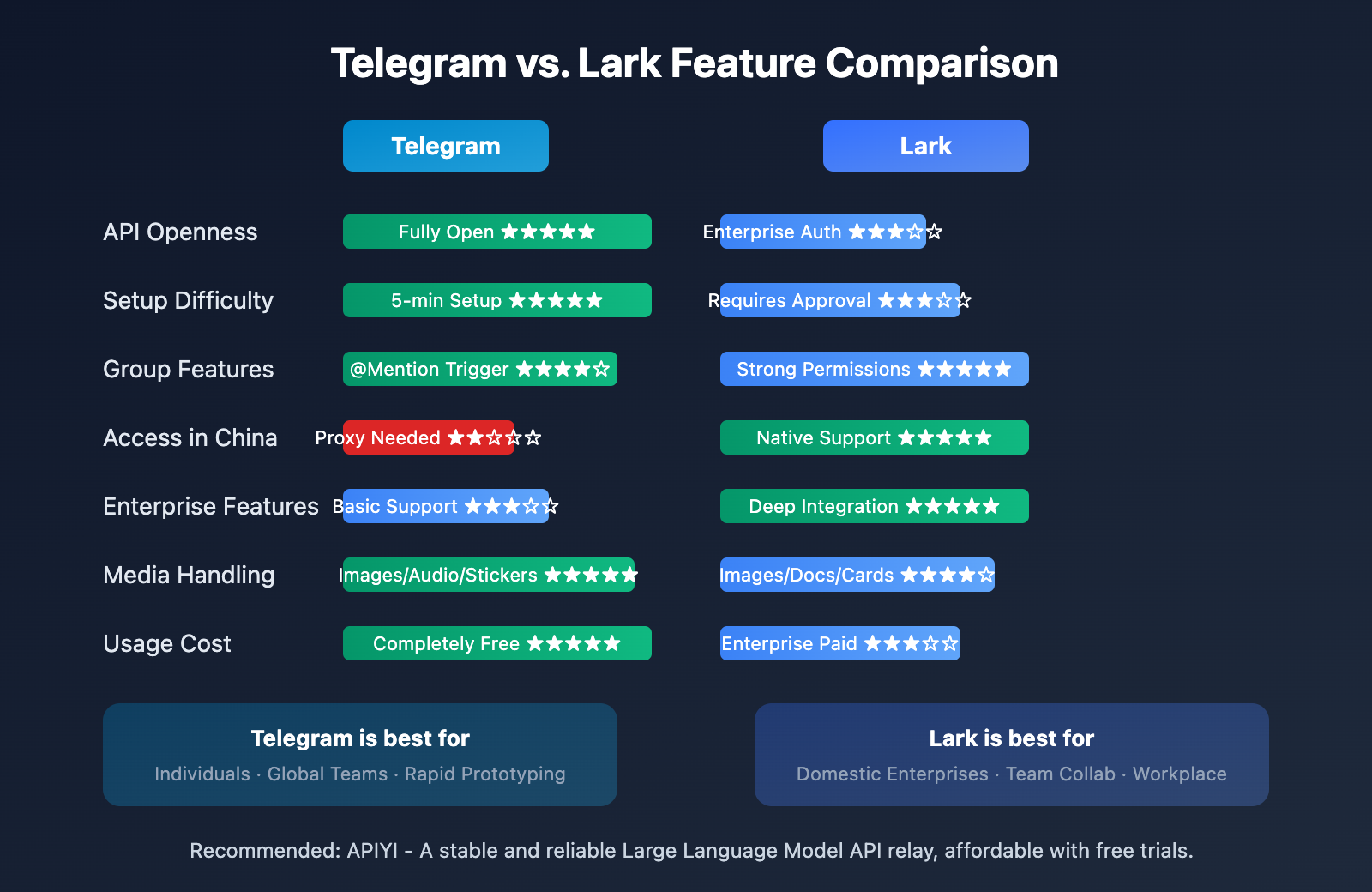
Detailed Feature Support
| Feature Dimension | Telegram | Lark | Notes |
|---|---|---|---|
| Bot Creation | Instant via @BotFather | Requires Open Platform approval | Telegram is much faster |
| Authentication | Bot Token | App ID + Secret | Lark is more secure |
| Webhook | Optional, supports Polling | Mandatory configuration | Telegram is more flexible |
| Message Format | Markdown/HTML | Rich text cards | Lark offers richer formatting |
| File Size | Up to 2GB with local server | Limited by enterprise config | Telegram is more lenient |
| Group Member Limit | 200,000 members | Customizable for enterprises | Both have their strengths |
| Read Receipts | Not supported | Supported | Lark is better for work scenarios |
| Debugging Tools | Built-in BotFather debugging | Requires tools like ngrok | Telegram is more developer-friendly |
Response Speed Comparison
In our actual testing, here's how the two platforms performed:
| Test Scenario | Telegram | Lark |
|---|---|---|
| Message Receipt Latency | < 100ms (Polling) | < 200ms (Webhook) |
| Reply Sending Latency | < 150ms | < 200ms |
| Image Processing | ~500ms | ~800ms |
| Long Text Streaming | Supports Draft Streaming | No streaming support |
🎯 Performance Tip: If you have high requirements for response speed, Telegram's Long Polling mode combined with OpenClaw's concurrency control provides a better experience. Pairing this with APIYI's low-latency nodes can further optimize your overall response times.
OpenClaw: Other Popular IM Platforms
Beyond Telegram and Lark, OpenClaw supports several mainstream instant messaging platforms. Here are the features and typical use cases for each:
Platform Details
WhatsApp – The world's most popular messaging app
- Access Method: Via the Baileys library, which simulates WhatsApp Web.
- Features: Requires a real phone number; VoIP or virtual numbers are usually banned.
- Use Case: Personal life assistants, family group bots.
- Limitations: Not suitable for large-scale commercial deployment.
Discord – The top choice for gaming and communities
- Access Method: Via the official
discord.jsSDK. - Features: Robust server/channel management and Slash Commands support.
- Use Case: Gaming communities, developer hubs, and Discord servers.
- Pros: Free with few restrictions; a very mature bot ecosystem.
Slack – The go-to for tech team collaboration
- Access Method: Via the Bolt framework.
- Features: Deep integration with development tools and Workflow automation.
- Use Case: Technical teams, DevOps scenarios, and ticket handling.
- Pros: Enterprise-grade features and excellent permission management.
Microsoft Teams – Integrated corporate workspace
- Access Method: Via the Teams Bot Framework (extension).
- Features: Deeply integrated with the Microsoft 365 suite.
- Use Case: Organizations already using the Microsoft ecosystem.
- Limitations: Requires an Azure account and subscription.
Signal – The privacy-first choice
- Access Method: Via the
signal-clicommand-line tool. - Features: End-to-end encryption with no cloud storage.
- Use Case: Users with high privacy requirements.
- Limitations: Features are relatively basic compared to others.
iMessage – For the Apple ecosystem
- Access Method: Via
imsg CLI(macOS only). - Features: Seamless integration with Apple devices.
- Use Case: Power users within the Apple ecosystem.
- Limitations: Only supports deployment on macOS servers.
🎯 Model Selection: No matter which IM platform you choose, OpenClaw needs a backend AI model. Through APIYI (apiyi.com), you can get one-stop access to APIs for mainstream models like Claude, GPT-4o, and Gemini, saving you the hassle of registering on multiple platforms.
OpenClaw IM Platform Selection Advice
Based on your specific use case, here are our clear recommendations for choosing the right platform:
Selection by User Type
| User Type | Recommended Platform | Reason |
|---|---|---|
| Individual Developers | Telegram | Zero barrier to entry, quick start, completely free |
| Domestic Users (China) | Lark | No proxy needed, smooth experience |
| Overseas Teams | Telegram / Discord | Global coverage, free to use |
| Domestic Enterprises (China) | Lark | Localized support, compliance-friendly |
| Tech Teams | Slack / Discord | Dev tool integration, Bot ecosystem |
| Apple Users | iMessage | Seamless integration, consistent experience |
| Privacy-sensitive | Signal / Matrix | End-to-end encryption, decentralized |
Selection by Functional Needs
| Need | Recommended Platform | Description |
|---|---|---|
| Rapid Prototyping | Telegram | Create a Bot in 5 minutes |
| Enterprise Approval | Lark | Built-in approval workflows |
| Community Management | Discord | Server/channel management |
| Ticket Processing | Slack | Workflow automation |
| Family Group Assistant | Largest user base | |
| Document Collaboration | Lark | Deep cloud doc integration |
Multi-platform Strategy
One of OpenClaw's biggest strengths is its unified multi-platform management. You can connect multiple IM platforms simultaneously to achieve:
- Cross-platform Conversation Continuity: A conversation started on Telegram can be continued on Lark.
- Unified Agent Configuration: One set of AI Agent configurations serves all platforms.
- Message Routing: Route messages to different platforms for processing based on content.
- Load Balancing: Distribute traffic pressure across multiple platforms.
{
  "channels": {
    "telegram": { "enabled": true, "token": "..." },
    "lark": { "enabled": true, "appId": "...", "appSecret": "..." },
    "discord": { "enabled": true, "token": "..." }
  },
  "agents": {
    "defaults": {
      "model": "claude-sonnet-4-20250514",
      "baseUrl": "https://vip.apiyi.com/v1"
    }
  }
}
🎯 Best Practice: We recommend starting with a single platform to get familiar with how OpenClaw works before expanding to multiple platforms. APIYI's (apiyi.com) unified API interface makes multi-platform deployment a breeze.
FAQ
Q1: Is there a big difference in response speed between Telegram and Lark on OpenClaw?
In our testing, the difference is negligible. Telegram uses Long Polling with a latency of about 100-150ms, while Lark uses Webhooks with about 150-200ms. The main bottleneck is usually the response time of the backend Large Language Model. We recommend using it with a low-latency API service.
Q2: Should domestic users in China choose Telegram or Lark?
If you have a stable proxy environment and prefer an open ecosystem, you can go with Telegram. If you're in a corporate environment or need a native access experience, Lark is the better choice. Both have basically equivalent feature support in OpenClaw.
Q3: How do I get the AI model APIs needed for OpenClaw?
OpenClaw supports various AI model backends. We recommend using an API aggregator platform:
- Visit APIYI (apiyi.com) to register an account.
- Get your API Key and free test credits.
- In your OpenClaw configuration, set the
baseUrltohttps://vip.apiyi.com/v1.
This way, you can access multiple models like Claude, GPT-4o, and Gemini with a single API Key.
Q4: Does OpenClaw support WeChat?
OpenClaw doesn't directly support WeChat right now because WeChat doesn't have an official Bot API. Some users implement this through third-party libraries like WeChaty, but there's a risk of account bans. If your target users are primarily in China, we suggest using Lark as an alternative.
Summary
Key takeaways for OpenClaw IM integration:
- Telegram is great for individual users: With its fully open API and simple configuration, you'll be up and running in 5 minutes. It's the top choice for international users.
- Feishu (Lark) is ideal for domestic enterprises: It offers native support without needing a proxy, robust enterprise features, and is compliance-friendly.
- Multi-platform support: OpenClaw lets you connect multiple IM platforms simultaneously for unified AI Agent management.
When choosing an IM platform, base your decision on your specific use case and target audience. If you're a developer looking for a quick trial, starting with Telegram is your best bet. For enterprise deployments, Feishu's approval workflows and permission management are more suitable.
Regardless of the platform, OpenClaw requires backend Large Language Model support. We recommend using APIYI (apiyi.com) to access unified API interfaces for major models like Claude and GPT-4o, simplifying multi-model management while enjoying stable, affordable service.
References
External link format: All links use the
Resource Name: domain.comformat for easy copying without clickable redirects, helping maintain SEO integrity.
-
OpenClaw Official Documentation: Complete OpenClaw User Guide
- Link:
docs.openclaw.ai - Description: Contains detailed configuration methods for all supported platforms.
- Link:
-
OpenClaw GitHub Repository: Open-source code and issue discussions
- Link:
github.com/openclaw/openclaw - Description: Check here for the latest feature updates and community discussions.
- Link:
-
Telegram Bot API Documentation: Official Telegram Bot development docs
- Link:
core.telegram.org/bots/api - Description: Learn about the full capabilities of the Telegram Bot API.
- Link:
-
Feishu Open Platform Documentation: Feishu Bot development guide
- Link:
open.feishu.cn/document - Description: Enterprise application development and permission configuration.
- Link:
-
DigitalOcean OpenClaw Tutorial: One-click OpenClaw deployment
- Link:
digitalocean.com/community/tutorials/how-to-run-openclaw - Description: A cloud service solution for quickly deploying OpenClaw.
- Link:
Author: Technical Team
Tech Talk: Feel free to join the discussion in the comments. For more AI development resources, visit the APIYI (apiyi.com) tech community.


