

On November 10, Anthropic changed three product names at once. Claude Whiteboards and Claude Sheets entered public beta. Claude Dashboards, which had been in beta, graduated to general availability and was renamed Claude Data. With all three names changing together, the confusing part isn’t the features themselves. It’s keeping straight which are still in testing, which are officially released, and which are on by default.
This isn’t a new model release. Whiteboards, Sheets, and Data are interface features inside the Claude app, not new API model IDs. If you call the API, your list of available models hasn’t gained a new entry.
What you’ll get from this article: In about 3 minutes, you’ll know the status of each of the three features, which platforms they cover, and what you’ll see when you open Claude on different plans.
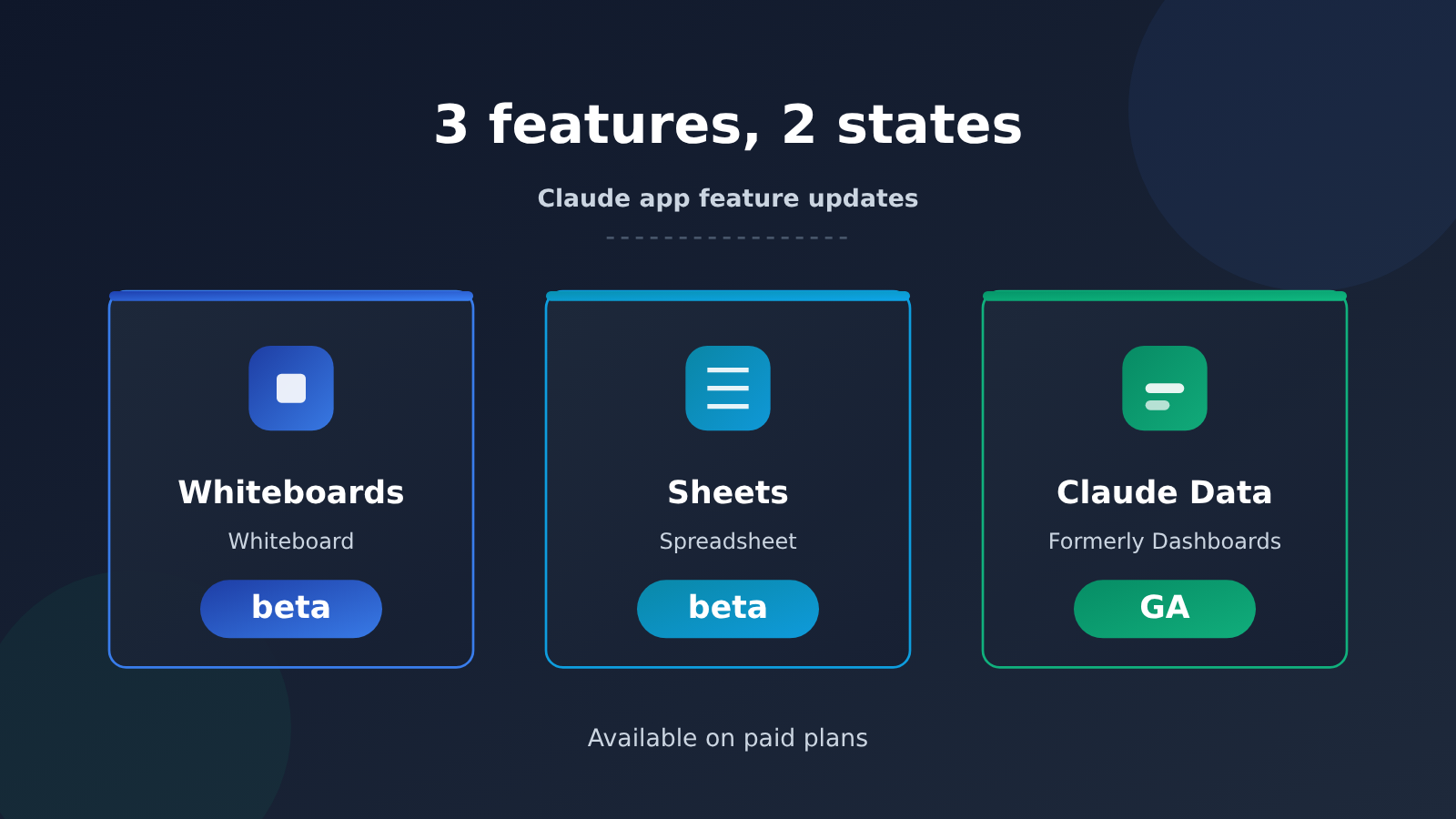
Claude Whiteboards and Sheets Beta: Key Facts at a Glance
Let’s pin down the timing, the publisher, and the scope first, so the rest of the analysis stays on track. This is a product-announcement-level update, not a version-number jump, and it came with no changes to model weights or pricing.
| Item | Details |
|---|---|
| Announced | November 10, 2026 |
| Publisher | Anthropic |
| What’s new | Claude Whiteboards and Claude Sheets enter beta; Claude Dashboards graduates and is renamed Claude Data |
| Available plans | Paid plans |
| Platforms | Web, desktop, mobile |
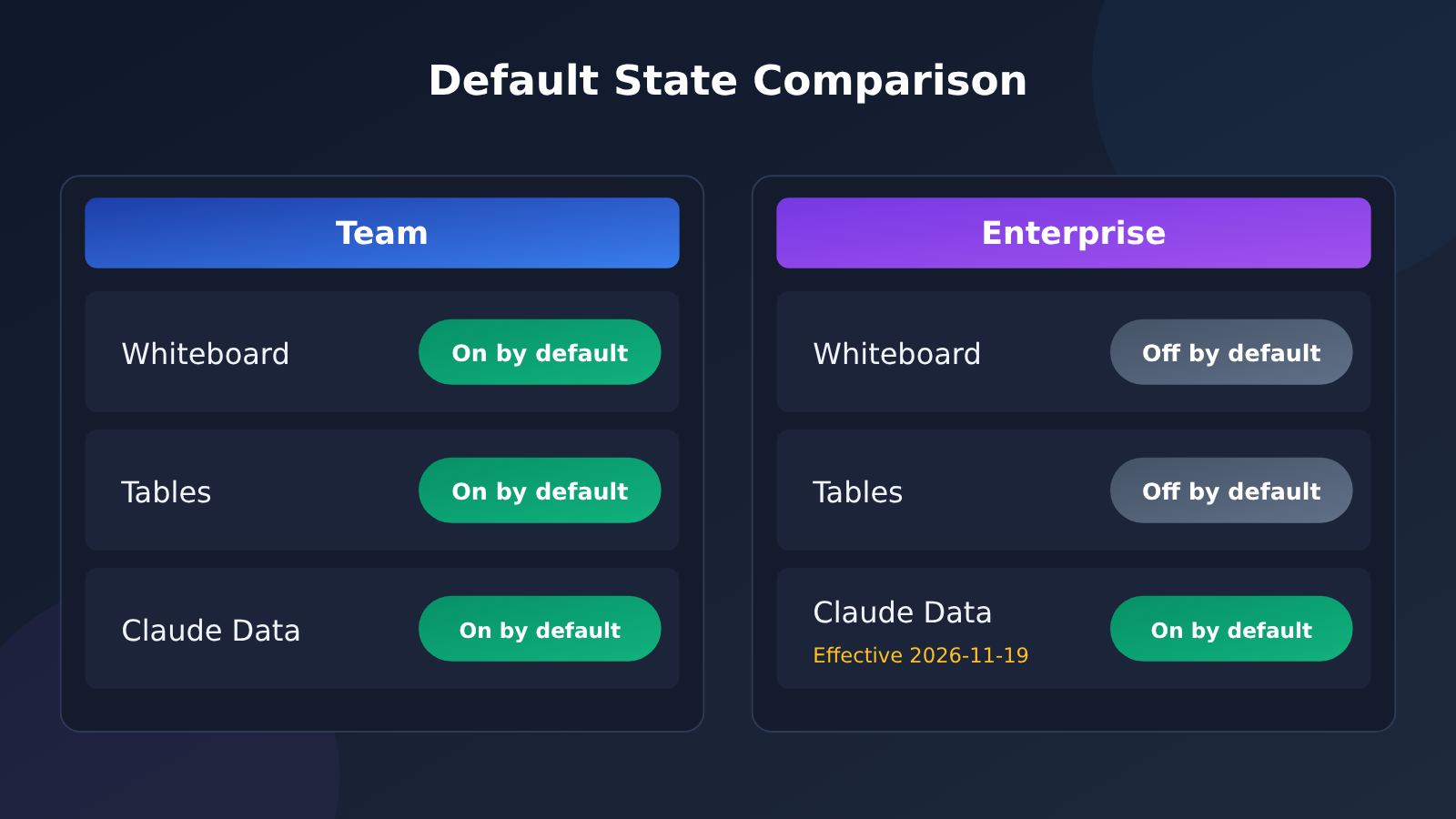
| Default state | Team plan: all three on by default. Enterprise plan: Whiteboards and Sheets off by default; Claude Data on by default starting November 19, 2026 |
| Is it an API model? | No, unrelated to model IDs or API parameters |
Once you’ve read the table, the last row is the one that matters most. New capabilities in the product interface and models you can call through the API live at different layers, and this update sits entirely in the first one.
What Layer Do Whiteboards, Sheets, and Data Belong To?
Whiteboards and Sheets are collaborative canvases and structured data editing. You open Claude and start working, with no calling code to write. Claude Data is the continuation of the old Dashboards, which organizes data into views you can browse. Its graduation means it has moved from testing to officially available.
None of the three is a model, and none of them changes the model’s reasoning ability. What they change is whether you can produce and organize content directly inside Claude.
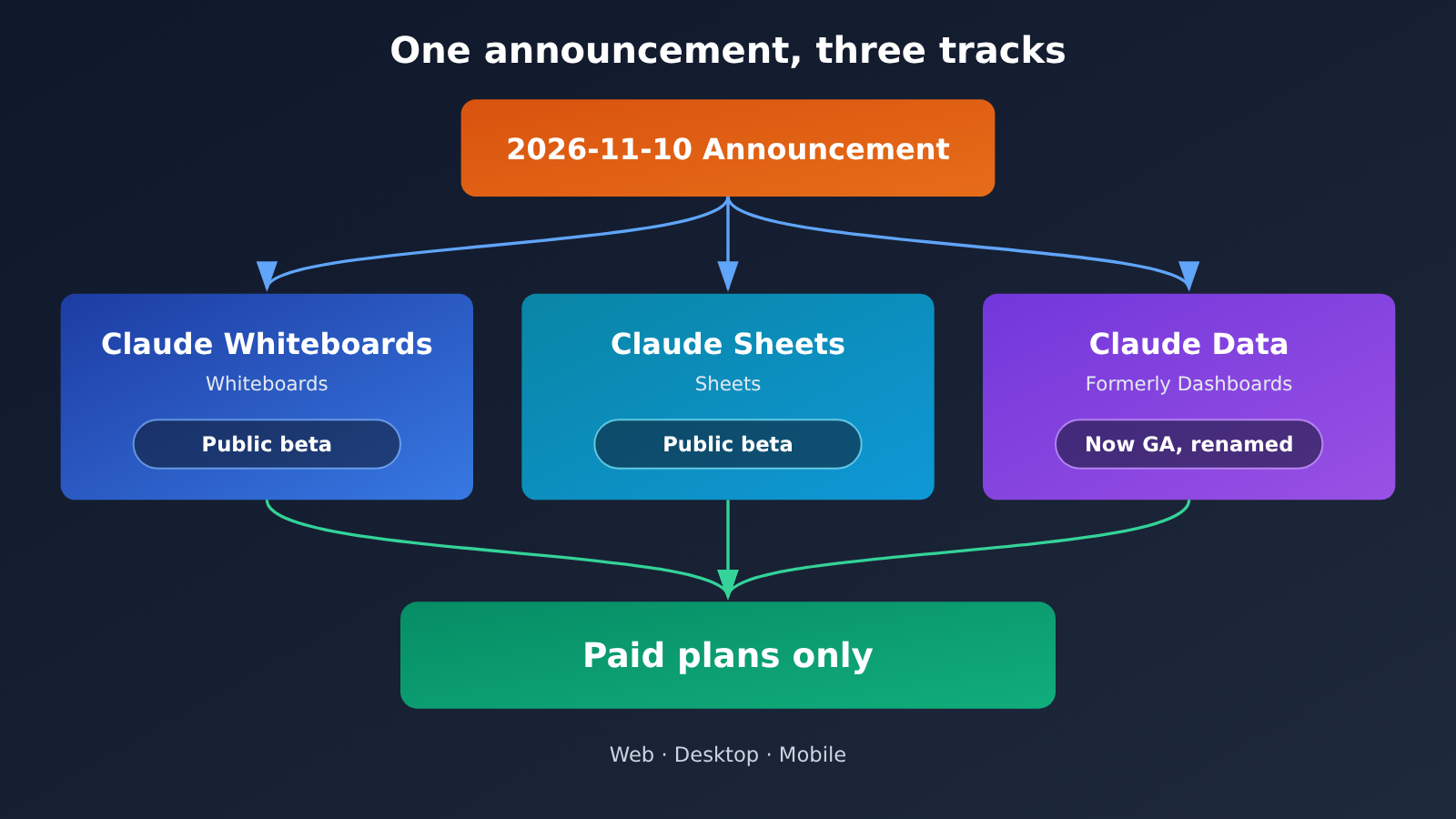
Three Capabilities Compared: Beta, Graduation, and a Rename
This announcement mixes two different statuses, and it’s the part readers are most likely to get tripped up on by the headline. Whiteboards and Sheets are “newly entering beta,” while Claude Data is “coming out of beta.” The directions are exactly opposite.
| Capability | Current Status | Direction of Change | Available Plans |
|---|---|---|---|
| Claude Whiteboards | Public beta | Newly entering beta | Paid plans |
| Claude Sheets | Public beta | Newly entering beta | Paid plans |
| Claude Data (formerly Dashboards) | Generally available | Leaving beta, renamed | Paid plans |
The difference in status directly affects what you should expect. Beta features are usually still being iterated on, so interface details and interaction patterns may change in later releases. Generally available features are relatively stable and safe to build into your everyday workflow. Lump the two together and you can easily reach the wrong conclusion during evaluation.
The Rename Deserves a Quick Note
Renaming Dashboards to Claude Data isn’t just swapping a label. Moving from “dashboards” to “data” widens the semantic scope a bit, and it’s easier to read as a unified entry point to the data layer inside Claude. For teams already using Dashboards, continuity of functionality matters more than the name, and the announcement doesn’t mention any capabilities being cut.
Default Toggles: Team Is All On, Enterprise Takes Two Steps
The most practical detail in this update is the defaults. Team and Enterprise are both paid plans, but they start out in different states. That decides whether members open the app and find the features already there, or have to wait for an admin to switch them on first.
| Plan Type | Whiteboard | Tables | Claude Data |
|---|---|---|---|
| Team | On by default | On by default | On by default |
| Enterprise | Off by default | Off by default | On by default starting November 19, 2026 |
Team handles this in a straightforward way: all three capabilities are visible to members by default, so teams can start trying them out without any extra setup. The upside is fast adoption, since members will naturally run into the new entry points. The downside is that admins need to confirm usage guidelines after the fact.
Enterprise takes a more conservative approach. Whiteboard and Tables are off by default, which hands the decision about whether to enable them back to the organization. Claude Data gets a clear date: it turns on by default starting November 19. That window of a little over a week is essentially there for companies to run internal evaluations and communicate with their teams.
What Admins Should Look at This Week
For Enterprise admins, the real question isn’t “is this feature any good?” but “which teams should have it right now?” Whiteboard leans toward brainstorming and solution discussions, while Tables leans toward structured organization, and the two have different requirements for where data ends up. Since Claude Data will be on by default, it’s easier to confirm who can see that data up front than to patch things up afterward.
🎯 Technical tip: If your team is also comparing the integration costs of several models, you can handle the interface-layer updates and the API-layer choices separately. For unified API access, you can use APIYI at apiyi.com. One API key covers mainstream models like OpenAI, Claude, and Gemini through an OpenAI-compatible interface, which lets you save your energy for product decisions.
Why This Isn’t a New API Model
The easiest mistake to make with this announcement is treating Whiteboards, Sheets, and Claude Data as names you can drop into a request parameter. They aren’t model IDs, and they aren’t new API endpoints.
| Comparison | Product interface features (this update) | API models |
|---|---|---|
| Typical examples | Whiteboards, Sheets, Claude Data | Claude series model identifiers |
| How you use them | Open the Claude app and work in it directly | Send requests through the API |
| Changed in this update? | Yes: new features and graduations from preview | No change |
| Who’s affected | Teams using the Claude app | Developers integrating model capabilities |
This distinction matters mostly for troubleshooting. If your team sees a whiteboard entry point in the app, that’s a product feature going live. If your code tries to call a model named Sheets, that model doesn’t exist, and the API won’t accept a new name just because of this announcement.
How Developers Can Tell What Applies to Them
The question developers usually care about is “Do I need to change my code?” The answer is no. All three names belong to the application layer. They don’t show up in the model list, and they don’t affect the request structure. API changes that actually matter come from model version updates or parameter adjustments, and that kind of information won’t be buried in an announcement about interface features.
💡 Tip: The simplest way to tell whether a name is a product feature or a model is to ask whether it can appear in a request parameter. To confirm which Claude models you can currently call, check the model list on APIYI (apiyi.com). It’s much faster than trying to guess from the announcement.
Impact Analysis: Who Will Notice Changes After November 10
This update mainly affects teams that already use the Claude app, not everyone. Here’s the breakdown by role.
For Teams Using the Claude App
Members on the Team plan will notice the changes first, since all three features are on by default. Whiteboards and spreadsheets fill in the gap between discussing and organizing. With Claude Data now out of beta, the data view no longer carries a test label, so the team will feel a bit more comfortable building it into their workflows.
Enterprise plan members will see the changes later. Whiteboards and spreadsheets are off by default and an admin has to turn them on. Claude Data won’t show up by default until November 19. It’s worth spelling out this timing gap in your internal communications so members don’t assume it’s a permissions problem.
For Developers and API Integrators
The direct impact is close to zero. The model lineup, request structure, and billing haven’t changed because of this announcement. The indirect impact is that your product side may come up with new requirements, such as piping the structured content organized in Claude into your own systems. That’s when you’d come back to the API layer to build the integration.
| Role | Direct Change | What to Do |
|---|---|---|
| Team members | All three features visible by default | Get familiar with the new entry points and set clear usage boundaries |
| Enterprise members | Whiteboards and spreadsheets off by default; Claude Data on by default from November 19 | Wait for admin configuration, or confirm they’re already enabled |
| Developers | No API changes | Keep an eye on model version updates, not UI announcements |
💰 Cost Optimization: When product-side capabilities expand, API-side costs often rise along with them. If your team is running comparison tests across multiple models, an aggregation platform like APIYI (apiyi.com) lets you pay as you go and switch models flexibly, which is easier than maintaining a separate account for each model.
FAQ
Q1: What is Claude Whiteboards?
It’s a whiteboard feature inside the Claude app, built for free-form layout and discussion outside the chat itself. It entered public beta on November 10, 2026, and is available on paid plans.
Q2: How is Claude Sheets different from a regular spreadsheet?
Claude Sheets is a spreadsheet feature inside the Claude app, and it’s also in beta. It’s a UI feature, so it has nothing to do with model invocation at the API level. It’s also not a model name you can put in a request parameter.
Q3: How does Claude Data relate to the old Dashboards?
Claude Data is simply the former Claude Dashboards. On November 10, 2026, it left beta and became generally available, and it was renamed at the same time. The functionality carries over, and the announcement doesn’t mention any capabilities being cut.
Q4: When can I start using these features?
Whiteboards and Sheets entered beta on November 10, 2026, and Claude Data became generally available the same day. On Enterprise plans, Claude Data is on by default starting November 19, 2026. All three features are available on web, desktop, and mobile.
Q5: Why don’t I see the Whiteboards option in my account?
Start by checking your plan type. On Team plans, all three features are on by default. On Enterprise plans, Whiteboards and Sheets are off by default, and an admin needs to enable them. If you still don’t see it, make sure you’re on a paid plan and that you’re using the web, desktop, or mobile app.
Q6: Do these features cost extra?
According to the announcement, they’re available on paid plans, and it doesn’t mention separate pricing for these three features. For specific quotas and billing details, go with the official documentation.
Q7: I call Claude models through the API. Do I need to change my code for this update?
No. Whiteboards, Sheets, and Claude Data aren’t API model IDs, and this update doesn’t change the model list or the request structure. To check which Claude models are currently available, look at the model list on APIYI (apiyi.com). The platform offers an OpenAI-compatible interface, and new users get free test credits, so it’s a good place to validate things before going live.
Q8: What are the known limitations of this update?
Whiteboards and Sheets are in beta, so the UI and interactions may still change. I wouldn’t build a production workflow on them just yet. On Enterprise plans, an admin has to turn on Whiteboards and Sheets manually, which adds some setup work. All three features are limited to paid plans, so free users can’t access them.
Key Takeaways: Claude Whiteboards and Sheets Beta
- Three changes on the same day: Whiteboards and Sheets enter beta, and Dashboards graduates from beta and is renamed Claude Data.
- Opposite directions: The first two are newly entering testing, while the last one is leaving testing. Don’t mix them up.
- Available on all three platforms: Web, desktop, and mobile, limited to paid plans.
- Defaults vary by plan: Team has all three turned on, while Enterprise has Whiteboards and Sheets off by default.
- One firm date: For Enterprise, Claude Data is on by default starting November 19, 2026.
- Not API models: None of the three names show up in the model list, so nothing changes at the API layer.
- Where to start: If you want to call Claude models, keep using the model list on APIYI (apiyi.com).
Summary
The announcement boils down to three points. First, Claude Whiteboards and Claude Sheets enter beta. They’re new interface capabilities and still in an iteration phase. Second, Claude Dashboards graduates and is renamed Claude Data, moving from beta to general availability. Third, the default switches differ by plan: Team has everything on, Enterprise admins need to enable Whiteboards and Sheets, and Claude Data is on by default after November 19.
Read this as a product-level update and you won’t mistake it for a change to the model lineup. There are really only two things to act on: Enterprise admins should confirm the scope of what gets enabled, and teams should agree internally on usage boundaries.
If you need to call Claude models, the API-side choice has nothing to do with this update. Keep going by the model list published on APIYI at apiyi.com.
References
- Anthropic Official Announcement: Release notes for Claude Whiteboards, Claude Sheets, and Claude Data
- Link:
claude.com/resources/articles/sheets-whiteboards-data -
Description: The original source for this update, including status, supported platforms, and default toggle details
-
APIYI apiyi.com: A unified multi-model API platform
- Link:
apiyi.com - Description: Used to check which Claude models are currently available, with an OpenAI-compatible interface and pay-as-you-go billing
Author: APIYI Technical Team
Technical Discussion: Feel free to reach out to us on the APIYI apiyi.com homepage. You can also bring up any questions about the API or models there


