
"I passed a seed to Nano Banana Pro, and it threw an error: Invalid value at 'generation_config.seed' (TYPE_INT32). Does it actually support a seed or not?"—this was one of the most frequently asked questions in the Gemini image API community back in 2026.
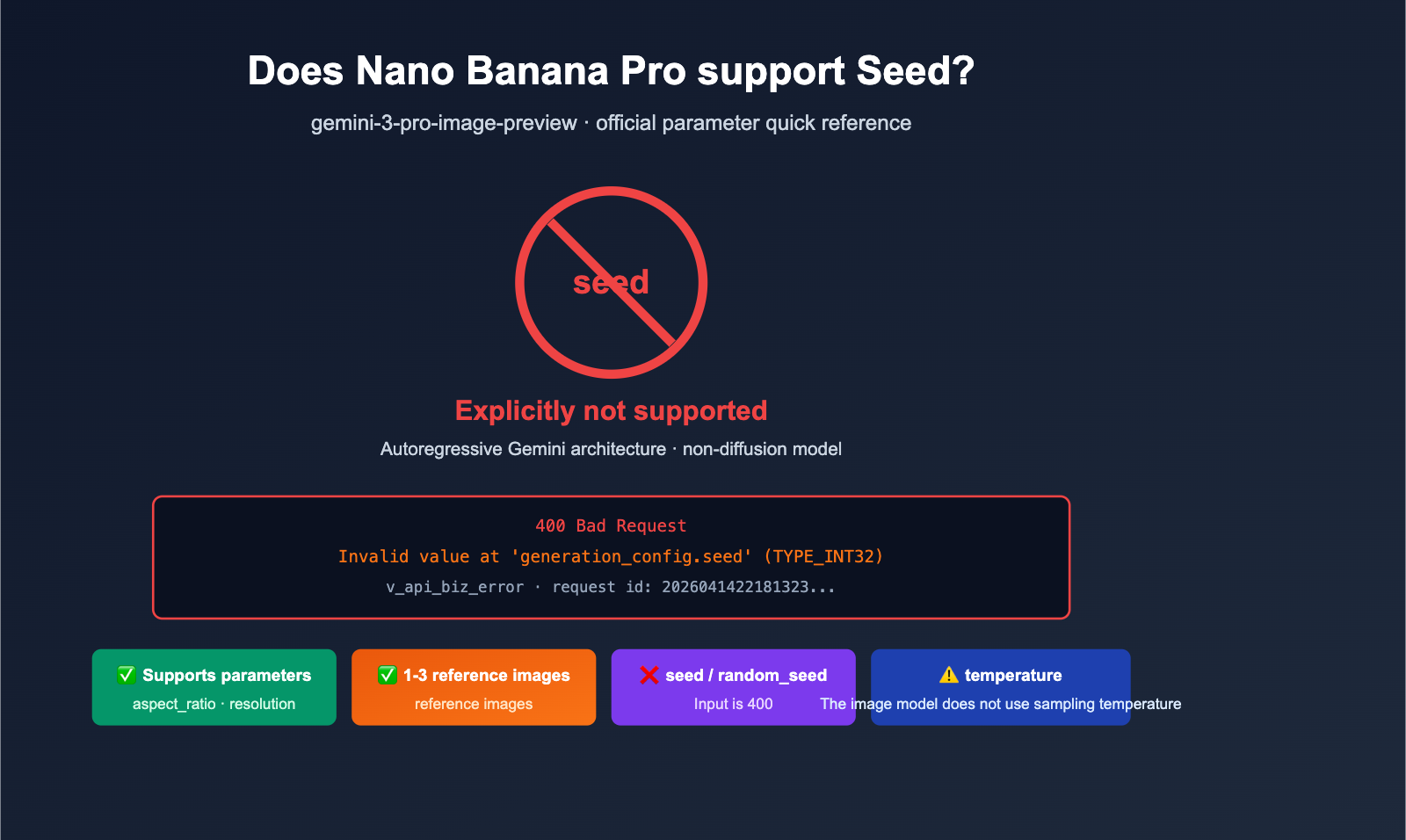
Let’s start with the conclusion: Nano Banana Pro (gemini-3-pro-image-preview) does not support the seed parameter. This isn't an SDK bug or a typo in the parameter name; it's because Google simply hasn't enabled a seed-based reproducibility mechanism for this specific model. The TYPE_INT32 error you're seeing is essentially a parameter validation error triggered by the Google backend when it encounters a field the model isn't designed to accept.
In this article, we’ll clear up three things based on official documentation and community feedback: why Nano Banana Pro lacks a seed, what that error message actually means, and how to achieve image consistency without a seed. All conclusions here are based on primary English-language sources to ensure accuracy.
Does Nano Banana Pro Support the Seed Parameter: Official Verdict
Let’s go back to the facts users care about most.
Official Stance
- Nano Banana Pro =
gemini-3-pro-image-preview, part of the Gemini 3 Pro Image model family by Google DeepMind. - As of April 2026, the official API documentation lists only these supported parameters for image generation:
- aspect_ratio: 9 different ratios (1:1, 16:9, 21:9, etc.)
- resolution: 1K / 2K / 4K
- response_modalities: text / image / mixed
- reference images: support for reference image input
- seed / random_seed or any equivalent fields are not on this list.
Why It's Not "Just Not Implemented Yet"
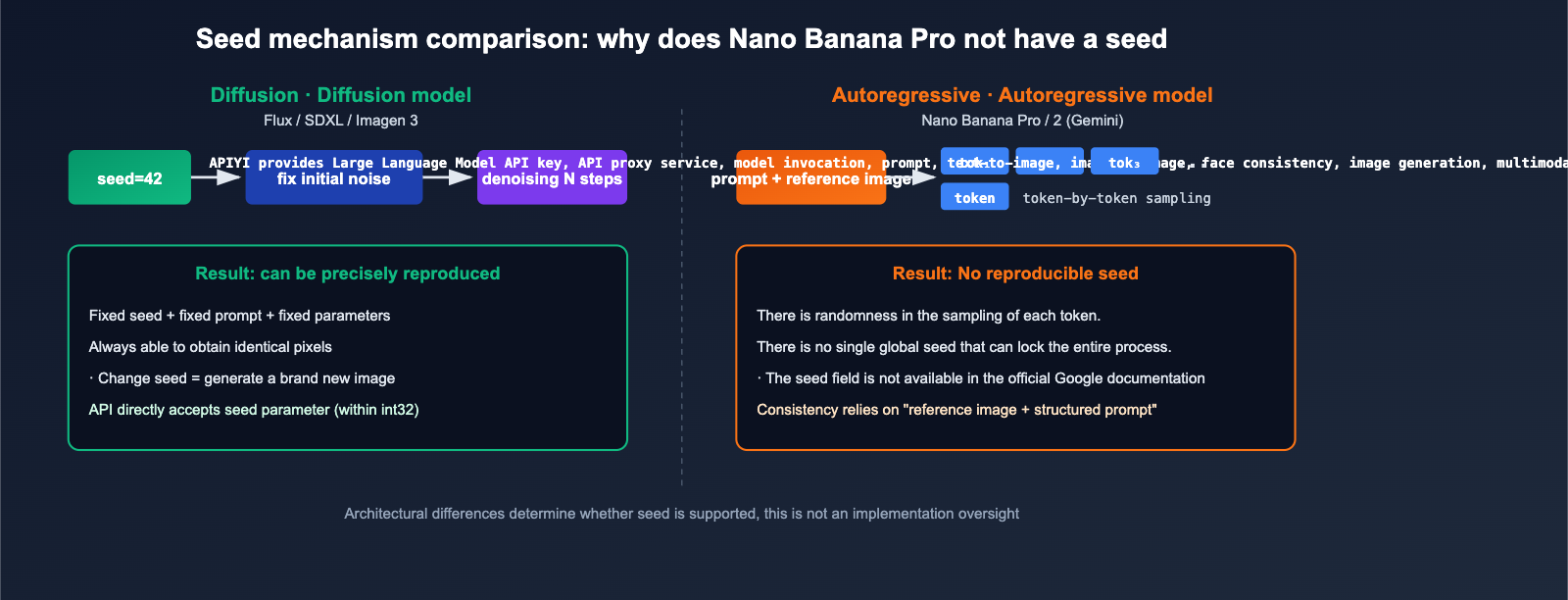
Unlike diffusion models like Flux or Stable Diffusion, Nano Banana Pro is based on Google's Autoregressive Gemini architecture. The source of randomness for these models is entirely different from diffusion models:
- Diffusion models: Fixed seed → fixed initial noise → same sampling steps → precise reproducibility.
- Autoregressive models: Token-by-token sampling, where randomness stems from sampling decisions like top-k / top-p / temperature. There is no single "seed" that can lock an entire generated image.
So, Nano Banana Pro not having a seed isn't an oversight; it's that the architecture doesn't support this type of reproducibility semantically.
🎯 Cognitive Correction: Be cautious when you see "third-party interfaces that support the seed parameter for Nano Banana Pro"—that’s usually just a placeholder field in the API proxy service layer, which has no reproducible effect on the actual Google model. When calling Nano Banana Pro via APIYI (apiyi.com), we recommend omitting the seed field and using the four official methods for consistency described later in this article.
What the "Invalid value at 'generation_config.seed' (TYPE_INT32)" Error Actually Means
Here is the error message provided by the user:
[&{{Invalid value at 'generation_config.seed' (TYPE_INT32),
   230718326286594 (request id: 2026041422181323975211237876978)
   v_api_biz_error 400} 400 }]
There are two layers of information here that are worth breaking down.
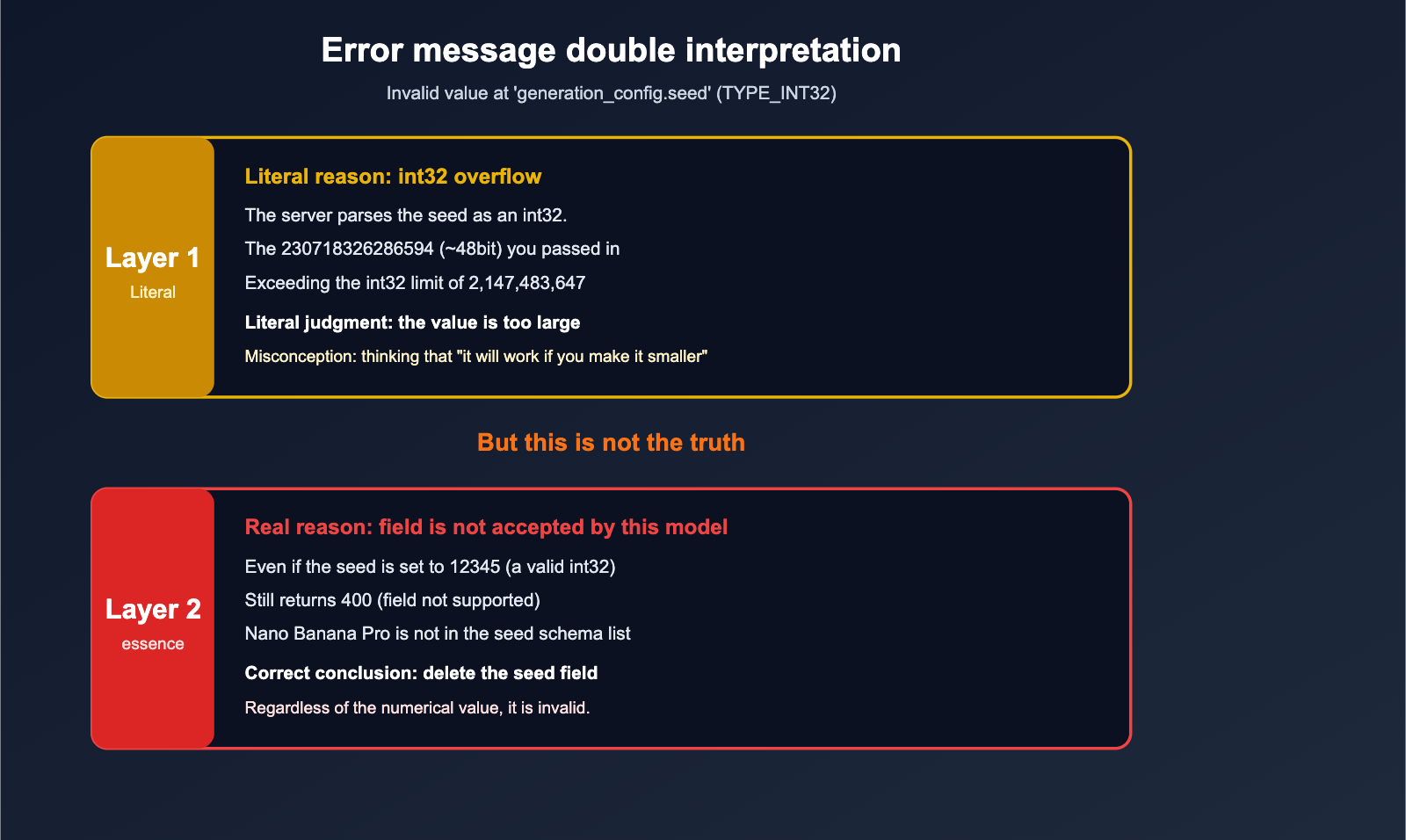
Layer 1: The Literal Meaning
- 400 Bad Request: The parameter validation failed.
- TYPE_INT32: The server expects the
seedfield to be anint32. - The value you passed,
230718326286594, is a nearly 48-bit integer, which far exceeds the maximum value for anint32(2,147,483,647).
So, literally, the server is saying: "I'm trying to parse this seed value as an int32, but the value has overflowed."
Layer 2: The Real Reason (More Important)
Don't be misled by the literal meaning. Even if you were to shrink the seed to fit within the int32 range (e.g., 12345), you would still receive a 400 error. The error message might simply change to Unknown field or generation_config.seed is not supported for this model. This means:
- For the Nano Banana Pro model,
generation_config.seedis an unsupported field. - In the Google server's validation path for unknown fields, it performs type checking against the known proto schema first. Since
seedhappens to be defined as anint32in the general GeminiGenerationConfigproto, it throws theTYPE_INT32error first. - The real problem isn't the value itself; it's that the model shouldn't be receiving this field at all.
Comparison Across Other Models
- Gemini Text Models (Gemini 2.5 Pro / Flash): SDK support for
seedhas fluctuated historically; some versions only had it defined in the underlying proto without being exposed in the SDK. - Vertex AI Models: Some models have officially enabled
seedas a reproducible sampling parameter. - Nano Banana Pro / Nano Banana 2 (Image Models): Explicitly do not support
seed, regardless of how you try to inject it.
What to Do Without a Seed: 4 Consistency Alternatives
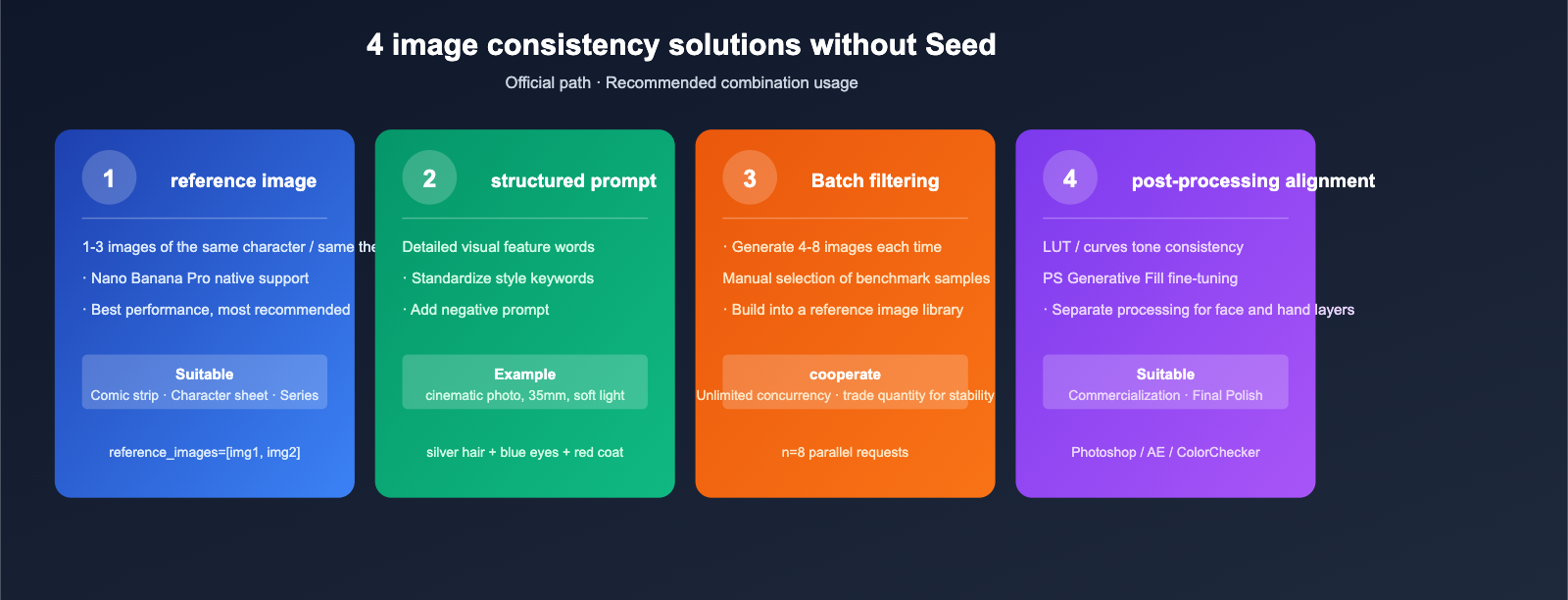
Although you can't use a seed to lock in randomness, image consistency (same character / same scene / same style) can still be achieved through mechanisms officially supported by Nano Banana Pro.
Option 1: Reference Images
This is the most direct and effective method:
- Attach 1-3 reference images of the same character, object, or scene in your prompt.
- Nano Banana Pro's autoregressive architecture leverages reference images well for "same-theme regeneration."
- Best for: Comics, character sheets, and product series.
Option 2: Structured Prompts to Lock Key Features
"Lock" the randomness within the prompt itself:
- List detailed visual features (hair color, eye color, clothing, composition, lighting).
- Use consistent style keywords (e.g.,
cinematic photo, 35mm, soft rim light). - Use negative descriptions to exclude unwanted directions.
Option 3: Batch Generation + Manual Selection
Since randomness isn't reproducible, use "quantity to trade for consistency":
- Generate 4-8 images at a time.
- Manually select the one that best fits your benchmark.
- Use that image as a reference image for subsequent generations.
Option 4: Post-Processing Alignment (PS / AE / Color Management)
For commercial output:
- Use color matching tools (LUTs / curves) to unify tones.
- Use Photoshop Generative Fill for local fine-tuning.
- Perform layer-based processing on key areas (faces, hands).
🎯 Consistency Pro-Tip: The truly stable approach is a combination of "Reference Images + Structured Prompt." The advantage of using APIYI (apiyi.com) to initiate multiple parallel requests without concurrency limits really shines in these "quantity for consistency" scenarios, significantly shortening the total time from generation to selection.
Official Parameter Quick Reference & Error Code Mapping
| Field | Nano Banana Pro Supported? | Notes |
|---|---|---|
aspect_ratio |
✅ Supported | 9 aspect ratios (1:1 / 16:9 / 21:9, etc.) |
resolution |
✅ Supported | 1K / 2K / 4K |
response_modalities |
✅ Supported | text / image / mixed |
| reference images | ✅ Supported | 1-3 reference images |
seed / generation_config.seed |
❌ Not Supported | Passing this will trigger a 400 error |
random_seed |
❌ Not Supported | Same as above |
temperature |
⚠️ May not take effect | Image models don't use sampling temperature |
top_k / top_p |
⚠️ Not for image models | These are for text models |
Quick Start: How to Call Without Triggering Seed Errors
Python Example (OpenAI Compatible + APIYI API proxy service)
from openai import OpenAI

client = OpenAI(
    base_url="https://api.apiyi.com/v1",
    api_key="YOUR_API_KEY",
)

# ✅ Correct: Omit the seed, rely on prompt + reference images for face consistency
resp = client.images.generate(
    model="nano-banana-pro",
    prompt=(
        "A young woman with silver hair and blue eyes, "
        "wearing a red coat, cinematic photo, 35mm, soft rim light"
    ),
    size="2048x2048",
    n=4,                      # Generate 4 images at once for manual selection
)
for i, img in enumerate(resp.data):
    print(f"Image {i}: {img.url}")
📎 Expand to view advanced calls with reference images
# Note: Nano Banana Pro officially supports reference images, but the OpenAI SDK
# Images endpoint requires using the /chat/completions multimodal structure
# for native reference image scenarios.
# Pseudo-code example:

messages = [
    {"role": "user", "content": [
        {"type": "image_url", "image_url": {"url": "https://.../ref1.jpg"}},
        {"type": "image_url", "image_url": {"url": "https://.../ref2.jpg"}},
        {"type": "text", "text": "Maintain character appearance consistency, change to a morning beach scene"},
    ]}
]
# Call the endpoint that supports image output to align with Nano Banana Pro's native multimodal capabilities
Error Example (Will trigger a 400)
# ❌ This code will trigger a TYPE_INT32 / Invalid value error
resp = client.images.generate(
    model="nano-banana-pro",
    prompt="a cute corgi",
    extra_body={"generation_config": {"seed": 230718326286594}},
)
# → 400 Invalid value at 'generation_config.seed' (TYPE_INT32)
🎯 Migration Tip: When migrating from diffusion models (Flux / SDXL / Imagen 3) to Nano Banana Pro, make sure to completely remove the seed field from your legacy code. If your business requires "reproducibility," keep Flux as a backup channel. Through APIYI (apiyi.com), you can run multiple models under the same account without needing to manage separate accounts.
3 Suggestions for Handling Seed Errors
Suggestion 1: Remove the seed field
The simplest approach—remove all instances of seed, generation_config.seed, and random_seed from your code. This is the only way to get Nano Banana Pro working properly.
Suggestion 2: Implement a compatibility layer
If your code needs to support both Flux / SDXL (which support seeds) and Nano Banana Pro (which doesn't), you can implement model-aware logic in your client:
def build_params(model, prompt, seed=None):
    params = {"model": model, "prompt": prompt}
    # Only include seed for models that support it
    if seed is not None and model.startswith(("flux", "sdxl", "imagen")):
        params["seed"] = seed
    # Nano Banana Pro / Nano Banana 2 automatically ignores the seed
    return params
Suggestion 3: Use request_id for tracking at the business layer
Not having a seed doesn't mean you can't track versions. By keeping a record of the request_id + prompt + reference image hash for every call, you can at least trace "how it was generated at the time," even if you can't perfectly reproduce it.
FAQ
Q1: Why do the results for the same prompt differ every time?
Because the autoregressive sampling in Nano Banana Pro is inherently stochastic and lacks a reproducibility entry point. This isn't a bug; it's a design choice of the architecture. To achieve better stability, use a combination of a reference image and a structured prompt.
Q2: I'm getting the same error with Nano Banana 2. Does it also lack support?
Yes. Nano Banana 2 (gemini-3.1-flash-image-preview) also does not support seeds, as it belongs to the same architectural family as Nano Banana Pro, differing only in speed and positioning.
Q3: Are third-party claims of "enabling seed support for Nano Banana Pro" real?
Most likely, they are just placeholder implementations in an API proxy service—they accept the seed you provide before calling Google, but they don't actually pass it to Google (doing so would trigger an error). It has no effect on the reproducibility of the actual image output. If you want an API proxy service that transparently passes official parameters, choose a platform with higher transparency, such as APIYI (apiyi.com).
Q4: Will the same model on Vertex AI support seeds?
As of the time of writing (April 2026), the image generation interface for gemini-3-pro-image in the Vertex AI documentation does not expose a seed parameter either. While some other Gemini models on Vertex AI do support seeds, they cannot be used interchangeably across different models.
Q5: Why doesn't temperature work either?
Because temperature is primarily used for token sampling in Large Language Models. Nano Banana Pro is an image generation endpoint, and the image sampling path doesn't have a direct mapping to temperature; passing it may be ignored or result in a 400 error.
Q6: Is there a way to "lock in" the style across multiple generations?
Yes. We recommend this trio: (a) use an "anchor image" as a reference; (b) fix a set of prompt template keywords; and (c) build a library of your best generated samples as reference images—the more you use them, the more stable your results will be. With the unlimited concurrency capabilities of APIYI (apiyi.com), you can generate 4-8 images at once to select your anchor image, significantly shortening the cycle for tuning consistency.
Summary: The Architectural Truth Behind Seed Errors
Returning to our opening question—"Does Nano Banana Pro support the seed parameter?"—the answer is a definite no.
- Literal Error: The
Invalid value at 'generation_config.seed' (TYPE_INT32)is simply a symptom of server-side parameter validation. - Root Cause: Nano Banana Pro is built on an autoregressive Gemini architecture, which by design lacks a seed entry point.
- Reproducible Alternatives: Use a reference image + structured prompt + batch selection + post-processing.
- Engineering Advice: Remove all seed fields, implement a model-aware compatibility layer, and use
request_idfor traceability.
Nano Banana 2 also doesn't support it, so there's no need to keep trying—if your workflow relies on seeds, keep diffusion-based models (Flux / SDXL / Imagen 3) as a fallback.
🎯 Implementation Tip: On the APIYI (apiyi.com) platform, you can use a single account to concurrently call Nano Banana Pro (no seed, primary image generation) and Flux / Imagen 3 (with seed, for reproducible backups). With recharge discounts as low as 15% off and no concurrency limits, it's perfect for workflows where you need to "generate multiple images at once to select for consistency." Clean the seed fields out of your code today and switch to using reference images + structured prompts; you'll immediately feel the true power of Nano Banana Pro.
— APIYI Team (APIYI apiyi.com Technical Team)


