
Many developers calling the Nano Banana Pro API (which corresponds to the Google gemini-3-pro-image-preview model) for the first time fall into the same trap: they reuse the size: "1024x1024" parameter from the OpenAI / DALL-E era. As a result, the image resolution either refuses to change, the request returns a 400 error, or the parameter is silently ignored by the server.
This is the most common "high-frequency bug" when calling the Nano Banana Pro API. The correct approach is: resolution is determined by two parameters, imageConfig.imageSize (for clarity: 1K/2K/4K) and imageConfig.aspectRatio (for aspect ratio: 1:1/16:9/etc.). Do not pass any size field. This article explains everything you need to know in 600 words and provides copy-paste-ready curl, Python, and Node.js code.
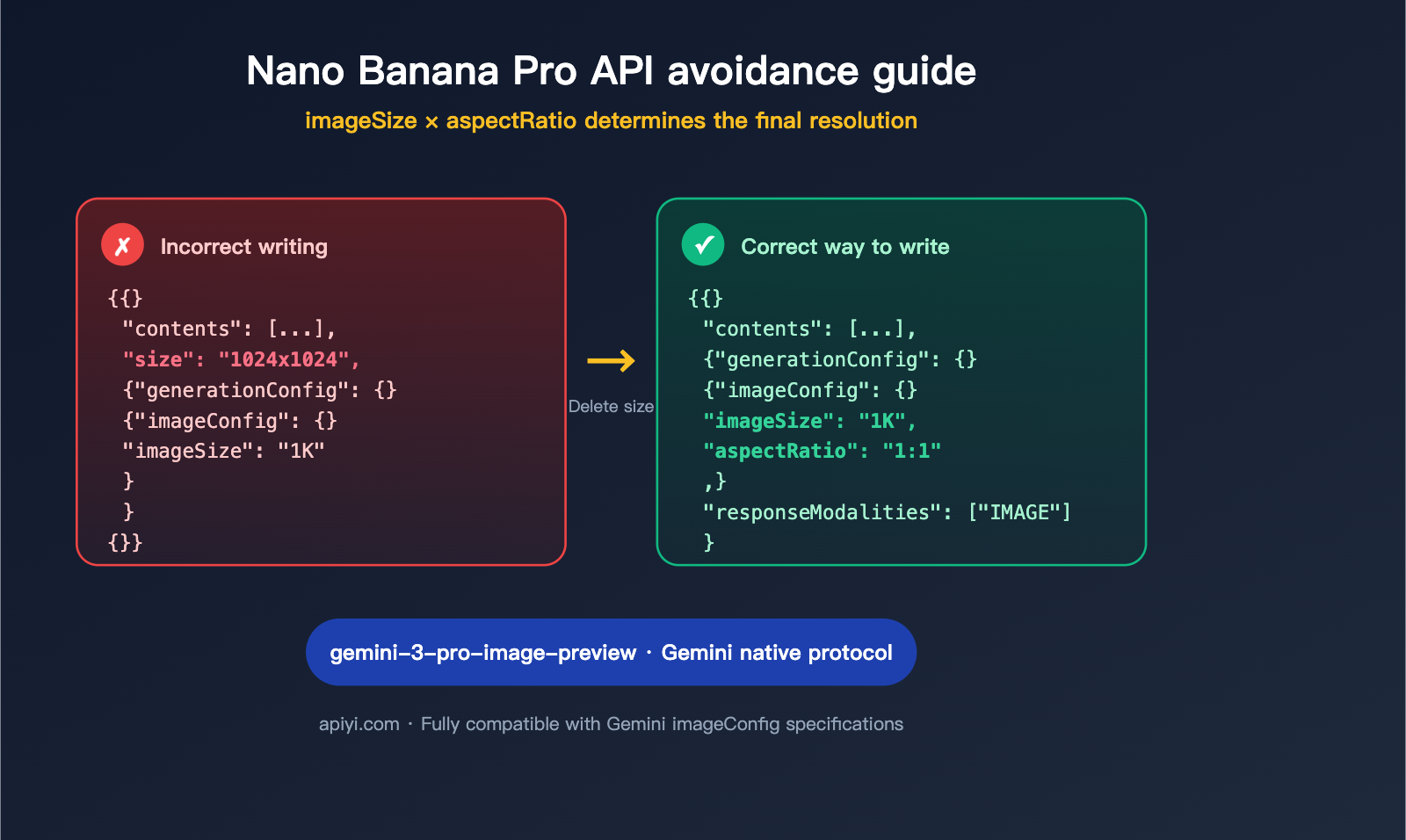
Core Essentials for Calling the Nano Banana Pro API
Before you start pasting code, keep these three golden rules in mind—once you understand these, 90% of this article is just details:
- Model Name Mapping: Nano Banana Pro =
gemini-3-pro-image-preview(also known as Gemini 3 Pro Image), which belongs to the Google Gemini 3 series of image generation/editing models. Some in the industry call it Nano Banana 2, but it's essentially the same thing. - Native Gemini Protocol: It does not use the OpenAI Chat Completions compatible protocol. The request path is
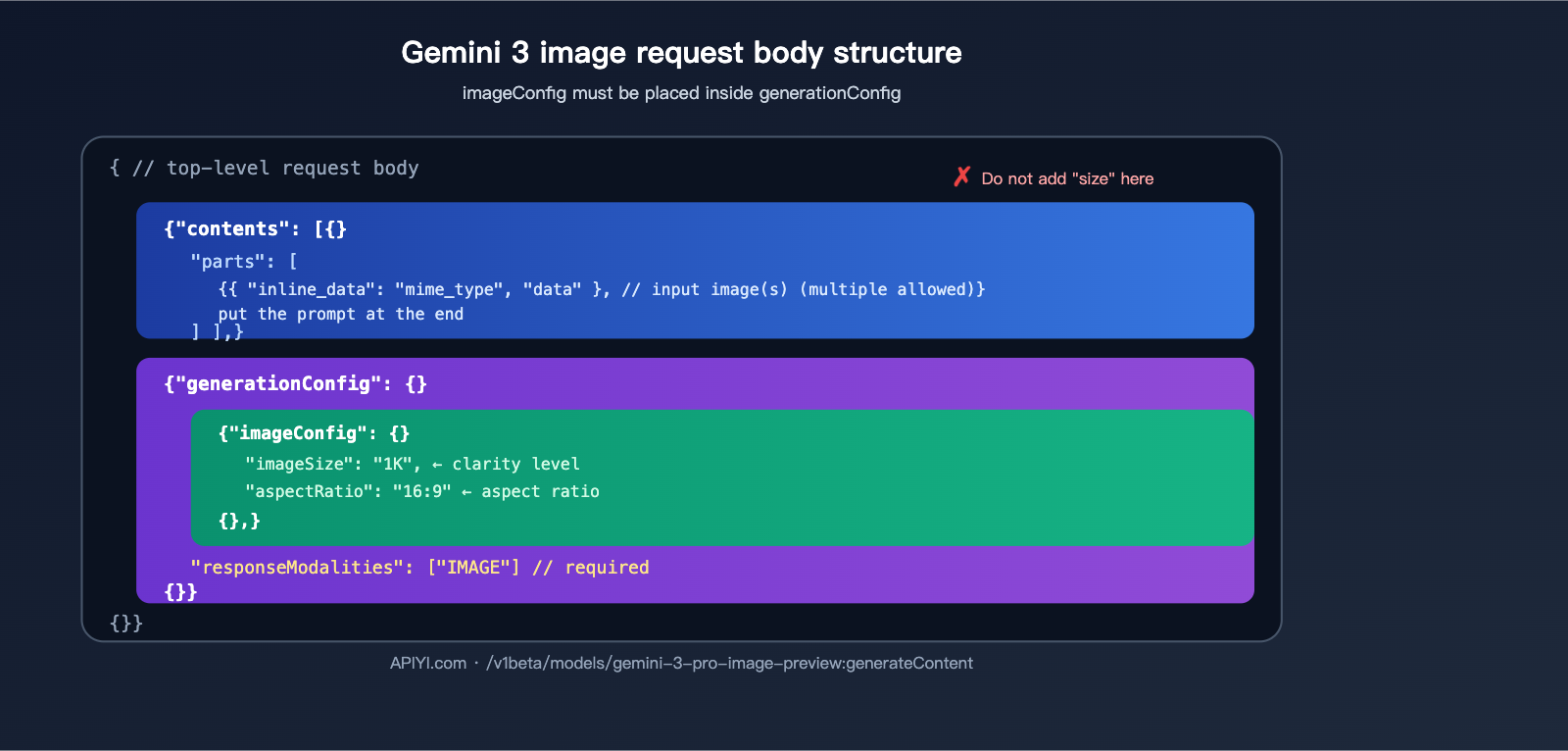
:generateContent, and the top-level fields in the request body arecontents+generationConfig. There are nomessagesand no OpenAI-stylesizefields. - Resolution = imageSize × aspectRatio:
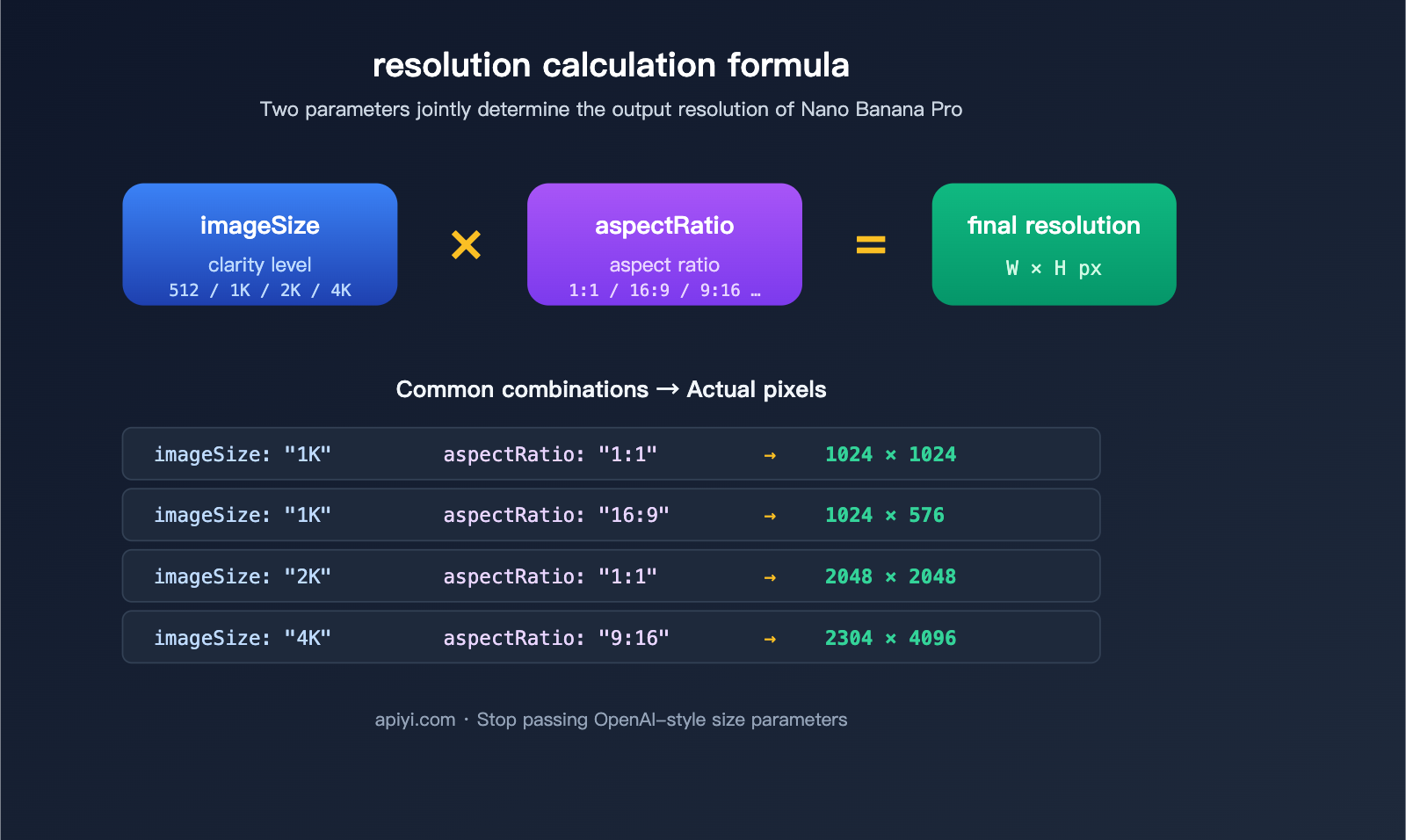
imageSizecontrols the clarity level (512 / 1K / 2K / 4K), andaspectRatiocontrols the frame ratio (1:1 / 16:9 / 9:16 / etc.). Together, they determine the final output pixels.
📌 One-sentence summary: When calling Nano Banana Pro using the Gemini protocol, completely forget your OpenAI
size: "1024x1024"habits. The APIYI (apiyi.com) Nano Banana Pro endpoint fully retains the native Gemini protocol; anyimageConfigsyntax valid in the official Google documentation will also work on APIYI.
Quick Reference for Nano Banana Pro Parameters
| Parameter | Location | Purpose | Example Values |
|---|---|---|---|
imageSize |
generationConfig.imageConfig |
Clarity level | "512" / "1K" / "2K" / "4K" |
aspectRatio |
generationConfig.imageConfig |
Aspect ratio | "1:1" / "16:9" / "9:16" / "4:3", etc. |
responseModalities |
generationConfig |
Output modality | ["IMAGE"] (Required) |
contents[].parts[].text |
contents |
Text prompt | Free text |
contents[].parts[].inline_data |
contents |
Input image (base64) | Includes mime_type and data |
⚠️ The
sizefield not listed in the table: Because it is not a valid parameter for the Gemini protocol, do not pass it.
Why you shouldn't use the size parameter: A protocol-level explanation
This is the most critical section of this article. We’ll break this down across three levels to help you fully understand why.
Protocol Level: Gemini and OpenAI are two independent specifications
OpenAI’s image API (DALL-E 2/3, gpt-image-1) uses a top-level size: "1024x1024" string parameter. In contrast, the Google Gemini 3 image API is designed with a nested imageConfig object. These two specifications are completely independent. Nano Banana Pro follows the native Gemini protocol, so:
- ❌
size: "1024x1024"— The Gemini protocol does not have this field. - ❌
size: "1K"— This field does not exist. - ❌
n: 4— There is no field for "generating N images at once" like in OpenAI's API. - ✅
imageConfig.imageSize: "1K"— Correct. - ✅
imageConfig.aspectRatio: "16:9"— Correct.
Behavioral Level: What happens if you pass size anyway?
There are usually three ways the server handles this, and none of them are what you want:
- Silent Ignore: The upstream gateway treats unknown fields as invalid and drops them. You might think it worked, but you'll actually get the default 1K 1:1 output.
- Immediate 400 Error: Gateways with strict schema validation will reject the request outright due to the unknown field.
- Impact on Billing/Routing: Some proxy layers use the
sizeparameter as a routing signal, which might cause your request to be matched to the wrong endpoint version.
Engineering Level: Avoiding technical debt
Many teams wrap multiple APIs—like OpenAI, Gemini, and Stability—within the same invocation layer and habitually reuse a "generic size field." While it might look elegant, it's actually a breeding ground for bugs. When calling native Gemini interfaces like Nano Banana Pro, we recommend using a separate transformation pipeline. Explicitly map your size to imageConfig.imageSize + imageConfig.aspectRatio instead of passing the raw size through.
💡 Tip: When using APIYI (apiyi.com) to call Nano Banana Pro, write a small parameter conversion function. Break down strings like
"1024x1024"intoimageSize: "1K"+aspectRatio: "1:1"to prevent mixed parameters at the source.
imageSize × aspectRatio complete reference table
imageSize levels and billing
| imageSize | Approx. Resolution Limit | Output Tokens | Unit Price (Ref) | Recommended Use |
|---|---|---|---|---|
"512" |
512×512 level | Lower | Cheapest | Thumbnails / Drafts |
"1K" |
1024×1024 level | ~1120 | ≈ $0.134 | Default recommendation |
"2K" |
2048×2048 level | ~1120 | ≈ $0.134 | HD Posters |
"4K" |
4096×4096 level | ~2000 | ≈ $0.24 (~80% more) | Print-ready |
💰 Cost Note: 4K is about 80% more expensive than 1K/2K, so don't default to 4K for everything. 1K is sufficient for most Web/App scenarios; only use 4K when ultra-high resolution is required. Please refer to the official APIYI (apiyi.com) pricing page for the latest rates.
aspectRatio complete support list
| Ratio | Use Case |
|---|---|
"1:1" |
Avatars / Social media squares |
"16:9" |
Landscape video covers / Desktop wallpapers |
"9:16" |
Portrait short videos / Mobile wallpapers |
"4:3" |
Traditional landscape photos |
"3:4" |
Traditional portrait photos |
"3:2" / "2:3" |
DSLR standard ratios |
"4:5" / "5:4" |
Instagram posts |
"21:9" |
Ultra-wide cinematic |
"1:4" / "4:1" |
Long banners |
"1:8" / "8:1" |
Extreme long strips for special use |
Common combinations → Final pixel mapping
| imageSize | aspectRatio | Approx. Output Pixels |
|---|---|---|
1K |
1:1 |
1024 × 1024 |
1K |
16:9 |
1024 × 576 |
1K |
9:16 |
576 × 1024 |
2K |
1:1 |
2048 × 2048 |
2K |
16:9 |
2048 × 1152 |
4K |
1:1 |
4096 × 4096 |
4K |
9:16 |
2304 × 4096 |
4K |
21:9 |
4096 × 1728 |
Note: Actual pixel dimensions may have minor adjustments of ±N pixels due to internal model alignment rules, but this does not affect the visual clarity tier.
How to Properly Call the Nano Banana Pro API
Below are minimal, runnable examples in three different languages. All three examples perform the same task: input an original image + a prompt, and output a 1K 1:1 image.
curl Version (Most straightforward, great for debugging)
curl -X POST \
  "https://api.apiyi.com/v1beta/models/gemini-3-pro-image-preview:generateContent" \
  -H "Authorization: Bearer YOUR-APIYI-KEY" \
  -H "Content-Type: application/json" \
  -d '{
    "contents": [{
      "parts": [
        {
          "inline_data": {
            "mime_type": "image/png",
            "data": "iVBORw0KGgoAAAANSUhEUgAA...(base64 of original image)"
          }
        },
        {
          "text": "Convert this image to cyberpunk style, keeping the character pose"
        }
      ]
    }],
    "generationConfig": {
      "responseModalities": ["IMAGE"],
      "imageConfig": {
        "aspectRatio": "1:1",
        "imageSize": "1K"
      }
    }
  }'
Python Version (Recommended: use requests directly; no SDK dependencies)
import base64
import requests

with open("input.png", "rb") as f:
    img_b64 = base64.b64encode(f.read()).decode()

resp = requests.post(
    "https://api.apiyi.com/v1beta/models/gemini-3-pro-image-preview:generateContent",
    headers={
        "Authorization": "Bearer YOUR-APIYI-KEY",
        "Content-Type": "application/json",
    },
    json={
        "contents": [{
            "parts": [
                {"inline_data": {"mime_type": "image/png", "data": img_b64}},
                {"text": "Convert this image to cyberpunk style, keeping the character pose"},
            ]
        }],
        "generationConfig": {
            "responseModalities": ["IMAGE"],
            "imageConfig": {
                "aspectRatio": "1:1",
                "imageSize": "1K",
            },
        },
    },
    timeout=120,
)

data = resp.json()
out_b64 = data["candidates"][0]["content"]["parts"][0]["inline_data"]["data"]
with open("output.png", "wb") as f:
    f.write(base64.b64decode(out_b64))
Node.js Version (Native fetch to avoid SDKs stripping imageConfig)
import fs from "node:fs";

const imgB64 = fs.readFileSync("input.png").toString("base64");

const resp = await fetch(
  "https://api.apiyi.com/v1beta/models/gemini-3-pro-image-preview:generateContent",
  {
    method: "POST",
    headers: {
      "Authorization": "Bearer YOUR-APIYI-KEY",
      "Content-Type": "application/json",
    },
    body: JSON.stringify({
      contents: [{
        parts: [
          { inline_data: { mime_type: "image/png", data: imgB64 } },
          { text: "Convert this image to cyberpunk style, keeping the character pose" },
        ],
      }],
      generationConfig: {
        responseModalities: ["IMAGE"],
        imageConfig: {
          aspectRatio: "1:1",
          imageSize: "1K",
        },
      },
    }),
  },
);

const data = await resp.json();
const outB64 = data.candidates[0].content.parts[0].inline_data.data;
fs.writeFileSync("output.png", Buffer.from(outB64, "base64"));
🔧 Why we strongly recommend native
fetch/requests: It's a known industry issue that some SDKs (including earlier versions of LiteLLM or certain Google Node SDK versions) filter outimageConfigas an unknown field, causingimageSize/aspectRatioto be ignored. Constructing the JSON request body directly ensures you avoid this pitfall 100%. If you must use an SDK, please update to the latest version and verify the final body in your request interceptor.
Troubleshooting: 6 Most Common Errors
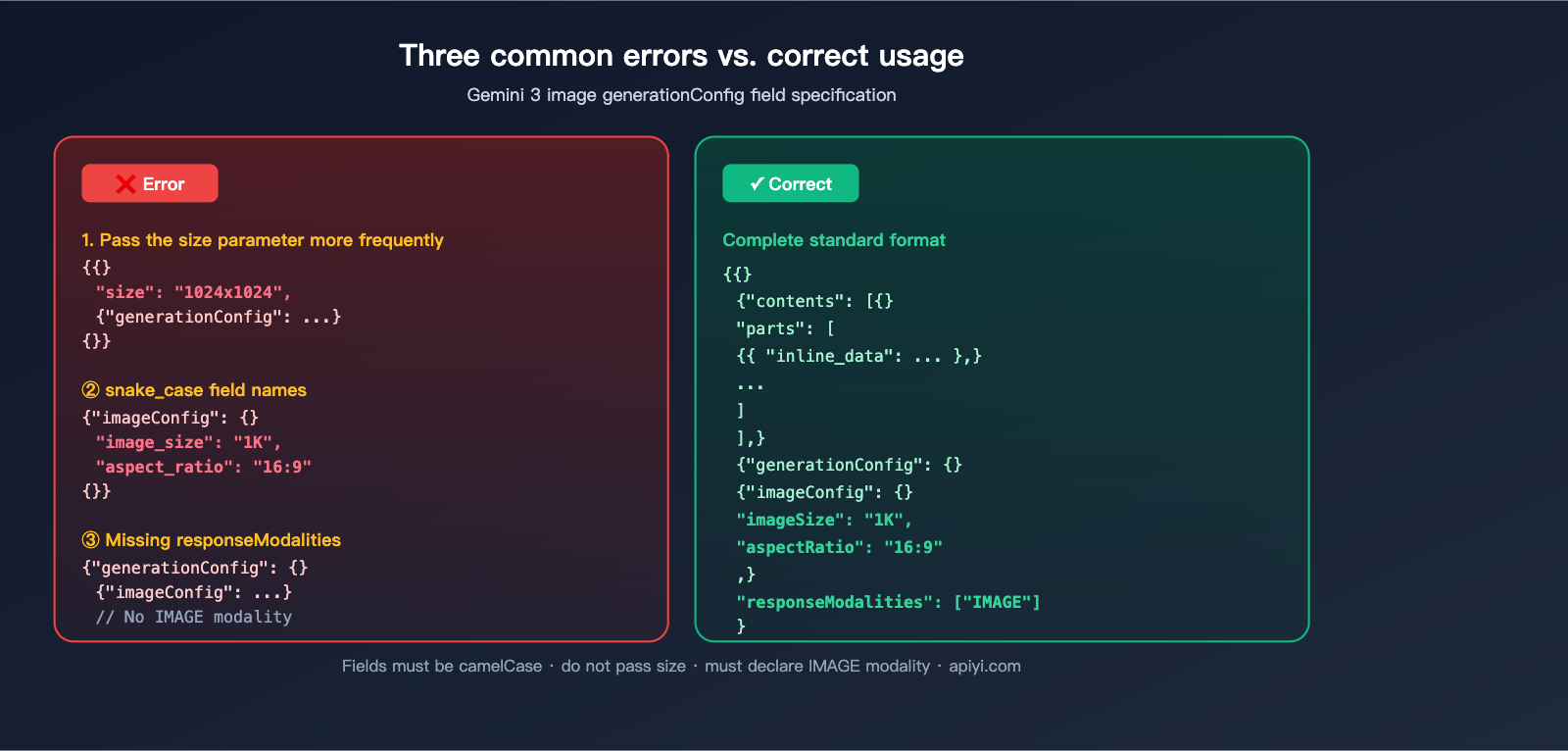
Pitfall 1: Including OpenAI-style size parameter
// ❌ Wrong: 'size' is not a valid field in the Gemini protocol
{
  "contents": [...],
  "size": "1024x1024",
  "generationConfig": { "imageConfig": { "imageSize": "1K", "aspectRatio": "1:1" } }
}

// ✅ Right: Remove 'size', keep only 'imageConfig'
{
  "contents": [...],
  "generationConfig": { "imageConfig": { "imageSize": "1K", "aspectRatio": "1:1" }, "responseModalities": ["IMAGE"] }
}
Pitfall 2: Using snake_case for field names
The imageConfig fields for the Gemini 3 image API use camelCase: imageSize, aspectRatio, responseModalities. Common mistakes:
- ❌
image_size/aspect_ratio/response_modalities - ✅
imageSize/aspectRatio/responseModalities
Pitfall 3: imageConfig being silently stripped by SDKs
As mentioned, some SDK versions filter out unknown fields. Debugging steps:
- Print the actual HTTP body before and after the SDK call.
- Use
mitmproxyorCharlesto capture the actual outgoing request. - If you find
imageConfigis missing, switch to nativefetch/requests.
Pitfall 4: Forgetting responseModalities
// ❌ Without setting responseModalities, it might return text instead of an image
{ "generationConfig": { "imageConfig": {...} } }

// ✅ Must explicitly declare that the response modality includes IMAGE
{ "generationConfig": { "imageConfig": {...}, "responseModalities": ["IMAGE"] } }
Pitfall 5: No exponential backoff for 429 errors
When upstream load is saturated, you may receive:
{ "error": { "message": "Upstream load for this group is saturated, please try again later", "type": "upstream_error", "code": 429 } }
The correct approach is exponential backoff (3s → 6s → 12s). Do not retry immediately, as it only worsens congestion:
import time

for attempt in range(3):
    resp = requests.post(url, json=body, headers=headers, timeout=120)
    if resp.status_code != 429:
        break
    time.sleep(3 * (2 ** attempt))   # 3s, 6s, 12s
Pitfall 6: Incorrect placement of multiple reference images
Nano Banana Pro supports multi-image input (original image + multiple reference images). All images should be provided as multiple inline_data items in the parts array, with the text prompt placed at the end:
// ✅ Right: Images first, text last
"parts": [
  { "inline_data": { "mime_type": "image/png", "data": "original_image_base64" } },
  { "inline_data": { "mime_type": "image/png", "data": "ref_image1_base64" } },
  { "inline_data": { "mime_type": "image/png", "data": "ref_image2_base64" } },
  { "text": "Transfer the style of the original image to match the tone of ref1, using ref2 for composition." }
]
🧰 Summary: Turn these 6 points into your internal "Nano Banana Pro Checklist." Reviewing it before implementing a new call will save you from 90% of low-level bugs. APIYI's Nano Banana Pro endpoint fully follows the Gemini protocol, so all these tips apply.
User Invocation Workflow Breakdown: Where Things Usually Go Wrong
Many readers have shared logs that look almost identical to this workflow:
Frontend POST /api/generate
  → server.js extracts parameters
  → Checks if modelKey.startsWith('nano-banana')
  → _generateViaGemini() assembles request body
  → POST https://api.apiyi.com/v1beta/models/gemini-3-pro-image-preview:generateContent
  → Returns / Retries
Let's break down the nodes where things are most likely to go wrong:
| Stage | Common Issues | Recommendation |
|---|---|---|
| Frontend Params | Habitually passing size: "1024x1024" |
Split into imageSize + aspectRatio fields |
| server.js Body Assembly | Accidentally passing size to Gemini |
Explicitly delete size in your assembly function |
| Model Routing | Routing nano-banana to 1.5 instead of 3 Pro |
Use the exact name gemini-3-pro-image-preview |
| Request Sending | Using an SDK version with strict schema validation | Switch to native fetch or update SDK to the latest version |
| Error Handling | Throwing 429 errors directly to the user | Implement exponential backoff and retry 3 times |
| Response Parsing | Defaulting to text instead of IMAGE |
Use the correct path: candidates[0].content.parts[0].inline_data.data |
📋 TL;DR: Your workflow structure is correct. Just strip out that redundant
sizefield during parameter extraction and ensure yourserver.jsdoesn't accidentally inject it back outside ofgenerationConfig, and your pipeline will be clean.
FAQ
Q1: Are Nano Banana Pro and Nano Banana 2 the same thing?
Yes. Many in the community refer to Gemini 3 Pro Image (gemini-3-pro-image-preview) as Nano Banana 2 or Nano Banana Pro; these three names refer to the same model. On APIYI (apiyi.com), always use the model name specified in the official documentation.
Q2: What happens if I don't pass imageConfig?
The model will output using its internal defaults (usually 1K resolution at 1:1 aspect ratio). If you don't care about resolution, you can omit it; if you have specific requirements for the frame, you must explicitly pass imageConfig.
Q3: Can I use the Gemini protocol but pass size like I do with OpenAI?
You can't do this reliably. The Gemini protocol doesn't have a size field, and mixing them will only lead to unpredictable behavior. Standardizing on imageConfig.imageSize + imageConfig.aspectRatio is the safest approach.
Q4: Does choosing 4K for imageSize guarantee better quality?
You'll get richer details, but the cost is nearly double (~$0.24 vs $0.134), and generation takes longer. 1K or 2K is usually sufficient for web/app assets. I recommend testing a set of real-world images and comparing them visually before deciding.
Q5: What's the difference between calling Nano Banana Pro via APIYI (apiyi.com) versus calling the official Google API directly?
APIYI provides unified OpenAI-style authentication (Bearer Token), a domestic-accessible gateway, and unified billing, while the invocation protocol itself remains identical to the native Gemini format. This means imageConfig, aspectRatio, and responseModalities found in Google's official docs work exactly the same way on APIYI.
Q6: Why is my output still 1K even though I set imageSize: "2K"?
The 3 most common reasons: (1) You're using an SDK that filters out unknown fields, (2) the field name is misspelled as image_size, or (3) the generationConfig nesting level is incorrect. Capture the actual network request to verify if the body matches the spec before troubleshooting the server side.
Q7: What should I do about upstream 429 rate limiting?
Implement exponential backoff retries (3s/6s/12s). If your business is latency-sensitive, consider switching groups or requesting a dedicated quota in your APIYI (apiyi.com) workspace. Never write an infinite loop that retries immediately; you'll just keep hitting the rate limiter's brakes.
Q8: Is there a limit to the number of reference images I can input?
The Gemini 3 image interface has a limit on the total size of images per request (usually measured in MB; check official docs for specifics). I recommend keeping reference images to 4-5 max and ensuring each is a reasonable size (resize before base64 encoding), otherwise, you'll trigger 413 errors or timeouts.
Summary: Committing the "Two-Parameter Resolution Method" to Muscle Memory
If you only take one thing away from this, make it this:
Nano Banana Pro's final output resolution =
imageConfig.imageSize×imageConfig.aspectRatio. Stop passing any OpenAI-stylesizefields.
Complete checklist:
- ✅ Model name:
gemini-3-pro-image-preview - ✅ Endpoint:
/v1beta/models/.../generateContent - ✅
generationConfig.imageConfig.imageSize∈512/1K/2K/4K - ✅
generationConfig.imageConfig.aspectRatio∈1:1/16:9/9:16/4:3/3:4/21:9/ … - ✅
generationConfig.responseModalitiesmust include"IMAGE" - ✅ Place multi-image inputs in the
partsarray, with the text prompt at the end - ✅ Handle 429 rate limits with exponential backoff (3s/6s/12s)
- ❌ Do not pass
size: "1024x1024" - ❌ Do not use
image_sizeoraspect_ratio(snake_case is incorrect) - ❌ Don't trust older SDKs to filter out unknown fields; capture traffic to verify first
📢 Final word: If you're integrating Nano Banana Pro via APIYI (apiyi.com), just copy the curl / Python / Node.js code templates provided in this article. All parameters strictly adhere to the native Gemini protocol—just copy-paste, swap in your API key, and you're good to go.
Author: APIYI Team · Continuously curating best practices for Large Language Model API invocation · apiyi.com


