
"I have an old 1024×1024 photo, can I upscale it to 8K or even 16K for printing?" This is the most common question users and designers were asking AI tools in 2026. There’s an ever-growing list of tools marketed as "image upscalers": some are true super-resolution models (Real-ESRGAN, Topaz Gigapixel, SUPIR, Magnific), others are native high-resolution generative models (Nano Banana Pro / Nano Banana 2), and some are just simple bicubic interpolation wrappers. They vary drastically in their underlying principles, performance ceilings, and operational costs. Choosing the wrong tool will either leave you with a blurry mess or an image filled with AI-generated "hallucinations."
In this article, we'll break down 6 mainstream contenders from a technical perspective: identifying which ones can natively output 8K or higher, which ones cap out at 4K, and which ones rely on tiling to stitch together ultra-high resolutions. All conclusions are based on primary English-language sources from 2025–2026, helping you choose the right tool the next time you need to "rescue" a small image.
The 3 Technical Paths for Image Upscaling
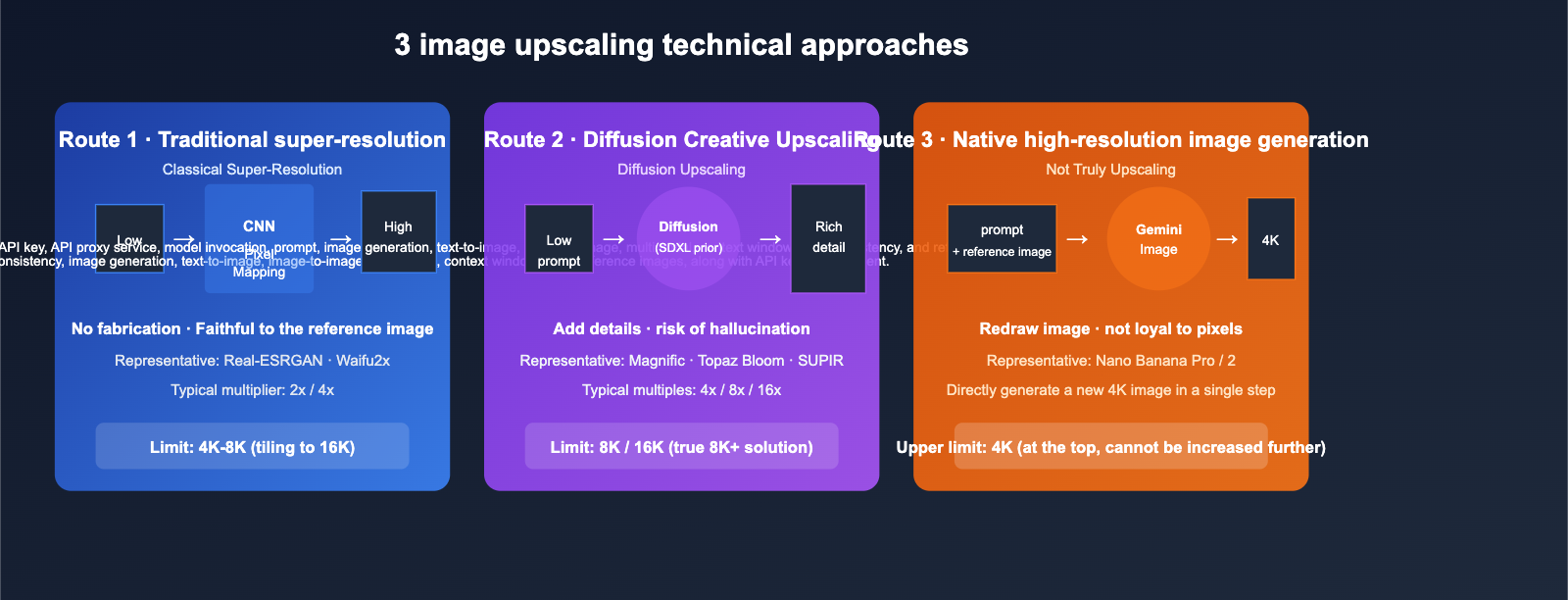
Before choosing a tool, you need to understand that "upscaling" actually involves three distinct approaches, each with different results and limitations.
Path 1: Classical Super-Resolution
Representatives: Real-ESRGAN, Waifu2x, early versions of ESRGAN.
- Principle: Uses CNNs to learn the mapping from "low-resolution to high-resolution," typically outputting at 2x / 4x.
- Features: Doesn't "invent" details; stays faithful to the original. Fast and low VRAM usage, open-source and free.
- Limitations: When faced with extremely blurry images or AI-generated content, it often produces a smooth, plastic appearance and lacks texture.
Path 2: Diffusion Upscaling
Representatives: Magnific AI, Topaz Gigapixel Bloom, SUPIR, Enhancor.
- Principle: Uses a diffusion model (typically SDXL or a proprietary model) as a "generative prior," progressively denoising based on low-resolution input while actively filling in textures and structures.
- Features: Sharper images with rich detail; ideal for photography and commercial posters.
- Limitations: High risk of "hallucinations"—the model might fabricate details that weren't in the original image (like text, facial features, or brand logos), which requires human oversight.
Path 3: Native High-Resolution Generation (Not Truly Upscaling)
Representatives: Nano Banana Pro (Gemini 3 Pro Image), Nano Banana 2 (Gemini 3.1 Flash Image).
- Principle: This doesn't upscale an existing image; instead, it regenerates a new 4K image based on text or a reference image.
- Features: High image integrity and aesthetic consistency.
- Limitations: Maximum native output is only 4K (approx. 3840×2160). If you want 8K, you must layer a traditional super-resolution tool on top, making this a "generate first, upscale later" two-step process.
🎯 First Principles of Tool Selection: First, ask yourself whether you are "rescuing an old image" or "creating a new, high-definition image." The former requires true upscaling models, while the latter is better handled by generation models like Nano Banana Pro. Teams looking to integrate multiple solutions can use the API proxy service at APIYI (apiyi.com) to invoke various generation/upscaling interfaces from different providers, saving you the hassle of managing multiple accounts.
title: "6 Main Image Upscaling Models Compared: Real-World Capabilities from 4K to 16K"
description: "A deep dive into 6 popular image upscaling models, comparing their strengths, limitations, and best use cases for everything from 4K to 16K resolution."
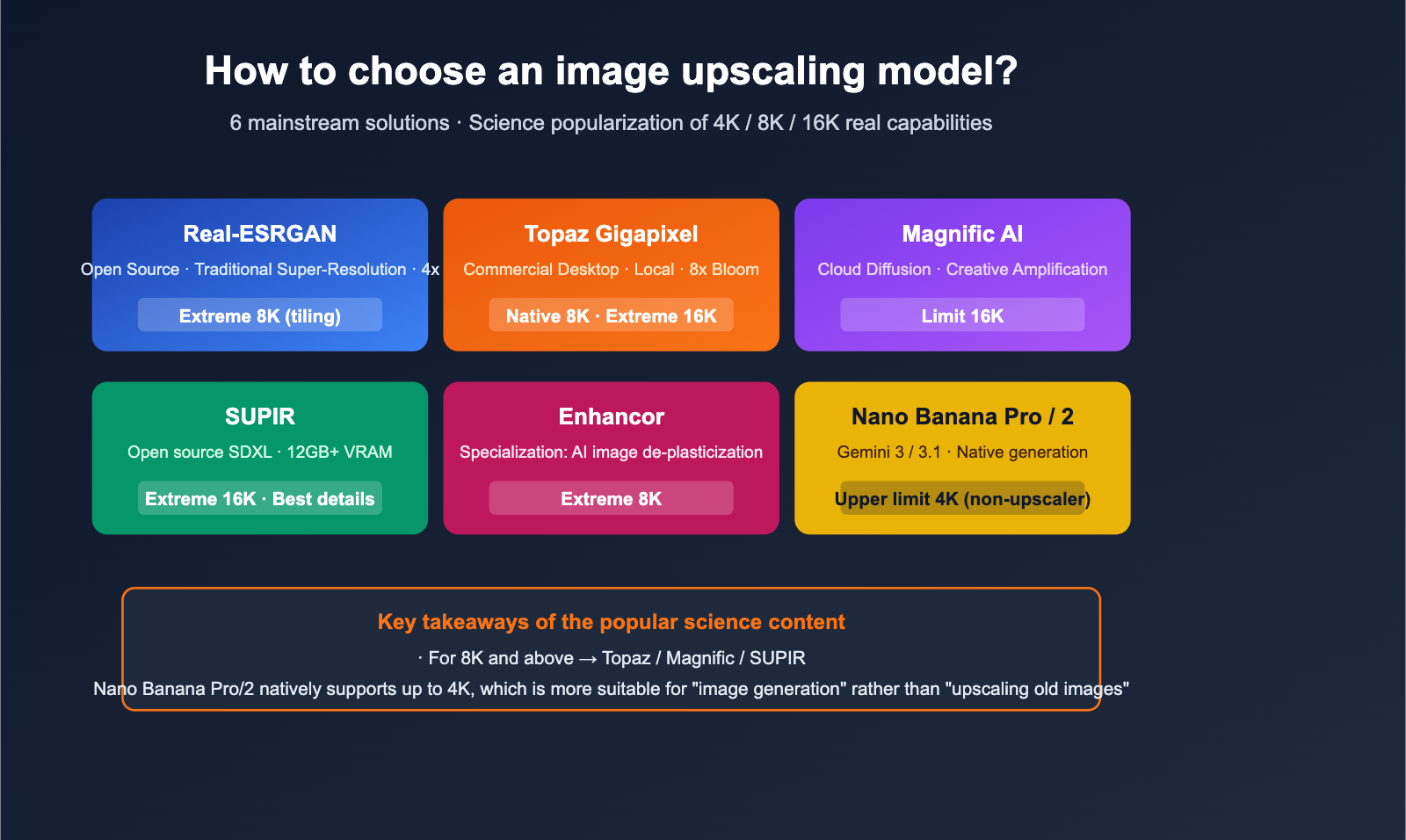
Here’s a breakdown of these models, ranked by their maximum resolution capabilities.
Real-ESRGAN: The Open-Source Classic, Using Tiling for 4K/8K
- Type: Classical Super-Resolution (SR)
- Max Upscale Factor: Official model is 4x; can achieve 8K or 16K lossless output via tiling workflows.
- Pros: Open-source and free, low VRAM requirements, and fast. It’s almost irreplaceable for offline scenarios or zero-budget projects.
- Cons: Cannot "hallucinate" details for images that are already extremely blurry or heavily compressed; textures tend to look a bit flat.
- Best For: Developers building automated batch image processing pipelines or as a baseline for open-source projects.
Topaz Gigapixel AI: The Commercial Benchmark, Local 8x Upscaling
- Type: Classical SR + Bloom diffusion mode (in newer versions)
- Max Resolution: Supports up to 8x magnification, easily handling native 8K output and beyond.
- Pros: Desktop-based, processes locally, keeps data off the cloud. The Bloom mode uses diffusion-based logic to fill in details; it’s the most mature workflow for professional photography.
- Cons: Requires a paid license; results for AI-generated images aren't as "aggressive" as Magnific or SUPIR.
- Best For: Professional photographers, print production, and studios with strict data privacy requirements.
Magnific AI: The Cloud-Based "Hallucination Engine," King of Creative Upscaling
- Type: Diffusion-based creative upscaling (SDXL-class)
- Max Resolution: Theoretically up to 16x; the new Precision mode is tailored for photographic upscaling.
- Pros: Richest details and the most "cinematic" look; superior at "re-imagining" AI-generated images compared to its peers.
- Cons: Cloud-only, subscription-based, and relatively expensive; it will "invent" details that weren't in the original image.
- Best For: E-commerce high-res assets, posters, and concept design where "visual impact" is the priority.
SUPIR: The Open-Source SOTA, Powerful but VRAM-Hungry
- Type: Diffusion-based creative upscaling, using SDXL as a generative prior
- Max Resolution: Up to 8K/16K with tiling; 4x-8x is standard.
- Pros: Best-in-class for repairing severely degraded images (old photos, low-res scans); open-source and free.
- Cons: Requires 12GB+ VRAM; due to high iteration counts, it is 10-50 times slower than Real-ESRGAN.
- Best For: Tech-savvy users with an RTX 4090 or cloud GPU who want to bring "ruined" images up to modern standards.
Enhancor: Specialized for AI Images, Cures the "Plastic Look"
- Type: Diffusion-based creative upscaling (specialized texture reconstruction)
- Features: Specifically targets the "smooth plastic skin" look common in AI-generated images, excelling at reconstructing textures for skin, fabric, and hair.
- Best For: Commercial output of portraits or avatars generated via Midjourney or SD.
Nano Banana Pro / Nano Banana 2: Native 4K, But Not a True Upscaler
- Type: Native high-resolution generative models (Gemini 3 Pro Image / Gemini 3.1 Flash Image)
- Max Resolution: Native 4K (approx. 3840×2160); Nano Banana 2 covers all tiers from 512 / 1K / 2K to 4K.
- Speed: Nano Banana 2 takes just 4-15 seconds for 1K, and 10-56 seconds for 4K.
- Important Note: These are not upscaling models. If you feed a low-res image to Nano Banana Pro/2 hoping for a "lossless upscale," the result will usually be a new 4K image generated based on the original, rather than an upscale that stays true to the original pixels. The ceiling is 4K.
- Best For: When you need a new, thematically consistent 4K high-res image; treat it as a "one-shot 4K generator" rather than an upscaler.
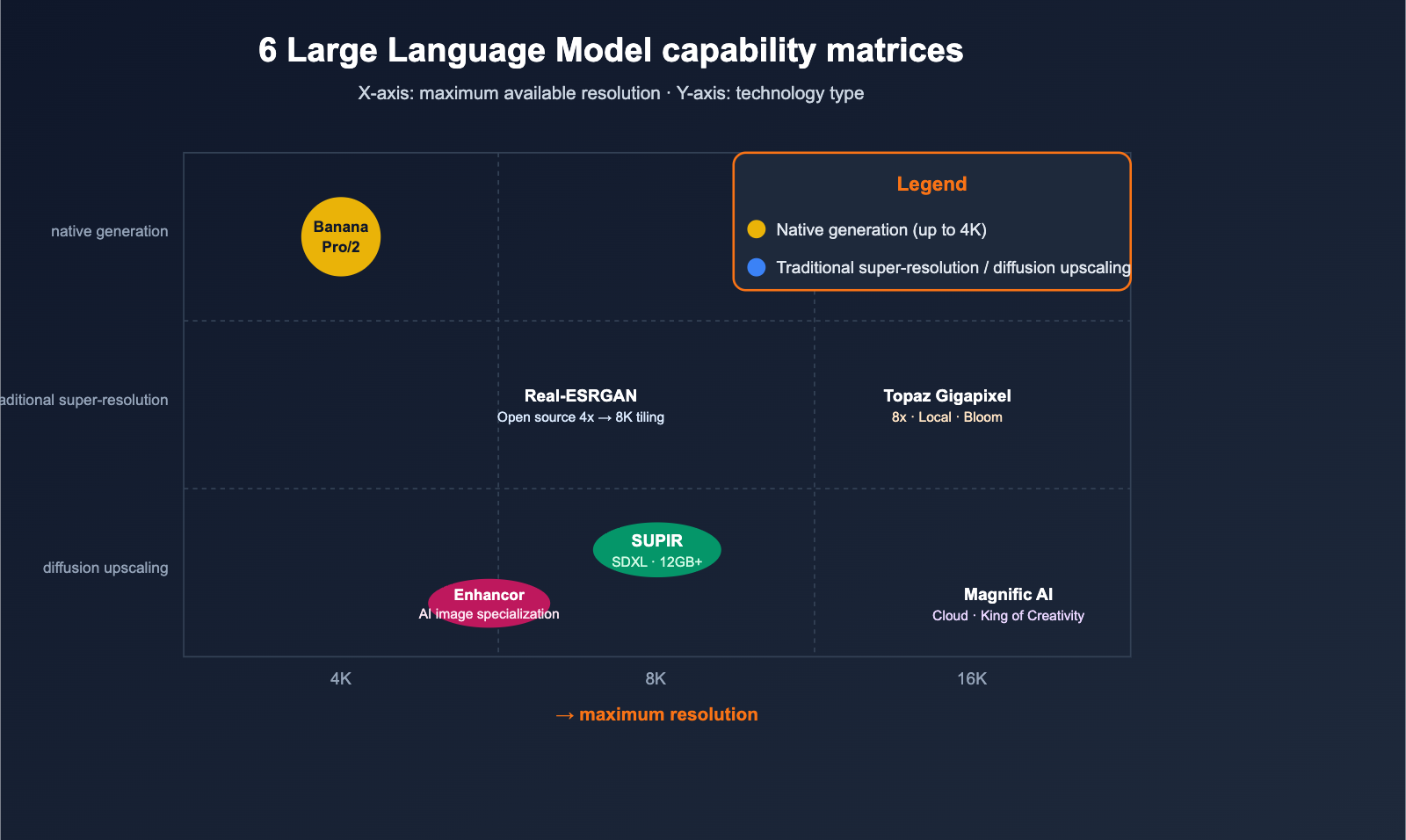
🎯 Pro Tip: Nano Banana Pro/2 are "one-shot 4K" generators, not upscalers. If you truly need 8K or higher, you must use Topaz Gigapixel, Magnific, or SUPIR. On the APIYI (apiyi.com) platform, you can combine these by using Nano Banana Pro to generate a fresh 4K image, then pipe it into other upscaling tools for a secondary pass to create a powerful hybrid workflow.
Comparison Table: Key Upscaling Model Capabilities
We've gathered these 6 contenders into a single table to help you make decisions at a glance.
| Model | Type | Native Max | Extreme (w/ Tiling) | Cost | Best For |
|---|---|---|---|---|---|
| Real-ESRGAN | Traditional Upscaling | 4x (~4K-8K) | 8K / 16K | Open-source/Free | Batch, baseline, local |
| Topaz Gigapixel | Upscale + Bloom | 8x (8K+) | 16K+ | Desktop (Paid) | Photography, printing |
| Magnific AI | Diffusion Upscaling | 16x | 16K+ | Cloud (Premium) | Creative, posters |
| SUPIR | Diffusion Upscaling (OSS) | 4-8x | 16K | Free (VRAM intensive) | Heavily degraded images |
| Enhancor | Diffusion Upscaling (Specialized) | 4x | 8K | Subscription | Removing "plastic" AI skin look |
| Nano Banana Pro / 2 | Native Generation | 4K | 4K (Limit reached) | API (Pay-per-use) | New 4K generation |
Scaling Workflow: From 1K to 8K/16K in Practice
Workflow A: Restoring Old Photos to 8K
Best for: Scanned documents, low-resolution historical photos, and heavily compressed social media images.
- Start with SUPIR or Topaz Gigapixel for a 4x upscale → nets you 4K.
- Check for "hallucination errors" in faces, text, or edges and fix them manually.
- Perform a second 2x upscale → brings you to 8K.
- Finish with traditional sharpening and noise reduction.
Workflow B: Scaling AI-Generated Images to 8K (Starting with Nano Banana Pro)
Best for: Posters, large-format ads, and print materials over 4K.
- Use Nano Banana Pro or Nano Banana 2 to generate a native 4K image (this is their limit).
- Pass the 4K image to Magnific / Topaz Bloom for a 2x creative upscale → 8K.
- If you need 16K, run another round through SUPIR or Magnific, but watch out for hallucination risks.
Workflow C: Batch Product Image Scaling (E-commerce)
Best for: Large volumes of product detail images requiring high-definition visuals.
- Run all original images through Real-ESRGAN at 4x for a baseline first pass.
- Rerun key SKUs through Magnific to get a "creative version."
- Manually select the best version for your final output.
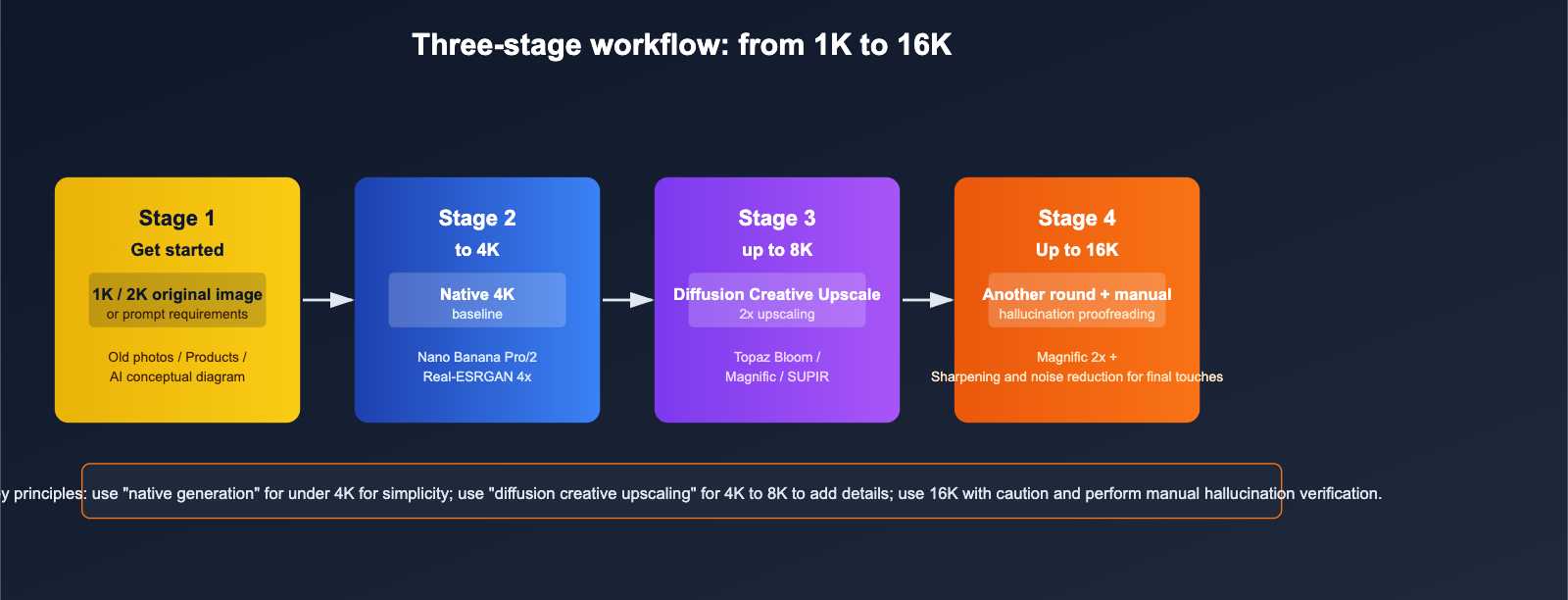
🎯 Workflow Tip: Generation and upscaling are two distinct capabilities; combining them is far more stable than relying on a single model. Through APIYI (apiyi.com), you can use the same codebase to first invoke Nano Banana Pro for a 4K generation, then pass that result directly to an upscaling model—saving you the headache of managing multiple provider accounts.
title: "Can Nano Banana Pro / 2 Be Used as an Upscaler? A Quick Explainer"
description: "Clarifying the capabilities of Nano Banana models for image upscaling and how to build an effective high-resolution workflow."
tags: ["Nano Banana", "AI", "Image Generation", "APIYI", "Upscaling"]
Many users see that Nano Banana 2 supports 4K and assume it’s a "magic upscaling tool." Let’s clear this up once and for all.
Technical Facts
- Both Nano Banana Pro (Gemini 3 Pro Image) and Nano Banana 2 (Gemini 3.1 Flash Image) are image generation models based on Gemini.
- Their native maximum output is 4K; the official API doesn’t support higher resolutions.
- When you provide a low-resolution image and ask it to "upscale," what it's actually doing is using the original image as a reference to re-generate a new 4K image. The fine details might end up looking completely different.
What It's Good For
- Generating 4K originals from scratch: Perfect for posters, covers, and large social media graphics.
- High-quality thematic re-rendering: Great when you don't need pixel-perfect fidelity but want the output to match the vibe of your reference image.
What It's Not For
- ❌ Pixel-perfect restoration of old photos—it will "beautify" and re-draw them instead.
- ❌ 8K or higher output—it tops out at 4K.
- ❌ Precise upscaling of specific text or brand logos—the text might get "re-written" or hallucinated.
🎯 The Right Approach: Think of Nano Banana Pro as a "4K-native generator," not an "upscaler." If you need 8K, use it to generate the 4K base material, then pass it to tools like Topaz or Magnific to scale up to 8K. You can manage this entire pipeline through APIYI (apiyi.com).
Quick Start: Upscaling Workflow API Example
Example 1: Generate a 4K Original with Nano Banana Pro
from openai import OpenAI

client = OpenAI(
    base_url="https://api.apiyi.com/v1",
    api_key="YOUR_API_KEY",
)

resp = client.images.generate(
    model="nano-banana-pro",   # Gemini 3 Pro Image
    prompt="A cinematic landscape of Shanghai skyline at sunset, ultra detailed",
    size="3840x2160",          # Native 4K
)
print(resp.data[0].url)
Example 2: Local 4x Upscaling with Real-ESRGAN (Open Source Script)
# Call open-source Real-ESRGAN via Hugging Face / Replicate
# Input 1024x1024 → Output 4096x4096, ideal for batch baselines
📎 Click to view pseudocode for a hybrid workflow (4K → 8K)
# 1. Generate the 4K base image
img_4k = nano_banana_generate(prompt, size="3840x2160")

# 2. Pass to diffusion upscaler for 2x -> 8K
img_8k = magnific_upscale(img_4k, scale=2, mode="precision")

# 3. Optional: Perform one round of sharpening and noise reduction
img_final = post_process(img_8k)
🎯 Integration Tip: The pain point of combining generation and upscaling from different vendors is managing separate accounts, billing, and rate limits. By using APIYI (apiyi.com), you can call multiple models with a single API key, allowing you to unify your two-step workflow into one service and significantly reduce operational costs.
title: "FAQ: Image Upscaling and Resolution"
description: "Answers to common questions about image upscaling, resolution limits, and selecting the right model for your project."
tags: [AI, Image Generation, Upscaling, FAQ, APIYI]
FAQ
Q1: Why can't Nano Banana 2 scale up to 8K?
Because its underlying generation pipeline has a native limit of 4K. Google hasn't provided an 8K sampling pipeline for Gemini 3.1 Flash Image. If you really need 8K, you'll have to use external tools like Topaz, Magnific, or SUPIR for post-processing upscaling.
Q2: How big is the difference between Real-ESRGAN and Topaz Gigapixel?
Real-ESRGAN is an open-source baseline perfect for batch processing with a zero-dollar budget. Topaz, on the other hand, is a commercial tool; it offers more natural details, includes a "Bloom" diffusion mode, and has specific optimizations for faces and skin. The former is for when you just need "something that works," while the latter is for when you need output "ready for print."
Q3: Why is Magnific so expensive, yet people still use it?
Because its creative upscaling results remain one of the gold standards in 2025-2026. For e-commerce, posters, and concept design, it can turn a mediocre AI sketch into a textured "finished product." For these use cases, the ROI is definitely worth it. You can access similar cloud-based upscaling services via APIYI (apiyi.com) on a pay-per-use basis for greater flexibility.
Q4: Is 8K always better than 4K?
Not necessarily. 4K is plenty for viewing on standard screens; you really only need 8K for large-format printing, cinema-grade displays, or specific technical requirements. Blindly chasing 16K can often amplify noise and AI hallucinations.
Q5: Can my PC handle SUPIR?
You'll need at least 12GB of VRAM (an RTX 3090 or 4090 is the bare minimum), and processing a single image often takes several minutes. If you're on a budget, I'd suggest using a cloud-based version or sticking with Real-ESRGAN or Topaz.
Q6: Can I use Nano Banana Pro to "upscale" images containing text?
I strongly advise against it. It will try to "rewrite" the text, which often leads to distorted characters. For images with text, you should use Real-ESRGAN or Topaz (traditional super-resolution) to maintain pixel-perfect fidelity.
Summary: Choosing the Right Class for True 8K
Circling back to the initial question—"Which model is best for image upscaling, and can I get 8K or higher?"—the professional takeaway can be summarized into three points:
- If you need pixel-perfect restoration for older images: Choose Topaz Gigapixel (commercial) or Real-ESRGAN (open source), which cap out at 8K/16K.
- If you need visually stunning creative upscaling: Choose Magnific AI or SUPIR. These go up to 16K, but watch out for potential hallucinations.
- If you need to generate a new 4K image in one go: Choose Nano Banana Pro / Nano Banana 2. These cap at 4K; you'll need to chain them with external upscaling models if you want to go higher.
🎯 Pro-tip: Most professional workflows actually require a "Generation + Upscaling" pipeline. With a single account on APIYI (apiyi.com), you can access Nano Banana Pro (native 4K) and mainstream upscaling models (8K/16K). Combined with unified billing and high-concurrency support, it makes running multi-step workflows much smoother.
— APIYI Team (apiyi.com technical team)


