

Author’s note: This article lists GPT-6.2 Sol Ultrafast’s official speed ceiling, promotional price, and list price separately, and provides a speed-premium formula you can apply to your own tasks.
Whether to turn on Ultrafast for GPT-6.2 Sol depends on how much waiting this task can save. The official speed is up to 4.5× the standard tier of the same model, the promotional price is 3× the standard price, and the list price from March 2027 onward is 6×. Speed is a ceiling; price is a fixed number. They’re not equally certain, so you can’t just divide one by the other.
This article won’t answer “is it worth buying” for you. We won’t make our own speed-test conclusions, and we won’t treat an anecdotal report with no control group as a final result. This article only provides a method: first measure how long your own task takes on the standard tier, then use the official “up to” multiplier to calculate the maximum time you could save, and finally compare that with the price difference.
Key takeaway: After reading this, you can calculate for any given task “how much extra you pay for each minute saved,” then decide task by task whether to turn on the speed tier.
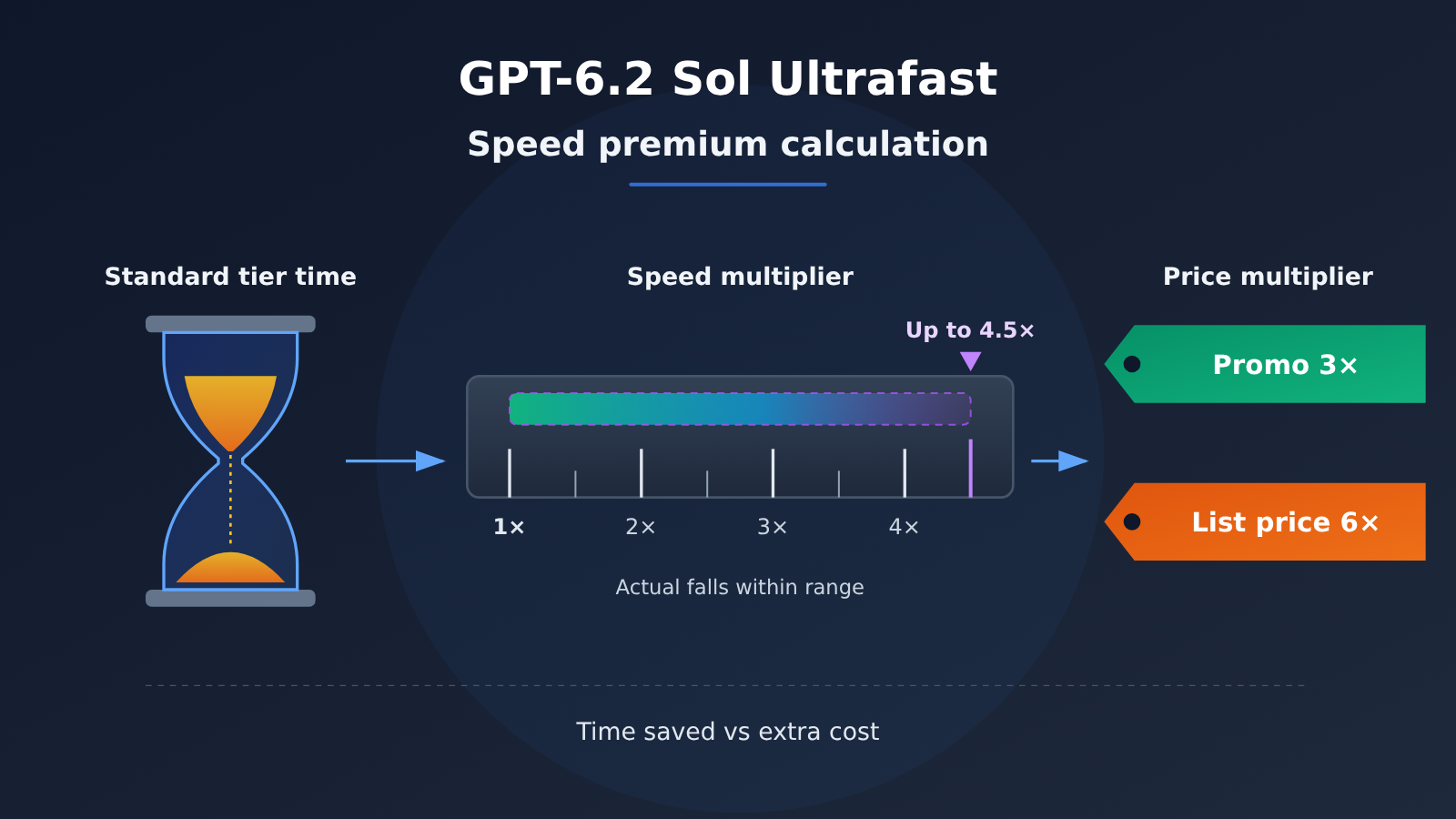
GPT-6.2 Sol Ultrafast: The Core Difference Behind the Speed Premium
First, let’s clear up one thing: Ultrafast is a service tier, not a separate model. As written in the official API docs, the model in the request is still gpt-6.2-sol; you just add service_tier and set it to ultrafast. Currently, this service tier is supported by GPT-6.2 Astra, GPT-6.2 Sol, GPT-6 Astra, and GPT-6.1 Sol.
So you’re comparing two delivery speeds for the same model, not the capability gap between two models. Output quality is a separate issue; this comes down to just two variables: time and price.
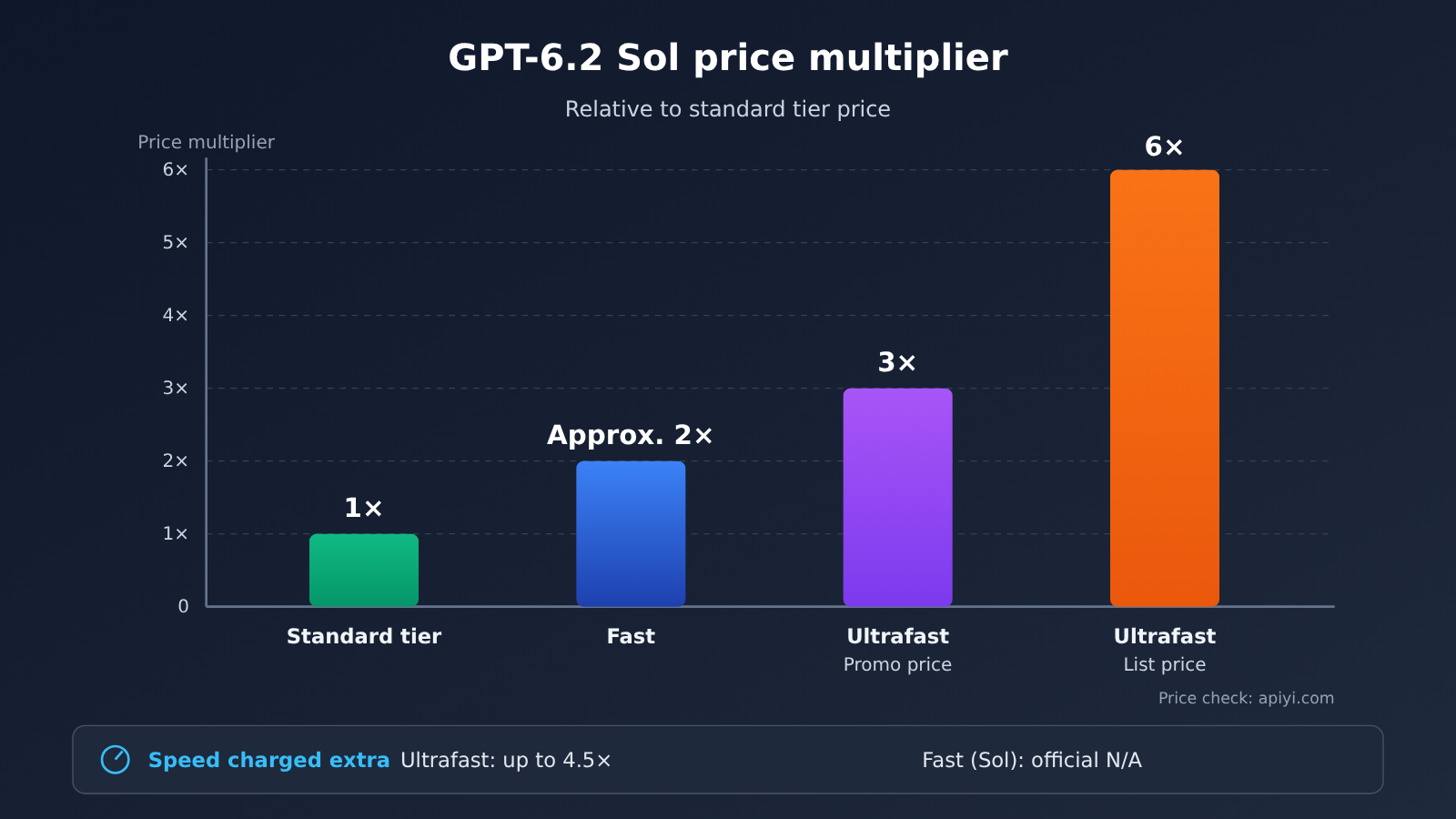
| Tier (gpt-6.2-sol, short context) | Input | Cache read | Output | Relative to standard price | Official speed claim |
|---|---|---|---|---|---|
| Standard tier | 2 | 0.10 | 10 | 1× | Baseline |
| Fast | 4 | 0.20 | 20 | About 2× | Docs don’t state a speed multiplier for Sol |
| Ultrafast promotional (through Feb 28, 2027, Pacific Time) | 6 | 0.30 | 30 | 3× | Up to 4.5× |
| Ultrafast list price (from Mar 1, 2027) | 12 | 0.60 | 60 | 6× | Up to 4.5× |
Prices in the table are in USD per million tokens. Short context means input up to 272K tokens. One caveat for the Fast tier: the “about 1.5× speed” in the official docs applies to GPT-6.2 Astra and GPT-5.6, not GPT-6.2 Sol, so don’t apply that multiplier to Sol’s Fast tier.
GPT-6.2 Sol Ultrafast Long-Context Pricing
If input exceeds 272K tokens, long-context pricing kicks in. Official standard-tier long-context pricing is 4 for input, 0.20 for cache read, and 15 for output. Ultrafast promotional pricing is 12 / 0.60 / 45, and list price is 24 / 1.20 / 90—still 3× and 6× the standard price.
| Line item (long context, USD per million tokens) | Input | Cache read | Output |
|---|---|---|---|
| Official standard tier | 4 | 0.20 | 15 |
| Ultrafast promotional | 12 | 0.60 | 45 |
| Ultrafast list price | 24 | 1.20 | 90 |
APIYI master table gpt-6.2-sol (over 272K input) |
3 | Refer to the platform’s list | Refer to the platform’s list |
There’s one pricing discrepancy worth calling out separately: APIYI apiyi.com’s model master table lists the tier as $2 for input from 0 to 272K tokens and $3 for input over 272K, while the official standard-tier long-context input price is $4. Don’t conflate the two numbers: calls through APIYI are billed at the master table’s $3, while direct calls to the official API are billed at $4.
Where Does GPT-6.2 Sol Ultrafast’s Speed Come From: Official Ceiling vs. Community Reports
On the speed side, there are currently two types of information, with very different levels of credibility, and it’s best to treat them separately.
| Source | What it says | Nature | Can you use it as your multiplier? |
|---|---|---|---|
| Official Codex / API documentation | Ultrafast generation speed can reach up to 4.5 times the standard tier of the same model (up to 4.5 times) | Official ceiling claim | Can only be treated as a ceiling |
| Artificial Analysis | The standard tier of the same model is about 85 output tokens/sec | Third-party public benchmark | Can only be used as a reference |
| OrcaRouter report from 2026-11-18 | One task averaged about 126 tokens/sec, peaking at about 252 | A single secondhand report, with no standard-tier comparison | No |
The official wording uses “up to,” which means the maximum that can be reached—not a promise that every request will hit 4.5×. When you’re doing the math, it belongs in the “best case” column.
On 2026-11-18, OrcaRouter relayed a single task from an editor on X: Ultrafast averaged about 126 tokens per second, with a peak of about 252; the task’s wall-clock time was about 27 minutes, of which model response took about 14 minutes. The author of the report compared that number with Artificial Analysis’s published standard-tier figure of 85 tokens/sec and arrived at about 1.5×. This record is a single run—no repeats, and no standard-tier comparison on the same task—so it’s just one data point and can’t represent the definitive performance of this speed tier.
This record also exposes an easily overlooked fact: of the 27-minute wall-clock time, model response accounted for only about 14 minutes. The speed tier can only accelerate the model generation segment; tool calls, file reads and writes, manual approvals, and other steps won’t get any faster as a result.
How to Calculate the GPT-6.2 Sol Ultrafast Speed Premium: A Plug-and-Play Formula
The method below deliberately avoids using any “multiplier someone else measured.” The only data point you need to supply is how long this task takes on the Standard tier.
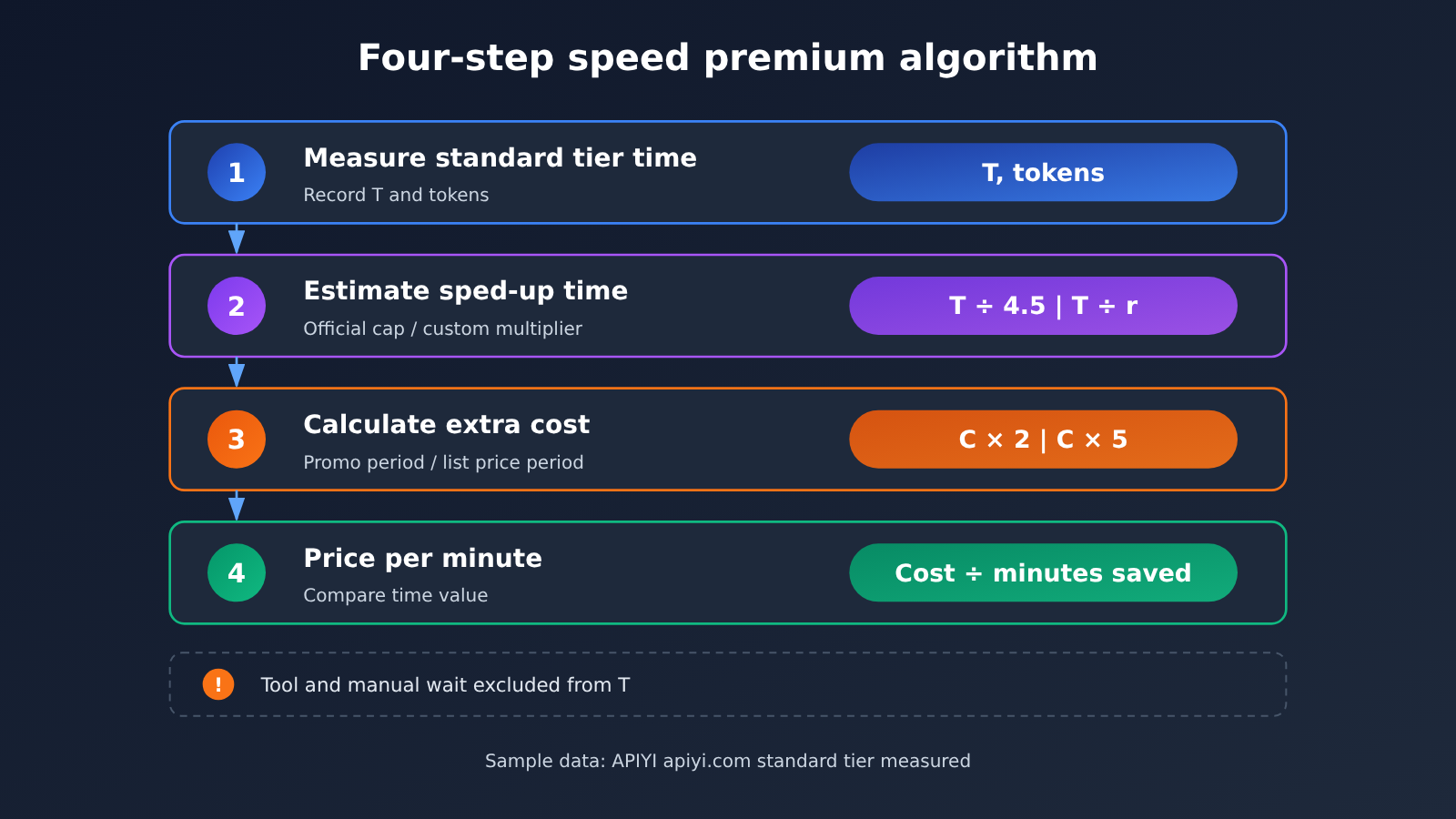
| Step | Item | Formula | Notes |
|---|---|---|---|
| ① | Standard-tier generation time T | Measure it yourself | Count only model generation, not tool time |
| ② | Best-case time saved | T × (1 − 1/4.5) ≈ 0.78T | Use the official upper limit |
| ②′ | Conservative time saved | T × (1 − 1/r) | r is a multiplier you choose, and r ≤ 4.5 |
| ③ | Standard-tier cost C | input × unit price + cache read × unit price + output × unit price | Choose the price tier based on context length |
| ④ | Extra cost during promo | C × 2 | Ultrafast promo price is 3C |
| ④′ | Extra cost at list price | C × 5 | Ultrafast list price is 6C |
| ⑤ | Price per minute saved | extra cost ÷ minutes saved | Compare it with the value of your time |
GPT-6.2 Sol Ultrafast Example Calculation
Below is a set of hypothetical numbers to walk through the algorithm — these are not benchmark results. Suppose a task has 200,000 input tokens (short context) and 50,000 output tokens, with no cache hits; the output speed you measure yourself on the Standard tier is 80 tokens/second.
- Standard tier cost C = 0.2 × 2 + 0.05 × 10 = USD 0.9.
- Standard tier generation time T = 50000 ÷ 80 ≈ 625 seconds, about 10.4 minutes.
- The Ultrafast promotional price is USD 2.7, an extra USD 1.8; the list price is USD 5.4, an extra USD 4.5.
| Assumed multiplier r | Generation time | Time saved | Price per minute during promotion | Price per minute at list price |
|---|---|---|---|---|
| 4.5 (official upper limit) | ~2.3 minutes | ~8.1 minutes | ~USD 0.22 | ~USD 0.56 |
| 3 | ~3.5 minutes | ~6.9 minutes | ~USD 0.26 | ~USD 0.65 |
| 2 | ~5.2 minutes | ~5.2 minutes | ~USD 0.35 | ~USD 0.87 |
| 1.5 | ~6.9 minutes | ~3.5 minutes | ~USD 0.51 | ~USD 1.29 |
Two things stand out from this table. First, when the multiplier drops from 4.5 to 1.5, the price per minute roughly doubles — so the multiplier assumption matters more than the price itself. Second, once the list price takes effect in March 2027, saving the same single minute costs about 2.5 times more; you can’t carry the promotional-period conclusion straight into next year.
💰 Cost check tip: The Standard tier unit prices in this example can be compared directly against the
gpt-6.2-solpricing in the APIYI apiyi.com master table (input 2, cache read 0.1, output 10). These prices match the official Standard tier for short context, so they’re a good source for the C value in your algorithm.
Measure Your Own GPT-6.2 Sol Standard-Tier Latency with Code
The first step in the algorithm requires a real T. The code below uses streaming output to record the time to first token and total generation time, then reads the token counts from usage to calculate the speed for your kind of task on the standard tier.
import time, openai

client = openai.OpenAI(
    api_key="YOUR_API_KEY",
    base_url="https://api.apiyi.com/v1"  # APIYI OpenAI-compatible endpoint
)

start = time.time(); first = None; usage = None
stream = client.chat.completions.create(
    model="gpt-6.2-sol",
    messages=[{"role": "user", "content": "把你的真实任务提示词放在这里"}],
    stream=True,
    stream_options={"include_usage": True},
)
for chunk in stream:
    if chunk.choices and chunk.choices[0].delta.content and first is None:
        first = time.time()
    if chunk.usage:
        usage = chunk.usage
end = time.time()
gen = end - (first or start)
print(f"首 token {first - start:.1f}s,生成 {gen:.1f}s,"
      f"输出 {usage.completion_tokens} tokens,约 {usage.completion_tokens / gen:.0f} tok/s")
View the full comparison script including service_tier
import time, openai

client = openai.OpenAI(
    api_key="YOUR_API_KEY",
    base_url="https://api.apiyi.com/v1"
)

PRICE = {  # USD per million tokens, short context
    "default":   {"in": 2,  "cache": 0.10, "out": 10},
    "promo":     {"in": 6,  "cache": 0.30, "out": 30},
    "list":      {"in": 12, "cache": 0.60, "out": 60},
}

def run(prompt: str, tier: str | None = None):
    kwargs = dict(
        model="gpt-6.2-sol",
        messages=[{"role": "user", "content": prompt}],
        stream=True,
        stream_options={"include_usage": True},
    )
    if tier:
        # Official approach: same model ID plus service_tier
        kwargs["extra_body"] = {"service_tier": tier}
    start = time.time(); first = None; usage = None; served = None
    for chunk in client.chat.completions.create(**kwargs):
        if chunk.choices and chunk.choices[0].delta.content and first is None:
            first = time.time()
        if chunk.usage:
            usage = chunk.usage
        served = getattr(chunk, "service_tier", served)
    gen = time.time() - (first or start)
    return gen, usage, served

def cost(usage, p):
    cached = getattr(getattr(usage, "prompt_tokens_details", None), "cached_tokens", 0) or 0
    fresh = usage.prompt_tokens - cached
    return (fresh * p["in"] + cached * p["cache"] + usage.completion_tokens * p["out"]) / 1e6

prompt = "把你的真实任务提示词放在这里"
t_std, u_std, s_std = run(prompt)
c_std = cost(u_std, PRICE["default"])
print(f"标准档:生成 {t_std:.1f}s,费用约 ${c_std:.3f},返回档位 {s_std}")

for name, r in [("官方上限", 4.5), ("保守假设", 2.0)]:
    saved_min = t_std * (1 - 1 / r) / 60
    print(f"{name} r={r}:省 {saved_min:.1f} 分钟,"
          f"促销每分钟 ${c_std * 2 / saved_min:.3f},刊例每分钟 ${c_std * 5 / saved_min:.3f}")

# To actually measure the speed tier, uncomment the lines below and check whether the returned service_tier field is ultrafast
# t_uf, u_uf, s_uf = run(prompt, tier="ultrafast")
# print(f"速度档:生成 {t_uf:.1f}s,实际倍数约 {t_std / t_uf:.2f},返回档位 {s_uf}")
A note on service_tier: the APIYI (apiyi.com) master model list only shows gpt-6.2-sol. There’s no separate ultrafast model, and the service_tier field isn’t written out there either — the prices on that list correspond to the standard tier. This article only checked documentation and pricing; I didn’t send any real requests, so I can’t tell you how this parameter behaves when calling https://api.apiyi.com/v1. If you need a speed tier, go by the tier field returned in the response and by your billing statement, and treat the platform’s model list as the source of truth for model names and prices.
🚀 Getting started tip: First run the standard-tier
gpt-6.2-solon APIYI (apiyi.com) against two or three of your own real tasks, and take the median generation time as T. This only costs the standard rate, but it determines how accurate all your later calculations are.
GPT-6.2 Sol Ultrafast Scenario Recommendations
The conclusion has to be drawn per task. The same person can reach opposite answers on different tasks.
Scenarios where Ultrafast makes sense
- Interactive tasks where someone’s sitting at the screen waiting: real-time pair programming, live demos. Waiting time is directly labor cost, and by the formula above the unit price is usually covered.
- Tasks where generation dominates wall-clock time: if T accounts for most of a task’s total duration, the time saved shows up directly in delivery time.
- Short-context tasks during a promo period: 3x the price combined with a low short-context unit price means the extra spend in absolute terms is small.
Scenarios better left on the standard tier
- Background batch processing and overnight tasks: nobody’s waiting, so the minutes saved have no corresponding time value.
- Tool-call-heavy agent tasks: like the transcript quoted earlier, where model responses accounted for only about 14 of the 27 wall-clock minutes — a speed tier can only compress part of that.
- Long-context, large-output tasks: during the list-price period, the long-context output unit price reaches 90, and the extra spend grows quickly.
| Task characteristic | Generation time share | Someone waiting | Leaning |
|---|---|---|---|
| Interactive coding, live demos | High | Yes | Run the math first; the unit price can usually be covered |
| Tool-heavy agents | Medium-low | Depends | Count only the generation portion; gains get diluted |
| Overnight batch jobs | High | No | Stay on the standard tier |
| Long context, large output | High | Depends | Calculate carefully during the list-price period |
💡 Recommendation: If a project has both kinds of tasks, you can decide in code whether to attach
service_tierbased on task type instead of turning it on globally. Run a standard-tier baseline with the same API key through APIYI (apiyi.com), then decide which task types are worth testing on a speed tier.
GPT-6.2 Sol Ultrafast: Decision Guide
Turn the earlier discussion into a repeatable process:
- Run real tasks on the standard tier and record the generation time T and token usage — don’t rely on someone else’s speed numbers.
- Use the official ceiling of 4.5 to work out the best case, then pick a conservative multiplier r that you consider reasonable, and calculate both scenarios.
- Compute the extra spend at the promotional 3× and the list-price 6×, which gives you two “price per minute” figures.
- Compare those against the value of your time: only tasks that still pay off under the conservative multiplier are worth turning on.
- Re-run the numbers with the new pricing before the list price takes effect on 2027-03-01.
The key to this process is step 2. The official “up to 4.5 times” can serve as an upper bound, and the roughly 126 tokens/sec figure reported on 2026-11-18 is just a single data point. Neither one is the actual multiplier for your task. The only way to find the real multiplier is a controlled test on your own workload.
FAQ
Q1: Is GPT-6.2 Sol Ultrafast a new model?
No. According to the official API docs, Ultrafast is a service tier — the `model` in your request is still `gpt-6.2-sol`; you just add `service_tier` and set it to `ultrafast`. The model itself doesn’t change.
Q2: If I enable Ultrafast, am I guaranteed to hit 4.5×?
No. The official wording is “up to 4.5 times,” which is a ceiling. When you do the math, prepare a lower conservative multiplier as well, and treat your own controlled test as the source of truth.
Q3: When does the GPT-6.2 Sol Ultrafast promotional price end?
The official promotional price runs through 2027-02-28 (Pacific Time) at 3× the standard rate; from 2027-03-01 the list price applies at 6× the standard rate. Both short-context and long-context pricing follow this same multiplier.
Q4: Can I use that ~126 tokens/sec figure as a reference?
You can treat it as one data point, but not as a conclusion. It’s a single task that OrcaRouter relayed on 2026-11-18 — not run repeatedly, and with no standard-tier comparison on the same task. The roughly 1.5× figure mentioned there comes from comparing it against the 85 tokens/sec standard-tier number published by Artificial Analysis.
Q5: Which tier is the gpt-6.2-sol price I see on APIYI?
The standard tier. In the APIYI apiyi.com master table, `gpt-6.2-sol` is listed at input 2, cached read 0.1, output 10 — matching the official standard-tier short-context pricing — and it supports both the responses and chat endpoints. The master table has no separate ultrafast model and doesn’t spell out `service_tier`.
Q6: When input exceeds 272K tokens, how is the standard tier billed?
The two sources differ, so you need to calculate them separately: the APIYI master table lists $3 for input above 272K, while the official standard-tier long-context input price is $4. When calling through https://api.apiyi.com/v1, the platform’s model list applies; when going direct to the official API, use $4.
GPT-6.2 Sol Ultrafast Speed Premium: Key Takeaways
- Ultrafast is a service tier: Same model ID
gpt-6.2-sol, just addservice_tier— the model’s capabilities stay the same. - 4.5x is the official ceiling: The original wording is “up to,” so don’t treat it as a multiplier you’ll hit every single time.
- Pricing comes in two phases: 3x the standard price during the promotional period, then 6x list price starting 2027-03-01.
- Only generation time gets faster: Non-generation time, like tool calls, doesn’t count toward what you can save.
- A single anecdote isn’t representative: The ~126 tokens/sec record from 2026-11-18 has no standard-tier comparison alongside it.
- Measure your own standard tier first: Use the standard tier of
gpt-6.2-solon APIYI apiyi.com to measure T, then plug it into the formula.
Summary
The math behind the GPT-6.2 Sol Ultrafast speed premium boils down to three points:
- Take two speed values — the ceiling and a conservative one: Put the official max of 4.5x in the best-case column, and your own conservative multiplier in the other column.
- Calculate the price separately: The extra spend is 2x the standard cost during the promo period and 5x at list price — don’t mix the two sets of conclusions.
- Let the task decide the conclusion: Only if the price per minute saved is lower than what your time is worth does it make sense to turn on the speed tier for this task.
The answer to the question in the title depends on your own task data. Start by measuring a baseline with the standard tier on APIYI apiyi.com, then plug the numbers into the calculation table in this article.
📚 References
-
OpenAI Codex Speed Tier Documentation: Official statement of up to 4.5x for Ultrafast
- Link:
developers.openai.com/codex/agent-configuration/speed - Notes: Confirms the exact wording “up to 4.5 times” and which models it applies to
- Link:
-
OpenAI Ultrafast Mode API Guide: How to use
service_tierand supported models- Link:
developers.openai.com/api/docs/guides/ultrafast-mode - Notes: Confirms Ultrafast is a service tier and
modelstays unchanged
- Link:
-
OpenAI API Pricing Page: Standard tier, Fast, and Ultrafast promotional and list prices
- Link:
developers.openai.com/api/docs/pricing - Notes: Full pricing for both short and long context
- Link:
-
OrcaRouter Report: Data from a single Ultrafast task on 2026-11-18
- Link:
orcarouter.ai/blog/gpt-6-2-sol-ultrafast-tokens-per-second - Notes: A single, uncontrolled secondhand report, useful only as one data point
- Link:
-
APIYI Model Summary Table:
gpt-6.2-solstandard tier pricing and tiers- Link:
docs.apiyi.com/models.md - Notes: Verify standard tier unit price and pricing above 272K input tokens
- Link:
Author: APIYI Technical Team
Technical Support: If you have questions about calculations or integration, feel free to contact us through the APIYI homepage. For more resources, visit the docs.apiyi.com documentation center.


