

Summary: This article answers one question: can GPT-6.2 Sol handle data questions from end users, and which ones still need a second look?
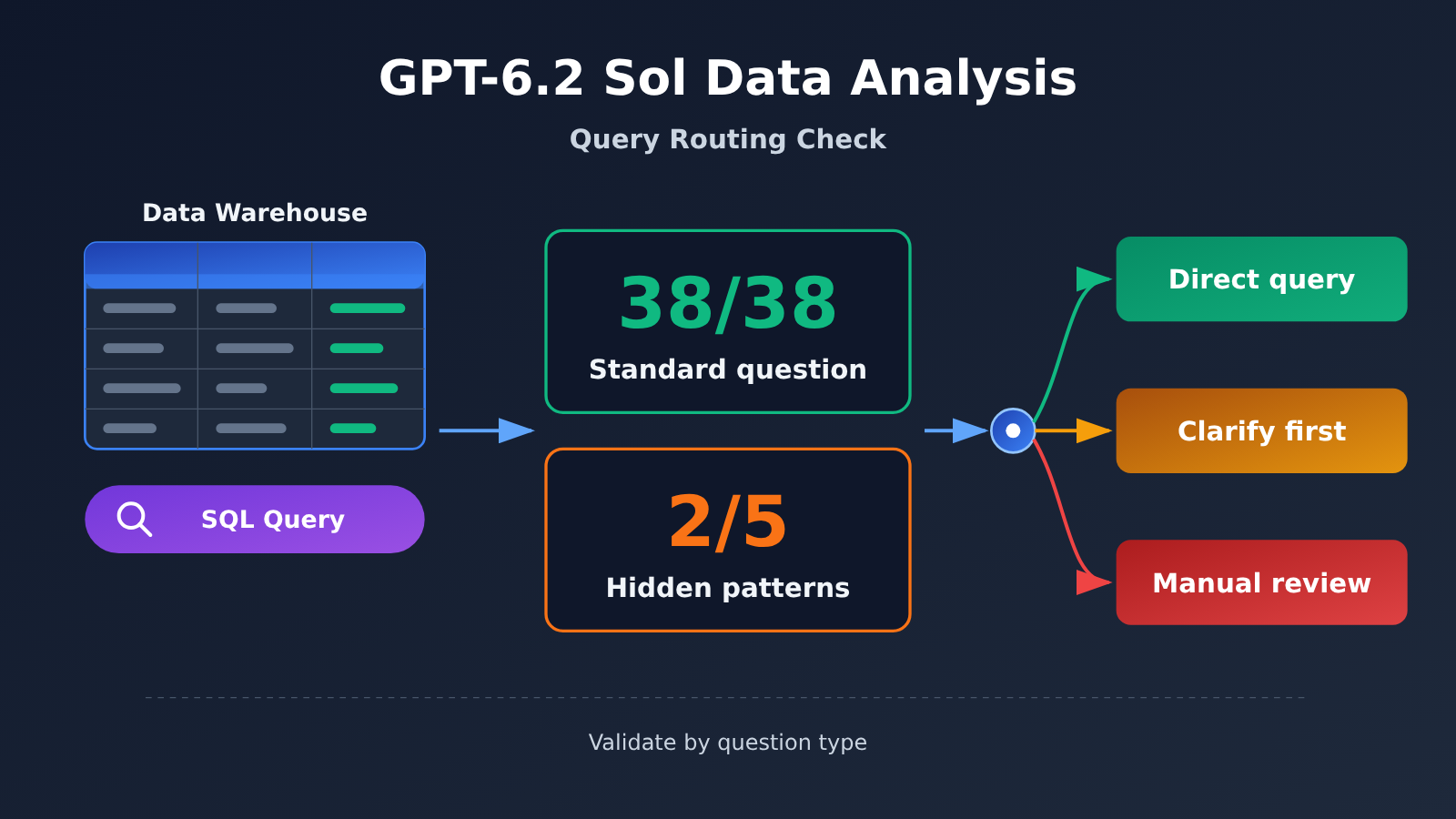
You can split GPT-6.2 Sol’s data analysis performance into two parts. In a single-round specialized test published by Plotly on November 17, 2026, it got all 38 questions right across five categories—routine analysis, ambiguity detection, unanswerable data, data quality, and statistical traps—with a median time of about 10.5 seconds per question. In the same round, it passed only 2 of 5 hidden-pattern questions.
That leads to this judgment: for low-impact aggregate queries with a clear metric definition, you can pilot letting Sol answer directly under read-only permissions; when the definition is missing, have it ask for clarification first; open-ended attribution and external-facing decisions should go to an analyst for review. This conclusion rests on three assumptions: the test ran only one round, the question bank was English-language questions simulating a wind power company, and the costs came through the OpenRouter channel. Once you switch to your own data and channel, you’ll need to re-validate by question type.
GPT-6.2 Sol Data Analysis Knowledge Map and Reading Index
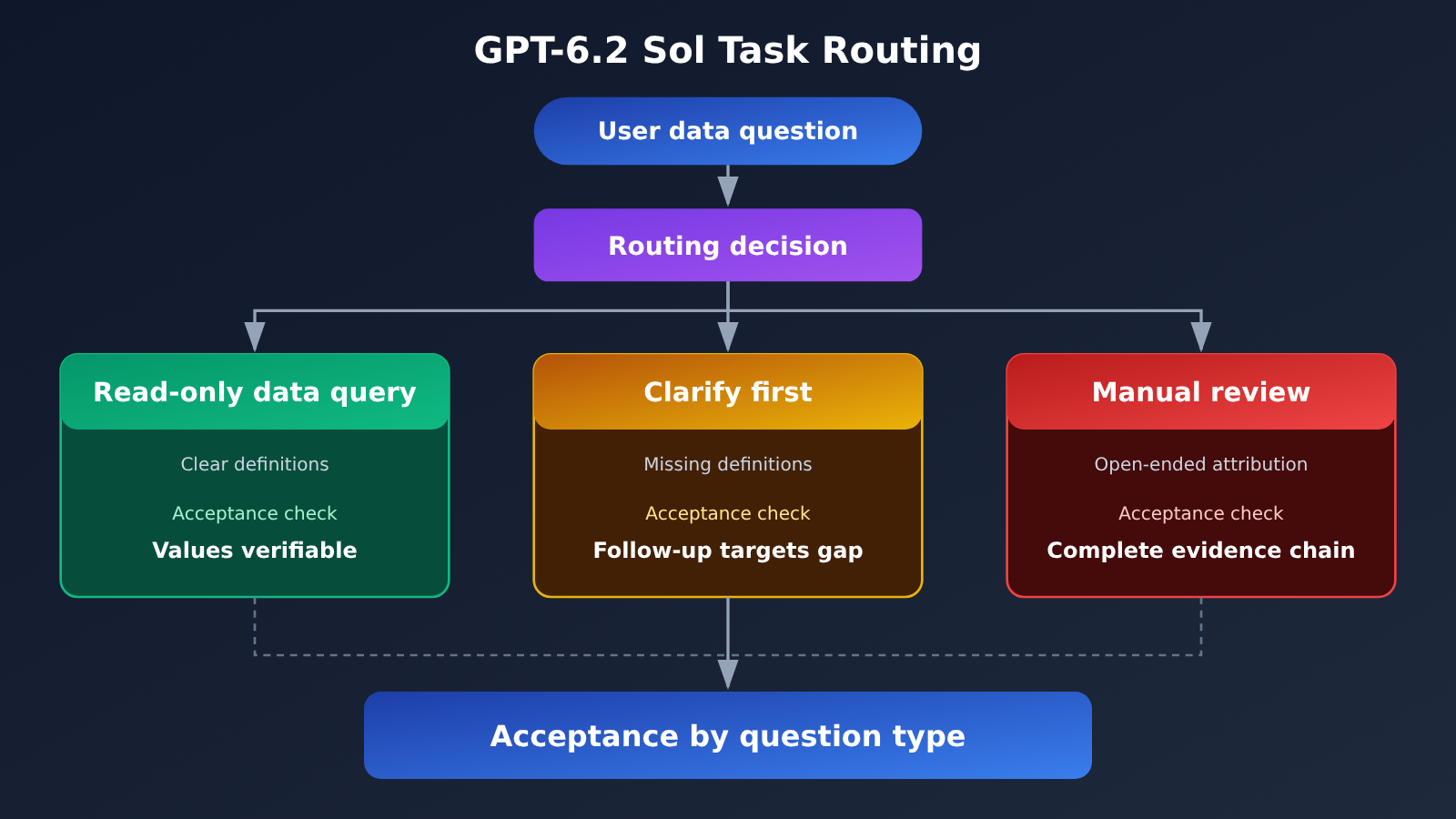
The diagram below shows the task-routing logic for the whole article. Each branch spells out the input conditions, the output the model should produce, and the section number for that branch in the body.
User asks a data question
 │
 ├─ Clear metric definition + low-impact aggregation ──→ [1] Sol read-only data query
 │                              Output: value + numerator/denominator + time range and time zone + query statement
 │
 ├─ Missing metric definition / insufficient data ────→ [3.2] Clarify first
 │                              Output: one specific follow-up question + list of possible metric definitions
 │
 └─ Open-ended attribution / external decision ──→ [3.3] Hand off to analyst for review
                                 Output: initial investigation record + supporting evidence + alternative explanation checks
            ↓
   [2] Use latency and per-question cost to decide whether to put it in the front end
            ↓
   [4] Validate on your own data by question type, and deliver results with data date and query evidence
The sections are ordered as follows. Section 3 runs in parallel and can be read as needed; the other sections are best read in order.
| Section | Question it answers | What it provides for the next section | What you can do after reading |
|---|---|---|---|
| 1 | Which types of questions Sol is reliable on | Question-type boundaries: 38/38 and 2/5 | Define the range where you can query data directly |
| 2 | Whether it’s worth putting in the front end | Latency, per-question cost, and extrapolation assumptions | Judge the budget and wait time for interactive scenarios |
| 3 | Which signals require clarification or handoff to a human | Three failure patterns and three sample outputs | Design routing rules |
| 4 | How to validate on your own data | Metrics and boundaries by question type | Produce a reviewable deliverable |
To Know: Key Terms for GPT-6.2 Sol Data Analysis
| Term | Plain explanation |
|---|---|
| Data warehouse | A collection of data that brings together historical data scattered across business systems for query and analysis |
| Metric definition | The metric’s definition, filter conditions, numerator and denominator, and time boundaries |
| Read-only SQL | A query method that only retrieves and aggregates data; the data source itself keeps read-only permissions |
| Hidden-pattern question | Structural anomalies are pre-planted in the data; the question only gives clues, and the model needs to actively find the specific pattern |
| Query evidence | Query statements, metric definitions, results, and data dates that let others review the conclusion |
| p50 / p95 latency | The time within which half of requests complete / the time within which 95% of requests complete |
| Cached input | Input tokens recognized upstream as reusable for billing, with a unit price much lower than regular input |
| Validation by question type | Score data queries, clarifications, refusals, and exploration separately so an overall score doesn’t mask a certain type of error |
1. GPT-6.2 Sol for Data Analysis: Start with Question-Answering Results You Can Reliably Accept
1.1 What the Plotly Test Actually Did
Inside the Plotly Studio Embedded test framework, Plotly called the model through OpenRouter and exposed only four read-only tools: list datasets, run SQL queries, generate charts, and display tables. The test repo simulates a wind power company, with roughly 19.9 million rows of data, 44 tables, and 554 columns. Forty-three English questions were graded one by one against an answer key and scoring rules. The judge model was Claude Sonnet 5 with temperature=0, and any question that lost points was manually re-reviewed by the team.
This setup closely mirrors what enterprise BI question-answering really looks like: the model can’t see all the data, so it has to find the tables itself, write SQL, read the results, and then answer. The question set and answer key are kept by Plotly and can’t be reproduced question by question externally, so the numbers below should be read as a single-round observation with a documented method — not a stable leaderboard.
| Question Type | Count | GPT-6.2 Sol Result | What It Means for the Business |
|---|---|---|---|
| Routine analysis | 20 | 20/20 | Fixed-definition summaries are ready for pilot direct answering |
| Ambiguity detection | 5 | 5/5 | Can recognize that the question itself has multiple interpretations |
| Unanswerable data | 5 | 5/5 | Can refuse when the data doesn’t support an answer instead of inventing numbers |
| Data quality | 3 | 3/3 | Can notice issues like missing values and duplicates |
| Statistical traps | 5 | 5/5 | Can avoid common statistical misreadings |
| Hidden patterns | 5 | 2/5 | Open-ended pattern finding still needs human verification |
| Total | 43 | 40/43 | First 38 questions all passed; every lost point came from exploratory questions |
Plotly also noted that other models showed fluctuations of up to three questions on reruns. 40/43 is only three questions off a perfect score, which lands squarely inside that fluctuation range. So what’s more worth watching is the distribution of lost points: all of them fell on the hidden-pattern questions, while the first five categories were perfect.
1.2 Why Fixed-Definition Question Answering Can Be Reviewed
Take an after-sales report as an example. “Return rate per warehouse over the past 7 days” can be reliably accepted only if three things are fixed in advance: whether the denominator is signed-for orders or all orders, which time zone the date range is cut off in, and whether the filters exclude test orders and internal orders. Once those three points are written into the definition document, the model’s SQL and results can be checked item by item against a manual query.
Fixed definitions turn “is the model smart?” into “do the numbers match?” — and the latter can be compared automatically. That’s also why all 38 questions can pass, and why that passing rate actually means something: most of these questions have a single standard answer.
2. GPT-6.2 Sol Data Analysis Latency and Cost: Should It Run in the Front End?
2.1 A Full-Round Comparison of the Two Sol Generations
When users ask questions in the front end, wait time directly shapes their experience. Plotly’s report offers a head-to-head comparison of GPT-6.2 Sol and GPT-6.1 Sol on the same 43-question run:
| Metric | GPT-6.1 Sol | GPT-6.2 Sol | Change |
|---|---|---|---|
| Full-run cost | $2.61 | $1.22 | About 53.3% lower |
| Median time per question | 17.6 s | 10.5 s | About 40.3% lower |
| Tool calls | 258 | 158 | Notably fewer |
| Model calls | 227 | 173 | Fewer |
| Input volume | ~7.8M tokens | ~4.6M tokens | Lower |
| Output volume | ~70K tokens | ~45K tokens | Lower |
| Cached input ratio | 94% | 97% | Higher |
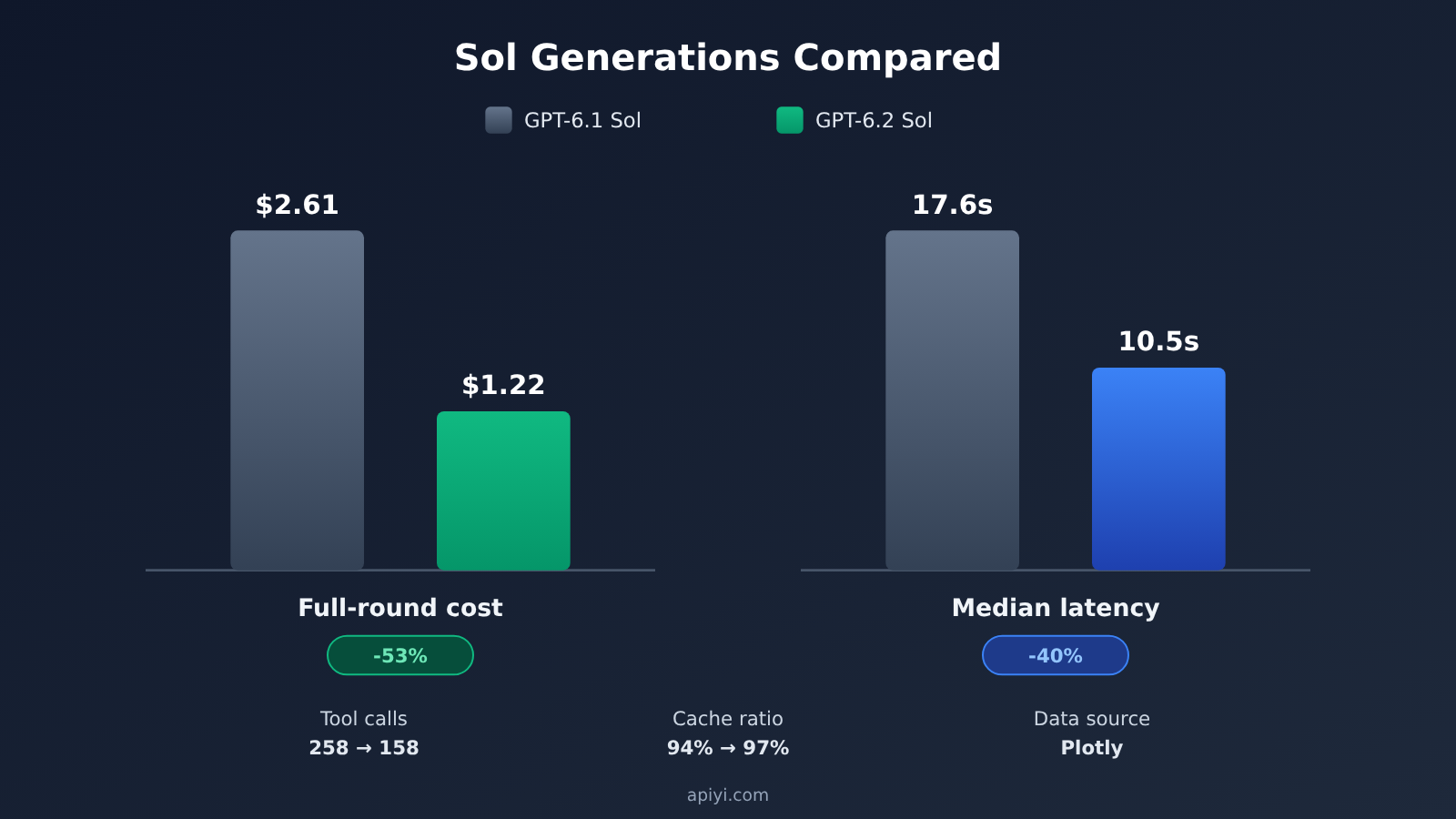
The two Sol generations share the same base sticker price for short-context Standard, yet the full-run cost is nearly halved. The gap comes from how the task unfolds: fewer invocation rounds, fewer tokens read and written, and a higher cache hit rate. So when you evaluate cost in a data analysis setting, measure it as “how much it costs to finish one question” — the per-million-token price is only one factor in that number.
2.2 The ~$28.4 per Thousand Questions Extrapolation and Its Assumptions
Divide the $1.22 full-run cost by 43 questions and you get roughly $0.0284 per question, which extrapolates to about $28.4 per thousand questions. That figure only holds if all of the following assumptions are met:
- The mix of question types matches Plotly’s 43 questions, where exploratory questions account for about 12%;
- You use the same OpenRouter channel and pricing;
- The cache ratio stays around 97%, with questions sharing the same system prompt and table schema descriptions;
- Each question runs only once, with no retries.
Another number on the Plotly leaderboard is the median cost per question of $0.017, which is a different statistic from the averaged value. Exploratory questions call more tools and take longer, which pushes the mean upward, while the median sits closer to what an ordinary data question costs. When budgeting, you can use the median to estimate everyday data questions and then add a separate allowance based on the share of exploratory questions.
OpenAI’s official short-context Standard pricing is: regular input $2.00, cached read $0.10, output $10.00 (USD per million tokens, with output already including reasoning tokens). When a request’s total input exceeds 272K, the entire request switches to the long-context tier. The short tier in APIYI apiyi.com’s public pricing endpoint matches the official one, and the long tier is $3 for input, $0.15 for cached read, $3.75 for cache write, and $11.25 for output. A single request in a data question scenario is usually far below 272K — you only need to watch for a tier switch when you dump a large batch of table schemas or historical results into one request.
3. Three kinds of signals in GPT-6.2 Sol data analysis: when to clarify, when to hand off to a human
3.1 Why it loses points on hidden-pattern questions
On the 38 questions without a hidden pattern, 6.2 Sol averaged about 2.9 tool calls per question and 6.1 Sol about 4.3 — and both passed every one. On the 5 hidden-pattern questions, the Sol special report records 6.2 Sol averaging about 9 database queries versus about 16 for 6.1 Sol. (When the Plotly leaderboard article gave its examples, it used the ~18 figure for the previous generation; this article follows the special report.)
After manual review, the three failed questions came down to:
- It didn’t isolate the planted pattern as a separate finding;
- It didn’t identify which specific objects were affected;
- It didn’t find the slice of data where the effect actually existed.
All three share one thing: the queries stopped at the surface. We can note this as an observation: the new version searches less deeply on exploration questions. As for the causal claim that “fewer queries caused the failures,” confirming that would take a controlled experiment. For business purposes the conclusion is the same either way: on any attribution question that requires actively hunting for evidence, you can’t treat the model’s first answer as the conclusion.
3.2 Missing metric definition: ask first, answer second
Below, a fictional after-sales ticket dataset demonstrates three kinds of output. The dataset has four tables — orders, tickets, product batches, and warehouses — and the outputs shown are designed examples, not measured results.
Normal answer (definition clear). The user asks to “list the return rate by warehouse for the past 7 days.” A qualified output, besides the value for each warehouse, also preserves: the numerator (number of physical return tickets), the denominator (number of orders signed for in the same period), the date range and time zone (e.g. 11-13 to 11-19 Beijing time), the aggregation dimension (warehouse), plus the SQL that was executed.
Ask for the definition first (definition missing). The user only asks “what was the return rate last week?” The model should first ask back: “Should the return rate be counted by refund requests or by physical returns? The two differ substantially in refund-only scenarios.” Then it lists both definitions for the user to choose from, and doesn’t output a number until the user has picked one.
3.3 Open-ended attribution: hand it to an analyst
When the user asks “the return rate on one channel doubled — which batches is the anomaly concentrated in?”, we’re in hidden-pattern territory. The model can run a preliminary investigation first: check whether the data has gaps, whether the overall sample size is sufficient, then slice by channel, category, warehouse, and batch in turn. The output should preserve at least one piece of supporting evidence, plus one check that rules out an alternative explanation (for example, confirming that the channel’s order volume didn’t drop abnormally that week, which rules out a doubling caused by a shrinking denominator).
Once that’s done, the output should be labeled “pending analyst review” rather than “conclusion.” The routing rules boil down to a table:
| Signal | Typical question | Route | Model output | What to check |
|---|---|---|---|---|
| Definition clear, low impact | 7-day return rate by warehouse | Sol read-only data query | Value + definition + SQL | Value matches a manual query |
| Definition or data insufficient | What was the return rate last week? | Clarify first | One follow-up question + candidate definitions | The follow-up hits the actual gap |
| Open-ended attribution, external decision | Which batches is the anomaly concentrated in? | Hand off to analyst for review | Investigation log + supporting evidence + alternative-explanation check | Evidence coverage, false positives and misses |
4. Acceptance-test GPT-6.2 Sol’s data analysis capability with your own data
4.1 Integration and routing code
You can call gpt-6.2-sol through either the Responses or Chat Completions endpoint, and function calling plus built-in tools go through the Responses path. Neither endpoint accepts the none reasoning tier, so you’ll need to check that parameter when migrating older code. Here’s a minimal example that uses Chat Completions for route classification:
import openai, json

client = openai.OpenAI(
    api_key="YOUR_API_KEY",
    base_url="https://api.apiyi.com/v1"  # APIYI OpenAI-compatible endpoint
)

question = "上周退货率多少"
resp = client.chat.completions.create(
    model="gpt-6.2-sol",
    messages=[
        {"role": "system", "content": "把用户的数据问题分类为 direct / clarify / escalate,"
                                      "只返回 JSON:{\"route\":..., \"reason\":...}"},
        {"role": "user", "content": question},
    ],
)
print(json.loads(resp.choices[0].message.content))
View the full example of a read-only SQL tool call (Responses API)
import openai, json, sqlite3

client = openai.OpenAI(
    api_key="YOUR_API_KEY",
    base_url="https://api.apiyi.com/v1"
)

# Open the database in read-only mode at the connection level; the regex check is only a second safeguard
conn = sqlite3.connect("file:aftersales.db?mode=ro", uri=True)

def run_readonly_sql(sql: str) -> str:
    head = sql.strip().lower()
    if not (head.startswith("select") or head.startswith("with")):
        return json.dumps({"error": "only read-only queries allowed"})
    rows = conn.execute(sql).fetchmany(200)
    return json.dumps({"rows": rows, "row_count": len(rows)}, default=str)

tools = [{
    "type": "function",
    "name": "run_readonly_sql",
    "description": "在售后数据仓库执行只读 SQL,返回最多 200 行",
    "parameters": {
        "type": "object",
        "properties": {"sql": {"type": "string"}},
        "required": ["sql"],
    },
}]

instructions = (
    "你是数据分析助手。回答必须包含:分子、分母、时间范围与时区、聚合维度、所执行的 SQL。"
    "口径不明确时先提问;涉及归因的结论标注为待分析师复核。"
)

resp = client.responses.create(
    model="gpt-6.2-sol",
    instructions=instructions,
    input="按仓库列过去 7 天的退货率",
    tools=tools,
)

# Loop through tool calls until the model produces a final answer
while True:
    calls = [o for o in resp.output if o.type == "function_call"]
    if not calls:
        break
    outputs = [{
        "type": "function_call_output",
        "call_id": c.call_id,
        "output": run_readonly_sql(json.loads(c.arguments)["sql"]),
    } for c in calls]
    resp = client.responses.create(
        model="gpt-6.2-sol",
        previous_response_id=resp.id,
        input=outputs,
        tools=tools,
    )

print(resp.output_text)
print("output_tokens:", resp.usage.output_tokens)
🚀 Quick start: To validate with your own business samples, you can apply for a free trial quota for new users through APIYI at apiyi.com. The same API key lets you switch between
gpt-6.2-soland other mainstream models, so you can compare them side by side on the same set of questions—just keep the data source read-only.
4.2 Acceptance metrics by question type
Your acceptance question bank should cover the three routing paths from Section 3, with each question type scored separately.
| Question type | Primary metric | How it’s judged | What to record |
|---|---|---|---|
| Fixed-definition numeric queries | Numeric accuracy | Row-by-row comparison against manual SQL results | Per-question cost, p50/p95 latency |
| Missing definition | Appropriate clarification rate | Whether the follow-up nails the truly missing definition | Whether it “asks when it shouldn’t” |
| Unanswerable data | Correct refusal rate | Doesn’t fabricate numbers | Number of wrong answers |
| Open-ended attribution | Evidence coverage, false positives and false negatives | Whether supporting evidence + alternative explanations are checked comprehensively | Consistency across multiple reruns |
The Plotly report only gives median latency — your own acceptance testing needs to add p95. Front-end experience often gets dragged down by a handful of long-tail requests, and exploratory questions are especially prone to long tails. For cost, read the output volume from usage.output_tokens; reasoning tokens are usually listed in the output_tokens_details.reasoning_tokens subfield. Combine that with the cache read volume to calculate the actual cost per question.
4.3 The boundaries of small samples and reruns
Plotly’s hidden pattern only has 5 questions, and a 2/5 result comes with a wide confidence interval — a different batch of questions might give you 1/5, or it might give you 4/5. When other models were rerun, fluctuations of up to three questions showed up, so a single round’s total score difference isn’t enough to support model selection. In your own acceptance testing, run the exploratory questions at least several rounds, and align on five variables: data snapshot, toolset, model reasoning tier, invocation channel, and scoring rubric. If any one of them changes, results before and after can’t be compared directly.
💡 Acceptance recommendation: Channel is an easily overlooked variable. Plotly’s costs come from OpenRouter, and your production channel’s billing and caching strategy may differ. We recommend rerunning with the same data snapshot on APIYI apiyi.com, recalculating the cost per thousand questions against your actual bill, and then deciding on your front-end quota.
4.4 A Deliverable You Can Actually Sign Off On
The acceptance bar is simple: every data-question result has to be re-checkable by a third person working on their own. Here’s what a passing deliverable looks like (fictional data):
question: return rate over the past 7 days, by warehouse
route: direct
data_snapshot: 2026-11-19 23:59 (Asia/Shanghai)
metric_definition:
  numerator: number of physical return tickets (status = returned)
  denominator: number of orders signed for in the same period (test orders and internal orders excluded)
  time_range: 2026-11-13 ~ 2026-11-19, Beijing time
  group_by: warehouse_id
query: "SELECT w.warehouse_id, ... GROUP BY w.warehouse_id"
result: [{warehouse: East China Warehouse 1, rate: 3.1%}, {warehouse: South China Warehouse 2, rate: 2.4%}]
model: gpt-6.2-sol
cost_usd: 0.012
latency_s: 8.7
reviewer: none needed (fixed-definition data question)
A deliverable carries the data date, the metric definition, the query, and the results — and GPT-6.2 Sol can be signed off right at the front-line data-question step. Output that’s missing any of these items shouldn’t go into a report, even if the numbers happen to be correct. If you want to get this pipeline running on your own warehouse, a good place to start is the OpenAI-compatible endpoints at APIYI apiyi.com: ship fixed-definition data questions first, then work your way out to clarification and attribution.
References
- Plotly – GPT-6.2 Sol Data Analytics Special Report: itemized results across 43 questions, plus cost and latency comparisons
- Link:
plotly.com/blog/gpt-6-2-sol-plotly-data-analytics-bench
- Link:
- Plotly – DataAnalyticsBench Testing Methodology: question design, scoring rules, and how the leaderboard is calculated
- Link:
plotly.com/blog/introducing-dataanalyticsbench
- Link:
- OpenAI – GPT-6.2 Sol Model Card: context window, endpoint support, and long-context billing rules
- Link:
developers.openai.com/api/docs/models/gpt-6.2-sol
- Link:
- OpenAI – API Pricing: unit prices for Standard input, cached input, and output
- Link:
developers.openai.com/api/docs/pricing
- Link:
- APIYI Public Pricing API: short-tier and long-tier pricing expressions for
gpt-6.2-sol- Link:
api.apiyi.com/api/pricing
- Link:
Author: APIYI Technical Team
Technical Discussion: Feel free to reach us through the APIYI homepage — you’ll find more integration resources in the docs.apiyi.com documentation center.


