
When you ask Claude Code to fetch http://www.weather.com.cn and get the same red error five times in a row: Unable to verify if domain www.weather.com.cn is safe to fetch. This may be due to network restrictions or enterprise security policies blocking claude.ai., it looks like a "network/firewall blocking claude.ai" issue. But that’s not the truth—this error message is highly misleading for both users and system admins.
This article breaks down the real root cause of the Claude Code WebFetch error. Based on official Anthropic GitHub issues, Claude Code network configuration documentation, and community testing, I’ve put together a 4-step troubleshooting guide. At the end, I’ve included best practices for users in China using Claude Code via APIYI (apiyi.com)—APIYI only handles API forwarding; the WebFetch preflight issue requires a combination of proxy settings and configuration.
The Real Reason Behind the Claude Code WebFetch Error
Before you start tweaking your configuration, let’s clarify what that error message is actually saying. The Claude Code WebFetch error is a classic case of "mistaking a cold for cancer."
The Truth Behind the Error Message
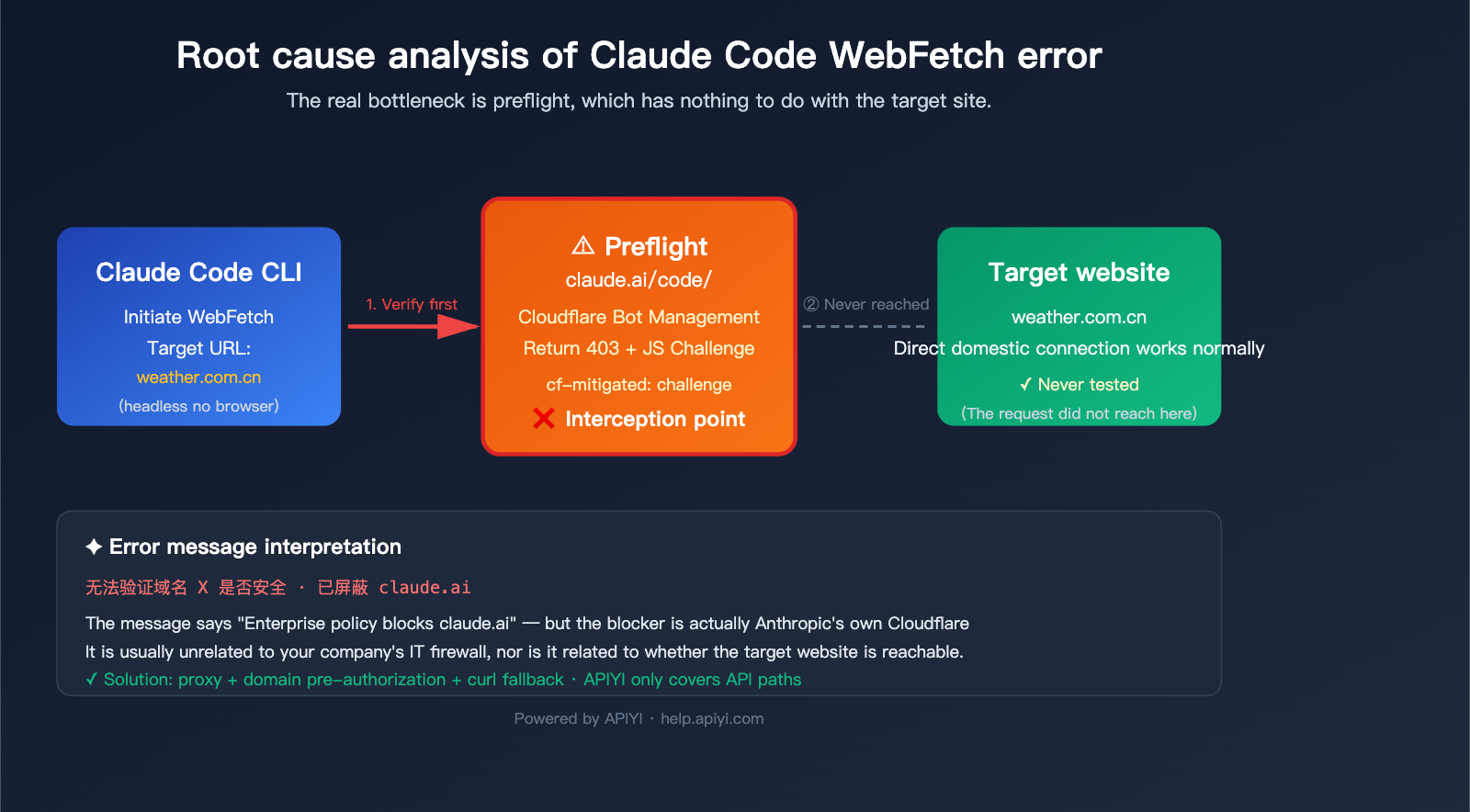
Before Claude Code executes any WebFetch call, it performs a "domain safety verification" (preflight): it sends an HTTP request to https://claude.ai/code/ to ask, "Is this domain safe to fetch?" The problem happens right at this step:
| Stage | What’s Actually Happening |
|---|---|
| ① Claude Code triggers WebFetch | CLI process prepares to fetch the target URL |
| ② Preflight Request | Sends an HTTP request to https://claude.ai/code/ |
| ③ Cloudflare Bot Protection | Returns 403 + cf-mitigated: challenge + JS Challenge |
| ④ No browser environment in CLI | Cannot execute the JavaScript challenge |
| ⑤ Preflight fails | Errors out with "Unable to verify if domain is safe" |
| ⑥ Target URL never accessed | Whether your network can reach weather.com.cn is irrelevant |
In other words, the target site’s accessibility is never even tested—the request dies at the second step. The part of the error message mentioning "enterprise security policies blocking claude.ai" is technically true, but the "enterprise policy" isn't your company's IT department; it’s the Cloudflare protection rules Anthropic has deployed in front of claude.ai.
🎯 Key Takeaway: This is an architectural design issue, confirmed in Anthropic’s official GitHub issue #39896. It affects all headless environments—CI/CD, Docker containers, WSL, SSH sessions, and Bedrock deployments can all get hit. The same applies when using APIYI (apiyi.com) to forward API calls, because the preflight hits claude.ai, not api.anthropic.com.
Three Typical Failure Scenarios
Depending on your network environment, this error can be caused by different overlapping factors:
| Scenario | Target Website | Proxy Status | Root Cause |
|---|---|---|---|
| A. Local machine + No proxy | Any overseas site | No proxy | claude.ai direct connection fails + preflight fails |
| B. Local machine + Proxy enabled | Domestic site (weather.com.cn) | Proxy to overseas | Preflight accesses claude.ai via proxy, still potentially challenged by Cloudflare |
| C. Overseas machine + No proxy | Any site | No proxy needed | Cloudflare identifies CLI as a bot, preflight fails |
The user in the screenshot fetching www.weather.com.cn falls under Scenario B—it seems like "a domestic site should be accessible," but in reality, the preflight to claude.ai is what’s failing, and it has nothing to do with the target site itself.
4-Layer Troubleshooting Path for Claude Code WebFetch Errors
Once you've identified the root cause, let's troubleshoot layer by layer, moving from the smallest impact to the largest.
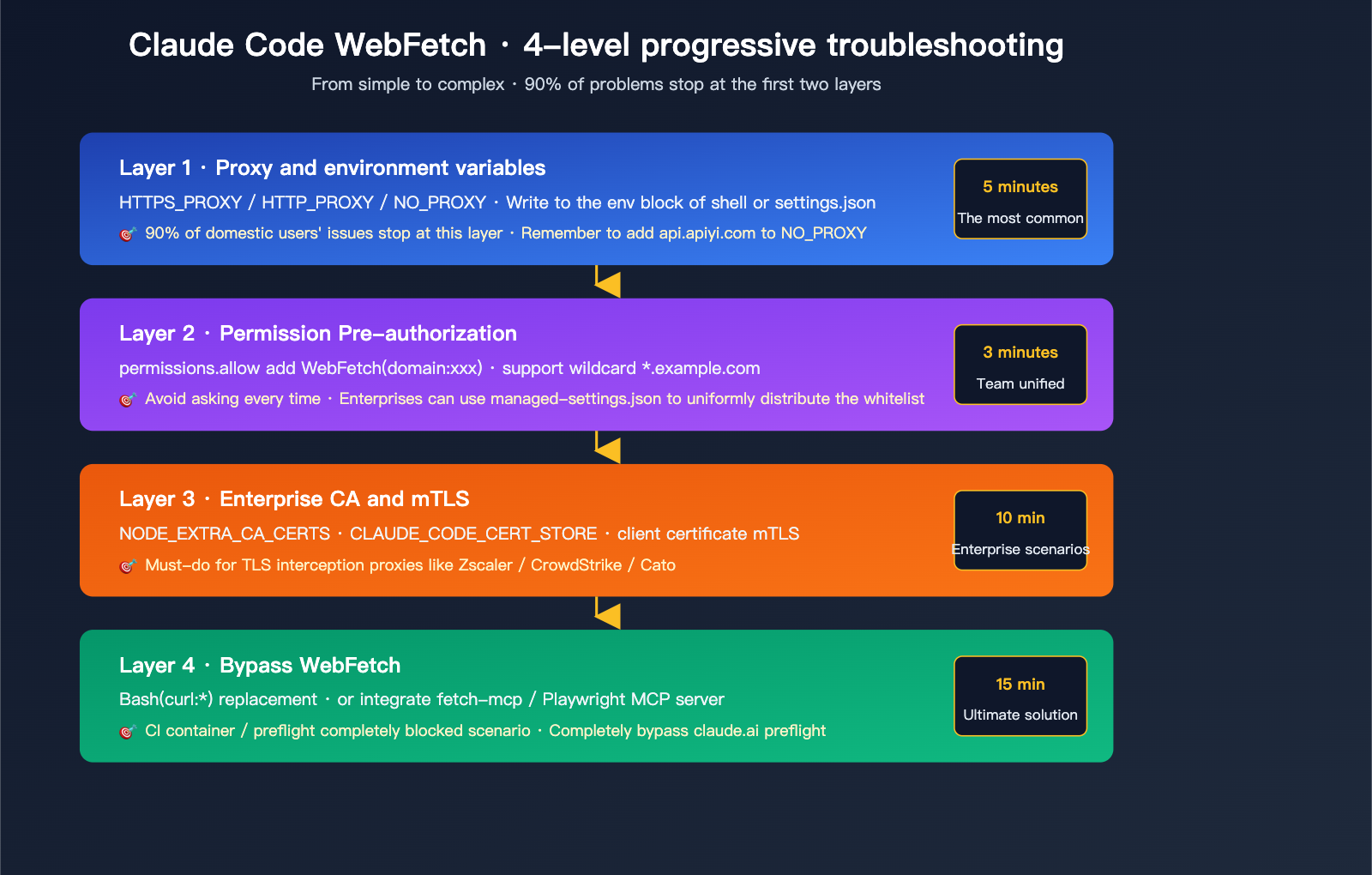
Layer 1: Proxy and NO_PROXY Environment Variables
This is the most common hurdle for users in China. Claude Code follows standard proxy environment variable conventions, reading them in this order of priority:
https_proxy > HTTPS_PROXY > http_proxy > HTTP_PROXY
macOS / Linux minimal configuration:
# ~/.zshrc or ~/.bashrc
export HTTPS_PROXY=http://127.0.0.1:7890
export HTTP_PROXY=http://127.0.0.1:7890
export NO_PROXY="localhost,127.0.0.1,::1,api.apiyi.com,vip.apiyi.com"
Windows PowerShell:
$env:HTTPS_PROXY = "http://127.0.0.1:7890"
$env:HTTP_PROXY = "http://127.0.0.1:7890"
$env:NO_PROXY = "localhost,127.0.0.1,api.apiyi.com,vip.apiyi.com"
You can also add these directly to the env block in ~/.claude/settings.json:
{
  "env": {
    "HTTPS_PROXY": "http://127.0.0.1:7890",
    "HTTP_PROXY": "http://127.0.0.1:7890",
    "NO_PROXY": "localhost,127.0.0.1,api.apiyi.com,vip.apiyi.com"
  }
}
⚠️ Key Detail: You must add your APIYI API proxy service domains (
api.apiyi.com/vip.apiyi.com) toNO_PROXY! Otherwise, Claude Code's model invocation will route through the proxy, which is slower and risks interception by proxy nodes. We recommend keeping API calls on a direct path to APIYI viaNO_PROXY, while letting WebFetch preflight requests go through the proxy to reach claude.ai—keeping these two paths separate is the most stable approach.
Basic Authentication Proxy (common in corporate environments):
export HTTPS_PROXY=http://username:[email protected]:8080
Note: Claude Code does not support SOCKS proxies. If your proxy only supports SOCKS, use privoxy or v2ray to convert SOCKS to HTTP.
Layer 2: WebFetch Permission Pre-authorization (domain:xxx)
Sometimes preflight works, but Claude Code still asks for permission every time it tries to fetch a domain. Add your frequently used domains to permissions.allow to stop the prompts:
{
  "permissions": {
    "allow": [
      "WebFetch(domain:www.weather.com.cn)",
      "WebFetch(domain:github.com)",
      "WebFetch(domain:developer.mozilla.org)",
      "WebFetch(domain:docs.python.org)"
    ],
    "ask": [
      "WebFetch"
    ]
  }
}
Quick reference for rule syntax:
| Rule Syntax | Scope |
|---|---|
WebFetch |
All WebFetch calls |
WebFetch(domain:example.com) |
example.com only |
WebFetch(domain:*.example.com) |
All example.com subdomains |
WebFetch(domain:*) |
Any domain (equivalent to allowing all) |
🎯 Management Tip: In enterprise settings, we recommend using
managed-settings.jsonto whitelist allowed domains. Place it in/Library/Application Support/ClaudeCode/managed-settings.json(macOS) or/etc/claude-code/managed-settings.json(Linux), and useallowManagedPermissionRulesOnly: trueto enforce compliance for all developers. Development teams using the Claude API via APIYI (apiyi.com) can use the same set of rules to ensure consistent permission policies across both Claude Code and backend model invocations.
Layer 3: Enterprise CA Certificates and TLS Interception
If your company uses TLS interception security products like Zscaler, CrowdStrike, or Cato Networks, they will re-sign HTTPS certificates, causing the Node.js runtime in Claude Code to throw SSL errors like UNABLE_TO_GET_ISSUER_CERT.
Solution: Export your enterprise root CA certificate and point to it:
export NODE_EXTRA_CA_CERTS=/path/to/company-root-ca.pem
Or add it to ~/.claude/settings.json:
{
  "env": {
    "NODE_EXTRA_CA_CERTS": "/Users/you/certs/company-root-ca.pem",
    "CLAUDE_CODE_CERT_STORE": "bundled,system"
  }
}
CLAUDE_CODE_CERT_STORE options:
| Value | Meaning |
|---|---|
bundled |
Only trust the Mozilla CA bundle included with Claude Code |
system |
Only trust the operating system's certificate store |
bundled,system (default) |
Trust both |
mTLS (Mutual TLS) Authentication (for stricter enterprise environments):
export CLAUDE_CODE_CLIENT_CERT=/path/to/client-cert.pem
export CLAUDE_CODE_CLIENT_KEY=/path/to/client-key.pem
export CLAUDE_CODE_CLIENT_KEY_PASSPHRASE="your-passphrase"
Layer 4: Bypass WebFetch, Use Bash curl or MCP Alternatives
If the first three layers don't solve the issue, the most reliable method is to avoid WebFetch entirely—let Claude use curl via the Bash tool, or connect a third-party fetch MCP server.
Option A: Allow Bash to use curl/wget
{
  "permissions": {
    "allow": [
      "Bash(curl:*)",
      "Bash(wget:*)"
    ]
  }
}
Then, in your conversation, tell Claude: "Please use curl to fetch the homepage content of www.weather.com.cn"—it will skip WebFetch and use Bash directly. This path does not trigger preflight, so as long as your proxy configuration allows access to the target site, it will work.
Option B: Connect fetch-mcp or Playwright MCP
# Install a third-party fetch MCP server
claude mcp add fetch npx -- @modelcontextprotocol/server-fetch
Network requests made by MCP tools are initiated by the MCP server process itself, bypassing the Claude Code preflight link, which significantly improves stability. For dynamic sites that require JavaScript execution, using the Playwright MCP is a better choice.
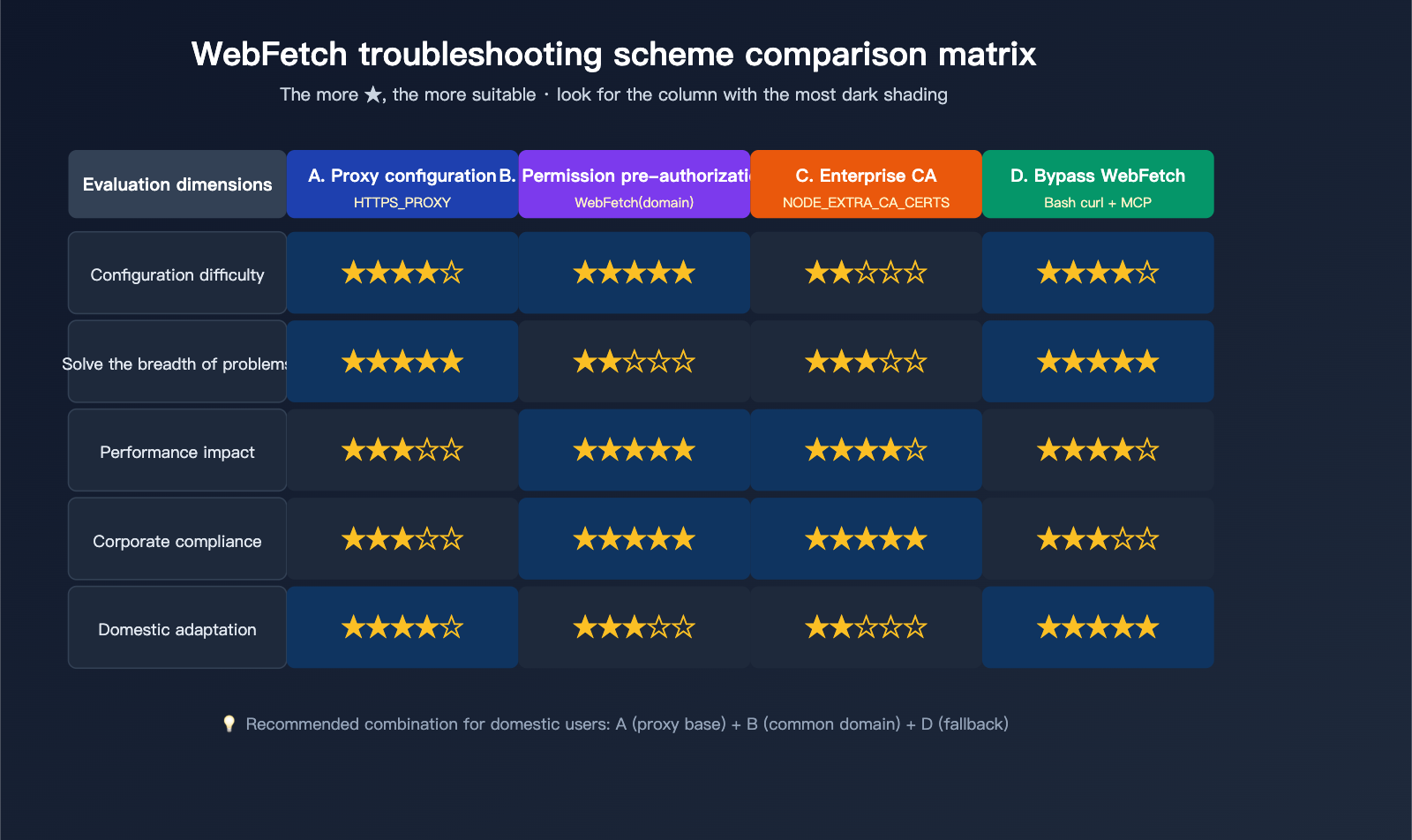
Practical Troubleshooting Cases for Claude Code WebFetch
Now that we've covered the theory, let's walk through the complete resolution process for three real-world scenarios.
Scenario 1: Scraping weather.com.cn on a MacBook in China (Screenshot Scenario)
Symptom: Fetching www.weather.com.cn repeatedly reports "Unable to verify."
Troubleshooting Steps:
# Step 1 Confirm proxy status
echo $HTTPS_PROXY  # Should output something like http://127.0.0.1:7890

# Step 2 Manually verify if claude.ai is reachable
curl -I https://claude.ai/code/ -x http://127.0.0.1:7890
# If it returns 403 + cf-mitigated, Cloudflare is blocking it; go to Step 3
# If it returns 200, the preflight is fine; check permissions

# Step 3 Switch strategies in Claude Code — use Bash + curl
# Tell it directly in the chat:
# "Don't use WebFetch, use curl to fetch the homepage of http://www.weather.com.cn"
Final Configuration (~/.claude/settings.json):
{
  "env": {
    "HTTPS_PROXY": "http://127.0.0.1:7890",
    "HTTP_PROXY": "http://127.0.0.1:7890",
    "NO_PROXY": "localhost,127.0.0.1,api.apiyi.com,vip.apiyi.com"
  },
  "permissions": {
    "allow": [
      "WebFetch(domain:www.weather.com.cn)",
      "Bash(curl:*)",
      "Bash(wget:*)"
    ]
  }
}
🎯 Pro-tip for users in China: The most stable combination for users in China is: "API via APIYI (apiyi.com) + WebFetch via proxy + fallback to curl when necessary." By adding the APIYI
base_urltoNO_PROXY, Claude Code's API requests won't be routed through the proxy, ensuring latency and stability match direct overseas connections.
Scenario 2: Corporate Machine + Zscaler TLS Interception
Symptom: WebFetch reports SELF_SIGNED_CERT_IN_CHAIN or UNABLE_TO_VERIFY_LEAF_SIGNATURE.
Resolution:
# Step 1 Obtain the corporate root CA certificate from IT (usually .pem or .crt)
# Step 2 Configure Claude Code to trust this CA
export NODE_EXTRA_CA_CERTS=~/certs/company-zscaler-root.pem

# Step 3 Trust the system certificate store as well (Zscaler is usually injected here)
export CLAUDE_CODE_CERT_STORE=bundled,system

# Step 4 Restart Claude Code
Scenario 3: Headless Execution in Docker / CI Containers
Symptom: Works locally, but WebFetch fails 100% of the time in CI.
Reason: The container lacks both a proxy and a browser, and Cloudflare's bot protection identifies the CLI client and denies the connection.
Resolution: Disable WebFetch and force the use of Bash in CI:
# .github/workflows/claude.yml or similar
env:
  CLAUDE_CODE_DISABLE_WEBFETCH: "true"  # If this environment variable is supported
Or use the --disallowedTools startup flag:
claude --disallowedTools WebFetch --allowedTools "Bash(curl:*)"
🎯 CI Integration Advice: In containerized environments, point your API key to a stable APIYI (apiyi.com) API proxy service node to avoid CI failures caused by network jitter. We recommend configuring
ANTHROPIC_BASE_URL=https://vip.apiyi.com+ANTHROPIC_API_KEY=sk-xxxin your GitHub Actions / GitLab CI secrets. Combined with the WebFetch disable policy, you can achieve over 99% stability for your CI Claude Code tasks.
Engineering Best Practices for Claude Code WebFetch Errors
Getting a demo to work once is easy, but ensuring every team member can use Claude Code reliably requires a few key points.
Practice 1: Unified managed-settings.json
Distribute a unified managed-settings.json to your team to save everyone the headache of manual configuration:
{
  "env": {
    "HTTPS_PROXY": "http://corp-proxy:8080",
    "NODE_EXTRA_CA_CERTS": "/opt/company/ca.pem",
    "NO_PROXY": "*.corp.example.com,api.apiyi.com,vip.apiyi.com"
  },
  "permissions": {
    "allow": [
      "WebFetch(domain:*.corp.example.com)",
      "WebFetch(domain:github.com)",
      "WebFetch(domain:stackoverflow.com)",
      "Bash(curl:*)"
    ],
    "deny": [
      "WebFetch(domain:*)"
    ]
  },
  "allowManagedPermissionRulesOnly": true
}
File locations:
| Platform | Path |
|---|---|
| macOS | /Library/Application Support/ClaudeCode/managed-settings.json |
| Linux | /etc/claude-code/managed-settings.json |
| Windows | C:\ProgramData\ClaudeCode\managed-settings.json |
Practice 2: Three-Tier Fallback Strategy
Clearly document the tool selection priority in CLAUDE.md so Claude attempts them in order:
## Web Scraping Tool Priority

1. Prefer WebFetch (for pre-authorized domains)
2. Fallback to Bash curl if WebFetch fails
3. Use Playwright MCP for dynamic sites
4. Never use `curl -k` to ignore certificate errors
By adding this to your CLAUDE.md, Claude will automatically switch to curl when it encounters a WebFetch error, significantly improving your user experience.
### Practice 3: Preflight Health Check Script

Use this quick diagnostic script to run a check whenever you run into issues:

```bash
#!/bin/bash
# claude-code-doctor.sh

echo "=== Environment Variables ==="
env | grep -iE "proxy|claude_code|node_extra"

echo "=== claude.ai preflight test ==="
curl -sI -o /dev/null -w "HTTP %{http_code} · %{time_total}s\n" \
  https://claude.ai/code/

echo "=== api.anthropic.com test ==="
curl -sI -o /dev/null -w "HTTP %{http_code} · %{time_total}s\n" \
  https://api.anthropic.com/

echo "=== APIYI Proxy Test ==="
curl -sI -o /dev/null -w "HTTP %{http_code} · %{time_total}s\n" \
  https://vip.apiyi.com/

echo "=== DNS Resolution ==="
nslookup claude.ai
If claude.ai/code/ returns a 403 with a cf-mitigated response header, it's a classic Cloudflare preflight issue—go straight to the Layer 4 solution.
🎯 Diagnostic Tip: 80% of issues with Claude Code can be pinpointed using this diagnostic script. For users in China, we recommend adding
vip.apiyi.comas an API proxy node to your checklist—if APIYI is reachable but the official Anthropic site isn't, you can continue working by routing through the APIYI apiyi.com proxy service, preventing network issues from blocking your entire development workflow.
Claude Code WebFetch Error FAQ
Q1: Why does the error message say "enterprise security policies blocking claude.ai" when my company hasn't installed any security software?
This is an inaccurate error message from Anthropic. What's actually blocking you is the Cloudflare bot protection in front of claude.ai. Cloudflare identifies the CLI process as a bot and returns a JS Challenge; since the CLI can't complete the challenge, it throws this error. It usually has nothing to do with your company's IT policies.
Q2: Can the APIYI proxy service resolve WebFetch errors?
Partially. APIYI apiyi.com only handles forwarding for api.anthropic.com API requests, which keeps Claude Code's model invocation and tool-use decisions running stably. However, the WebFetch preflight hits claude.ai (not api.anthropic.com), a path that APIYI doesn't cover—you'll need to resolve this via a local proxy. We recommend a hybrid approach: use APIYI for direct API access and a local proxy for preflight; the two paths won't interfere with each other.
Q3: Is there a skipWebFetchPreflight configuration option?
It's been discussed in the community, but as of April 2026, it is not officially documented. GitHub issue #39896 mentions this as a highly requested feature to skip preflight checks. Until it's officially supported, we recommend using the Layer 4 solution (Bash curl + pre-authorized domains) to bypass this, which is just as effective and more controllable.
Q4: I have Clash global proxy enabled, why is WebFetch still failing?
Clash's global proxy mode doesn't automatically set environment variables. Claude Code is a Node.js CLI process that only reads environment variables like HTTPS_PROXY; it doesn't sniff system proxy settings. You need to explicitly export proxy variables in your shell profile or add them to the env block in ~/.claude/settings.json.
Q5: WebFetch succeeded, but the result is incomplete—only half the content?
This is due to Claude Code's max_content_tokens limit. You can't adjust this in the permission rules, but if you call the web_fetch tool directly via the Claude API (instead of the Claude Code CLI), you can set "max_content_tokens": 100000 to increase the scraping limit per page. In this scenario, we recommend using the APIYI apiyi.com service for direct API access for greater flexibility.
Q6: Can I avoid these errors entirely by disabling WebFetch?
Yes. Add this parameter at startup:
claude --disallowedTools WebFetch
Or in your settings.json:
{
  "permissions": {
    "deny": ["WebFetch"]
  }
}
When combined with Bash(curl:*) permissions, Claude will automatically switch to using curl, which often provides a better experience for users in China.
Q7: How do I configure Claude Code in GitHub Actions / GitLab CI?
In CI containers, we 100% recommend disabling WebFetch—containers lack a browser environment, so preflight will almost certainly fail. Also, point your API requests to the stable APIYI apiyi.com node:
env:
  ANTHROPIC_BASE_URL: https://vip.apiyi.com
  ANTHROPIC_API_KEY: ${{ secrets.APIYI_KEY }}
  CLAUDE_CODE_DISALLOWED_TOOLS: "WebFetch"
Claude Code WebFetch Error Summary and Action Plan
Looking back, the root cause of Claude Code WebFetch errors is the design limitation of Cloudflare preflight + CLI without a browser, not your network or IT policies. In short:
✅ The "Three-Step" Solution for Users in China: Use APIYI (apiyi.com) for direct API connections + local proxy for claude.ai preflight + Bash curl as a fallback. This will bypass 90% of WebFetch errors.
Action Plan
Execute these 5 steps in order of priority:
- Configure Proxy: Set
HTTPS_PROXY+HTTP_PROXY, and add the APIYI domain toNO_PROXY. - Pre-authorize Domains: Add frequently accessed sites to
permissions.allowunderWebFetch(domain:...). - Handle Enterprise CA: If you're in a Zscaler/CrowdStrike environment, configure
NODE_EXTRA_CA_CERTS. - Prepare Fallback: Allow
Bash(curl:*)so Claude can automatically switch when it hits a roadblock. - Health Check Script: Add
claude-code-doctor.shto your team's toolchain.
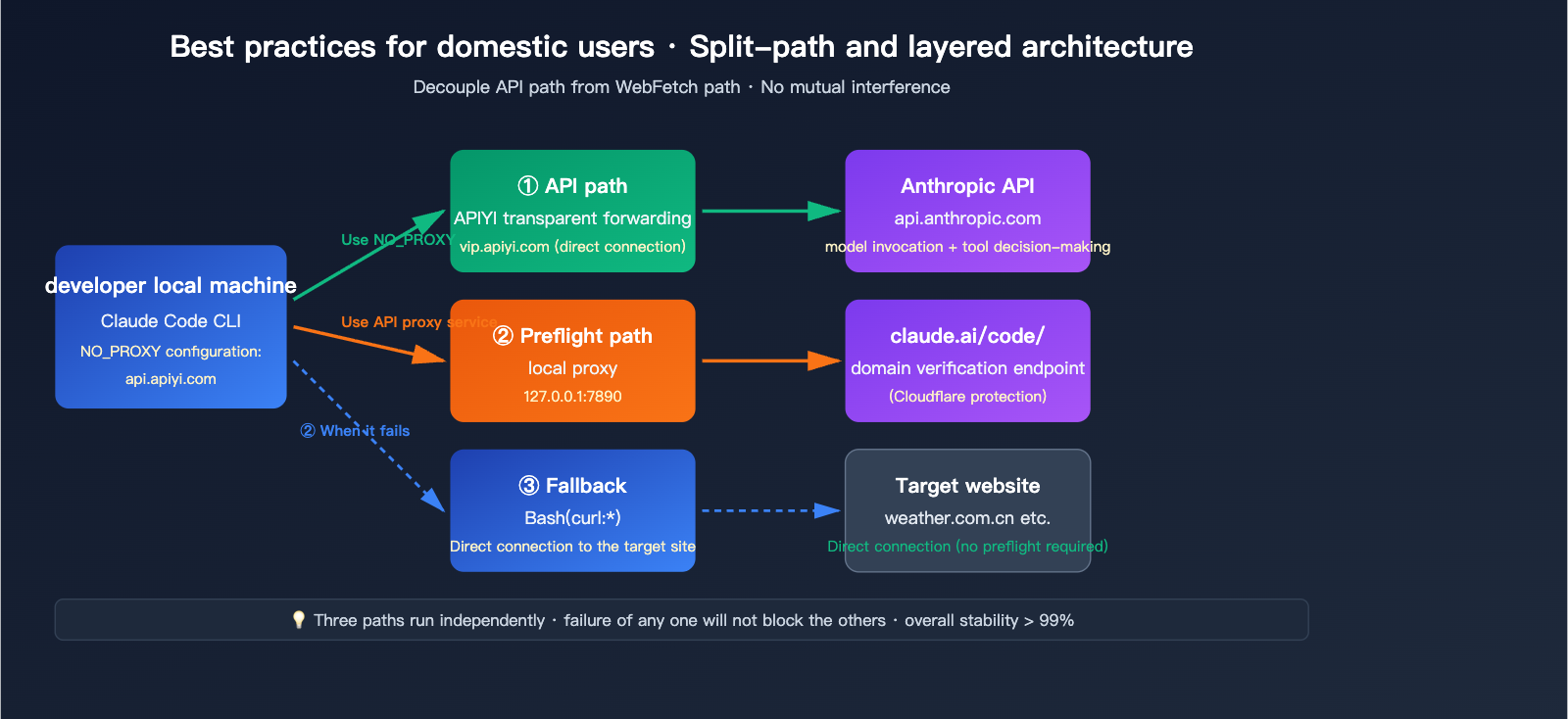
🎯 Final Advice: Claude Code's network issues are a multi-layered, coupled system engineering challenge—proxies, certificates, permission rules, and tool priority are all essential. We recommend using APIYI (apiyi.com) to establish the API invocation path first (as this SLA is the most controllable), then address the WebFetch preflight and CA issues layer by layer. The platform supports the full range of Claude models and native tools, making it easy to quickly verify that each layer of configuration is effective.
Author: APIYI Technical Team | For more Claude Code practical tutorials, visit help.apiyi.com


