

It can save, but only under certain conditions. According to the two hypothetical examples in Google’s official documentation, in a scenario with 200 tools and a 2,000-token base context, Gemini Tool Retrieval cuts input tokens from 164,000 to 23,650, a reduction of about 85.6%. In a scenario with 10 tools and a 30,000-token base context, input tokens rise from 68,000 to 92,830, an increase of about 36.5%. Whether it pays off depends on one question: can the full tool schemas you save cover the extra context overhead that server-side search introduces?
What will you learn from reading this?
- Which part of the tokens Tool Retrieval saves, and which new part it adds.
- The full premises and item-by-item breakdown of the official 200-tool example and 10-tool example.
- The break-even formula derived from the official parameters, and how to decide “how many tools make it worth enabling.”
- How to use the
interaction.usagefield and caching rules to calculate the true cost of one agent task.
Index: Start with the concept table and impact overview to align terminology and figure out which type of reader you are. The “Objective facts” section explains the mechanism Google published, the billing rules, and the exact wording of the two examples. The “Analysis and judgment” section gives the break-even point derived from the official parameters, the difference between the three kinds of “savings,” the single-task bill formula, and the enablement decision table.
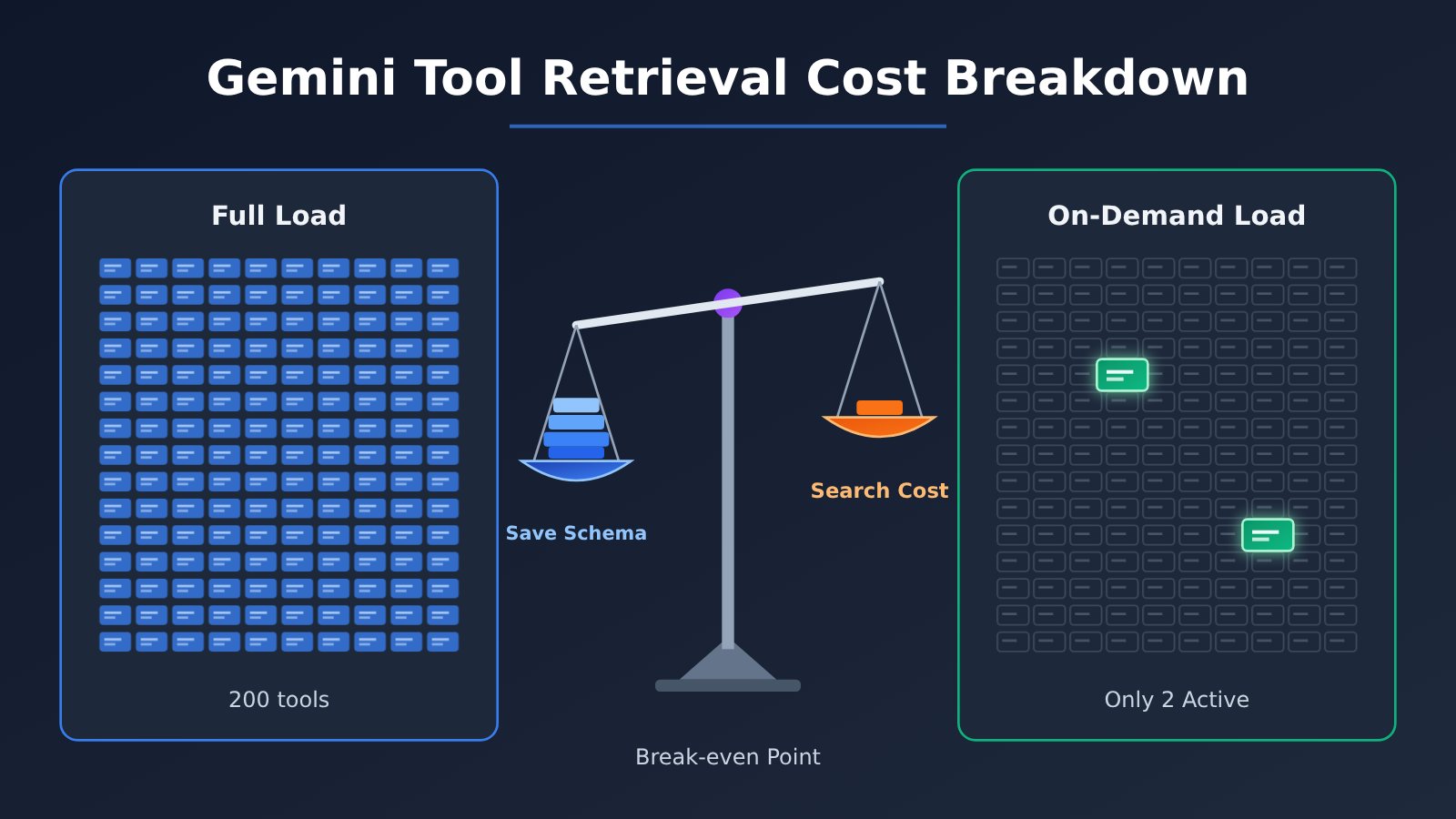
Gemini Tool Retrieval Cost Analysis To Know: Concepts Explained
| Concept | Brief explanation |
|---|---|
| Input tokens | The unit of measurement for text, conversation history, tool declarations, and other content sent to the model for processing |
| Tool schema | The full parameter definition the model relies on when generating a function call; in the example, each one is about 400 tokens |
| Deferred tool list | With defer_loading: true set, the tool names and short descriptions the model initially sees; in early official tests, each item was about 26 tokens |
| Base context B | In the worked example, the history and task information that each model call would process anyway |
| Post-search inference | An additional model call made after the server retrieves a tool, carrying the existing context plus the newly added schema |
total_tool_use_tokens |
The extra model-call input triggered by server-side tools and search within the same request |
total_cached_tokens |
The portion of input usage handled by cache and billed at the cached rate |
| Break-even point | The boundary at which static loading and on-demand loading have equal input costs under the same set of assumptions |
| Cost per successful task | The sum of model-call and tool costs across all rounds required to complete one business goal |
Gemini Tool Retrieval Impact at a Glance
- Agent developers connecting to large tool libraries: When you have many tools but a single task uses only a few, there’s an opportunity to significantly reduce the schema cost of repeated input. This is the scenario behind the official 200-tool example.
- App developers with smaller tool sets and longer contexts: Each server-side search requires an extra model inference run and reprocesses the long context, so enabling it can be more expensive. The official 10-tool example is the counterexample.
- Engineering or FinOps staff responsible for cost accounting: Looking only at the first request’s
total_input_tokenswill underestimate costs. You must account fortotal_tool_use_tokens, cache hits, and output tokens together. - Platform teams maintaining enterprise tool registries: Client-side retrieval mode can be combined with your own permission filtering and dynamic tools, but each search adds an extra API round trip, so the cost model needs to be evaluated separately.
The Facts: Gemini Tool Retrieval’s Launch and Billing Mechanism
What Gemini Tool Retrieval Is and When It Launched
On November 19, 2026, Google announced on its official blog that Tool Retrieval was available in preview within the Gemini Interactions API. The feature is in Preview and requires the v1beta API version; the older generateContent method doesn’t support it. To turn on server-side mode, you add {"type": "tool_search"} to tools and set defer_loading: true on the function or mcp_server you want to load lazily.
As of November 20, 2026, the developer docs explicitly list four compatible model IDs: gemini-4-hydrogen, gemini-4-argon, gemini-3.8-flash, and gemini-3.6-flash. The announcement’s phrasing—”Gemini 3.6 and newer models”—is broader, but any model not listed in the docs has to be verified on your own. Setting defer_loading on an unsupported model returns HTTP 400.
One point that’s easy to misread is worth stressing: in server-side mode, developers still have to submit the full tools array on every request, including the complete parameters of the deferred tools, even when using previous_interaction_id. What Tool Retrieval changes is when the full schema enters the model’s context window—not whether those definitions are still sent in the request body.
Where the costs of static loading and Gemini Tool Retrieval come from
With static loading, every model call has to read the full schema of all tools — even when this turn only uses a single refund function. Tool Retrieval swaps those full definitions for a short tool list: when the model needs something, it fires a tool_search_call, the server returns a tool_search_result containing the full schema, and the model then generates a function_call from it.
Google explicitly says Tool Retrieval carries no separate feature fee, but the following are still billed at the rates of the model you’ve selected:
- The short list entries for all deferred tools.
- The fixed search instructions added once
tool_searchis enabled. - The extra model inference triggered by each server-side retrieval, which reprocesses the full context plus the newly loaded schema.
- The full schemas of the loaded tools, plus their continued occupancy in later turns (the current docs offer no unloading mechanism).
- Normal output, Thinking, and tool-execution-result tokens.
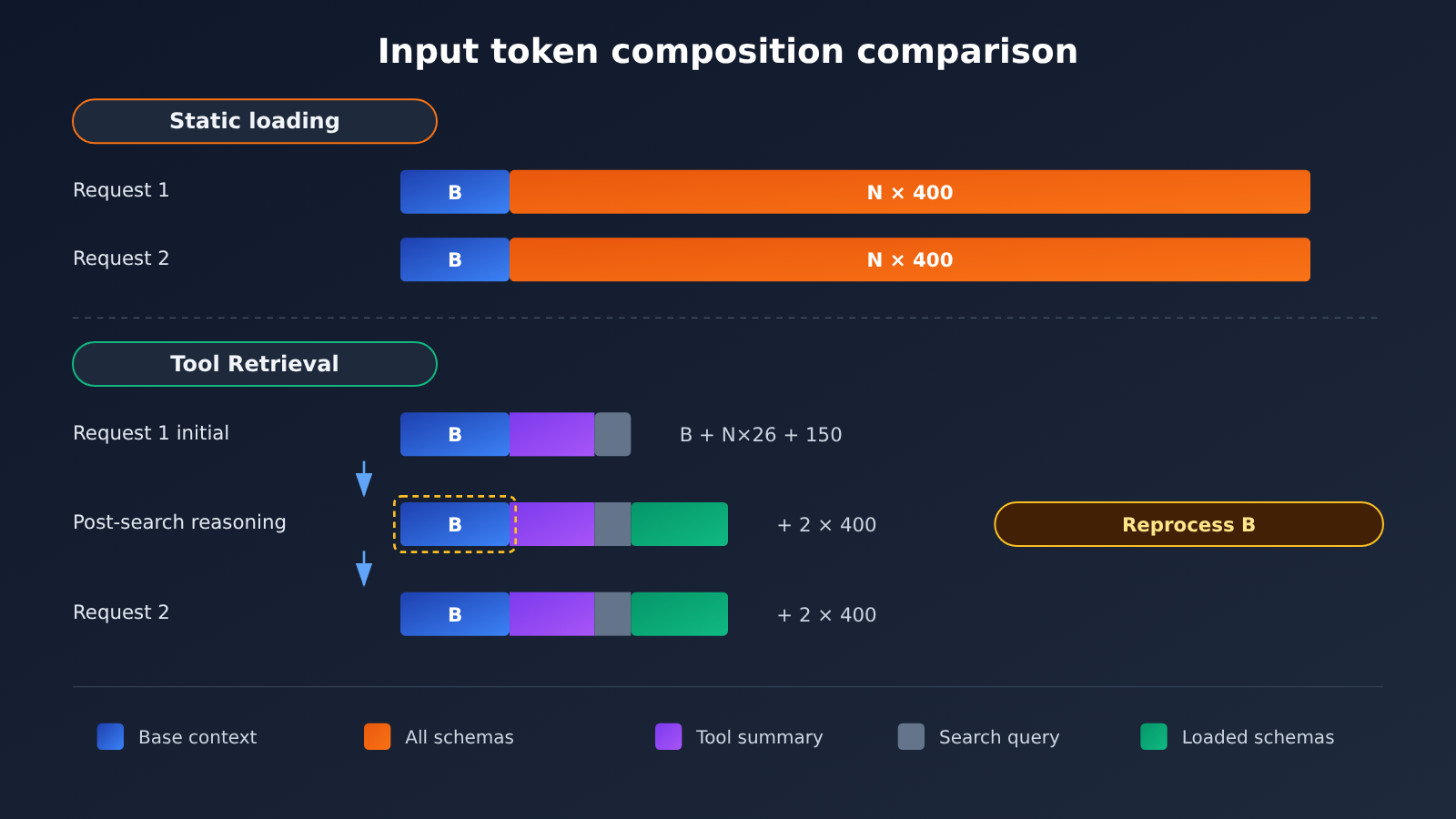
Gemini Tool Retrieval Official Worked Examples: 200 Tools vs. 10 Tools
Both sets of examples come from Google’s Tool Retrieval documentation. They’re officially labeled hypothetical calculations, not production benchmarks, and both ignore output tokens and caching benefits. The shared assumptions are: each full schema is 400 tokens, each deferred tool summary is about 26 tokens, the search instruction is 150 tokens, one task includes 2 external requests, 1 server-side search happens during the first request, and 2 tools are loaded in total.
| Calculation item | 200 tools, B=2,000 | 10 tools, B=30,000 |
|---|---|---|
| Static loading: 2 × (B + N × 400) | 164,000 | 68,000 |
| Request 1 initial input (B + N × 26 + 150) | 7,350 | 30,410 |
| Request 1 post-search inference (plus 2 schemas) | 8,150 | 31,210 |
| Request 2 input | 8,150 | 31,210 |
| Tool Retrieval total | 23,650 | 92,830 |
| Change | -140,350 | +24,830 |
| Change rate (recalculated from official figures) | about -85.6% | about +36.5% |
The 200-tool scenario saves so much because the static approach has to carry 80,000 tokens of tool definitions on every request, while the base context is only 2,000, so the extra cost of running one more inference pass after search is small. The 10-tool scenario is the opposite: tool definitions total only 4,000 tokens, so there’s limited room to save, and post-search inference has to process the 30,000-token long context again, so the added overhead directly outweighs the savings.
Usage fields, pricing, and caching rules for Gemini Tool Retrieval
Google provides the fields in interaction.usage that you need to analyze Tool Retrieval costs:
| Field | Meaning | Role in cost analysis |
|---|---|---|
total_input_tokens |
Input to the first model invocation within the request | Only reflects “how much shorter the initial context got” |
total_tool_use_tokens |
Input to additional model invocations triggered by server-side tools and search | The main source of search costs, and the easiest to overlook |
total_cached_tokens |
The portion already included in the input and handled by the cache | Billed at the cache rate, and can’t be added again |
total_output_tokens |
Output generated by the model | Billed at the output rate |
total_thought_tokens |
Tokens produced by the reasoning process | Billed at the output rate of the selected model |
On pricing: in the Standard tier on Google’s pricing page, Gemini 4 Hydrogen input is $1.50 per million tokens, output (including Thinking) is $7.50, and cached input is $0.075. If you take just this input unit price and do the arithmetic on the official worked examples, the 200-tool scenario comes out to roughly $0.246 versus $0.0355, and the 10-tool scenario to roughly $0.102 versus $0.139. This is just hypothetical token counts multiplied by the official rates — not an actual bill of any kind.
There are two separate thresholds to understand in the caching rules. First, the Interactions API only supports implicit caching, and as of November 20, 2026, the minimum implicit-cache input size for the Gemini 4 series, Gemini 3.8 Flash, and Gemini 3.6 Flash is 4,096 tokens. Second, in Gemini 4 multi-turn conversations and Agent Loops, a new request must add at least 2,050 tokens before the system will cache the full previous request; below that, the last 2,050 tokens of the previous request are re-billed at the standard input rate, and model output, Thinking, and function results all count toward this incremental amount.
As of the date of source verification, Google has not published the token savings ratio, latency improvement, or tool-selection accuracy gains of Tool Retrieval on real task sets, nor is there any sufficiently verifiable independent developer production testing.
Analysis: When Does Gemini Tool Retrieval Actually Save Tokens?
Gemini Tool Retrieval’s Break-Even Point: How Many Tools Make It Worth Enabling?
The following is an extended example derived from the official worked-example parameters, not a general threshold published by Google. Let N be the total number of tools and B be the base context. Using the same assumptions: S=400, D=26, H=150, K=2, and “two requests, one search”:
- Static loading: T_static = 2 × (B + 400N)
- On-demand loading: T_retrieval = 3 × (B + 26N + 150) + 2 × 2 × 400
This formula reproduces both sets of official results exactly. Setting T_retrieval < T_static and simplifying gives 722N > B + 2050, or N > (B + 2050) / 722. The 2050 here comes from 3 × 150 + 1600; it’s just an algebraic result and has nothing to do with the 2,050-token incremental condition for Gemini 4 multi-turn caching in the caching docs. Don’t mix the two up.
| Base context B | Tool count N | Static loading | Tool Retrieval | Change | Percentage | Data type |
|---|---|---|---|---|---|---|
| 2,000 | 200 | 164,000 | 23,650 | -140,350 | -85.6% | Official worked example |
| 30,000 | 10 | 68,000 | 92,830 | +24,830 | +36.5% | Official worked example |
| 30,000 | 44 | 95,200 | 95,482 | +282 | +0.3% | Extended derivation |
| 30,000 | 45 | 96,000 | 95,560 | -440 | -0.5% | Extended derivation |
| 30,000 | 50 | 100,000 | 95,950 | -4,050 | -4.1% | Extended derivation |
| 30,000 | 100 | 140,000 | 99,850 | -40,150 | -28.7% | Extended derivation |
With B=30,000, the break-even point is N > 44.39, meaning on-demand loading only gains a slight edge starting with the 45th tool, and near the threshold the savings are almost negligible. Under the same formula, if B=2,000, the threshold is about 5.6, so 6 tools are enough to flip the result. This shows that the longer the base context, the larger the tool library needs to be to amortize the cost of reprocessing context during search.
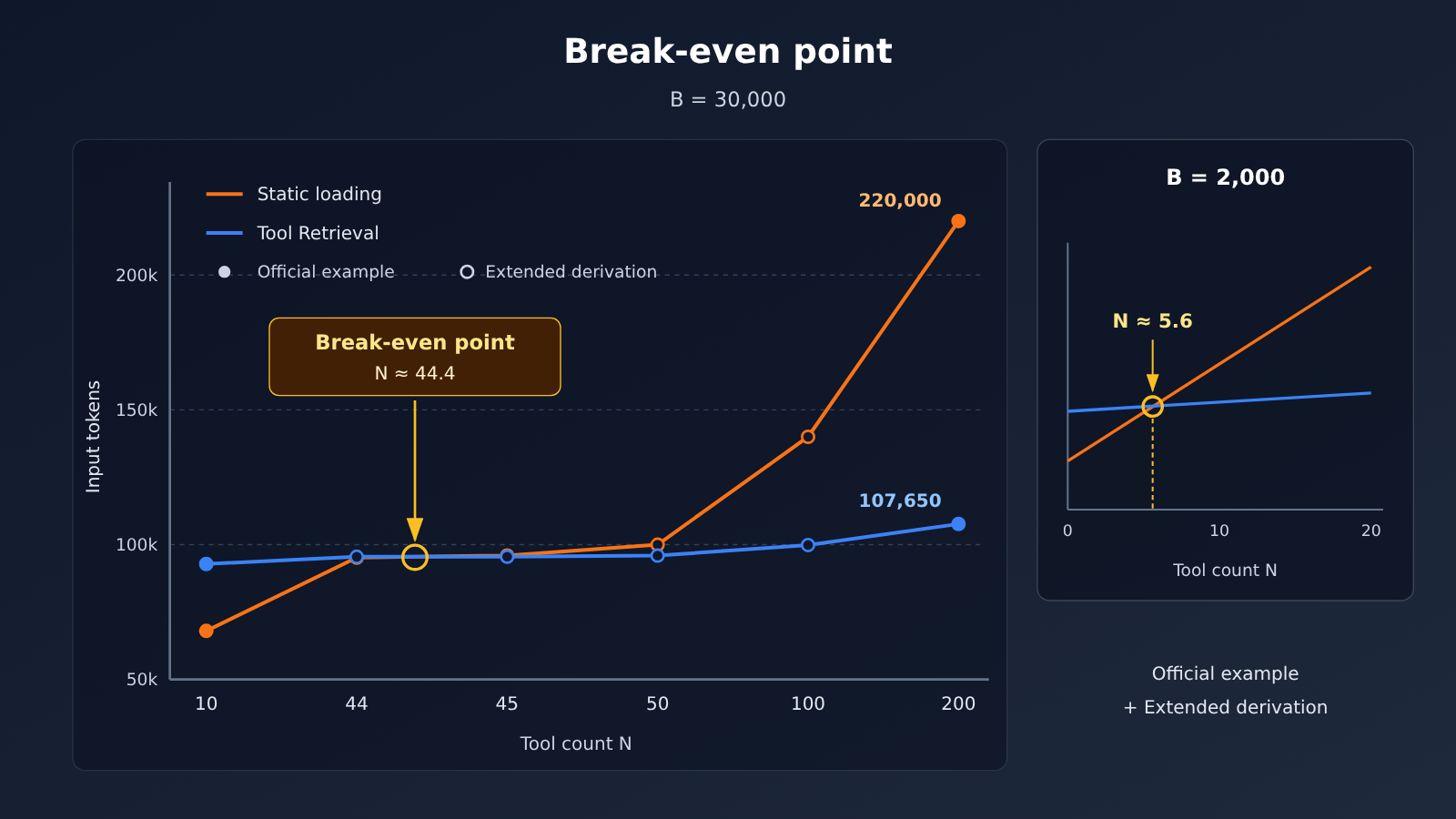
Figure caption: The first two rows are Google’s official worked examples; the rest are derived under the same assumptions. Search counts and load counts in real tasks will change the curve, so we recommend re-testing with your own business requests. You can quickly spin up static-loading baselines for multiple models through the unified APIYI (apiyi.com) API for comparison.
Real-world tasks rarely match these assumptions exactly. The following variables shift the break-even point:
- Number of searches: Each additional server-side search adds another model input roughly the size of “B + tool list + loaded schemas”; in long-context scenarios, that’s like paying for B again every time.
- Actual loaded count K: The more tools loaded, the smaller the savings; loaded schemas can’t be unloaded, so they keep accumulating in long conversations.
- Individual schema size S: For tools with complex parameters and lengthy descriptions, on-demand loading pays off more; when schemas are very short, the gains get eaten up by list entries and search instructions.
- Number of conversation turns: The static approach repeats all schemas every turn. The more turns there are—and the less often new searches are triggered—the more obvious the advantage of on-demand loading becomes.
Fewer Input Tokens, Lower Total Billing, Faster Responses: The Three Kinds of “Savings” in Gemini Tool Retrieval
These three things often get lumped together, but they aren’t equivalent. Fewer input tokens is the most visible one — but if you only look at total_input_tokens, you’ll miss the post-search reasoning that gets recorded under total_tool_use_tokens, and you’ll overestimate the savings.
Lower total billing also depends on caching and unit price. On-demand loading makes the initial prompt shorter, and if the original prompt only cleared the 4,096-token implicit cache threshold thanks to a big pile of schemas, turning it on can actually cost you the cache. And if the short loop of function calls and result returns adds less than 2,050 tokens of new content, Gemini 4 won’t get the full cache of the previous request either. In other words: fewer tokens, but the price structure might get worse.
Faster responses currently have no official or independent data behind them. Server-side search doesn’t add client round trips, but the request does run extra model inference internally; client-side retrieval adds one API round trip per search. Whether latency actually improves or degrades can only be answered by your own end-to-end testing.
How to calculate the real bill for a Gemini Tool Retrieval agent task
Based on the official usage semantics — standard billing, cached tokens already included in input, no other per-call tools — a single request can be estimated as:
USD ≈ [ (I + U − C) × P_in + C × P_cache + (O + T) × P_out ] / 1,000,000
Here I, U, C, O, and T correspond in order to the five fields in the table above. An agent task usually spans multiple requests, so you need to sum up the usage from each request before calculating, and finally divide total cost by the number of successfully completed tasks to get the cost per successful task.
Before turning on Tool Retrieval, the safest move is to measure a static-loading baseline first. Below is a static Function Calling run through an OpenAI-compatible interface to record baseline usage:
import openai

client = openai.OpenAI(
    api_key="YOUR_API_KEY",
    base_url="https://api.apiyi.com/v1"  # APIYI unified endpoint, used to run the static-loading baseline
)

resp = client.chat.completions.create(
    model="gemini-3.8-flash",  # model name is subject to the platform's model list
    messages=[{"role": "user", "content": "Refund 40 USD for order A-1042."}],
    tools=[{"type": "function", "function": {"name": "issue_refund",
            "parameters": {"type": "object", "properties": {
                "order_id": {"type": "string"}, "amount": {"type": "number"}},
                "required": ["order_id", "amount"]}}}]
)
print(resp.usage)  # record input and output tokens for static full loading
One thing worth noting: Tool Retrieval itself relies on the v1beta version of the Google Interactions API. The example above is only for obtaining static-loading comparison data. For the on-demand side, use a call pattern that supports the Interactions API, then put both usage numbers into the same cost formula for comparison.
See the full implementation: break-even estimation + usage billing estimate
import openai

# ---------- 1. Theoretical estimate following the official worked example (extended example, not official thresholds) ----------
def static_tokens(B: int, N: int, S: int = 400) -> int:
    return 2 * (B + N * S)

def retrieval_tokens(B: int, N: int, D: int = 26, H: int = 150,
                     K: int = 2, S: int = 400) -> int:
    return 3 * (B + N * D + H) + 2 * K * S

def breakeven_tools(B: int) -> float:
    return (B + 2050) / 722  # Only valid when S=400, D=26, H=150, K=2

for B, N in [(2000, 200), (30000, 10), (30000, 45), (30000, 100)]:
    s, r = static_tokens(B, N), retrieval_tokens(B, N)
    print(f"B={B:>6} N={N:>3} static={s:>7} retrieval={r:>7} "
          f"change={(r - s) / s:+.1%}")
print("B=30000 breakeven tool count:", round(breakeven_tools(30000), 2))

# ---------- 2. Estimate per-request cost (USD) from the Usage fields ----------
def request_cost(I, U, C, O, T, p_in, p_cache, p_out) -> float:
    """I/U/C/O/T correspond to total_input / tool_use / cached / output / thought tokens"""
    return ((I + U - C) * p_in + C * p_cache + (O + T) * p_out) / 1_000_000

# Example: Gemini 4 Hydrogen standard pricing 1.50 / 0.075 / 7.50 (per million tokens)
print(request_cost(I=7350, U=8150, C=0, O=200, T=0,
                   p_in=1.50, p_cache=0.075, p_out=7.50))

# ---------- 3. Static loading baseline (OpenAI-compatible endpoint) ----------
client = openai.OpenAI(
    api_key="YOUR_API_KEY",
    base_url="https://api.apiyi.com/v1"
)

def run_static_baseline(prompt: str, tools: list, model: str = "gemini-3.8-flash"):
    resp = client.chat.completions.create(
        model=model,
        messages=[{"role": "user", "content": prompt}],
        tools=tools
    )
    return resp.usage  # When aggregating multi-turn tasks, accumulate request by request
🚀 Quick start: we recommend you first get the static loading baseline running on APIYI (apiyi.com) with a single key, record the tokens and completion rates from your real business task set, and only then decide whether to migrate the agent to on-demand loading — don’t change your architecture based on the official illustrative numbers alone.
Gemini Tool Retrieval Enablement Decision: Does Your Tool Library Qualify?
Combining the official engineering guidance with the reasoning above, you can use the table below for a first-pass judgment. The final call should still rest on the cost per successful task and the completion rate on real workloads:
| Workload characteristics | Recommended strategy | Rationale |
|---|---|---|
| Fewer than ~20 stable tools, most of them used every turn | Keep static loading | Official recommendation; there’s little Schema to save, and search overhead is a large share of the cost |
| Few tools but a very long base context | Static loading, or defer only a handful of large-Schema tools | Every search reprocesses the long context — the 10-tool example is the counterexample |
| Dozens to hundreds of tools, with only a few used per invocation | Prioritize evaluating server-side retrieval | Large long-tail tool libraries are exactly the scenario the official 200-tool example targets |
| A mix of high-frequency tools plus many low-frequency specialized tools | Load high-frequency tools directly, defer_loading for the low-frequency ones |
The officially recommended hybrid approach — avoids searching first even for simple tasks |
| Multi-tenant, dynamic tools, filtering required by user permissions | Evaluate client-side retrieval | Can hook into a self-built registry, but each search adds an extra round trip |
| Tools that system instructions name frequently | Keep direct loading | Official warning: named deferred tools may bypass search and be called directly, causing errors |
💡 Selection tip: Run the same batch of tasks through both the static and on-demand setups, keeping the model, tool library, context length, and caching conditions identical. With APIYI apiyi.com you can switch between different Gemini and other mainstream models under a unified interface for baseline comparisons, which makes it easier to attribute cost differences to the tool-loading strategy itself.
A few more engineering details directly affect the bill: when store=false and you manage history yourself, you must preserve tool_search_call, tool_search_result, and their signature exactly as-is, otherwise subsequent requests may return HTTP 400; you can’t drop the parameters of deferred tools just to shrink the request body; and when debugging, check the function_call entries in interaction.steps, not just interaction.status. Once these issues trigger a retry, the tokens from the repeated request also count toward cost.
Ultimately, Tool Retrieval is a cost tool built on the premise that “a few tools are used frequently while most sit idle.” The two official examples pointing in opposite directions already spell out the boundaries: the larger the tool library, the shorter the context, and the less searching you do, the more likely you’ll save; the reverse and you may spend more. What you should really optimize isn’t the token count of the first request, but the total bill per successful task.
As Chen Danran of the Qing dynasty wrote in Wuyan · Discussion on Relocating the Capital and Establishing Vassal States: “Those who do not plan for the whole cannot plan for a single domain.”
References
- Google official announcement: Introducing Tool Retrieval in the Gemini API (2026-11-19)
- Link:
blog.google/innovation-and-ai/technology/developers-tools/gemini-api-tool-retrieval
- Link:
- Google Tool Retrieval technical documentation: configuration, billing, official worked examples, and limitations
- Link:
aistudio.google.com/docs/tool-retrieval
- Link:
- Google Context caching documentation: implicit caching thresholds and Gemini 4 multi-turn caching rules
- Link:
aistudio.google.com/docs/caching
- Link:
- Google Gemini Developer API pricing: model input, output, and caching rates
- Link:
aistudio.google.com/docs/pricing
- Link:
Author: APIYI Technical Team
Technical discussion: If you want to compare Token costs across multiple models like Gemini in Agent scenarios, feel free to visit APIYI at apiyi.com to get test credits. For more integration guidance, see the documentation center at docs.apiyi.com


