
Author’s note: Following the README, release notes, and provider docs, this breaks down OpenMotion’s five production stages, explains which stages a single OpenAI-compatible key can connect to, and shows how shots that can’t be connected can be generated externally and then imported.
When you’re making your own film with OpenMotion and happen to have an API key on hand, your first instinct is probably to plug it into the OpenAI-compatible connection in Model Settings and expect image generation, voiceover, shots, and soundtrack to all just work. As the repository docs put it, a single compatible key maps to only two protocols in OpenMotion: image generation and voiceover. Subtitle transcription is a third, separate endpoint. Video shots and soundtracks don’t live in the compatibility slot.
This isn’t another repo popularity write-up. This article doesn’t use star counts as evidence. It only checks the README, the v0.1.1 release notes, and provider docs, stage by stage, to verify where the key can connect. Every capability claim is sourced; none comes from hands-on testing.
Core value: After reading this, you’ll be able to judge for yourself which stages go to the compatible endpoints, which stages need a different provider, and which stages should be generated externally first and then imported into OpenMotion.
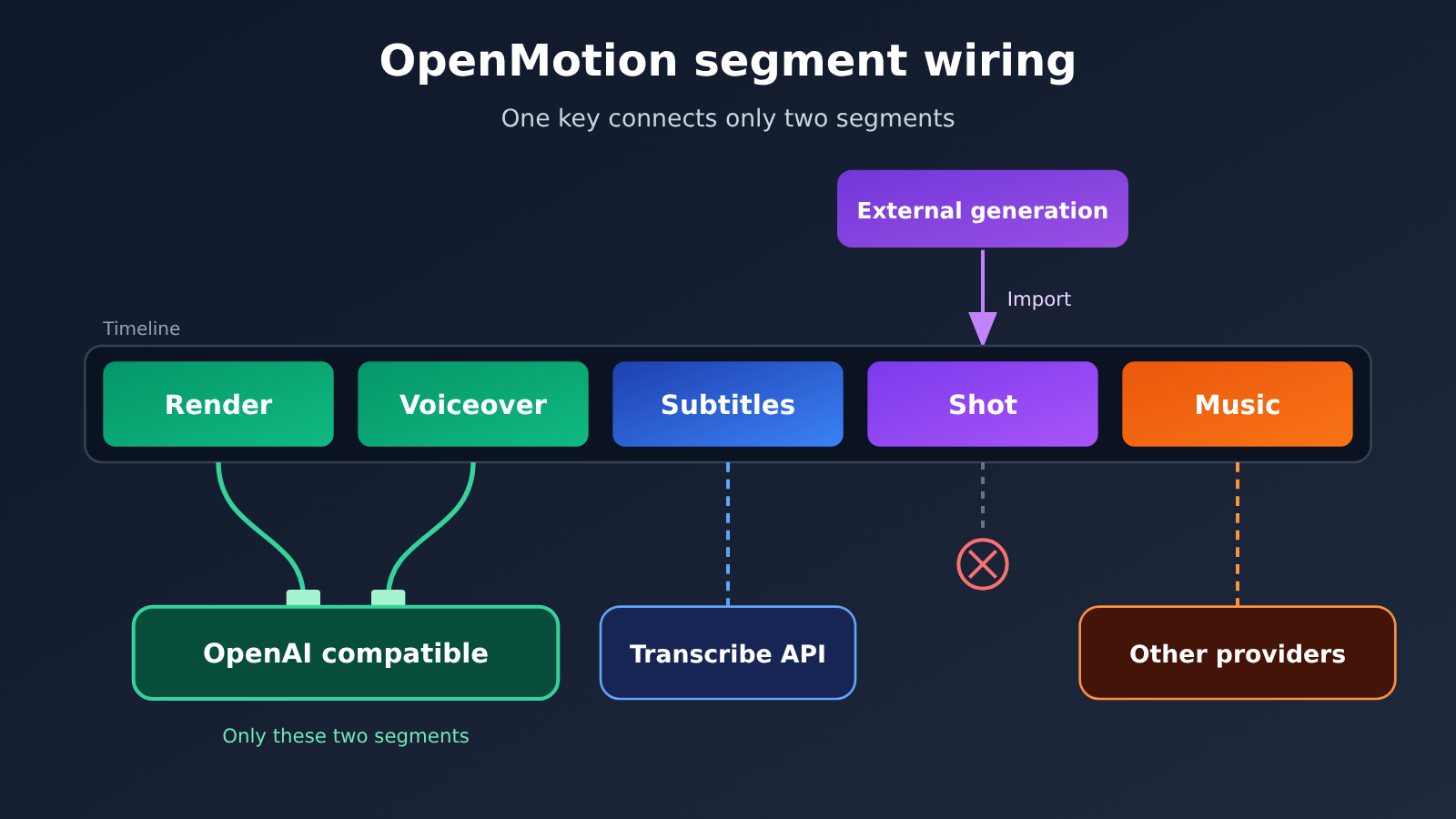
OpenMotion’s Core Points for Video API Key Setup
Let’s get the conclusions into a table first. The “expected protocol” in the table comes from the repository’s docs/provider-settings.md and compatible.md, and represents what’s implemented on OpenMotion’s side — it doesn’t mean any given platform actually offers the corresponding endpoint.
| Production Stage | Protocol OpenMotion Expects | Can a Compatible API Key Connect Directly? | Next Step When It Doesn’t Connect |
|---|---|---|---|
| Image Generation | POST base + /images/generations, reads b64_json or url |
Yes, provided the platform offers that endpoint | Choose a platform that has an image generation endpoint |
| Voiceover | POST base + /audio/speech, with input in the body, must include voice, returns binary audio |
The protocol is implemented, but the platform must actually have that endpoint | Switch to a provider that has this endpoint, or import your own recorded audio |
| Subtitles | POST base + /audio/transcriptions, needs real timestamps |
It’s a separate interface, not shared with voiceover | Write them manually in Studio, or import a subtitle file |
| Shots | Goes through fal.ai, Atlas Cloud, WaveSpeedAI, or OpenDesign Cloud | No | Generate the final footage externally, then import it |
| Soundtrack/Sound Effects | Same as shots; the compatible protocol doesn’t implement music or sound effects | No | Switch providers, or import your own audio |
OpenMotion’s Compatible Interface Only Recognizes Image Generation and Narration
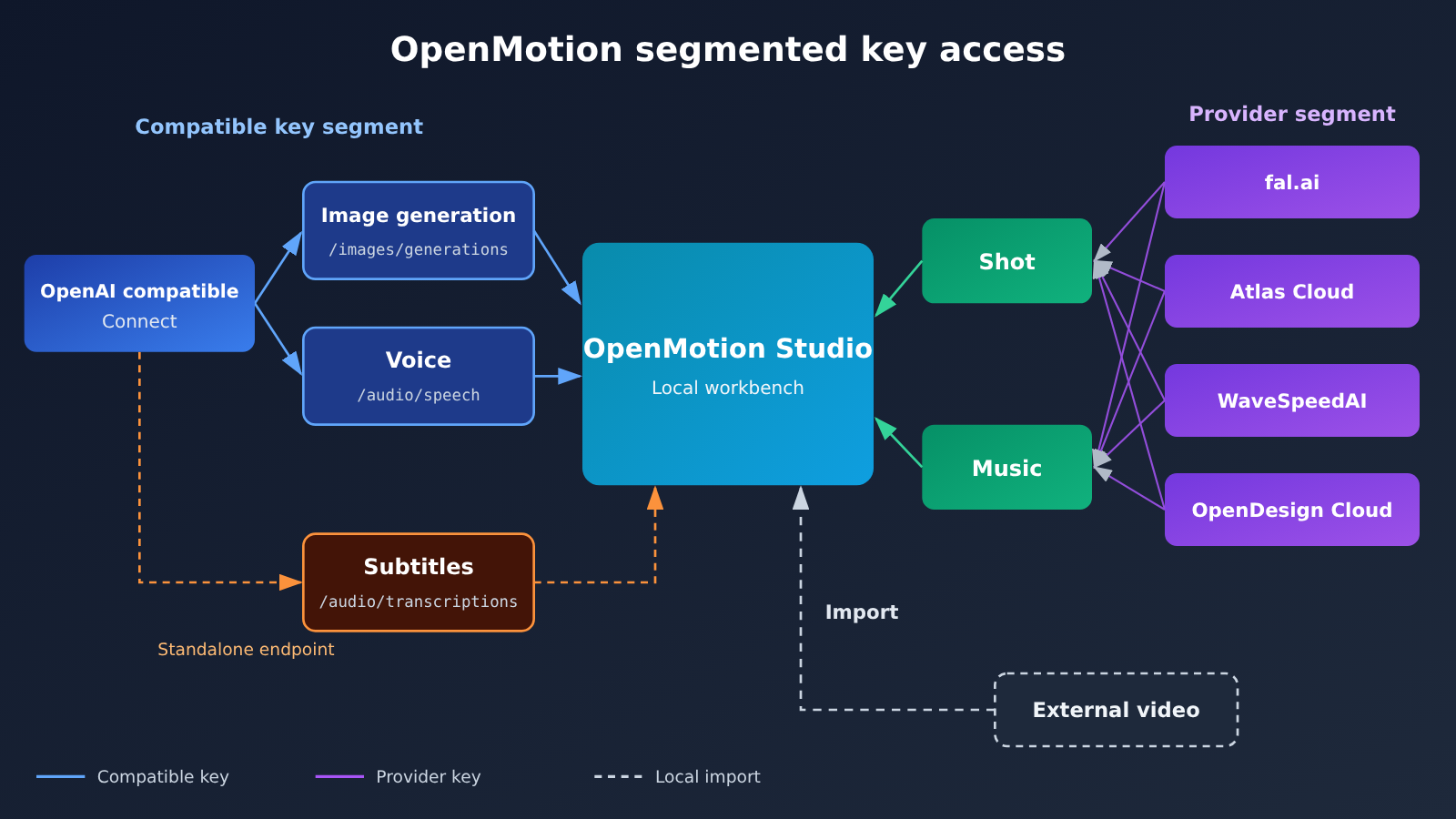
The repo’s docs/provider-settings.md puts it bluntly: an OpenAI-compatible connection can only execute /images/generations and the binary /audio/speech, and speech must include a voice. Anthropic and Google Gemini are catalog-only here — there’s no general media adapter, so even if you paste in a Claude or Gemini key, image generation or voiceover capability won’t materialize out of thin air. Video and music are explicitly handed off to fal.ai, Atlas Cloud, WaveSpeedAI, or OpenDesign Cloud.
compatible.md also draws the boundaries of the compatibility adapter. Image generation is text-to-image only — no image editing or upload, no async video. Narration returns binary audio, but the music and sound-effect protocols aren’t implemented. docs/model-gateway.md (marked updated 2026-11-15) adds one more note: a general-purpose compatible connection implements the standard speech protocol; that doesn’t mean those connections have a portable music or sound-effect interface. In other words, “compatible” stops at speech.
Don’t Mix Up the Three Model Lists in the OpenMotion README
The README gives three lists in different places. They serve different purposes and can’t be merged into a single “OpenMotion supported models” table.
- The examples at the top: image generation, adding shots, music, and narration are illustrated with GPT Image 2.6, Seedance 2.5, Suno, and Eleven v4, just to show what the workflow looks like.
- The fal.ai catalog section: after hooking up fal.ai in Model Settings and refreshing the catalog, you can find GPT Image 2.6, Nano Banana 2.1, FLUX.3, Seedance 2.5, Kling 4.0, Wan 3.0, and Eleven v4. That’s the catalog as seen through fal.ai.
- The capability table: images are Codex Image, Nano Banana 2 via Atlas Cloud, FLUX Schnell via fal.ai; video is Seedance 2.0 via Atlas Cloud, Wan 2.2 via fal.ai; music is Suno v4 via Atlas Cloud; speech is Kokoro via fal.ai.
These three lists answer three different questions: “what does the workflow look like,” “what’s in a particular provider’s catalog,” and “what hookups do the docs list.” Seeing Seedance 2.5 mentioned at the top doesn’t mean that compatible key of yours can produce Seedance shots directly in OpenMotion.
OpenMotion Video Quick Start: Wiring Up Keys, Step by Step
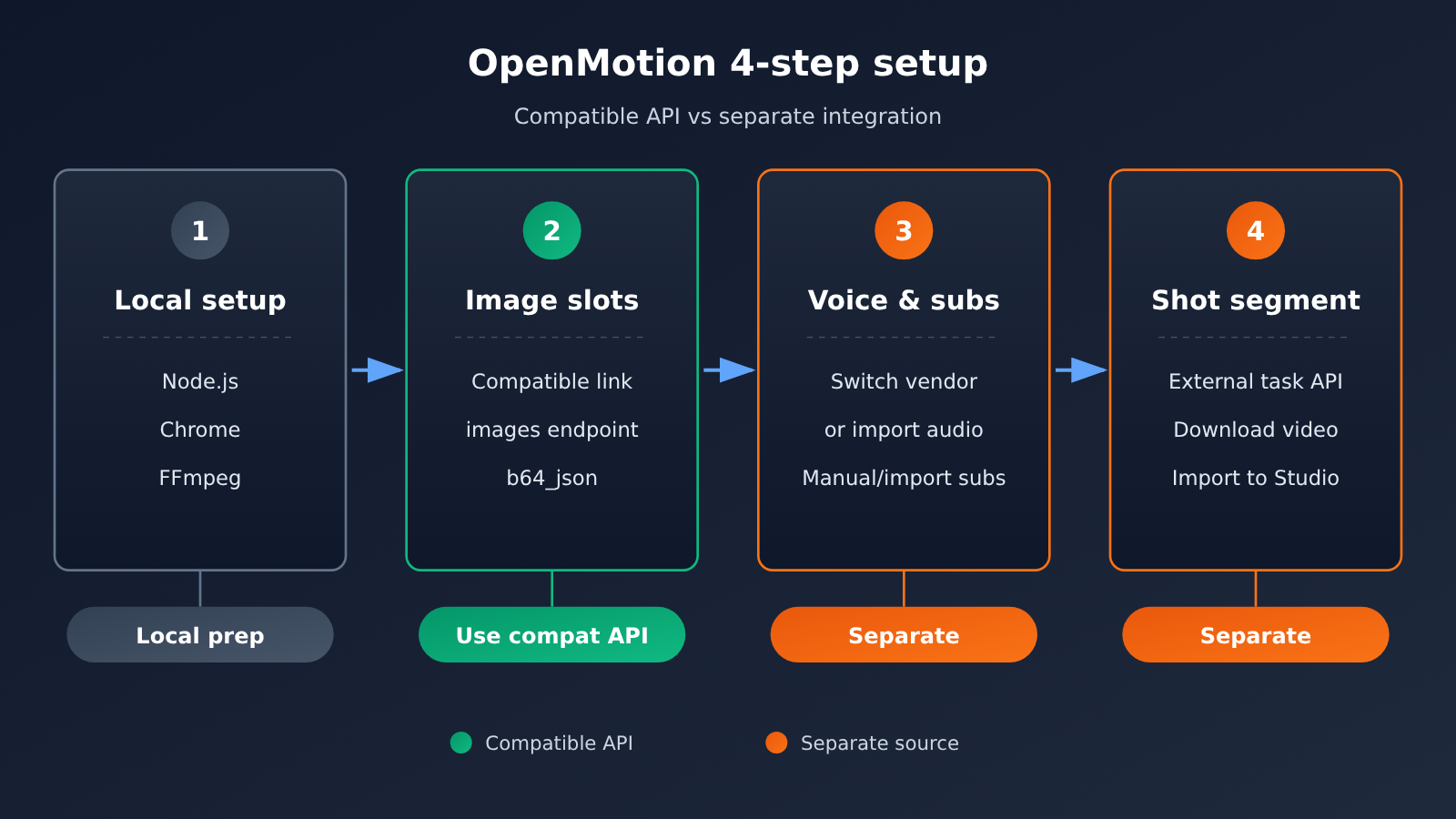
Let’s walk through the whole thing in the order you’d actually make a video. At each step, I’ll start with what OpenMotion expects, then look at whether the key you’re holding lines up.
Step 1: Set Up the OpenMotion Local Environment
Here’s what the README’s installation section lists. It’s worth confirming you’ve got everything before you start plugging in keys:
- Node.js 26.11.1: the version the README specifies.
- Building from source is the default: the published npm app is optional. The README itself warns that published versions can lag, so new features may show up late.
- Chrome or Chromium, plus FFmpeg: local preview and export both depend on them.
- Docker Compose (optional): the v0.1.1 release notes say you can use Docker Compose to open Studio locally from source.
The README also makes clear that the software itself charges no subscription and no per-render fee — each provider bills through your own account. And you can skip the generation APIs entirely, importing your own footage, images, and audio directly. That option comes up again and again for the steps that don’t connect.
Step 2: Fill OpenMotion’s image-generation slot with a compatible connection
Image generation is the most reliable part of the compatible-key workflow. Take APIYI as an example: it’s an OpenAI-compatible model aggregation platform where one key can invoke multiple mainstream models, and its image generation endpoint /v1/images/generations matches exactly the path OpenMotion’s image generation adapter expects. In Model Settings, fill it in roughly like this:
| Field | Value | Notes |
|---|---|---|
| Connection type | OpenAI-compatible | Only this type routes through /images/generations |
| Base URL | https://api.apiyi.com/v1 |
The adapter appends /images/generations to it |
| API Key | Token created in the platform console | Make sure the token group includes the group for the selected model |
| Image model | gpt-image-2.6-all, gpt-image-2.6-flare, or gpt-image-2.6-sunburst |
Corresponds to GPT Image 2.6 in the README example |
| Response format | b64_json or url |
The adapter can read either |
After filling it in, generate a single still frame first to confirm the pipeline is working. Note that OpenMotion’s compatible image generation adapter does not support image editing uploads, so “editing an existing image” won’t work through this path—you’ll need to regenerate or import an image edited elsewhere.
🚀 Quick start: For the image-generation step, we recommend first using APIYI apiyi.com’s free trial credits for new users to get one image through, confirming that the Base URL, token group, and model ID all match, then batch-generating storyboard stills.
Step 3: Confirm Endpoints First for OpenMotion Voiceover and Subtitles
The voiceover slot needs /v1/audio/speech, and the subtitle slot needs /v1/audio/transcriptions — these are two different APIs. Based on the APIYI pricing endpoint read on 2026-11-20, the only public endpoints are /v1/messages, /v1/embeddings, Gemini generateContent, /v1/images/generations, /v1/chat/completions, and /v1/responses. There is no /v1/audio/speech, and no /v1/audio/transcriptions either.
In the summary table, the tts-1 and tts-1-hd entries only list chat, while OpenMotion’s voiceover adapter sends /audio/speech requests. So you can’t just put these two model IDs into the voiceover slot and expect audio. There are two paths for the voiceover part: switch to a provider that actually offers /audio/speech and supports the voice parameter, or record the audio yourself and import it directly.
Subtitles are actually easier in v0.1.1. The release notes say you can generate, import, or hand-write subtitles in Studio, then export them as SRT or VTT. The subtitle section in compatible.md (checked on 2026-11-17) notes that you can only export SRT or VTT once you have real timestamps — text alone won’t give you a timeline. Without a transcription endpoint, hand-writing or importing a subtitle file with timestamps is the most direct approach.
Step 4: Generate OpenMotion shots externally, then import them
Shot segments can’t be placed in the compatibility slots. Even if you generate shots directly in OpenMotion, it still has to go through fal.ai, Atlas Cloud, or WaveSpeedAI. If your video credits are on another platform, generate the final video there, then import the file into Studio. The single-segment MP4 export added in v0.1.1 also makes it easier to inspect clips where you’ve replaced shots individually. How exactly to generate Seedance 2.5 externally gets its own section next.
How to reconcile OpenMotion image-generation model IDs and pricing
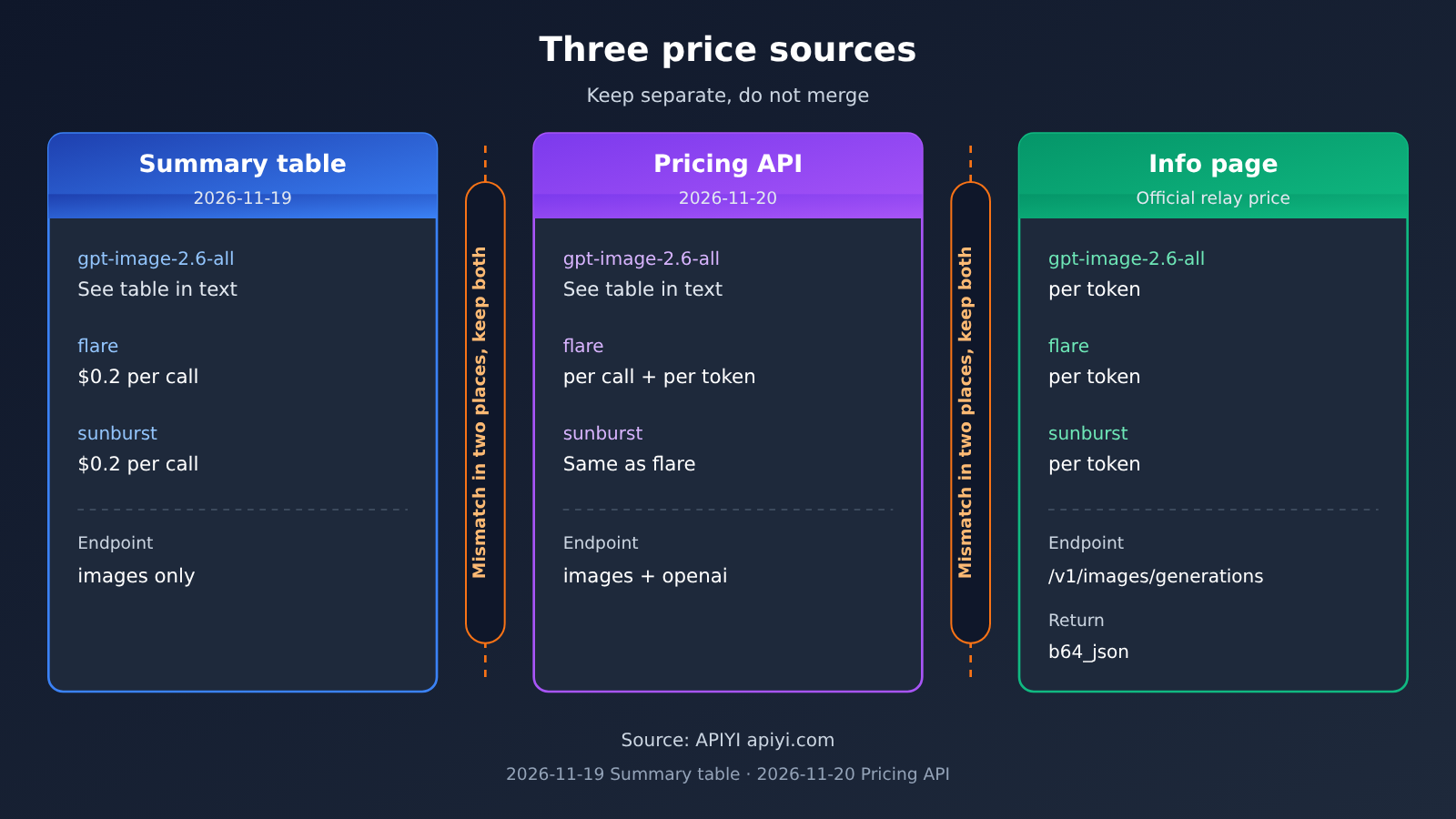
The easiest mistake when checking model IDs and prices is to mash numbers from different pages into a single price. Below I list them by APIYI’s three sources; the read date is in each table header, and when two sources disagree, I keep both.
| Model ID | Master table (data timestamp 2026-11-19 10:59) | Pricing API (read 2026-11-20) | Description page |
|---|---|---|---|
gpt-image-2.6-all |
USD 0.025 per call; endpoints chat, images; groups Default, image2_OSS, SVIP | model_price 0.025; endpoints image-generation, openai |
The description page says gpt-image-2-all at USD 0.025/image, not 2.6 |
gpt-image-2.6-flare |
USD 0.2 per call; endpoints list only images; groups Default, image2Enterprise, image2_OSS, SVIP | model_price 0.2, plus billing_expr (p * 5 + cr * 1.25 + img * 8 + img_cr * 2 + c * 30); endpoints image-generation, openai |
Official relay is priced by token: text input 5, image input 8, image output 30 USD per million tokens; cache read text 1.25, image 2 USD |
gpt-image-2.6-sunburst |
Same as flare: USD 0.2 per call, endpoints list only images | Same as flare | Same as above, token-based |
As you can see, the master table lists flare and sunburst at USD 0.2 per call with only images as the endpoint, while the pricing API, in addition to 0.2, also carries a token-based billing formula and adds openai to the endpoints. The description page lists official-relay prices by token and states that official-relay text-to-image uses /v1/images/generations and returns b64_json. These statements don’t fully agree, so this article won’t merge them into a single price. For actual charges, rely on the model list in the apiyi.com console at the time you place the order.
For the OpenMotion image-generation slot, the key information is actually the endpoint: all three model IDs’ image endpoints match /images/generations, and the return format is b64_json, which the adapter can read.
On the music and narration side, the Suno and Eleven v4 examples in the README don’t appear in the 2026-11-19 master table or the 2026-11-20 pricing API, and whisper isn’t in the master table either. Suno and Eleven v4 aren’t listed yet; we’ll get this model listed as soon as possible. Model IDs and prices are subject to the platform’s model list.
The OpenMotion Shot Segment: Why Seedance 2.5 Doesn’t Go Into the Compatibility Slot
Seedance 2.5’s model ID on APIYI is doubao-seedance-2-5-260628. There are two reasons it doesn’t go into the OpenMotion compatibility slot: OpenMotion’s compatibility adapter doesn’t handle asynchronous video at all, and doubao-seedance-2-5-260628 on APIYI runs through its own task endpoint rather than the compatible video endpoint.
| Item | Master table (2026-11-19) | Pricing interface (2026-11-20) | Seedance2 docs page |
|---|---|---|---|
| Endpoint | lists chat only | only openai (i.e. chat) | POST /seedance/api/v3/contents/generations/tasks |
| Group | SeeDance2 | only SeeDance2; the SeeDance2, SD2Fast, and SD2Mini group multipliers are all 0.18 | token must have SeeDance2 selected, multiplier 0.18x |
| Price format | usage-based, input 70, output 70 USD per million tokens, no cache-read data | same model, converted by group multiplier | a 720p, 5-second example with no input video comes out to 1.3721 USD |
| Billing mode | usage-based | usage-based | usage-based preferred, or usage-based |
Don’t conflate these two numbers. The 70 USD per million tokens in the master table is the list price; the 1.3721 USD on the docs page is a specific example that already applies the SeeDance2 group’s 0.18 multiplier. Take list price × 0.18 and you get 12.60 USD per million tokens; multiply that by the 108900 tokens used in the docs example and you get roughly 1.37 USD, which matches that example. So they’re two layers of the same billing scheme, not two prices you can pick from.
The group names differ too: the master table writes fast and mini as SD2-Fast-Cheap and SD2-Mini-Cheap, while the pricing interface calls them SD2Fast and SD2Mini. When you create a token, go by whatever group name the console actually shows — don’t force-fit the name from one page.
In the actual production workflow: first submit the shot task to APIYI’s Seedance task endpoint, download the finished clip once the task completes, then import the video file into the OpenMotion timeline and edit it alongside the stills generated through the compatibility endpoint and voiceover recorded externally.
💡 Recommendation: If you want to manage your shot quota and image quota under the same key, you can select both the image generation group and the SeeDance2 group for your token on APIYI apiyi.com. Feed the images into OpenMotion and generate the shots through the task endpoint, then import them — your bill will reconcile cleanly in a single dashboard.
FAQ
Q1: What is OpenMotion?
OpenMotion is an open-source video production studio released by nexu-io under the Apache-2.0 license, with the repository created on 2026-05-11. The repo description says it supports 22 agents and name-checks Claude Code, Codex, DSH, and WorkBuddy. According to the README, the software itself charges no subscription or rendering fees — generation calls are billed by your own provider account.
Q2: How does OpenMotion’s compatible endpoint differ from fal.ai and Atlas Cloud?
Inside OpenMotion, the compatible endpoint only implements two protocols: `/images/generations` and `/audio/speech`, while subtitles go through `/audio/transcriptions` separately. fal.ai, Atlas Cloud, WaveSpeedAI, and OpenDesign Cloud are the video and music channels the docs actually specify. If you want to generate shots directly inside the Studio, you have to go through one of those.
Q3: When was OpenMotion v0.1.1 released, and what changed?
v0.1.1 shipped on 2026-11-18 at 19:32 (Beijing time). Per the release notes: subtitles can be generated, imported, or written by hand and exported as SRT or VTT; individual segments can be exported as MP4; 96 new Skills were added; you can open the Studio locally from source via Docker Compose; and an optional DeepSeek Harness plugin puts the Studio right next to the conversation. All of this comes from the release notes, not from hands-on testing.
Q4: Can I put tts-1 into OpenMotion’s narration slot?
Not directly. The narration slot sends a `/v1/audio/speech` request that requires a `voice` field and returns binary audio. But in the APIYI master table, `tts-1` and `tts-1-hd` only list the chat endpoint, and the public endpoints of the pricing API don’t include `/v1/audio/speech` either. For narration, it’s better to switch to a provider that offers that endpoint, or record your audio and import it.
Q5: How do I quickly hook up image generation for OpenMotion via API?
Just a few steps:
1. Sign up at APIYI (apiyi.com) and claim your free trial credits.
2. Create a token, and make sure its group includes the group of the image model you want to use — for example, Default.
3. In OpenMotion’s Model Settings, create a new OpenAI-compatible connection, set Base URL to `https://api.apiyi.com/v1`, and enter an available model ID such as `gpt-image-2.6-all`.
4. Generate a single still frame to verify — the adapter will read the returned `b64_json` or `url`.
Q6: How do I get shots generated by Seedance 2.5 into OpenMotion?
Use `doubao-seedance-2-5-260628` to submit a task through the task endpoint `POST /seedance/api/v3/contents/generations/tasks`, with the token’s SeeDance2 group enabled. Once the task completes, download the video file and place it on the timeline in OpenMotion by importing it as media. Pricing needs to be read in two places: the master table lists $70 per million tokens for both input and output, while the example on the description page for 720p, 5 seconds works out to $1.3721 after conversion.
Q7: What are the known limitations of this setup?
– **Image generation**: The compatible adapter doesn’t support uploading images for editing — it’s text-to-image only.
– **Narration and subtitles**: The OpenMotion protocols are implemented, but the platform has to actually offer `/audio/speech` and `/audio/transcriptions`. Without real timestamps, subtitles can’t be exported as SRT or VTT.
– **Music and sound effects**: Not implemented in the compatible protocol — you’ll need to go through fal.ai, Atlas Cloud, WaveSpeedAI, or OpenDesign Cloud, or import your own audio.
– **Pricing basis**: The master table, the pricing API, and the description page don’t describe the same model in exactly the same way — before you order, go by the platform’s model list.
Key Takeaways: Wiring Up API Keys for Video Production in OpenMotion
- The compatibility slot only speaks two protocols: image generation at
/images/generationsand voiceover at/audio/speech. Subtitles are the third endpoint. - Shots and soundtracks don’t go through the compatibility slot: generating them inside Studio means going through fal.ai, Atlas Cloud, WaveSpeedAI, or OpenDesign Cloud.
- Don’t merge the three lists in the README: the opening examples, the fal.ai catalog, and the capability table each serve a different purpose.
- Image generation already has models on the shelf:
gpt-image-2.6-all,gpt-image-2.6-flare, andgpt-image-2.6-sunburstall line up with the image endpoint. - Read pricing separately by source: the summary table is per call, the pricing endpoint comes with formulas, and the docs page is per token — don’t squash them into one price.
- If it won’t connect, generate externally and import: Seedance 2.5 renders video through its task endpoint — download it, then import it into the timeline.
- Start by generating one image: use APIYI’s free quota to verify the Base URL and token group, then expand to the other stages.
Summary
To make your own film with OpenMotion, key setup boils down to three points:
- Image generation goes through the compatible endpoint: point the Base URL at a platform that offers
/images/generations, then fill in one of the listed GPT Image 2.6 model IDs. - Check the endpoint before relying on voiceover and subtitles: OpenMotion’s protocol supports them, but if the platform has no
/audio/speechor/audio/transcriptions, switch providers or write and import them yourself. - Shots and soundtracks connect elsewhere: generate the finished clip externally and import it, or hook up fal.ai, Atlas Cloud, or WaveSpeedAI inside Studio.
Before you start, list which endpoint each stage needs using the section table in this article — that’s far less hassle than dumping in every key at once and then chasing down error messages. For image generation and Seedance shots, you can manage both with a single token on APIYI apiyi.com: verify the pipeline with the free quota first, then decide how to split the work for the real film.
📚 References
-
OpenMotion repository and README: installation requirements, three model lists, and billing notes
- Link:
github.com/nexu-io/openmotion - Description: Read from the main branch on 2026-11-20; covers the Node.js version, Chrome, and FFmpeg dependencies
- Link:
-
OpenMotion v0.1.1 release notes: updates including subtitles, single-segment export, and Docker Compose
- Link:
github.com/nexu-io/openmotion/releases/tag/v0.1.1 - Description: Released on 2026-11-18; all descriptions of version capabilities in this article come from this page
- Link:
-
OpenMotion provider docs: the protocol boundaries a compatible endpoint can implement
- Link:
github.com/nexu-io/openmotion/blob/main/docs/provider-settings.md - Description: The files
docs/model-gateway.mdandskills/openmotion-media/references/providers/compatible.mdin the same directory add details for the image generation, speech, and subtitle interfaces
- Link:
-
APIYI model list, capability description pages, and pricing API: model IDs, endpoints, groups, and prices
- Link:
docs.apiyi.com/models.md - Description: The overview pages
/api-capabilities/gpt-image-2/overview.mdand/api-capabilities/seedance2/overview.mdon the same site provide further details; the pricing API path is/api/pricingunder the api subdomain, with pricing_versionshell-api-modelmak-v1
- Link:
Author: APIYI Technical Team
Technical support: If you run into mismatched model IDs, groups, or endpoints during integration, feel free to contact us through the APIYI official website homepage.


