
Author’s note: Break down the five use cases in Vane’s open-source image-generation skill, explain what sticker packs, posters, book covers, red envelope covers, and pet portraits each deliver, and show how to call three GPT Image 2.6 endpoints yourself to generate images when Codex isn’t installed.
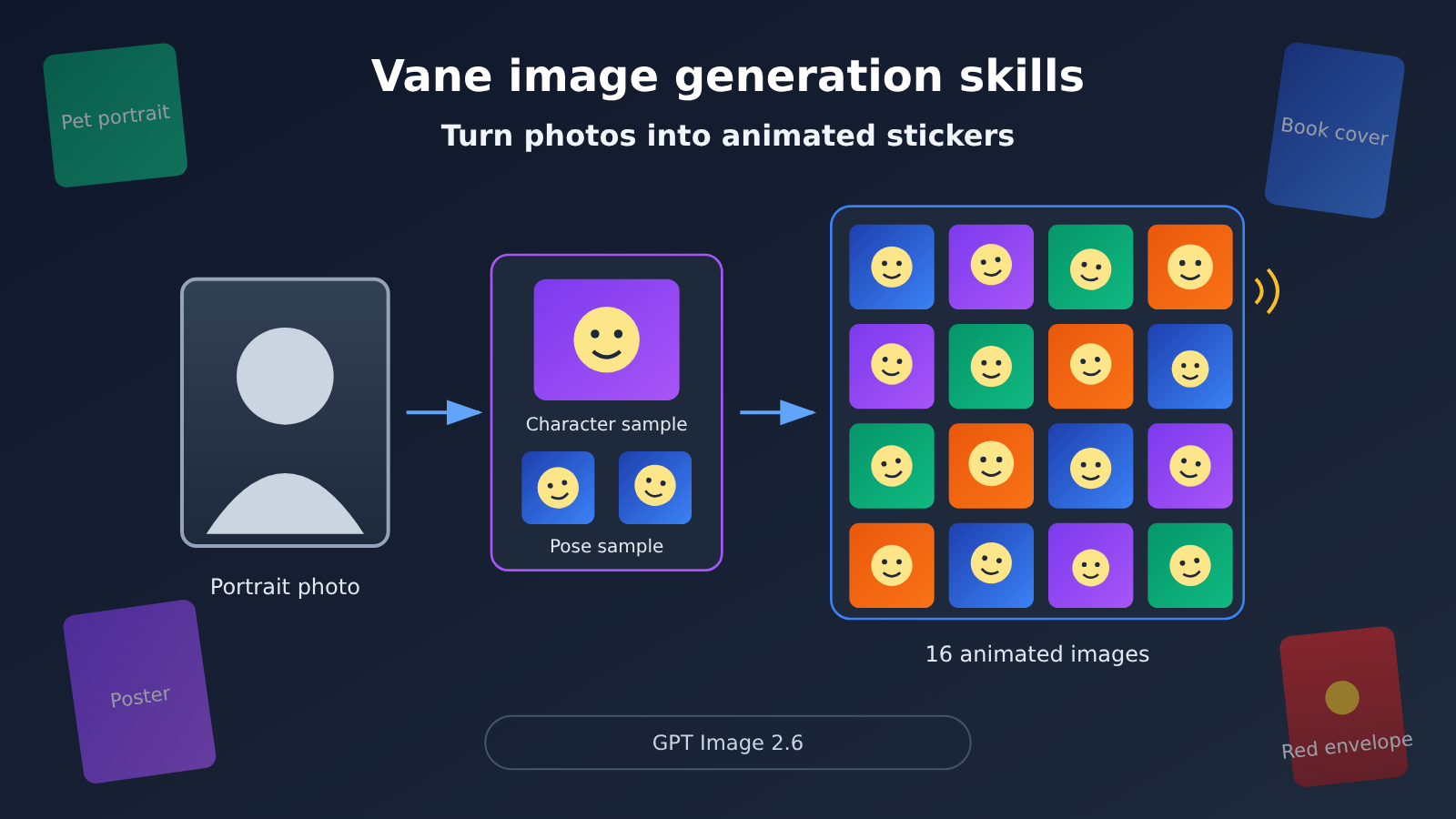
Turning a selfie or a character you drew into animated stickers isn’t hard because of “can it generate?”—the hard part is whether what comes out is actually usable. Wayne Vane open-sourced a GPT Image 2.6 Use-Case Collection on GitHub, turning five needs—sticker packs, movie posters, book-page movies, red envelope covers, and pet New Year portraits—into installable skills.
This isn’t another prompt list. Every skill specifies its deliverables, default specs, and the boundary of “if it can’t do it, say so.” This article won’t audit the repo line by line; it focuses on what makes this skill set worth using, which one you should install first, and which sample proof to check first.
Core value: By the end, you’ll know what each of the five use cases delivers, why sticker packs need a sample proof first, and how to call the API yourself with a script when Codex isn’t installed.
Vane Image Generation Skills: What Each of the Five Playbooks Delivers
The repo behind this skill set is github.com/VaneAi888/vane-gpt-image-skills. The author describes himself as Wayne Vane and focuses on AI creation and brand visual design; the project is MIT-licensed. This is his personal repo, not an official OpenAI product. The repo description reads, “A collection of fun and usable open-source playbooks for GPT Image 2.6, continuously updated.” It was created on 2026-11-05, and the latest push was on 2026-11-19.
One thing worth clarifying: the README title refers to the GPT Image 2.6 family, while the skill body asks you to call an “image generation tool” and doesn’t hard-code a specific model ID. So it’s more a working method for “how to make good images”; which image tool actually executes it depends on your setup.
| Playbook | Command | Deliverable (repo wording) | What you get |
|---|---|---|---|
| Photo-to-animated sticker pack | $vane-portrait-gif-stickers |
12 art styles, 6 themes; 16 stickers per set by default | A GIF sticker pack where the person actually moves |
| Cinematic poster | $vane-cinematic-poster |
36 layouts, 4 preview sets each in Chinese and English | A vertical-format cinematic poster |
| Cinema in a book | $vane-book-cinema |
36 book effect examples, 4 preview sets | A creative image that turns a book into a movie poster |
| WeChat Red Packet Cover | $wechat-red-packet-cover |
36 styles, a single cover | A red packet cover style concept |
| Pet New Year portrait | $vane-pet-new-year-portrait |
9 standalone portraits by default, 3 studio backgrounds | A set of festive pet portraits |
Why the Vane Sticker Skill Stands Out: the Person Has to Actually Move
Many “animated sticker packs” are really just a still image being panned, zoomed, or swayed left and right. It looks like motion, but the person in the image doesn’t move at all. This skill makes the rule strict: the person themselves must move; panning, zooming, or swaying the whole image doesn’t count as character motion. If the current tool can’t do that, it has to say so — it can’t quietly downgrade to still images and claim the job is done.
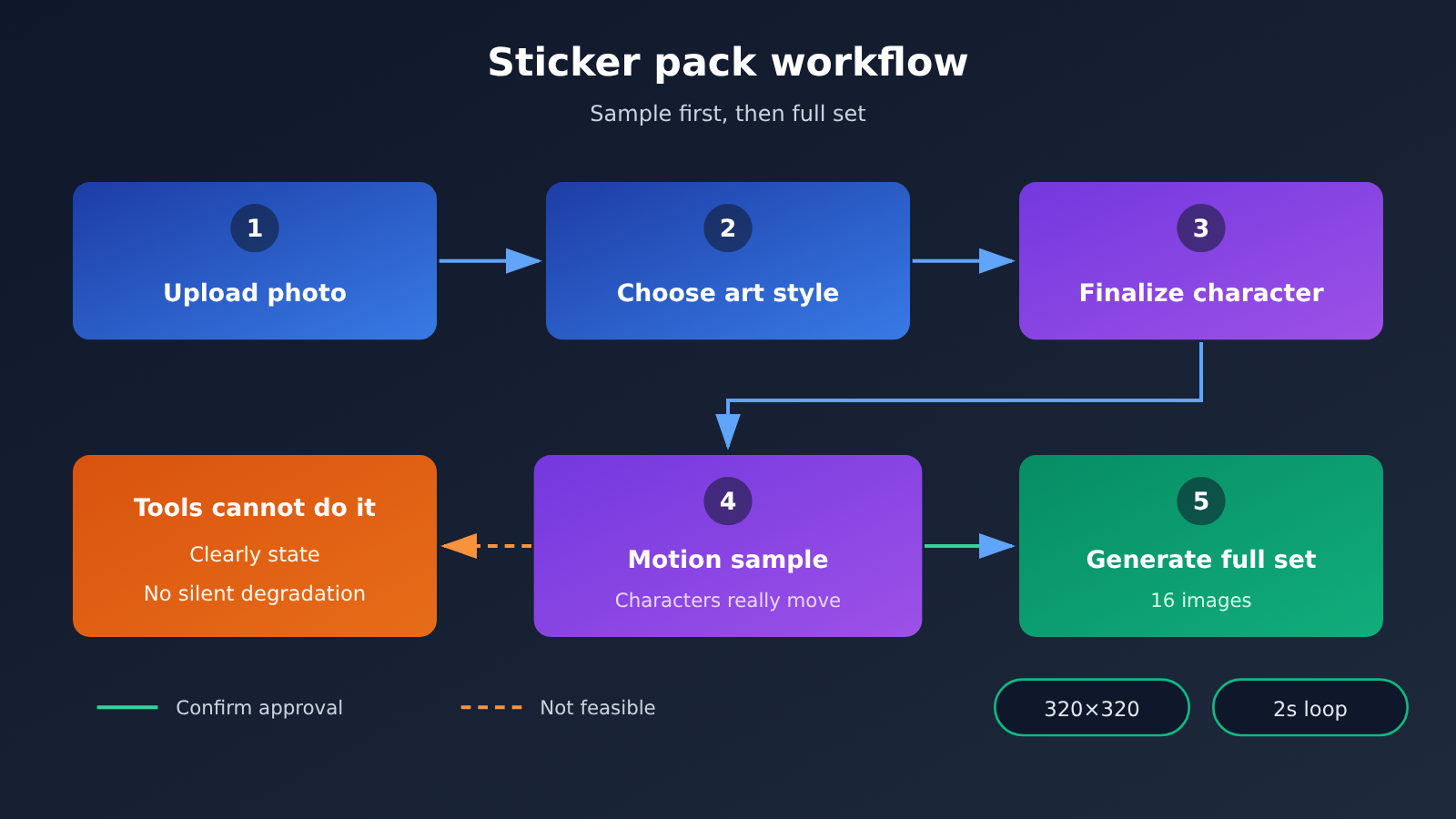
That rule is the most valuable part for readers. What you get is either something that genuinely moves, or a clear message that it can’t be done — not a set of “fake animated images.” The default spec is 320×320 per sticker with roughly a 2-second loop, which is just right for chat apps.
Why Vane Stickers Start with Samples Before the Full Set
The default flow is to review the final character design and a few motion samples first, and only after you confirm them generate the full set of 16. The reason is practical: once the character’s appearance drifts, all 16 stickers are wasted — plus time and tokens. Confirm “does it look like the person,” “is the art style right,” and “does the motion feel natural” with one or two samples, then batch-generate. That keeps rework costs down.
Vane Image Generation Skill Default Specs: Posters, Book Covers, Red Envelopes, Pet Portraits
Besides sticker packs, the other four modes also have clear default specs. Knowing these defaults saves you a few detours on your first invocation and makes it easier to judge whether the results match your expectations.
| Mode | Default specs | Preview method | Boundaries to watch out for |
|---|---|---|---|
| Animated sticker pack | 16 images, each 320×320, ~2-second loop | Character plus a few sample motion tests first | GIFs may require Pillow, FFmpeg |
| Cinematic poster | Portrait 2:3 | 4 sets each in Chinese and English, designed separately | Names, studios, and awards shown in the image don’t represent a real film |
| Movies in the pages of a book | Portrait 2:3 | 4 preview sets | Creative showcase, not an official adaptation or licensed poster |
| WeChat red envelope cover | Single cover | Style-simulation preview | Not a ready-to-upload original file, and not an official WeChat template |
| New Year pet portraits | 9 standalone portraits, 3 studio backdrops | You can start with the 9-grid | The 9-grid is only a preview; individual photos need to be generated one at a time |
Design Details for Movie Posters and Book-Page Movies
The poster skill’s Chinese and English previews are designed separately — it doesn’t just translate the Chinese version word for word into English. That means the English version’s title letterforms and layout rhythm are rearranged around English reading habits, which is closer to how real movie posters are made.
The book-page movie skill, meanwhile, “adapts” a book into a movie poster. The repo clearly states this is a creative showcase — the book effects in the examples are not official adaptations or licensed posters. Using your own book or original story is the safer way to go.
Usage Notes for Red Envelope Covers and Pet Portraits
The red envelope cover skill gives you a style simulation — good for finding a direction and locking in colors and composition. If you actually want to upload and use it, you’ll need to sort out dimensions and assets separately according to the platform’s requirements. The default Year of the Goat elements in pet portraits are just a showcase example — you can swap in other zodiac signs. The 9-grid makes it easy to pick your favorite backdrop at a glance, but if you want 9 photos you can post to Moments individually, you’ll need to generate them one at a time.
The repo also spells out a few general boundaries: whether GIF motion, text inside images, and transparent backgrounds work depends on your assets and the tools available; third-party characters shown in the examples are only for unofficial style demos; and you need to own the rights to the photos and characters you use.
Vane Image Generation Skills Quick Start: Installing in Codex
If you already have Codex, this is the easiest route. The installation guide is in the repo’s docs/installation.md, and the skills get copied to the ~/.codex/skills/ directory.
| Operation | Command | Notes |
|---|---|---|
| Install all five | python3 scripts/install_skills.py --all |
Checks all targets before copying; if any one already exists, the whole batch is skipped |
| Install only sticker pack | python3 scripts/install_skills.py --skill vane-portrait-gif-stickers |
Recommended as the first one to install |
| Install only poster | python3 scripts/install_skills.py --skill vane-cinematic-poster |
Good for covers and promotional images |
| Invoke a skill | After opening a new Codex conversation, type $ followed by the skill name |
The skill won’t take effect unless you start a new conversation |
| Install missing dependencies | Install Pillow and FFmpeg yourself | The installer won’t install them automatically |
Which Vane skill should you install first?
I’d suggest installing vane-portrait-gif-stickers on its own first. Among the five use cases, the sticker pack has the most complete workflow. Once you’ve gone through the chain of “sample confirmation — full set generation — motion validation” one time, you’ll understand the design philosophy behind these skills, and the other four will be much faster to pick up.
There are two common pitfalls during installation. First, the installer stops when it encounters a directory with the same name and won’t overwrite it, so before updating to a new version, you need to deal with the old directory yourself. Second, after installing, you must open a new round of Codex conversation before invoking $vane-portrait-gif-stickers. On the first call, upload a clear front-facing photo and ask only for character finalization and two or three action samples first. See whether the character is actually moving, then ask it to generate the full set.
🚀 Quick start: Install one skill and generate one sample first; it’s easier to judge the result than installing all five at once. For animated GIFs, remember to install Pillow and FFmpeg in advance.
You Can Run Vane’s Image-Gen Skill Yourself: Call the API Without Installing Codex
Not everyone wants to install Codex. The skill itself only describes an “image generation tool” — you can absolutely follow its approach and call the image API from your own script: first generate character samples, then pose samples, then batch-generate once you’ve signed off. Making these images costs tokens, especially a 16-image sticker pack plus several rounds of samples, so choosing the right model really matters.
OpenAI released Images 2.6 on 2026-11-04, and it landed in ChatGPT, Codex, and the API. There are two models on the API side: gpt-image-2.6-flare and gpt-image-2.6-sunburst. Officially, overall generation is reported to be 50% faster than before, with Flare hitting about 6 seconds at its fastest under low quality — these are official numbers, not benchmarks we ran for this article.
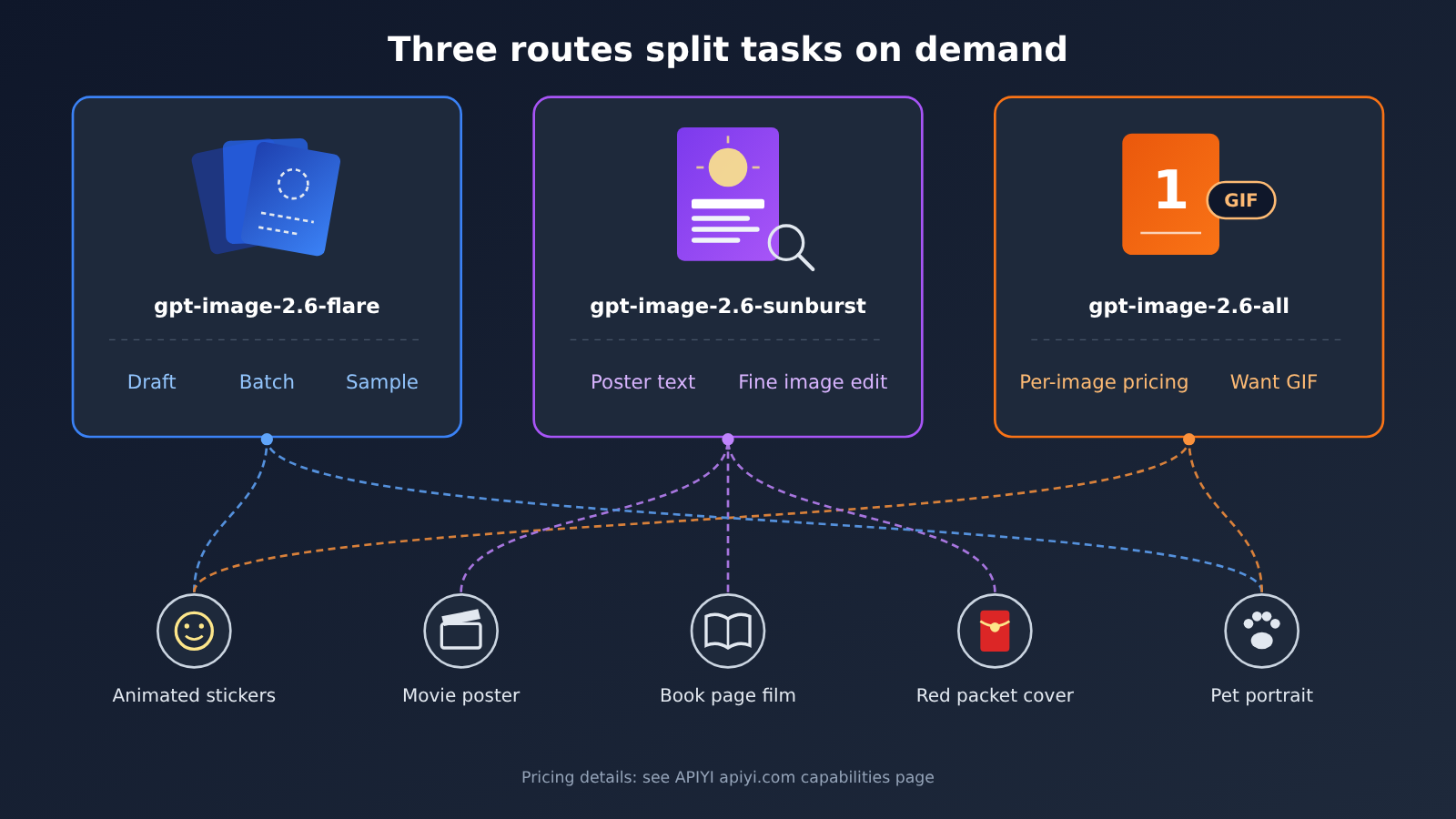
If you want to reach all of these lines with a single key, you can connect through APIYI (apiyi.com). It provides an OpenAI-compatible interface — set base_url to https://api.apiyi.com/v1 in your script, then swap model for one of the IDs below. All three are already listed on the platform’s model list, and an easy way to remember the division of labor is “flare for drafts, sunburst for polish, all for per-image billing.”
| Model ID | Pricing | Best for | Boundaries to know |
|---|---|---|---|
gpt-image-2.6-flare |
Per token | Sticker-pack drafts, character samples, batch generation | Docs position it for fast iteration; preferred for new text-to-image integrations |
gpt-image-2.6-sunburst |
Per token | Poster text, book-cover layout, fine retouching | Docs position it for precision visuals; preferred for fine editing |
gpt-image-2.6-all |
$0.025 per image | Per-image accounting, direct GIF output | 2K/4K are upscaled; GIF dimensions aren’t guaranteed |
Prices and capabilities in the table above follow APIYI (apiyi.com)’s model list and capability page, read on 2026-11-20.
Token pricing for flare and sunburst
gpt-image-2.6-flare and gpt-image-2.6-sunburst run on the official relay line and are billed by token, at the same price as the two 2.5 models and the five gpt-image-2 models:
| Billing item | Unit price (USD / million tokens) |
|---|---|
| Text input | 5 |
| Image input | 8 |
| Image output | 30 |
| Cached text read | 1.25 |
| Cached image read | 2 |
These numbers come from the APIYI capability page, and the billing expression in the pricing API uses the same set. Worth noting: on the same day, the platform’s master table listed these two as “0.2 USD per call”, which doesn’t line up with the capability page or the pricing API. This article goes with the token-based figures — the 0.2 USD number shouldn’t be read as a uniform per-image price for these two. Separately, the image2Enterprise group carries a 1.2× multiplier, but that applies only to that group, not as a uniform price for the model.
Actual cost depends on size, quality, output format, and token usage. The maximum legal resolution on the official relay includes 3840×2160 — the 4K tier is a valid output resolution. The 2.6 official relay supports GIF and SVG: GIF needs frame parameters, and the docs specify 2–16 frames with a default of 9, plus a frame duration of 20–2000 ms with a default of 200 ms. SVG needs svg.model and carries a separate authoring model fee, so you can’t estimate it as if it were a single PNG.
Using gpt-image-2.6-all with per-image pricing
gpt-image-2.6-all is a route that reverse-engineers the ChatGPT web version of Images 2.6. It costs $0.025 per image per call, with no extra charge for 2K/4K, and the endpoint supports both chat and images. Its 512–1536 long edge is the native tier; 2K/4K are upscaled, meant only to give you a larger canvas, with no promise of being sharper than 1536.
If you want a GIF, you must explicitly pass output_format=gif, and the GIF size isn’t guaranteed. For a 320×320 sticker pack, you may need to crop it yourself. SVG quality on this route is inconsistent, and the docs don’t recommend it for production. If you need SVG, use sunburst or flare instead. Speed ranges from about 10–46 seconds, the figures given in the original docs.
💡 Recommendation: During the early sampling stage for sticker packs, run several rounds with flare. Leave poster headline text and localized image edits to sunburst. Try -all if you want clear per-image costs or want to get a GIF directly. All three can be switched in APIYI apiyi.com with the same API key, making it easy to compare them using your own assets.
Frequently Asked Questions (FAQ)
Q1: What is the Vane image-generation skill?
It’s an open-source collection of GPT Image 2.6 workflows released by Wayne Vane under the MIT license, bundling five skills that can be installed into Codex: animated stickers, movie posters, book-page films, red envelope covers, and pet New Year portraits. It’s a personal project by the author, not an official OpenAI product.
Q2: How is the Vane skill different from just writing prompts?
Writing prompts directly usually only covers “generate an image.” The Vane skills define deliverables and workflows: stickers must start with a small sample, the characters have to actually move, and if something can’t be done it must be stated clearly; posters are designed separately for Chinese and English; pet portraits distinguish between nine-grid previews and standalone photos. These rules cut down on rework and “looks done” fake results.
Q3: Is the Vane skill tied to a specific model?
No. The README title says GPT Image 2.6, but the skill body only requires the use of an “image generation tool” and doesn’t hard-code `gpt-image-2.6-flare`, `gpt-image-2.6-sunburst`, or `gpt-image-2.6-all`. Which one you use depends on your Codex environment or the configuration in your own scripts.
Q4: What scenarios suit Vane animated stickers best?
– **Personal chat stickers**: Build a set of 16 animated stickers from your own photos.
– **Original character merch**: Make stickers for characters you’ve drawn, with a consistent art style.
– **Community events**: Pick a holiday or event theme from the 6 themes and create a dedicated sticker set.
Q5: How do I call GPT Image 2.6 through the API without installing Codex?
You can register at APIYI apiyi.com to get an API key, and new users get free test credits. In your script, set base_url to `https://api.apiyi.com/v1`, use `gpt-image-2.6-flare` for drafts, `gpt-image-2.6-sunburst` for fine detail, and `gpt-image-2.6-all` for per-image billing or when you need a GIF—then follow the skill workflow to produce a small sample first and the full set afterward.
Q6: What known limitations does the Vane image-generation skill have?
– **Dependencies**: The installer doesn’t automatically install Pillow or FFmpeg, which GIFs may require.
– **Effect boundaries**: GIF motion, in-image text, and transparent backgrounds depend on the source material and tools.
– **Demo nature**: The people, books, and red envelope covers in the examples are unofficial demos; the red envelope previews can’t be uploaded directly.
– **Copyright**: You need to own the usage rights for the photos and characters yourself.
Q7: Which model gives better cost control for stickers?
There’s no universal answer—it depends on your number of rounds and sizes. flare and sunburst are billed by token, which suits precise control over quality and dimensions; -all is $0.025 per image, which suits per-image accounting. A good approach is to run one round of small samples with the same set of materials at APIYI apiyi.com, then decide based on your own bill.
Vane Image Generation Skill: Key Takeaways
- What it is: Vane’s personal open-source repo — five playbooks, each with clear deliverables and default specs.
- Sticker rules: The character itself has to move. Panning or zooming the whole image doesn’t count — and if the tool can’t do it, say so.
- Small sample first, full set later: Confirm the character and a handful of actions first, then generate the full set of 16 frames at 320×320, roughly 2 seconds.
- Default specs: Posters and book covers are vertical 2:3; red envelopes are single images; pet portraits are 9 images across three backgrounds.
- Not official demos: The sample characters, book covers, and red envelope designs aren’t licensed finished products.
- Call the APIs yourself: On APIYI apiyi.com, split the work by role — “flare for drafts, sunburst for fine detail, all for per-image”.
Summary
The value of Vane’s image generation skill is that it upgrades “generating an image” into “delivering a usable set of images”:
- Clear deliverables: Each of the five playbooks spells out quantity, dimensions, preview method, and boundaries.
- Less rework: For stickers, look at the character and action samples first, then batch-generate once they’re confirmed.
- No faking the results: The character has to actually move — if the tool can’t do it, say so.
For a first step, I’d suggest installing only vane-portrait-gif-stickers and running a character sample from one of your own photos. If you’d rather not install Codex, try flare, sunburst, and -all on APIYI apiyi.com with the same key, using your own real material to find the combination that works best for you.
📚 Reference Materials
-
Vane GPT Image Skills repository: source code and documentation for five skills
- Link:
github.com/VaneAi888/vane-gpt-image-skills - Notes: includes the installation guide at
docs/installation.mdand the GIF sticker tutorial atdocs/portrait-gif-stickers.md
- Link:
-
OpenAI Images 2.6 announcement: release details for Images 2.6
- Link:
openai.com/index/introducing-images-2-6 - Notes: the official word on Flare, Sunburst, and speed
- Link:
-
OpenAI image generation developer docs: model IDs and capability descriptions
- Link:
developers.openai.com/api/docs/guides/image-generation - Notes: covers complexity, mark-guided editing, SVG, GIF, and more
- Link:
-
APIYI GPT Image 2.6 capability page: pricing and parameters for official relay and official reverse channels
- Link:
docs.apiyi.com/api-capabilities/gpt-image-2/gpt-image-2-6.md - Notes: GIF frame parameters, resolution limits, and how billing is calculated
- Link:
Author: APIYI Technical Team
Technical discussion: Reach out to us through the APIYI homepage to get the GPT Image 2.6 integration docs and test credits


