
Why is OpenArt's Nano Banana Pro a "Love-Hate" Relationship?
OpenArt is a powerful AI art creation platform that integrates over 100 AI models. Among them, Nano Banana Pro (Google Gemini 3 Pro Image) has become one of the most popular models on the site, thanks to its native 4K output, 94% text rendering accuracy, and lifelike physical realism.
But here's the catch: a single image generation using Nano Banana Pro on OpenArt costs a staggering 60 credits—that's 60 times more than a standard SD model!
| Model Type | Credits/Image | Relative Cost |
|---|---|---|
| SD Base Models | ~1 credit | 1x |
| Editor Operations | ~5 credits | 5x |
| Trained Model Generation | ~20 credits | 20x |
| Nano Banana Pro | 60 credits | 60x |
What does this mean in reality? Let's do the math:
- Free Plan: 40 credits → You can't even generate a single image.
- Essential Plan: $7/month → Roughly 70 images (assuming 4,000 credits).
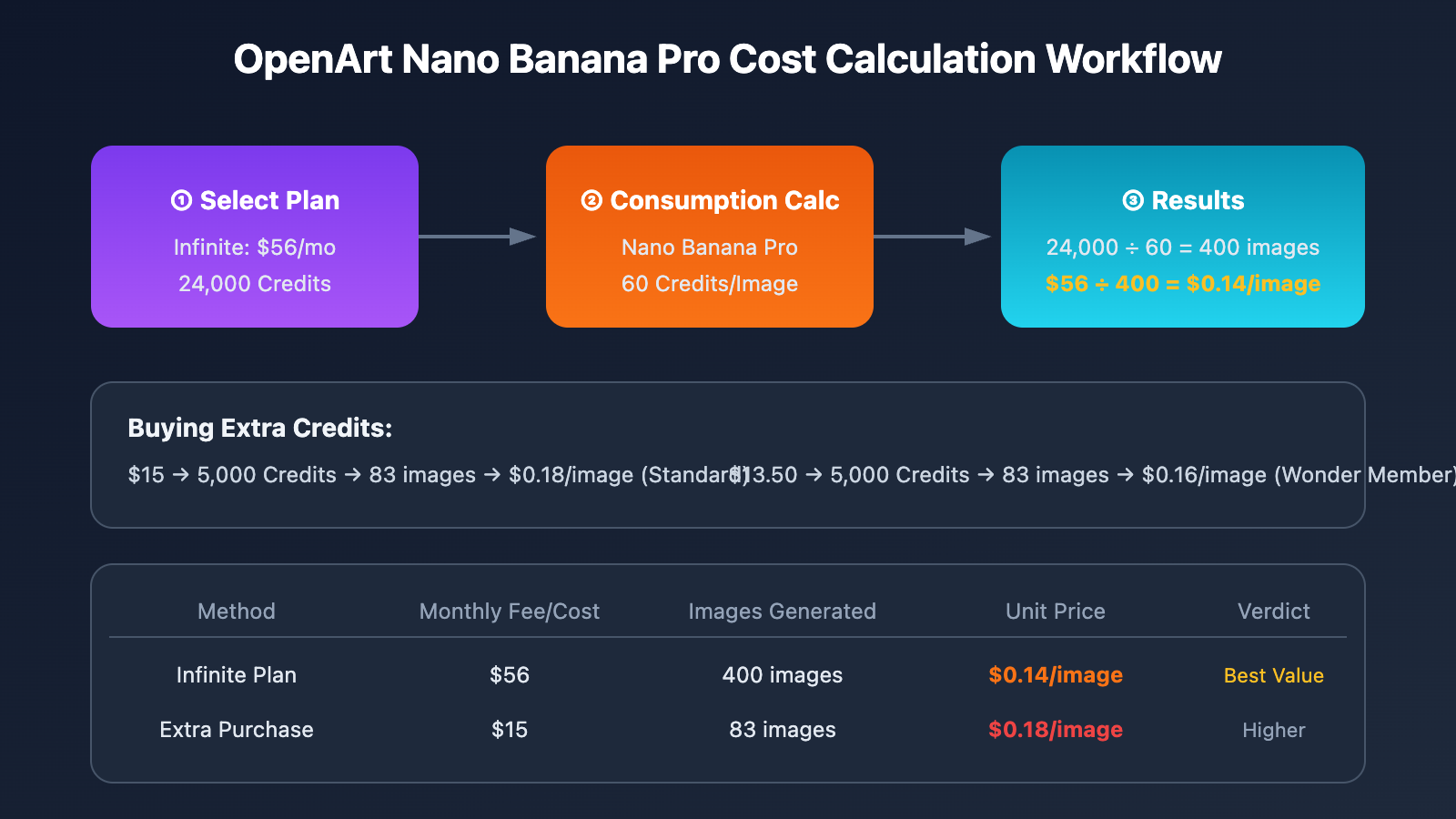
- Infinite Plan: $56/month, 24,000 credits → 400 images.
🎯 Core Pain Point: While Nano Banana Pro's quality is undoubtedly top-tier, the 60 credits/image cost is a major barrier. If you're looking for bulk generation or commercial usage, your costs on OpenArt will spiral out of control fast.
OpenArt Nano Banana Pro Real Cost Analysis
2.1 OpenArt Plans and Credit Configurations
| Plan | Monthly Fee | Credits/Month | Nano Banana Pro Capacity (Images) |
|---|---|---|---|
| Free | $0 | 40 (one-time) | 0 images |
| Essential | $7 | ~4,000 | ~66 images |
| Advanced | $14 | ~8,000 | ~133 images |
| Infinite | $56 | 24,000 | 400 images |
| Wonder | $240 | Unlimited (select models) | Depends on specific limits |
2.2 Cost of Buying Extra Credits
OpenArt allows you to purchase additional credits starting from the Advanced plan:
- Standard Price: $15 / 5,000 credits
- Wonder Member: $13.50 / 5,000 credits (10% off)
2.3 Unit Price Comparison
| Method | Cost | Credits | Images | Unit Price |
|---|---|---|---|---|
| Infinite Plan | $56 | 24,000 | 400 | $0.14/image |
| Extra Purchase (Standard) | $15 | 5,000 | 83 | $0.18/image |
| Extra Purchase (Wonder) | $13.50 | 5,000 | 83 | $0.16/image |
| Google Official 4K | – | – | – | $0.24/image |
Key Takeaways:
- Cheaper than official – OpenArt's best unit price of $0.14 is lower than the official $0.24 price tag.
- Still on the higher side – For high-volume usage, costs add up fast.
- No API support – You're limited to manual operations on the OpenArt platform.
- Credits don't roll over – Subscription credits expire at the end of the month (though purchased ones do roll over).
💡 Reality Check: OpenArt's strength lies in its variety of models and the all-in-one creative experience. However, if you primarily use Nano Banana Pro and need API integration, you'll find it more economical to look for specialized solutions.
4 Ways to Reduce Nano Banana Pro Costs
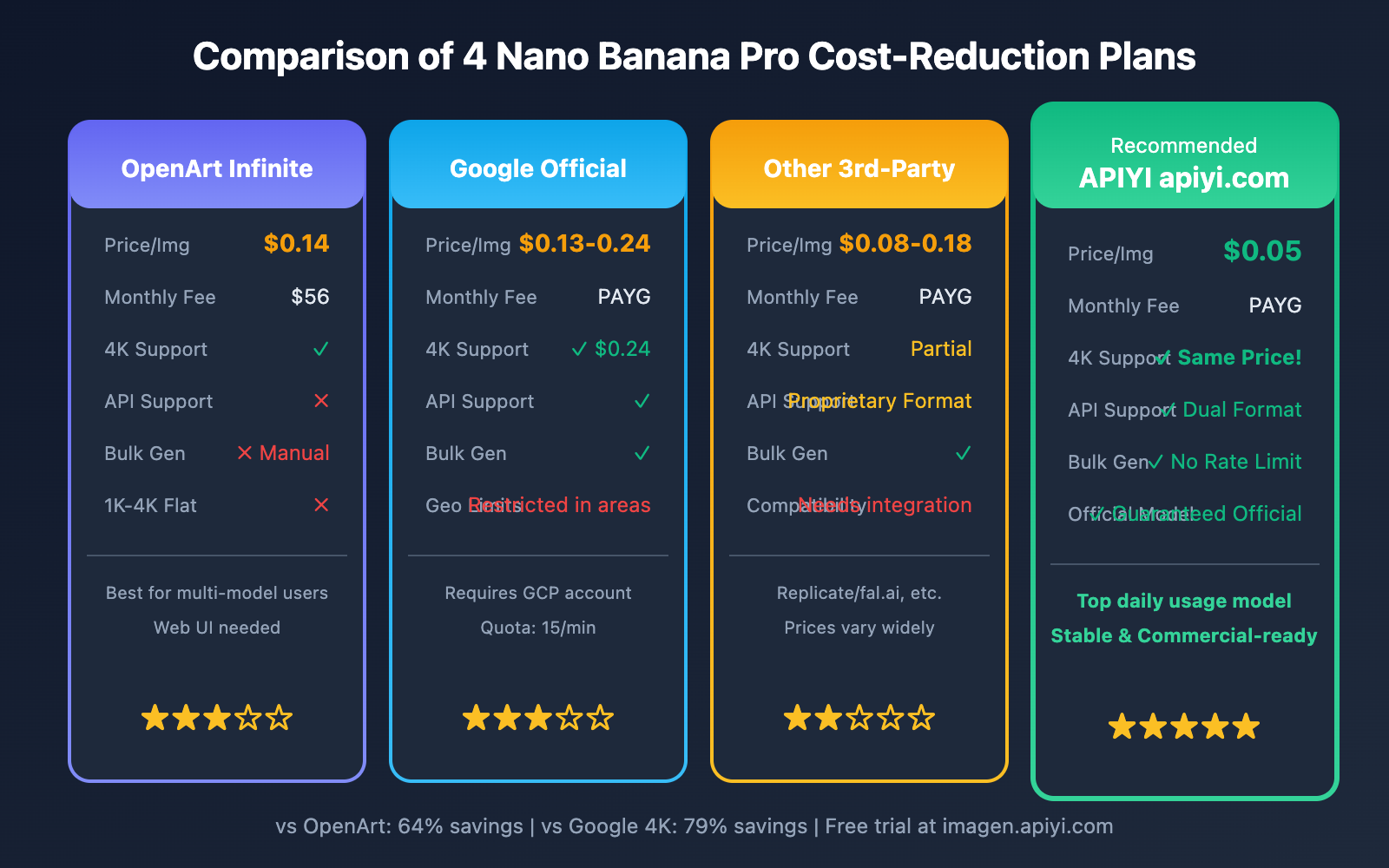
If your main goal is using Nano Banana Pro, here are the 4 most effective cost-reduction strategies available right now:
Summary of Plan Comparison
| Solution | Unit Price | 4K Support | API | Best For |
|---|---|---|---|---|
| OpenArt Infinite | $0.14 | ✅ | ❌ | Multi-model users |
| Google Official API | $0.13-0.24 | ✅ | ✅ | Users with direct access |
| Other 3rd-Party | $0.08-0.15 | Partial | Partial | Specific niche needs |
| APIYI apiyi.com | $0.05 | ✅ (Same Price) | ✅ | API Integration + Cost Savings |
Option 1: Optimizing Your OpenArt Strategy
If you're set on staying with the OpenArt platform, here's how you can cut down on costs:
4.1 Choosing the Right Plan
| Monthly Usage | Recommended Plan | Monthly Cost | Unit Price |
|---|---|---|---|
| < 66 images | Essential | $7 | $0.11 |
| 66-133 images | Advanced | $14 | $0.11-0.21 |
| 133-400 images | Infinite | $56 | $0.14-0.42 |
| > 400 images | Infinite + Additional | $56+ | $0.14+ |
4.2 Making the Most of Credit Rollover Rules
- Subscription Credits: These expire at the end of the month, so make sure to use them up.
- Purchased Credits: These can roll over to the next month.
Strategy: Go for a lower-tier plan and buy extra credits as needed to avoid any waste.
4.3 Limitations
- ❌ No API access, so you can't integrate it into your own apps.
- ❌ Batch generation still requires manual steps.
- ❌ Costs still add up if you're a heavy user.
Option 2: Official Google API
If you have direct access to Google services, the official API is definitely an option:
5.1 Official Pricing
| Resolution | AI Studio | Vertex AI |
|---|---|---|
| 1K-2K | $0.134/image | $0.134/image |
| 4K | $0.24/image | $0.24/image |
5.2 Restrictions
- Geographic Restrictions: Some regions don't have direct access.
- Quota Limits: The free tier is capped at 15 requests per minute.
- Complex Billing: You'll need to set up and link a GCP (Google Cloud Platform) billing account.
5.3 Official Documentation Reference
Google AI Image Generation Docs: ai.google.dev/gemini-api/docs/image-generation
Option 3: Other Third-Party Platforms
There are several other third-party platforms on the market that offer Nano Banana Pro:
| Platform | 2K Price | 4K Price | Features |
|---|---|---|---|
| Replicate | $0.08 | $0.15 | Proprietary API format |
| fal.ai | $0.10 | $0.18 | European nodes |
| Segmind | $0.12 | $0.23 | Close to official pricing |
The Issue: Pricing is inconsistent, API formats aren't standardized, and you'll need to do extra work to adapt your code.
Option 4: APIYI – The Top Choice for Cost Reduction (Recommended)
🚀 Why we recommend it: Nano Banana Pro is the #1 model by daily consumption on the APIYI platform. We've invested heavily in DevOps resources to ensure it's stable and ready for commercial use.
6.1 Core Advantages
| Advantage | Description |
|---|---|
| Ultra-Low Price | $0.05/request, saving you 64%-72% compared to OpenArt. |
| Same Price for 1K-4K | Whether it's 1K or 4K resolution, it's a flat $0.05. |
| Guaranteed Official Source | Direct calls to Google's official interface—not a third-party model. |
| No Rate Limiting | No quota restrictions; supports high-concurrency batch generation. |
| OpenAI Compatible | Use the SDKs you're already familiar with—zero learning curve. |
| Google Format Compatible | Also supports the official API format for seamless migration. |
6.2 Price Comparison
OpenArt Infinite:  $0.14/image (requires $56 monthly sub)
OpenArt Additional: $0.18/image
Google Official 4K: $0.24/image
APIYI:             $0.05/image (Flat rate for 1K-4K!)

Savings Ratio:
vs OpenArt Infinite: 64%
vs OpenArt Additional: 72%
vs Google 4K: 79%
6.3 Free Generation Test
Want to see the results for yourself first? We've provided a free online testing tool:
🎨 Generation Test: Visit
imagen.apiyi.comfor a free trial. Experience the 4K output quality of Nano Banana Pro firsthand—it's identical to the results you'd get on OpenArt.
Practical Tutorial: Calling Nano Banana Pro via APIYI
7.1 Preparation
- Visit APIYI at
apiyi.comto register an account. - Create an API Key in the console.
- Top up your account balance (Alipay and WeChat are supported).
7.2 Two Ways to Call the API
Option 1: Official Google Format (Seamless Migration)
If you're already familiar with the official Google documentation, you just need to swap out the endpoint and the key:
import google.generativeai as genai

# Just replace these two lines; the rest of the code is identical to the official docs
genai.configure(
    api_key="your-apiyi-key",
    transport="rest",
    client_options={"api_endpoint": "https://api.apiyi.com"}
)

model = genai.ImageGenerationModel("imagen-3.0-generate-002")

result = model.generate_images(
    prompt="Professional product photo, luxury watch on velvet, studio lighting, 4K",
    number_of_images=1,
    aspect_ratio="1:1"
)

result.images[0].save("watch.png")
📚 Official Format Reference: Check out the Google docs at
ai.google.dev/gemini-api/docs/image-generation. APIYI is fully compatible—just replace the endpoint and key.
Option 2: OpenAI Compatible Format (Recommended)
import openai

client = openai.OpenAI(
    api_key="your-apiyi-key",
    base_url="https://api.apiyi.com/v1"  # APIYI unified interface
)

response = client.images.generate(
    model="nano-banana-pro",
    prompt="E-commerce product photo, wireless headphones, clean white background, 4K",
    size="1024x1024",
    quality="hd"
)

print(response.data[0].url)
7.3 Node.js Example
import OpenAI from 'openai';

const client = new OpenAI({
  apiKey: 'your-apiyi-key',
  baseURL: 'https://api.apiyi.com/v1'  // APIYI interface
});

async function generateProductImage(productName) {
  const response = await client.images.generate({
    model: 'nano-banana-pro',
    prompt: `Professional product photography of ${productName}, studio lighting, clean background, 4K ultra detailed`,
    size: '1024x1024',
    quality: 'hd'
  });

  return response.data[0].url;
}

// Batch generation - something you can't do manually on OpenArt
const products = ['smartwatch', 'earbuds', 'laptop', 'tablet'];
for (const product of products) {
  const url = await generateProductImage(product);
  console.log(`${product}: ${url}`);
}
7.4 cURL Example
curl -X POST "https://api.apiyi.com/v1/images/generations" \
  -H "Authorization: Bearer your-apiyi-key" \
  -H "Content-Type: application/json" \
  -d '{
    "model": "nano-banana-pro",
    "prompt": "Modern minimalist poster, tech conference 2026, gradient background, bold typography",
    "size": "1024x1024",
    "quality": "hd"
  }'
Cost Comparison Across Different Usage Levels
8.1 Monthly Cost Simulation
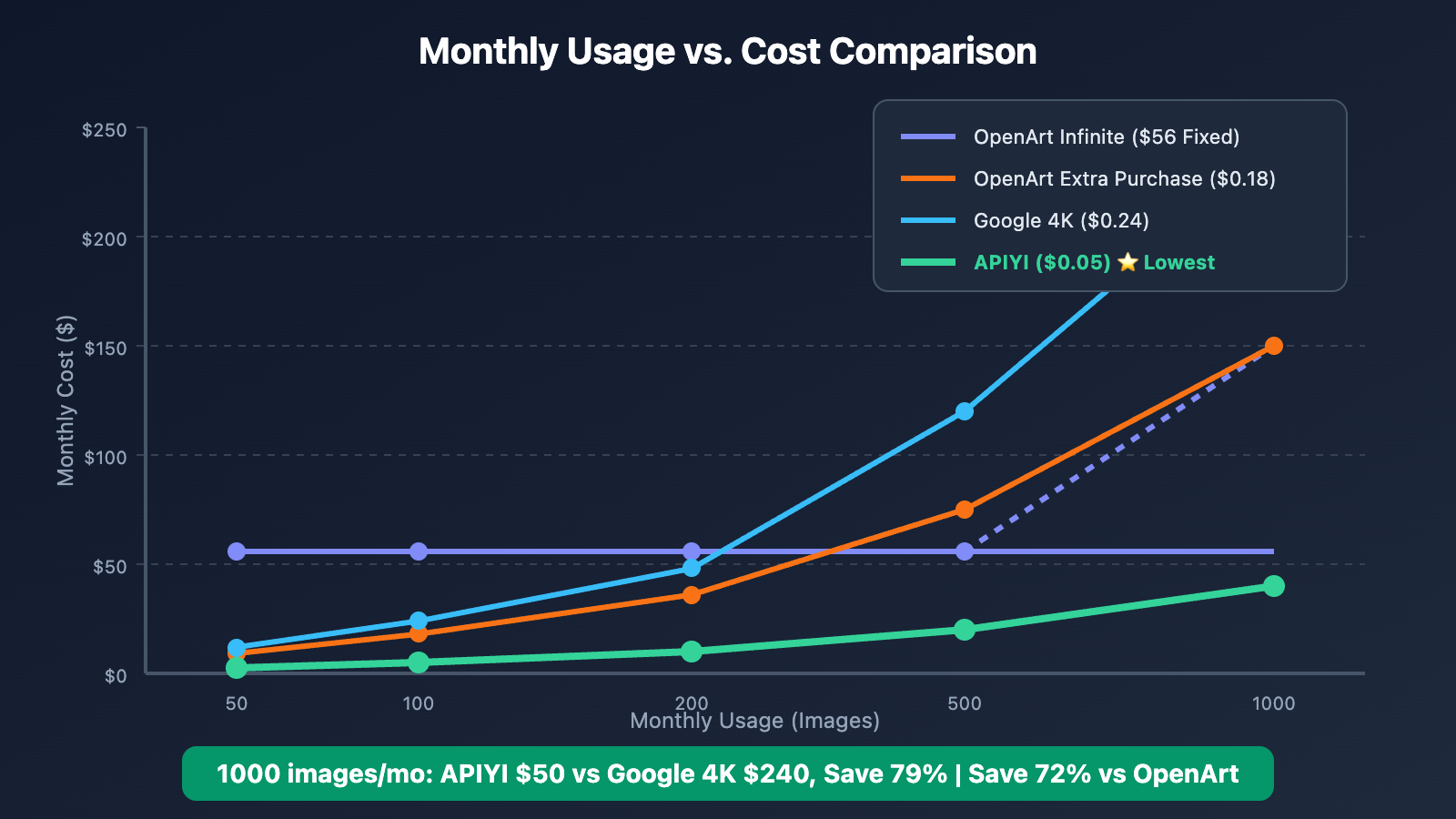
| Monthly Usage | OpenArt Infinite | OpenArt Extra Purchase | Google 4K | APIYI | Recommended |
|---|---|---|---|---|---|
| 50 Images | $56 (Fixed) | $9 | $12 | $2.50 | APIYI |
| 100 Images | $56 | $18 | $24 | $5 | APIYI |
| 200 Images | $56 | $36 | $48 | $10 | APIYI |
| 400 Images | $56 | $72 | $96 | $20 | APIYI |
| 500 Images | $56 + $18 | $90 | $120 | $25 | APIYI |
| 1,000 Images | Not enough quota | $180 | $240 | $50 | APIYI |
8.2 Key Insights
- Low Usage (< 100 Images): APIYI costs just 4%-9% of OpenArt Infinite.
- Medium Usage (100-400 Images): While OpenArt's fixed fee looks attractive, APIYI is still 64% cheaper.
- High Usage (> 400 Images): OpenArt's quota runs out and requires extra purchases, making APIYI's advantage even more obvious.
8.3 Annual Cost Comparison
Let's say you're an e-commerce team generating 300 product images every month:
OpenArt Infinite Annual: $56 × 12 = $672
OpenArt Extra Purchase:  $54 × 12 = $648 (Monthly $18 × 3)
Google Official 4K:      $0.24 × 300 × 12 = $864
APIYI:                  $0.05 × 300 × 12 = $180

Annual Savings (vs OpenArt Infinite): $492 (73%)
Annual Savings (vs Google 4K): $684 (79%)
💰 Cost Optimization: Calling Nano Banana Pro via APIYI (apiyi.com) can save you 64%-73% compared to OpenArt, all while giving you full API integration capabilities.
OpenArt vs APIYI: Feature Comparison
| Feature | OpenArt | APIYI |
|---|---|---|
| Nano Banana Pro | ✅ 60 credits/image | ✅ $0.05/image |
| Native 4K Output | ✅ | ✅ Same price |
| Other AI Models | ✅ 100+ models | Focus on mainstream models |
| Web Creation Interface | ✅ | Online testing tools |
| API Interface | ❌ | ✅ OpenAI + Google compatible |
| Batch Generation | ❌ Manual | ✅ Supported |
| 1K-4K Same Price | ❌ | ✅ |
| Credits Rollover | Partial | Pay-as-you-go, no waste |
Frequently Asked Questions (FAQ)
Q1: Is Nano Banana Pro on APIYI the same model as the one on OpenArt?
A: Yes, they're exactly the same. Both are the official Google Gemini 3 Pro Image model. APIYI connects directly to Google's official interface, ensuring it's an official model relay. The generation quality is identical to what you get on OpenArt. You can visit imagen.apiyi.com to test and compare the results for free.
Q2: Why is APIYI so much cheaper than OpenArt?
A: There are a few main reasons:
- Economies of Scale – Nano Banana Pro is the most-used model on APIYI, allowing for high-volume optimization.
- API Focus – We don't need to maintain a complex web-based creation platform.
- Technical Optimization – Our smart routing helps keep operational costs down.
Q3: What if I still need other models from OpenArt?
A: You can definitely use both together!
- Other Models → Continue using them on OpenArt.
- Nano Banana Pro → Call it via APIYI to significantly cut down your costs for this specific model.
Q4: Is it complicated to migrate from OpenArt to APIYI?
A: Not at all—it's super simple. If you've been doing things manually on OpenArt, all you need to do now is:
- Grab an API key from APIYI.
- Use the code samples we provide.
- Pass your prompt in as a parameter.
Check out the detailed documentation at: docs.apiyi.com
Q5: Do you support the official Google API format?
A: We sure do. APIYI is fully compatible with the official Google API format. You can refer to the official docs at ai.google.dev/gemini-api/docs/image-generation and migrate seamlessly just by swapping out the endpoint and your key.
Q6: Can I try it for free?
A: You bet. Just head over to our image testing tool at imagen.apiyi.com to experience the power of Nano Banana Pro for free.
Recommended Use Cases
9.1 When to Stick with OpenArt
- ✅ You need access to the 100+ other AI models on OpenArt.
- ✅ You're comfortable with the OpenArt web interface for your creative workflow.
- ✅ Your Nano Banana Pro usage is very low (< 30 images/month).
- ✅ You don't need API integration.
9.2 When to Switch to APIYI
- ✅ Nano Banana Pro is your primary model.
- ✅ Your monthly usage exceeds 50 images.
- ✅ You need to integrate the API into your own applications.
- ✅ You need batch generation capabilities.
- ✅ You're cost-conscious and want to slash expenses by 60%+.
- ✅ You need stable 4K output.
9.3 Typical Cost-Saving Examples
| User Type | Before (OpenArt) | After (APIYI) | Monthly Savings |
|---|---|---|---|
| Individual Creators | Infinite $56 | ~$10 (200 images) | $46 |
| Design Studios | $56 + extras | ~$25 (500 images) | $100+ |
| E-commerce Teams | Quota insufficient | ~$50 (1,000 images) | No limits |
| SaaS Products | No API access | ~$100 (2,000 images) | Unlocked API access |
Summary: The Best Way to Save on OpenArt Nano Banana Pro
After a detailed comparison, if your goal is to reduce the cost of using Nano Banana Pro, APIYI is currently the best choice:
Why Choose APIYI?
- Lowest Price – At $0.05/image, it's 64%-72% cheaper than OpenArt.
- Consistent Quality – It uses the exact same official Google Large Language Model.
- API Capabilities – Fully compatible with both OpenAI and Google formats.
- No Speed Limits – Supports high-concurrency batch generation.
- Highest Daily Volume – It's our top-performing model, backed by significant maintenance resources to ensure it's stable and commercially viable.
Take Action Now
- Free Trial: Visit
imagen.apiyi.comto test image generation. - Check Documentation: Visit
docs.apiyi.comfor full API details. - Get Started: Register at
apiyi.comto get your API Key.
💡 Core Value: APIYI's Nano Banana Pro service costs just $0.05 per request with the same price for 1K-4K resolutions. It’s uncapped and guaranteed to be an official relay. As our platform's most-used model, we've invested heavily in maintenance to ensure it's rock-solid for commercial use.
References
- OpenArt Pricing Page: openart.ai/pricing
- Google AI Image Generation Documentation: ai.google.dev/gemini-api/docs/image-generation
- APIYI Official Documentation: docs.apiyi.com
- Image Generation Test Tool: imagen.apiyi.com
This article was written by the APIYI Team. Nano Banana Pro is the flagship model with the highest daily consumption on APIYI. For more information or to get a customized enterprise solution, please visit apiyi.com to contact us.


